[Most Recent Entries] [Calendar View]
Tuesday, October 2nd, 2012
- Wireless hotspot: When connected over Ethernet to a router / switch, the DS213air can be configured as a wireless hotspot to provide Wi-Fi capability in the network.
- Wireless router: When connected directly to the modem through Ethernet, the DS213air can act as a wireless router to provide Wi-Fi access to various wireless devices.
- Wi-Fi client: The radio can also be used to connect the NAS to the network wirelessly (freeing up the Ethernet port). This is unlikely to be a usage mode for most users since Wi-Fi reach / reliability will never match up to what can be obtained through a wired connection.
| Time | Event | ||||||||||||||||||||||||||||||||||||||||||||||||||||||||||||||||||||||||
| 12:12a | NVIDIA Quietly Releases GeForce GTX 670MX and GTX 675MX for Notebooks Testing the Alienware notebooks with NVIDIA GeForce GTX 680Ms while seeing reviews for the GK104-based GeForce GTX 660 Ti and GK106-based GeForce GTX 660 go up has been interesting because it seemed as though NVIDIA's branding had painted themselves into a corner with the GTX 670M and 675M. Both of those chips are re-brands of last generation's Fermi-based GTX 570M and 580M, respectively. So while the GK106 would be seemingly ideal for notebooks, where was NVIDIA going to put it? The GTX 660M is based on GK107 with GDDR5, and then it's a jump to Fermi for the 670M. As it turns out, NVIDIA's branding team is as creative as they've always been, although this launch is an unusually quiet one. No press releases or fanfare, but certainly worthy of attention. NVIDIA is updating their mobile line with the GTX 670MX and GTX 675MX, both of which are based on Kepler silicon. The GTX 675MX, essentially replacing the GTX 675M, seems to be a full GK104 chip, with 960 CUDA cores and up to 4GB of GDDR5 on a 256-bit memory bus. Assuming the performance difference between the desktop GTX 660 and GTX 560 Ti (the two chips powering the GTX 675MX and GTX 675M/580M respectively) scales down, the 675MX should be about 20% faster than its predecessor. It's clocked at 600MHz on the cores and an effective 3.6GHz on the GDDR5. I'm not 100% sure on the GPU on this one, though; it'd have to be GK104 cut down to five SMX clusters, which would be accurate to the GK106 except for the 256-bit memory bus (GK106 only supports 192-bit). Meanwhile, the GTX 670MX appears to be using a full GK106, as it too has 960 CUDA cores but only tops out at 3GB of GDDR5 on a 192-bit memory bus. It's clocked at 600MHz on the CUDA cores and 2.8GHz effective on the GDDR5. Again this should be a fairly handsome performance improvement over the Fermi-based GeForce GTX 670M. As an added sidebar, NVIDIA has also launched their first Kepler-based Quadro mobile GPU, the Quadro K3000M. This appears to be a heavily cut down GK106, with 576 CUDA cores and up to 2GB of GDDR5, presumably on a 128-bit memory bus. Origin PC was the first to get into our mailbox announcing immediate availability of these GPUs, but undoubtedly they will gradually become available from other vendors as well. 
 | ||||||||||||||||||||||||||||||||||||||||||||||||||||||||||||||||||||||||
| 5:45a | AMD A10-5800K & A8-5600K Review: Trinity on the Desktop, Part 2 Last week we took a look at the GPU side of the desktop Trinity APUs. We looked at the top end 384-core Radeon HD 7660D configuration as well as the slightly slower 256-core Radeon HD 7560D GPU, both of which easily outperformed Intel's HD 4000 and HD 2500. As far as processor graphics go, Trinity on the desktop maintains a healthy lead over Intel. There's still a place for discrete GPUs but that's pretty much at the $100 and above price points. Today we're able to talk about pricing and x86 CPU performance. Read on to see how AMD's latest APU fares against Intel's newly released Ivy Bridge based Core i3 3220. 
| ||||||||||||||||||||||||||||||||||||||||||||||||||||||||||||||||||||||||
| 8:00a | HTC Makes the Global One X+ Official - 1.7 GHz AP37 Tegra 3, 64 GB of Storage
For a while now there has been chatter about HTC updating its One X line, and today those plans have become official with the HTC One X+. The update is a significant spec bump from the existing Tegra 3 based One X, and includes a faster version of Nvidia's Tegra 3 SoC (AP37 in the place of AP33), up to 64GB of NAND, an improved 1.6MP front facing camera, Android 4.1 Jelly Bean with Sense 4+, and a larger 2100 mAh battery. But one of the most important and interesting parts is that the One X+ includes support for LTE without using a Snapdragon S4 SoC, instead HTC will ship a One X+ with LTE support courtesy Qualcomm's MDM9215 baseband, and a version with the same GSM/WCDMA support as the existing One X through another Intel XMM6260 baseband. The move from Tegra 3 AP33 in the international One X to AP37 affords a jump in maximum single-core CPU clock from 1.5 GHz to 1.7 GHz, and a jump in the GeForce ULP GPU clock from 416 MHz to 520 MHz. Otherwise this is the same 40nm LPG Tegra 3 with four ARM Cortex A9s and a fifth 'shadow core' A9 for hotplugging in idle states. HTC reports an increase in performance of 27 percent over the previous One X (T3) and 37 percent more talk time battery life.
Gallery: HTC One X+ Global       I've put together a comparison table with the details of the One X+ in comparison to the previous One X (T3) and One X (MSM8960) version also known as the One XL. The One XL doesn't go away now that the One X+ is out, either, but the One X+ with LTE does take its place at the high end.
The One X+ also ships running Android 4.1 Jelly Bean and HTC Sense 4+ which includes improvements to Sense UI and layout. I had a chance to play with the One X+ running Android 4.1 and noted some welcome improvements to the stock HTC keyboard, and that Sense 4+ struck a good balance with the changes made in Android 4.1's UI, including the better notifications and different styling. Both the existing international One X and One S will be updated to Android 4.1 sometime in October. The One X+ is slightly heavier in the hands (135 vs 130 grams) but doesn't feel all that different and maintains the same external dimensions. I wasn't able to determine if the larger battery includes the higher voltage chemistry that a number of other OEMs have moved to, though it's obvious the energy density has gone up. The non-LTE One X+ includes the same GSM/EDGE and WCDMA bands as the previous international version (850/900/1900/2100 MHz for WCDMA, 850/900/1800/1900 MHz for GSM/EDGE) and of course the same HSPA+ capabilities since it includes the same Intel XMM6260 baseband. I don't have any word at the moment on what LTE bands will be supported on the One X+ with LTE, but with MDM9215 and possibly WTR1605 we could see more than the One XL. Qualcomm's MSM8960 SoC contains the same IP block that's inside MDM9215 and is still 28nm. It's interesting to see the One X+ using this combination as it may finally put to rest the talk of Tegra 3 being "incompatible" with LTE. Source: HTC One X+ 
| ||||||||||||||||||||||||||||||||||||||||||||||||||||||||||||||||||||||||
| 9:58a | Synology Launches 12-bay DS2413+ and Wi-Fi Enabled 2-bay DS213air
Synology has been on a tear lately, with product launches happening in quick succession. Approximately a month back, we had the launch of the 2013 2-bay lineup (DS213 and DS213+). The 4-bay lineup (DS413 and DS413j) was launched on September 18th. Today, we have the launch of two products targeting different market segments. DS2413+ The DS2413+ is the first 12-bay tower form factor NAS from Synology in the standard business product lineup. Along with the optional DX1211, users can have up to 24 bays at their disposal. With a passively cooled CPU design and dual GbE LAN with failover support and hot-swappable drives, reliability and uptime get an added boost. With link aggregation, Synology claims speeds of up to 201.03 MBps reads and 196.87 MBps writes under RAID5. The NAS is based on the Intel Atom D2700 platform which has two cores running at 2.13 GHz.
Gallery: Synology DS2413+       The business oriented features of the DS2413+ include VAAI for improved VMware support, LUN backup software and ADS support for domains up to 100K users/ groups. Synology also takes special care to point out the photographer-friendly features and packages available for the DS2413+. The DS2413+ is available for purchase today and is priced at $1700. DS213air The DS213air is one of the innovative products to grace the NAS market this year. In their quest to offer differentiating features, Synology seems to have found an interesting niche. The DS213air is based on the DS213 platform (Marvell Kirkwood based 2-bay NAS). It integrates a single band (2.4 GHz) 802.11n radio (we are awaiting clarification on the exact speeds - 150 Mbps / 300 Mbps / 450 Mbps) on-board.
Gallery: Synology DS213air       The 802.11n radio can be used in multiple ways: The other specifications are similar to that of the DS213 launched last month. The DS213air is available for purchase today and is priced at $307.

| ||||||||||||||||||||||||||||||||||||||||||||||||||||||||||||||||||||||||
| 12:00p | Acer Announces Upcoming S7 Ultrabooks with Windows 8, We Go Hands On
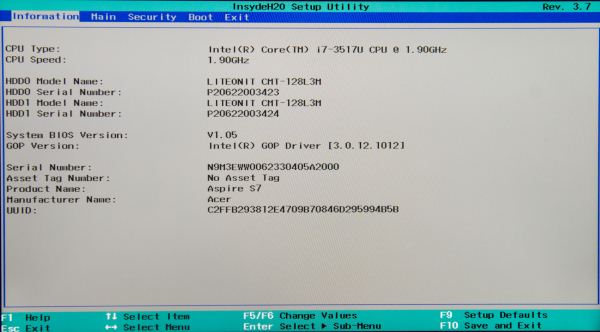
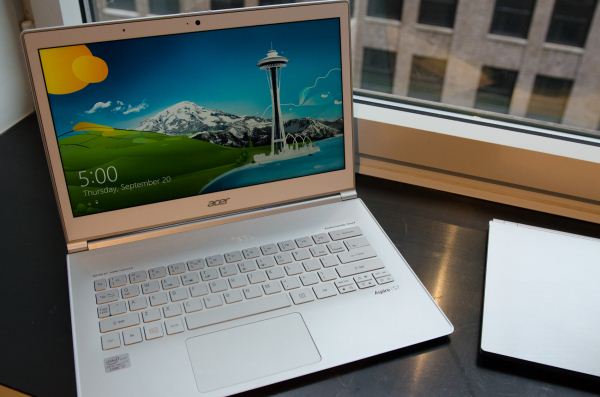
Last week we met with Acer to go over the fall product stack, and we’ll have a bunch of announcements over the coming two weeks all leading up to the late October launch of Windows 8. We start off today with their S7 Ultrabooks, Acer’s highest tier of Ultrabooks. We’ve preciously reviewed Acer’s Aspire S3 and more recently the Aspire S5, but the S7 goes all-in on build quality, materials, and design. The S7 will be available in both 11.6" and 13.3" flavors. Both models feature an all-aluminum unibody design, but the top cover material differs between the two. The 11.6" model has a brushed aluminum top cover, while the 13.3" model uses Gorilla Glass 2 as its outer surface. On the underside of the machine is a soft touch, smartphone-like plastic finish. The materials look and feel great in person. I was particularly impressed by the glass on the 13.3" model. The two chassis are also some of the thinnest Ultrabooks we’ve ever encountered, measuring 0.47”/0.48” (11.9/12.1mm) thick. The 13.3” models also feature a 180 degree hinge that allows the LCD to lie flat on a table, desk, or other surface where it can function as a typical tablet. Some of the key features of the S7 series are the touch enabled 1080p displays on both 11.6” and 13.3” models, Intel 3rd Generation Core i5 and i7 processors, and pure SSD storage solutions. At least for the 256GB model it appears that Acer is using two Lite-On CMT-128L3M SSDs in RAID-0. Lite-On's drives use a Marvell controller similar to the Plextor M3 series. The displays looked great in person, with subjectively very good brightness, contrast and viewing angles. We'll have to get the S7s in house to truly evaluate the performance of the panels however. The keyboard on both models felt good although the lack of a dedicated row of function keys seemed odd. Also impressive was the trackpad performance which didn't exhibit any of the usual issues we've seen from Ultrabooks thus far. The 13.3” S7-391 will be available in two models initially, one with an i5-3317U processor and a 128GB SSD for $1400 with the second featuring an i7-3517U processor and a 256GB SSD for $1650. The S7-391 weighs 2.86 lbs. (1.3kg). The smaller S7-191 includes the same i5-3317U CPU and 128GB SSD but weighs just 2.29 lbs. (1.04kg) and will cost $1200. Both models also feature backlit keyboards with an ambient light sensor that will adjust the backlight levels appropriates. Battery life is a bit of a question still, as Acer quotes up to 12 hours with an optional battery; we don’t have details on the optional battery or the default battery configurations, unfortunately. Note also that both models feature 4GB DDR3 memory that’s soldered onto the motherboard; we’d really like to see 8GB these days, especially considering the cost and the inability to upgrade should you desire additional RAM in the future.
Gallery: Acer S7 Ultrabook Hands On Part 2      
Gallery: Acer S7 Ultrabook Hands On       The full specs for the three announced models are below. Also be sure to check out our hands on video from IDF last month, also below.

| ||||||||||||||||||||||||||||||||||||||||||||||||||||||||||||||||||||||||
| 1:30p | HTC One X+ headed to AT&T along with new HTC One VX
Earlier today HTC made the One X+ official, which includes a faster Tegra 3 SoC, 64 GB of NAND for the AT&T version, LTE from an MDM9215, improved 1.6 MP front facing camera, and a larger internal battery. The One X+ with LTE will be headed to AT&T in the coming months in the same form as the international One X+ with LTE. Alongside that availability note however is the announcement of another handset, the HTC One VX, which will be exclusive to AT&T and looks like it sits somewhere between the One S and One V. The One VX includes a Snapdragon S4 Plus MSM8930 SoC, which is 1.2 GHz dual core Krait and includes Adreno 305 graphics. MSM8930 includes the same air interface support as MSM8960 as well (UE Category 3 LTE, up to DC-HSPA+, and 1x/EVDO). In addition the One VX includes what looks like the One V's camera system, the same 5 MP CMOS sensor with BSI, F/2.0 optics with 28mm focal length, and HTC ImageChip. The One VX also includes something we haven't seen on a lot of HTC's phones lately - microSD expansion. Display is a qHD (960 x 540) 4.5" Super LCD.
The One VX will launch on AT&T initially running Android 4.0.4 and later get updated along with the One X to Android 4.1 and Sense 4+. The way the One VX is positioned it will likely launch at a price significantly below the One X+. The HTC One X+ and One VX announcement is a bit scant on availability details for the two devices, noting that both will be available "in the coming months." Interestingly enough the announcement notes the One 8X will be available in November. 
| ||||||||||||||||||||||||||||||||||||||||||||||||||||||||||||||||||||||||
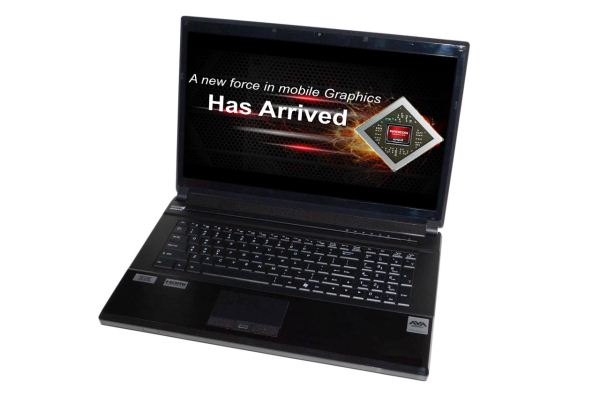
| 5:35p | AVADirect Clevo P170EM: Has AMD’s HD 7970M Got Game? A couple weeks back, we posted something of a first look at the Clevo P170EM when we did our overview of AMD’s upcoming Enduro 5.5 release. As one of the readers put it, the driver update from AMD is the “great white hope” for HD 7970M owners with Clevo notebooks. We’re told that the initial public driver release should be out in the next week or so, but prior to that launch we have our “full” review of the AVADirect notebook. The jury is actually still in deliberation as far as gaming performance is concerned—more on that in a moment—but while we await that verdict we can still take some time to check out the underlying hardware and design and see how things are shaping up. For this review, we have two parts: this first part uses a Clevo P170EM from AVADirect equipped with a Radeon HD 7970M GPU and AMD’s Enduro technology. Part two will show how AMD’s top mobile GPU stacks up to NVIDIA’s best, the GTX 680M. With NVIDIA having just released their latest 306 series WHQL driver, we’re still running benchmarks, so we’ll need a bit more time to uncover the full story. Until then, we have the Alienware M17x R4 as a comparison point; read on for our first full review of the HD 7970M and Clevo’s updated P170EM chassis. 
| ||||||||||||||||||||||||||||||||||||||||||||||||||||||||||||||||||||||||
| 6:38p | Testing AMD’s HD 7970M Enduro Hotfix
I just posted the full review of the Clevo P170EM from AVADirect, but there’s a ton of content specific to the Clevo notebook and I know many of you are waiting to hear more about AMD’s Enduro 5.5 driver updates. Let me start by pointing back to our overview of AMD’s Enduro technology. I had some back and forth discussions with AMD, and that took long enough that the public Enduro 5.5 update is now available. As I noted in the beginning of the first Enduro article, my initial impressions weren’t particularly good to say the least, and my first encounter with the P170EM didn’t assuage my concerns. Thankfully, AMD has been working to improve/fix the technology, and the public Enduro 5.5 driver at least installs and updates the UI for Enduro, with the promise of future driver releases. There were many comments on the Enduro article, and in general most of those comments weren’t particularly favorable towards AMD or the HD 7970M, but my experience suggests that (nearly?) all of the problems can be fixed with driver updates. One complaint in particular is with GPU underutilization—that the 7970M in some games is only running at 50-70% utilization, and thus delivers lower than expected frame rates. The public 12.9 Beta drivers still have this problem in many games, but AMD knows this and is working to fix things. Let me first describe what’s happening before getting to the fix. When you max out the details in most games the 7970M will still get above 30FPS, which is good. Unfortunately, in some titles the GPU utilization will drop well below 90% (around 60% in some games) and this results in a very perceptible drop in performance. So for example, a game like Battlefield 3 might go from a smooth 40+ FPS down to 20FPS for a second or two, then back to 40+ FPS—lather, rinse, and repeat. As you can imagine, that makes serious multiplayer gaming a real problem, and at lower detail settings (with higher frame rates), the GPU utilization is even worse (sometimes even lower than 50%). Going through our current gaming test suite with the public drivers, in some of our test titles we only get slightly improved frame rates despite dramatically lower complexity. Owners of 7970M notebooks have expressed a great deal of frustration with AMD over the situation, and the lack of driver updates has only heightened the irritation. Thankfully, AMD is set to address the driver updates issue with their new Enduro Catalyst program. What’s more, AMD is aware of the GPU underutilization problem and they’re working to address that as well. The initial 12.9 Beta driver still has underutilization problems, but AMD plans to release a Hotfix in the next week or so that should hopefully clear things up. Whatever the root cause (possibly the problem is related to the copying of frames over the PCIe bus, as the problem becomes more pronounced in games that hit higher frame rates), AMD says the issue can be fixed with drivers. To prove this, AMD gave us advanced access to the Hotfix drivers, and we’ve run them with our current test suite. You can see the full performance breakdown in the Clevo P170EM review, where we look at performance with three sets of drivers to show how things have/haven’t changed since the 7970M launch, but we wanted to provide a short summary outside of the notebook review. The above table compares the Hotfix performance to the best result from the previous two drivers (e.g. the initial Clevo P170EM driver from May and the Catalyst 12.9 Beta from last week). The 12.9 Beta actually tends to be the lowest performing driver out of the three we tested in most games, but it’s usually relatively close to the original driver. The Hotfix on the other hand only shows one drop in performance: Batman at Enthusiast settings is down from the Beta, which in turn is down quite a bit from the original driver. Everywhere else, the Hotfix is at least equal to the better of the previous two drivers, and in many cases it’s significantly faster. It’s especially potent at lower quality/resolution settings, where we see an average increase of around 30% at our Value and Mainstream settings. At maximum quality for our six titles (since Shogun 2 won’t allow the Very High preset), the average increase is only 7%, but if we eliminate Batman it’s a 13% increase. That still doesn’t really tell the whole story, however, as performance was actually good in many titles but needed help in a few others. If we take a closer look, Battlefield 3, Civilization V, DiRT 3, and Shogun 2 all show >40% improvements at our Value preset, and the same set minus BF3 sees big gains at our Mainstream preset. At our Enthusiast settings, however, only Civilization V sees a major increase in performance. That sort of performance jump is huge—GTX 680M for instance is only around 50% faster than the previous generation GTX 580M on average—but of course we’re really talking about HD 7970M performing poorly at launch and getting fixed (and I believe most of this is specific to Enduro enabled 7970M notebooks like the Clevo P150EM and P170EM). All of this goes back at least in part to the GPU underutilization issues seen with earlier drivers, where higher quality settings/resolutions are more likely to stress the GPU. We did check GPU utilization with the Hotfix on all of the tested titles, and there are still games where we see sub-80% GPU use (particularly at lower details/resolutions), but I’m not sure that’s particularly important when we’ve got competitive frame rates. Note also that as far as I’m aware, the GPU underutilization issue is confined mostly or perhaps even solely to the HD 7970M/7950M—the lesser GPUs like 7870M and 7770M should not experience this as much, largely because they’re not as fast and it will be easier to reach GPU bottlenecks as opposed to CPU limits. We’re not done with the AMD Enduro driver story, of course. With this release, AMD is starting on the road to delivering reference drivers that will in theory work with all Enduro (PowerXpress 4.0 or later) laptops. In practice, there are still some teething problems, and long-term AMD needs to get all the kinks straightened out. They’re aware of issues with other Enduro laptops and the 12.9 Beta drivers (they’re beta for a reason, right?), and hopefully the next major release after the Hotfix will take care of the laptop compatibility aspect. I’ve stated before that AMD’s Enduro feels like it’s where NVIDIA was with Optimus about two years (2.5 years) back, and that continues to be the case. The first public Enduro beta driver is a good place to start, and now AMD just needs to repeat and refine the process a few more times. Hopefully by the end of the year we’ll see a couple more driver updates and compatibility will improve. We’re also working to get the Alienware M17x R4 with HD 7970M, which will allow us to specifically see how much performance is affected when we enable/disable Enduro support. AMD’s target should be less than a 5% drop (basically similar to what NVIDIA achieves with Optimus), so if/when we can test a discrete-only 7970M implementation we will provide further details. In the meantime, if you simply must have an HD 7970M notebook, Alienware’s inclusion of software controlled muxes to allow the disabling of Enduro makes that the safest bet. 
| ||||||||||||||||||||||||||||||||||||||||||||||||||||||||||||||||||||||||






_575px.jpg)

| << Previous Day |
2012/10/02 [Calendar] |
Next Day >> |