[Most Recent Entries] [Calendar View]
Wednesday, October 24th, 2012
| Time | Event | ||
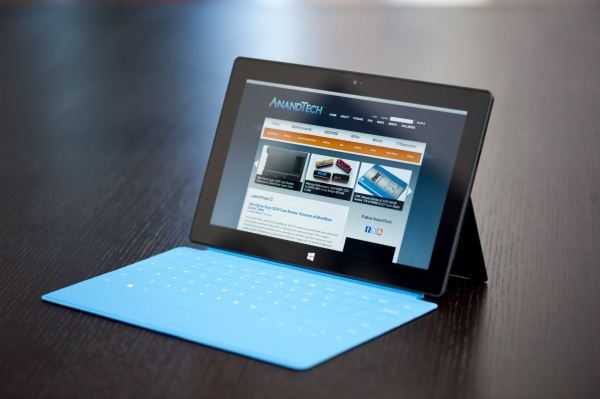
| 1:01a | Microsoft Surface Review A week ago, I sat in an auditorium and listened to Steve Sinofsky talk about the tablet market. He talked about how the iPad was a great device, and a logical extension of the iPhone. Give iOS a bigger screen and all of the sudden you could do some things better on this new device. He talked about Android tablets, and Google’s learning process there, going from a phone OS on a tablet to eventually building Holo and creating a tablet-specific experience. He had nothing but good things to say about both competitors. I couldn’t tell just how sincere he was being, I don’t know Mr. Sinofsky all that well, but his thoughts were genuine, his analysis spot-on. Both Apple and Google tablets were good, in their own ways. What Steve said next didn’t really resonate with me until I had spent a few days with Surface. He called Surface and Windows RT Microsoft’s “perspective” on tablets. I don’t know if he even specifically called it a tablet, what stuck out was his emphasis on perspective. I then listened to Panos Panay, GM of Microsoft’s Surface division, talk about wanting to control the messaging around Surface. He talked about how Microsoft’s June 18th event was scheduled because Surface was about to hit a point in its production where he could no longer guarantee there wouldn’t be substantial leaks about what the product actually was. He talked about the strict usage and testing guidelines everyone at Microsoft was forced to adhere to, again to avoid major leaks. He didn’t want Surface to be judged immediately and cast aside on someone else’s terms, because of some leak. Panos Panay wanted Microsoft to be the ones to bring Surface to market. Sure some rumors leaked about it before the June 18th event. A couple of weeks earlier, while I was in Taiwan, I even heard the local OEMs complaining about it (a lot of the “surprised” public outrage by Taiwanese OEMs was mostly politics). But for the most part, we didn’t know what Surface looked like and we had no concept of its design goals. Touch and Type Cover were both well guarded secrets. Surface is Microsoft’s perspective. With the exception of some technical display discussion, Microsoft hardly mentioned the iPad in our Surface briefing. And when it did, it did so in a positive light. Microsoft isn’t delusional, the iPad is clearly a very well executed tablet. At the same time it believes there’s room for something else. Read on for our full review of Microsoft's first branded tablet: Surface. 
 | ||
| 5:36a | Understanding Apple's Fusion Drive
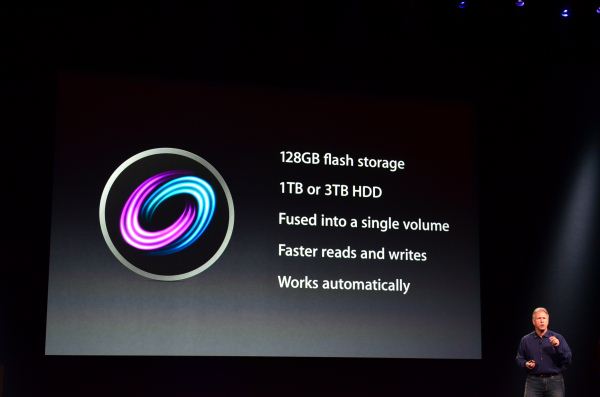
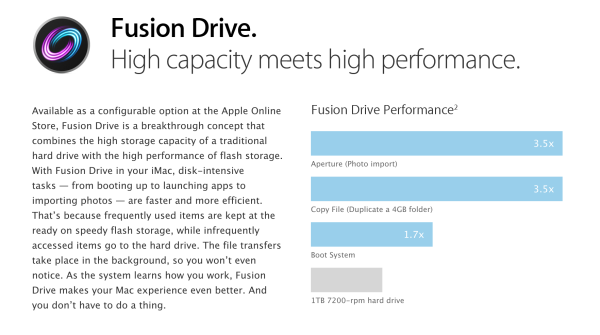
During its iPad mini launch event today Apple updated many members of its Mac lineup. The 13-inch MacBook Pro, iMac and Mac mini all got updated today. For the iMac and Mac mini, Apple introduced a new feature that I honestly expected it to debut much earlier: Fusion Drive. The idea is simple. Apple offers either solid state or mechanical HDD storage in its iMac and Mac mini. End users have to choose between performance or capacity/cost-per-GB. With Fusion Drive, Apple is attempting to offer the best of both worlds. The new iMac and Mac mini can be outfitted with a Fusion Drive option that couples 128GB of NAND flash with either a 1TB or 3TB hard drive. The Fusion part comes in courtesy of Apple's software that takes the two independent drives and presents them to the user as a single volume. Originally I thought this might be SSD caching but after poking around the new iMacs and talking to Apple I have a better understanding of what's going on. For starters, the 128GB of NAND is simply an SSD on a custom form factor PCB with the same connector that's used in the new MacBook Air and rMBP models. I would expect this SSD to use the same Toshiba or Samsung controllers we've seen in other Macs. The iMac I played with had a Samsung based SSD inside. Total volume size is the sum of both parts. In the case of the 128GB + 1TB option, the total available storage is ~1.1TB. The same is true for the 128GB + 3TB option (~3.1TB total storage). By default the OS and all preloaded applications are physically stored on the 128GB of NAND flash. But what happens when you go to write to the array? With Fusion Drive enabled, Apple creates a 4GB write buffer on the NAND itself. Any writes that come in to the array hit this 4GB buffer first, which acts as sort of a write cache. Any additional writes cause the buffer to spill over to the hard disk. The idea here is that hopefully 4GB will be enough to accommodate any small file random writes which could otherwise significantly bog down performance. Having those writes buffer in NAND helps deliver SSD-like performance for light use workloads. That 4GB write buffer is the only cache-like component to Apple's Fusion Drive. Everything else works as an OS directed pinning algorithm instead of an SSD cache. In other words, Mountain Lion will physically move frequently used files, data and entire applications to the 128GB of NAND Flash storage and move less frequently used items to the hard disk. The moves aren't committed until the copy is complete (meaning if you pull the plug on your machine while Fusion Drive is moving files around you shouldn't lose any data). After the copy is complete, the original is deleted and free space recovered. After a few accesses Fusion Drive should be able to figure out if it needs to pull something new into NAND. The 128GB size is near ideal for most light client workloads, although I do suspect heavier users might be better served by something closer to 200GB. There is no user interface for Fusion Drive management within OS X. Once the volume is created it cannot be broken through a standard OS X tool (although clever users should be able to find a way around that). I'm not sure what a Fusion Drive will look like under Boot Camp, it's entirely possible that Apple will put a Boot Camp partition on the HDD alone. OS X doesn't hide the fact that there are two physical drives in your system from you. A System Report generated on a Fusion Drive enabled Mac will show both drives connected via SATA. The concept is interesting, at least for mainstream users. Power users will still get better performance (and reliability benefits) of going purely with solid state storage. Users who don't want to deal with managing data and applications across two different volumes are still the target for Fusion Drive (in other words, the ultra mainstream customer). With a 128GB NAND component Fusion Drive could work reasonable well. We'll have to wait and see what happens when we get our hands on an iMac next month. 
| ||
| 5:54a | DigitalStorm Bolt Gaming System Review: It's Little But It's Fierce Since I've started reviewing boutique desktops I've been of the opinion that while they're not strictly for enthusiasts, the enthusiast market is one that boutiques can tap into by offering something that can't simply and easily be built. It's not just important for these small companies to differentiate from each other in a general sense, but there really does need to be something they offer that allows them to compete on something other than price. Over the past year a number of them have started to produce systems with custom cases, and DigitalStorm in particular is now on their second custom chassis with the system announced yesterday and reviewed today, the Bolt. DigitalStorm is positing it as the thinnest gaming desktop available, a claim that has to compete with Falcon Northwest's 4"-wide Tiki and Alienware's 3.75"-wide X51. Just being a tenth of an inch thinner than the X51 isn't going to be enough, though. Is the Bolt worth your attention, or does it need to go back to the drawing board? 
| ||
| 12:00p | NVIDIA Releases 310.33 Beta Drivers; GeForce 6 & 7 Series Moved To Legacy Status
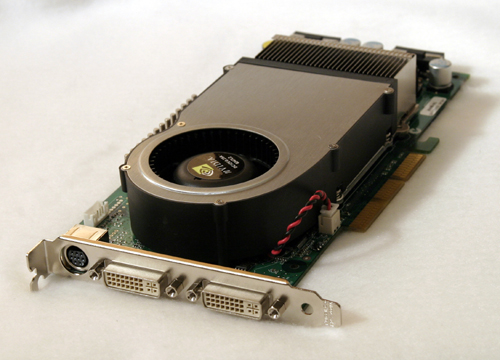
It would appear that on top of everything else going on this week, this is also a big week for video drivers. Following AMD’s major release of Catalyst 12.11 earlier this week, NVIDIA has their own driver release this week with the release of their 310.33 beta drivers. These drivers are the first public release of the previously announced R310 family, making this the 4th major driver family release for NVIDIA this year (R295, R300, R304, R310). From a feature standpoint these drivers won’t offer a big change for most end users right away, but Windows 8 users will be in for a treat. Thanks to Windows 8’s new stereoscopic 3D functionality, these drivers add windowed S3D support for a multitude of applications and games, including YouTube 3D, various Blu-Ray players, and all DX9 games. Meanwhile developers will want to play close attention to these drivers for new API functionality they expose. These are the first drivers to support OpenGL 4.3, which among other things means this is the first GeForce driver set to have support for new features such as OpenGL compute shaders, along with full OpenGL ES 3.0 superset functionality. As for CUDA developers these are the first GeForce drivers that will support the recently released CUDA 5. Feature additions aside, for most users the biggest benefit these drivers will bring will be performance improvements, bug fixes, and new game profiles, and like any new NVIDIA driver branch 310.33 comes with a mix of all of those. On the performance side of things NVIDIA is claiming that these drivers offer notable performance improvements for GeForce 600 users in Skyrim, Starcraft II, and Batman: Arkham City, among other games. Interesting the former two tend to be quite CPU limited (and Batman isn’t far behind), so it’s not where we’d typically expect to see significant performance improvements. We haven’t had a chance to test these drivers, but NVIDIA’s own performance analysis is available over at GeForce.com. Going by NVIDIA’s numbers this isn’t going to be the kind of major performance boost that AMD’s Catalyst 12.11 was – and we weren’t expecting it to be – but it’s a decent performance boost all the same. As for bug fixes and profile improvements, the most notable change is the return of MSAA support for Diablo III. Otherwise it’s a fairly typical (and extensive) collection of profile updates, including an updated SLI profile for DiRT: Showdown and an updated Ambient Occlusion profile for CS:GO. Finally, with these drivers we’ll be bidding adieu to support for the last of NVIDIA’s DirectX 9 GPUs. As previously announced by NVIIDA, starting with R310 NVIDIA is formally moving the GeForce 6 and 7 series to legacy status. NVIDIA retired their earlier NV30 architecture based GeForce 5 FX series relatively quickly with R175 back in 2008, but they have supported the newer and far more successful NV40 based 6 and 7 series for much longer. By our count it has been nearly 8 years since the first of those cards was released and 5 years since the last, marking the end of what has been the longest support cycle for consumer GPUs that we have yet to see. We’re still waiting to get confirmation from NVIDIA about what legacy status entails in this case – whether it means reduced driver updates (ala AMD HD 2000-4000) or a complete end to driver updates – but given how long NVIDIA has supported these cards it’s likely the latter. Starting with R310 NVIDIA’s minimum supported hardware will be the GeForce 8 series. If NVIDIA’s DX9 GPU support is anything to go by, then considering the slower pace of upgrades in recent years and just how long NVIDIA has sold GeForce 8 GPUs – particularly G92 – we wouldn’t be surprised to see them support their DX10 GPUs for as long as or longer than they did their DX9 GPUs. 
| ||
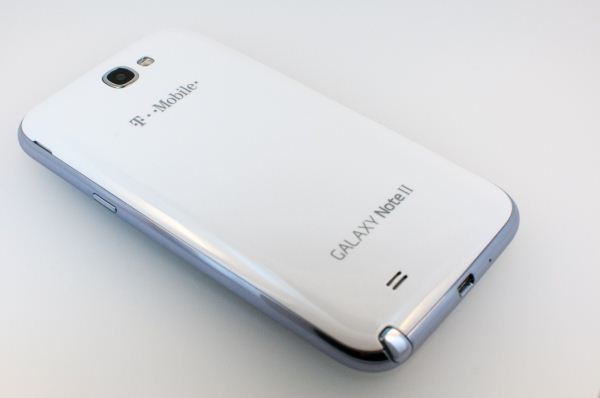
| 1:00p | Samsung Galaxy Note 2 Review (T-Mobile) - The Phablet Returns So I have a confession to make. What seems like an eternity ago, I received a Galaxy Note review unit for AT&T, but never quite finished my review. While the reasons for that were no fault of the device and rather the result of some other personal failings, I spent a lot of time with the original Note really trying to size up the experience of using the world’s first smartphone that crossed over into tablet territory — a so-called “phablet.” If anything, the original Galaxy Note drove home for me just how dangerous it can be to make conclusions about a handset or mobile device before you’ve held it in your hands. There’s this constant tug of war in the tech space between making a quick conclusion based on what evidence and data is laid out before you, and waiting a week, a few weeks, or even a month and then writing in hindsight looking back how the whole experience turned out. In the smartphone space, the pace is even more rapid with week long review cycles or shorter, and thus we see many trying to draw conclusions based on form factor, display size, and lots of speculation. For me, the original Galaxy Note roughly defined an upper bound for mobile devices that are still ultimately pocketable, and I was surprised just how easy it was to grow accustomed to. The original S Pen showed up right around the height of the draw something app craze, and the result was a ton of attention to a device that many initially criticized for its size and inclusion of stylus. The story today however is about the Galaxy Note 2, which I’ve been using for one solid week now. Subtract out the time spent battery life testing, and it’s really only been a few days, but my experiences and thoughts about the Note 2 really mirror those that solidified with the original Note and the Note 2’s smaller sibling, the Galaxy S 3. It’s an upper bound for smartphone size, but ultimately the right one, if your pockets can handle it. Read on for the full review. 
| ||
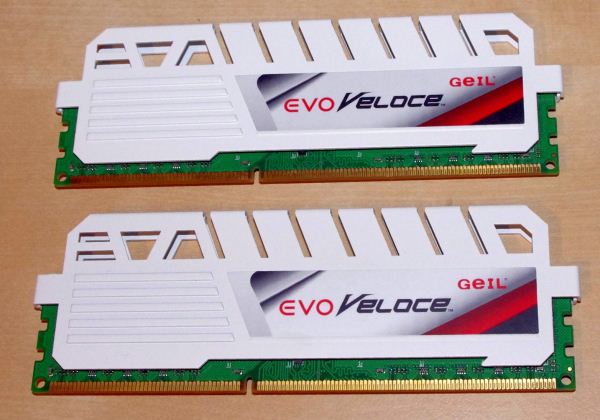
| 9:50p | GeIL Evo Veloce Review: 2x8GB at DDR3-2400 C11-12-12 1.65 V As part of a series of memory reviews, the next kit to enter our test beds is a limited edition enthusiast kit from GeIL. Attached with what GeIL is calling a ‘Frost White’ colored heatsink, this is a two module dual channel kit with a total of 16 GB running at DDR3-2400 MHz at 11-12-12-30 sub-timings, and retails for ~$150. Read on for the full review. 
|


.jpg)

| << Previous Day |
2012/10/24 [Calendar] |
Next Day >> |