[Most Recent Entries] [Calendar View]
Tuesday, December 4th, 2012
| Time | Event | ||
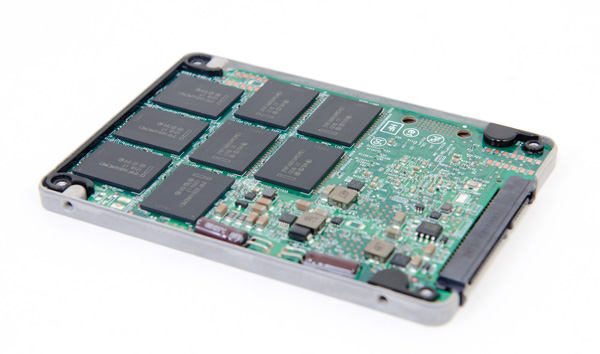
| 4:00a | Exploring the Relationship Between Spare Area and Performance Consistency in Modern SSDs When we reviewed Intel's SSD DC S3700 I started looking at consistency of IO latency, an area that Intel's latest controller specifically targeted for significant improvement. In our review of OCZ's Vector I took the same methodology and applied it to the current crop of high-end consumer drives. As I believe improving IO consistency is a good optimization practice for all SSDs, the hope is that we'll see improvements in this area on both client and enterprise focused drives. In the comments thread for the Vector review, jwilliams4200 posted some very interesting data. The S3700 has 264GiB of NAND on-board but only exposes 186GiB of it (200GB advertised capacity) as user accessible storage, the rest is used as spare area to improve performance, consistency and endurance. Most client drives on the other hand only feature about 7% of their total NAND capacity set aside as spare area (256GiB of NAND, 238GiB of user storage). The obvious hypothesis is that a big part (if not all?) of the S3700's advantage in performance consistency is due to the large amount of spare area. We've understood the relationship between spare area and write amplification for quite some time now. The real question is what's the relationship between spare area and IO latency/performance consistency. To find out, I repeated jwilliams4200's tests. I took a bunch of 240/256GB drives and filled them to various percentages of their capacity, and performed our IO consistency test with an identical span of LBAs. The goal was to simulate worst case IO consistency while taking into account greater percentages of spare area. Read on for our analysis! 
 | ||
| 1:00p | Enhancing Your IT Business Offerings You can’t argue with the notion that an ideal New Year’s resolution would be to increase the performance and speed of each and every one of the IT projects you’ve got your hands on this coming new year. Lucky for you, all it takes is a commitment to embrace some of the finest technology to hit the market so you can be the go-to resource for modern businesses. Of course, not every company or organization needs the same technology solution. While every enterprise aims to prevail over competitors, the answer that leads to greater efficiency and success this year and every year may be unexpected – but nonetheless welcomed. A qualified IT professional will have that answer. That’s why more and more companies are turning to VMware Competency Partners to make it easier to deliver virtualization and cloud computing expertise in the marketplace. A good example comes from George Reed, CIO of Seven Corners travel insurance: “Netech holds both a Desktop and Infrastructure Virtualization Solution Competency from VMware. These Competencies and their collaborative approach gave them the expertise our company needed to go beyond the typical efficiency benefits of the cloud to build innovative business services that generate whole new revenues.” Simply stated, you want to provide your business with tech solutions that allow you to improve your productivity and bottom line. Consider this satisfied customer: “Synchronet used their VMware Infrastructure Virtualization expertise to validate our VMware installation. We quickly realized the results of the high-quality implementation, including a simplified disaster recovery initiative and increased IT efficiency at Myron Steves. Synchronet proved themselves to be the expert consultants that we needed,” reports the insurance brokerage firm Myron Steves. This year, join the brigade of IT professionals who are improving their business by choosing VMware Competency Partners. Visit www.vmware.com/partners/solution-compete 
| ||
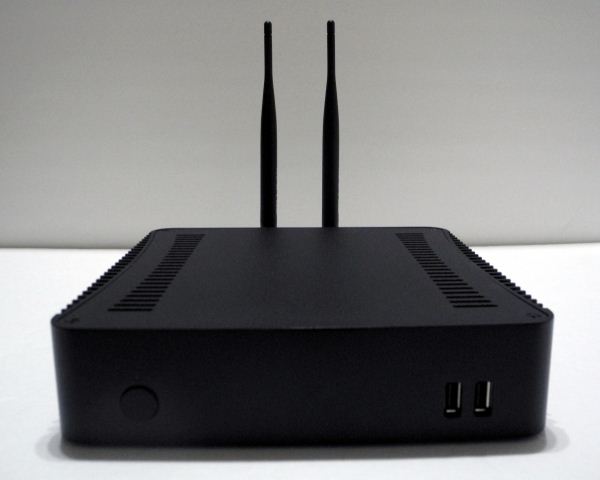
| 2:00p | Aleutia Relia Industrial PC Review: Ivy Bridge & Q77 in a Fanless Chassis Industrial PCs come with stringent requirements that are not satisfied by generic PCs. It is customary for builders to use active cooling in order to ensure that the components are in proper working order. Ventilation slots are also provided to keep airflow up. Chassis size is also not always a concern. However, these flexibilities are not always possible in industrial PCs. Operating environments for such systems usually call for passive cooling, dust resistance, rugged nature and minimal size (read, mini-ITX).
We have already covered the launch of a few industrial PCs including that of the Aleutia Relia which is being reviewed today. The specifications of the Aleutia Relia also make it attractive to users who are picky about having a completely silent machine in their media center. How well does the Aleutia Relia fare in our benchmarks? What are the effects of going in for a fully passive thermal solution? Read on to find out. 
| ||
| 3:51p | Latest WebKit Build Doubles Scrolling Performance on MacBook Pro with Retina Display
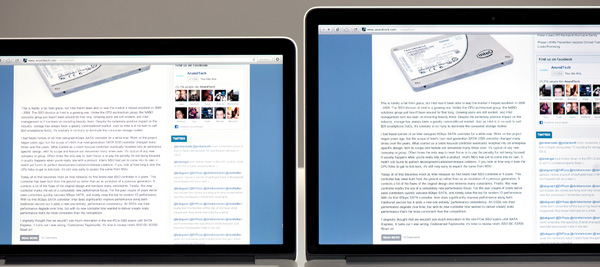
In both of our MacBook Pro with Retina Display reviews (13-inch & 15-inch), I pointed out a big downside to the user experience today: UI performance in some applications is significantly reduced compared to non-Retina models. I couldn't find a direct cause for the issue, just that whatever work Apple does to make OS X look like OS X ends up requiring quite a bit of CPU power, and the workload scales with resolution. I've seen this in applications like Mail and Safari, although it's present in more than just that. In our 13-inch rMBP review I proposed a couple of solutions: 1) a dramatic increase in single-threaded CPU performance, and/or 2) software improvements (e.g. the move to Mountain Lion for example shifted more animation workload over to the GPU, improving scrolling performance vs. Lion on rMBPs). Last week I received a tip (thanks Joan!) pointing me at a Macrumors post claiming that the latest nightly builds of WebKit fixed scrolling performance on the rMBP. I grabbed a build (r135516 - it's no longer the latest build but I assume the later builds also contain the fix) and tried it out on the 13-inch rMBP. Scrolling down my Facebook news feed ended up being one of the best showcases for poor scrolling performance on the rMBPs, so that's obviously the first test I ran. As always I used Quartz Debug to measure UI frame rate. First, here's what the average frame rate looked like using the latest version of Safari on Mountain Lion with the 13-inch rMBP running at the scaled 1440 x 900 setting: 13-inch rMBP, 1440 x 900 scaled setting, Safari Version 6.0.2 (8536.26.17) Average frame rates end up being around 20 fps, with dips down as low as 17 fps. Now here's the same test but using the r135516 WebKit build: 13-inch rMBP, 1440 x 900 scaled setting, WebKit Nightly r135516 Safari Version 6.0.2 (8536.26.17, 537+) Performance is more than doubled! Scrolling is so much smoother. I also ran tests on pages that previously worked fine (e.g. the AnandTech front page) and performance hadn't changed there. I haven't managed to figure out exactly what's changed in the codebase to improve performance so much but it's appreciable. For those of you who are early adopters of Retina MBPs, there looks to be some hope that we might see software solutions to improving UI performance. The real question is when we'll see these types of improvements rolled into OS X. 
|






| << Previous Day |
2012/12/04 [Calendar] |
Next Day >> |