[Most Recent Entries] [Calendar View]
Thursday, December 6th, 2012
| Time | Event | ||
| 1:23a | Hands on with the Analogix SlimPort microUSB to HDMI and VGA adapters
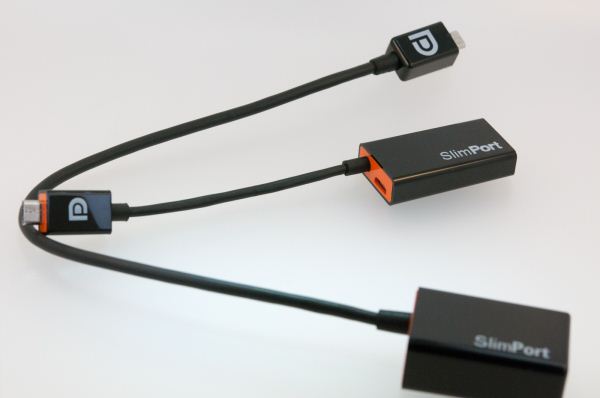
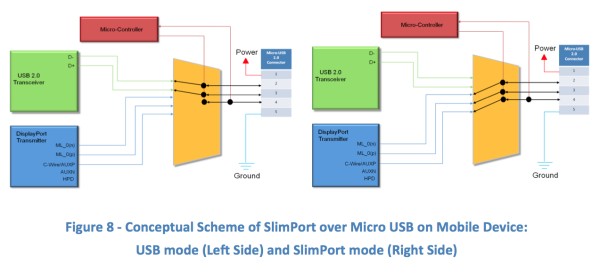
In my Nexus 4 review, I noted that the device was the first shipping handset to include support for SlimPort via an Analogix ANX7808 SlimPort transmitter. When I wrote that review it wasn't immediately clear what advantages SlimPort offered over MHL, which has become relatively ubiquitous in the year or so since its introduction. Since then I've acquired the SlimPort microUSB to HDMI 1.4 SP1002 and VGA (D-SUB) SP2002 adapters from Analogix for testing out SlimPort on the Nexus 4. SlimPort is a new video output standard which works over microUSB, and is effectively an MHL alternative based on the DisplayPort standard administered by VESA. SlimPort is offered both license and royalty free, and supports up to 1080p60 or 1080p30 with 3D content over HDMI 1.4 (up to 5.4 Gbps of bandwidth), in addition to support for DVI, VGA (up to 1366x768 and 720p at 60 Hz), and DisplayPort. What's different about SlimPort from a user-facing perspective is that external microUSB power is not required for the adapter to work and is instead only required for optional charging. At the same time, the adapters draw no power from the source to operate. I've spent some time playing around with the SP1002 HDMI adapter, which I believe is based on ANX7730, and the SP2002 VGA adapter, which is likely based on ANX9832. As of this writing, the Analogix SP1002 adapter is available on Amazon for around $30 USD. I haven't seen the SP2002 available online anywhere yet, however.
When connected to the Nexus 4, the HDMI adapter rotates the UI into landscape and mirrors the display just as expected. Resolution is scaled to 1080p60 on the Nexus 4 up from the panel resolution of 1280x768, which results in some letterboxing. As expected there's no requirement to have microUSB power connected to the adapter, I tested it with and without external microUSB power, all this does is just enable charging. I posted a video review (shot on the Samsung Galaxy Camera) demonstrating the Nexus 4 doing mirroring with the SlimPort SP1002 adapter and received a query about whether the combo enables multichannel audio over HDMI as well. I tested VLC for Android with some .MKVs I had laying around with 5.1 AAC tracks and found that VLC will decode the multichannel audio and ship it over as 5.1 PCM to my A/V Receiver, so this does work, surprisingly enough. There's no bitstreaming support as far as I can tell, however. As an aside I was able to playback a number of 720p MKVs with hardware decoding checked in VLC for Android and 5.1 audio out with no dropped frames. The Nexus 4 seems to be a passable platform if you're looking to play the occasional 720p video over HDMI — provided you have the free storage for it. I also tested out the SP2002 microUSB SlimPort to VGA adapter, which has a longer cable and correspondingly beefier module for accommodating the D-SUB connector on the end. I tried with a Dell G2410 LCD display and XGA resolution DLP projector and saw an output resolution of VGA (640x480 at 60 Hz), which wasn't quite what I expected. The SP2002 should work just fine with 720p60 over VGA, and I know both monitors expose the proper EDID, it seems as though the Nexus 4 just defaults to this mode. Just like the HDMI adapter there's a microUSB port on the back for optional charging, though the dongle doesn't require external power to operate. Thus far I'm fairly impressed with SlimPort. I enjoyed discrete microHDMI connections on devices when that was the norm, though finding a microHDMI to HDMI cable was always the challenge. Later MHL seemed a step in the right direction, but requiring three cables to do display mirroring seemed like a bit much. With SlimPort I think we've finally arrived at something close to ideal with the standard not requiring external power to function. It will be interesting to see how SlimPort, MHL, and Miracast adoption fare in the coming year as mirroring to a larger display is in the cards as a convergence trend for smartphones and tablets. 
 | ||
| 6:24a | TeamViewer 8 Released, with Windows 8 and Retina Support
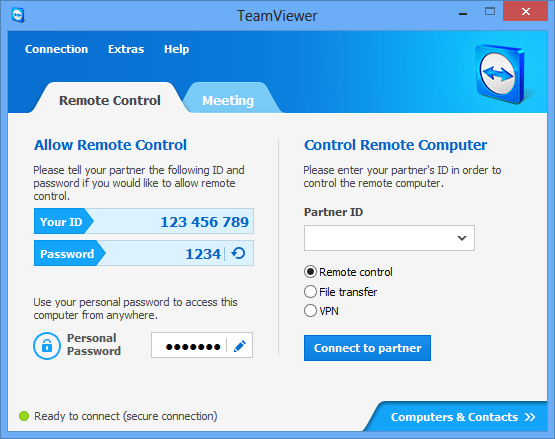
TeamViewer is one of those applications that some people have heard about and love, while others have no idea what it is. At its core, TeamViewer is a remote control utility for Windows and OS X computers—and unlike Windows Remote Assistance (WRA), in my experience it works well and it’s extremely easy to get connected. I first stumbled on TeamViewer when I couldn’t get WRA working to help my mom with a computer problem; trying to explain to a computer neophyte how to start WRA, save an invitation file, find the file they just saved, then email the file is not exactly a simple process. What makes it truly frustrating is when you go through all the steps and then the connection still doesn’t work. When WRA does work, I have no complaints, but my experience has been very hit or miss. After trying for a few hours to get WRA working, I gave up and started looking for other options, and that’s when I found TeamViewer. Literally 15 minutes later, I had connected to the other laptop, fixed the problem (which involved making some registry edits), and we were done. The quick connect options on TeamViewer was particularly handy, as it skips past the installation process and lets you get straight to helping someone. Long story short, after having used TeamViewer to help several friends and family members over the past month, I received a press release announcing the new TeamViewer 8 with Windows 8 support (available as of December 4). With Windows 8 adding a few new items to the mix—e.g. the Start Screen and Charms Bar—TeamViewer has been updated to provide access to these items through its menus. It might seem like a minor thing, but given the UI overhaul in Windows 8 it’s something that will likely prove necessary. Windows 8 isn’t the only OS with new features; on OS X, Retina displays are now supported. TeamViewer also has their remote access app available on iOS, Android, and Windows RT The above features are available in all versions of TeamViewer 8. For the non-free (e.g. Business, Premium, and Corporate) versions, other new additions include an improved user management interface, connection reporting of all sessions, browser-based connections, session handover, improved remote printing (VPN is no longer required), deeper MS Outlook integration, transmission of remote sound and video (video will require a fair amount of bandwidth, naturally), and enhanced session recordings. TeamViewer’s Magdalena Brzakala (Public Relations Manager), Andre Schindler (Business Development Manager), and Tom Carpenter (Account Manager) took some time today to run me through some of the new features, and basically everything worked as expected. The fully licensed version, while expensive, also adds some functionality that I can certainly see as being useful for IT shops in particular, as well as telecommuters or those who need access to their home data and documents. I wouldn’t go so far as to suggest TeamViewer is unique in any of these areas, but I can say that it has worked well when I needed it and it’s definitely one of those utilities I now keep in my software toolkit.

| ||
| 5:40p | Mushkin Announces First 480GB mSATA SSD
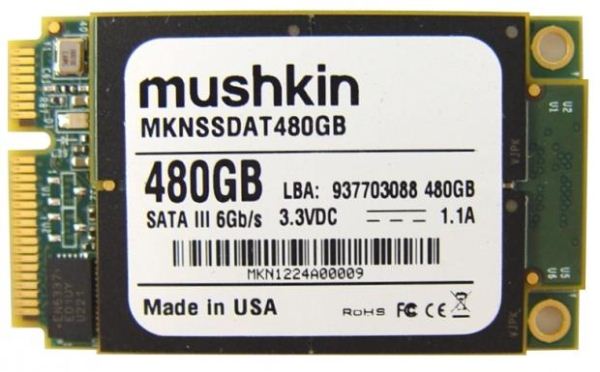
We're seeing a true shift in the mobile market to including SSDs in more of the market spectrum. What was once the domain of $1500+ laptops is now being pushed well into sub-$1000 territory, and good 128GB SSDs are generally available for under $100 now. If you need capacity, it's still hard to beat hard drives, but for fast storage SSDs are the way to go and have been for a few years. Along with the transition to faster and better SSDs, we're also seeing smaller mSATA SSDs. Up until now, the largest mSATA SSDs have topped out at 240GB/256GB, but Mushkin is now announcing their 480GB SF-2281 based Atlas mSATA drive. What's particularly interesting is that this may be the first 16GB NAND die we've seen; we're trying to confirm that, but it would make sense considering the capacity and form factor. Ultrabooks and ultraportables in general are set to benefit from the presence of higher capacity mSATA SSDs. While many users can get by with 128GB or 256GB of storage, another class of users can routinely fill up 256GB SSDs and then some. A quick look at my Users folder on my primary desktop reveals I'm using 150GB just for my normal data (documents, images, videos, music, email, etc.) Add in my Program Files and Windows directories and that's another 80GB. Obviously I'm not a typical user, but if I were to try and go pure SSD while keeping all of my data on one drive, I'd definitely need more 256GB--and as Anand showed earlier this week, having more spare area available will only help improve the consistency of performance. Specifications for the new Atlas mSATA drive are what you would expect from a modern SandForce 480GB offering. Trim, ECC, SATA 6Gbps, upgradeable firmware, and all the other usual suspects are present. Mushkin is using "high speed MLC NAND", just like virtually every other modern consumer SSD, and the Atlas comes with a 3-year limited warranty. It uses the MO-300 mSATA form factor (50.80 x 29.85 x 4.85mm). Availability is expected in January with an MSRP of $500. That's higher than 2.5" 480GB SF-2281 drives by $50-$150, but that's the price we pay for smaller form factors. 
| ||
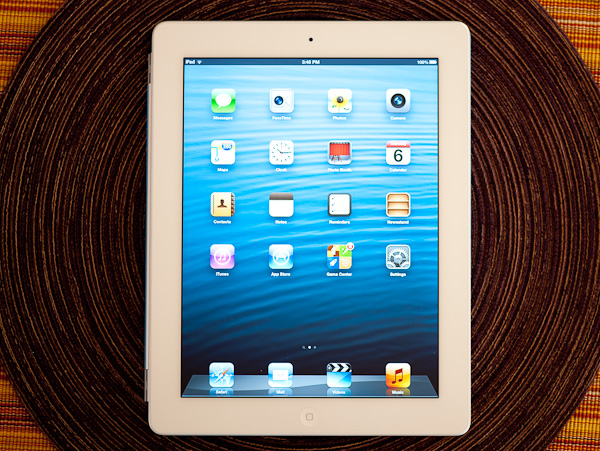
| 8:40p | iPad 4 (Late 2012) Review For years, almost a decade in fact, we've been asking for higher quality displays in notebooks. With most of our pleas left ignored for the value notebook segment, smartphone and eventually tablet makers capitalized on the opportunity. These days the $399 - $499 tablet display experience tends to be superior to the $399+ notebook experience. Things are beginning to change, but not quite fast enough. At the forefront of driving tablet display performance is Apple with its Retina Display equipped iPad. While the company has never really competed in the low-cost notebook or netbook market directly, the iPad has been Apple's solution for consumers who want a computer at a $500 - $700 price point. By focusing on areas that have been neglected by PC makers in the past (e.g. display, wireless connectivity, ease of use), Apple has managed to be quite successful in this space with the iPad. As a big part of its overall strategy, Apple has done a good job of issuing regular updates to the iPad family since its initial unveil in 2010. Now, just seven months after the release of the 3rd generation iPad, Apple followed up with a 4th generation model. It's the relentless execution cycle in addition to focusing on the integration of high quality tangibles like the display that has made the iPad a formidable competitor in the $500 - $700 consumer computing space. Read on for our full review of the 4th generation iPad. 
|




| << Previous Day |
2012/12/06 [Calendar] |
Next Day >> |