[Most Recent Entries] [Calendar View]
Wednesday, January 22nd, 2014
| Time | Event | |||||||||||||||||||||||||||||||||||||||||||||||||||||||||||||||||||||||||||||||||||||||||||||||||||||||||||||||||||||||||||||||||||||||||||||||||||||||||||
| 12:49a | Amped Wireless: 802.11ac WiFi with High-Gain Antennas
It’s been a while since we last looked at Amped Wireless, a company with a primary goal being the development of higher quality and longer range WiFi products. Wireless testing being what it is – namely, a pain in the rear – I haven’t completed any of the 802.11ac router reviews yet, but the AC1200 Amped Wireless router I’ve been testing has worked well. Amped now has several newer products coming out that supersede the AC1200 router, with an AC1900 router topping their lineup and providing four stream 2.4GHz support (600Mbps) and three stream 5GHz support (up to 1300Mbps on 11ac, or 450Mbps on 11n). They’ve also added a USB 3.0 port to several of their routers to provide high-speed access to network storage, which is a potentially useful feature. The wireless routers are now dressed in black, while the repeaters/range extenders use similar hardware that’s tuned for a slightly different workload and their casings are white. Amped also has access points available, which are more for business, with the highest model currently being AC1200 (two stream 2.4GHz/5GHz), which comes in a steel-grey color. The AC1200 RTA15 router has been shipping for a few months now with an MSRP of $190, while we’re still waiting for the new AC1900 model to begin shipping. Similarly, the REA20 range extender is currently shipping with a $200 MSRP, and we’re waiting for availability on the AC1900 range extender. Along with the routers, repeaters, and access points, Amped has a couple new 802.11ac client adapters. One is the ACA1, an AC1200 USB WiFi adapter with USB 3.0 connectivity that supports two streams (300Mbps/867Mbps) and can be used with any suitable laptop or desktop. USB 2.0 compatibility is provided as well, but performance will potentially be lower due to the limited bandwidth offered. The second client adapter is the PCI20E, and AC1200 WiFi PCI-E adapter, which has similar performance but comes with a PCI-E x1 expansion card for use in your desktop. The ACA1 is already shipping with a $90 MSRP, while the PCI20E is currently on pre-order with an MSRP of $80, and availability is expected in March. The potentially fastest routers at CES support up to four streams 802.11ac (1733Mbps), but the only four stream solution currently available comes from Quantenna. Considering most of Amped’s other products use Realtek chipsets, they may not bother with a four stream 11ac router, so the AC1900 line is likely to be the highest performance router and range extender from Amped for the time being. 
 | |||||||||||||||||||||||||||||||||||||||||||||||||||||||||||||||||||||||||||||||||||||||||||||||||||||||||||||||||||||||||||||||||||||||||||||||||||||||||||
| 12:30p | Floating point peak performance of Kaveri and other recent AMD and Intel chips
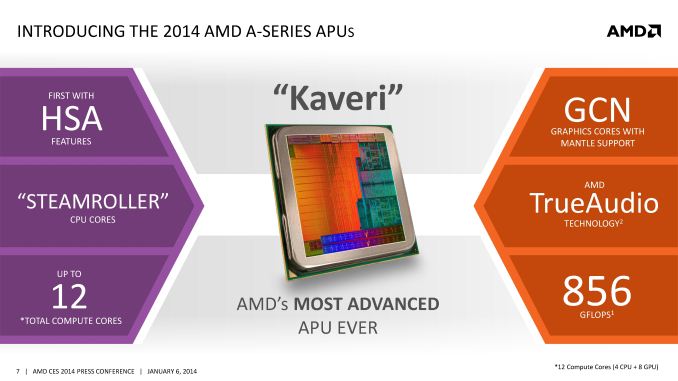
With the launch of Kaveri, some people have been wondering if the platform is suitable for HPC applications. Floating point peak performance of the CPU and GPU on both fp32 and fp64 datatypes is one of the considerations. At launch time, we were not clear on the fp64 performance of Kaveri's GPU but now we have official confirmation from AMD that it is 1/16th the rate of fp32 (similar to most GCN based GPUs except the flagships) and we have verified this on our 7850K by running FlopsCL. The peak CPU performance will depend on the SIMD ISA that your code was written and compiled for. We consider three cases: SSE, AVX (without FMA) and AVX with FMA (either FMA3 or FMA4).
It is no secret that AMD's Bulldozer family cores (Steamroller in Kaveri and Piledriver in Trinity) are no match for recent Intel cores in FP performance due to the shared FP unit in each module. As a comparison point, one core in Haswell has the same floating point performance per cycle as two modules (or four cores) in Steamroller. Now onto GPU peaks. Here, for Haswell, we chose to include both GT2 and GT3e variants.
The fp64 support situation is a bit of a mess because some GPUs only support fp64 under some APIs. The fp64 rate of Intel's GPUs does not appear to be published but David Kanter provides an estimate of 1/4 speed compared to fp32. However Intel only enables fp64 under DirectCompute but does not enable fp64 under OpenCL for any of its GPUs. Situation on AMD's Trinity/Richland is even more complicated. fp64 support under OpenCL is not standards-compliant and depends upon using a proprietary extension (cl_amd_fp64). Trinity/Richland do not appear to support fp64 under DirectCompute (and MS C++ AMP implementation) from what I can tell. From an API standapoint, Kaveri's GCN GPUs should work fine on for fp64 under all APIs. Some of you might be wondering whether Kaveri is good for HPC applications. Compared to discrete GPUs, applications that are already ported and work well on discrete GPUs will continue to be best run on discrete GPUs. However, Kaveri and HSA will enable many more applications to be GPU accelerated. Now we compare Kaveri against Haswell. In applications depending upon fp64 performance, conditions are not generally favorable to Kaveri. Kaveri's fp64 peak including both the CPU and GPU is only about 110 gflops. You will generally be better off first optimizing your code for AVX and FMA instructions and running on Haswell's CPU cores. If you are using Windows 8, you might also want to explore using Iris Pro through C++ AMP in conjunction with the CPU. Overall I doubt we will see Kaveri being used for fp64 workloads. For heterogeneous fp32 applications, Kaveri should outperform Haswell GT2 and Ivy Bridge. Haswell GT3e will again be a strong contender on Windows given the extremely capable Haswell CPU cores and Iris Pro graphics. Intel's GPUs do not currently support OpenCL under Linux, but a driver is being worked on. Thus, on Linux, Kaveri will simply win out on fp32 heterogeneous applications. However, even on Windows Haswell GT3e will get strong competiton from Kaveri. While AMD has advantages such as excellent GCN architecture and HSA software stack (when ready) enabling many more applications to take advantage of GPU, Iris Pro will have the eDRAM to potentially provide much improved bandwidth and the backing of strong CPU cores. I hope I have provided a fair overview of the FP capabilities of each platform. Application performance will of course depend on many more factors. Your questions and comments are welcome. 
| |||||||||||||||||||||||||||||||||||||||||||||||||||||||||||||||||||||||||||||||||||||||||||||||||||||||||||||||||||||||||||||||||||||||||||||||||||||||||||
| 1:00p | OCZ Vertex 460 (240GB) Review The last few months have not been easy at OCZ. After long-lasting financial issues, the company filed for bankruptcy on November 27th and a week later Toshiba announced that it will be acquiring the assets for $35 million. OCZ is currently surrounded by uncertainty, at least from a consumer's perspective. The details of the acquisition are scarce at best and OCZ only announced that Toshiba will be funding them to ensure normal operation during the acquisition process. I was hoping to have an update about OCZ's situation (especially about existing product warranties) but I was told by OCZ that they can't shed any light on the deal until it closes. Assuming the acquisition process is on schedule, we should expect to hear more in the next couple of weeks. Meanwhile, OCZ continues to do business as usual and the Vertex 460 is a sign of that. Already showcased at CES a couple weeks ago, the drive is now ready for release. Read on to find out how the drive performs! 
| |||||||||||||||||||||||||||||||||||||||||||||||||||||||||||||||||||||||||||||||||||||||||||||||||||||||||||||||||||||||||||||||||||||||||||||||||||||||||||
| 10:38p | Razer’s Project Christine: A Modular PC Prototype
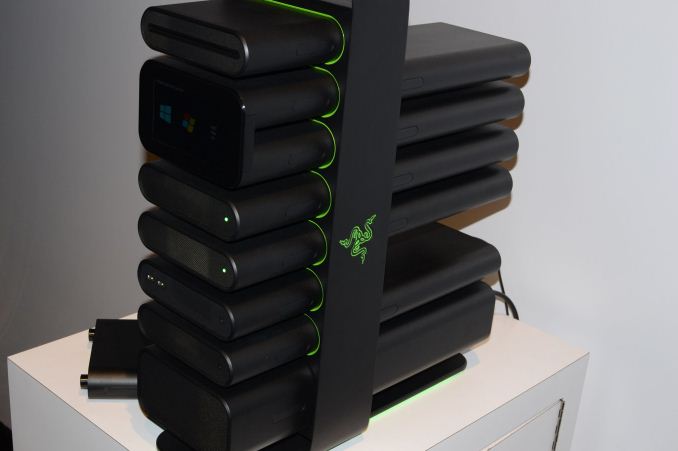
It’s my last CES post (finally, I know), but I saved one of the more innovative ideas for the end. Coming courtesy of Razer, Project Christine ran away from CES with numerous awards and accolades. There were other items on display at Razer as well – like the “Nabu” wearable fitness band/smartwatch – but most of the products have already been launched so I won’t dwell on them. And as for Nabu, the idea isn’t bad but the early models shown at CES felt a bit too bulky/uncomfortable to me. The big news in my book was the modular PC, so let’s take a closer look at what Razer has created. First, it’s important to note that the two Christine prototypes shown at CES are apparently not functional (or at least, no longer functional after shipping?), which is unfortunate as we would have loved to see a more real-world demonstration. Anyway, the idea is that you have this modular case (tower/column) where you can plug in GPUs, HDDs/SSDs, and other devices that come in self-contained modules. Need a faster GPU? No longer do you open up your PC and unscrew the old GPU and then install the new GPU; instead, you simply pop out the old module and add a new one – or in the case of CrossFire and SLI systems, you could simply plug in a second (or third?) GPU. Or perhaps you need more storage; simply pop in another SSD module and away you go. Take one look at the Christine prototype and you might start to wonder about cooling. Instead of air-cooling or even liquid-cooling, Razer is apparently using a non-conductive mineral oil that circulates through all of the modules (or at least the modules that need cooling I suppose), with as I understand it the parts being completely submerged in the oil. Presumably along with the GPUs, Power Supply, Storage, and other devices, one of the modules will likely need to be a pump + radiator. Again, it would have been great to see the PC actually running, but perhaps it’s not at that stage yet – though Razer indicated that there’s at least one working prototype that’s currently being used by their CEO. So far so good, but rerouting PCI Express lanes to custom ports isn’t really all that difficult (relatively speaking). Where things start to break down is when we get into the idea of adding more…let’s say “unusual”…parts. Swapping GPUs is easy enough, as we already do that with our “modular” desktop PCs. The same applies to storage devices as well as things that might plug into USB ports. But what happens if you want to upgrade your CPU or chipset? And what sort of RAM is supported and where is it located? RAM is usually in close proximity to the CPU, and one of the modules houses the CPU + RAM, so that solves that question (though it might make upgrading RAM a little difficult). But the location of the chipset wasn't disclosed (maybe it's in with the CPU and RAM?), and I suspect in the prototype upgrading the chipset/platform simply isn’t possible. What would be really ground breaking would be a modular PC where you could easily swap any and all components. Maybe that’s something Razer is hoping to deliver in the future, but imagine having the center column contain a large PCI-E backplane that could be upgraded with various options. The default model might come with 24 or 32 PCI-E lanes, while higher end backplanes could boast 48, 72, or even 96 (or more!) lanes. Perhaps the chipset would need to be part of the backplane, or maybe not – certainly it would have to be something more than a stock chipset if it were going to support differing numbers of PCI-E lanes – or at the very least, it would have to have something like a PLX switch, which wouldn't actually doing anything for peak bandwidth. We could even have a design that could be upgraded to PCI-E 4.0 support in the future, and maybe something with the ability to transition between CPU platforms – so AMD, Intel, ARM, etc. That would take a lot of work and probably wouldn’t really receive much in the way of support from Intel, but it’s a nice dream. Ultimately, it’s an idea we’d love to see flourish, but we’ll have to wait and see where Razer goes with it. We could draw a parallel with the automotive industry and their concept cars, where all sorts of cool/crazy ideas are shown but few of them ever reach the point of mass production. Right now, we have plenty of questions and Razer isn’t really providing much in the way of answers. How much would the modular PC cost – for the initial base unit as well as for the component upgrades? When will it be available (if ever)? What’s the cooling capacity? How much (if any) noise does it make? How reliable would such a device be long-term? What about durability for frequent upgraders (or if someone happens to accidentally knock it over – I mention this as someone with a few children running around the house; I like my big, sturdy box, thank you very much!)? Even if the device may not be entirely practical, Razer has built a brand around somewhat niche products. Their peripherals have catered primarily to gamers since they first showed up, and the Razer Blade laptops are generally high quality designs if a bit expensive. The Project Christine prototypes felt pretty solid and it’s certainly an eye-catching design, though perhaps a bit too much so. If Razer brings in other partners or perhaps licenses the core elements, we might even end up with more traditional looking modular PCs that still provide an easier path to upgrades than our current devices. Now if we can just get something similar for laptops, I’ll be happy.

|
_575px.jpg)
_thumb.jpg)
_thumb.jpg)
_thumb.jpg)
_thumb.jpg)
_thumb.jpg)
_thumb.jpg)


_575px.jpg)
_thumb.jpg)
_thumb.jpg)
_thumb.jpg)
_thumb.jpg)
_thumb.jpg)
_thumb.jpg)
| << Previous Day |
2014/01/22 [Calendar] |
Next Day >> |