[Most Recent Entries] [Calendar View]
Monday, August 4th, 2014
- Download and install Tor Browser.
- Open Tor Browser and visit http://cypherxffttr7hho.onion. This link works only with the Tor Browser.
- Login with your identification code to get further instructions on how to get a decryption key.
- Your identification code is - (also visible here).
- Follow the instructions on the decryption page once a valid decryption key has been acquired.
- A unique RSA-2048 keypair is generated on a remote server and linked to this system.
- The RSA-2048 public key is sent to this system while the private key stays in the remote server database.
- A random 256-bit key is generated on this system when a new file needs to be encrypted.
- This 256-bit key is then used to encrypt the file with AES-256 CBC symmetric cipher.
- The 256-bit key is then encrypted with the RSA-2048 public key.
- The resulting encrypted 256-bit key is then stored in the encrypted file and purged from system memory.
- The original unencrypted file is then overwrited with random bits before being deleted from the hard drive.
- The encrypted file is renamed to the original filename.
- To decrypt the file, the software needs the RSA-2048 private key attributed to this system from the remote server.
- Once a valid decryption key is provided, the software search each files for a specific string stored in all encrypted files.
- When the string is found, the software extracts and decrypts the unique 256-bit AES key needed to restore that file.
| Time | Event |
| 5:00a | Transcend SSD340 (256GB) Review A couple of months ago we reviewed JMicron's JMF667H reference design SSDs, which did relatively well in our tests especially when taking JMicron's older SSD controllers into account. As always, reference designs are only meant for evaluation and do not make their way into retail, so today we are taking a look at Transcend's SSD340. Let's find out how the SSD340 compare with other SSDs, and if it can offer a value proposition that will entice buyers. |
| 5:39a | Nanoxia Releases Deep Silence 3 Mid-Tower
One of Nanoxia’s raisons d’être is for the ultra-silent cases, even if fans are involved. Part of the complexity of silent designs with fans is managing the air intakes and vents as this is where the noise will come from. The latest in Nanoxia’s quest for silence is the Deep Silence 3, a steel mid-tower sized chassis to fit ATX, mATX and mini-ITX sized systems. Compared to the previous Deep Silence models, this number three is aimed at the more budget and size conscious users.
Nanoxia is keen to promote its use of decoupled mounting of the hard disks and power supply along with anti-vibration feet and a dense foam padding designed to absorb vibrations. This foam is used primarily in the front of the case behind the vanity panel, at the top with the fan mounting holes and inside the case panels. The case can support eight storage drives (five 3.5”/2.5”, three dedicated 2.5”) and graphics cards up to 345 mm. By removing the hard drive cage, this length extends up to 430mm.
For cooling, the case uses two 120mm fans in the front and a third at the rear, with an integrated 2-channel fan controller. There is space for two 120/140mm fans at the top if the Nanoxia foam covers are removed, and another space for a 120mm at the bottom when the secondary HDD-cage is removed. The IO panel gives two USB 3.0, a USB 2.0 as well as audio ports. Dustin has previously reviewed a small number of Nanoxia cases, some of which are distributed within the US. The Deep Silence 3 should be with distributors in Europe as of today, although no formal North America date has been announced. Source: Nanoxia |
| 7:00a | MSI Teases All Black X99S SLI PLUS
With every generation, motherboard manufacturers are increasingly using social media to provide teasers about their upcoming products. MSI had already shown one of its X99 motherboards, or at least a pre-production sample, at Computex but now another has surfaced via Facebook. The X99S SLI PLUS seems to come in an all-black delivery, although judging by the dull-ness of the rear panel one might suggest that MSI reduced the color palette to a grey scale but some red color in the USB 3.0 is still there. Aside from the LGA2011-3 socket cover which is different to LGA2011-0, this X99 motherboard will support eight DIMMs with the power delivery isolated to above the CPU only. It looks like a single 8-pin ATX power connector, and we can tell that this motherboard is not part of MSI’s OC range as there are no overclocking buttons in the top right of the motherboard.
There are two USB 3.0 headers on the right, followed by eight SATA 6 Gbps ports. Storage also comes via a SATA Express (which has two more SATA ports) and an M.2, although as of yet we do not know whether X99 will support more than one PCIe storage device for Intel’s RST at a time, so there may still be some context of storage bandwidth switching similar to Z97. I see at least five fan headers on this motherboard, along with two USB 2.0 headers at the bottom as well as MSI’s usual power/reset/OC Genie buttons. Worth noting is the lack of a two-digit debug display. The X99S SLI PLUS sounds like it will be aimed at a gaming crowd, however the audio portion of the motherboard looks significantly regular, more akin to a stock ALC1150 or ALC898 audio codec implementation. MSI also lists the number of PCB layers it uses on the bottom right of its boards, and this looks like an 8-layer implementation. Teasers are great, although we cannot tell more about the storage controllers used until we get more information about the X99 chipset – whether it supports M.2/SATAe, how many SATA ports, how many USB 3.0 ports and so on. The MSI X99S SLI PLUS seems to come across as a mid-range X99 motherboard overall, especially when we consider what has been on X79 motherboards in the past. Source: Facebook, MSI Malaysia Fanclub |
| 9:00a | ECS’ LIVA Mini-PC, now in 64GB White
Ganesh recently reviewed the ECS LIVA, a mini-PC aimed at the nettop market to replace basic office machines, library computers coming out of XP support and digital signage, among other uses with its Bay Trail-M SoC. One of the key points of the ECS LIVA, apart from the minute form factor, was its use of eMMC via the SDIO rather than SATA connectivity. One comment Ganesh made was in relation to the size of this eMMC – given that it is not upgradable a 64 GB edition would be welcomed. This is not surprising – I would want more storage in a cased PC than my smartphone. It was the point of view echoed by several reviews of the LIVA, and ECS is releasing a white 64 GB to help drive this market.
There is no indication if this upgrade is double density eMMC or multiplying the number of ICs on the motherboard itself, as each of these options would impact storage performance. All other specifications (Celeron N2806, Gigabit Ethernet, 2x2 802.11 WiFi) are identical. At Computex, ECS showcased the LIVA as a system ripe for modifications in terms of aesthetics, and the white design might help those users skip a step for a base coat. The 64 GB White Edition should be available sometime in August. We are asking about the pricing increase over the 32 GB edition. Source: ECS |
| 10:00a | Thermaltake Goes Big: Water 3.0 Ultimate CLC Launched, 3x120mm
Truth be told, I am a fan of closed-loop liquid cooling systems. While they might be more expensive than air coolers of similar performance, they tend to be quieter, less bulky and use fan mounts already in the case. What Thermaltake is doing with the new Water 3.0 Ultimate seems to be providing the bulkier solution with better cooling for users with larger cases. The Water 3.0 series, from Performer to Extreme, uses the standard sized CLC configurations and the new Ultimate takes on the 3x120mm form factor with relatively little competition.
In liquid cooling systems, longer radiators mean a longer retention time for the liquid to cool down. Custom loops, especially those dealing with multiple components (CPU + GPU, or >2 GPU) use either longer radiators, thicker radiators or more radiators to help generate this delta. In some cases, radiators are put between the two hot components to maximize the delta of cooler air coming in. The downside of more radiators is resistive pressure in the system, so it helps to have a pump to compensate. Thermaltake is not quoting the efficiency or flow rate of the pump, but do have it listed at 3600 RPM. Each of the three fans included with the Water 3.0 Ultimate is rated for 99 CFM at 20 dBA, but no static pressure (the key figure in pushing air through a restrictive medium) is quoted.
All modern sockets are supported (1150/1155/1156, 1366, 2011-0/2011-3, AM2/AM3/FM1/FM2), and I can imagine that this unit has a price premium over the more common 2x120mm configuration. We have no pricing information as of yet but will update when we do. Note that Thermaltake is not averse to large water cooling systems: we spotted this 3x180mm radiator for custom loops at Computex this year:
Now, I wonder what a CLC version of that would cost. Source: Thermaltake |
| 11:00a | Thermaltake Goes Small: Core V1 mini-ITX Chassis Launched
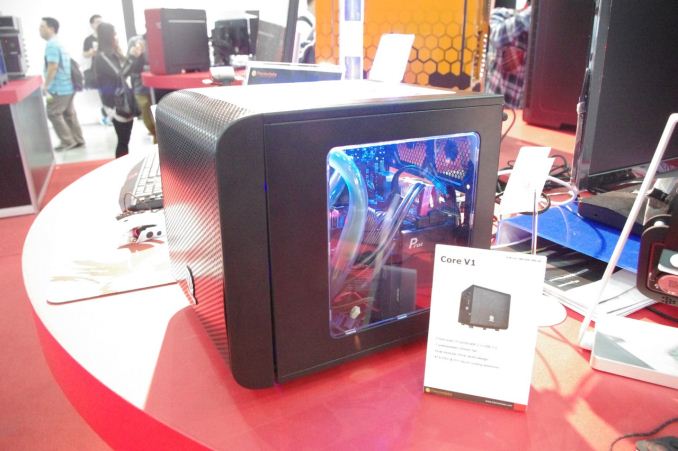
When meeting with one of Thermaltake’s main press relations people at Computex, he was keen to show off what he described as ‘his baby’. We reported on the Core V1 at the time – a mini-ITX chassis to incorporate better cooling, quieter cooling, easy maintenance and a good-looking, fast system. Aside from the size, the interchangeable top, bottom and sides of the chassis could be replaced with Perspex side windows to increase the view of the internals, but also the front was fitted with a 200mm fan with space for another 120mm in the rear. The front of the chassis is designed with the fan offset such that longer GPUs can fit inside, up to 250mm.
Much like the full size ATX cases being designed with a warm side/cold side, the V1 uses the same concept but for top and bottom. The top half houses the motherboard, processor and CPU, with space for 140mm of CPU cooler. The bottom half is for storage and the power supply, with space for PSUs up to 180mm in length with another 80mm of cable management space. Thermaltake quote the Core V1 as supporting mounding points for 120mm and 140mm fans on the sides with an additional two 80mm points at the back. Thermaltake point to its Water 3.0 Performer and Pro CLCs as being supported.
The front panel is located on the left hand side, with power/reset buttons, two USB 3.0 ports and audio jacks.
One of the key elements of the Core V1, apart from the design and the visuals, was the price. During Computex I was told that Thermaltake was aiming at a US$50 MSRP, which caught the eye of a number of our readers. The Core V1 is currently listed at Newegg for $49.99, hitting that price right on the nose. Source: Thermaltake |
| 11:50a | Short Bytes: Intel's Devil's Canyon
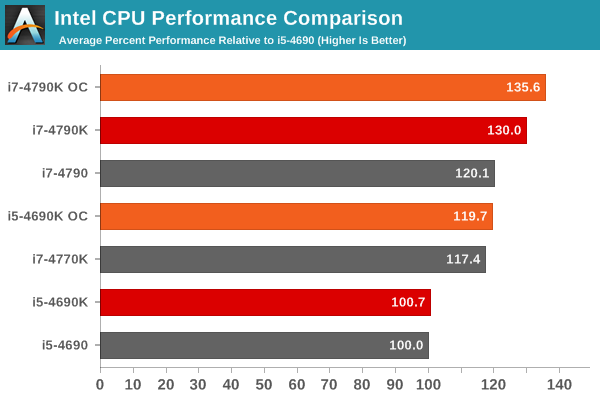
In early July, Intel released two new processors that go by the codename "Devil's Canyon" (DC). You can read our full review, but if you just want the executive summary it's pretty simple. Take the core processor design of Haswell (4th Generation Core Series) and modify the packaging to improve a few areas that will mostly be of interest to overclocking enthusiasts. Specifically, Intel has used a new Thermal Interface Material (NGPTIM) and they've added some capacitors to improve voltage stability/delivery. What does this mean to the layman? For most users, it means a drop in CPU core temperatures of around 10C under load, which can help with noise, cooling, and overclocking as well as improved performance. There are only two DC CPUs at present, the i5-4690K and the i7-4790K. These are both K-series CPUs, so they're unlocked and target the overclocking enthusiast for a slight price premium, and they supersede the earlier i5-4670K and i7-4770K Haswell parts at similar prices ($5-$10 more). The only noteworthy specification changes: the TDP (Thermal Design Power) has been bumped from 84W to 88W, base/turbo clocks have been increased, and the DC CPUs are the first K-series parts to support VT-d and TSX-NI (mostly useful for workstation/server type environments). In the case of the i5-4690K, the jump in clock speeds is only 100MHz (base and turbo clocks), but the i7-4790K boasts a far more impressive 500MHz increase over the i7-4770K. The new CPUs should work with all 9-series and 8-series chipset motherboards, but 8-series boards will require a BIOS/firmware update so you'll want to verify compatibility before making a purchase.
What this boils down to is how much you want/need to increase CPU performance; you can see the quick summary of performance above. Without overclocking, the i5-4690K is functionally equivalent to the i5-4690 while costing $15 more, so it's almost solely targeted at overclockers. The i7-4790K on the other hand has the highest stock clocks of any CPU Intel has ever released; it's clocked 400Mhz higher than the i7-4790 while costing $25 more. That extra 400MHz translates into a 10-11% improvement in CPU clocks (9% overall performance increase on average), which is quite good all things considered – i7-4770K was only about 7% faster than i7-3770K on average in our testing. Gaming performance, if you're wondering, is largely bottlenecked by GPUs and so any of the CPUs listed above will result in very similar frame rates. For those interested in overclocking, our internal testing suggests that the new sweet spot for maximum clocks on air/water is going to be around 4.7GHz, which is slightly improved from Haswell where there was more variability. Those chasing extreme overclocks who have already investigated other options for improving overclocking performance (e.g. delidding the CPU package to replace the TIM and integrated heatspreader) will likely find little to no difference between Haswell and DC. Unless you're after the top overclocking spot, DC isn't going to do much for enthusiasts who already own a fast CPU. Users that aren't looking at overclocking will have an easier choice to make. If you're buying a new system, DC is of course worth considering, and the i7-4970K is the fastest consumer CPU to date. If you're thinking of upgrading, at the top of the product stack the i7-4790K still offers a 9% increase in average CPU performance over i7-4770K and 17% over i7-3770K, which is certainly enough to warrant consideration. But if you're running heavily threaded workloads, you're going to be better off waiting for Haswell-E and X99, which should bring 6-core and 8-core processor's to Intel's Extreme platform next month. |
| 8:45p | Synology Advises Users of SynoLocker Ransomware
NAS and storage server manufacturer Synology sends word this afternoon that they are informing their customers of a currently ongoing and dangerous ransomware attack that is targeting Synology devices. Dubbed SynoLocker, the ransomware is targeting Internet-exposed Synology servers and utilizing a hereto-unknown exploit to break in to those systems. From there SynoLocker engages in a Cryptolocker-like ransom scheme, encrypting files stored on the server and then holding the key ransom. The attackers are currently ransoming the key for 0.6 Bitcoins (roughly $350 USD), a hefty price to pay to get your files back. At this time only a portion of Synology servers are affected. Along with being Internet-exposed, Synology has confirmed that SynoLocker attacks servers running out of date versions of DSM 4.3 (Synology’s operating system). Meanwhile they are still researching as to whether the newer DSM 5.0 is affected as well. With Synology still isolating the vulnerability and affected software versions, the company is asking users to take precautions to secure their servers against SynoLocker. Along with removing external Internet access to the server, Synology is also suggesting all users upgrade their DSM to the latest version and backup all of their data so that if they have or do get it, a backup copy is safe from SynoLocker.
Meanwhile for those users whose servers have been infected, Synology is advising users to immediately shutdown their servers to prevent any further files from being encrypted and to contact Synology support about the issue. Synology is also suggesting that affected users also be on the lookout for fake Synology emails, out of a concern that the ransomware authors may follow up by hitting the infected users with spear phising attacks. It goes without saying that while Cryptolocker and its ransomware ilk are already dangerous pieces of malware, SynoLocker is especially dangerous due to the larger quantity of data stored on a dedicated storage server compared to an average client machine or workstation, along with the potential value of the information stored on such a server. Furthermore whereas Cryptolocker is principally a “pull” attack delivered via Trojans (drive-bys, phishing, and otherwise), SynoLocker is a “push” attack that is capable of reaching out and directly infecting vulnerable servers without any human intervention. Finally, Synology tells us that they are hoping to finish identifying which versions of DSM are affected this evening. They are also hoping to have a resolution, though admittedly if SynoLocker is as effectively implemented as Cryptolocker, then there is a distinct possibility that there may be no way to recover the ransomed data other than paying. We will update this article once we hear more from Synology. Full SynoLocker ransom message, courtesy the Synology German User forum (via CSO)
|






| << Previous Day |
2014/08/04 [Calendar] |
Next Day >> |