[Most Recent Entries] [Calendar View]
Thursday, August 28th, 2014
-
Galaxy Gear2 by Samsung
- BCM4334 Single-Chip Dual-Band Combo Device Supporting 802.11n, Bluetooth 4.0+HS & FM Receiver
-
Smoke + CO Alarm by Nest
- BCM43362 WICED 2.4GHz Wi-Fi Controller
-
Wi-Fi Smart Thermostat by Honeywell
- BCM43362 WICED 2.4GHz Wi-Fi Controller
-
MyQ Garage Door Controller by Chamberlain
- BCM43362 WICED 2.4 GHz Wi-Fi Controller, BCM20702 Bluetooth Processor and BCM20732 Bluetooth SMART SoC
-
LED Smart Bulb by Lifx (X2)
- BCM43362 WICED 2.4GHz Wi-Fi Controller
-
LeapPad Ultra by Leapfrog
- BCM4319 single-chip device, with radio, MAC, baseband & integrated power amplifier (PA)
-
Halo Hearing Aid by Starkey
- BCM20732S WICED 2.4GHz Bluetooth SMART SIP Module
-
Toy Car by UPRTek
- BCM20732S WICED 2.4GHz Bluetooth SMART SIP Module
-
iGrill by iDevices
- BCM20737 WICED 2.4GHz Bluetooth SMART SoC
-
Nimbus by Quirky
- BCM43362 WICED 2.4GHz Wi-Fi Controller
-
ViSi Mobile System by Sotera Wireless
- BCM43341 Quad Combo Dual-Band (2.4 GHz/5 GHz) 802.11 g/n MAC/Baseband/Radio with Integrated Bluetooth 4.0, NFC & FM Receiver
-
Wi-Fi Weight Scale by Blip
- BCM43362 WICED 2.4GHz Wi-Fi Controller
-
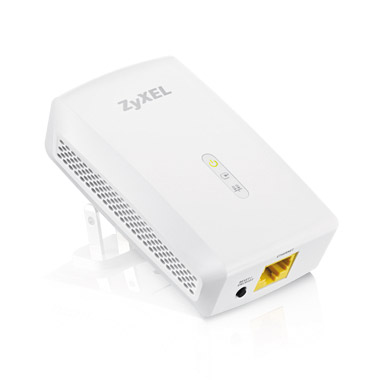
PLA5206
- Broadcom BCM60333 HPAV2 SISO Chipset
- PLA5206KIT contains a pair of adapters, MSRP of $160
- Available Sept. 1
- Delivers speeds of up to 1Gbps
- Utilizes HomePlug AV2 standard to transmit multiple HD video streams simultaneously
- 128-bit encryption
- Green power saving options
-
PLA5405
- Qualcomm Atheros QCA7500 HPAV2 MIMO Chipset
- Pricing TBD
- Available Oct. 1
- Delivers speeds of up to 1.2Gbps
- Line-Natural / Line-Ground MIMO smart-antenna technology allows data to be sent simultaneously over different wires, delivering faster throughput / extended coverage
- Utilizes HomePlug AV2 standard to transmit multiple HD video streams simultaneously
- 128-bit encryption
- Green power saving options
| Time | Event |
| 2:53a | PROMISE FileCruiser: A Private Dropbox-like Solution for SMBs and SMEs
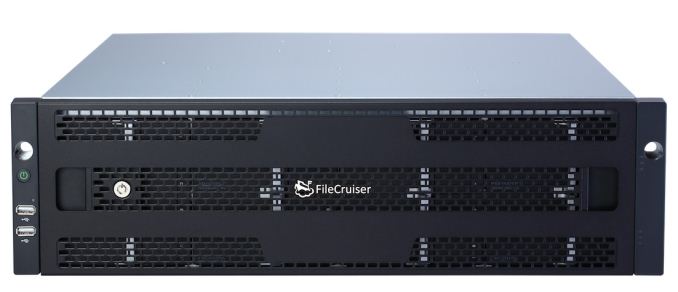
PROMISE Technology launched a private Dropbox-like cloud storage solution for enterprise file synchronization and sharing last week. Dubbed 'FileCruiser', this is a comprehensive solution targeting SMBs and SMEs (particularly those who still rely on FTP as a mode of data exchange between users). As the BYOD (Bring Your Own Device) trend proliferates, mobile apps become an essential part of the enterprise file sharing solution. FileCruiser's apps provides access and sync capabilities across a variety of devices (Android / iOS, Mac / Windows). The IT administrator can set limits on file types and sizes that users can upload to the FileCruiser storage. The platform also provides support for team collaboration, link sharing with password protection and expiry dates. Data security is also important in this market segment. In addition to the standard 256-bit AES encryption, we also have two-factor authentication for mobile apps, audit trail and remote wiping capabilities for lost devices. The FileCruiser app also supports streaming of media files. This avoids the need to download the complete stream to the mobile device prior to playback. FileCruiser can be implemented on multiple hardware platforms, but PROMISE also provides dedicated SKUs combining both hardware and software. The specifications of the FileCruiser VA2600 and VR2600 are presented below.
|
| 6:00a | AMD Radeon R7 SSD (240GB) Review In 2011 AMD took the first step in expanding the Radeon brand and partnered with Patriot and VisionTek to provide AMD branded memory. With the launch of the Radeon R7 SSD AMD is continuing this strategy by jumping into the SSD market. Just as they did with memory, AMD is partnering with a third party that handles the development, manufacturing and support of the product, which in the case of the R7 SSD is OCZ. Based on OCZ's Barefoot 3 controller, the R7 is positioned between the Vector 150 and ARC 100 with its four-year warranty and 30GB/day endurance. Read on to see what AMD's first SSD adds to the market. |
| 10:15a | Broadcom WICED Sense Boosts IoT Development Ecosystem
The Internt of Things (IoT) revolution is in the process of taking off in a big way with the rising popularity of wearables and home automation platforms. Different vendors have placed their bets on different radios / protocols for IoT. For example, Sigma Designs is heavily promoting Z-Wave, while Freescale and some other vendors are pushing 802.15.4 (ZigBee). Broadcom's play in the IoT market is the WICED (Wireless Internet Connectivity for Embedded Devices) platform. The strategy involves a combination of Bluetooth and Wi-Fi, with Bluetooth being the primary focus. The WICED platform has been around for some time now. A couple of days back, Broadcom announced an update in this category by launching a new development kit, the WICED Sense. In addition to the BCM20737 Bluetooth SiP, the kit also integrates five different MEMS sensors (gyroscope, accelerometer, e-compass, barometer and humidity/temperature measurement). The kit is already FCC certified. It has a micro-USB connector for simplified application development. Apps exist for both iOS and Android. iBeacon support is also touted. Best of all, this kit is available for around $20, enabling enthusiasts and developers to economically develop and prototype their IoT product concepts. Along with the product announcement, Broadcom also let us in on a select list of IoT products with communication enabled by their silicon. The above list includes some of the hottest IoT products in the market right now. Z-Wave and ZigBee have been around for a long time. But, it is Wi-Fi which is helping IoT products reach out to a larger market. Bluetooth support enables a different kind of IoT use-case where the device is better off communicating with a smartphone or similar mobile device directly. Broadcom seems well set to target this market with a comprehensive solution set for all kinds of IoT developers (from the enthusiast in his garage to companies delivering high-volume products). |
| 1:45p | ZyXEL Launches SISO and MIMO HPAV2-based Gigabit Powerline Adapters
Last year, we saw the introduction of HomePlug AV2 (HPAV2) silicon from both Broadcom and Qualcomm Atheros. In conformance with the usual product development cycle, we saw the announcement of various HPAV2 products at CES in January. TP-LINK and TRENDnet were the players that seemed to be taking the lead in getting them to the market. Even though their products were supposed to ship in Q2 / Q3, we are yet to see them outside tradeshows. ZyXEL is springing a surprise by launching two powerline adapters based on the HPAV2 standard with confirmed ship dates Things have been relatively quiet on the powerline networking front from a home consumer perspective (with Wi-Fi advancements being the primary networking market driver right now). That said, these solutions will be a welcome addition in buildings where Wi-Fi remains ineffective due to reach issues. Powerline technology remains attractive for service providers and consumers in the EMEA / APAC markets. |
| 2:15p | A Look at Bioshock for iOS and How it Compares to its PC Counterpart
I originally bought Bioshock for PC a number of years ago during one of Steam's summer sales. It was $2, and I had heard good things about it so I decided to buy it. Unfortunately like many of the inexpensive purchases I made, the game sat in my library unplayed for a long period of time. A couple of years after purchasing it, a friend of mine mentioned that I had quite a number of unplayed games in my Steam library and insisted that I play some of them. At that time I finally sat down and played Bioshock, and it became one of my favorite first person shooter games of all time. While some of the visuals seemed dated as a result of me playing it so long after its release, the atmosphere, setting, environments, and the story were some of the best I had experienced in a video game. When I recently heard that Bioshock would be coming to iOS, I felt both excitement and worry. The excitement was obviously due to my love of the game and the appealing prospect of being able to play it on a smartphone. The worry came from my fear that the game would be severely crippled to run on mobile devices. Deus Ex: The Fall was a recent disappointment for smartphone gaming based on a successful PC and console franchise, and I worried Bioshock would meet a similar fate. But I was hopeful that it would be a faithful experience so long as they maintained the original experience which wasn't designed for the limitations of mobile hardware. Thankfully from my experience with the game so far, my hope wasn't misplaced. Getting Set UpBioshock was originally released in 2007, and includes support for DirectX 9 on Windows XP and DirectX 10 on Windows Vista. Windows 7 has never really been an officially supported operating system, and I find that Bioshock gives me more trouble than other games do. Just do a Google search for "Bioshock crash windows 7" and you'll see what I mean. The issues seem to relate to audio, as on a new Windows install I will either have issues with crashes to desktop or a lack of audio in an otherwise functioning game. Disabling all sound output devices except for the one in use seemed to fix the issue this time.
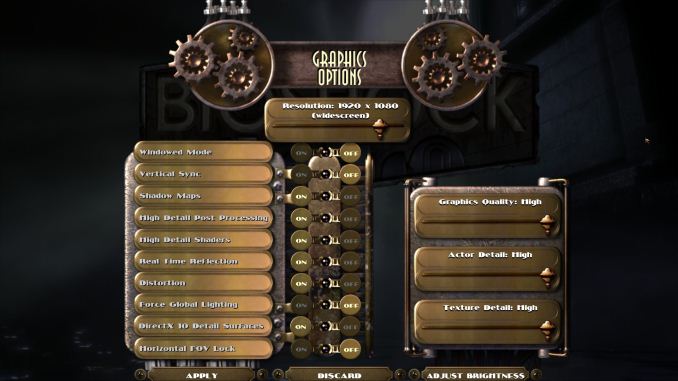
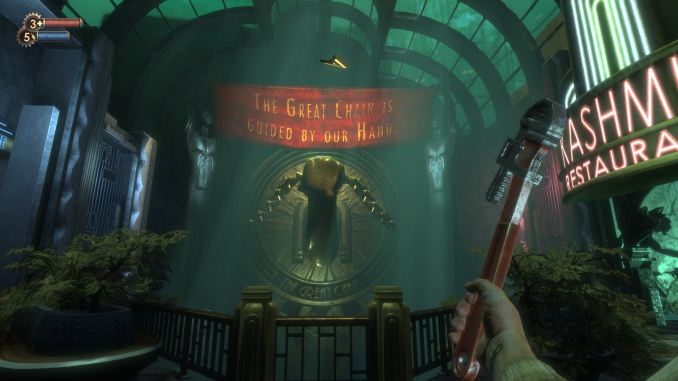
Once the game was booted I jumped into the graphics settings menu to make sure everything was at its highest setting. For the purposes of these comparisons the PC versions of the game was run at 1920x1080 for a 16:9 aspect ratio matching that of the iPhone 5s version. There's one option here that needs to be discussed and that's the option for "Horizontal FOV Lock." Essentially this setting keeps the horizontal FOV at the same value it would be on a 4:3 display regardless of the aspect ratio of the monitor being used. For 16:9 displays this means a more zoomed in appearance. Below I've put screenshots of the game with this option on and off, as well as the iPhone version for reference.
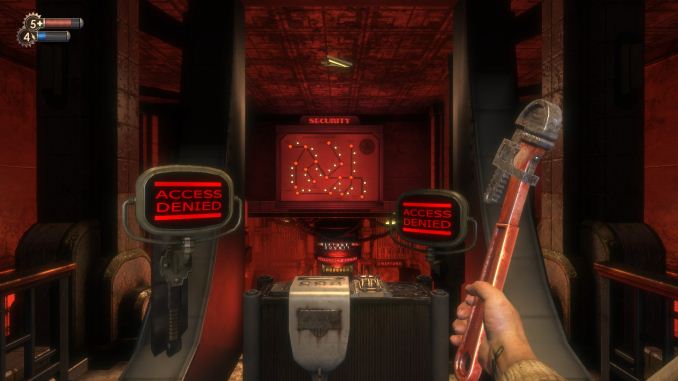
Top: FOV lock off. Middle: FOV lock on. Bottom: iPhone version The iOS version of the game doesn't have any sort of graphical settings menu. As you can see above, it definitely uses the horizontal FOV lock setting and the field of view is essentially the same as on a PC or console with the setting enabled. At the very least, this ensures a consistent experience going from iPhone to iPad, but I'm still not a fan of how zoomed in it feels at times. Bioshock on iOS doesn't really require any setup like the PC version. There are settings for difficulty, subtitles, object highlight, the quest arrow, and vita chambers, but like other mobile games there's nothing involving graphical settings. The menus themselves are the same as the PC version which really helps to make it feel like you're playing the full Bioshock and not a cut down mobile experience. GraphicsThe first thing to talk about here is what devices Bioshock runs on. This is definitely the most demanding game on the App Store, and despite the visual concessions in bringing a PC game to mobile it still requires significant processing power. Because of that, only devices sporting Apple's A6 or A7 chips can run the game properly. It will open on an older device but the frame rate is very low and the game becomes essentially unplayable. This means that every Apple A5 (and A5X in the third generation iPad) device is unsupported which is quite a long list of devices. First generation iPad Mini owners may be especially disappointed since their device is still sold and isn't even two years old, but given that it launched with the same hardware platform as the iPad 2 from 2011 it was to be expected that it wouldn't have a record setting length of time for software support.
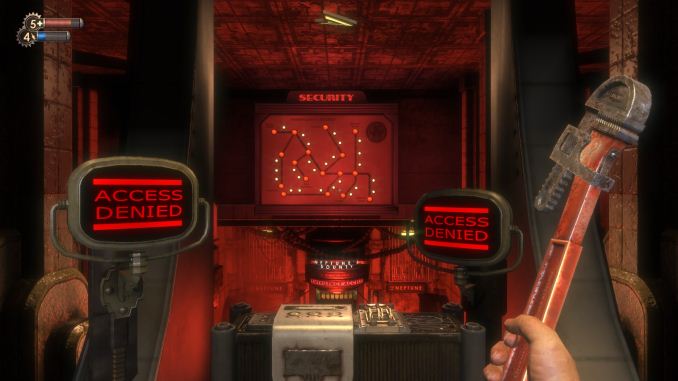
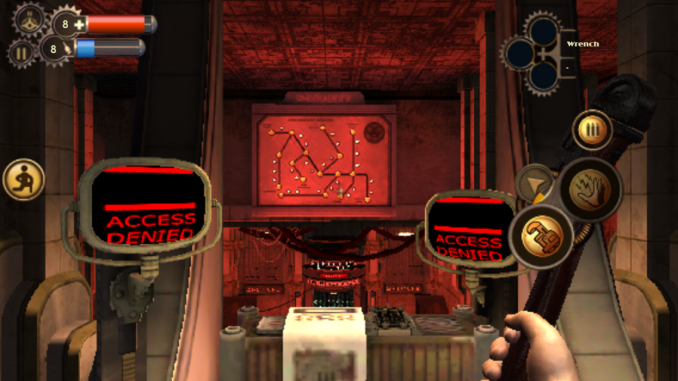
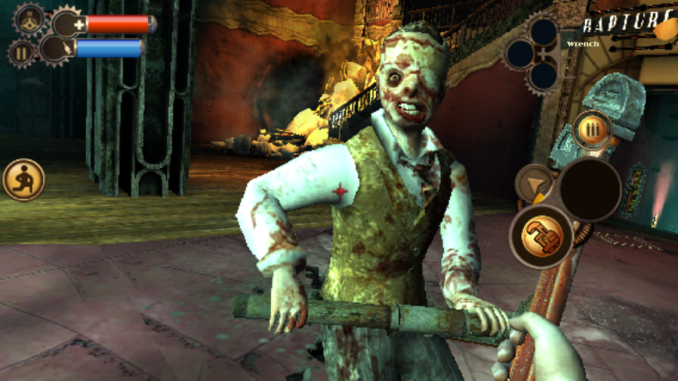
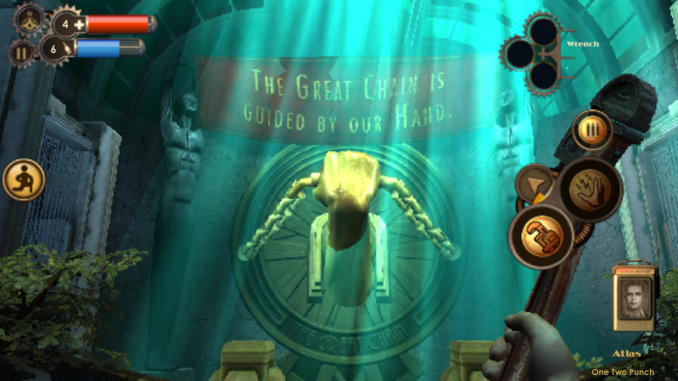
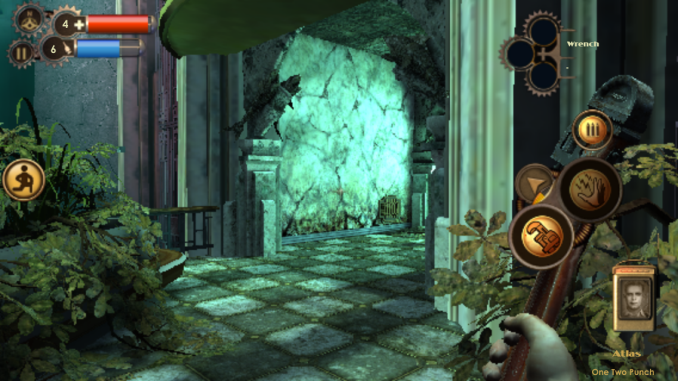
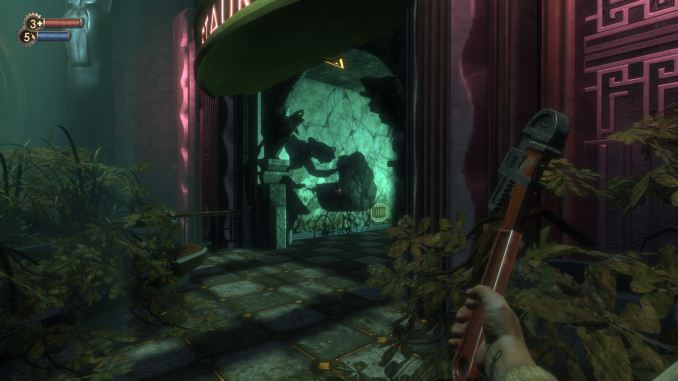
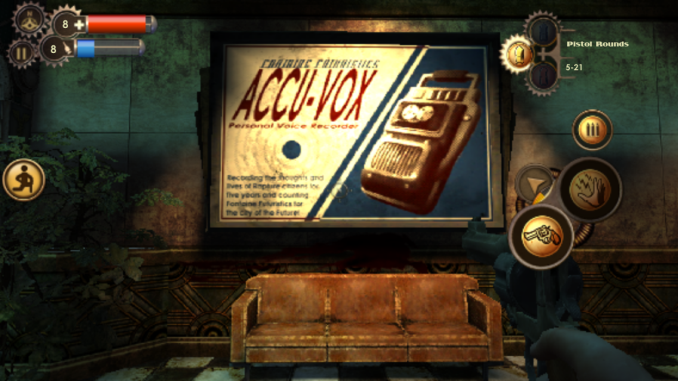
Top: PC. Bottom: Mobile The game looks very impressive for a mobile shooter. Scenes like the introduction with the plane crash and the burning wreckage on the water have impressive fire and smoke effects that compare well to the PC version. However, there were definitely sacrifices made with the lighting and the shadows. The images for the HUD and the menus are also surprising low resolution, and I think the quality reduction there had more to do with fitting inside Apple's 2GB limit for applications than any issue with hardware capabilities. Below are some more comparisons of Bioshock on iOS compared to on PC. In all cases the mobile version is on the left and the PC version on the right. I've tried to take screenshots of several different areas and objects to give an idea of where the graphics were toned down to work on mobile, and where they really hold up well compared to the PC version. You can click the images to view in a larger size.
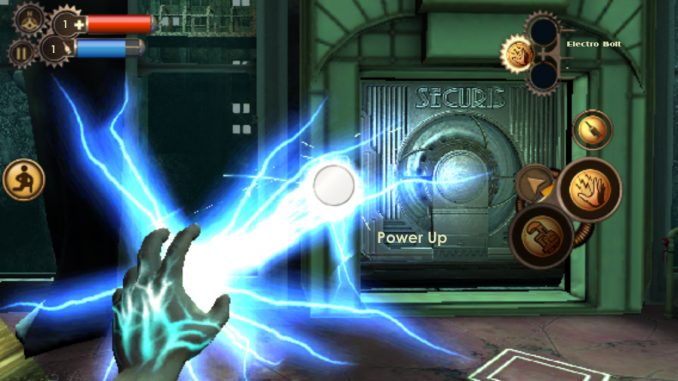
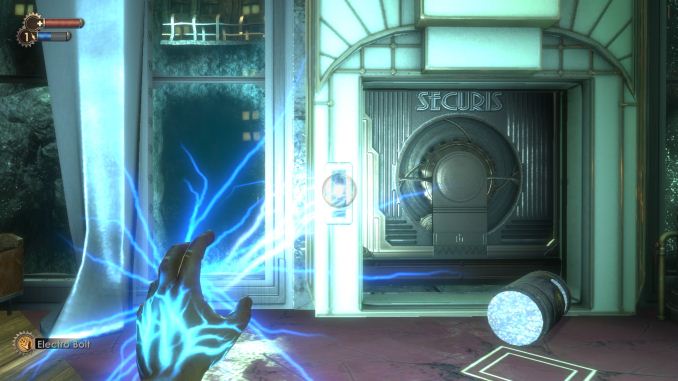
I feel like 2K did a good job in maintaining the quality of the models in the game when bringing it over to mobile. The effect for the electro bolt plasmid is really close to the PC version. Something that needs to be kept in mind is that some of the areas that look low quality in the iPhone screenshots are harder to notice when the game is in motion on a 4" display. I chose the last two comparisons for a reason, as they do well to demonstrate the affect that the reduced lighting and shadows have on the game's atmosphere. Graphical fidelity aside, the game just isn't as dark and creepy on mobile. The shadow of the splicer playing with the baby carriage being missing was especially disappointing as that's a very disturbing scene and it doesn't have the same impact without it. The aliasing is also a significant issue as well. I don't know what resolution the game has to render at to run at an acceptable frame rate but I think I would have taken some more graphical reductions for either anti-aliasing or a higher rendering resolution. My big concern is that the aliasing is really noticeable even on a 4" iPhone 5s which has the best CPU and GPU speed relative to its resolution of all the devices the game runs on. While the iPad Mini Retina and iPad Air are less thermally constrained and can sustain higher clock speeds for a greater period of time, they're likely to have even more issues with aliasing with the game being scaled up to larger displays. I also began to wonder about the overhead impact of OpenGL ES and if the game could look even better if it had been made to run using Apple's Metal API that will be launching with iOS 8. I emailed 2K and they were unable to comment on any plans for using Metal on Bioshock or any future releases so we'll have to wait and see how future iOS games can look with Metal. Below I have an album of all the screenshots I took while playing. At the time of writing I was at the medical pavilion level and I do intend on completing the game on mobile. One final thing to note is that there's no significant compression to the game's audio to reduce the size. The audio contributes greatly to the atmosphere of Bioshock and I'm very happy it was preserved.
Gallery: Bioshock iOS Screenshots
      GameplayIn my opinion the gameplay is really what matters. I would rather have a game that visually mediocre but enjoyable to play than one that looks amazing but feels like a glorified tech demo when played. I don't have access to a Bluetooth controller so I'll be evaluating the touch control experience for Bioshock on iOS. I believe that's how most users will play the game anyway.
Before I talk about how the HUD functions, I really do need to reiterate that the blurriness of all the controls is distracting and annoying. I don't know why they're so low resolution and I really hope 2K updates the game to fix them. Bioshock has a more complex control scheme than other first person shooters. This is partly due to the inclusion of plasmids which necessitates a way to switch between them and your weapons. Before the game released I had wondered if the game would be altered to allow plasmids and weapons to be used simultaneously like in Bioshock 2, but the original system has been preserved.
Movement is controlled by a virtual control pad on the left side which only appears when in use. Crouching and standing is controlled by the button on the left of the screen. On the right side of the screen there is a button with three bullets on it which is used for reloading weapons. When using plasmids the icon of this button changes to an eve hypo syringe. The section below the reload icon controls switching between weapons and firing. Tapping on the icon for the selected weapon or plasmid fires it. Tapping the other icon is how you switch between weapons and plasmids. When using a weapon or plasmid, the arrow icon cycles through them. In practice these controls work fairly well as far as touch controls go, although I really want to try the game out using a Bluetooth game controller. The one control you may notice is missing is for jumping. Bioshock for iOS actually doesn't have a way to jump, and some levels have had changes made as a result. For example, the very first level in the PC version has a fallen pillar on the ground and when approaching it the game tells you to hit the space bar to jump over it. Since the iOS version has no jumping, this tutorial and the fallen pillar was removed. While this does feel like a concession to make the game work on mobile, jumping was never a big part of Bioshock to begin with and when playing I never wanted to jump but was unable to. One thing I would like to see is an update to allow the placement of the controls to be changed. The current position of the controls for firing and weapon switching end up covering the viewmodel for your weapon and I would like to move it further to the right side of the display.
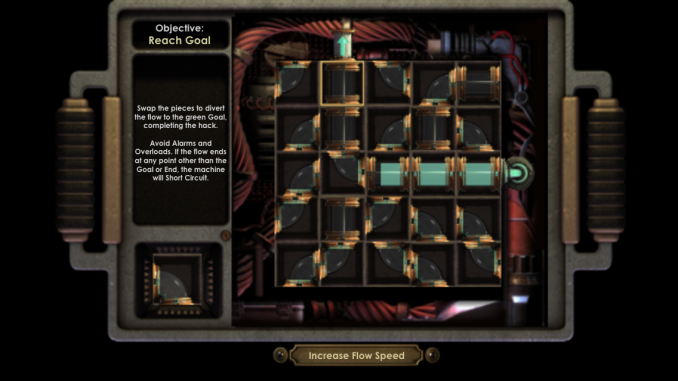
The rest of the gameplay is very faithfully brought over to mobile. Plasmids, hacking, upgrades, and everything else is still in the game. The hacking in particular translates very well to mobile, it may actually be better on mobile than it was on PC. Conclusion and Thoughts on Handheld Gaming
Bioshock for iOS is available on the App Store now for $14.99. The download is 1.65GB in size (and takes up 2.6GB installed on my iPhone 5s) and it only runs on devices with Apple's A6, A6X, or A7 chips which includes the iPhone 5, 5c, 5s, iPad 4, iPad Mini Retina, and iPad Air. I really think it's worth checking out if you can spare the money and are a fan of the original game. |
| 6:00p | Xbox Games With Gold September 2014 Preview
It is the end of August already, which means two things. School is back, and Xbox Games with Gold has released the upcoming games for September. On the Xbox One, as usual, there are two games for the entire month but unfortunately one of the games is carried over from last month. The Xbox 360, with its much larger catalogue of games has two new games to the program though, but as is standard with the Xbox 360, one game is for the first half of the month, and the second game is for the latter half of the month. Xbox OneCrimson Dragon
“Available Sep. 1-30, Crimson Dragon, originally an Xbox One launch title, and acts as a spiritual successor to the much-beloved Panzer Dragoon saga. It’s a fast-paced rail shooter set in a beautiful fantasy world, where you can join with up to three other players for online co-op battles. You have a half-dozen majestic draconian steeds to choose from, and they level up as you progress through the game’s epic story. Crimson Dragon also features a killer soundtrack, courtesy of Panzer Dragoon composer Saori Kobayashi.” This is the carryover game from last month. The game is set in a science fiction universe where humans have recently colonized a planet inhabited by dragons, which can be befriended and controlled. The game is a spiritual successor to the Panzer Dragoon series, however critical and user reviews of the game have been mixed. The game scores a 56/100 on Metacritic and 6.6 for the User score. Crimson Dragon normally sells for $19.99. Super Time Force
“Super Time Force is an action-packed platformer with a time-travelling twist! You’re in control of time itself, bending and stretching it to your advantage on the battlefield. Rewind time and choose when to jump back into the action, teaming-up with your past selves in a unique single-player co-op experience! Take control of up to 16 unique characters, and battle across 6 different time periods, from the long-ago past to the far-away future.” Super Time Force is from the developer Capybara Games, and was originally released May 14th, 2014. This unique take on the side scroller allows the player to rewind their timestream when they die or if they choose in order to play as a previous character. It has a Metascore of 81 from Metacritic, and a 6.6 user score. Super Time Force normally sells for $14.99. Xbox 360Monaco: What’s Yours is Mine
“Assemble a crack team of thieves and execute the perfect crime. Sneak, steal, and run for your lives in single player or with up to four friends in local or online co-op. Find out why it won the 2010 IGF Grand Prize and has been described by Rev3Games' Anthony Carboni as "quite possible the best co-op ever." The first game for the Xbox 360 is available starting September 1st, and comes from developer Pocketwatch Games. Monaco: What’s Yours is Mine is a stealth action game where you can play single player or co-operatively with up to four players that plays out on a top down perspective, but you can only see what is in your character’s line of site. The game scored an 81 Metascore with a 7.2 User Score on Metacritic, and normally retails for $14.99. Halo: Reach
“Halo: Reach,” developed exclusively for Xbox 360, is theblockbuster prequel to the landmark “Halo” video game franchise and is the biggest game yet in the Halo series.“Halo” is one of the biggest video game series in history, and is the top selling franchise on Xbox. It has defined a generation of gamers and changed how people view video games. “Halo: Reach” tells the tragic and heroic story of Noble Team, a group of Spartans, who through great sacrifice and courage saved countless lives in the face of impossible odds. The planet Reach is humanity’s last line of defense between the encroaching Covenant and their ultimate goal, the destruction of Earth. If it falls, humanity will be perched on the brink of destruction.” The second game for the Xbox 360 is Halo: Reach by Bungie. On September 16th, Xbox 360 owners with Xbox Live Gold will have access to the prequel to the biggest Xbox franchise ever – Halo. This game got an outstanding 91 Metascore and 7.8 User Score on Metacritic, so if you have not played it this is a great chance to try it out. Halo: Reach normally retails for $24.99. As seems to be the norm, the Xbox 360 lineup appears quite a bit stronger than the Games with Gold for the Xbox One, but that is not hard to understand with eight years of titles to choose from. If you happened to miss last month’s games, you still have a couple of days to grab them so pick them up soon before they are gone.
|








| << Previous Day |
2014/08/28 [Calendar] |
Next Day >> |