[Most Recent Entries] [Calendar View]
Tuesday, September 30th, 2014
| Time | Event | ||||||||||||||||||||||||||||||||||||||||||
| 8:00a | The iPhone 6 Plus Mini-Review: Apple's First Phablet While we’ve also written about the iPhone 6, the iPhone 6 Plus needs its own review in order to really understand the various features of the device that would otherwise be buried in the context of the iPhone 6. Without question, this device represents a significant departure from the way Apple has competed in the smartphone space. For as long as I can remember, Apple has deliberately avoided the phablet space, choosing not to compete with the Galaxy Note line that has been established as the main market competitor for the past 3-4 generations. As a result, Apple occupies a fast-follower position at best. To find out if the iPhone 6 Plus manages to compete with the Galaxy Note line, read on for the full review. | ||||||||||||||||||||||||||||||||||||||||||
| 8:00a | Xbox Games With Gold October Preview
October is here, which means an update to the Games with Gold program for the Xbox One and Xbox 360. Continuing the trend we have seen since the introduction of Games with Gold for the Xbox One, the much larger catalog for the 360 means that there are more gems in there to pick out, and this month looks to be no exception. Xbox One
The Xbox One has only a single new game this month, which replaces last month’s Super Time Force. That likely means Crimson Dragon is sticking around for a third month. It is disappointing to see only a single game, and often a low cost indie game, when there are several year old launch titles that would fit in here nicely. The new game for the Xbox One this month is Chariot, from the Canadian developer Frima. This game will debut on the Xbox One as a free download for Xbox Live subscribers, which is something we have seen from Sony over the last couple of months. If there is only going to be a single game, at least it is a game that you can guarantee no one has already purchased. Chariot is a co-op platformer which can be played alone or with a friend. “Chariot, the newest ID@Xbox game from Canadian developers Frima, is a couch co-op platformer that can be played alone or with a friend. Players take the role of the brave Princess or her faithful Fiancé as they maneuver the departed king’s coffin-on-wheels through 25 levels set in five vibrant underground environments, with his majesty’s ghost giving them a piece of his mind every step of the way. Filled to the brim with emergent physics-based gameplay, Chariot offers hours of exciting exploration, fast-paced ride sequences and mountains upon mountains of loot!” Xbox 360
On the Xbox 360, there is not an indie game to be found this month. The first game, available from October 1st to 15th, is Battlefield: Bad Company 2, from DICE. This 2010 game plays at the multiplayer squad level, and includes a single player campaign as well. This is a well-reviewed game which scores an 88 Metascore and 8.7 User Score on metacritic. Battlefield: Bad Company 2 normally sells for $19.99. “Battlefield: Bad Company 2, brings the award-winning Battlefield gameplay to the forefront of Xbox 360 console with best-in-class vehicular combat and unexpected "Battlefield moments." Vehicles like the ATV and a transport helicopter allow for all-new multiplayer tactics on the Battlefield. You can compete in four-player teams in two squad-only game modes, fighting together to unlock exclusive awards and achievements. Battles are set across expansive maps, each with a different tactical focus. The game also sees the return of the B Company squad in a more mature single-player campaign.”
October’s second Xbox 360 game is Darksiders II from Vigil Games. This was originally released in August 2012, and players assume control of Death – one of the Four Horsemen of the Apocalypse. It is an action RPG with a hack and slash combat. Darksiders II received a 83 Metascore and 8.0 User Score on metacritic. Darksiders II normally sells for $49.99 but is available for free to Xbox Live Gold subscribers from October 16th to 31st. “Finally, Xbox 360 players get a chance to play one of the platform’s most underrated games: Darksiders II, which continues the series’ emphasis on huge environments, exploration, and a deep and rewarding story. Combine that with fantastic voice acting, impressive visuals, and a huge variety of procedurally generated loot (not to mention character-building options), and you’ll quickly find yourself enraptured by Darksiders II’s depth and top-notch game design. Did we mention you get to play as Death himself? Yeah.” It is good to see a brand new game come to the Xbox One GWG program, but hopefully the program will be able to pick up steam soon with some new content being launched. The Xbox 360 continues to offer quality titles, which is something we don’t want to see changing. If you missed September’s games, you can pick them up until the end of the month.
| ||||||||||||||||||||||||||||||||||||||||||
| 8:01a | The iPhone 6 Review With every launch of the iPhone, Apple seems to have everything to lose and not much to gain. Apple’s iPhone line accounts for the majority of profits in the smartphone space, and as the smartphone market marches towards maturity it seems inevitable that companies like Xiaomi will be able to deliver largely similar experiences at much lower prices. The same was once happened with Apple in the days of the PC industry where Apple approached irrelevance. Yet generation after generation, Apple seems to be able to hold on to a majority of the profit share, and they’ve managed to tenaciously hold on to their first-mover advantage. To find out if they can continue that trend with the latest iPhone launch, read on for the full review. | ||||||||||||||||||||||||||||||||||||||||||
| 9:19a | HP, AppliedMicro and TI Bring New ARM Servers to Retail
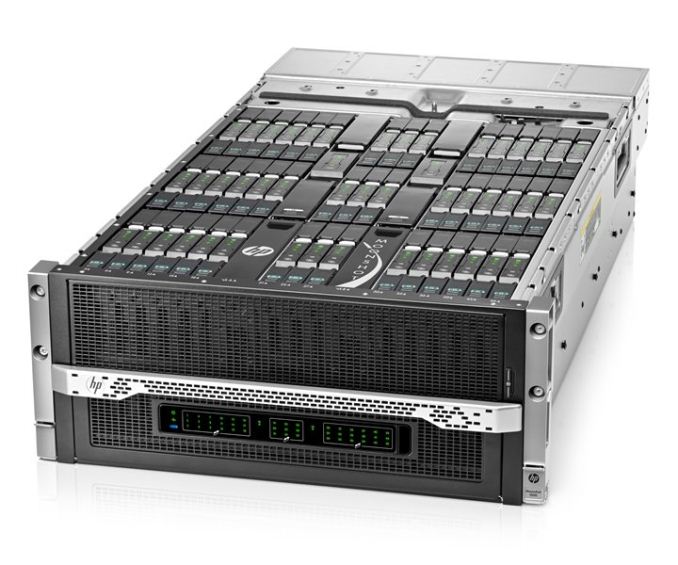
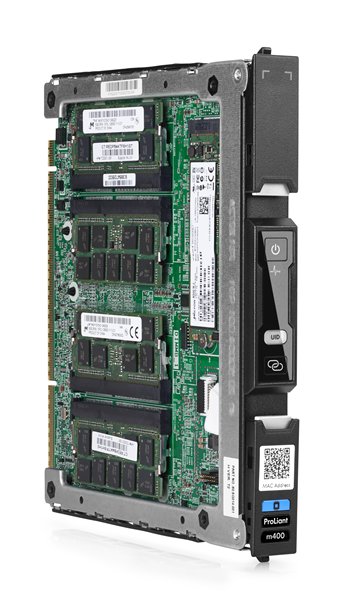
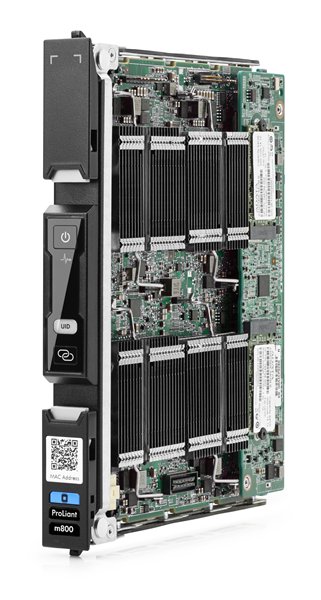
Yesterday HP announced retail availability of two ARM based servers, the ProLiant m400 and m800. Each are offered in a server cartridge as part of the Moonshot System. A single 4.3U Moonshot chassis can hold 45 server cartridges. Usually higher numbers mean better, but in this case the m400 and m800 are so significantly different I wouldn’t consider them competitors. The m800 is focused on parallel compute and DSP, while the m400 is focused on compute, memory bandwidth, IO bandwidth and features the first 64-bit ARM processor to reach retail server availability.
Starting with the m400, HP designed in a single AppliedMicro X-Gene SoC at 2.4 GHz. AppliedMicro has been discussing the X-Gene processor for several years now, and with this announcement becomes the first vendor to achieve retail availability of a 64-bit ARMv8 SoC other than Apple. Considering Apple doesn’t sell their processors stand-alone, this is a significant milestone. AppliedMicro has significantly beaten AMD’s A1100 processor to market, as AMD has not yet entered production. Marquee features of the X-Gene SoC include 8 custom 64-bit ARM cores, which at quad-issue should be higher performance than A57, quad channel DDR3 memory, and integrated PCIe 3.0 and dual 10GbE interfaces. Look out for a deep dive on the X-Gene SoC in a future article.
The m800 is a 32-bit ARM server containing four Texas Instruments KeyStone II 66AK2H SoCs at 1.0 GHz. Each KeyStone II SoC contains four A15 CPU cores alongside eight TI C66x DSP cores and single channel DDR3 memory, for a total of 16 CPU and 32 DSP cores. IO steps back to dual GbE and PCIe 2.0 interfaces. It is clear from the differences in these servers that m400 and m800 target different markets. There isn’t yet a best-of-both-worlds server combining the core count and memory + IO interfaces of the m400 and m800 together.
Each server is available with Ubuntu and IBM Informix database preinstalled, and will be demonstrated at ARM TechCon October 1-3 in Santa Clara, California. Source: HP | ||||||||||||||||||||||||||||||||||||||||||
| 1:00p | Pebble Announces Improved Health Tracking and Lower Prices
Regardless of one's opinion about the utility of the Pebble watch, there's no denying that the company has done a good job of updating their software, features, and both UI and hardware design as time has gone on. Earlier this year the company revealed the Pebble Steel which is a version of the Pebble with a more premium design. They also introduced the Pebble appstore which is home to over 4000 applications that have been downloaded over 5 million times cumulatively. Today the company is announcing more fitness focused features and a price drop for all versions of the Pebble, The incoming health and fitness update will enable full activity tracking and sleep monitoring. The Misfit health application for Pebble has also been updated to take advantage of these new abilities. This, combined with the Pebble's relatively long battery life for a smartwatch, will provide health, fitness, and sleep tracking throughout the day and night which is difficult to do with other smartwatches that need to be taken off for a nightly charge. To celebrate the Pebble's growth, the watch is also being reduced in price. The original Pebble is being dropped to just $99 / €129 / £99, while the Pebble Steel has been dropped to $199 / €229 / £179. At $250 the Pebble Steel was definitely pricey and had pressure from competing Android Wear devices that can sell for $199 or less. Even at $199 I think the Pebble Steel may be a hard sell due to its limitations compared to other smartwatches, but the superior battery life may be what sways users | ||||||||||||||||||||||||||||||||||||||||||
| 4:25p | A New Windows - Windows 10 Announced By Microsoft
It was only two years ago that Windows 8 was unleashed on the world. Microsoft tried to usher in an era of “Touch First” applications with a new look and feel for Windows. To say that Windows 8 was unsuccessful would be an understatement, and from both Microsoft’s and user’s perspectives, it was certainly a failure. Two years in, Windows 8 and its 8.1 derivative have struggled to gain market share over Windows 7 and XP, which still command the lion’s share of the desktop OS pie. A new interface, unfamiliar to users, did little to sway their wallets, and other market factors have come in to play as well.
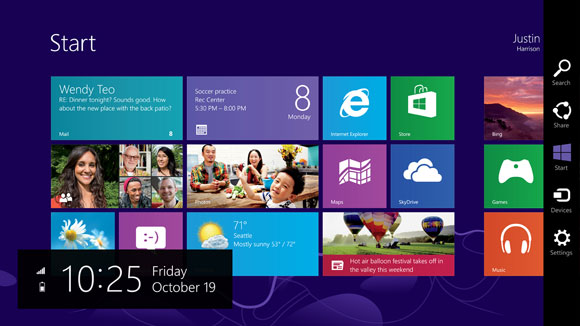
Looking back at Windows 8, it was a big change from a company that traditionally has been called too conservative. Gone was the familiar start menu, replaced with a full screen version. Gone was the ability to move and resize applications into “windows” and instead it was replaced with full screen apps that take command of your desktop. Gone was a lot of what made Windows, well Windows. Add in the fact that Windows 8 at its launch was only half complete, and it is not surprising that the market did not buy into the new world. There were two disjointed interfaces, but one person had to interact with both no matter what form factor they were on. If you are on a touch based tablet, much of the settings and controls were still found in the old Control Panel applets. The file explorer was on the desktop, which was difficult to use with touch. On the other side of the coin, traditional desktop PC users also had to learn the new Start Screen, charms, and other controls which were clearly made for “touch first” and not the mouse and keyboard. Within weeks of the Windows 8 launch, major players in its creation were let go, or given new duties. Since the day one release of Windows 8, Microsoft has been trying to fix many of the issues people have with the new version of their operating system, and Windows 8.1 was a step in the right direction, fixing interfaces for both the touch interface and the desktop. Windows 8.1 Update, announced at BUILD earlier this year, was a truly desktop-centric update with new keyboard and mouse controls for use in the touch environment, and the ability to control Windows Store apps with a title bar. It was a big help, but also showed off at BUILD were features coming in a later version of Windows, and that version has now come. Windows 10 is as dramatic a shift from Windows 8 as Windows 8 was to Windows 7. Gone is the start screen for the desktop, with the familiar start menu back. Gone is the full screen applications taking over your computer, with those applications now being relegated to windows as before. Gone is the touch first interface on top of an operating system primarily used with a keyboard and mouse. However this is not Windows 7.1, and nor should it be. Windows 8 certainly had its faults, but not everything about Windows 8 needed to be thrown out. Windows 10 starts its journey as the Windows Technical Preview for Enterprises. Microsoft’s core customer base is the enterprise, and this is important that they are starting the discussion with this market group this time around. Beginning tomorrow, people can join the Windows Insider Program and download and install the latest version of Windows for themselves. Microsoft has made it clear though that this preview is actually a preview, and not meant for general availability. Expect some rough edges, and some bugs, which should be worked out by the time the OS ships. As for the consumer side of the story, Microsoft is planning to announce more on that front in early 2015, and for developers, BUILD will be coming sometime after that. The actual Windows 10 launch is listed as “later in the year” with the year being 2015. There is a lot to go over, and once we get our hands on the preview build we can dig into the new OS and give a full breakdown on what is new. One of the biggest complaints about Windows 8 and 8.1, is that real people do not want a single interface on every device they own. They want a User Interface which is tailored to the usage model. With Windows 10, Microsoft promises to address this.
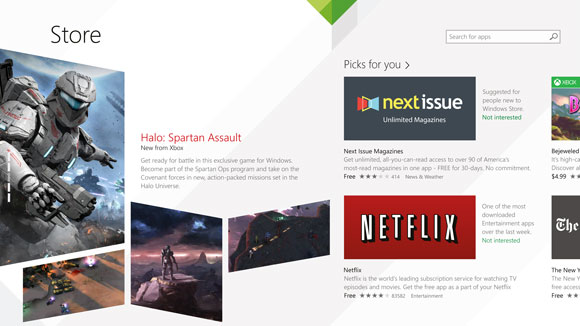
Before we can talk about Windows though, we need to briefly discuss the Windows Store. Windows Store apps are executed in WinRT, which is the Windows RunTime, replacing the old Win32 runtime. WinRT has some advantages as a new framework, with the ability to be resolution independent natively, and support the Windows contracts such as Share. At BUILD in 2014, Microsoft announced Universal Apps, which are a key feature of the Windows store that is not available on any other platform. There is a lot of confusion as to what a Universal App is, and what it is not is a single application that runs on a phone, PC, tablet, and console. A Universal App leverages the common WinRT framework available in Windows, Xbox One, and Windows Phone, to allow a developer to share a common code base, but use a suitable UI for each system, and have all of it available on all platforms seamlessly through the Windows Store. It is certainly a lofty idea, and one that has gained a bit of traction in the store. With Windows 10 though, the concept of a Universal App allows a developer to target a phone, Xbox, tablet, and desktop. If anything is the killer feature of Windows 10, this could be it. Time will tell of course and developers need to buy into WinRT for this to be a reality. Today’s announcement is not developer focused, so we will expect more news on the WinRT API updates later on, at the BUILD conference.
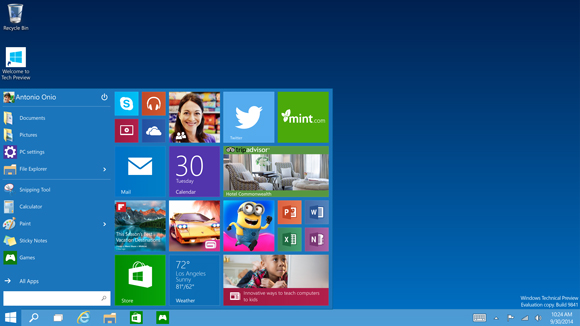
The first place to start, is going to be Start. On Windows 7, clicking the Start button brought up the Start Menu. Windows 8 dropped the start button altogether, but 8.1 brought it back even though it opened the Start Screen. On tablets, the start screen was fine, but on a desktop, it could be unwieldy. It interrupted your workflow to bring you into a new environment, where you can find the application you want and launch it. Windows 10 brings back the Start Menu, but with a twist. Rather than just the traditional start menu of Windows 7, a familiar start menu can now also be populated with Live Tiles from the Windows Store apps. But this is only on the desktop. Tablets will get a different interface, as will the phone. To quote Microsoft: “We’re not talking about one UI to rule them all – we’re talking about one product family, with a tailored experience for each device.” If Windows 10 is going to be successful, the tailored experience for each device is the key. The new start menu is just the first step towards that, and is especially important for the enterprise and desktop user.
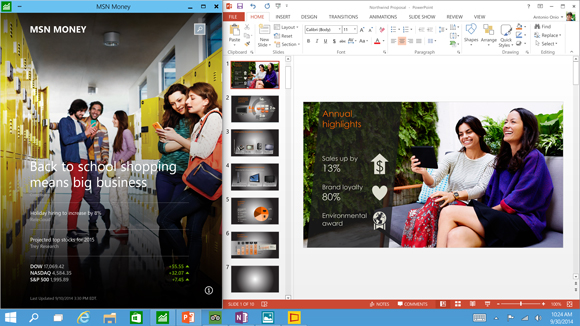
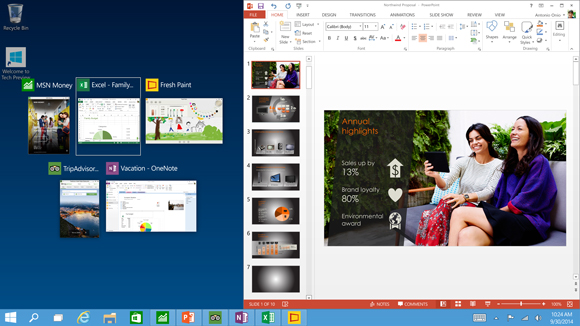
The next interface change, was also announced at BUILD, and that is the ability to run Windows Store apps within a window on the desktop. This is a big change for two reasons. First, on a desktop, full screen Windows Store apps are less useful. Generally you have multiple things going on at once, and to have a single app take over the screen is generally not ideal. The usefulness of Windows Store apps has instantly been increased. The other reason it is important is for developer buy-in. Even though Windows 8 did not light the world on fire as far as unit sales, it is still on hundreds of millions of devices. However the majority of those devices are going to be traditional desktops. Writing an application for the Windows Store practically precluded use by the majority of the user base. By putting these apps on the desktop, it opens up a much larger potential audience. Microsoft needs the Windows Store to be kick-started, and this is one way they can advance that goal.
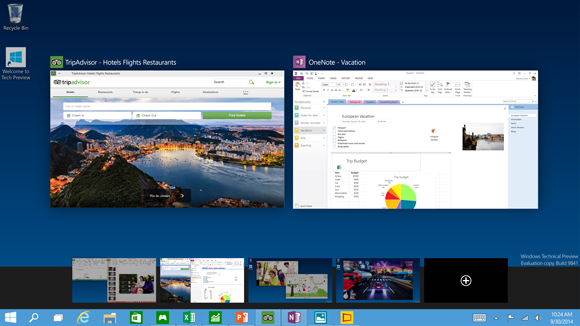
Windows Snap was also debuted in Windows 8, and it allowed two Windows Store apps to be snapped open, with one taking about 70% of the screen and the other using 30%. For multitasking, it was certainly better than other mobile operating systems from 2012, but it was a long way from Windows 7. Windows 8.1 improved Snap, and allows more than two apps to be snapped open on the screen at any one time, and for the snap percentage to be changed. Windows 10 is now offering another update on Snap. Apps can now be snapped to all four corners, giving more real estate to each app than before. Snap was a good feature, and this is a further improvement on it.
Another long requested feature is now coming to Windows 10 – multiple desktops. Desktops can be designated for different purposes, and users will be able to easily switch among them. There is a small but vocal group who have been asking for this for a long time, and they have finally been rewarded. Sticking with the enterprise features, data security is always a big concern. Multifactor authentication based on smart cards or tokens is now built right into the OS. Bitlocker is still around, offering full device encryption, but Windows 10 now offers application and file level data separation, which can enable data protection even if that data leaves the device. Though they have not gone into a lot of detail as to how that is done, it likely leverages some of Microsoft’s other technologies such as Active Directory Rights Management Services. Future updates to Windows should be easier for IT workers as well due to a new in-place upgrade option. And to go along with that, businesses will be able to choose whether to jump on the fast update consumer track, or lock down the updates to only deliver critical security patches, or somewhere in the middle. And this approach does not need to be at the enterprise level – different groups of machines can follow different update patterns depending on how critical the infrastructure is. Windows 10 also supports Mobile Device Management (MDM) tools, as well as the traditional Active Directory and System Center approach to device management. This should be a boon to any small to mid-sized business who does not want to invest in a comprehensive solution. Finally, the new Windows Store will allow volume license purchasing from within the store. Companies can re-claim licenses, and re-issue them to new devices. They can also create a custom store for their own computers which can include Windows Store and company-owned apps in the same interface. Microsoft is trying hard to win back the Enterprise customers who have been turned off by Windows 8. Obviously we will have to wait and see if they are successful, but there is a lot to like in this new release. The “one UI to rule them all” model of Windows 8 has been put out to pasture, and instead replaced with a single platform, with a UI to suit the device it is running on.
Not all was bad about Windows 8, and it is good to see that some of the good ideas have been taken and molded into the new OS, but also tweaked at the same time to make them work better for the device they are on. The Universal App is a powerful idea, and one that has yet to make a big splash so far, but if the WinRT framework can be updated to make it more powerful, then it would certainly add a lot of power to Windows 10. Unlike Win32, WinRT apps support high DPI by default, which is more and more important as we move to higher resolution displays on all sizes of devices. The ability to log in to any Windows PC and get your own custom look and feel, including all of your applications, and data, is a powerful feeling. They have all of the tools they need to do this across all devices now, and it is exciting to see a glimpse at what the future may hold. Once we get the actual install files for Windows 10, we will be able to provide more coverage on this major release of Windows.
| ||||||||||||||||||||||||||||||||||||||||||




| << Previous Day |
2014/09/30 [Calendar] |
Next Day >> |