[Most Recent Entries] [Calendar View]
Tuesday, October 28th, 2014
- Support for up to three different Bluetooth devices, with easy switching between device profiles with a rotary dial on the top left corner
- Recess to allow placement of smartphones / tablets in a position suitable for viewing while typing on the keyboard
- Keyboard support for both Mac and Windows / Android ecosystems
- Explicit power on/off switch for conserving battery life
| Time | Event | |||||||||||||||||||||||||||||||||||||||||||||||||||
| 7:00a | Alienware Launches The Alienware 13 Gaming Laptop With A Twist
Alienware teased the new, smaller version of their gaming laptop in August. Available today, the Alienware 13 is the 4.5 pound little brother to the Alienware 14, but this gaming laptop has a twist. Alienware is offering an add-on Alienware Graphics Amplifier, which lets you plug a desktop GPU into this portable machine to dramatically increase performance. Let us take a quick look at the new Alienware 13 though. While not as small as an ultrabook, it is significantly thinner than the 14 inch model, coming in at just under 1 inch thick. This, coupled with the two pounds less weight than the larger model, should make it a lot more portable.
The CPU will be Intel i5 and i7 Haswell U series parts, and the GPU offerings will be up to the NVIDIA GTX 860M. This will power a display, which at the default configuration is a lowly 1366x768 IPS panel, but luckily the display can be upgraded significantly with 1920x1080, and 2560x1440 options, as well as optional touch. The base $999 model also comes with a 5400 rpm 1 TB hard drive as the base option, however the laptop can be outfitted with SSDs as well. In late 2014, it seems hard to believe that a $999 computer can still come with a slow mechanical hard drive, so hopefully the upgrade to SSD storage does not break the bank. The star or the show though is the Alienware Graphics Amplifier, which is a first for this segment. Ryan will be covering this in full, but this $300 add-on is certainly a unique offering from Dell. With a dedicated 460 watt power supply just for the GPU, the amplifier should help the Alienware 13 with thermals when gaming on the discrete GPU. However, you can fall back to the GPU built into the laptop when you are on the go. Hopefully this adapter gets added to the entire Dell laptop line.
Unfortunately, details are light on this launch, with Alienware not releasing any press releases at the time of this writing. Check in to www.alienware.com starting today to check out all of the available pricing and options for the Alienware 13. | |||||||||||||||||||||||||||||||||||||||||||||||||||
| 9:00a | Alienware's Graphics Amplifier Announced - An External Video Card Chassis Shipping Soon
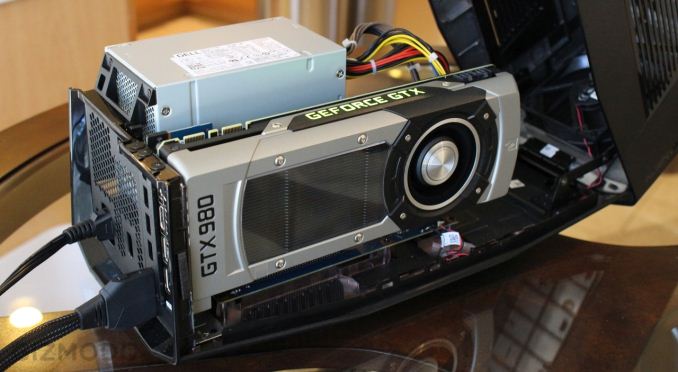
The idea of an external PCI-Express chassis for video cards is practically as old as PCI-Express itself. However over the years the idea has failed to reach the consumer market as a complete product, even with the introduction of standardized external PCIe interfaces such as Thunderbolt. Various prototypes have been shown, but in practice the only way to acquire such a rig has been to build it yourself, combining an ExpressCard slot and its pokey PCIe 2.0 x1 link with an external PCIe chassis. Thankfully it looks like the PC industry is finally going to turn the corner on the concept thanks to Alienware. Today Alienware is introducing their own PCIe video card chassis, the Alienware Graphics Amplifier. Alienware’s amplifier is a fairly typical take on the concept – there are only so many ways to build an external PCIe chassis – however Alienware has been able to put together something that is clearly tuned for video cards. The chassis itself houses a PSU and a single x16 PCIe slot for a video card, along with a quartet of USB 3.0 ports for any other I/O needs. Notably, Alienware has designed the amplifier to be able to handle double-wide video cards up to 375W, which is quite a bit more power than professional grade external PCIe chassis, and this means it can conceivably run just about any self-contained video card on the market. That said, like many small form factor computers the amplifier is also clearly designed for video cards with fully exhausting blowers, so it’s going to be best paired with reference model video cards since blowers are nearly non-existent in custom cards these days.
More interesting perhaps is the PCIe interface, which up until now has always been the sticking point in getting a video card chassis to market. The good news is that Alienware has more or less solved the problem, but the bad news is that the interface is a proprietary Alienware/Dell design that is only available on their laptops. Alienware notes that the interface is actually a PCIe + USB interface – apparently carrying USB over from the host rather than using PCIe to power a separate controller – and in the meantime we’re still working to determine just how many PCIe lanes the interface is carrying. Even if it’s not a full 8 lanes (the Haswell U series CPUs don’t support 16 lanes), given the severe bandwidth limitations of ExpressCard and Thunderbolt, even a 4 lane setup would represent a significant improvement in bandwidth. Like Thunderbolt however this interface does appear to use active cabling (it would be very difficult to carry that much bandwidth externally without it), in which case the cable is going to be an expensive part of the entire setup. On the host side, the amplifier is being launched alongside the Alienware 13, which will be the first of what will presumably be a series of Alienware laptops to support the amplifier’s interface. Rather than hanging off of spare PCIe lanes, we suspect some kind of MUX is in play here, as Alienware has noted that the 13’s internal dGPU (a GeForce 860M) has to be shut off to use the amplifier interface. Most likely Alienware is rerouting the GPU’s lanes to the interface when it’s in use. Activating or deactivating the interface does require a reboot, which although not especially convenient bypasses some very messy issues that could occur when hot-plugging an active GPU, and we suspect would otherwise be a show-stopper.
Meanwhile it’s interesting to note that in their development process Alienware has been able to solve some of the technical issues around an external video card in the process to better integrate it with the host. The video card in an amplifier can be used to drive both external and internal displays, meaning that it’s possible to use the amplifier to drive the 13’s built-in display and still reap the benefits, even without an external monitor. The overall non-portability of the 7lb+ amplifier and the USB ports strongly drives the amplifier towards being used as a docking station with an external monitor, but if you want to use it to drive the internal display that is going to be a viable option. Moving on, Alienware is taking a vendor agnostic approach with the amplifier and will be supporting NVIDIA as well as AMD GPUs. There are still some additional technical details we’re chasing down on how this will work with the internal display capabilities, but ultimately it means the amplifier can be used with a wide range of cards from both vendors. That said, since the amplifier is going to be best paired with a blower type video card, NVIDIA’s cards are going to be the more natural fit at this time. Alienware has been showing the amplifier off with the GTX 980, and next to being the most powerful single-GPU video card on the market it also has a reference blower that is an excellent match for the amplifier’s cooling capabilities. Finally and perhaps most importantly, Alienware has made it clear that the amplifier isn’t a prototype and won’t be vaporware, and that we’re looking at an external video card chassis that is actually going to ship. Alienware will begin taking orders for the amplifier today alongside the Alienware 13 laptop, with the hardware shipping in November. Even the price is decent (especially compared to DIY attempts), with the amplifier set to cost $299. This is on top of the price of the Alienware 13 laptop and the video card to fill the amplifier with, so the total cost of a setup is still going to be significant, but despite being the first shipping consumer solution it’s not priced through the roof. | |||||||||||||||||||||||||||||||||||||||||||||||||||
| 11:00a | Razer Announces The Leviathan Sound Bar
The Leviathan is able to produce 5.1 virtual surround sound using Dolby Virtual Speakers and accepts Dolby Digital and Pro Logic II multichannel audio. The bar itself contains four tuned drivers, with two 2.5” full range and two 0.74” tweeters, which are powered by a 30 watt RMS amplifier. Frequency response is quoted as 180 Hz to 20 KHz on the sound bar itself. Complementing the bar and filling in the remainder of the audio range is a 5.25” 30 watt RMS subwoofer with a downward firing driver, which has a quoted response of 20 Hz to 180 Hz.
The sound bar supports analog, optical, or Bluetooth inputs, with the Leviathan supporting any Bluetooth 4.0 device streaming over A2DP, and Razer has also made sure to include aptX audio codec support for higher quality A2DP streaming. To make the connection to the sound bar as easy as possible the Leviathan also includes NFC to configure the Bluetooth pairing. The bar also supports several tilt angles (0°, 15°, and 18°) to ensure it works well in a variety of situations.
If the idea of virtual surround sound through the use of a sound bar seems like something you might be interested in, the Razer Leviathan will be available for pre-order on razerzone.com with worldwide availability starting in November. Prices are USA: $199/EUR: €199. Source: Razer | |||||||||||||||||||||||||||||||||||||||||||||||||||
| 6:45p | Motorola and Verizon Announce the Droid Turbo
Verizon and Motorola have always had a close relationship. The smartphones in Motorola's Droid line are typically exclusive to the carrier, and they helped make Verizon a heavy supporter of Android devices during a time where AT&T was the exclusive US carrier for the iPhone. Today's announcement is no exception. The Droid Turbo is a Verizon exclusive smartphone made by Motorola, and seemingly their most powerful. Its biggest selling point is its battery life, but before getting into specifics I've given an overview by laying out all the specifications in the chart below.
It's interesting that this is a Verizon exclusive device, as it has significantly better specifications than the Moto X which is Motorola's current widely available flagship. Like many of the other recently released flagship phones, the Droid Turbo uses Qualcomm's Snapdragon 805 with four Krait 450 cores at 2.7GHz and 3GB of LPDDR3 memory. The front of the device sports a 2560x1440 AMOLED display, which is also quickly becoming the norm for Android flagship smartphones. Above it is a 2MP front-facing camera capable of recording 1080p video, and below it lies three capacitive navigation buttons which is a departure from the on-screen buttons that Motorola has been using on their other devices for some time now. The back of the device is home to the 21MP rear-facing camera which Motorola states is capable of recording 4K video at 24fps, with 1080p recording still topping out at 30fps. The design of the back is somewhat similar to the Moto X and Moto G, but it appears to be far less curvy. There's a great deal of branding, with a logo for Verizon, the Droid brand, and Motorola's. Even without those, it's would still be clear to anyone familiar with Motorola's style of hardware design that this is a Motorola device. The curved back, centered camera, and crosshatch pattern on the back are all reminiscent of past and current Motorola phones. However, there is no lip at the top for the 3.5mm headphone jack like on Motorola's other current devices. The big point of differentiation is the battery capacity. Motorola has not stated the voltage of the battery, but states that it has a 3900mAh capacity and claims it will last up to 48 hours of usage. While there is always some degree of variance from a manufacturer's claims based on how a user uses their device, if the Droid Turbo approaches anywhere close to that claim in battery testing it will be very far ahead of competing smartphones with regards to battery life. One possible issue I noticed with Motorola's listed specifications is in the network section which classifies the device as supporting category 4 LTE. This may be referring to Verizon's network certification, but the Droid Turbo should be rated for category 6 LTE.
The Droid Turbo will come with two choices of materials. There is a metallic finish which comes in black or red, and is the lighter and thinner of the two variants. These will all have a 32GB capacity. The 64GB version will only be available in the Nylon Ballistic Black finish which is slightly thicker and heavier. It will be launching this Thursday for $199 and $249 for the 32GB and 64GB variants respectively on a two year term. | |||||||||||||||||||||||||||||||||||||||||||||||||||
| 9:45p | Logitech K480 Multi-Device Bluetooth Keyboard Capsule Review
We have been doing round-ups of various input devices fit for HTPC purposes. Some of the vendors have started shipping with Bluetooth instead of using a proprietary communication mechanism over 2.4 GHz RF. The advantage of Bluetooth is its versatility and presence in almost all modern mobile devices (smartphones and tablets). These don't support a full-size USB host port for plugging in the USB RF receiver dongles. Utilizing Bluetooth enables these input devices to communicate with the rising crop of mobile devices as well as interface with traditional PCs. Communication with PCs can be enabled by using either an inbuilt card - common in most notebooks which integrate Bluetooth and Wi-Fi capabilities in a single mPCIe card - or, an explicit Bluetooth dongle. Logitech recently introduced an innovative Bluetooth keyboard, the K480. While traditional Bluetooth keyboards have aimed to differentiate with aesthetics, in-built rechargeable batteries and support for multiple devices at the $100+ price points, Logitech's K480 aims to bring in a set of 'sweet-spot' features for $50. The salient features of the K480 include: After extensive use, we found that the keyboard fulfills most of its promises. It is cross-platform and does support pairing to multiple devices. The sequence of steps to get the device paired is outlined pictorially in the top half - This ensures that even the tablet-only non-tech savvy consumers can get up and running quickly with the unit. There is no need for a dongle, and as long as the target device has Bluetooth capabilities, the keyboard is good to go. Range is not an issue due to the use-case (mobile devices in close proximity). The unit feels quite solid, and is heavy (in order to ensure stability when heavy tablets are placed in the recess). The function keys are multiplexed with some multimedia / mobile specific buttons (such as single keypress to home). In addition, on Android devices, an app can be installed to provide additional keyboard layouts. In terms of key feel and the typing experience, it has to be said that the keyboard is suitable for usage in bursts (again, the typical smartphone / tablet usage), and not prolonged typing. The shape of the keys, as well as the keypress feedback, seem to have been decided more with the looks and aesthetics in mind, rather than the typing experience. Fortunately, there is nothing to complain about the keyboard layout itself (from the viewpoint of Windows and Android systems, at least). Other than that, it would have been nice to have an adjustable tilt option for ergonomic considerations.
In terms of future improvements at this price point, it would be nice to have a trackball (in case of an unchanged form factor) or a trackpad. This would enable standalone usage with a PC (similar to the Adesso Bluetooth Keyboard WKB-4000BB). The Bluetooth keyboard market for mobile devices is heavily commoditized. So, it is refreshing to see Logitech integrating some nifty and interesting features in the K480 to make it stand out in the crowd. | |||||||||||||||||||||||||||||||||||||||||||||||||||







| << Previous Day |
2014/10/28 [Calendar] |
Next Day >> |