[Most Recent Entries] [Calendar View]
Sunday, January 4th, 2015
| Time | Event |
| 3:05a | Acer Announces First 15” Chromebook, with a Broadwell Processor
CES officially starts this week, which means announcements are going to start pouring out. Every year it seems the pre-CES stuff starts earlier, and for 2015 Acer is kicking things off with a bevy of new products. We’ve already covered their new IPS G-SYNC display, and up next we have new Chromebooks. I’ve been working on a review of the Chromebook 13, which will receive a minor update with the availability of a touchscreen now, but the real news is the Chromebook 15. At first blush, you might wonder why anyone would need a 15.6” Chromebook, but with Chrome OS expanding in features and capabilities it’s only natural to see a wider variety of devices. The 15.6” class also means things like 1080p displays are readily available, and the Chromebook 15 will have models with 1080p as well as lower spec models with 1366x768 displays. Even better is that the 1080p panel features wide viewing angles and an anti-glare coating. The 1366x768 panel on the other hand appears to be a typical mediocre quality TN panel, “ideal for budget minded customers”. More interesting than the display perhaps is the processor choice: the Chromebook 15 will be the first Chromebook to ship with a 5th Generation Intel processor. It’s not too surprising that we’re talking about a Celeron variant of Broadwell, but given that the Haswell-based Celeron 2955U still does quite well compared to other Chromebook processors, the upgrade to Broadwell certainly can’t hurt. As with the C720, there will also be a Core i3 variant available for those that want even more performance. Battery life for now doesn’t appear to have changed from the older C720 Chromebook, as Acer is rating the CB15 at eight hours of battery life. In terms of styling, the CB15 builds off the white theme of the Chromebook 13, only with a larger chassis obviously. The dimensions are 393mm x 256mm x 24.2mm (15.4” x 10.08” x 0.95”), and the CB15 weighs 2.2kg (4.85 lbs). It also comes with 2x2 802.11ac WiFi, Bluetooth 4.0, one USB 3.0 and one USB 2.0 port, an HDMI port, and an SD card reader. Pricing of the Chromebook 15 starts at $249 for the 1366x768 version with 2GB RAM and 16GB storage. Other models with up to 4GB RAM and 32GB storage will exist, but the full specifications and pricing for those models has not been disclosed. Availability has not been announced either, but when we visit with Acer later this week we’ll hopefully be able to find out more about the CB15 and get some hands on time with it. As for the touchscreen C13, battery life is rated at up to 13 hours with pricing starting at $329. Availability is slated for this month, but Acer doesn’t mention whether the touchscreen option will be available with both 1366x768 and 1080p models, or only one. There’s also still the question of how much a touchscreen really matters for laptops; I don’t generally find myself missing a touchscreen if it’s not there, as I’m more concerned with keeping fingerprints off my display, but YMMV. |
| 4:22p | MSI Unveils GE62 and GE72 Apache Notebooks
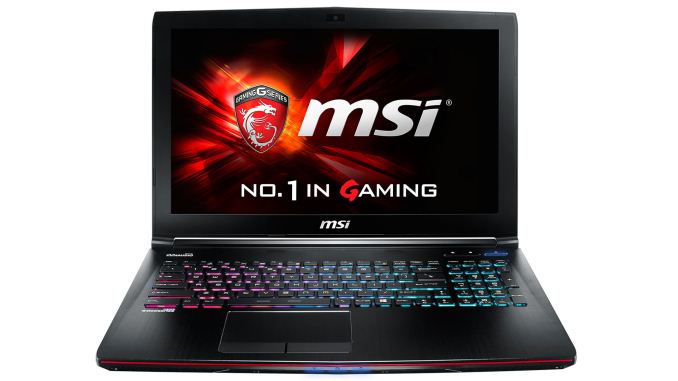
After reviewing the GT72 Dominator Pro last year, I wondered how long it would take to see some of the updated industrial design elements make their way into other MSI notebooks. The answer: not too long at all. In an interesting move, MSI will be phasing out the current GT60 chassis, replacing it with the GE62. It appears that the GT72 will continue to be the halo gaming notebook from MSI, along with the upcoming GT80 Titan (more on that soon!), with the GE and GS series being a step down in performance. The GS series is also MSI’s “thin” platform, while the GE series tends to go after the more value minded laptop gamers. With the updated designs, though, GE may be moving up in the world. Briefly covering the design changes, the LCD and cover are now a bit thicker and more rigid, which was one of my complaints with the previous GE series offerings. The hinges have also been reworked to help improve build quality, and in the time I spent checking out the notebooks the changes seem to have worked. Other than the hinges and cover, most of the appearance remains similar to the last generation GE products, with a few refinements that help with the overall aesthetic. In terms of internals, there have been other changes that improve the overall package as well, with the GE line now sporting dual cooling fans and improved airflow. The result should be a potent gaming notebook that may not match the raw performance of the GT72, but it also shouldn’t cost as much. In terms of the hardware, pricing, and availability, I don’t have any clear specifics on the latter but I can say that the version of the GE62 being shown still uses a Haswell processor, the i7-4720HQ. The display on the GE62 is an IPS panel, which is great to see, and while some might complain about the 1080p resolution I actually don’t mind 15.6” 1080p IPS instead of 3K/4K, especially if it means a lower price point. The graphics card has not been announced yet, so we’ll have to hold off on publishing any details for that element for a few more days, but it should be something faster than the GTX 860M. As for the GE72, that notebook appears to be a bit further out, as the engineering sample being shown still has a TN panel and MSI is working on finalizing the specs. It ends up looking very much like the GT72 but with a slightly lighter and slimmer chassis and a bit less cooling performance. Specifications should otherwise be quite similar to the GE62, with the only real difference being the larger screen and chassis. |
| 4:28p | MSI Announces GS30 Shadow Laptop and GPU Expansion Dock
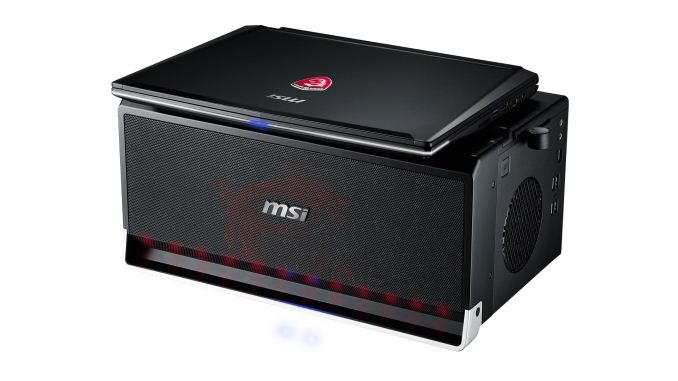
One of the very interesting looking laptops from MSI is their upcoming GS30, which carries on the thin and light theme of the GS series but extends that down into a 13.3” chassis. The core laptop uses a Crystalwell i7-4870HQ processor, which means it should have decent integrated graphics performance but nothing earth shattering. Along with the Haswell-based CPU comes support for up to 16GB of DDR3L memory, RAID SSD storage, and a 13.3” 1080p anti-glare IPS display. All of that is well and good, but where things get interesting is when we get to the expansion dock. Similar to the Alienware 13, the GS30 will have support for an expansion dock that supports full size desktop GPUs. MSI says it should work with all desktop GPUs, from lower end models all the way up to GTX 980, and Titan/Z/Black, as well as various AMD GPUs. The dock uses a proprietary connector, and the laptop sits on top of the dock rather than interfacing through a cable. The dock isn’t just for a discrete GPU either, as it supports an additional 3.5” hard drive, Killer Gigabit Ethernet, and it includes two speakers. I’m not convinced about the need for the speakers or networking support, especially considering the laptop already has a Gigabit Ethernet jack, but the additional four USB 3.0 ports certainly don’t hurt. If you’re curious how MSI is interfacing with all of these extra devices and whether there will be sufficient bandwidth, the answer is that the dock uses a full x16 PCIe 3.0 based connector. That means not only is there plenty of bandwidth, but the discrete GPU will also be able to run at maximum performance. Interestingly, MSI noted that with certain high-end GPUs (e.g. Titan class and above), there may be a minor drop in performance on the laptop unless you also connect the laptops AC adapter. The dock itself comes with a 450W PSU, which should be plenty to run any GPU, HDD, USB peripherals, and still leave sufficient room to power the laptop, but until we can do some actual testing with the final hardware it’s not clear why there would be a need for the added power. The GS30 Shadow is definitely one of the more interesting laptops we’ve seen, and for those that don’t need to have a ton of gaming power on the go it offers a nice blend of mobility with the option to hook up to a dedicated display and GPU at home for serious gaming. Note also that the GS30 cannot “hot-dock” – you have to power down the system before undocking, or there could be problems. Also, when docked the laptop’s internal display is disabled (for now?) and only an external display connected to the discrete GPU can be used. Pricing and availability have not been announced yet, but at least the latter should be sooner rather than later. It’s also not clear whether the GS30 Shadow will always be sold as a package that includes the GPU docking bay, or if that will be a separate device. Selling the dock as an accessory would likely make the most sense, as there may be users that don’t care for the dock but otherwise like the GS30 laptop. We’ll have a full review once the laptop and dock are ready for retail customers. This is clearly a shot across the bow of Alienware, and while it’s too early to declare a victor and both offerings have their pros and cons, it’s shaping up to be a very interesting year for laptops. |
| 5:07p | MSI GT80 Titan: Full Specs Revealed
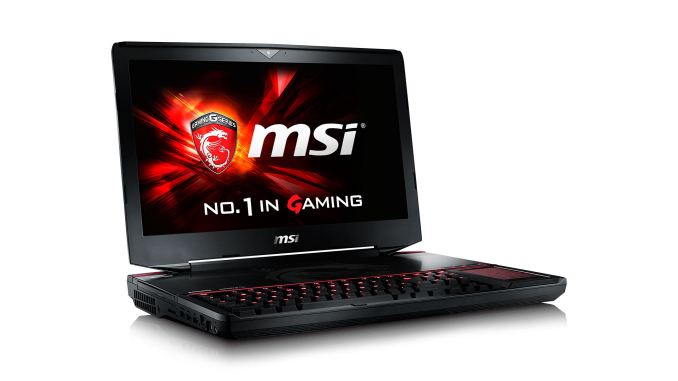
Last year, MSI teased us with some images of their upcoming GT80 Titan notebook, an 18.4” gaming behemoth with support for SLI GPUs and a full Cherry MX mechanical keyboard. Today we’re able to official reveal the full specs for the GT80, and as expected they’re quite impressive. Start with dual GPUs, up to the GTX 980M, and right off the bat we have the potential for better performance than a single desktop GTX 980. Of course, the cost of an SLI GTX 980M notebook dwarfs that of a GTX 980, but that’s part of the price you pay for mobility…or at least transportability. Other specs are equally impressive. The CPU in the system being shown is the top-end Crystal Well offering from Intel, the i7-4980HQ. It has a slightly slower base clock compared to the socketed i7-4940MX (2.8GHz vs. 3.1GHz), but the maximum Turbo Boost is still 4.0GHz. As we discussed earlier, the GT80 also has a full mechanical keyboard with Cherry MX Brown switches – MSI may offer MX Red switches in the future, but for now the supply of MX Browns makes them a safer choice. (MSI also plans to provide a key puller and gold WASD keys, or at least we were shown some early key cap samples.) The GT80 also comes with four SO-DIMM slots with support for up to 32GB RAM, four M.2 SATA slots in RAID for SSD storage, an additional 2.5” bay for an HDD (or another SSD if you want to upgrade it), 802.11ac WiFi and GbE from Killer Networks, and a 1080p display. That last item is actually one of the few potential weak spots in the design; we’re only just now starting to see higher quality (e.g. IPS) 17.3” displays for notebooks, and while we might see some higher resolution options later this year at present I’m not aware of anyone shipping a 2.5K, 3K, or 4K 17.3” panel. Moving up to the even more niche 18.4” notebook (luggable) market only further limits the options for the display. As such, it’s unfortunate that the GT80 Titan for now will ship with a 1080p display, though thankfully MSI informs us they're using a Samsung PLS panel. What’s particularly ironic is that this is one of the few notebooks out there that could legitimately handle a lot of games at 3K or 4K resolutions! MSI may also update the display to a higher resolution panel if/when such options become available. There are a lot of naysayers when it comes to extreme gaming notebooks, and one of the biggest complaints is that you end up with an expensive system that can’t be upgraded. MSI is doing their part to at least partially address this shortcoming, as they are now guaranteeing support for at least the next two GPU cycles through select vendors in the US. So the GT80 ships with support for GTX 980M and should be able to run at some future point the “GTX A80M” and “GTX B80M” (whatever they end up being called). To take advantage of the GPU upgradeability, users in the US will have to ship their notebook to one of MSI’s System Integrator partners – MSI mentioned iBUYPOWER, XoticPC, GentechPC, and PowerNotebook as options right now. The SI will perform the upgrade, including swapping out the GPU as well as the cooling module, install driver and firmware updates, and then ship the updated notebook back to the user along with the old GPU(s) and cooling modules. Note that the GPU upgrade option is available for both the GT80 Titan as well as the GT72 Dominator. I know quite a few users have been able to upgrade other gaming notebooks (including the GT70 series), but all of that was done “unofficially”. MSI is taking it a step further by publicly committing to notebook GPU upgrades, and while I don’t think many users would fork over an extra $1000 to upgrade one generation of GPUs (e.g. from 780M to 880M, or 880M to 980M), the potential to skip at least one generation makes this a far more useful feature. It will be interesting to see how this plays out long-term, as MSI might even support more than two generations of GPU upgrades. Wrapping up the GT80, this is obviously a very large notebook (over 10 pounds) and I suspect battery life would measure under 30 minutes with even a moderate load. MSI does provide the option to turn off the GPUs and switch to integrated graphics if the user desires (a reboot is required), so battery life may still be okay in that mode. Note that similar to the GPU upgrade option, MSI has chosen to drop NVIDIA’s Optimus Technology for their GT72 and GT80 notebooks based on user feedback; Optimus remains part of the GS and GE lines. The placement of the keyboard at the front is also a conscious decision to make the notebook feel more like a typical desktop keyboard, and the touchpad on the right can also function as a 10-key if you press the num-lock area in the top-left. GT80 is clearly a very niche product, but it’s an interesting alternative to the other SLI notebooks out there and we’ll be interested in doing a full review when the notebook starts to ship. Pricing and availability for the GT80 Titan have not been announced, but given the components it’s a safe bet that we’re looking at prices closer to $3000 if not more. Gallery: MSI GT80 Titan: Full Specs Revealed
 _thumb.jpg) _thumb.jpg)    |
| 6:50p | MSI WS60 and WT70 Mobile Workstations
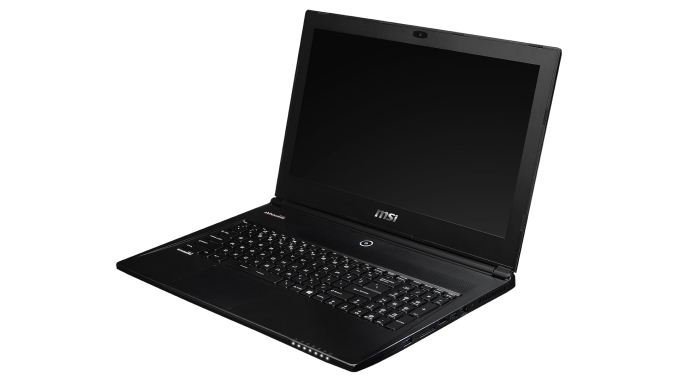
Wrapping up the MSI Notebooks coverage, also on display at MSI’s suite were a couple of their latest mobile workstations. These are lower volume parts and basically take their consumer laptops and add in a Quadro GPU along with going through the required testing to be certified for use with NVIDIA’s Quadro GPUs. The two laptops shown are the WS60 (workstation version of the GS60) and the WT70 (workstation version of the GT70). The mobile workstations feature some toned down styling, so the MSI Dragon Army and red highlights often found on MSI’s consumer laptops are gone, with a “Workstation” logo on the cover instead. Starting with the WS60, the CPU is the same i7-4710HQ found in the GS60, while the display is a 4K (3840x2160) IPS panel. HiDPI displays aren’t always the greatest depending on the apps you run, but for professional users and in particular those doing video editing, the native 4K support can prove useful. For the GPU, MSI supports the Quadro K2100M, a 576 CUDA core part that uses a GK106 Kepler core. Performance should be faster than the previous generation K2000M but not at the level of the K3000M, and the 667MHz core clock and 3000MHz GDDR5 clock are relatively tame. Still, the Quadro drivers enable enhanced performance in various professional OpenGL application as well as video and image editing software, which can greatly improve performance to the point where a K2100M outperforms even the fastest GTX 980M in such tasks. Moving on to the WT70, the core GT70 design and features are present, which means a single large cooling fan for both the CPU and GPU. GPU options include the Quadro K3100M and K4100M, and support for the K5100M also exists (though it sounds as though very few users are willing to pay the price for that GPU). As with the GT70, there’s support for up to three SSDs in RAID 0 with a 2.5” HDD bay for additional storage. Memory support goes up to 32GB, with the default configuration being 2x8GB of DDR3L RAM. The LCD also appears to be the same old 1080p TN panel used in the GT70, which is unfortunate but not surprising. An update with WT72 (GT72 for workstations) is sorely needed and is likely in the works. NVIDIA is also just about overdue for Maxwell based workstation class GPUs, so we will likely see those in the coming months. The workstation world for the most part is following in the footsteps of the desktop world; there will always be users that need the most performance they can get, but for many laptops have now become fast enough that the ability to take your system on the road is worth the added cost. As such, the mobile workstation market may be small, but it’s growing steadily and profit margins tend to be better than in the consumer sector. Currently, there are only a few mobile workstation options out there. Dell has their Precision line, HP has their ZBook line, and Lenovo has their W-series. Other than that, your choices are generally limited to system integrators using Clevo or MSI based platforms. MSI has definitely made some marked improvements in their consumer notebook designs lately, and it will be great to see workstation options of these in the future. |
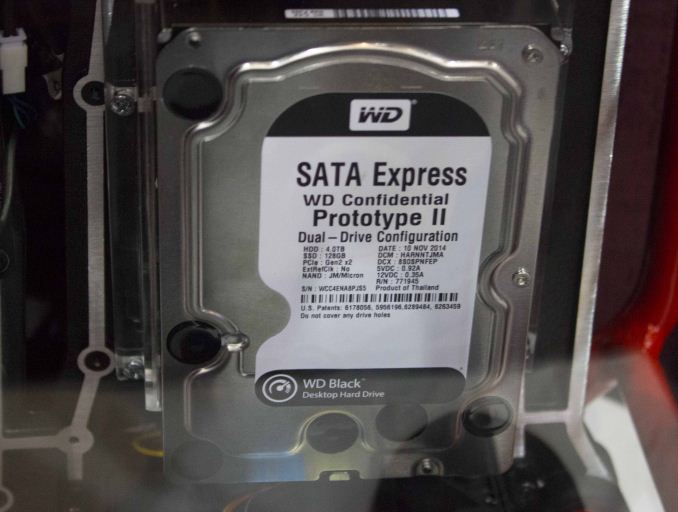
| 9:30p | Western Digital Shows Off a 128GB SSD + 4TB HDD 3.5" SATA Express Dual-Drive
Storage Visions kicked off today and on the show floor Western Digital was showcasing a prototype of its new 3.5" dual-drive. The drive consists of a 128GB SSD along with a 4TB hard drive and utilizes PCIe 2.0 x2 interface through the SATA Express connector. Similar to the Black2 we reviewed last year, the prototype shows off as two separate volumes, although Western Digital is also working on a caching software to make the solution more user friendly. 2.5" version is also in the plans, although at first Western Digital is focusing on the 3.5" form factor.
Since the drive is in prototype stage, there are no specs available but since the drive is based on a JMicron SATA 6Gbps controller, the performance maxes out at ~550MB/s. At the booth, Western Digital was showing off two prototypes in software RAID 0 reaching 1GB/s, which is what you would expect from any two SATA 6Gbps SSDs in RAID 0.
Currently the product is more of a concept and there is no set release schedule, but the drive will likely appear on the market later this year. To be completely honest, the product as it stands today doesn't make much sense because it's internally SATA 6Gbps, but uses for PCIe for host connectivity. From a performance perspective the only advantage of PCIe is that the SSD and HDD can be accessed at the same time at full speed, but ultimately I think Western Digital has to go with a native PCIe SSD controller to be competitive. Western Digital told me that they are looking into PCIe controllers but since there aren't any available at this point, the prototype is stuck with SATA 6Gbps controllers. |
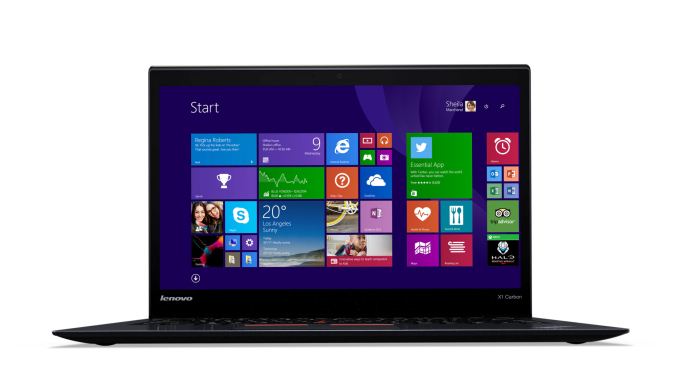
| 10:13p | Lenovo ThinkPad X1 Carbon: Broadwell Version
Lenovo has a whole slew of announcements coming out over the next few days, but let’s start at the top with the updated X1 Carbon. The latest iteration upgrades the CPU to Intel’s latest 5th Generation Core processors, with support for up to Core i7. This is the Broadwell-U line of CPUs, which means we can’t disclose specifications just yet, but it should be comparable to the Haswell-U processors – we’d expect a 5-10% performance increase in most workloads. Lenovo also rates the latest X1 Carbon at up to 10.9 hours of battery life with a 50Wh battery, compared to the previous version’s 8.6 hours. Most of the remaining design elements are similar to last year’s X1. The LCD is a 2560x1440 IPS touchscreen display (there may still be a lower resolution option), it ships with up to 8GB RAM, and the dimensions are the same 331mm x 226.5mm x 17.7mm (13.0” x 8.9” x 0.7”) with a starting weight of 1.31kg (2.88 lbs). Storage has also received an update to M.2 PCIe with up to 512GB, and WiFi is again 2x2 802.11ac. There’s nothing particularly surprising with the update, but then there weren’t any major issues with the old X1 Carbon. Battery life is better, performance is better, and storage is better; everything else basically stays the same. Pricing and availability have not yet been announced, but the new model should take over from the previous generation when it launches. |
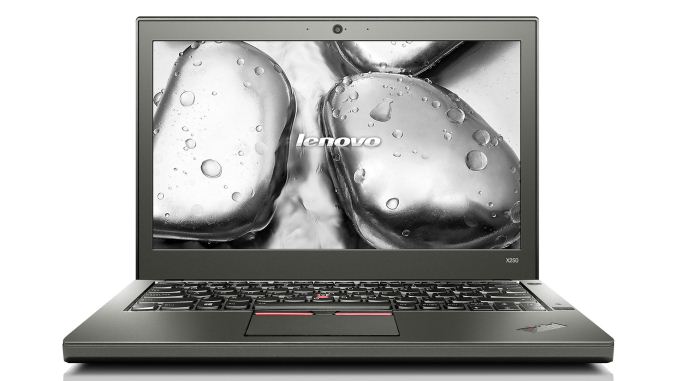
| 10:33p | Lenovo ThinkPad X250
There’s a theme with the Lenovo updates being announced today: in most cases, the new models are similar to the previous generation, only now with Intel’s Broadwell-U processors in place of Haswell-U. The ThinkPad X250 continues that trend, supporting up to Core i7 Broadwell-U processors. Of course the big draw of the X250 is that it boasts more battery life than any other laptop I know of with the same battery capacity. Equipped with the 72Wh 6-cell battery (in addition to the built-in 3-cell 23.2Wh battery), the X250 is rated at up to 20 hours of battery life. As with the X1 Carbon, that’s a nice increase compared to the previous model that was rated at 17.4 hours. Screen options are the same as before: 1366x768, 1366x768 Premium IPS, or FullHD IPS. Memory still comes courtesy of a single SO-DIMM slot (8GB max), storage options consist of up to 512GB SSD or 1TB HDD, and the weight and dimensions appear to be unchanged as well. Pricing and availability have not been announced but the X250 should occupy the same MSRP bracket as the X240 (which is now on sale). Gallery: Lenovo ThinkPad X250    |
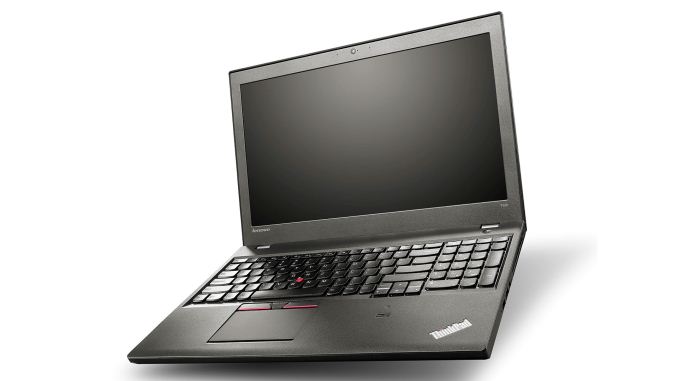
| 11:10p | Lenovo ThinkPad Broadwell Updates for T550, T450s, E550, E450, and L450
Wrapping up the ThinkPad updates for now, Lenovo also announced the T550, T450s, E550, E450, and L450 today. As with the X1 Carbon and X250, these replace the previous generation Haswell products and upgrade them to Broadwell processors. Let’s quickly go through the various laptops. The T550 is a 15.6” Ultrabook with an optional 3K (2880x1620) touchscreen display. Similar to the X250, it supports Lenovo’s Power Bridge Technology that features a smaller integrated battery with a user swappable external battery. Combined with the 6-cell 72Wh battery, the T550 is rated at up to 17 hours of battery life. It weighs 2.26kg (4.98 lbs) and measures 380mm x 252mm x 22.4mm (14.96” x 9.92” x 0.88”). It supports up to Core i7 Broadwell-U processors, with up to 16GB RAM and a 512GB SSD. The T450s is a slightly smaller 14.0” version of the T550 Ultrabook, with up to a 1080p display. Power Bridge Technology is again present, allowing for up to 17 hours of mobility. The T450s measures 331mm x 226mm x 21mm (13.03” x 8.90” x 0.83”) and weighs 1.58kg (3.48 lbs). It comes with 4GB RAM soldered onto the motherboard with one SO-DIMM slot allowing up to 12GB RAM total. Up to a 512GB SSD and a Core i7 Broadwell-U processor are supported. The E550/E450 are one step down the ThinkPad hierarchy, and as such they lose support for Power Bridge. They are also not Ultrabooks, but they do have optional discrete GPUs – R7 M260 2GB for the E450 and R7 M265 2GB for the E550. Both support up to the Core i7-5500U, with two SO-DIMM slots allowing up to 16GB RAM. Storage from the factory consists of pure HDD solutions, unfortunately. The E550 is available with either a 15.6” 1366x768 or 1080p LCD, while the E450 comes with a 14” 1366x768 or 1080p LCD. Both are rated at up to nine hours of battery life, with the E450 featuring an integrated (non-swappable) battery while the E550 has a user swappable battery. The E550 weighs 2.35kg (5.2 lbs) and measures 377mm x 256mm x 27mm (14.82” x 10.08” x 1.06”) while the E450 weighs 1.81kg (4.0 lbs) and measures 339mm x 239mm x 24mm (13.35” x 9.41” x 0.94”). But have 720p webcams, but the E550 has an optional 3D camera. Finally, the L450 is the entry-level 14” ThinkPad, but it’s more of a step sideways from the E-series. It comes with up to Core i7 processor support, 16GB RAM, 1TB HDD or 360GB SSD, and up to a 1080p IPS display. It comes with R5 M240 graphics and Intel’s HD 5500, along with a 720p webcam. It’s a bit heavier than the E450, weighing 1.93kg (4.25 lbs), but dimensions are similar at 339mm x 235mm x 24.3mm (13.3” x 9.3” x 0.9”). Pricing and availability for all of these ThinkPad models have not been announced, but we’d expect most of these to ship Q1 at the latest. |
 white-front angle start_575px.jpg)
 white-front angle start_thumb.jpg)
 white-front left angle_thumb.jpg)
 white-front SO with start bar_thumb.jpg)
 white-front SO_thumb.jpg)
 white-front up angle_thumb.jpg)
 white-front up left angle start bar_thumb.jpg)
_thumb.jpg)
_thumb.jpg)
_thumb.jpg)



_thumb.jpg)
_thumb.jpg)
_thumb.jpg)








| << Previous Day |
2015/01/04 [Calendar] |
Next Day >> |