[Most Recent Entries] [Calendar View]
Tuesday, June 2nd, 2015
| Time | Event | ||||||||||||||||||||||||||||||||||||||||||||||||||||||||||||||||||||||||||||||||||||||||||
| 1:41a | Computex 2015: Intel Keynote Live Blog We're here at Intel's Keynote, waiting for Kirk Skaugen to announce some new things. | ||||||||||||||||||||||||||||||||||||||||||||||||||||||||||||||||||||||||||||||||||||||||||
| 3:45a | OCZ Announces Trion 100 TLC SSD & Shows Off an Upcoming NVMe Drive with Toshiba Controller
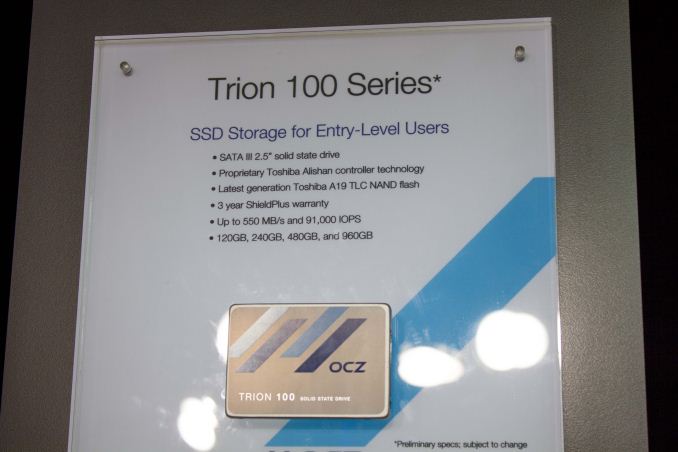
One of the things I've been expecting to see at this year's Computex is more TLC NAND based SSDs. So far only Samsung and SanDisk have been shipping TLC SSDs in high volume, but OCZ will shortly join the club with its Trion 100 SSD series that was showcased on the Computex showfloor. The Trion 100 is based on a totally in-house designed Toshiba "Alishan" controller, whereas some earlier Toshiba controllers have been modified/renamed third party silicons with the company's firmware. We discussed the cooperation between the two companies in more detail in our interview with OCZ's CEO, Ralph Schmitt, but to put it shortly the use of Toshiba IP in an OCZ product is part of the companies' strategy to consolidate product development to maximize resources as it wouldn't be efficient to have both companies working on platforms that ultimately have the same end goal. The NAND in Trion 100 is Toshiba's A19nm (i.e. second generation 19nm) TLC, although OCZ is planning on switching to the latest 15nm node later this year once the supply is high enough. For error correction the drive uses Toshiba's own QSBC (Quadruple Swing-By Correction) technology, which from what I was told is basically in between traditional BCH and LDPC correction. I don't have too many details of the technology at this point, but I will try to gather more information to better know how the technology stacks up against the competition. Typical to TLC drives, the Trion 100 employs an SLC cache to increase peak performance in smaller capacities and also to boost endurance.
One of the biggest improvements in the Trion 100 is the support for DevSleep and other power saving modes. Because of the silicon design the Barefoot 3 isn't capable of offering low idle power consumption, which has been one of main criticisms for a while now. With the Trion 100 OCZ is finally looking to provide a solution that's also suitable for mobile applications where power draw and battery life are major concerns. The Trion 100 is now in final validation and the official release will take place later in the summer. Hence performance, endurance and pricing are not final yet, but what I was told is that the performance will be read focused (as most light client workloads are read-centric), endurance goal is 20GB/day and price will be slightly below the ARC 100.
Aside from the Trion 100, OCZ also showed off a new unannounced M.2 NVMe drive that will be released later this year (I'm hearing September-October timeframe) as a new RevoDrive. Unlike the previous designs we have seen, this isn't based on OCZ's own JetExpress controller, but on Toshiba's PCIe 3.0 x4 NVMe controller. The reason OCZ is using Toshiba's controller is cost because the the JetExpress has been designed mainly with enterprise in mind, meaning that it cannot be implemented into a cost effective client drive. Gallery: OCZ Computex 2015
   Obviously OCZ also had it's new Z-Drive 6000 series on display along with the upcoming JetExpress based XD-JX series. | ||||||||||||||||||||||||||||||||||||||||||||||||||||||||||||||||||||||||||||||||||||||||||
| 7:45a | The Intel Broadwell Desktop Review: Core i7-5775C and Core i5-5765C Tested (Part 1) On almost all PC technology forums, it is hard to escape users talking about what Intel’s next processor lineup will be. Due to problems in Intel’s 14nm node, Broadwell in both mobile and desktop have been delayed, somewhat substantially in the case of the desktop. So while motherboard manufacturers released their Z97 platform over 6 months ago, we have been waiting for Broadwell to arrive. That day is today, and we can lay the smackdown with some benchmark numbers too. | ||||||||||||||||||||||||||||||||||||||||||||||||||||||||||||||||||||||||||||||||||||||||||
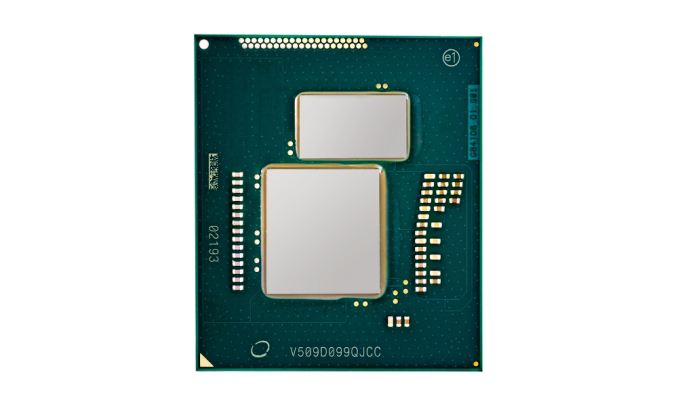
| 8:50a | Intel Launches Five 47W Laptop Broadwell SKUs
As part of Intel’s batch of announcements today, including Broadwell on the desktop and Thunderbolt 3, the 47W laptop/mini-PC processors that were also launched offers an interesting talking point. These are essentially the drop in models for current high end Haswell laptops, offering manufacturers an upgrade path before Intel’s 6th Generation, Skylake. The five SKUs are:
The clear odd one out here is the i7-5700HQ, already announced in some laptops, which holds HD 5600 graphics whereas the rest are on Iris Pro 6200 with Crystal Well and have an extra 128 MB of eDRAM that acts as an L4 cache. The i5 is also the lower SKU coming with two cores and four threads, suggesting that this is a disabled die to satisfy yields rather than a native dual core design. Pricing is appropriate, with the i5 also getting only 4MB of L3 cache but a higher base frequency than some of the quad core variants. We have 47W Broadwell based laptops inbound for review, but the interesting element in this is that Apple recently updated their Macbook Pro line but decided not to wait for the official Broadwell announcement. It is a little unclear why, but the i7-4770HQ and i7-4870HQ variants would match up nicely (with speed bumps) to the i7-5750HQ and i7-5870HQ as they are both listed at the same price. Source: Intel | ||||||||||||||||||||||||||||||||||||||||||||||||||||||||||||||||||||||||||||||||||||||||||
| 9:00a | Connexant Launches New HD Audio CODEC For Mobile
Conexant today announces a new high-end HD audio codec for notebooks, ultrabooks and tablets. The CX8200 features a fully-integrated Class-D smart amplifier with real-time speaker sensing and protection. The chip offers programmable hardware 14-band equalizer and dynamic range compression blocks. An increasingly required feature for audio codecs is the inclusion of voice wakeup and recognition. All of today's Android devices voice wakeup capabilities are enabled by specialized audio codec ICs such as from Qualcomm or Cirrus Logic (Formerly Wolfson Microelectronics). The CX8200 is able to check this feature-box and satisfies Google requirements for Chromebook integration as well as support for Intel Automatic Speech Recognition.
The codec is able to use a proprietary ‘SoftAware’ link to interconnect amplifier hardware sensors with software algorithms. The dataflow between hardware sensors and software enables dynamic updates to the algorithms performing speaker control and Acoustic Echo Cancellation functions, which radically improves overall system performance. “Conexant offers a complete range of audio solutions that provide consistent benefits for all of the devices/applications in the mobile PC ecosystem,” noted Saleel Awsare, Conexant vice president and general manager. “Our software radically improves the quality of voice and audio performance and is tightly coupled with our next generation CODEC and amplifier products for a truly innovative, comprehensive solution. With the CX8200, we’re giving consumers an enterprise-class speakerphone experience – effectively a new appliance – on the same PC or tablet platform that they’re already using every day for communication and collaboration.” | ||||||||||||||||||||||||||||||||||||||||||||||||||||||||||||||||||||||||||||||||||||||||||
| 9:01a | Dell Launches Premium Support Option For Consumers
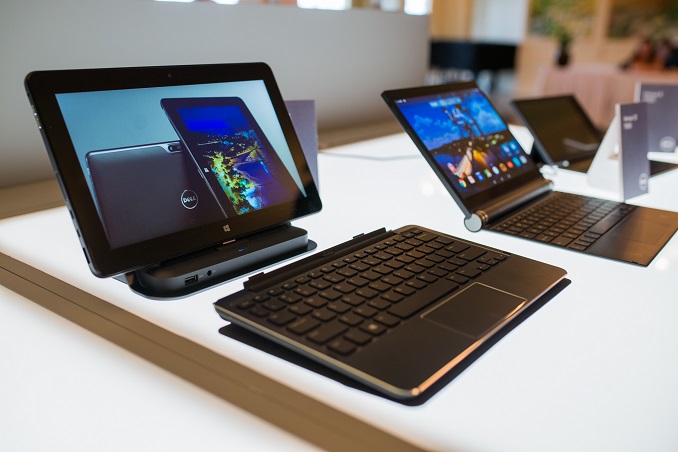
Today Dell is unveiling a new offering in the world of after purchase support which they have dubbed Premium Support. It promises to significantly reduce the amount of time spent on the phone when there is an issue, and the support can encompass anything from hardware to software. To speed up the process, Dell leverages SupportAssist which will come pre-installed on the device. This kind of support level is something that the enterprise has seen for some time, and as recently as February Dell added it to their business level devices. Unlike traditional support, where it is a reactive model based upon the customer having an issue and reporting it, Dell’s SupportAssist software monitors the system and, assuming you have an active subscription to the service, sends Dell notifications of issues with the device so that they can reach out to the customer through whatever means the customer prefers, so Dell can call or email letting them know that there is an issue. One of the key benefits of this approach is that if you do have an issue, the correct person can be the first point of contact rather than having to be bounced around while on hold. Dell commissioned Principled Technologies to simulate a support case using Dell’s Premium Support with SupportAssist against the top-tier support of Apple, HP, and Lenovo, and the call time for Dell support for a broken hard drive was 4m 05s. Apple and Lenovo were about tied at 25m 44s for Apple and 25m 49s for Lenovo, with HP at 40m 40s. That was just the call time though. Apple then made an appointment for the customer to visit the Genius Bar for further troubleshooting, and HP wanted the laptop shipped to them for service or a refund. Dell and Lenovo both shipped out a new drive and an on-site technician for service.
Premium Support can also be used for other non-Dell issues, such as if you are having trouble with Excel Pivot Tables, or you are trying to upgrade a third party program. Dell wants it to be a one-stop shop for all computer support for Dell customers. They even said it could be used to help with migrating a computer over to Windows 10. SupportAssist is free to all customers to help them with diagnosing their computers, and those that want to move up to the Premium Support model can do that starting at $39 per year. It is currently available in the USA and Canada on Dell Inspiron, Alienware, Venue, and Chromebook products. Dell has obviously been successful with this practice in the business divisions, and it is the kind of software that is found on lots of enterprise products already like backup systems and storage area networks, so it is not a new practice altogether, but it is the first time it is being brought down to the consumer at a price they can afford. To hit this price point though, Dell is using overseas support rather than the NA support offered to its business customers. I’m not sure that this would ever be the right product for me, but on a larger scale, there are likely a lot of people that would like this kind of service. The low price helps a lot too. Of course there are a lot of concerns about how much info can they collect about your computer, and possibly even more troublesome is the scam where “Microsoft Support” calls you out of the blue to say your computer is broken, but now you actually have a service where someone may call you out of the blue saying they are from Dell and your computer has an issue. However this model has proven to be successful in the enterprise and business sectors and Dell’s SupportAssist is based off of Compellent’s technology from when Dell acquired them in 2010. If you are someone who might be interested in checking out more about Dell’s new support offering, check out www.dell.com/premiumsupport | ||||||||||||||||||||||||||||||||||||||||||||||||||||||||||||||||||||||||||||||||||||||||||
| 9:47a | Meizu Launches m2 note 5.5" Budget Smartphone
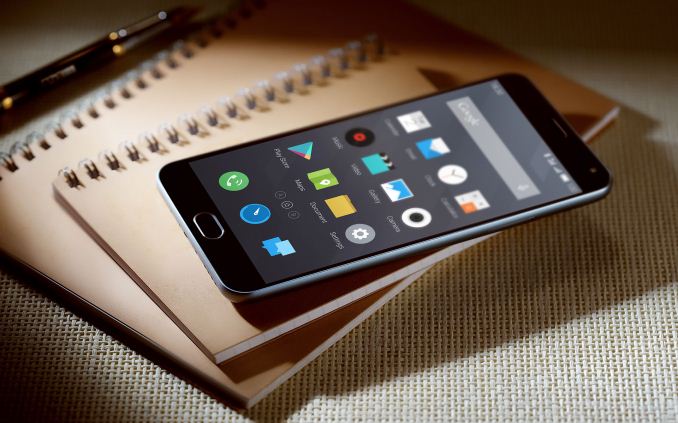
Meizu today launches the successor to the m1 note, a cheap entry-level smartphone that still manages to pack enormous value for its price-range. The m2 note has a 5.5" Sharp manufactured IGZO display coming in at 1920x1080 resolution. The most interesting aspect of the m2 note as opposed to the original m1 is the inclusion of 13 frequency bands including FDD-LTE frequencies. This ensures that the m2 note can be used in a wide range of global regions. We're still not sure exactly which frequencies are included, as for example we saw the MX4 Pro not provide the 800MHz band for FDD networks.
The device is powered by MediaTek's MT6753 which employs 8 A53 cores clocked in at up to 1.3GHz and a low-end Mali T720MP3 at 450MHz. This is definitely a low-end performer, but it will be interesting to see how battery life pan out as the device comes with a large 3100mAh Sony battery.
On the camera side, Meizu employs a new Samsung 13MP sensor with a F/2.2 lens module as the main rear camera, and a 5MP Omnivision sensor on a 68° wide angle F/2.0 front camera setup. The device itself is falls in norm for a 5.5" display, coming in at 150.9 x 75.2 x 8.7mm and a rather lighter 149 grams. I was generally impressed with Meizu's build quality and in the press shots the m2 note looks to be a very attractive phone.
The phone comes with Meizu's new Android 5.0 version of FlymeOS 4.5, making this the first Meizu phone to come out with Lolipop out of the box while older devices are currently being updated to the new OS version. It's the price that is most interesting: At CNY999 which corresponds to about $160 this device offers quite an incredible value for its price. Usually Meizu prices devices slightly higher in western markets as for example the m1 note can be gotten for 225€ at European online retailers. This puts it in direct competition with other higher quality low-priced phones such as Motorolla's Moto E which we've review just a couple of months ago. Source: Meizu | ||||||||||||||||||||||||||||||||||||||||||||||||||||||||||||||||||||||||||||||||||||||||||
| 12:00p | Rockchip Announces RKi6000 WiFi SoC for ULP IoT
Today at Computex in Taiwan, Rockchip announced a ultra-low-power WiFi SoC for IoT devices. The RKi6000 promises huge jumps in power efficiency, and the ability to provide WiFi connectivity at the levels of Bluetooth Low-Energy. The RKi6000 is a 802.11b WiFi combo-chip with up to 11Mbps data transfer rates. Rockchip explains that it achieves such drastic improvements in low power in the following ways: - Improvements in wireless communication and radio-frequency architecture: Rockchip’s patented technology greatly reduces an IoT smart device’s power consumption by receiving and transmitting data continuously, enabling devices to achieve ultra-low power consumption while in standby and in use.
- Adaptive Dynamic Power Control Technology: improves power efficiency in different working modes, greatly reducing all-over power consumption in different application scenarios and adjusting the chip’s power configuration according to data transmission requirements and actual transmission quality, achieving the best energy efficiency ratio.
- Technological innovation - connects to Wi-Fi without waking up the main-control processor: for IoT applications requiring long standby times while remaining online, the Rockchip RKi6000 maintains its Wi-FI connection without waking up the main-control processor, simplifying the power consumption system’s design and extending battery life.
Comparing the RXi6000 to other competing solutions from Broadcom, Qualcomm, Texas Instruments or Gainspan shows significant reduction in Rx power, with up to 3 times less power than the next-best WiFi solution.
While Rockchip has a clear advantage in power over other LP WiFi chipsets, it's the comparison with other low-power transmission technologies that Rockchip is able to show its true strength:
When comparing the RKi6000 running WiFi 802.11b at 11Mbps, the chipset is able to present an order of magnitude of improvement over other technologies such as Bluetooth with Enhanced Data Rate, Bluetooth LE or Zigbee. The fact that this is a WiFi technology simplifies deployment and development of IoT application as it is able to use connections provided by standard infrastructures. Applicable product categories include wearables, home appliances, home automation and safety. The RKi6000 starts availability in Q3 2015. | ||||||||||||||||||||||||||||||||||||||||||||||||||||||||||||||||||||||||||||||||||||||||||
| 3:10p | Intel Announces Thunderbolt 3 - Thunderbolt Meets USB (At Last)
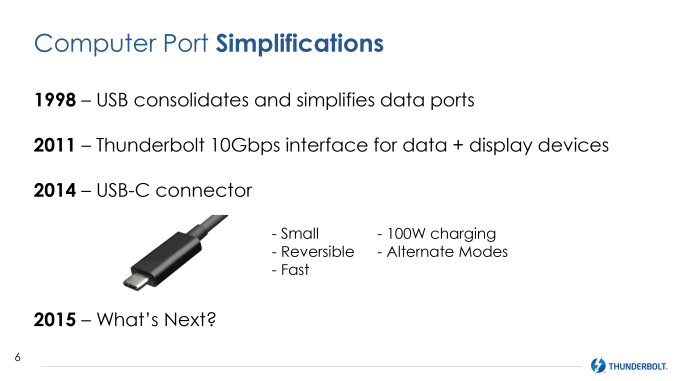
A lot has been happening in the world of external communication buses over the past year. In the last 12 months the USB consortium has announced both 10Gbps “Superspeed+” USB 3.1 and the new USB Type-C connector, USB’s new compact, reversible connector that is designed to drive the standard for the next decade or more. Meanwhile with the introduction of USB Alternate Mode functionality – the ability for USB Type-C to carry other protocols along with (or instead of) USB Superspeed data – has made USB more flexible than ever, with the VESA announcing that DisplayPort will be supporting alternate mode to deliver DisplayPort video over USB Type-C ports and cabling. As a result, the introduction of USB Type-C has led to a definite and relatively rapid transition over to the new standard. With the USB consortium having designed a very capable and desirable physical layer for Type-C, and then alternate modes allowing anyone to use that physical layer, there have been a number of other technologies that have started aligning themselves with USB in order to take advantage of what is becoming an even more common platform for external buses.
This brings us to today, with the announcement of Thunderbolt 3 from Intel. With the advancements occurring elsewhere in the world of external communication buses, Intel has not been sitting idly by and letting other standards surpass Thunderbolt. Rather they have been hard at work on the next generation of Thunderbolt, one that in the end seeks to combine the recent developments of the USB Type-C physical layer with all of the feature and performance advantages of Thunderbolt, culminating in Thunderbolt 3 and its incredibly fast 40Gbps bus.
As a bit of background, the last time Intel updated the Thunderbolt specification was in 2013 for Thunderbolt 2, AKA Falcon Ridge. By aggregating together two of Thunderbolt 1’s 10Gbps channels, Intel was able to increase the available bandwidth over a single channel from 10Gbps to 20Gbps, at the cost of reducing the total number of channels from two full duplex channels to one full duplex channel. Of particular note here is that with Thunderbolt 2 the Thunderbolt signaling layer didn’t change – Thunderbolt 2 still operated at 10Gbps for each of its four underlying lanes – so in reality the Thunderbolt signaling layer has remained unchanged since it was introduced 2011. Now at 4 years old, it’s time for the Thunderbolt signaling layer to change in order to support more bandwidth per cable than what Thunderbolt 1 and 2 could drive. To accomplish this upgrade in signaling layers, Intel has needed to change the physical layer as well. Thunderbolt 1 and 2 used the Apple-developed mini-DisplayPort interface for their cables, but with the VESA signaling that it may eventually replace the DisplayPort physical layer with USB Type-C, the DisplayPort physical layer’s days are likely numbered. Consequently mini-DisplayPort’s days are numbered as well, as consumer devices and the development of new standards both shift over to Type-C. This has put Thunderbolt in an interesting situation that has Thunderbolt moving forwards and backwards at the same time. As originally planned, Intel wanted to have Thunderbolt running through USB ports, only for the USB consortium to strike down that idea, resulting in the shift over to mini-DisplayPort. Now however with the waning of DisplayPort and the introduction of USB Type-C and its alternate modes, Thunderbolt is back to where Intel wanted to start all along, as a standard built on top of the common USB port.
The end result of this upgrade of virtually every aspect of Thunderbolt is the latest generation of the technology, Thunderbolt 3, which seeks to combine the strengths and capabilities of the Thunderbolt platform with the strengths and capabilities of USB Type-C. This means bringing together Thunderbolt’s very high data speeds and the flexibility of its underlying PCI-Express protocol with the simple, robust design of the Type-C connector, all enabled via the USB alternate mode specification. Throw in Type-C’s associated power delivery standards, and you have what Intel believes to be the most powerful and capable external communications bus on the market.
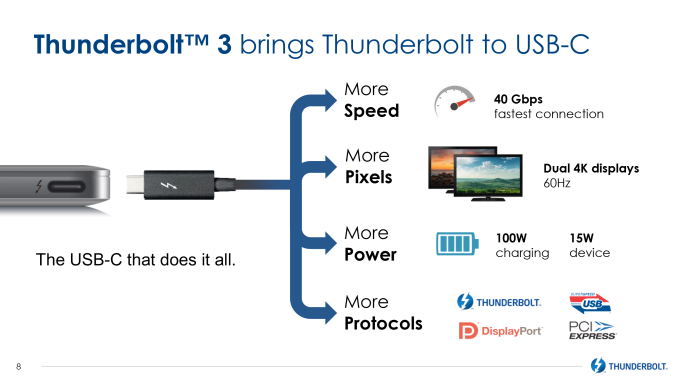
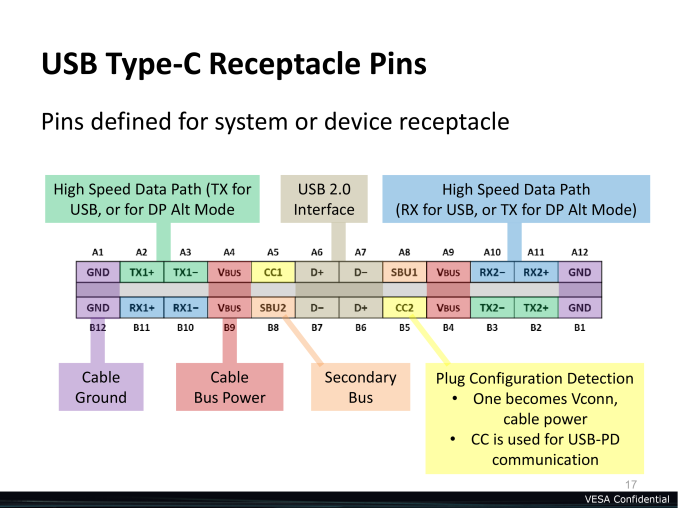
Along with the change to using the USB Type-C port, the big news here is that Thunderbolt 3 is doubling the amount of bandwidth available to Thunderbolt devices. With Thunderbolt 2 topping out at a single full duplex 20Gbps channel, Thunderbolt 3 is increasing that to 40Gbps. Compared to DisplayPort 1.3 and USB 3.1, this is 1.5 to 4 times the available bandwidth, with DisplayPort 1.3 topping out at 25.9Gbps (after overhead), and USB 3.1 topping out at 10Gbps per channel (with Type-C carrying 2 such channels). From a signaling standpoint, Thunderbolt 3 is being implemented as a USB alternate mode, taking over the 4 lanes of high-speed data that Type-C offers. This is the same number of lanes as Thunderbolt 1 and 2 used, so the bandwidth increase comes as a result of doubling the amount of data carried per lane from 10Gbps (half duplex) to 20Gbps. Which when aggregated at either end is what gives us 20Gbps full duplex.
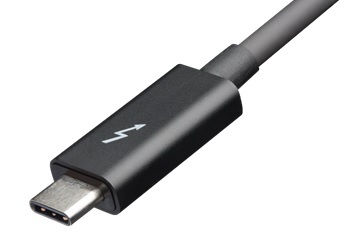
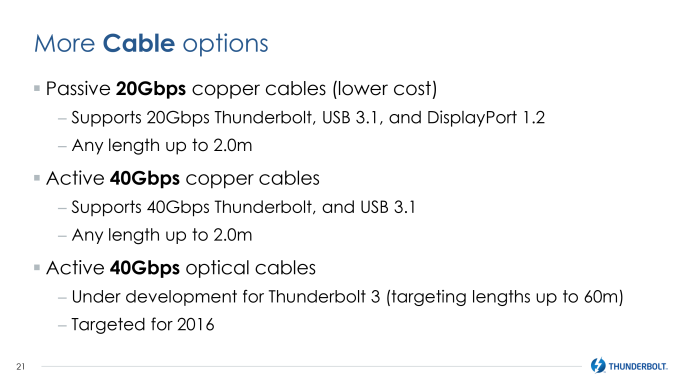
To handle the new Type-C interface and the increased data rates, Intel is rolling out a new type of active cable for the new Thunderbolt standard. Like previous generation cables, the new cable includes significant active electronics at both ends of the cable, allowing Intel to achieve greater bandwidth than what passive cabling would allow, at the cost of increased cable prices. The new cable retains the distinctive Thunderbolt logo and is a bit larger than a passive at both ends to accommodate the electronics, but other than the change to the Type-C port is similar in concept to Thunderbolt 1 and 2’s active cables.
Meanwhile because it’s built on Type-C, Thunderbolt 3.0 will also introduce support for passive cabling using the now-standard Type-C cable. When using a Type-C cable, Thunderbolt drops down to 20Gbps full duplex – the amount of bandwidth available in a normal Type-C cable today – sacrificing some bandwidth for cost. With Type-C cables expected to eventually cost only a few dollars compared to thirty dollars or more for traditional Thunderbolt cables, this makes Thunderbolt far more palatable as far as cable costs go, not to mention allowing cables to be more robust and more easily replaced. Driving these new cables in turn will be Intel’s new Alpine Ridge controller for Thunderbolt 3. The latest generation of the Ridge family, this controller steps up in capabilities to match Thunderbolt 3’s 40Gbps speeds. Alpine Ridge also integrates its own USB 3.1 (Superspeed+) host controller, which in turn serves dual purposes. When serving as a host controller for a USB Type-C port, this allows Alpine Ridge to directly drive USB 3.1 device if they’re plugged into an Alpine Ridge-backed Type-C port (similar to how DisplayPort works today with Thunderbolt ports). And when serving as a device controller (e.g. in a Thunderbolt monitor), this allows devices to utilize and/or offer USB 3.1 ports on their end.
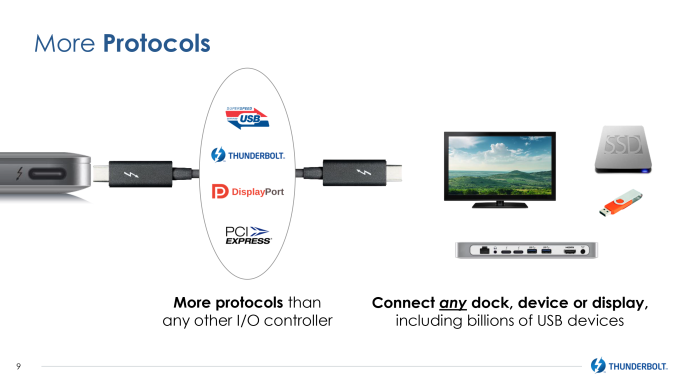
The addition of USB host controller functionality further increases the number of protocols that Thunderbolt 3 carries in one way or another. Along with PCI-Express and DisplayPort, the use of Alpine Ridge ensures that USB 3.1 is also available, as it’s now a built-in function of the controller. The only notable difference here is that while DisplayPort video and PCI-Express data encapsulated in the Thunderbolt data stream, USB 3.1 is being implemented on top of the PCI-Express connection that Thunderbolt already carries rather than being encapsulated in the Thunderbolt data stream as well.
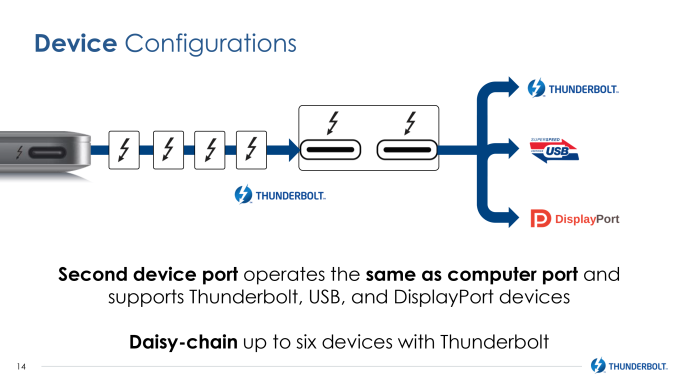
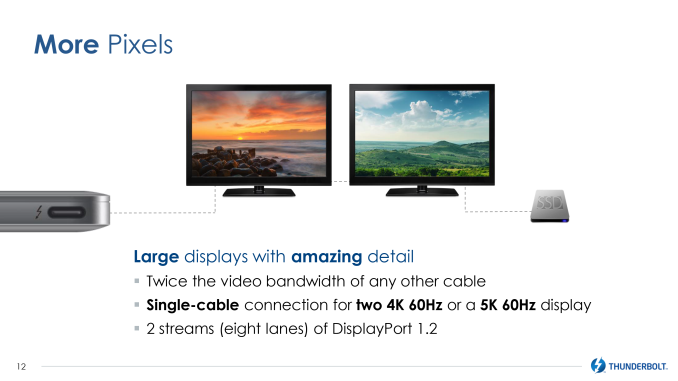
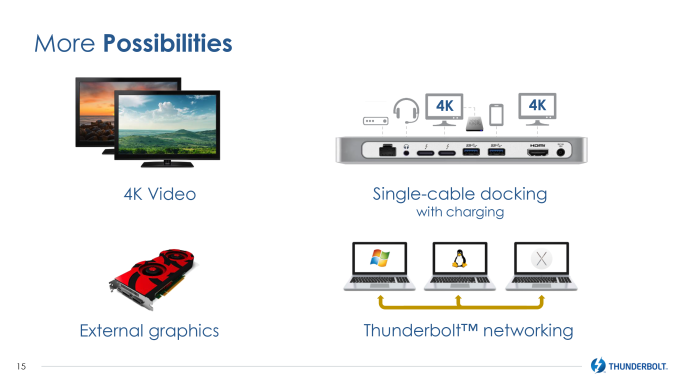
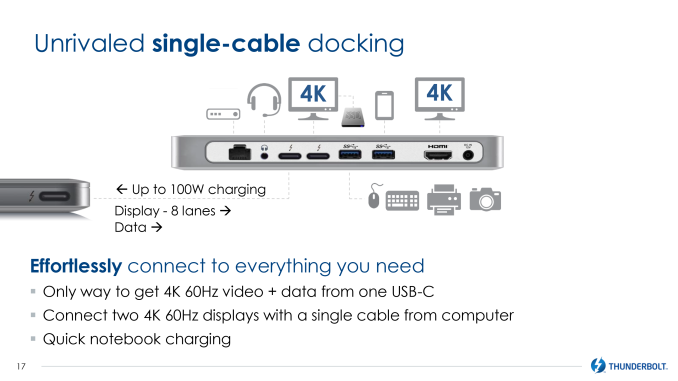
Speaking of encapsulation, Thunderbolt 3 also includes an update to the DisplayPort side of matters, though likely not what everyone has been expecting. With the increase in bandwidth, Thunderbolt 3 is able to carry twice as much video data as before. However Intel is not implementing the latest version of DisplayPort – DisplayPort 1.3 – in to the Thunderbolt 3 standard. Instead they are doubling up on DisplayPort 1.2, expanding the number of equivalent DisplayPort lanes carried from 4 to 8, essentially allowing one Thunderbolt 3 cable to carry 2 full DisplayPort 1.2 connections. The end result is that Thunderbolt 3 will not be able to drive the kind of next-generation displays DisplayPort 1.3 is geared towards – things like 8K displays and 5K single-tile displays – but it will be able to drive anything 1 or 2 DisplayPort 1.2 connections can drive today, including multiple 4K@60Hz monitors or 5K multi-tile displays.
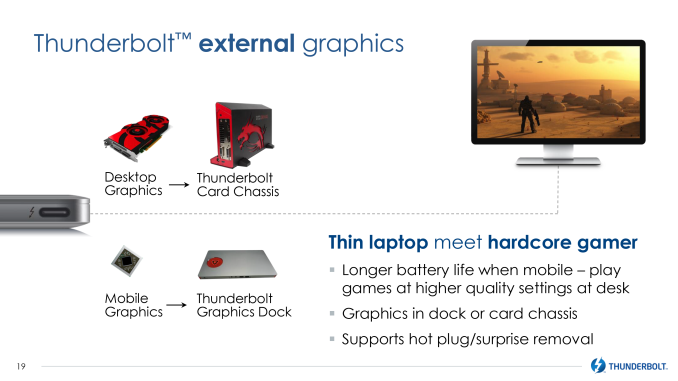
Meanwhile gamers will be happy to hear that Intel is finally moving forward on external graphics via Thunderbolt, and after more than a few false starts, external GPUs now have the company’s blessing and support. While Thunderbolt has in theory always been able of supporting external graphics (it’s just a PCIe bus), the biggest hold-up has always been handling what to do about GPU hot-plugging and the so-called “surprise removal” scenario. Intel tells us that they have since solved that problem, and are now able to move forward with external graphics. The company is initially partnering with AMD on this endeavor – though nothing excludes NVIDIA in the long-run – with concepts being floated for both a full power external Thunderbolt card chassis, and a smaller “graphics dock” which contains a smaller, cooler (but still more powerful than an iGPU) mobile discrete GPU.
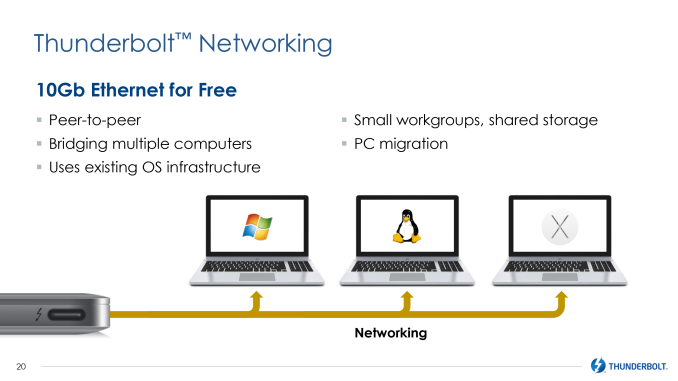
Another concept Intel has been floating around that will finally be getting some traction with Thunderbolt 3 is Thunderbolt networking. By emulating a 10GigE Ethernet connection, 2 computers can be networked via Thunderbolt cable, and with 10GigE still virtually unseen outside of servers and high-end workstations, this is a somewhat more practical solution for faster-than GigE networking. Thunderbolt networking has been around since 2013 in OS X, and in 2014 Intel demonstrated the technology working on PCs, however since it was a feature added to Thunderbolt 2 after its launch, the number of PCs with the necessary drivers for Thunderbolt networking has been quite low. With Thunderbolt 3 this is now a standard feature at launch, so system support for it should be greater.
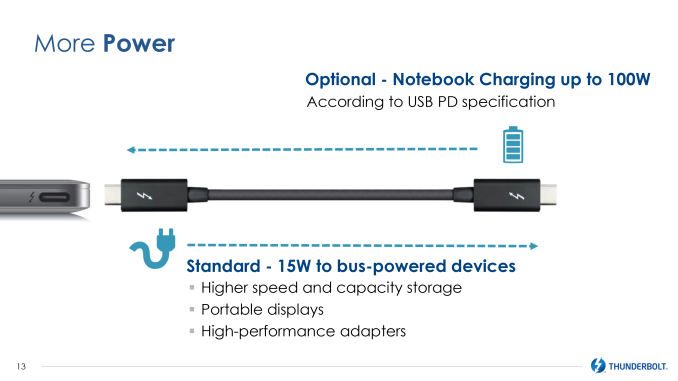
Moving on, by building Thunderbolt 3 on top of USB Type-C, Intel is also inheriting Type-C power delivery capabilities, which they will be making ample use of. With Type-C’s Power Deliver 2.0 specification allowing for chargers that can supply up to 100W of power, it will be possible (though optional) to use Thunderbolt 3 to deliver that same power, allowing for uses such as having a Thunderbolt dock or display charge a laptop over the single Thunderbolt cable (the one thing Apple’s Thunderbolt display can’t do today with Thunderbolt 2). That said, the USB power delivery standard is distinct from Thunderbolt’s bus power standard, so this doesn’t necessarily mean that all Thunderbolt hosts can provide 100W of power, or even any USB charging power for that matter. For standard bus-powered Thunderbolt devices, the Thunderbolt connection will now carry 15W of power, up from 10W for Thunderbolt 2.
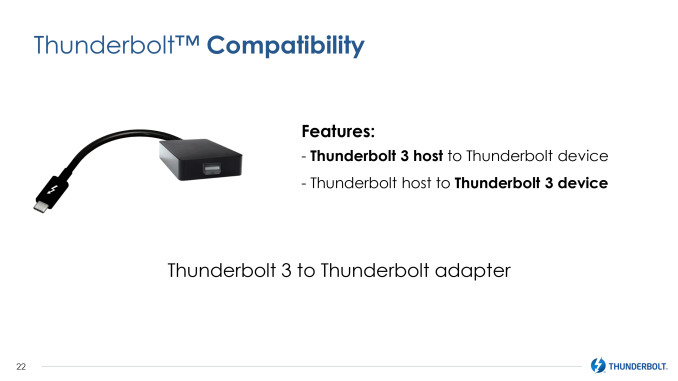
Finally, with the change in cabling, Intel is also clarifying how Thunderbolt backwards compatibility will work. Thunderbolt 3 to Thunderbolt adapters will be developed, which in turn will allow Thunderbolt 1/2 and Thunderbolt 3 hosts and devices to interoperate, so that older devices can work on newer hosts, and newer devices can work on older hosts. Though we’re not clear at this time whether the adapter is providing a simple bridge between the cable types (with the necessary regeneration), or if there’s going to be a complete Alpine Ridge controller in the adapter.
Wrapping things up, Intel tells us that they expect to see Thunderbolt 3 products begin shipping by the end of the year, with a larger volume of products in 2016. Given this timing we’re almost certain to see Thunderbolt shipping alongside Skylake products, though Intel is making it clear that at a technical level Skylake and Thunderbolt 3 are not interconnected, and that it would be possible to pair Alpine Ridge Thunderbolt 3 controllers with other devices, be it Broadwell, Haswell-E, or other products. As for whether Intel will see more success with Thunderbolt 3 than the previous versions of Thunderbolt, this remains to be seen. The switch to a Type-C port definitely makes it a bit easier for OEMs to stomach – DisplayPort on laptops has been fairly rare outside of Apple – so now OEMs can integrate Thunderbolt without having to install a port they don’t see much value in. On the other hand this is still an external controller of additional cost, which incurs power, space, and cooling considerations, all of which would add to the cost of a desktop/laptop as opposed to pure USB 3.1. As was the case with Thunderbolt 1 and 2, Intel’s greatest argument in favor of the technology is docking, as the use of PCI-Express and now the addition of USB Power Delivery gives Thunderbolt a degree of flexibility and performance that USB Type-C alone doesn’t match.
| ||||||||||||||||||||||||||||||||||||||||||||||||||||||||||||||||||||||||||||||||||||||||||
| 4:42p | ASUS Releases Android Lollipop For The ZenFone 4, 5, and 6
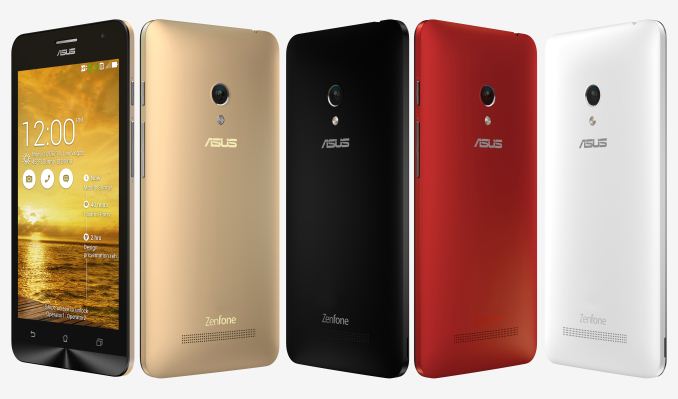
Today ASUS is rolling out an update to Android Lollipop for their first generation ZenFones. The update covers most of the original ZenFone devices offered by ASUS. While the Qualcomm based ZenFone 5 A500KL has been running Lollipop since April, this update brings the Intel powered A500CG and A501CG versions up to date as well. The ZenFone 4 A400CG is also receiving its Lollipop update. The updates for all these devices are being sent out over the air, but users can download them directly from ASUS to flash themselves if they don't want to wait. In addition to the ZenFone 4 and ZenFone 5, the ZenFone 6 A600CG and A601CG are also being updated to Lollipop. The firmware updates for these two phones are not yet being sent out as OTA updates, but the files are already available to download from ASUS. The fact that ASUS is updating their original ZenFones to Lollipop sends a good message to potential ZenFone 2 buyers who were worried about ASUS's commitment to keeping their devices updated. Hopefully ASUS can continue to keep their older devices updated as newer generations of ZenFones are introduced. Source: ASUS via GSMArena | ||||||||||||||||||||||||||||||||||||||||||||||||||||||||||||||||||||||||||||||||||||||||||
| 9:00p | AMD Launches Carrizo: The Laptop Leap of Efficiency and Architecture Updates Perform a small test for me. Close your eyes, and spend 15 seconds considering the state of the laptop market and what devices interest you, are available, or on the horizon. Done? Let me hazard a guess – Apple’s offerings loomed large over $800, with $1500+ gaming laptops on the periphery. At $300 we’re more in tablet-first space with a mix of cheap clamshell rubbish. In the middle is an assortment of $400-$700 good but not always great mixture of 2-in-1s (like the Surface) or clamshells (like the ASUS UX305), divided mostly on price and features but 95% of them contain Intel. Today’s launch of Carrizo by AMD is hoping to change that perception, particularly in $400-$700 and at 15W. | ||||||||||||||||||||||||||||||||||||||||||||||||||||||||||||||||||||||||||||||||||||||||||
| 11:07p | AMD Confirms June 16th Date for Upcoming GPU Announcement
After an earlier vague deadline of Q2’15 and more than a few teases in the interim, AMD has finally announced when they’ll be revealing their forthcoming high-end video card. AMD will be hosting an event on June 16th at 9am PST to release the details on the card, in a presentation dubbed “AMD Presents: The New Era of PC Gaming.” The presentation will be taking place at the Belasco Theater in Los Angeles, CA during E3 week, and happens to be where the AMD-sponsored PC Gaming Show also takes place that evening. This event is open to the public, or can be viewed via webcast. I would quickly note here that at no point does AMD specifically call this a launch. And for that matter, the last time they held a public event like this – the Radeon 200/Hawaii reveal – Hawaii didn’t launch until a month later. In this case AMD has already committed to a June launch for the card, but at the moment we’re not expecting to see the card go on sale on the 16th. | ||||||||||||||||||||||||||||||||||||||||||||||||||||||||||||||||||||||||||||||||||||||||||
| 11:10p | Microsoft Confirms You Can Clean Install Windows 10 After Upgrading
This is one question that a lot of people have been asking, and Gabe Aul, the head of the Windows Insider program, finally answered it on Twitter today. Credit goes to Brad Sams at Neowin for catching this since it was a reply to another tweet. Gabe states:
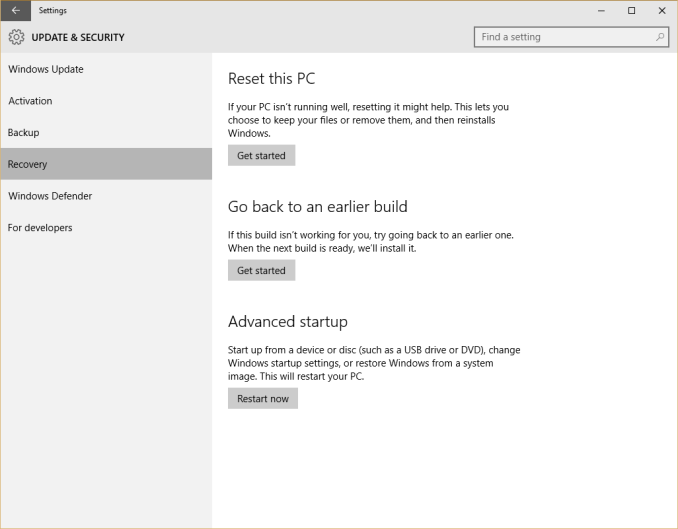
There’s not a lot else to be said, but he also said they are working on some more information to make this more clear. What it does mean is that in order to get the free upgrade, you need to upgrade from an eligible device, and once done, you can then blow that away and do a clean install. I guess we’re not sure yet if that means you can do a reset using the Windows Recovery tools, or if you can actually start with a new hard drive or ISO in order to do the clean install.
Hopefully we’ll get the final bit of clarification on this soon, but since this is one of the most asked questions that I have seen, I felt it was worth letting everyone know. | ||||||||||||||||||||||||||||||||||||||||||||||||||||||||||||||||||||||||||||||||||||||||||












| << Previous Day |
2015/06/02 [Calendar] |
Next Day >> |