[Most Recent Entries] [Calendar View]
Monday, June 8th, 2015
| Time | Event | |||||||||||||||||||||||||||
| 10:35a | FinalWire Releases AIDA64 For iOS and Windows Phone
To celebrate the twentieth anniversary of their AIDA64 software, FinalWire has released versions of the app for iOS and Windows Phone. AIDA64 has existed on Android for some time now, and the expansion to iOS and Windows Phone means that it's available on all of the major mobile platforms. At the moment, the app can display various information about a device's hardware and software. Most of it appears to be taken from the device itself, which means that there is some variance between what shows up on an iOS device and what shows up on Windows Phone. For example, the iOS version doesn't expose the different ISO and shutter speed settings used by the camera app.
Some other information appears to have been manually added based on what is known about a device but not exposed by the operating system. This seems to be more of the case on the iOS side, where Apple's A8 will report its microarchitecture as "Cyclone 2". In the case of A7, the process technology reports as 20nm, which appears to be a mistake, as A7 is actually fabbed on Samsung's 28nm process. I appreciate the fact that FinalWire has taken the time to design each app for its respective operating system instead of using the same interface across all of them. AIDA64 for iOS and Android is available now in each platform's respective store for apps. On iOS the app is free with ads, and a $1.99 option to remove ads can be purchased if desired. There don't appear to be any ads in the Windows Phone version yet. | |||||||||||||||||||||||||||
| 11:18a | Samsung Announces The Galaxy S6 Active
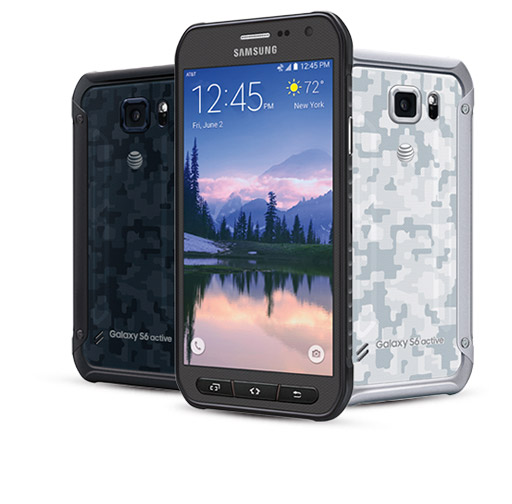
Today Samsung and AT&T announced the Galaxy S6 Active, a variant of the Galaxy S6 with a greater focus on durability and ruggedness. Releasing an Active version of their flagship Galaxy device has become a tradition for Samsung since the Galaxy S4, and it looks like this year is no exception. While it differs in its construction and design, I think people will find that its specifications are quite familiar. I've organized its specifications in the table below.
As far as its specifications go, the Galaxy S6 Active is effectively the same device as the normal Galaxy S6. It has the same 5.1" 2560x1440 AMOLED display, the same Exynos 7420 SoC, the same cameras, and the same connectivity. Where it differs are its dimensions, and subsequently, its battery capacity. While Samsung hasn't disclosed the size and mass of the Galaxy S6 Active, it's safe to say based on the photos that the rugged build makes it a larger device than the normal Galaxy S6. However, the larger size and greater thickness have allowed for a substantial increase in battery capacity. While the normal Galaxy S6 ships with a 9.81Wh battery and the S6 Edge with a 10.01Wh battery, the Galaxy S6 Active has a whopping 13.48Wh battery.
The biggest difference from the original Galaxy S6 with the Galaxy S6 Active is its design. The glass back of the Galaxy S6 is gone, and the entire device is surrounded by an additional frame to protect from damage. The single home button and capacitive keys have been replaced by three hardware buttons as well. It also appears that the fingerprint sensor has been removed in order to accommodate the hardware buttons. As a rugged device for an active lifestyle, the Galaxy S6 Active wouldn't be complete without resistance to water and dust. Its chassis has an IP68 rating for dust and water resistance, which guarantees protection when submerged in water as deep as 1.5 meters for up to 30 minutes. The Galaxy S6 Active also meets the Mil-STD-810G standard for resistance to pressure, temperature, humidity, shocks and vibrations. AT&T lists the Galaxy S6 Active as "Coming Soon", and customers will be able to purchase it on June 12. It will be available in camo white, camo blue, and grey finishes. On AT&T Next the Galaxy S6 Active will cost $0 up front, with a $695 cost split into monthly payments for a 20, 24, or 30 month term. | |||||||||||||||||||||||||||
| 12:35p | ADATA Displays XPG SX930 SSD, Two New TLC SSDs, Several PCIe Drives & USB Type-C Products
After a long week of meetings and over a day worth of traveling, I'm finally back from Taipei. Given our hectic schedule (it was just me and Ian at Computex this year), we didn't have time to report most of the things we saw last week, so it's now time to start going through all the new products we saw. First up is ADATA who had numerous new, interesting SSD products to show, including TLC, PCIe and USB 3.1 solutions.
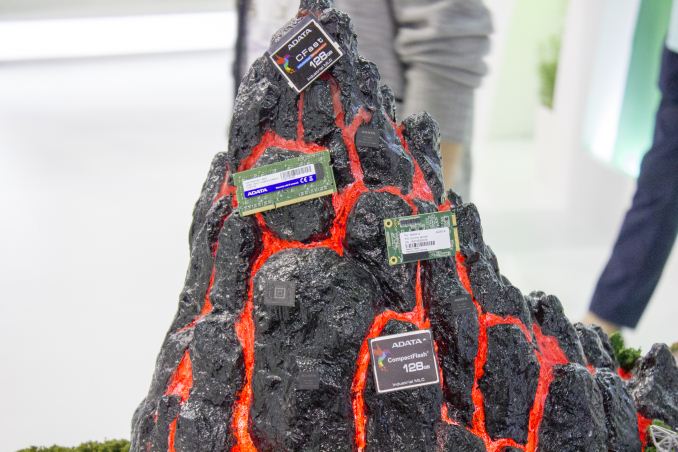
The first product ADATA had on display was the XPG SX930, which is ADATA's new high-end SATA SSD based on JMicron's latest JMF670H controller. If you remember our ADATA booth tour from last year's Computex, the SX930 was originally supposed to utilize SandForce's SF-3000 series controller in SATA 6Gbps mode, but as the SF-3000 keeps getting delayed (I heard it's scheduled for Q4'15 now) ADATA had to look for an alternative controller. JMicron actually sent me JMF670H reference design samples right before I left for Computex and based on my early benchmarking it seems to be a very potent controller. It's not a Samsung challenger, but it appears to offer a healthy upgrade over the JMF667H and be competitive against other controller on the market. We will have a review of the reference designs up in the next few weeks, so stay tuned for deeper performance analysis. In terms of NAND ADATA is using something the company refers to as MLC+. Basically it's just higher binned MLC NAND because ADATA does NAND binning in-house (which is in fact quite rare for a module house) and it enables the five-year warranty ADATA is offering for the SX930. I can't remember on top of my head whether ADATA is using Micron's 16nm or 20nm NAND, but I'll provide an update as soon as I know more. The SX930 will be available in the next couple of months in capacities of 120GB, 240GB and 480GB.
Aside from the technical aspects, ADATA is trying to revamp its XPG branding to be more appealing to gamers. The SX930 features a new flame logo that extends to the package design and the whole XPG branding now has a new 'Born to Battle' slogan. While I think most of our readers buy a drive based on its performance aspects rather than the design, I still think the new branding is a good move because gamers and other PC enthusiasts certainly care about the looks when building a desktop and ADATA's bird logo perhaps isn't the number one choice.
Moving on to TLC SSDs, ADATA didn't have just one, but two TLC SSDs on display. The first one is SP550, which uses Silicon Motion's SM2256 controller. The SM2256 is the successor to Silicon Motion's popular SM2246EN controller and it's the first commercially available controller platform with TLC NAND support. As a matter of fact Silicon Motion sent me reference design samples a while back and you can find some preliminary benchmarks in our Bench section, but I wanted to wait for shipping drives before doing a full review and drawing the final verdict.
ADATA's other TLC SSD is called SP560 and utilizes Marvell's 88SS1074 controller that is codenamed "Dean". Similar to the SM2256, the "Dean" also features LDPC error correction, which increases the endurance of TLC NAND by being able to fix a higher number of bit errors, although there is a slight negative impact on performance especially when the controller has to rely on software based LDPC for error correction. ADATA hasn't fully finalized the product specifications yet, but the company will be using 16nm TLC NAND from both Micron and SK Hynix. Micron just announced its 16nm TLC NAND last week and is already shipping to its partners, whereas SK Hynix hasn't made much noise about its 16nm NAND that is now available. The SP550 and SP560 will both be available in capacities of 240GB, 480GB and 960GB with shipping starting in the next few months. Pricing is TBA, but should be below ADATA's MLC drives, although I was told not to expect dramatic price cuts.
In addition to SATA 6Gbps drives, ADATA obviously had some upcoming PCIe SSDs to show. To be more specific, ADATA had two drives, of which both were based on Marvell silicon. The SR1020 will be aimed towards the enterprise and features Marvell's "Eldora" PCIe 3.0 x4 controller. Eldora's aim is to compete against the SF-3000 platform as it supports both AHCI and NVMe as well as LDPC error correction, similar to the SF-3000, but it's biggest advantage is the newer PCIe 3.0 interface with twice the available bandwidth. Again, the readers who read our ADATA booth tour a year ago might remember that the SR1020 was supposed to be based on SandForce SF-3739 controller, so it's starting to look like ADATA has switched solely to Marvell for high-end because of the constant delays of the SF-3000 platform. Live demo showing SR1020 at 3040MB/s sequential read The SR1020 will come in 2.5" form factor and use the SFF-8639 connector, which was actually officially renamed to U.2 by the Small Form Factor Working Group (SFFWG) last week. Given that SFF-8639 is gaining a lot of popularity due to it being the interface for 2.5" PCIe SSDs, it makes perfect sense to get rid of the number monster and move to U.2, which is more marketable and goes well with the existing M.2 spec.
As a more consumer-oriented drive, ADATA is offering a PCIe 3.0 x1 NVMe M.2 drive with Marvell's "Artemis 2" controller. The drive is so new that ADATA doesn't have a proper marketing name for it yet, but it's a DRAM-less design for improved cost efficiency. ADATA will specifically target the drive for mainstream users as a SATA replacement. In a live demo the drive reached 641.7MB/s sequential read, so it should still provide a decent upgrade over SATA 6Gbps and most importantly it will be price competitive. Exact availability is still a bit open, but ADATA will be launching full-scale PCIe SSD production in the second half of this year, so we will likely see the PCIe drives enter the market either in the fourth quarter or early next year.
For industrial applications ADATA demonstrated its nano coating technology by operating one of its industrial SSDs inside a block of ice (I even confirmed that it is real ice, not plastic).
ADATA also had a PCIe 3.0 x1 BGA SSD with a Marvell controller on display. It's obviously an industrial/OEM SSD, but it's pretty interesting that so much performance can be fit inside such a small package. I certainly hope high-end tablets will start adopting PCIe designs in the near future given that storage performance is still relatively poor in most devices, which is something that PCIe would fix.
Last but not least, ADATA had a whole lineup of USB Type-C products. The SE730 is ADATA's external SSD for USB 3.1 interface and Ganesh already has a sample, but we've been having some compatibility issues that have delayed the review.
ADATA also had a bunch of USB Type-C adapters, which I'm sure the MacBook owners will appreciate given Apple's pricing, although ADATA didn't reveal the prices yet. All in all, ADATA had a lot to show and I'm eagerly looking forward to getting my hands on some TLC and PCIe SSD samples. I also had a chance to sit down with Kevin Chen, ADATA's Vice President of SSD Marketing, so stay tuned for a more in-depth article of ADATA's SSD strategy in the coming weeks! | |||||||||||||||||||||||||||
| 1:45p | Apple Brings Apple Pay To The United Kingdom
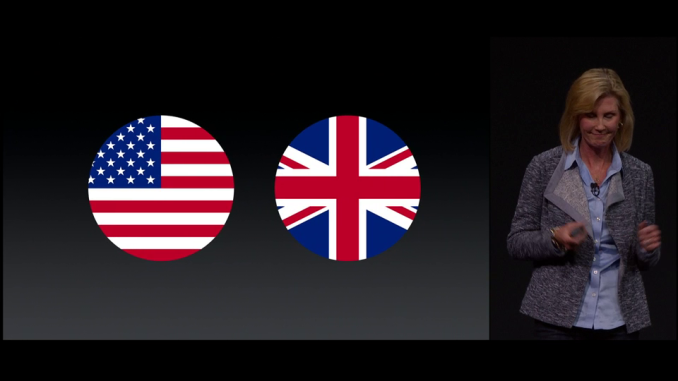
Today Apple announced that their Apple Pay service is coming to the United Kingdom in July. Apple Pay was launched in October of 2014, and was originally available only with credit and debit cards issued by banks in the United States. Bringing the service to the UK marks the first expansion of Apple Pay to another country. According to Apple, Apple Pay is launching with 8 major banks in the UK, and 70% of existing debit and credit cards will support it at launch. There will be over 250,000 locations in the UK that will support Apple Pay, with more to come in the future. A notable supporter will be the London Transportation System, with users being able to pay for transit fares using their phone. In addition to Apple Pay's expansion outside the United States, Apple also announced some improvements to the service that will be rolling out along with iOS 9. The Passbook app is being renamed to Wallet, and Apple is adding support for loyalty cards from retailers. | |||||||||||||||||||||||||||
| 2:43p | Apple Announces WatchOS 2
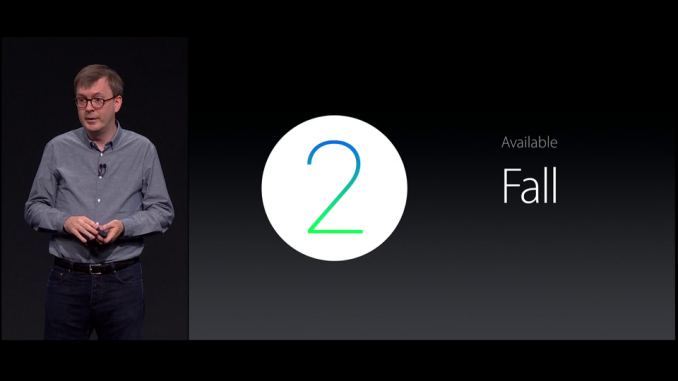
In addition to OS X El Capitan and iOS 9, Apple has announced an upcoming update to the WatchOS operating system that powers the Apple Watch. This will be the first major update to hit the Apple Watch since its launch in April, and it will be called WatchOS 2. During the WWDC keynote, Apple's VP of Technology Kevin Lynch highlighted a number of major improvements in the second iteration of WatchOS. The first improvement is the addition of new watch faces. A new Photo Face has been added, where users can set a personal photo as their background. There's also a photo gallery option, as well as a selection of timelapse watch faces that Apple has taken in cities and parks.
The next improvement in WatchOS 2 is a feature called Time Travel. This makes use of the digital crown, and it allows the user to move their watch face forward and backward in time to view information and events from the past or the future. This reminds me a lot of how the interface on the new Pebble Time is designed, but with a different implementation. Unfortunately, Apple hasn't yet found a way to make the forward in time function work with stocks. Next up are improvements to communication. WatchOS 2 enables FaceTime Audio support on the Apple Watch, so users can call other people with Macs, iPhones, iPads, and Apple Watches. Users can also reply to email using Siri for dictation, and they can use now use multiple colors in the drawings that they send to other Apple Watch users.
Since the Apple Watch will only last around a day, Apple has created a new clock mode for when the watch is laying on its side and charging. Essentially, this allows the watch to act as an alarm clock when it's charging. Hopefully Apple has considered the potential issues with persistently displaying a clock on an OLED display. Apple is also bringing WatchOS the improvements made in iOS 9. The new transit views and directions in the maps app are available, and the improvements to Apple Pay with the new Wallet app and loyalty card support will also be included.
The last, and possibly most important improvement in WatchOS 2 is the ability for developers to create native apps for Apple Watch. Apple Watch currently relies heavily on the iPhone that it's paired to. Although it has apps, the logic for those apps is run on the iPhone rather than the Apple Watch. This makes the Apple Watch something like a remote display into an app that is really running on your phone. With WatchOS 2, developers will be able to create apps that run natively on the Apple Watch. Apple is also giving developers significantly more access to the Apple Watch's hardware, with APIs for the microphone, the digital crown, WiFi, the taptic engine, and more. In order to put these new tools in the hands of developers as quickly as possible, Apple is making a developer beta of WatchOS 2 available today. Apple has moved quickly to include new features and enable native application support, and it's looks like WatchOS may be set on the same yearly upgrade cycle as iOS and OS X. WatchOS 2 will be available officially this fall. | |||||||||||||||||||||||||||
| 3:45p | Apple Announces OS X El Capitan
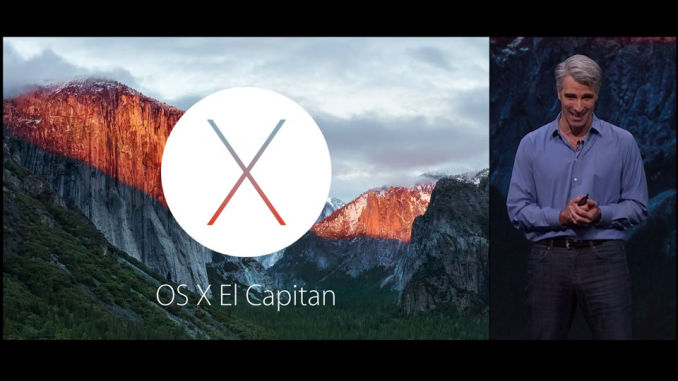
Today at WWDC Apple announced the next version of their OS X operating system. This next release, presumably version 10.11, is named OS X El Capitan. OS X Yosemite came with a comprehensive redesign which brought it in line with the new design principles that Apple introduced with iOS 7. The focus of El Capitan can be found in its name, which is a rock formation within Yosemite National Park. With Yosemite being the radical revamp, El Capitan focuses on improvements to the user experience and to performance.
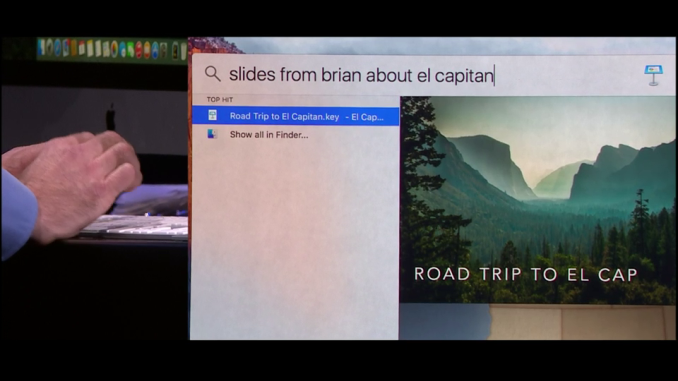
One of the areas that has seen dramatic improvements in El Capitan is Spotlight Search. In my experience, Spotlight has historically never been very smart. It was only with Yosemite that it gained the ability to search for keywords or phrases inside files. Even then, it was never able to bring up obvious results to certain queries that Siri would be able to do on the iPhone. For example, searching for the current weather would just try to find the phrase "current weather" somewhere on your Mac, which isn't useful at all. In El Capitan Apple is applying the search functionality of Siri to text searches done via spotlight. You can ask for information on the weather, or on the scores from a hockey game. You can also ask for very specific items, such as the query in the image above where Spotlight is used to find a set of Keynote slides about a natural park that were sent by a certain person.
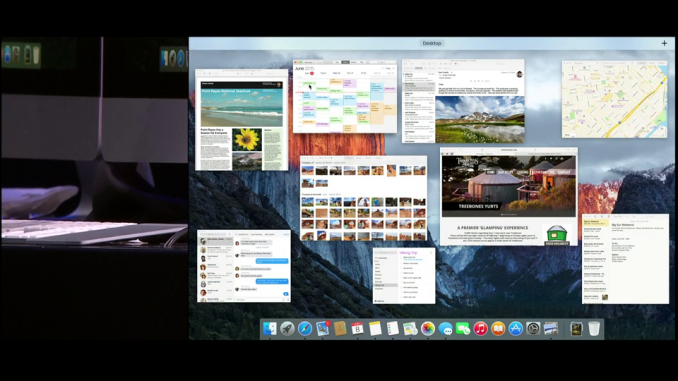
Mission Control sees a number of improvements as well. On the most basic level, there are a few changes to the interface. A blur effect is no longer applied to your wallpaper, and the bar at the top with your virtual desktops doesn't expand if you only have a single desktop at that moment, which gives more space for application windows. Apple has also added the ability to drag windows into the bar at the top to instantly put them into fullscreen mode.
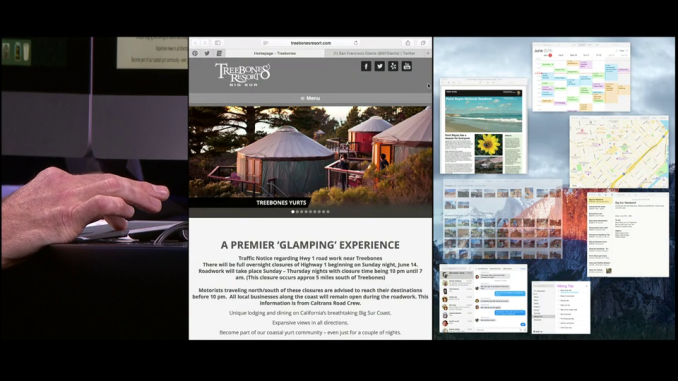
Application multitasking has also been improved. El Capitan has a new feature that essentially performs the same function as Aero Snap on Windows. Two apps or other parts of the interface can be set so they split the screen down the middle. This even works with parts of the OS like Mission Control which you can see in the photo above.
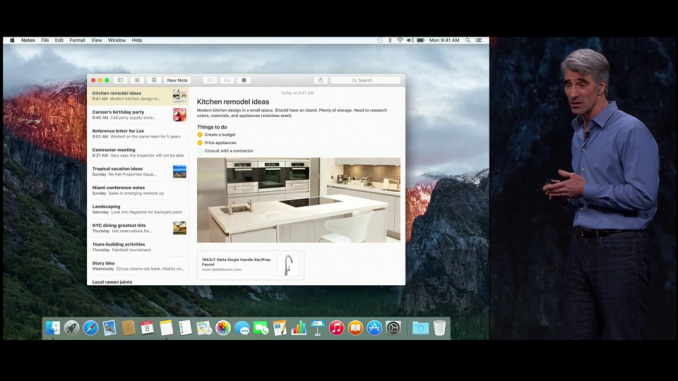
As usual, Apple has included a number of updates to their existing applications. Notes was definitely the app that saw the greatest amount of improvement. You can now embed photos and use rich type with the Notes app, which almost makes it like a very simple version of Pages, as you're no longer limited to just typing in text with the most basic of formatting abilities. Mail was another application that saw changes. You can now use trackpad gestures in the mailbox view to quickly mark or delete images. This is such an obvious feature, with the iOS version having had these abilities for some time now, and I'm surprised that it took this long to add it to OS X. Safari also received a couple of new features. You can now slide tabs to the left to pin them, which will keep them persistent even after restarting Safari or your computer. There are also indicators for which tabs are playing sound, which is something other browsers have had for some time now.
Of course, the biggest area of focus in El Capitan is performance. With the release of Yosemite it was clear that Apple needed to focus more on the performance of their OS after adding in visual effects that were taxing on the CPU and GPU. On my Retina MacBook Pro I saw considerable performance regressions compared to Mavericks, and even with OS X 10.10.3 many of those issues still remain. There are two areas of performance that need to be considered. The first is raw speed, while the second is the frame rate of animations. El Capitan tackles some of the issues with the first aspect, but Apple has definitely been focusing on the second aspect with their announcement that the Metal graphics API is coming to OS X. Both the Core Graphics and Core Animation APIs now run on Metal rather than OpenGL. According to Apple, they've seen up to a 50% in rendering performance with Metal, and this will hopefully translate to improved UI smoothness for users. The developer beta of OS X El Capitan is available today so developers can test their apps and try out new APIs. Like Yosemite, El Capitan will have a public beta beginning in July, and the final release will come this fall. | |||||||||||||||||||||||||||
| 4:50p | Apple Announces iOS 9 at WWDC
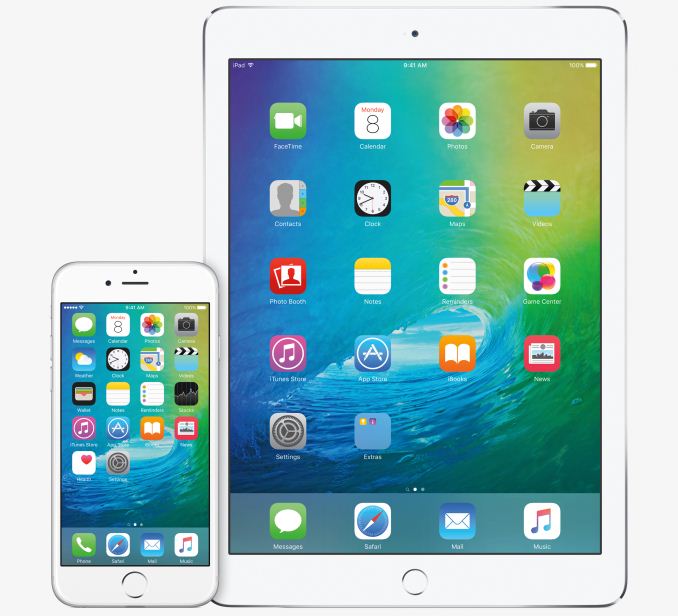
Today Apple has made a number of announcements relating to their three major operating systems. We've seen the announcement of WatchOS 2 for the Apple Watch, OS X El Capitan for Macs, and finally, iOS 9 for Apple's iPhones, iPods and iPads. With the ninth major iteration of their mobile operating system, Apple is bringing some long overdue improvements to features like Siri and Spotlight, improving performance on all devices, and revamping the experience for users on the iPad.
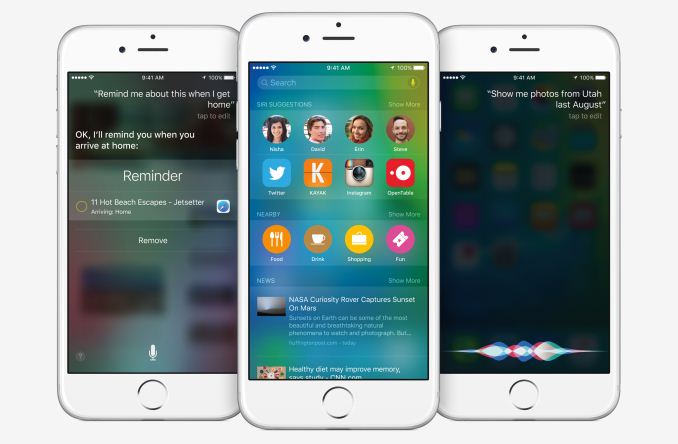
The first big change in iOS 9 that Apple introduced is a completely revamped Spotlight Search. This new screen was actually referred to as part of Siri during the keynote, and so it appears that the name Spotlight is now a thing of the past. Interesting enough, this new search screen is accessible by swiping to the right on your first home screen, which is how Spotlight was accessed up until iOS 7. The big improvement with the new search feature is how much smarter it is than Spotlight Search was. This mirrors the improvements made to Spotlight in OS X El Capitan, with users being able to make text searches for information that they could access via voice using Siri. As you can see above, information about sports scores and weather can be accessed by typing a single search term. These results appear on the same sort of cards that you see in Siri. In addition to search, this new screen can display relevant information in the same way that Google Now does. For example, it can show nearby restaurants and stores, and can suggest applications to launch or people to contact based on your daily routine. These improvements to search are definitely necessary to keep pace with Google. Many of the features mirror those that are available in Google Now, and even the interface of cards with information is very similar. However, Apple is quick to point out that they don't collect any identifiable information about the user when they use these new search features, and your search terms are never linked to your or your Apple ID.
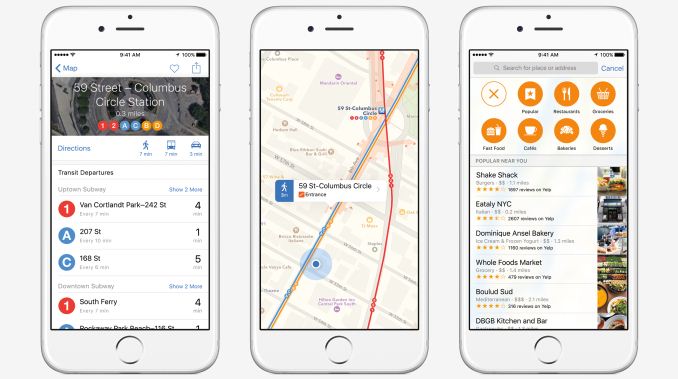
iOS 9 also brings significant improvements to Apple Maps. One of the most desired additions is maps and directions for transit. You will now be able to see maps of transit routes and get directions using public transportation in major cities. Apple also made note that there will be support for over 300 cities in China, which is another step in their efforts to expand in the Chinese market. Apple Maps in iOS 9 can also show you information about popular nearby stores. You can search by category, and can view detailed information about businesses such as their hours, their phone number, and whether or not they support Apple Pay.
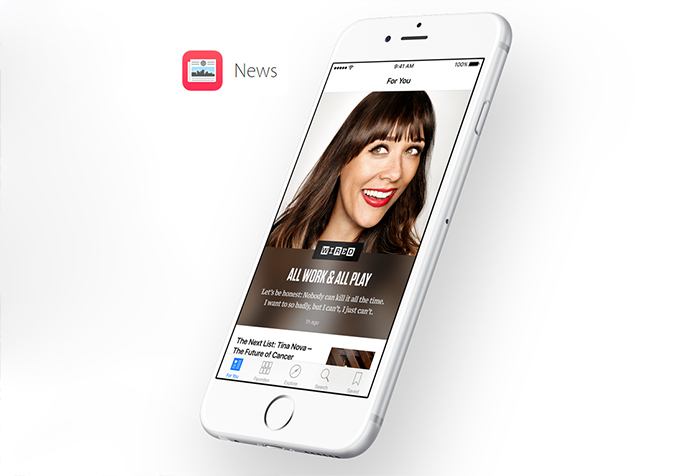
Newsstand has always been an annoyance on iOS. It never really took of, and after many years of users trying to hide it in folders or remove it entirely Apple is trying something new. The new News application in iOS 9 will bring a customizable news experience to users in the United States, United Kingdom, and Australia. The app looks very similar to Flipboard, but with a heavy focus on typography, animations, and images. It also doesn't appear that you'll be able to add any RSS feeds you want to the app, as publications in the News app need to be crafted using Apple's News Publisher program.
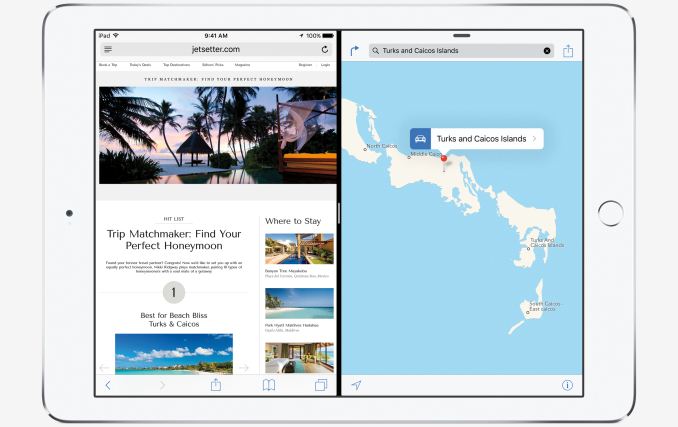
While Apple has made some nice improvements to iOS that will work across all devices, they've made some drastic improvements to the experience on the iPad. These upgrades are part of the new multitasking features in iOS 9. There's a new Split View mode, which you can see above. This mode allows you to use two applications side by side, with both of them functioning as they normally would. When you're using one app, you can still do touch input on the other. This feature will only be available on the iPad Air 2, most certainly due to its 2GB of RAM. It's not clear how it will work with legacy applications that are designed to only work at a given resolution, and we'll have to wait for future betas to find out for sure. In addition the Split View, Apple has a new Slide Over feature that allows you to temporarily slide one application overtop of another from the side. For example, you can slide the Messages application in from the right side while you're using Safari, respond to a message, and then slide away Messages to continue working in Safari. Apple also has a picture-in-picture mode where you can have videos playing in a window within another app. It can be resized and moved around, much like the video window feature in Google's Youtube app. These features will be available on all devices with Apple's A7, A8, and A8X chips.
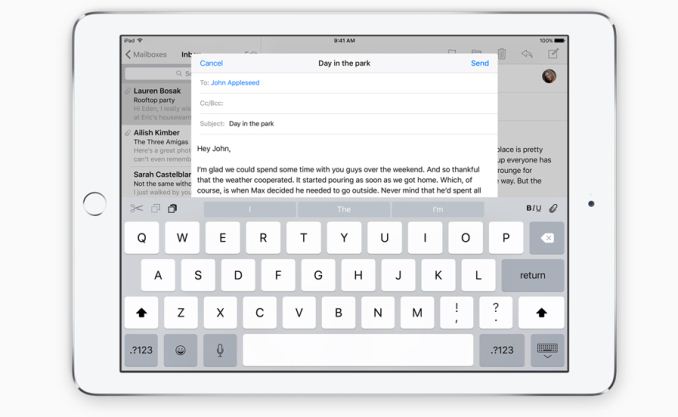
Along with the new multitasking features, the iPad keyboard receives some significant improvements in iOS 9 as well. Quick shortcuts have been added on the left and right sides in the suggestion bar, and you can now move across the keyboard with two fingers to use it as a trackpad. This allows you to move the cursor to select text without having to take your fingers off the virtual keyboard. On top of the new features and improvements to existing features in iOS 9, there are also significant improvements to performance and security. Many of the iOS graphics APIs, including Core Animation and Core Graphics, are now using Metal instead of OpenGL ES. This reduces CPU usage, and will improve the overall smoothness of the UI. Apple has also made improvements to power usage, and they claim that iPhone users will see battery life improve by up to an hour of usage. iOS OTA size has also been reduced from the ridiculous 4.58GB of the iOS 8 OTA update to just 1.3GB.
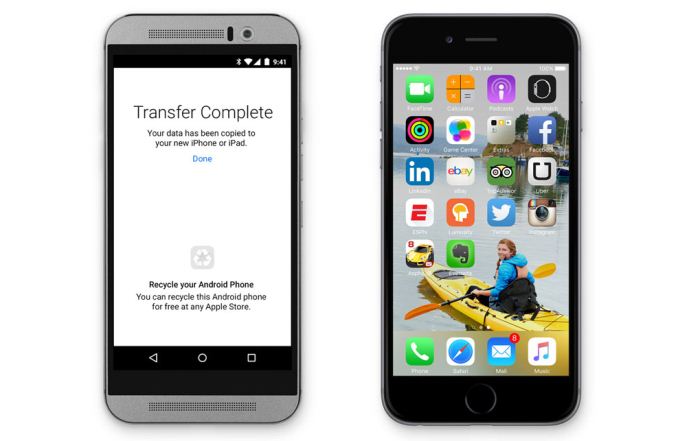
The last feature of iOS 9 is for users who are coming to the iOS platform from Android. It's a new app called Move to iOS, and it allows users to wireless transfer their data from an Android device to their iPhone. According to Apple, the app is able to move your contacts, message history, camera photos and videos, web bookmarks, mail accounts, calendars, wallpaper, and DRM-free songs and books. It will also recommend any free apps that you had installed on your Android phone so you can easily rebuild your app library. While iOS 9 doesn't seem as exciting on the surface as iOS 8, there's a number of changes under the hood that are sure to benefit users. iPad users definitely have a lot of improvements heading their way, although it's going to be disappointing for iPad Air and iPad Mini 2/3 users that they're unable to use the new multitasking features. iOS 9 will be launching alongside OS X El Capitan and WatchOS 2 in the fall of this year. Unlike previous releases where certain devices get dropped from support, iOS 9 supports every device that iOS 8 supported, which includes the Apple A5 based iPad 2 from 2011. A developer beta of iOS 9 is available now, and for the first time ever, Apple will be hosting a public beta which will begin in July. | |||||||||||||||||||||||||||
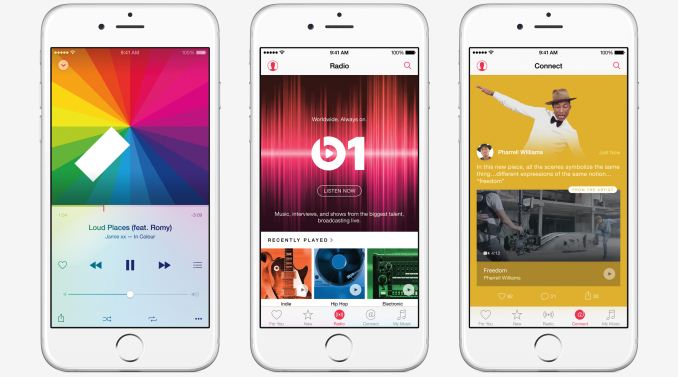
| 4:52p | Apple Unveils Apple Music; Coming to Mac, iOS, Windows, and Android
At the end of Apple's WWDC keynote the company revealed their brand new music streaming service, Apple Music. Apple Music is the successor to Apple's existing streaming music service, iTunes Radio, in effect building on top of the existing service with a number of additional features. The launch of the service has long been rumored ever since Apple purchased Beats and brought Jimmy Iovine into Apple along with it. The service will go live on June 30 for OS X, iOS, and Windows, and there will be three tiers. Though not widely promoted by Apple, the free tier is being held over from iTunes Radio, giving users the ability to view the Connect service, listen to Bears 1, and listen to Apple's curated radio stations with limited skipping. Otherwise the paid tiers are $9.99 for a single user, or $14.99 for a family of up to six users, and grant access to the rest of the service's features, including streaming rights to the entire iTunes music catalog, and unlimited skipping on the radio stations. Apple Music will also be available on Android later in the fall, though the free tier will not be available on Android. Finally, as an added kicker, Apple is offering the first 3 months of the service for free, though it does require signing up on an account set for auto-renewal. While Apple Music primarily acts as a competitor to other music streaming services like Spotify, it has a few features that may set it apart from other streaming services. As a radio service, Apple Music will provide recommended songs and playlists which are partially human curated, which they believe will give more relevant recommendations than those done solely by algorithms. Apple can also use your iTunes purchase history to examine what sort of music you enjoy, and base recommendations off of that. Meanwhile as a streaming music service, it allows on-demand streaming access to iTunes' music catalog, and this includes saving music for offline listening. Apple Music also has a feature called Connect, which allows music artists to interact with their fans. Connect can aggregate all of a musician's social media into a single feed, which will allow them to keep their fans updated with their future events and songs. Apple hasn't had much success in integrating social networks with iTunes and their music services, but since Connect integrates with existing services like Facebook and Twitter it has a much higher chance of success.
Apple is also launching a 24/7 radio station called Beats 1 which will feature a combination of news, interviews with musicians, and popular music. Based on the descriptions so far, I'd call the station vaguely similar to BBC Radio 1, especially given the mix of interviews and popular music. Though Apple is selling the benefits of Beats 1 to the public as a 24/7 manned radio station, I suspect it also offers some leverage for Apple, especially if it becomes a popular radio station. It's not clear how popular Apple Music will be with consumers. Apple can certainly leverage their brand and their existing music products, but with pricing in the hands of the industry it's not really possible for them to compete on cost. Users will likely end up choosing their music streaming service based on features and the user experience offered, and so it's up to Apple to provide a better experience if they want their service to take off. It's also not clear what the launch of Apple Music means for the Beats Music streaming service that Apple currently owns. | |||||||||||||||||||||||||||









| << Previous Day |
2015/06/08 [Calendar] |
Next Day >> |