[Most Recent Entries] [Calendar View]
Thursday, July 2nd, 2015
| Time | Event |
| 11:15a | The AMD Radeon R9 Fury X Review: Aiming For the Top Having launched last week and being reviewed today is AMD’s Radeon R9 Fury X, the company’s new flagship single-GPU video card. Featuring a fully enabled Fiji GPU, the R9 Fury X is AMD's new Fiji GPU at its finest, and a safe bet to be the grandest video card AMD releases built on TSMC’s 28nm process. Fiji is clocked high, cooled with overkill, and priced to go right up against the only GM200 GeForce card from NVIDIA that anyone cares about: the GeForce GTX 980 Ti. |
| 4:00p | Motherboards with DDR3L and DDR4: Biostar
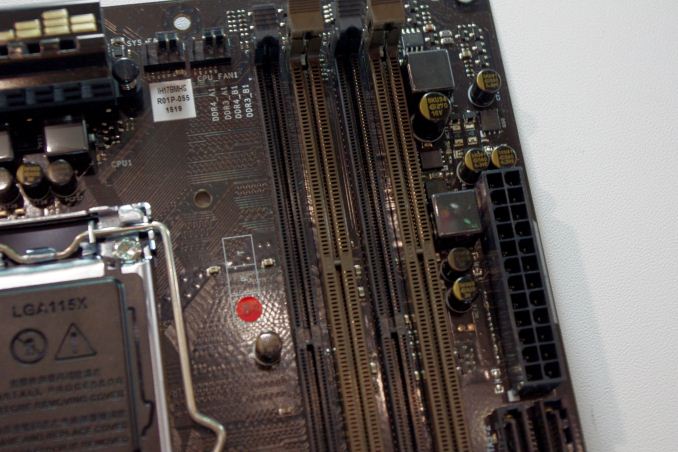
With Intel’s latest extreme platform, Haswell-E and X99, supporting DDR4, all fingers have been pointing towards the state of DDR4 support for the 100-series motherboards and Intel’s 6th generation of processors, Skylake. At Computex we saw a number of 100-series motherboards, although I want to point out a couple which showcase a little of the DRAM support we should expect. At the Biostar booth there was a H170 motherboard and a B150 motherboard that had clearly defined DDR3 and DDR4 memory slots:
The H170Z3 in show looks similar to a standard mATX motherboard using a single PCIe 3.0 x16, a couple of PCI slots, support for USB 3.0, SATA Express and M.2. It’s the DRAM slots with different spacing that act as the giveaway:
Note at the motherboard it states DDR3_A1 and DDR4_A1. Further questioning at the booth gave us two tidbits of information. Firstly, DDR3 is technically DDR3L, because the 1.35V requirement of DDR3L aligns better with the 1.2V (or 1.35V of high speed) DDR4 requirement. Regular DDR3 may work, though chances are it will not be tested. The other point of information was to be expected, because it mirrors that of the previous changeover – DDR3 and DDR4 cannot be used at the same time. As a result, this motherboard is essentially a one DIMM per channel design, but allows users an upgrade path if they already own DDR3L.
A full sized ATX-based B150Z5 with both DDR3 and DDR4 slots was also on show. It would seem (looking at the other motherboard manufacturers as well) that this type of hybrid design will not be on the Z170 series of motherboards, and is more resigned to the sub-$120 market. We would expect other manufacturers to come out with similar products as well. |
| 10:21p | You Might Not Get Windows 10 On July 29, But You Get A New Build Today
Another day, and another build of Windows 10 has been released to the fast ring. With Windows 10’s official release date of July 29th coming up very quickly now, Microsoft has shifted gears to bug fixes and polish. As I noted just yesterday, build 10158 and 10159 have made some big strides in stability and polish, and today’s build of 10162 is much the same. In fact, unlike all other builds so far, the blog post outlining the new build does not even list any new features other than bug fixes. The last couple of builds have all been to the fast ring. For those that don’t follow this as closely as I do, Windows 10 Insiders can choose whether to get fast builds or slow builds, and with the latest builds there is now an option to opt out of builds altogether as Microsoft prepares for the launch. The fast ring is more likely to have bugs, and the slow ring should be a bit more stable. Although not a strict policy, fast ring builds do not normally get released as ISOs either for a clean install, but slow ring builds do get ISOs. With 10162, Microsoft has released it to the fast ring but their internal testing shows that this is likely going to be a good candidate for the slow ring people. Assuming there are no glaring bugs discovered it should be released to slow soon. That should give them a lot more feedback as well, since there are now over five million people now in the Insider program. Microsoft also announced today their strategy to the initial Windows 10 upgrade cycle. With Windows 10 being officially released on July 29th, you may have assumed that everyone would get the software that day, but with over a billion devices running Windows, Microsoft is going to slow the rollout somewhat. First, very soon OEMs will receive Windows 10 so that they can prepare devices for sale. I had a chance to talk to Dell about how they are going about the process and they have been in a very active engagement with Microsoft with Windows 10 and have been working on having driver updates for all of their devices that were sold with Windows 7 or 8. They are also going to have some new launch devices with specific hardware to take advantage of new features of Windows 10 such as Windows Hello. So the OEMs are actively involved to make the transition as smooth as they can.
Next, Microsoft will provide a version of Windows 10 to retailers who will help customers perform the upgrade. Think Best Buy and the like. Quite a few PCs are being sold today that are “ready for Windows 10” and the customers may want to have it upgraded by the retailer.
On July 29th, Windows 10 will be released to Windows Insiders first. Yes, you get to be a beta tester again. Following that rollout, the PCs that have accepted the Windows 10 reservation popup that came through Windows Update will be updated in waves. But first, the upgrade process will do a scan of your system to notify you of any incompatible hardware or software. You will be able to continue with the upgrade even if there are incompatibilities in most cases, and the upgrade process will recommend different software from the Windows Store which you can replace it with. Finally, for business customers, Windows 10 Home and Pro will only be available on July 29th, and those that have access to the Enterprise version will be able to download it starting on August 1st which is ironically a Saturday, but I can’t imagine there are too many businesses that want to move to Windows 10 on day one. Looking at the calendar, the launch date is quickly approaching. It is less than four weeks now for one of the more pivotal releases of Windows in quite some time. Source: Windows Blog
|
| 10:45p | Windows 10 Editions Compared
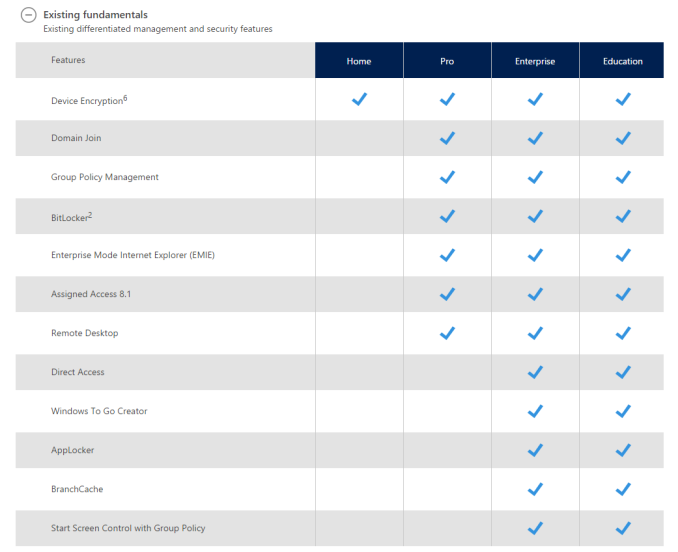
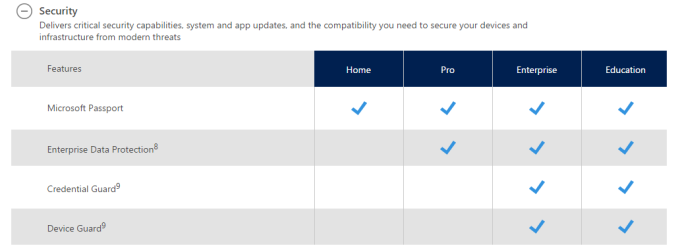
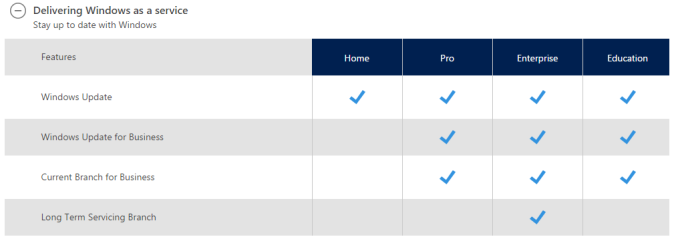
Today Microsoft has finally created tables outlining what the different versions of the operating system are going to feature. It was back in May that they finally announced all of the versions of Windows 10 that are coming, but the actual features of each version was still a mystery. We could of course take an educated guess based on history, but as of today there is finally a list of all of the features broken down by version. As a refresh, on the PC there are four basic versions. Home and Pro are the two that will be available for most people to purchase, and Enterprise is available to customers with volume licensing agreements. There is also an Education edition targeted towards that market.
As expected, Home has the fewest features available. Much like previous versions, there is no support to join an Active Directory domain, but that was not expected either. One thing that many users were hoping to see on Windows 10 Home is BitLocker support. BitLocker is Microsoft’s drive encryption suite, and Windows 10 Home does not have this unfortunately. There can still be encryption, but only as part of InstantGo, which was formerly known as Connected Standby. InstantGo is Connected Standby plus device encryption, and that is available to Home.
Windows 10 Pro keeps support for Remote Desktop, and it can of course join an Active Directory domain just as in prior versions. It also has access to the new Windows Update for Business service, but it must be kept on the Current Version branch.
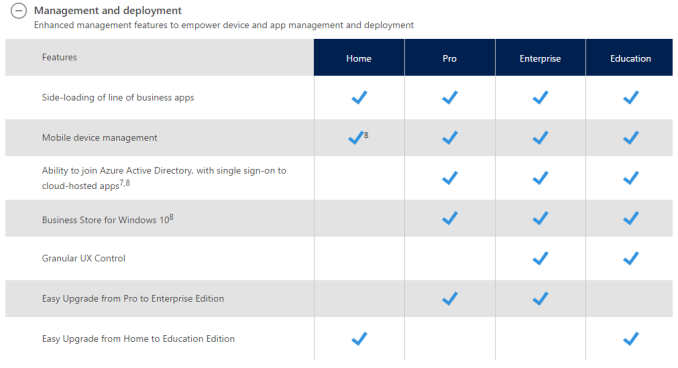
Enterprise and Education are very similar, and both offer practically the same feature set. The one big difference is that Enterprise customers can opt into the Long Term Servicing Branch whereas Education customers cannot. Pro, Enterprise, and Education also have access to the Business Store for Windows 10, and even the Home version supports side-loading of business apps. One thing that is nice to see is that all versions feature support for Mobile Device Management, although the Home version will not have this support initially and it will be added at a later time. |



| << Previous Day |
2015/07/02 [Calendar] |
Next Day >> |