[Most Recent Entries] [Calendar View]
Monday, August 3rd, 2015
- SanDisk Extreme 64GB
- Mushkin Atom 64GB
- Strontium Nitro Plus Nano 64GB
- Photos: 15.6 GB collection of 4320 photos (RAW as well as JPEGs) in 61 sub-folders
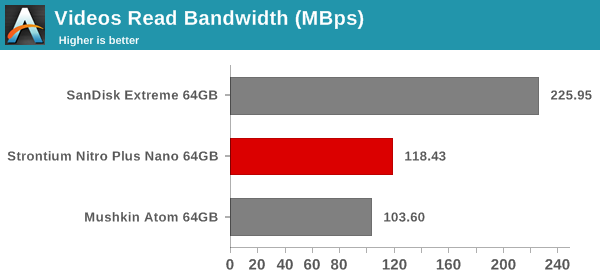
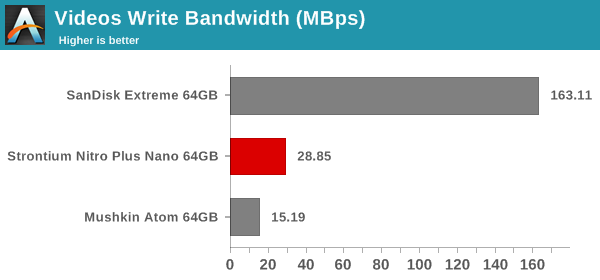
- Videos: 16.1 GB collection of 244 videos (MP4 as well as MOVs) in 6 sub-folders
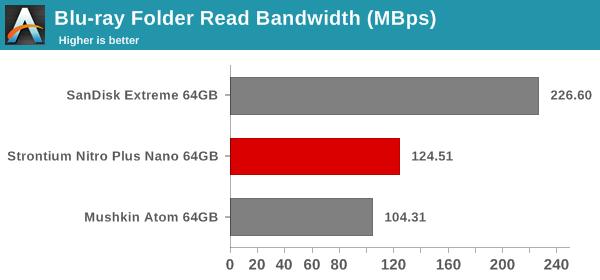
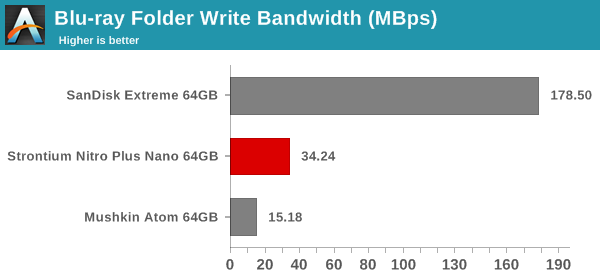
- BR: 10.7 GB Blu-ray folder structure of the IDT Benchmark Blu-ray (the same that we use in our robocopy tests for NAS systems)
- Adobe Photoshop (Light)
- Adobe Photoshop (Heavy)
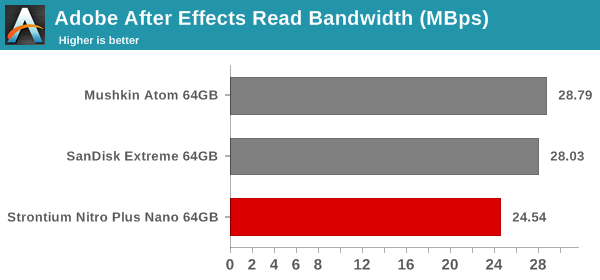
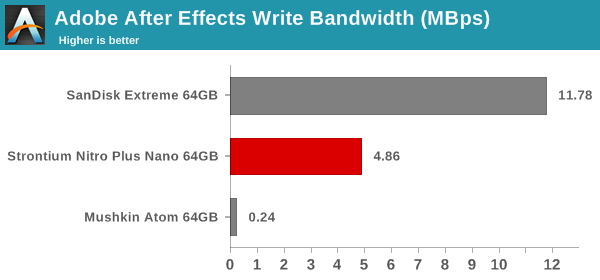
- Adobe After Effects
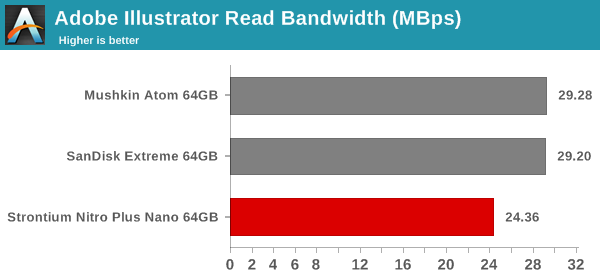
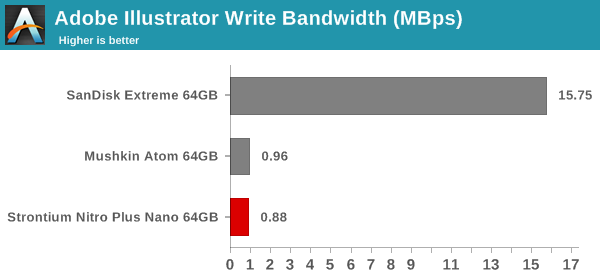
- Adobe Illustrator
| Time | Event | |||||||||||||||||||||||
| 8:00a | Lattice Announces First superMHL Chips: Sil8630 & Sil9396
Earlier this year at CES, the MHL Consortium announced the latest version of the Mobile High-Definition Link (MHL) standard, superMHL. The latest iteration on MHL, superMHL was introduced to further ramp up the amount of bandwidth available to MHL devices along with also integrating some of the latest display technologies. At the time of superMHL’s announcement the focus was on the high-end of the market – driving 8K TVs through the use of the 6 lane superMHL cable – however superMHL was designed to benefit the lower bandwidth segment of the market as well, and this is where Lattice Semiconductor is starting today, with the announcement of the first superMHL chips. Being announced today by Lattice (née Silicon Image) are the first transmitter and the first receiver to support superMHL, the Sil9396 and Sil8630 respectively. These two chips are small, one-lane chips intended to allow superMHL usage with mobile and PC devices in order to drive displays at up to 4Kp60, and will be the first use for superMHL.
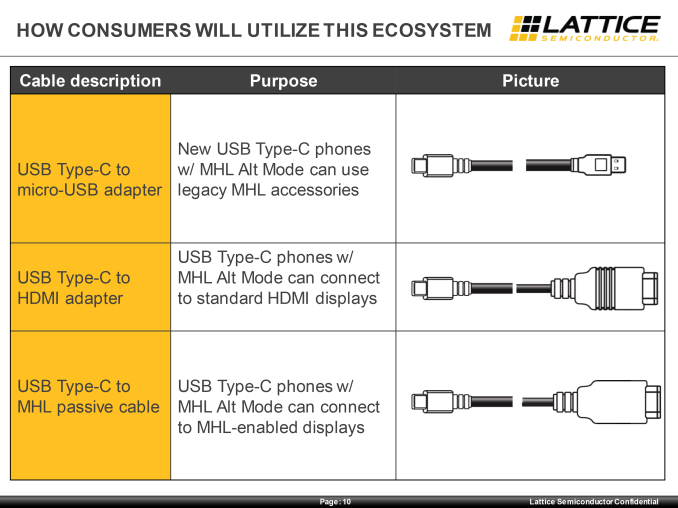
As previously announced alongside superMHL itself earlier this year, superMHL is available as a USB Type-C alt mode, and this is where Lattice is focusing their efforts for today’s mobile-centric products. With Type-C expected to quickly take over the market on both mobile devices and laptop PCs, it’s quickly become the port of choice for virtually every other standard that wants to move high speed data, and superMHL is no exception. What results is an impressive (and dizzying) array of connectivity options, as superMHL can interface with a number of different display types.
That said, the two mobile superMHL combinations that are most likely to actually be seen in the wild are Type-C to HDMI active and Type-C to MHL (i.e. HDMI passive). The difference between the two is that as with previous generations of MHL technology, superMHL can be carried into a TV that supports the protocol over an HDMI port, allowing the use of a straight-through passive cable. Otherwise superMHL can be actively converted via a chip such as the Sil9396 in an HDMI cable, allowing a superMHL device to interface with an HDMI-only display. In both cases superMHL offers the equivalent of HDMI 2.0, including HDCP 2.2 support and the annexes for improved color spaces and HDR. What Lattice and the MHL Consortium is hoping to do right now in what is a crowded market for display connectivity standards is to have superMHL stand apart from the other standards by the combination of legacy MHL support, USB Type-C support, and the fact that it can work over a single high-speed lane. Legacy MHL support in this context is rather straightforward, as it means superMHL devices can directly transmit to existing MHL receivers by downgrading the protocol, retaining MHL’s power changing abilities in the process. Otherwise HDMI of course can’t be natively passed over Type-C, and DisplayPort requires multiple lanes for 4Kp60 – 4 for DP 1.2, and 2 for DP 1.3 if a display supports the reduced blanking timings. This leaves further lanes open for USB 3.x Superspeed data, meaning that superMHL can drive a 4Kp60 display and carry a full USB Superspeed data connection at the same time. Though as Superspeed requires 2 lanes per connection, we’re not aware of any scenario for USB where a third lane is any better than having just two lanes, though superMHL would still leave the last lane open for something else.
Meanwhile, along with today’s announcement of the first transmitter/receiver pair, we’ve also learned a few more technical details about the superMHL protocol. superMHL operates at 6Gbps per lane, using lossy compression in order to pack 4Kp60 into that limited amount of bandwidth. So for 4Kp60 we’re looking at around 3:1 compression on the image side. DisplayPort 1.3 by contrast takes up an additional lane to deliver 4k60, but it doesn’t require image compression. Alternatively compression is in the works via Display Stream Compression, but the DisplayPort 1.3 standard has not yet been updated to include it. Finally, along with announcing their first superMHL transmitters/receivers today, Lattice is also announcing that engineering samples for the Sil8630 and Sil9396 are now available. It will still be some time before these chips will appear in retail products, but it means that OEMs can now being testing them and building designs that ingrate these chips. | |||||||||||||||||||||||
| 8:00a | The Intel Broadwell Review Part 2: Overclocking, IPC and Generational Analysis In our first part of our Broadwell coverage, we rushed to test both the i7-5775C and the i5-5765C in our new benchmarking suite against the previous generation of Haswell processors as well as AMDs Kaveri lineup. In Part 2, we have spent more time with the architecture to see how it stacks up against the last four years of Intel, as well as probing the high end overclocking capabilities. | |||||||||||||||||||||||
| 2:00p | Strontium Nitro Plus Nano USB 3.0 64GB Flash Drive Capsule Review
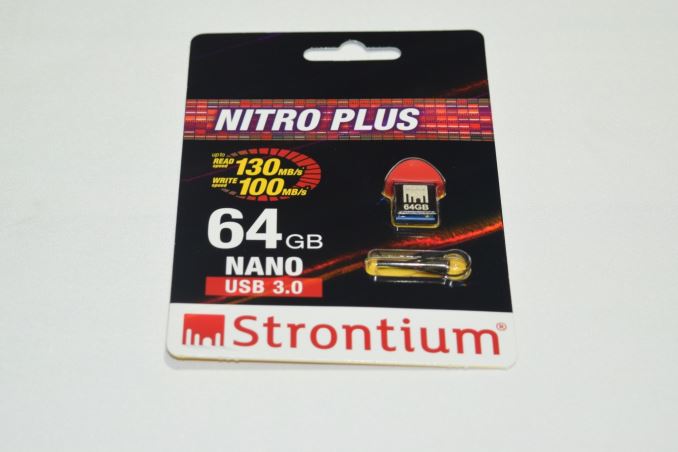
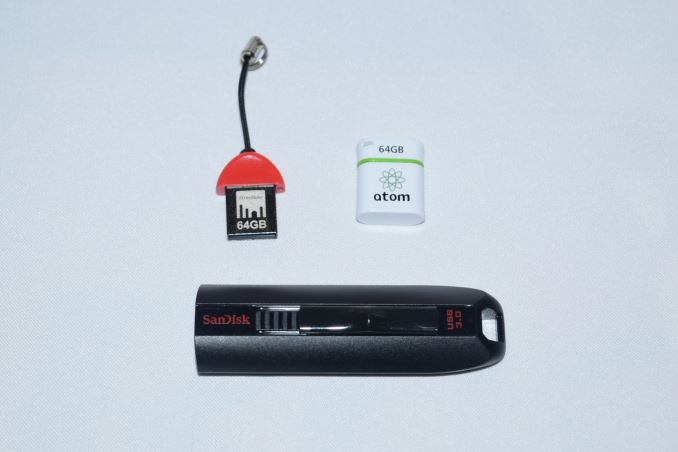
Flash drives are a dime a dozen these days, and most of them carry uninteresting specifications. In particular, flash drives advertising smaller physical footprints have tended to carry disappointing performance numbers. We were surprised when Strontium sent us their announcement of the Nitro Plus Nano USB 3.0 flash drive with 100 MBps+ read speeds. We had reviewed the Mushkin Atom 64GB flash drive with a similar form factor, and the numbers claimed by Strontium were quite a bit more than what we managed to get with the Mushkin Atom. Intrigued by Strontium's performance claims, we got a sample in for further evaluation. High-performance flash drives have traditionally employed a SATA SSD controller behind a USB 3.0 - SATA bridge. However, this increases the drive cost in what is essentially a price-sensitive market. Vendors have recently begun to introduce native high-performance USB 3.0 flash controllers, and the Strontium Nitro Plus Nano sports one such controller. The list of flash drives used for comparison purposes is provided below: Hardware Design and InternalsIn terms of external design and features, the Strontium Nitro Plus Nano USB 3.0 drive is small and discreet. A red cap that protrudes 8mm from the USB slot and has a total width of only 16mm ensures that the unit can fit in easily even in the ill-placed / oriented USB ports. A small hole at the top accommodates the bundled thread that enables hanging the flash drive off a keychain. As we can see from the photograph below, the Strontium Nitro Plus Nano USB 3.0 is one of the smallest flash drives that we have evaluated in its capacity class.
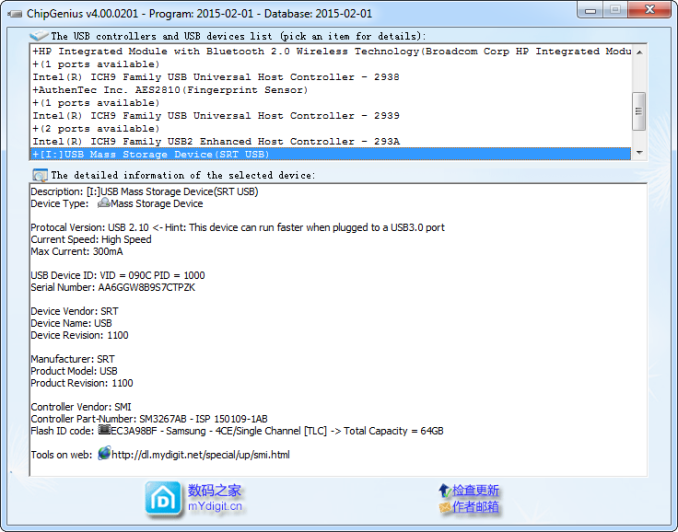
Without opening up the unit, it is possible to identify the controller and flash inside the unit.
The controller is the Silicon Motion SM3267 single-channel USB 3.0 controller. This appears to be an ideal controller for low-cost flash drives with a small physical footprint because it reduces BOM (bill-of-materials) cost as well as PCB area by integrating the required power IC and crystal oscillator. Depending on the flash memory used, Silicon Motion claims performance of up to 160 MBps reads. Strontium has gone in for Samsung TLC NAND in the flash drive. This must be compared to the Phison PS2251-07 used along with Toshiba TLC NAND in the Mushkin Atom 64GB drive. Testbed Setup and Testing MethodologyEvaluation of DAS units on Windows is done with the testbed outlined in the table below. For devices with USB 3.0 connections (such as the Strontium Nitro Plus Nano that we are considering today), we utilize the USB 3.0 port directly hanging off the PCH.
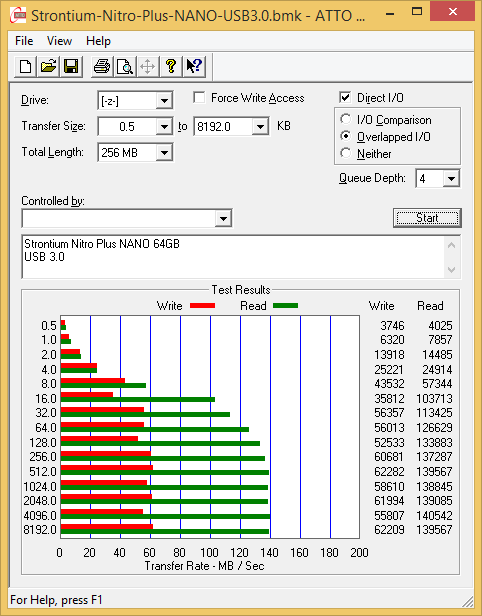
The full details of the reasoning behind choosing the above build components can be found here. Synthetic Benchmarks - ATTO and Crystal DiskMarkStrontium claims read and write speeds of 130 MBps and 100 MBps respectively, and the read number is backed up by the ATTO benchmarks provided below. Writes only seem to go up to 60 MBps with our standard testing queue depth. Unfortunately, these access traces are not very common in real-life scenarios. <select ... ><option ... >Strontium Nitro Plus Nano 64GB</option><option ... >Mushkin Atom 64GB</option><option ... >SanDisk Extreme 64GB</option> </select>
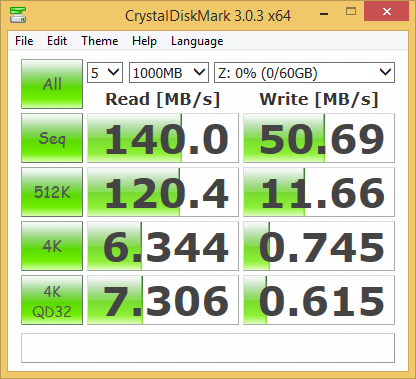
CrystalDiskMark, despite being a canned benchmark, provides a better estimate of the performance range with a selected set of numbers. As evident from the screenshot below, the performance can dip to as low as 0.615 MBps for random 4K writes. <select ... ><option ... >Strontium Nitro Plus Nano 64GB</option><option ... >Mushkin Atom 64GB</option><option ... >SanDisk Extreme 64GB</option> </select>
Benchmarks - robocopy and PCMark 8 Storage BenchOur testing methodology for DAS units also takes into consideration the usual use-case for such devices. The most common usage scenario is transfer of large amounts of photos and videos to and from the unit. The minor usage scenario is importing files directly off the DAS into a multimedia editing program such as Adobe Photoshop. In order to tackle the first use-case, we created three test folders with the following characteristics:
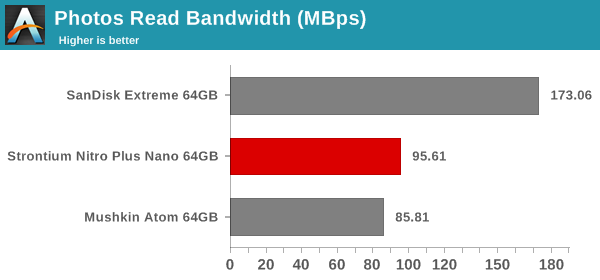
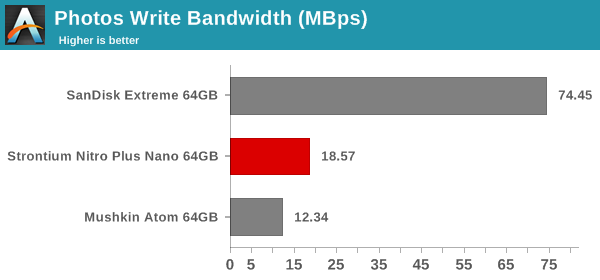
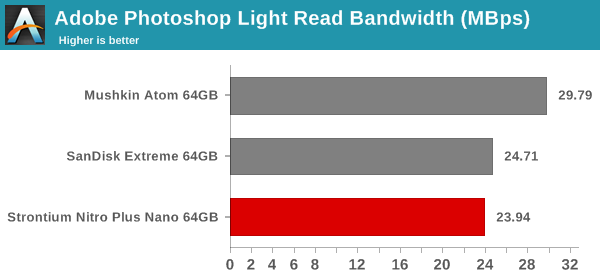
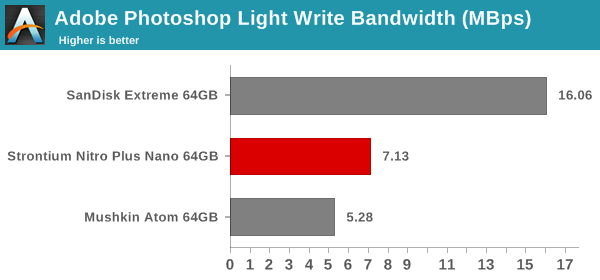
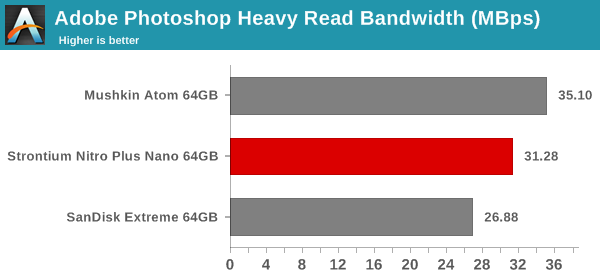
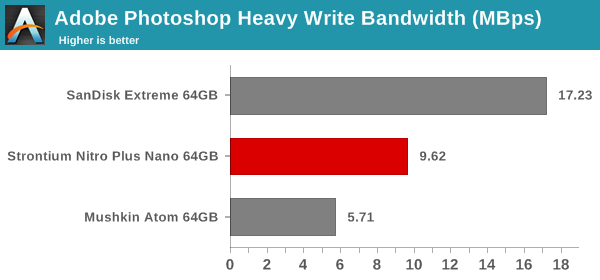
For the second use-case, we take advantage of PC Mark 8's storage bench. The storage workload involves games as well as multimedia editing applications. The command line version allows us to cherry-pick storage traces to run on a target drive. We chose the following traces. Usually, PC Mark 8 reports time to complete the trace, but the detailed log report has the read and write bandwidth figures which we present in our performance graphs. Note that the bandwidth number reported in the results don't involve idle time compression. Results might appear low, but that is part of the workload characteristic. Note that the same testbed is being used for all DAS units. Therefore, comparing the numbers for each trace should be possible across different DAS units. In any case, the PCMark 8 storage workloads are hardly the type of traces that would ever run on drives such as the Nitro Plus Nano. In general, these results show that the Stronitum drive performs better than the Mushkin one in most relevant benchmarks. The Mushkin is the only one that can be used for apples-to-apples comparison, since the SanDisk drive employs a SATA controller behind a USB 3.0 - SATA bridge, and has a much bigger physical footprint.
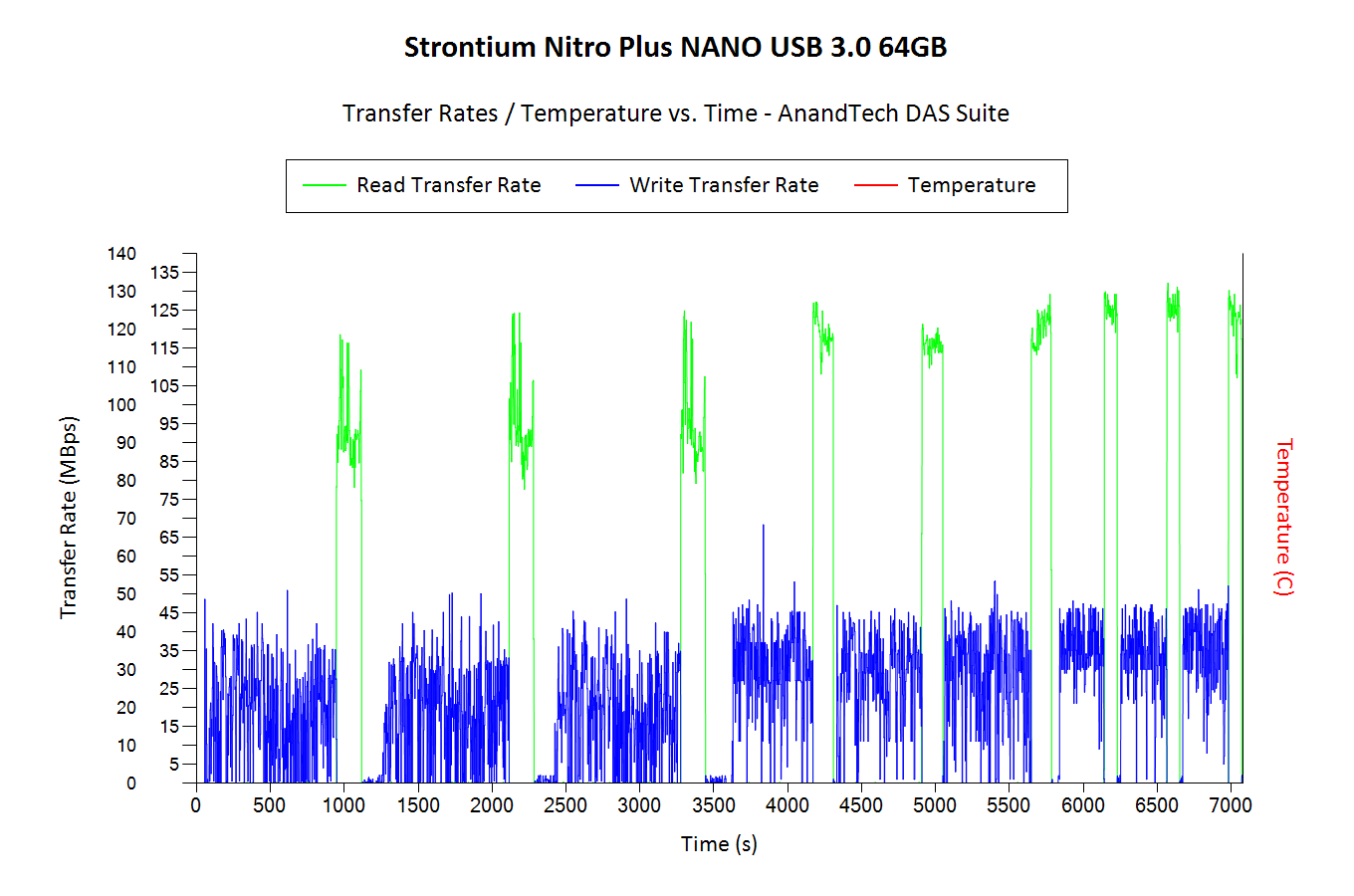
Performance ConsistencyYet another interesting aspect of these types of units is performance consistency. Aspects that may influence this include thermal throttling and firmware caps on access rates to avoid overheating or other similar scenarios. This aspect is an important one, as the last thing that users want to see when copying over, say, 50 GB of data from the flash drive, is the transfer rate going to USB 2.0 speeds. In order to identify whether the drive under test suffers from this problem, we instrumented our robocopy DAS benchmark suite to record the flash drive's read and write transfer rates while the robocopy process took place in the background. For supported drives, we also recorded the internal temperature of the drive during the process. The Strontium unit, however, doesn't expose the temperature over the USB interface. The graphs below show the speeds observed during our real-world DAS suite processing. The first three sets of writes and reads correspond to the photos suite. A small gap (for the transfer of the videos suite from the primary drive to the RAM drive) is followed by three sets for the next data set. Another small RAM-drive transfer gap is followed by three sets for the Blu-ray folder. An important point to note here is that each of the first three blue and green areas correspond to 15.6 GB of writes and reads respectively. Throttling, if any, is apparent within the processing of the photos suite itself. <select ... ><option ... >Strontium Nitro Plus Nano 64GB</option><option ... >Mushkin Atom 64GB</option><option ... >SanDisk Extreme 64GB</option> </select>
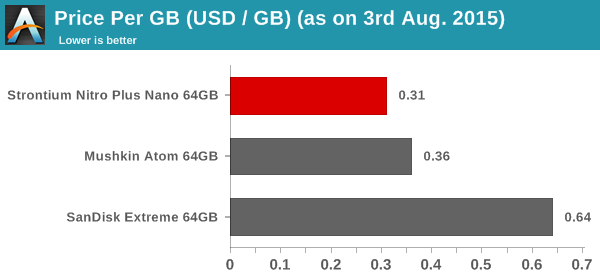
Despite the small size, the Strontium unit has not problems with sustaining the expected transfer rates and there seems to be no thermal throttling at play. The write rates are quite disappointing for small-sized files, but, that is to be expected given the nature of the device. Concluding RemarksThe performance of the drive is impressive when one considers the size of the unit. Obviously, the numbers are not going to be similar to what a real SSD controller with multiple flash chips can give us. This brings us to the most important aspect in this particular market niche - the pricing. As per the press release, the Strontium Nitro Plus Nano USB 3.0 64GB drive is expected to cost $20.
The Strontium unit manages to beat the Mushkin Atom in both pricing and performance numbers for real-life workloads. In addition, Windows reports an usable capacity of 60.44 GB with the Strontium unit, while the Mushkin one comes in at 57.70 GB only. When it comes to packing a punch in the smallest possible form factor for a USB 3.0 flash drive, the Strontium Nitro Plus Nano USB 3.0 is the king of the hill right now. Pretty much the only complaint that could be made against the unit is the absence of a protective covering for the USB connector. | |||||||||||||||||||||||


| << Previous Day |
2015/08/03 [Calendar] |
Next Day >> |