[Most Recent Entries] [Calendar View]
Monday, August 31st, 2015
- Corsair Voyager GS 512GB
- Corsair Voyager GTX v2 256GB
- Corsair Voyager GTX 256GB
- LaCie Rugged Thunderbolt 500GB
- Patriot Supersonic Rage 2 256GB
- VisionTek Pocket SSD 240GB
- Photos: 15.6 GB collection of 4320 photos (RAW as well as JPEGs) in 61 sub-folders
- Videos: 16.1 GB collection of 244 videos (MP4 as well as MOVs) in 6 sub-folders
- BR: 10.7 GB Blu-ray folder structure of the IDT Benchmark Blu-ray (the same that we use in our robocopy tests for NAS systems)
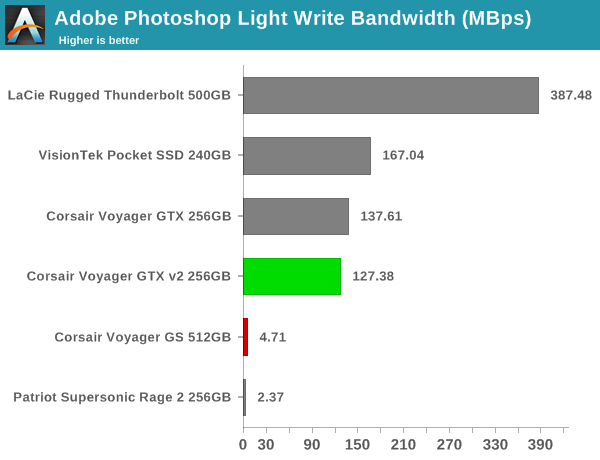
- Adobe Photoshop (Light)
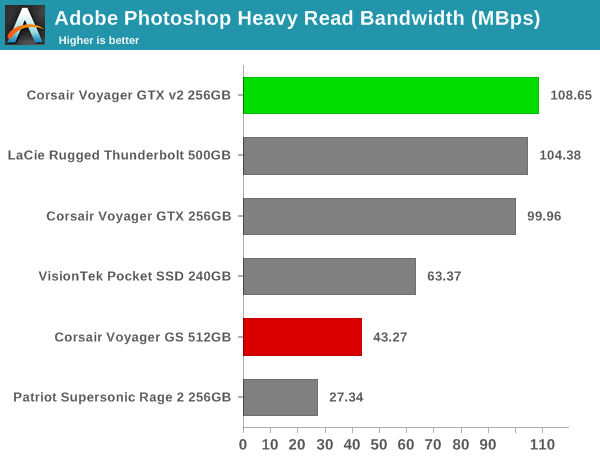
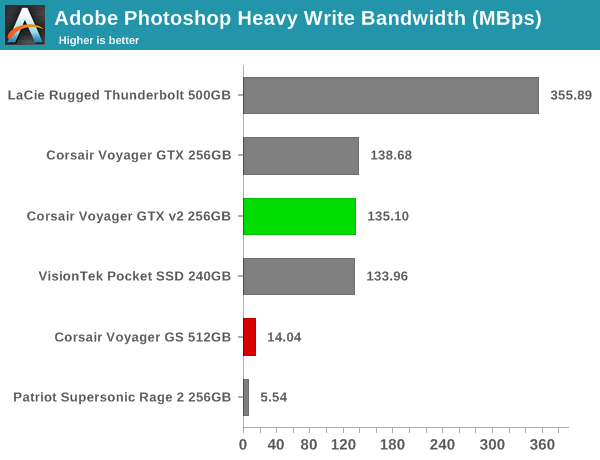
- Adobe Photoshop (Heavy)
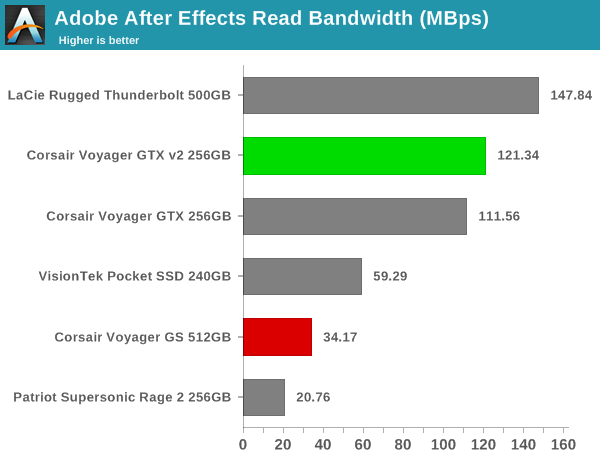
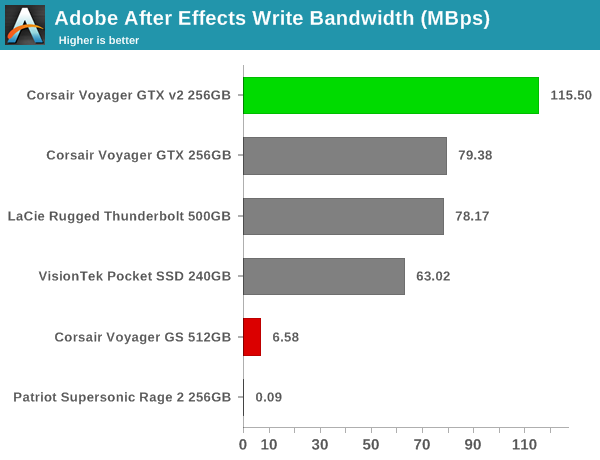
- Adobe After Effects
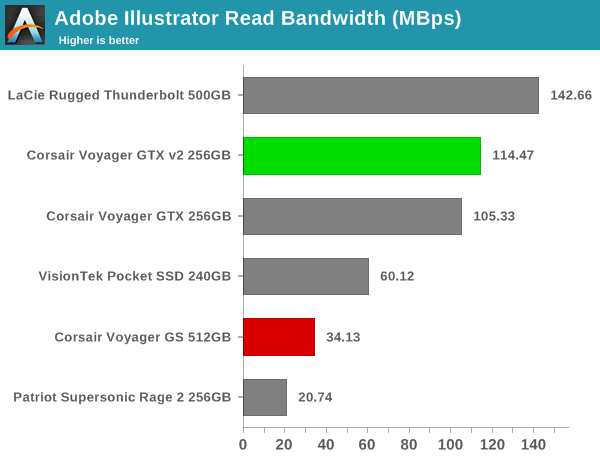
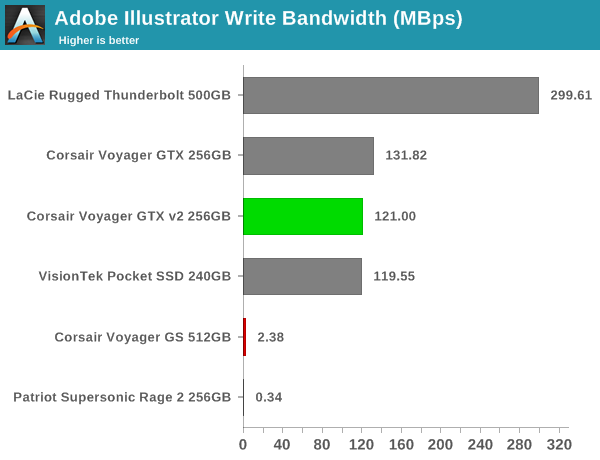
- Adobe Illustrator
- Dr Ian Cutress, Host, Senior Editor (@IanCutress)
- Brett Howse, Editor for Laptops (@BrettHowse)
| Time | Event | |||||||||||||||||||||||||||
| 7:45a | Corsair Flash Voyager GS USB 3.0 512GB Flash Drive Capsule Review
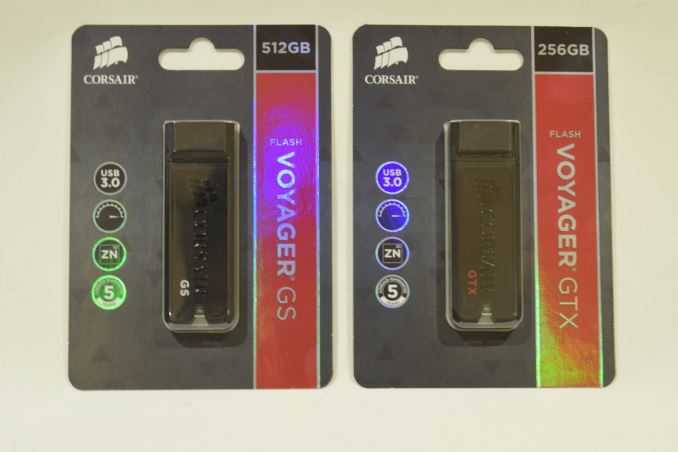
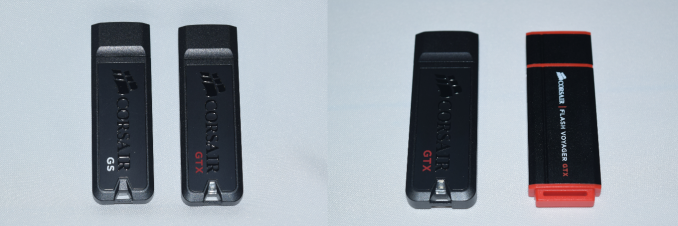
The ubiquity of USB 3.0 as a high speed interface for PCs and the increasing affordability of flash memory has led to some very interesting products. USB flash drives are a dime a dozen, but there is scope for manufacturers to differentiate themselves. High-performance flash drives have traditionally employed a SATA SSD controller behind a USB 3.0 - SATA bridge. However, this increases the drive cost in what is essentially a price-sensitive market. Controller vendors have recently started to introduce native high-performance USB 3.0 flash controllers. Today, we look at two products from the Corsair stable - the Flash Voyager GTX and the Flash Voyager GS. While the GTX is the high performance play (topping out at 256GB), the GS is more of a capacity play (the top end version has 512GB of flash memory). Corsair is one of the very few vendors to have a 512GB thumb drive in their product portfolio. In fact, the only other vendor with a 512GB flash drive is Kingston (I am not considering SSDs in an external enclosure like the Samsung Portable T1). This makes the Flash Voyager GS one of the unique products in the market right now. Users looking at the currently available Flash Voyager GTX will find that the same casing is used for the Flash Voyager GS also. The Flash Voyager GTX 256GB was one of the earliest flash drives that we evaluated with the new methodology. Since then, Corsair has changed the casing while retaining the same internals and model name / number. In addition to evaluating the performance of the Voyager GS, we will also be looking at the new Voyager GTX (referred to as Voyager GTX v2 hereon). Hardware Design and InternalsThe housings of both the Corsair Flash Voyager GS and GTX are made of a zinc alloy with aluminium accents. There is a small loop at one end for attaching to a keyring. An activity LED is also near the loop. While the previous generation Corsair Voyager GTX's external design was not as stylish, it at least allowed the protective cap to be securely placed at the other end during active usage. This is not possible in the current housing design. The photographs below show the Corsair Voyager GS and GTX v2 as well as the the old and new Voyager GTX versions side by side.
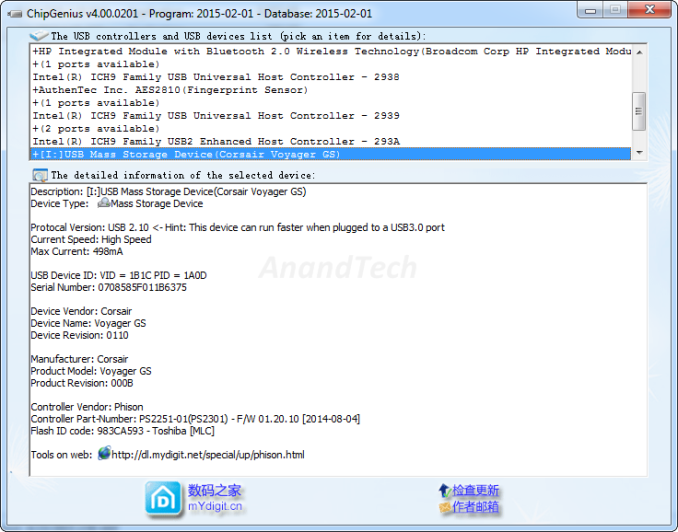
We already know from our previous review that the Voyager GTX comes with the Phison S9 SSD controller behind a USB 3.0 - SATA bridge. The Voyager GS is a native USB 3.0 flash drive, and the internals (Phison PS2251-01 with Toshiba MLC flash) could be determined without looking at the unit.
Testbed Setup and Testing MethodologyEvaluation of DAS units on Windows is done with the testbed outlined in the table below. For devices with USB 3.0 connections (such as the Corsair Voyager GS and GTX that we are considering today), we utilize the USB 3.0 port directly hanging off the PCH.
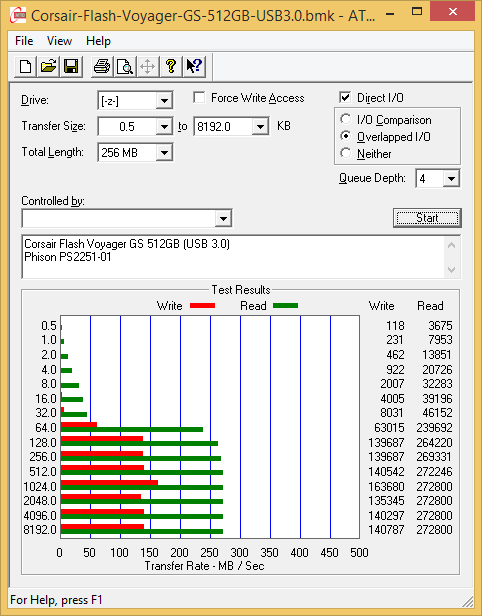
The full details of the reasoning behind choosing the above build components can be found here. The list of DAS units used for comparison purposes is provided below. Synthetic Benchmarks - ATTO and Crystal DiskMarkCorsair claims read and write speeds of around 290 MBps for the Voyager GS. ATTO reports only around 160 MBps for writes and 270 MBps for reads with our standard test settings. For the GTX v2, the results are in the same ballpark as that of the original GTX (around 375 MBps writes and 460 MBps reads). <select ... ><option ... >Corsair Voyager GS 512GB</option><option ... >Corsair Voyager GTX v2 256GB</option><option ... >Corsair Voyager GTX 256GB</option><option ... >LaCie Rugged Thunderbolt 500GB</option><option ... >Patriot Supersonic Rage 2 256GB</option><option ... >VisionTek Pocket SSD 240GB</option> </select>
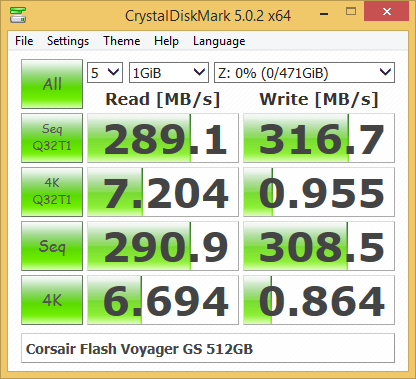
CrystalDiskMark, despite being a canned benchmark, provides a better estimate of the performance range with a selected set of numbers. These numbers seem to back up Corsair's performance claims. As evident from the screenshot below, the performance can dip to as low as 0.8 MBps for 4K random accesses at low queue depths for the Voyager GS. For the GTX v2 / GTX, these tests show around 400 MBps reads and 180 MBps writes - the two versions don't differ much in the artificial benchmarks, as expected. <select ... ><option ... >Corsair Voyager GS 512GB</option><option ... >Corsair Voyager GTX v2 256GB</option><option ... >Corsair Voyager GTX 256GB</option><option ... >LaCie Rugged Thunderbolt 500GB</option><option ... >Patriot Supersonic Rage 2 256GB</option><option ... >VisionTek Pocket SSD 240GB</option> </select>
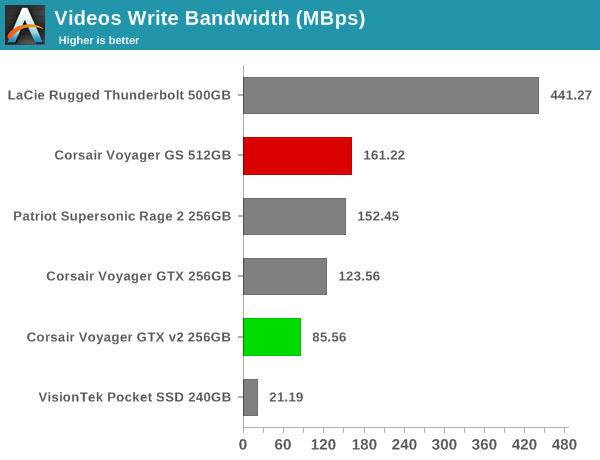
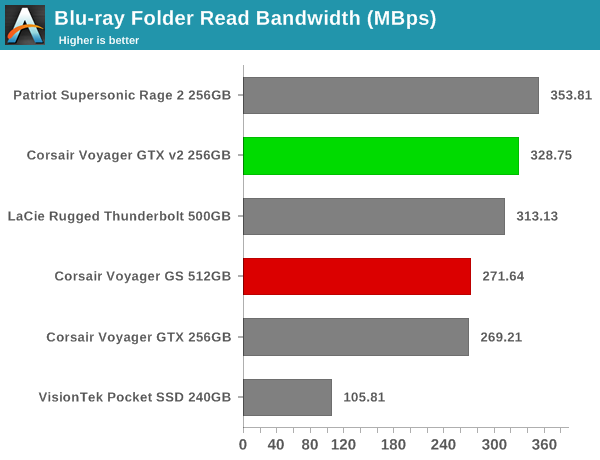
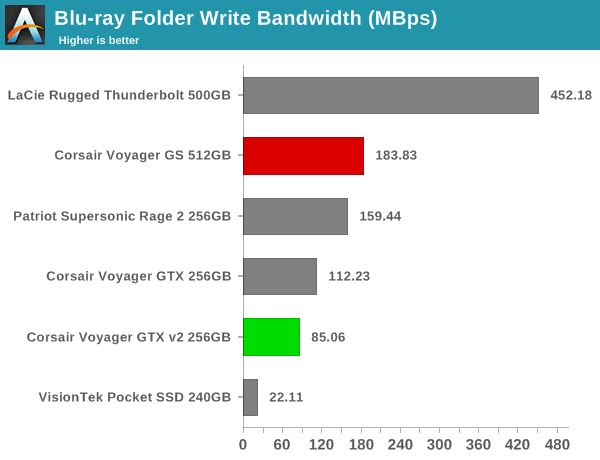
Benchmarks - robocopy and PCMark 8 Storage BenchOur testing methodology for DAS units also takes into consideration the usual use-case for such devices. The most common usage scenario is transfer of large amounts of photos and videos to and from the unit. The minor usage scenario is importing files directly off the DAS into a multimedia editing program such as Adobe Photoshop. In order to tackle the first use-case, we created three test folders with the following characteristics:
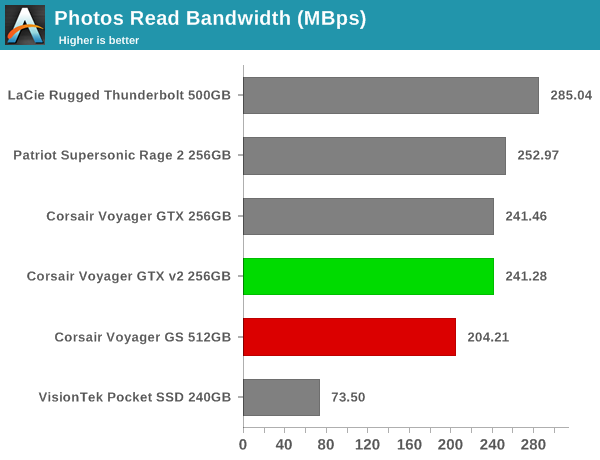
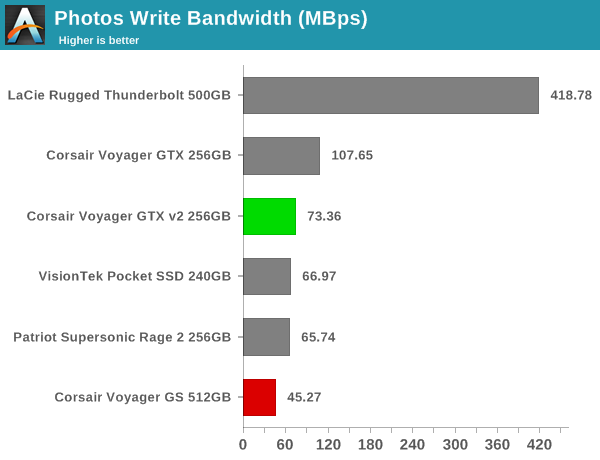
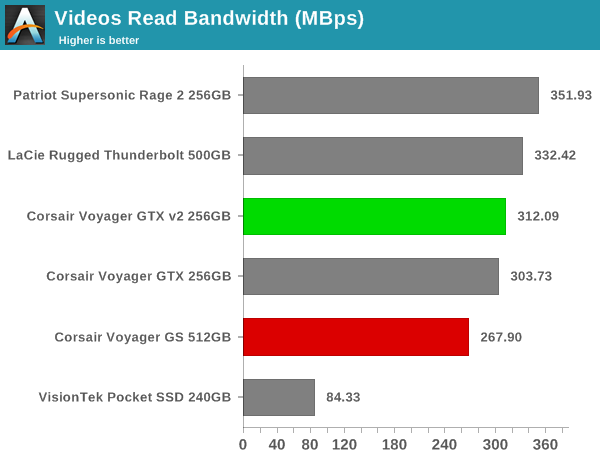
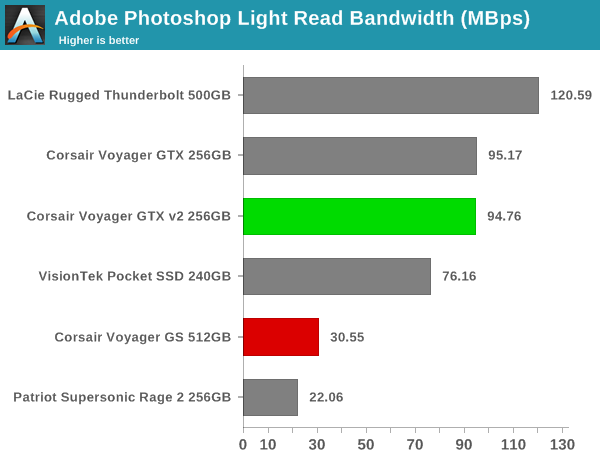
For the second use-case, we take advantage of PC Mark 8's storage bench. The storage workload involves games as well as multimedia editing applications. The command line version allows us to cherry-pick storage traces to run on a target drive. We chose the following traces. Usually, PC Mark 8 reports time to complete the trace, but the detailed log report has the read and write bandwidth figures which we present in our performance graphs. Note that the bandwidth number reported in the results don't involve idle time compression. Results might appear low, but that is part of the workload characteristic. Note that the same testbed is being used for all DAS units. Therefore, comparing the numbers for each trace should be possible across different DAS units.
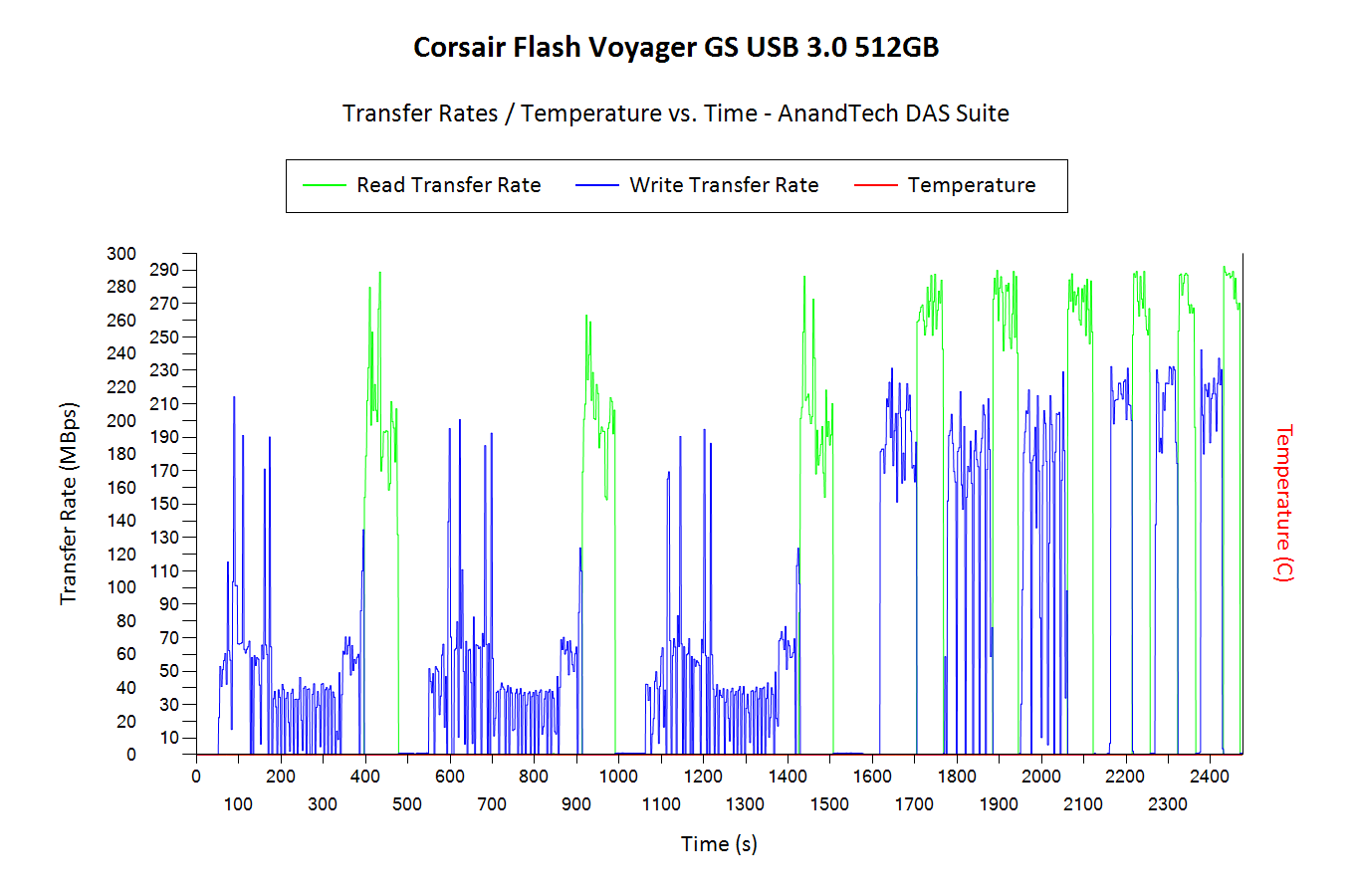
Performance ConsistencyYet another interesting aspect of these types of units is performance consistency. Aspects that may influence this include thermal throttling and firmware caps on access rates to avoid overheating or other similar scenarios. This aspect is an important one, as the last thing that users want to see when copying over, say, 100 GB of data to the flash drive, is the transfer rate going to USB 2.0 speeds. In order to identify whether the drive under test suffers from this problem, we instrumented our robocopy DAS benchmark suite to record the flash drive's read and write transfer rates while the robocopy process took place in the background. For supported drives, we also recorded the internal temperature of the drive during the process. The graphs below show the speeds observed during our real-world DAS suite processing. The first three sets of writes and reads correspond to the photos suite. A small gap (for the transfer of the videos suite from the primary drive to the RAM drive) is followed by three sets for the next data set. Another small RAM-drive transfer gap is followed by three sets for the Blu-ray folder. An important point to note here is that each of the first three blue and green areas correspond to 15.6 GB of writes and reads respectively. Throttling, if any, is apparent within the processing of the photos suite itself. The Corsair Voyager GS and the new GTX don't suffer from any such issues. <select ... ><option ... >Corsair Voyager GS 512GB</option><option ... >Corsair Voyager GTX v2 256GB</option><option ... >Corsair Voyager GTX 256GB</option><option ... >LaCie Rugged Thunderbolt 500GB</option><option ... >Patriot Supersonic Rage 2 256GB</option><option ... >VisionTek Pocket SSD 240GB</option> </select>
The surprising results in the above graphs involve the GTX v2 and GTX. While the original GTX took around 1900s to finish the benchmark, the GTX v2 took around 2200s. The reason behind this is evident in the robocopy benchmarks also - the write speeds of the new GTX seem to be a tad lower compared to the original GTX even though CrystalDiskMark and ATTO seem to indicate that both should have comparable performance. Corsair assured us that nothing had changed internally, but we did see that our original results were with firmware version S9FM01.7, while the GTX v2 came with S9FM02B1. Corsair indicated that S9FM02B1 is the best firmware to use for both the GTX and GTXv2. Concluding RemarksComing to the business end of the review, the Corsair Voyager GS continues Corsair's leadership in the USB flash drive area. With a 512GB capacity, the Voyager GS is one of only two high capacity thumb drives available in the market. We have already talked about the GTX, and, as mentioned before, the availability of a real SSD controller in the form of the Phison S9 makes it one of the drives we would recommend for portable OS installations. The Corsair Voyager GS doesn't support TRIM or any SMART commands. The Voyager GTX, on the other hand, supports both. Corsair's SSD Toolbox removed support for the Voyager GTX sometime last year. However, with 1.2.3.5 (released last week), support for the thumb drive is back. The SSD toolbox allows setting of software overprovisioning on the drive, something important to ensure performance consistency when used as a portable OS drive.
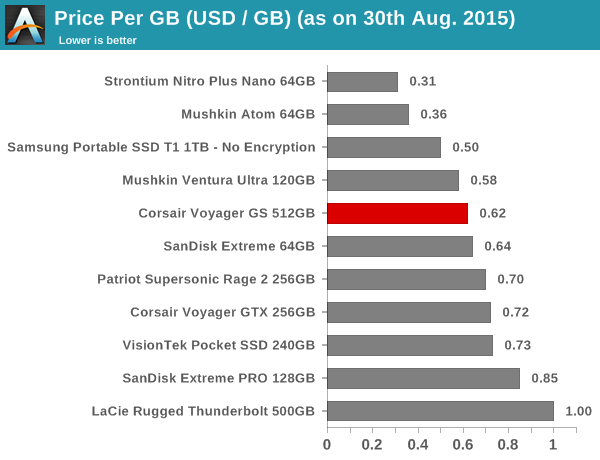
In terms of pricing, the Voyager GS 512GB retails for $315, while the GTX v2 256GB comes in at $185. These come in the middle of the pack in the price per GB graph above. As discussed earlier in this section, the GS and GTX v2 have different claims to uniqueness as justification for the slight pricing premium. | |||||||||||||||||||||||||||
| 8:00a | The ASUS ZenPad S (Z580CA) Review When I think of ASUS and Android, the first thing that comes to mind is their past portfolio of Android tablets. ASUS has been making Android tablets since the first wave of Android Honeycomb tablets hit the market. Back then, ASUS's point of differentiation from all the other Android tablets with essentially the same Tegra 2 hardware platform was their attachable keyboard dock. One could argue that ASUS really pioneered the 2-in-1 tablet form factor with their Transformer tablets. While ASUS continued to release a number of additional Transformer tablets with updated specifications for some time, it has been a while since we've seen any new high end tablets from the company. Recent offerings have usually been more budget oriented devices like the MeMO Pad series, or the hard to find ASUS PadFone, with the spot for a more standard tablet being left unfilled. Today's review takes a look at a tablet that doesn't pick up where the Transformer series left off, but instead kicks off a new line of tablets from ASUS under the ZenPad brand. There are a few different ZenPad tablets on the market, with multiple SKUs for each product creating even more versions. The tablet I'm looking at today is the ASUS ZenPad S, and more specifically, the ZenPad S Z580CA, which is ASUS's most high end tablet offering. To find out everything you need to know about ASUS's flagship tablet read on for the full review. | |||||||||||||||||||||||||||
| 12:00p | Google Announces Android Wear For iOS
Today Google announced that Android Wear now works with iPhones in addition to Android devices. The expansion to iPhones has been long rumored for the Android Wear platform, which up until now has only worked with Android smartphones. Using an Android Wear watch with an iPhone is fairly simple. If you own an Android Wear watch which supports iOS, you can just navigate to the Bluetooth section of the iOS settings application and pair your watch to your iPhone. Because Bluetooth 4.0 is required, Android Wear watches will only work with the iPhone 5 and above, not unlike the Apple Watch. You'll also need to be running iOS 8.2 or newer. Once you pair your watch with your iPhone, you'll be able to receive notifications, make and monitor fitness goals, and receive relevant information from Google Now. You can also use the "OK Google" command to make voice searches, which is something that iOS itself has never had throughout the OS due to the limitations of iOS applications. As of right now, Android Wear for iOS only works on the LG Watch Urbane. According to Google, all future Android Wear devices will support iOS. The wording of Google's post indicates that iOS support won't be coming to other existing Android Wear devices, which would be very disappointing if true. More information about this new development for Android Wear can be found in Google's blog post in the source below. | |||||||||||||||||||||||||||
| 2:00p | The AnandTech Podcast: Episode 35 - Windows 10 and Skylake
AnandTech Podcast #35: The summer season has been busier than usual. Microsoft released Windows 10, it’s latest operating system, as a free upgrade to current Windows 7 and Windows 8 users, promising it to be the latest and greatest from Microsoft, but also why it might be the last full release of an operating system from them. Brett’s indepth review of Windows 10’s features is now available on the AnandTech website, with a link below. Hot on the heels of Windows 10 was Intel’s launch of its new Skylake processor microarchitecture, which came in two desktop processors only to begin with. This was followed up by a more in-depth discussion of what Skylake actually does at Intel’s Developer Forum, and in this podcast we discuss what Skylake brings to the table as well as the performance and our interpretation of how Intel’s vision is set to develop in the coming years.
The AnandTech Podcast - Episode 35 iTunes Total Time: 1 hour 49 minutes 25 seconds Outline mm:ss 0:00 - Intro | |||||||||||||||||||||||||||
| 6:00p | Netgear Launches XS728T 28-port 10-Gigabit Smart Managed Switch
In early 2013, Netgear launched the XS708E (8x 10GBASE-T with 1x shared 10G SFP+) unmanaged switch, the XS712T (12x 10GBASE-T with 2x shared 10G SFP+) smart managed switch and the XSM7224 (24x 10GBASE-T with 4x 10G SFP+) fully managed switch. Netgear is announcing the XS728T today, adding a new member to the smart managed switch family. The XS728T comes with 24x 10GBASE-T ports and 4x dedicated 10G SFP+ ports. Netgear claims that the ProSafe XS728T is the industry's first 28-port 10-Gigabit Smart Managed Switch. It falls in the same category as the XS712T with respect to the management capabilities. We have been having a good experience using the XS712T in our 10G-capable NAS testbed. It is not a fully managed switch, but does manage to be cost-effective in the process. Compared to the XS712T, the XS728T brings support static IPv6 routing. Netgear advertises L2+/Layer 3 Lite features in the XS-T series making them suitable for core switches in SMB environments. The datasheet provides information about the L2+ / L3 Lite features.
The performance aspects of the XS712T and the XS728T are summarized in the table below.
The datasheet provides detailed technical specifications. One of the aspects that caught my eye was the acoustic levels. While the XS712T was rated at 49.7 dBA (We use it in our testbed, and the noise is pretty much what makes the usage of the unit difficult during evaluation in a home lab setting), the XS728T comes in at 41.6 dBA. I was also curious about the core platform. Netgear indicated that the XS728T uses Marvell silicon inside. These are fabricated in a smaller process node (we believe it is the Alaska transceivers and some combination of Prestera DX packet processors fabricated in 28nm). These operate a bit cooler, reducing the thermal load. The number of fans in the XS728T has also been doubled to four (compared to two in the XS712T). Taken together, these changes have enabled Netgear to run the fans slower and generate less noise. The XS728T has a MSRP of $4624. However, as is usual with enterprise equipment, final pricing for end customers may vary from one reseller to another.
| |||||||||||||||||||||||||||
| 6:50p | Samsung Announces The Gear S2 Smartwatch
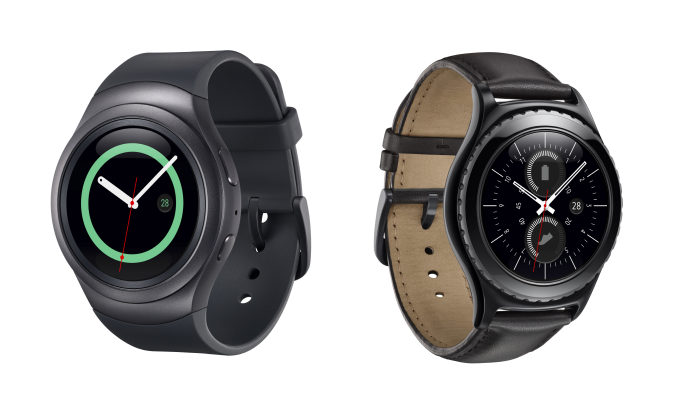
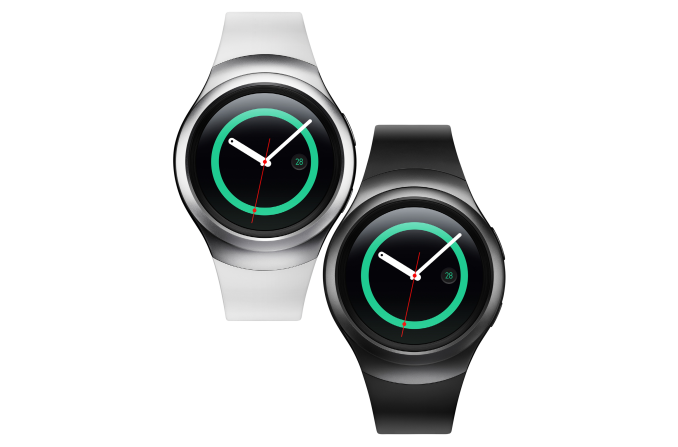
Today Samsung announced the Gear S2 and Gear S2 Classic, the newest products in their line of smartwatches. The Gear S2 has what Samsung describes as a more minimal and modern design, while the Gear S2 classic uses leather and a black finish in an attempt to appeal to fans of traditional mechanical watches. In addition to WiFi versions, there's also the Gear S2 3G which includes cellular capabilities to allow the user to make phone calls from their watch. All three models of the Gear S2 are similar, but there are some differences to accommodate visual changes between the Gear S2 and Gear S2 classic, as well as to fit a larger battery in the 3G edition. I've laid out all the known specifications of the Gear S2 in the chart below.
The Gear S2 is powered by an unnamed dual core SoC with a peak frequency of 1GHz. The circular display has a maximum horizontal and vertical resolution of 360 pixels, which equates to 302 pixels per inch. With Tizen being Samsung's own operating system they can tune the interface to work best with their AMOLED displays to minimize power consumption. Both WiFi versions of the Gear S2 include a 250mAh battery, while the 3G edition increases this to 300mAh, with a corresponding increase in case thickness. According to Samsung, the WiFi only version of the Gear S2 will last between two and three days of typical usage, while the 3G model will last around two days. The Gear S2 also includes a number of sensors in order to track information pertaining to exercise and fitness. It includes an accelerometer, a gyroscope, a heart rate tracker, an ambient light sensor, and interestingly, a barometer which can be used for tracking elevation by measuring atmospheric pressure. A barometer is a sensor that was notably absent from the Apple Watch, and it could help give Samsung an edge when it comes to the accuracy of their health tracking. Notably absent from the 3G model is a SIM slot. This is because the Gear S2 makes use of an e-SIM card, an embedded version of the SIM chip current devices use to register and work on mobile networks. It's not clear what implications this will have for carrier compatibility, but it would make sense that support from a carrier would be required in order to use the Gear S2 3G on their network.
Something that differentiates the Gear S2 from Samsung's previous watches are the methods of input that Samsung has included. The bezel around the circular display acts as a rotating input, which the user can use to zoom, scroll, etc. There are also two buttons located next to each other on the right side of the case, which function as home and back buttons respectively. This is again an advantage of Samsung using their own operating system, as they can implement controls that may not work within the control scheme of another operating system like Android Wear. Naturally, Samsung's Tizen smartwatches don't have access to the application library or functionality that comes with Android Wear. However, a look at Samsung's history with smartwatches makes it clear that they are pushing Tizen as their major wearable platform for their devices rather than Android Wear. It will be interesting to see how this turns out for them. On one hand, they can tune the OS to work seamlessly alongside the hardware. On the other hand, they're limited in terms of third party support from app developers. The Gear S2, Gear S2 Classic, and Gear S2 3G will be launching in the near future. There's currently no word on pricing, but there is already a commitment from AT&T, Verizon, and T-Mobile USA to sell the 3G version of the watch. | |||||||||||||||||||||||||||




| << Previous Day |
2015/08/31 [Calendar] |
Next Day >> |