[Most Recent Entries] [Calendar View]
Tuesday, January 5th, 2016
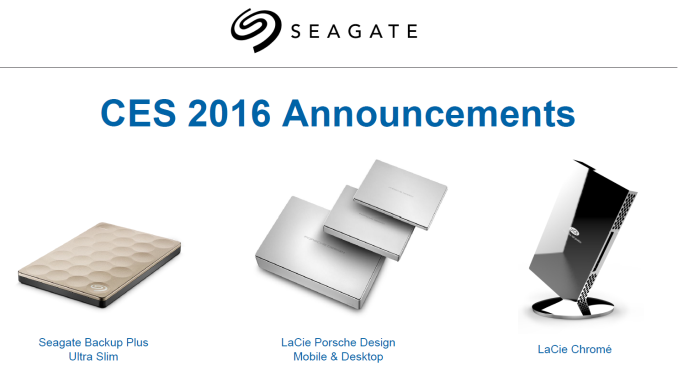
- Seagate Backup Plus Ultra Slim USB 3.0 bus-powered external hard drive
- LaCie Porsche Design USB 3.0 Type-C bus-powered external hard drive (mobile model)
- LaCie Porsche Design USB 3.0 Type-C external hard drive (desktop model) with power delivery
- LaCie Chrome USB 3.1 Type-C external SSD
| Time | Event | ||||||||||||||||||||||||||||||||||||
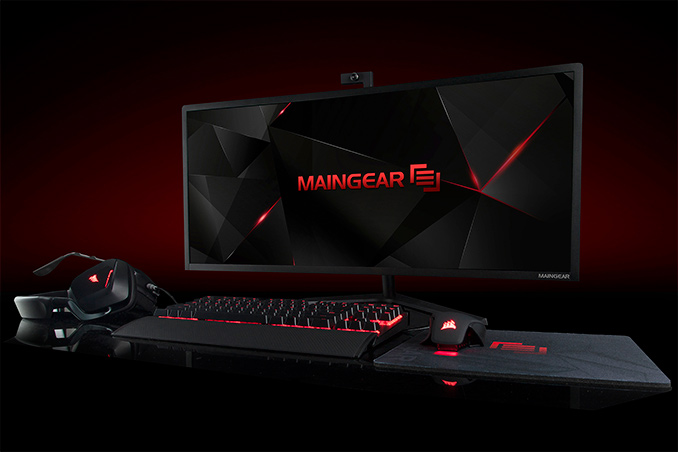
| 12:08a | MAINGEAR Rolls-Out 34” All-in-One PC with 18-Core Xeon, GeForce GTX Titan X
The concept of the all-in-one desktop personal computer was created to save space and simplify design of PCs. While there have been a number of traditional AIO desktops available over the years, leading PC makers only began to address performance-demanding market segments with specially-designed models several years ago. At the Consumer Electronics Show on Monday, boutique PC maker Maingear introduced the world’s first AIO desktop featuring top-of-the-range gaming or even server components. The Maingear Alpha 34 is a giant all-in-one desktop with 34” curved display with 3440×1440 resolution. Unlike the vast majority of semi-custom AIO PCs, the Alpha 34 is built around standard mini-ITX motherboards — in this case the ASUS ROG Maximus VIII Impact or the ASRock X99E-ITX for high-end configurations (Intel H110-based mainboard is available as an option for lower-cost configurations). Due to the flexibility in motherboard selection, the system can use either socket 1151 or socket 2011-3 CPUs depending on the board, including Intel's Core i3/i5/i7, or Intel Xeon E5 v3 processors with up to 18 cores and up to 45MB of cache. The AIO desktop uses the Maingear’s own closed-loop liquid cooler in order to ensure stability of desktop and server CPUs.
The Alpha 34 can be equipped with up to 32GB of unbuffered DDR4 memory, one M.2 NVMe solid-state drive and up to two 2.5” storage devices. The AIO can also accommodate full-sized desktop graphics cards, including the AMD Radeon R9 Nano, the NVIDIA GeForce GTX Titan X, or professional cards. The system naturally supports all the connectivity options provided by the aforementioned motherboards, including Gigabit Ethernet, 802.11 a/b/g/n/ac Wi-Fi, 5.1-channel audio, USB 3.0, USB 3.1 connectors and so on. As is usually the case for botique system builders, Maingear is offering a suite of customization options to let the AIO hit different price ranges and performance levels. That said, the Alpha 34 is always equipped with a 450W power supply unit, and therefore not all setups will be feasible. Multi-core Intel Xeon processors as well as top-of-the-range graphics cards consume a lot of power and 450W may not be enough to feed all the possible configurations.
Performance of the Alpha 34 featuring the latest Core i7 processors should be on par with that of high-end tower desktops. Upgradeability of all-in-one systems is not as flexible as that of tower machines, which is one of the reasons why AIOs are not for everyone. To make the Intel Z170-based systems a little more future-proof, the PC maker offers factory overclocking for Skylake-S CPUs inside the Alpha 34. All Maingear systems — including the Alpha 34 — can be custom painted and equipped with various peripherals like external optical drives, keyboards, mice, headsets and so on.
Pricing of the Alpha 34 starts at $1,999. A fully-fledged gaming setup with premium components, but without custom-finish and peripherals, will cost $6,150.99. A workstation machine inside the Alpha 34 chassis will be priced at around $15,000. Finally, Maingear will start to ship its Alpha 34 systems starting February 1, 2016. | ||||||||||||||||||||||||||||||||||||
| 4:30a | NVIDIA Announces DRIVE PX 2 - Pascal Power For Self-Driving Cars
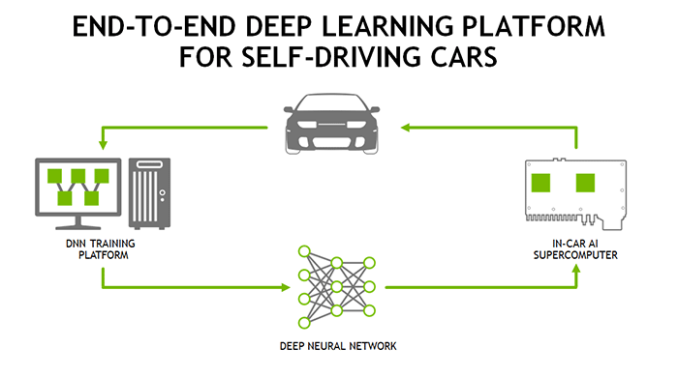
As has become tradition at CES, the first major press conference of the show belongs to NVIDIA. In previous years their press conference would be dedicated to consumer mobile parts – the Tegra division, in other words – while more recently the company’s conference has shifted to a mix of mobile and automobiles. Finally for 2016, NVIDIA has made a full transition over to cars, with this year’s press conference focusing solely on the subject and skipping consumer mobile entirely. At CES 2015 NVIDIA announced the DRIVE CX and DRIVE PX systems, with DRIVE CX focusing on cockpit visualization while DRIVE PX was part of a much more ambitious entry into the self-driving vehicle market for NVIDIA. Both systems were based around NVIDIA’s then-new Tegra X1 SoC, implementing it either for its graphics capabilities or its compute capabilities respectively. For 2016 however, NVIDIA has doubled-down on self-driving vehicles, dedicating the entire press conference to the concept and filling the conference with suitable product announcements. The headline announcement for this year’s conference then is the successor to NVIDIA’s DRIVE PX system, the aptly named DRIVE PX 2. From a hardware perspective the DRIVE PX 2 is essentially picking up from where the original DRIVE PX left off. NVIDIA continues to believe that the solution to self-driving cars is through computer vision realized by neural networks, with more compute power being necessary to get better performance with greater accuracy. To that while DRIVE PX was something of an early system to prove the concept, then DRIVE PX 2 is NVIDIA is thinking much bigger.
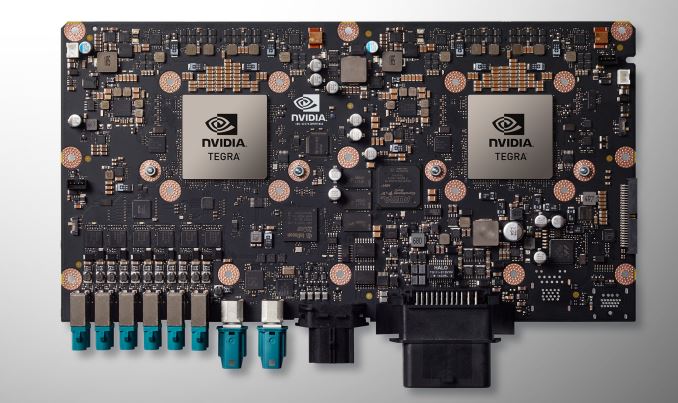
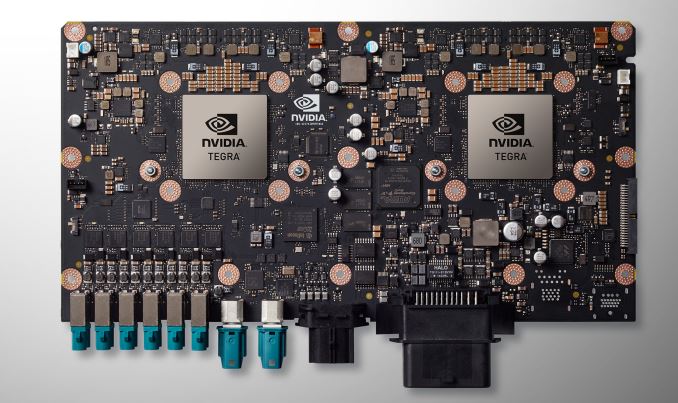
As a result the DRIVE PX 2 is a very powerful – and very power hungry – design meant to offer much greater compute performance than the original DRIVE PX. Based around NVIDIA’s newly disclosed 2016 Tegra (likely to be Parker), the PX 2 incorporates a pair of the SoCs. However in a significant departure from the original PX, the PX 2 also integrates a pair of Pascal discrete GPUs on MXM cards, in order to significantly boost the GPU compute capabilities over what a pair of Tegra processors alone could offer. The end result is that PX 2 packs a total of 4 processors on a single board, essentially combining the two Tegras’ 8 ARM Cortex-A57 and 4 NVIDIA Denver CPU cores with 4 Pascal GPUs.
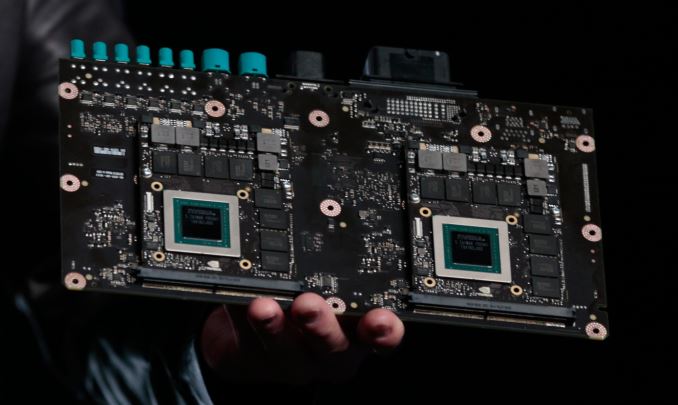
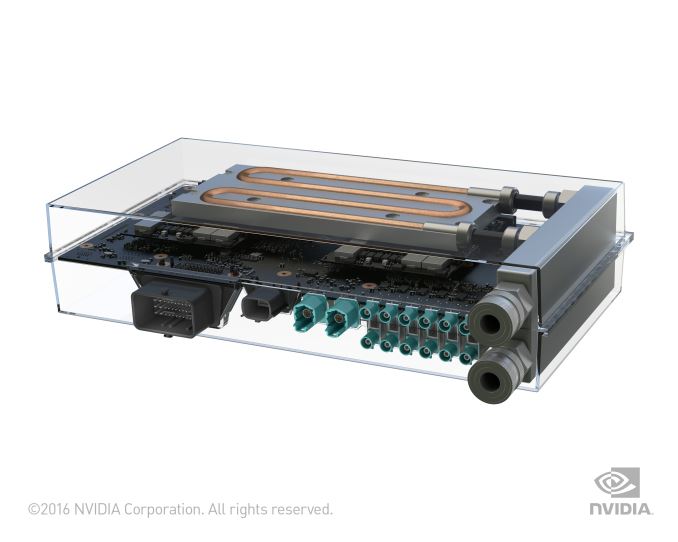
NVIDIA is not disclosing anything about the discrete Pascal GPUs at this time beyond the architecture and that, like the new Tegra, they’re built on TSMC’s 16nm FinFET process. However looking at the board held up by NVIDIA CEO Jen-Hsun Huang, it appears to be a sizable card with 8 GDDR5 memory packages on the front. My gut instinct is that this may be the Pascal successor to GM206 with the 8 chips forming a 128-bit memory bus in clamshell mode, but at this point that’s speculation on my part. What isn’t in doubt though are the power requirements for PX 2. PX 2 will consume 250W of power – equivalent to today’s GTX 980 Ti and GTX Titan X cards – and will require liquid cooling. NVIDIA’s justification for the design, besides the fact that this much computing power is necessary, is that a liquid cooling system ensures that the PX 2 will receive sufficient cooling in all environmental conditions. More practically though, the company is targeting electric vehicles with this, many of which already use liquid cooling, and as a result are a more natural fit for PX 2’s needs. For all other vehicles the company will also be offering a radiator module to use with the PX 2.
Otherwise NVIDIA never did disclose the requirements for the original PX, but it’s safe to say that PX 2 is significantly higher. It’s particularly telling that in the official photos of the board with the liquid cooling loops installed, it’s the dGPUs we clearly see attached to the loops. Consequently I wouldn’t be surprised if the bulk of that 250W power consumption comes from the dGPUs rather than the Tegra SoCs. As far as performance goes, NVIDIA spent much of the evening comparing the PX 2 to the GeForce GTX Titan X, and for good reason. The PX 2 is rated for 8 TFLOPS of FP32 performance, which puts PX 2 1 TFLOPS ahead of the 7 TFLOPS Titan X. However while those are raw specifications, it’s important to note that Titan X is 1 GPU whereas PX 2 is 4, which means PX 2 will need to work around multi-GPU scaling issues that aren’t an issue for Titan X. Curiously, NVIDIA also used the event to introduce a new unit of measurement – the Deep Learning Tera-Op, or DL TOPS – which at 24 is an unusual 3x higher than PX 2’s FP32 performance. Based on everything disclosed by NVIDIA about Pascal so far, we don’t have any reason to believe FP16 performance is more than 2x Pascal’s FP32 performance. So where the extra performance comes from is a mystery at the moment. NVIDIA quoted this and not FP16 FLOPS, so it may include a special case operation (ala the Fused Multiply-Add), or even including the performance of the Denver CPU cores. On that note, while DRIVE PX 2 was the focus of NVIDIA’s presentation, it was GTX Titan X that was actually driving all of the real-time presentations. As far as I know we did not actually see any demos being powered by PX 2, and it’s unclear whether PX 2 is even ready for controlled demonstration at this time. NVIDIA mentions in their press release that the PX 2 will be available to early access partners in Q2, with general availability not occurring until Q4. Meanwhile along with the PX 2 hardware, NVIDIA also used their conference to reiterate their plans for self-driving cars, and where their hardware and software will fit into this. NVIDIA is still aiming to develop a hardware ecosystem for the automotive industry rather than an end-to-end solution. Which is to say that they want to provide the hardware, while letting their customers develop the software.
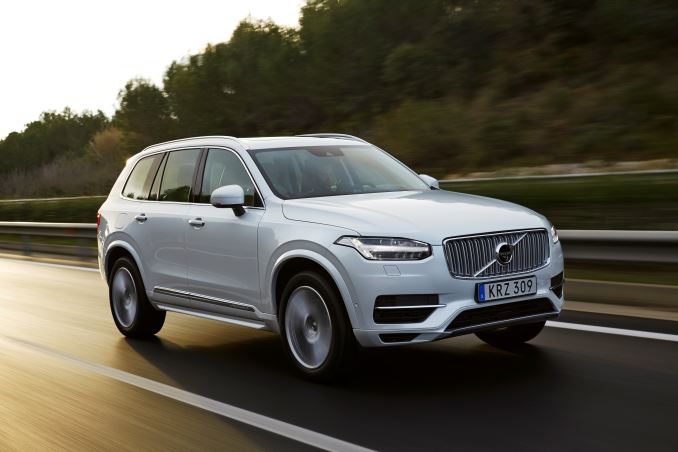
However at the same time, in an action admitting that it’s not always easy for customers to get started from scratch, NVIDIA will also be developing their complete reference platform combining hardware and software. The reference platform includes not just the hardware for self-driving cards – including the PX 2 system and other NVIDIA hardware to train the neural nets – but also software components including the company’s existing DriveWorks SDK, and a pre-trained driving neural net the company is calling DRIVENet. Consequently while the company isn’t strictly in the process of developing its own cars, it is essentially in the process of training them. Which means NVIDIA has been sending cars around the Sunnyvale area to record interactions, training the 37 million neuron network how to understand traffic. A significant portion of NVIDIA’s presentation was taken up demonstrating DRIVENet in action, showcasing how well it understood the world using a combination of LIDAR and computer vision, with a GTX Titan X running the network at about 50fps. Ultimately I think it’s fair to say that NVIDIA would rather their customers be doing this, building nets on top of systems like DIGITS, but they also have seen first-hand in previous endeavors that bootstrapping an ecosystem like they desire requires having all of the components already there. Finally, NVIDIA also announced that they have lined up their first customer for PX 2: Volvo. In 2017 the company will be outfitting 100 XC90 SUVs with the PX 2, for use in their ongoing self-driving car development efforts.
| ||||||||||||||||||||||||||||||||||||
| 4:31a | NVIDIA Discloses Next-Generation Tegra SoC; Parker Inbound?
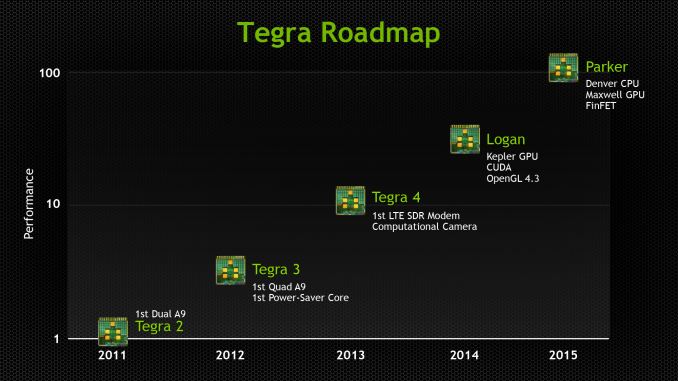
While NVIDIA has been rather quiet about the SoC portion of the DRIVE PX 2, it’s unmistakable that a new iteration of the Tegra SoC is present. The GPUs and SoCs of the DRIVE PX 2 are fabricated on TSMC’s 16nm FinFET processes, which is something that we haven’t seen yet from NVIDIA. The other obvious difference is the CPU configuration. While Tegra X1 had four Cortex A57s and four Cortex A53s, this new SoC (Tegra P1?) has four Cortex A57s and two Denver CPUs. As of now it isn’t clear whether this is the same iteration of the Denver architecture that we saw in the Tegra K1. However, regardless of what architecture it is we’re still looking at a CPU architecture that is at least partially an ARM in-order core with a wide, out of order VLIW core that relies on dynamic code optimization to translate ARM instructions into the VLIW core ISA. Based on the description of the SoC, while NVIDIA is not formally announcing this new SoC or giving it a name at this time, the feature set lines up fairly well with the original plans for the SoC known as Parker. Before it was bumped to make room for Tegra X1, it had been revealed that Parker would be NVIDIA's first 16nm FinFET SoC, and would contain Denver CPU cores, just like this new SoC.
Of course Parker was also said to include a Maxwell GPU, whereas NVIDIA has confirmed that this new Tegra is Pascal based. Though with Parker's apparent delay, an upgrade to Pascal makes some sense here. Otherwise we have limited information on the GPU at present besides its Pascal heritage; NVIDIA is not disclosing anything about the number of CUDA cores or other features.
But for now the bigger story is the new Tegra's CPU configuration. Needless to say, this is at least somewhat of an oddball architecture. As Denver is a custom CPU core, we’re looking at a custom interconnect by NVIDIA to make the Cortex A57 and Denver cores work together. The question then is why would NVIDIA want to pair up Denver CPU cores with also relatively high performng Cortex A57 cores? At least part of the answer is going to rely on whether NVIDIA’s software stack either uses the two clusters in a cluster migration scheme or some kind of HMP scheme. Comments made by NVIDIA during their press conference indicate that they believe the Denver cores on the new Tegra will offer better single-threaded performance than the A57s. Without knowing more about the version of Denver in the new Tegra, this is somewhat surprising as it’s pretty much public that Denver has had issues when dealing with code that doesn’t resemble a non-branching loop, and more troublesome yet code generation for Denver can take up a pretty significant amount of time. As we saw with the Denver TK1, Cortex A57s can actually be faster clock for clock if the code is particularly unfavorable to Denver. Consequently, if NVIDIA is using a traditional cluster migration or HMP scheme where Denver is treated as a consistently faster core in all scenarios, I would be at least slightly concerned if NVIDIA decided to ship this configuration with the same iteration of Denver as in the Tegra K1. Though equally likely, NVIDIA has had over a year to refine Denver and may be rolling out an updated (and presumably faster) version for the new Tegra. Otherwise it also wouldn’t surprise me if the vast majority of CPU work for PX 2 is run on the A57 cluster while the Denver cluster is treated as a co-processor of sorts, in which only specific cases can even access the Denver CPUs. | ||||||||||||||||||||||||||||||||||||
| 10:00a | HTC Unveils the Vive Pre Dev Kit
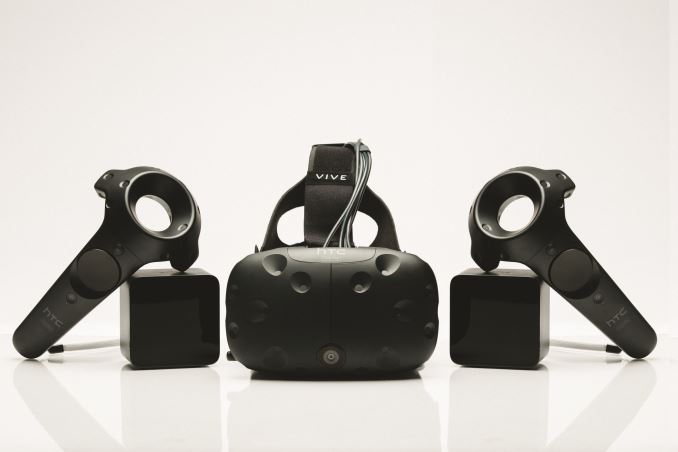
Today HTC has taken the wraps off of the second generation version of the HTC Vive. As you probably know, the HTC Vive is a virtual reality head-mounted display designed and made jointly by HTC and Valve. The consumer launch date for the Vive Pre has been pushed back a couple times now, but certain developers have had access to developer versions of the headset for some time now in order to develop new titles for it or work on adapting existing ones. The new Vive Pre is the second version of the Vive developer kit, and it comes with a number of improvements that bring the Vive closer toward its eventual commercial launch which will be occurring this year. The Vive Pre makes some notable additions to the earlier version. First and foremost are the improvements to ergonomics. According to HTC, the headset has basically been redesigned from the ground up to be more compact and fit more comfortably onto your head while also being more stable. The displays have been made brighter and refinements to the entire display and lens stack have improved clarity over the existing model. Finally, there has been a front camera added to the headset. This may seem strange at first, but what the camera allows for is augmented reality experiences where a feed of the real world can be shown to the user and illusions can be projected onto that space by the headset.
As for the controllers, the design has been overhauled to make them more ergonomic. The buttons have been textured to make them easier to find, and the trigger has been changed to a dual stage switch which allows for interactions with multiple states, such as holding or squeezing something. There's also haptic feedback to go along with interactions, and this is something that can really help the experience when implemented in a proper and subtle manner. Finally, the tracking stations for the controllers have been made smaller and more precise. I had a chance to try the new Vive Pre earlier, and it marked my first experience with a virtual reality headset, with the exception of the Nintendo Virtual Boy. While I can't make any statements that compare the new Vive to the old dev kit or to other VR headsets like the Oculus Rift, I can say that the experience with the headset and the controllers was unlike anything I've experienced before. The demo consisted of a virtual environment that simulated some of the challenges one would encounter when climbing Mount Everest. It included very theatrical sweeping shots where you looked over the mountains as though you were flying in the air or riding on a helicopter, as well as interactive segments that simulated crossing over a large pit, and climbing up a ladder. What amazed me was how quickly I forgot about the fact that I was just in a hotel room wearing a rather large helmet and holding some controllers, and I found myself too frightened to look right over the edge of a cliff, and felt a strange feeling when I climbed the ladder as though I was nervous with my increasing height, even though I knew very well that I was standing on the floor the entire time. Head tracking latency was also very low, and to be honest the only thing that ever took me out of the experience was the limited resolution of the displays. That's a technology issue that will be improved with time, but even with that barrier to total immersion the experience is still extremely compelling and unlike anything else. As of right now, the HTC Vive is scheduled to launch commercially in April of this year. Whether or not that date will be pushed back again is unknown, but what I can say is that I think the Vive and other VR headsets will have been worth the wait. | ||||||||||||||||||||||||||||||||||||
| 11:35a | Seagate Updates DAS Portfolio at CES 2016
Seagate has announced four new DAS (direct attached storage) products at CES 2016. Three of them target the premium / luxury market under the LaCie brand name. The LaCie Chrome USB 3.1 Type-C external SSD is easily the most impressive announcement of the four.
The product contains two 512GB M.2 SATA SSDs in RAID-0 (effective user capacity is 1TB). It can support data rates of up to 940 MBps, thanks to the integrated ASMedia ASM1352R dual SATA to USB 3.1 Gen 2 bridge chip. Seagate touts the aluminium enclosure, efficient triple cooling system, magnetized cable management (it is similar to the 2big Thunderbolt 2 product in this respect) and a removable magnetized display stand as unique features for this product. Gallery: LaCie Chrome USB 3.1 External SSD
      It must be noted that the Chrome does need an external power connector (understandable due to the need to power two M.2 SSDs). The above gallery shows us the various external aspects of the Chrome unit. The LaCie Porsche Design USB 3.0 Type-C external hard drives have a new industrial design for the aluminium enclosure and come with a Type-C connector. Other than that, there is nothing too striking about them. The desktop model needs external power, but, it also does power delivery over its Type-C port (making it ideal for devices like the MacBook). Both the Mobile and Desktop versions come with an USB Type-A to USB Type-C cable also (in addition to the Type-C to Type-C cable). This enables compatibility with a wider variety of systems.
The Mobile version comes in 1TB, 2TB and 4TB capacities, starting at $110. The Desktop Drive comes in 4TB, 5TB and 8TB capacities, starting at $210. Rounding up the product launches is the Seagate Backup Plus Ultra Slim. It is a 2.5" hard drive, and the firmware features are similar to the Seagate Backup Plus we reviewed last August. This implies the integration of a Seagate Dashboard for providing more features compared to a standard external hard drive. The device also comes with 200GB of OneDrive cloud storage valid for two years. It is also compatible with the Lyve photo management software.
The technically interesting aspects include the 9.6mm thickness (Seagate indicated that it is the thinnest external hard drive in its capacity class in the market right now). It comes in 1TB and 2TB capacities with a two-platter design. Cross-platform compatibility is enabled by a free Paragon driver download (enabling Macs to read drives formatted in NTFS and Windows PCs to read drives formatted in HFS+). The Seagate Backup Plus Ultra Slim comes in 1TB and 2TB capacities. We don't have pricing details yet, but, availability is slated for later this quarter. | ||||||||||||||||||||||||||||||||||||
| 12:43p | Toshiba’s DynaPad Tablet to Hit Stores in Late January
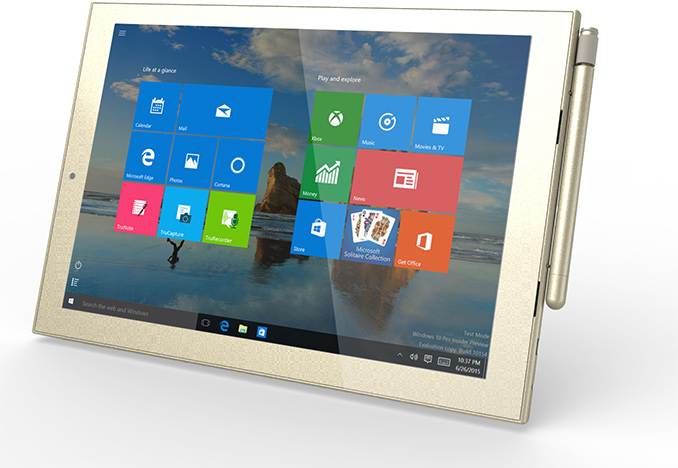
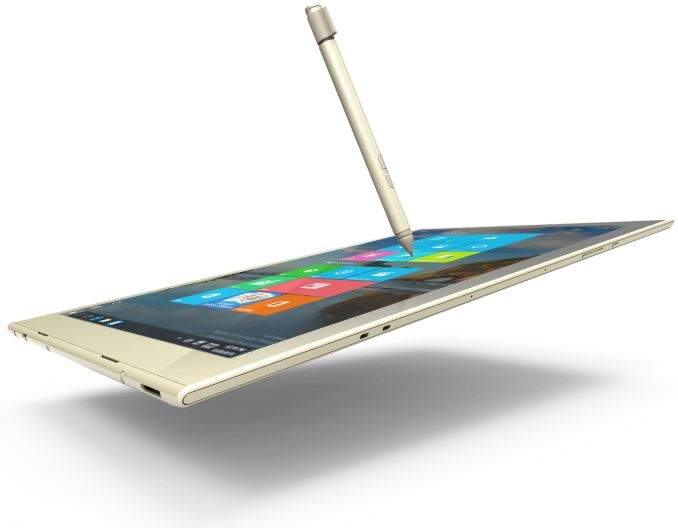
Toshiba showcased its ultra-thin dynaPad tablet in September, 2015, at IFA in Berlin, Germany, and then formally introduced it in mid-October. At the International CES 2016, the company finally revealed that the dynaPad will hit the U.S. market later this month. Toshiba says that its new 12-inch tablet is among the thinnest Windows 10-based devices of such kind. The Toshiba dynaPad tablet features a 12-inch display with 1920×1280 resolution, which is covered with Corning’s Gorilla Glass 3 as well as with a special anti-fingerprint coating. The device is equipped with Toshiba’s active electrostatics (ES) stylus with Wacom Feel technology that supports 2048 levels of pressure sensitivity. The digitizer pen can last for more than 1000 hours on one charge and can be used for note taking, sketching and drawing. In addition, Toshiba offers a special keyboard dock for its dynaPad, which can be used to convert the slate into a laptop.
The dynaPad tablet from Toshiba uses Microsoft Windows 10 operating system and is based on the Intel Atom x5 Z8300 system-on-chip (four cores, 2MB cache, 1.44 GHz – 1.84 GHz clock-rate, built-in Intel HD Graphics core with 12 execution units, 2 W thermal design power, 14 nm process technology). The SoC of the dynaPad is similar to that used by Microsoft’s Surface 3, but it runs at a lower frequency and thus has lower performance. Toshiba’s dynaPad also comes with up to 4 GB of DDR3L RAM, up to 64 GB of NAND flash storage, Wi-Fi (802.11ac) and Bluetooth 4.0 wireless technologies, a 2 MP front-facing and an 8 MP back-facing cameras, various sensors and so on. The dynaPad sports two micro USB 2.0 ports, a microSD card slot and a micro HDMI port for connecting to external displays. Toshiba yet has to reveal precise specifications and configurations of its dynaPad.
The new tablet from Toshiba weighs 580 grams (1.28 pounds) and measures about 6.9 mm (0.27 inch) thin. When the keyboard is attached, the weight increases to around 1000 grams (2.2 pounds). Toshiba has not released precise details about battery life of its new tablet. Toshiba plans to start selling its dynaPad online and at Microsoft Stores in late January. The most affordable version will cost $569.99.
The Toshiba dynaPad looks like a relatively powerful solution for various tasks usually performed on tablets. It has a fine 12-inch display and comes with a digitizer pen. By contrast, Microsoft’s Surface 3 sports a 10.1-inch screen and does not come with a stylus (it has to be bought separately). Moreover, Toshiba’s tablet is also thinner and lighter than Microsoft’s Surface 3. In fact, thickness is the dynaPad is similar to that of Apple’s iPad Pro, which also has a 12-inch display, but the latter weighs considerably more (713 grams, 1.572 pounds). Even though Toshiba has been trying to refocus its PC business and concentrate on business and enterprise customers, it continues to release consumer devices that look very interesting, at least, on paper. The dynaBook with its rather low weight, relatively low price, advanced stylus and decent capabilities looks like a viable rival not only for Microsoft’s Surface 3, but also for Apple’s iPad Air and iPad Pro. | ||||||||||||||||||||||||||||||||||||
| 1:00p | The Huawei Mate 8 Review It’s been over a year since we reviewed the Huawei Ascend Mate 7 and Ascend Mate 2. For many people and including ourselves at AnandTech these were among one of the first experiences with Huawei as a smartphone device manufacturer. Ever since our review of the Honor 6 I kind of fell into the position of being the main editor in charge of Huawei device reviews and thus experienced first-hand the company’s efforts in the high-end as well as their increasingly visible expansion into western markets. The Mate 8 is the successor to the Ascend Mate 7 and in a similar fashion to the P8 last spring, the phone drops the Ascend name in favour of better establishing the Mate brand. The Mate 8 is in a lot aspects an evolutionary design over the Mate 7 but at same time comes at the moment of a generational shift brought forth by the adoption of the new Kirin 950 SoC. With help of the new chipset and other improvements we’ll see that Mate 8 not only manages to raise the bar for Huawei but also to deal blows to competing devices in several aspects, making the phone a worthy candidate in the upcoming 2016 smartphone generation battle. | ||||||||||||||||||||||||||||||||||||
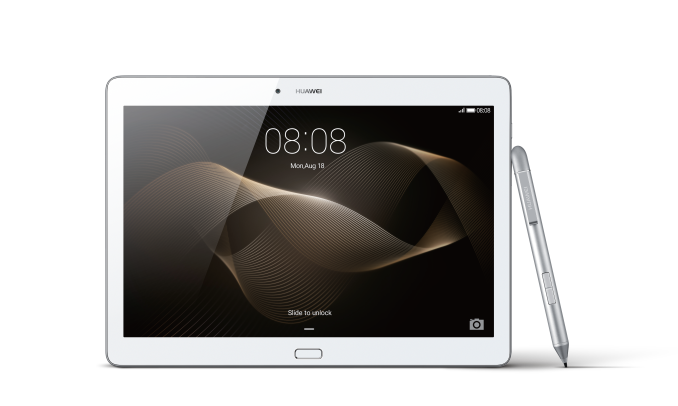
| 1:35p | Huawei Announces The MediaPad M2 10
Today at CES Huawei made a number of announcements. One of them is a new tablet called the Huawei MediaPad M2 10. It's a new tablet coming to the United States, with specs that sit somewhere in the mid range part of the tablet market. You can check out all of its specs in the chart below.
The MediaPad M2 10 is actually one of the first Huawei tablets that I've seen coming to the North American market. On paper, it appears to be a tablet targeting the mid range segment of the market. Starting with the SoC, you get HiSilicon's Kirin 930, which consists of two quad core Cortex A53 clusters with peak frequencies of 2GHz and 1.5GHz respectively. It's paired with an ARM Mali-T628 GPU, and either 2GB or 3GB of LPDDR3 memory depending on whether you buy the silver or gold model. Moving on to the display, the 1920x1200 IPS panel definitely isn't as high resolution as the panels shipping on high end tablets, but it's a lot better than the 1280x800 panels that used to ship on all the mid range tablets out there. Huawei has been a bit inconsistent with their calibration across their product lines, so I'm interested to see how the panel compares to the competition in that regard. Beyond the display, you get either 16GB or 64GB of storage, and a pair of 13MP and 5MP cameras.
As for the design of the MediaPad M2, it doesn't end up cutting any corners. It ships with a full aluminum unibody, and the industrial design is very similar to that of the Mate S. It isn't the thinnest or lightest tablet out there, with a thickness of 7.35mm or 500g, but for a mid range tablet the fact that it's made of aluminum already gives it an edge over other tablets. The Huawei MediaPad M2 10 will be available in silver and gold. The color choices also serve as a way to segment the devices, as the silver model comes with 2GB of RAM and 16GB of NAND, while the gold model comes with 3GB of RAM and 64GB of NAND. Both models will be available in the United States in the first quarter of this year, starting at $349 for the 2GB + 16GB WiFi model, and $419 for the 3GB + 64GB model which also includes the active stylus. Both models can have LTE support added on for $50. | ||||||||||||||||||||||||||||||||||||
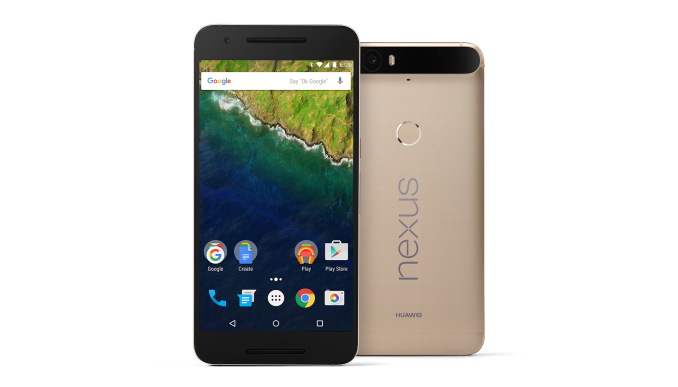
| 1:43p | Gold Nexus 6P Comes To The US
One of the smaller announcements from Huawei at CES was the arrival of the gold colored Nexus 6P in the United States. The gold Nexus 6P, also known as the Nexus 6P Special Edition, was shown off at Google's original San Francisco launch event for the phone. However, when it was released it was an exclusive to the Japanese market. It has since expanded to other markets, with India being the most notable. As of today, the gold Nexus 6P will be available in the United States as well, in both 32GB and 64GB capacities. It will be available on the Google Store and from Bestbuy for the same $499 starting price as the other Nexus 6P models. | ||||||||||||||||||||||||||||||||||||
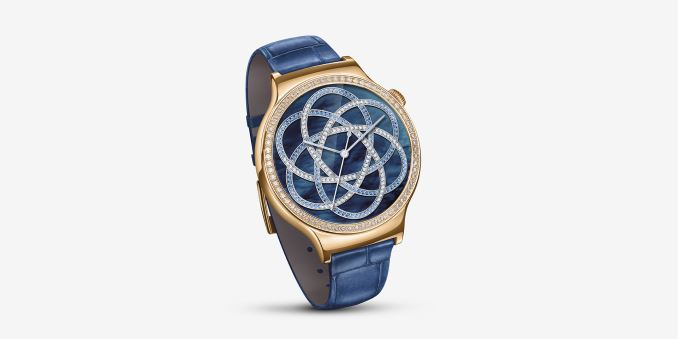
| 1:58p | Huawei Launches Huawei Watch Elegant and Huawei Watch Jewel
Huawei has announced two new versions of the Huawei Watch that target users looking for something more flashy than the standard steel model. The new versions of the Huawei watch are called Elegant and Jewel. They share the same specifications as the Huawei Watch, including the 316L steel case, and sapphire cover glass. The changes solely have to do with the appearance. The Huawei Watch Elegant has a gold top ring with a rose gold plated body, while the Huawei Watch Jewel is adorned with 68 Swarovski Zirconia around the watch face. Both watches will come with exclusive watch faces to match their designs. The Huawei Watch Elegant will be available for $499, while the Huawei Watch Jewel will be $599. Both will be available in the first quarter of the year. | ||||||||||||||||||||||||||||||||||||
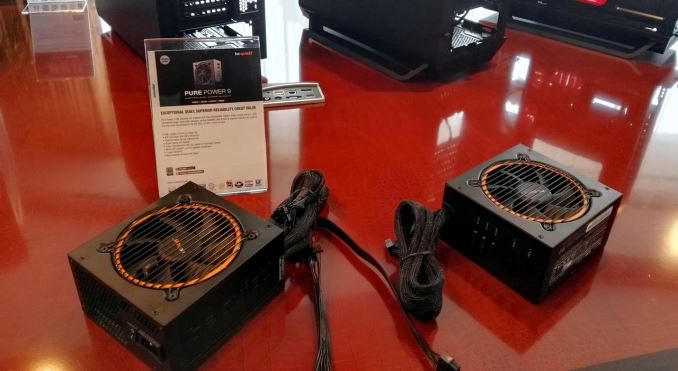
| 1:59p | CES 2016: be quiet! Doubles Revenue in 2015
One of my first meetings of the week here at CES 2016 is with be quiet!, a German based company that focuses on silent cooling, power supplies, and now cases. We see them every year, and long-time readers may remember our former PSU editor Christoph Katzer by name is actually our contact. They are not exhibiting too much this year – their newest items are new secondary colors of cases or a new version of the Pure Power 9 power supplies that offer almost full modularity. Thus the show for them is an ability to synchronize with media, partners, and talk shop with potential customers. What interested me is how be quiet! is growing. It turns out that 2015 has been a great year for them. The introduction of cases over 2014 and focusing on several specific models for quiet operation now accounts for up to 30% of the company revenue, with revenue on the whole doubling in 2015, now being an easy seven figures (official numbers have not been released, but it gives a sense of scale). Growth has been occurring in localized pockets worldwide, although new processor and chipset launches can help with peak sales beyond regular deals and combo offers. Their design team for all three segments (PSUs, cooling and power supplies) numbers fifteen maximum. I also asked about consumer vs B2B markets, but we were told that the B2B market is quite aggressive, and the bigger players have the advantage there so for now it is not so much a focus. For the future, we were told to look out on the water cooling scene as they have internally developed their own pump for quiet operations, although it may be this time next year before we see any demonstration units. | ||||||||||||||||||||||||||||||||||||
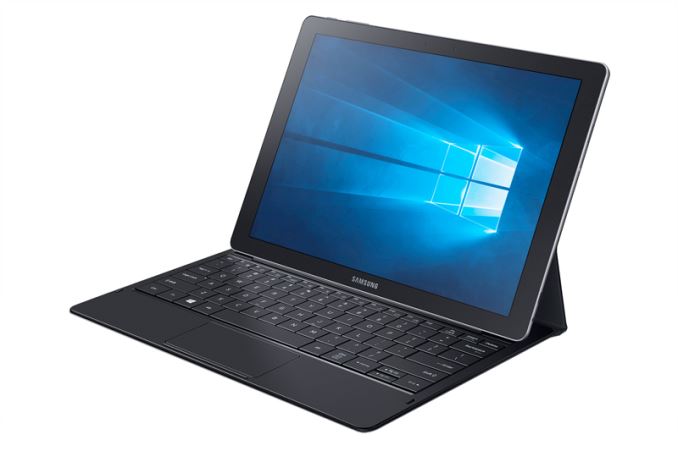
| 7:20p | Samsung Unveils The Galaxy TabPro S
During Samsung's CES press conference the company announced a brand new 2-in-1 tablet. While it was initially thought to be an Android tablet to take on the likes of the Pixel C and the iPad Pro, it turns out that the TabPro S is really a full blown Windows 10 convertible tablet. Below are its specs.
Since the TabPro S is larger than the average tablet and runs a full version of Windows, we're looking at different specifications than one would typically find in an Android device. On top of that, Samsung is able to source components from their different child companies, allowing for features that don't exist on many other tablets. Internally, the TabPro S is powered by Intel's Core m3 CPU, which is a Skylake-Y part. That CPU is paired with 4GB of RAM, and a 128GB or 256GB SSD. Samsung actually advertises it as an SSD, and given its size it's probably safe to assume that we're looking at an actual SSD rather than an eMMC solution.
The TabPro S uses a 12" 2160x1440 AMOLED display. The prospect of a Samsung tablet with an AMOLED display running Windows interests me greatly, because it opens up the possibility of manual calibration and different gamma targets like BT. 1886 which would greatly improve the movie watching experience. Like many of the productivity focused tablets that have launched recently, the TabPro S includes support for a keyboard and a digital pen. The keyboard connects to the tablet directly using pogo pins, while the pen works over Bluetooth. In addition to those accessories, there will also be an adapter that allows for the connection of USB Type A, Type C, and HDMI devices. The Galaxy TabPro S will be launching this February in both white and blue. The keyboard cover and Bluetooth pen will be available separately. Pricing for the TabPro S and accessories is currently unknown. | ||||||||||||||||||||||||||||||||||||
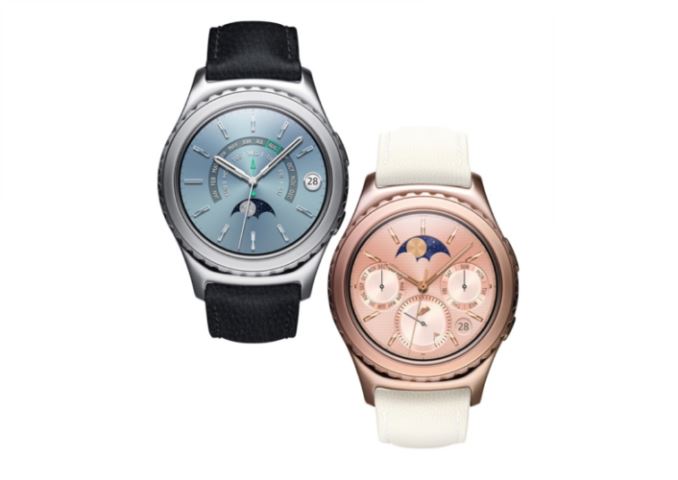
| 8:07p | Samsung Announces New Gear S2 Models And iOS Support
Among the announcements made during Samsung’s CES 2016 press conference, two related to Samsung’s Gear S2 smartwatch. The first is the introduction of two new finishes for the Gear S2 Classic. The first is an 18K rose gold plated model, and the second is a platinum plated model. The rose gold model comes with an Ivory leather band, while the platinum model comes with a black leather band. In addition to the two new premium models of the Gear S2, Samsung also announced that they will be enabling support for iOS on the Gear S2. This will allow Gear S2 users to use the watch with the iPhone if they so choose. | ||||||||||||||||||||||||||||||||||||
| 8:45p | SanDisk Announces X400 Client SSD for OEMs
As CES gets underway, SanDisk is announcing the X400 SSD as the successor to the X300 and X300s and as the higher-performance counterpart to the Z400s. The new X400 will be the flagship of SanDisk's line of SATA and M.2 SATA SSDs for OEMs, though by the standards of consumer SSDs sold at retail it wouldn't quite be a high-end SATA drive. The X300s was the Self-Encrypting Drive variant of the X300, but for the X400 SanDisk is unifying the two by making encryption a standard feature, pending a firmware update due in April to provide full TCG Opal support. The X400 improves performance in most areas, though not by any huge margins. They're dropping the smallest capacities, leaving 128GB as the starting point, and mSATA is no longer an option. Both changes reflect a lack demand for outdated drive configurations in new product designs. Like the X300, the X400 uses TLC NAND flash and relies on SLC-mode write caching to provide competitive write speeds.
The X400 adds a 1TB M.2 option that SanDisk claims is the first single-sided 1TB M.2 drive. The X400 also adds LDPC ECC to the mix, which probably helped SanDisk increase the warranty period to 5 years. The SanDisk X400 was sampling to OEMs as of late last year and is now available to OEMs and system integrators in volume. | ||||||||||||||||||||||||||||||||||||
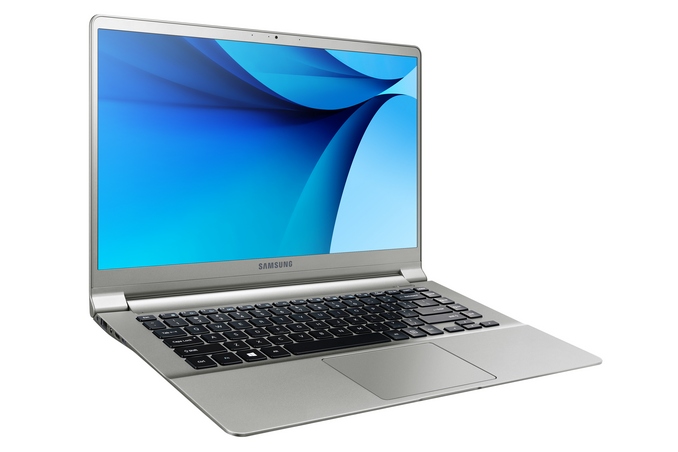
| 9:25p | Samsung Announces The Ultra-Light Notebook 9 Series Laptops At CES 2016
Samsung has been somewhat of a small player in the notebook market lately, but today they are announcing two new devices which should appeal to anyone looking for a very portable laptop. The new Notebook 9 series laptops, in both 13.3-inch and 15.6-inch sizes, come in at a very svelte 1.85 lb (840 g) and 2.84 lb (1.29 kg) mass, respectively. The 13.3 is one of the lightest notebooks around, and the 15.6-inch model is, as far as I know, the lightest 15-inch laptop yet. As well as being light, the magnesium framed devices are also very thin, with the smaller model just 13.4 mm thick, and the larger model only 14.5 mm. So they are small. Both of them are powered by Intel Skylake-U series processors, which have a 15 Watt TDP. Normally 15.6-inch notebooks can sport quad-core H series due to the extra size and mass, but Samsung has clearly made an effort to keep these as thin and light as possible. RAM is 4-8 GB, and storage is 128-256 GB SSDs, which is pretty typical for an Ultrabook. Despite the ultra-thin design, the keyboards are backlit, and feature 1.5 mm of key travel, which should mean a pretty decent typing experience. Both versions have two USB 3.0 ports, but the 15.6-inch one also has a Type-C connector with DisplayPort capability and USB 3.1 Gen 1 speeds (which are the same as 3.0). The displays are both 1080p PLS models, so unlike last year’s Samsung notebook, there is no longer a 16:10 offering here. That’s too bad, but the new models do feature thin bezels, reducing the overall footprint of the entire notebook. Samsung claims the 15.6-inch model fits in the same footprint as a traditional 14-inch device. Samsung claims “all-day battery life” but the battery is the one area where the march to thin and light has been impacted. The 13.3-inch model has just a 30 Wh battery, and the larger version only goes up to 39 Wh. Compared to something like the XPS 13, with a 56 Wh battery, you can see that battery life is going to be impacted. However, if a light notebook with a full Core U series processor is what you are after, the Samsung Notebook 9 series is likely one to check out. We’ll try to get some hands-on time with the new devices at CES. Source: Samsung | ||||||||||||||||||||||||||||||||||||
| 10:00p | Patriot Memory Enters PCIe Storage Market with Hellfire SSDs
Patriot Memory has been selling solid-state drives for about eight years now. To date, virtually all of Patriot’s SSDs have used the Serial ATA interface, which became a performance-limiting factor in the recent years. At the Consumer Electronics Show this week, Patriot finally announced its first SSDs with the PCI Express 3.0 x4 interface. The new Hellfire solid-state drives will be available for purchase at the end of the first quarter. The Patriot Hellfire SSDs are based on the Phison PS5007-E7, which is an eight-channel controller that supports the NVMe revision 1.20 protocol, the PCI Express 3.0 x4 interface as well as various types of NAND flash memory. The PS5007-E7 controller features error correction with 120-bit/2KB BCH code along with all the modern functionality, such as NVMe L1 power sub-state, power failure protection, end-to-end data path protection, an AES-256 engine, advanced global wear-leveling and so on. The Patriot Hellfire solid-state drives use MLC NAND flash memory, but the manufacturer yet has to reveal its exact type.
Patriot’s Hellfire SSDs will come in two form-factors: M.2 2280 card with PCIe 3.0 x4 interface as well as half-length half-height add-in-card with PCIe 3.0 x4 interface. The Hellfire M.2 and the Hellfire PCIe AIC drives will be available in 240 GB, 480 GB and 960 GB capacities. The Hellfire M.2 2280 SSDs will offer sequential read speeds of up to 2500 MB/s and write speeds of up to 600 MB/s. The Hellfire PCIe AIC will be considerably faster with sequential read speeds of up to 3000 MB/s and write speeds of up to 2200 MB/s. One of the reasons why the Hellfire SSDs in different form-factors offer different levels of performance despite of the same controller and logical interface is because the Phison PS5007-E7 controller cannot use all of its channels on an M.2 2280 card. It should also be noted that Phison’s reference M.2 2280 SSD with the PS5007-E7 ASIC (application specific integrated circuit) only supports capacities up to 512 GB. Patriot will not be the only company on the market to offer high-performance solid-state drives based on the Phison PS5007-E7 controller. Phison sells its chips along with reference designs to actual makers of SSDs, so expect multiple companies to use the PS5007-E7 inside their high-end SSDs in 2.5-inch, M.2 and AIC form-factors. For example, G.Skill demonstrated its PS5007-E7-based Phoenix Blade X SSD at Computex 2015 about six months ago. According to Patriot, its Hellfire PCIe AIC SSD will offer performance that will be higher than that of Samsung’s 950 Pro, which is one of the fastest solid-state drives today. If other producers manage to design SSDs with similar performance based on the PS5007-E7 ASIC, it will be a huge step forward for the whole market. | ||||||||||||||||||||||||||||||||||||













| << Previous Day |
2016/01/05 [Calendar] |
Next Day >> |