[Most Recent Entries] [Calendar View]
Wednesday, January 13th, 2016
| Time | Event |
| 8:00a | Seagate Unveils 10 TB Helium-Filled Hard Disk Drive for Cloud Datacenters
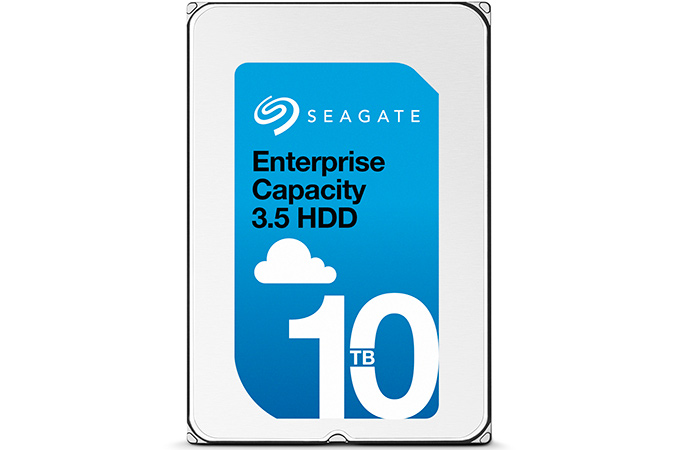
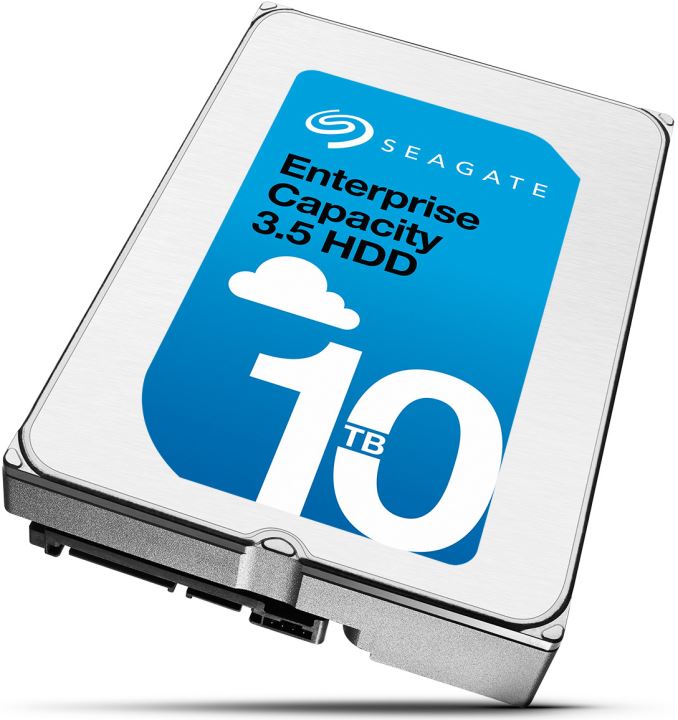
Seagate Technology on Wednesday introduced its first helium-filled hard disk drive. The novelty is designed for cloud datacenters that require maximum amount of storage and enhanced reliability. By filling its HDDs with helium, Seagate can substantially increase their capacity and lower power consumption while using current magnetic recording technologies. At present, two major customers of the company are already evaluating the new hard drives. Volume shipments of the HDDs will start later. The helium-filled Seagate Enterprise Capacity 3.5-inch HDD with 10 TB capacity incorporates seven perpendicular magnetic recording (PMR) platters with 1.43 TB capacity each as well as 14 heads. The manufacturer claims that the new drive features an advanced caching sub-system to increase performance. In addition, the new helium-filled Enterprise Capacity 3.5 HDD sports the company’s PowerChoice technology, which helps to manage power consumption during idle time, as well as PowerBalance technology, which enables operators of datacenters to balance power consumption and IOPS (input/output operations per second) performance of hard drives. Seagate claims 2.5 million hours MTBF for its helium-filled HDD, which is significantly higher compared to traditional enterprise-class drives. Typically, Seagate’s Enterprise Capacity HDDs feature 7200 revolutions per minute (RPM) spindle speed as well as special top and bottom attached motors (in a bid to reduce vibration), but the manufacturer did not confirm such details about its 10 TB helium-filled hard disk drive. Since hermetically sealed HDDs feature significantly different internal architecture, many actual specs of the Seagate Enterprise Capacity 10 TB may differ from predecessors.
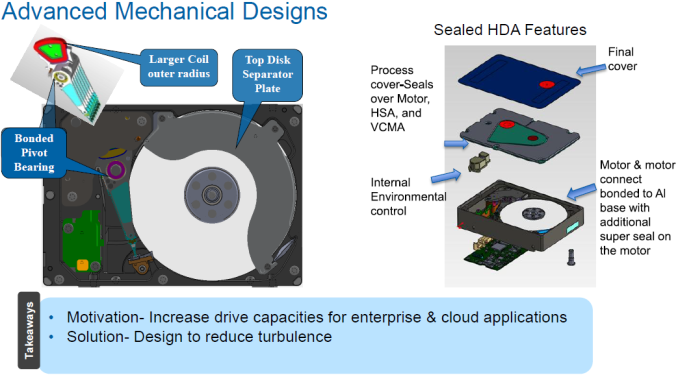
The new hermetically sealed helium-filled hard drives from Seagate use either Serial ATA-6 Gb/s or SAS-12 Gb/s interfaces and can be installed into various environments. The manufacturer did not reveal sector sizes of the new HDDs, but typically modern high-capacity hard drives have 4 KB sectors and can support 512-byte sectors via emulation. Typically, enterprise-class hard drives also optionally support data security features, such as self-encryption, secure erase and so on. Unfortunately, Seagate did not reveal exact feature-set of the helium-filled 10 TB HDDs, possibly because customers are only evaluating them at the moment and commercial drives may be different from today’s. The density of helium is one-seventh that of air, which reduces drag force acting on the spinning disk stack and lowers fluid flow forces affecting the disks and the heads. By filling hard drives with helium, makers of HDDs can install up to seven platters into one industry-standard 3.5/1-inch hard drive, reduce power consumption of HDD motors and improve accuracy of arm’s positioning. All three benefits are crucial for modern datacenters. By expanding capacity of its top-of-the-range Enterprise Capacity 3.5-inch HDD to 10 TB (up from 8 TB, or by 25%), Seagate increases capacity per rack to 2400 TB (up from 1920 TB), which significantly bolsters storage density in a datacenter while decreasing power consumption per terabyte. For datacenter owners such changes reduce total cost of ownership (TCO) and help to maximize their storage capabilities without expanding area of their facilities.
Seagate said last year that it had experimented with helium-filled hard disk drives for about 12 years. While the company is several generations behind HGST with its hermetically sealed commercial HDDs, the company’s helium platform should be rather robust in terms of both reliability and performance. At present, Alibaba and Huawei, who both said that the new hard drives help them to reduce their costs, evaluate Seagate’s Enterprise Capacity 10 TB HDDs. Some other companies have also received Seagae's new HDDs. HGST’s 10 TB helium-filled hard disk drives are already deployed by companies like Netflix, which need maximum amount of storage. Seagate itself predicted recently that in 2016 its 8 TB hard drives would be its most popular high-capacity models. The company did not announce high-volume availability timeframe of its 10 TB HDDs, but it is unlikely that Seagate will ship a lot of such products this year. Pricing of Seagate’s Enterprise Capacity 10 TB HDD is unknown. Mobile devices, Big Data analytics, 4K ultra-high-definition video, modern workloads and emerging devices generate tremendous amounts of data, which greatly increases storage requirements for datacenters. Since technologies like two-dimensional magnetic recording (TDMR) and heat-assisted magnetic recording (HAMR) are not ready for commercial hard drives just not, helium-filled HDDs will gradually gain importance for companies like Alibaba or Netflix. So far, HGST has shipped over four million helium-filled hard drives and in in the recent quarters adoption of such HDDs intensified among its customers. |
| 8:00a | CES 2016: Lenovo Booth Tour
Once again Lenovo took over the Aquaknox in the Venetian hotel to show off all of its new products for 2016. Lenovo launched a big refresh for CES, with new products, and updates to existing models. As with all PC makers, the release of Skylake has necessitated a refresh of all products, giving us the chance to see what the various PC makers are doing with this chance for a refresh. We’ve covered the announcements already here, here, here, and here, so this will just be some hands-on time and thoughts about the new products.
One product that I didn’t cover, but got a nice demo of, is the ThinkPad Stack lineup, which was initially launched last year at CES with four devices. The original four were a 1 TB hard drive, 10,000 mAh power bank, Bluetooth speaker, and wireless access point. For 2016, Lenovo is also introducing a ThinkPad Stack Mobile Projector, which is a compact 150 lumen 720p projector, and it’s a fully standalone product, with an integrated speaker, Miracast and battery for 2 hours of wireless projection. Because it’s a Stack product, it can be combined with the power bank and Bluetooth speaker to give it an 8-hour projection time without recharging, with decent sound quality out of the Bluetooth speaker. The other addition to the Stack lineup is the Charging Station, which can be used to charge mobile devices either with a cable or wireless. It can also be combined with the power bank to be able to charge several devices, or a single device several times. The projector will be $400 and the charging station will be $50 when released in April.
The entire stack lineup is gaining some traction, according to the Lenovo spokesperson I was talking to. It’s not inexpensive, but the modular lineup is very flexible and solidly built. The size of all of the devices makes them easy to take with you on the go, and the ability to mix and match is a big advantage. The demo I got of the projector was very slick, with Miracast providing the wireless connection. When it was docked on top of the other stack units, the Stack speaker instantly took over the duties. I could see this being a great set of tools for a mobile sales force to provide quick demos or slides to clients. The ThinkPad lineup got a nice refresh, and many of the devices are a bit thinner and lighter than previous models, yet they also offer larger batteries in some of the models despite the reduction in weight. That’s a good thing, since I did like the X1 Carbon a lot, but the battery life was far from class leading. Any improvement to that is welcome in my books. Let’s start with the X1 Carbon. Overall, it would be difficult to tell the difference between last year’s model and this one, but the 2016 version has lost a bit of weight and gained on battery. It has also lost the option of a touch screen display. Since this is a traditional notebook, the loss of touch should help a bit on battery life, and I found the display to have a bit of grain too it on the 2015 model. Quick inspection of the new version looks like it’s better now, but we’ll have to wait and see if we can get a hands-on in a location with better lighting in order to provide final judgement.
The 2015 T450s was one of my favorite laptops of last year, mostly due to the amazing keyboard. For 2016, the T460s moves to Skylake, and also drops about half a pound in weight, and it now comes in at just three pounds. The loss in weight is immediately noticeable, and despite the 0.74-inch thick chassis, it’s almost as light as the X1 Carbon’s 2.6 lb weight. The keyboard is exactly the same, which is good news. The T450s also features Power Bridge, so you can swap the rear battery out while the notebook runs off of the front battery, and the 72 Wh rear option is still available, giving 96 Wh total if you are OK with the extra thickness and weight of the larger battery. The X1 Tablet was very nice, and I am a big fan of the 3:2 aspect ratio for these convertible tablets. The X1 line has a very nice ThinkPad style keyboard attachment, and its unique aspect is the modular accessories. As I covered in the launch news, there are three attachable modules. You can attach either a productivity module which adds over 50% more battery capacity, along with an HDMI port, USB 3.0 port, and OneLink+ for docking. The Presenter module is an add-on pico projector, and the final module is an Intel RealSense 3D camera system for scanning objects. The build quality of the X1 Tablet was very solid, and the unique kickstand lets the projector be used with the tablet as a stand for it. You can get the X1 Tablet with up to Core m7 with vPro, and there is even an LTE-A option. This is a great looking productivity tablet and hopefully we can get one in to compare it head to head with the competition in this space (read that as Surface Pro 4).
On the PC side, I think the star of the show was the X1 Yoga though. I’m a big fan of the Yoga convertibles, since they offer features like Stand mode and Tent mode which make them even better for some consumption activities than a true tablet, since you don’t have to hold onto them. They also offer a much better laptop experience than the detachable screen convertibles due to the better weight distribution. The X1 Yoga offers the same keyboard experience as other ThinkPad Yogas, where when you rotate the keyboard around past 180°, the keys become flush with the case so they are less awkward when using it in the tablet mode. Amazingly the ThinkPad X1 Yoga is only 2.8 lbs, meaning it weighs almost the same as the X1 Carbon, yet offers the reversible display.
The standout feature though of the X1 Yoga is that it can be had with an OLED display. Lenovo had one of these available, and it truly looks stunning in person. OLED does have some drawbacks, especially power consumption on brighter average picture levels, and Lenovo has some extra software to try and lessen the blow here. They have an option you can enable to automatically dim all windows except the active window, which should help a bit, assuming you don’t run Excel at full screen. They also have a setting to turn the task bar black, which should help with concerns about it burning in. OLED is in its infancy on the PC, so I think there are going to be some growing pains, but for those that like the amazing contrast available, you will want to at least see these in person. For those that are more comfortable with an IPS LCD, the X1 Yoga will also offer that.
I also got a quick look at the MIIX 700 tablet, which is another 12-inch 3:2 model, and a few of the larger ThinkPads as well. The new Yoga 900 was on-hand as well, and it looks like a solid upgrade over the outgoing Yoga 3 Pro. Unfortunately it keeps the same RGBW 3200x1800 display, which needs to be addressed soon since it is far from the best panel in a notebook. Lenovo also has the ThinkPad 13, which is a low cost ThinkPad branded notebook. It looks to come in around $500 with Windows 10, and it includes flash memory. There is also a Chrome OS version of this notebook.
Lenovo also launched a couple of USB-C monitors, with the ThinkVision X24 Pro and ThinkVision X1. I think these are very nice looking displays, and they are also very thin. The stand can optionally include wireless charging, and when doing the news piece I guessed that it would be Qi, but it is actually Rezence based. The prices on the displays are pretty reasonable, and they both feature very thin bezels. Some people commented on the odd looking webcam at the top, but once I saw it in action it made a lot more sense. The webcam can slide out and tilt down, which allows you to use the webcam as a document scanner. When you think about what the “Think” lineup is all about, this is a pretty smart move for a lot of office workers. Both displays looked great, and the USB-C addition allows a single cable docking solution for notebooks with the correct USB-C implementation.
I also asked Lenovo about the state of their bundled software. They had made statements about reducing their pre-loaded software in the Windows 10 timeframe, and clearly 2015 was not a banner year for Lenovo in regards to bundled software. I was told that they would be offering cleaner bundles, as well as optional fully clean bundles on ThinkPads which should help speed up business deployment since they won’t need to be imaged first. Hopefully this is the case and Lenovo can step up and be a leader here. Overall, Lenovo had a lot of new products for CES. Some were just refreshes, some were already launched, but the new products for CES were all nicely done. The X1 Yoga looks like a great convertible notebook. We will work closely with Lenovo over the coming months to try and get some of these new devices in for review, and put them through their paces. |
| 9:00a | The Rosewill Quark Series Power Supply Review (750W, 850W, 1000W, 1200W) Today we are having a look at the Quark PSU series from Rosewill. Rosewill is a North American manufacturer, most commonly known as being Newegg's in-house brand. Rosewill is also a company that is usually trying to compete by outpricing the competition, offering low cost and mainstream products at lower prices. The Quark series however is not meant for the average user, but for enthusiasts that are shopping for a high quality and performance PSU, suggesting that Rosewill is not afraid to compete against the cream of the market. |
| 10:01a | CES 2016: The Race to Skylake Xeon Motherboards at GIGABYTE
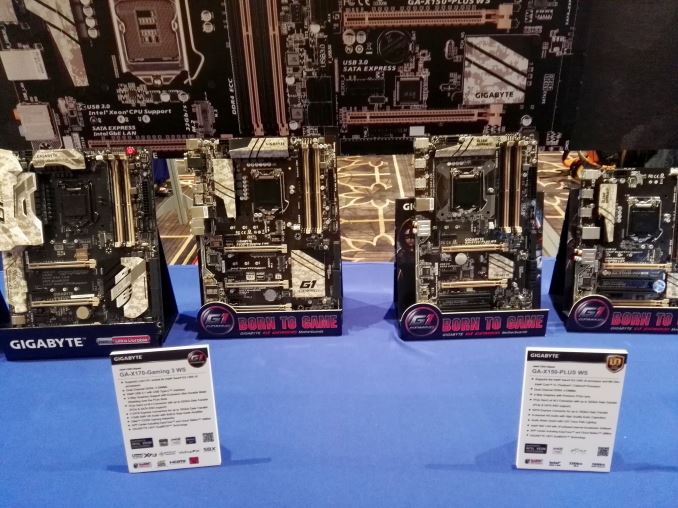
I have been relatively tight lipped on the swathe of Xeon focused motherboards recently making headlines, for good reason. Back at the launch of Intel’s latest generation of processors in August, codenamed Skylake, we had heard that this generation would deviate on the norm when splitting consumer and professional parts. Previously it was possible to run a professional Intel CPU, a Xeon, in a consumer motherboard that used a mainstream chipset – this allowed users to pick and choose if they wanted that Xeon (due to pricing or other factors) but also with features only found on consumer motherboards. With Skylake, Intel said this would change. While consumer processors would work in both consumer and professional motherboards, the professional Xeon processor line would be locked to professional-grade motherboards only. This change has meant that the major motherboard manufacturers are scrambling to launch a set of professional grade motherboards, and specifically the C232 and C236 chipsets which mirror the H150 and Z170 chipsets for consumer. This has been further compounded with the revelation regarding non-K series overclocking, and whether this should be a feature for Xeon CPUs. These C232/C236 motherboards will be unlike the ones that have come before in this segment, and feature more consumer oriented features for audio, storage, networking, USB 3.1, power delivery and even overclocking in the BIOS where possible. The GIGABYTE line on display at CES is essentially this. There were at least six models on display, and were easily spotted by the naming scheme (using X170, or X for Xeon) and the camouflage aesthetic with consumer features such as the PCIe guards.
Here the X170-Gaming 3 WS (that’s WS for Workstation) is built on the C236 chipset, with both SLI and CrossFire certification similar to a Z170 motherboard. If you add in the Killer E2200 chip, upgraded audio, USB 3.1 support via USB Type-C and PCIe Gen3 x4 M.2 slots, this is essentially a regular line gaming motherboard with just the chipset changed.
Interestingly enough, not many were advertised directly with ECC support when paired with Xeons. On the far left is the X170-Gaming 7 WS and one next to it is the X170-Extreme ECC, which both look like they should be the high end models with plenty of upgraded power phases, upgraded heatsinks and the other features we see on consumer motherboards.
The ECC model here gives both USB 3.1-C via Intel’s Alpine Ridge controller, which could indicate Thunderbolt 3 validation in future (wait for an announcement), as well as HDMI 2.0 support via the MDCP LSPCON that other GIGABYTE models have. Combine it with the E2400 and Creative solution, and it again seems to sync up with the consumer motherboard line.
Anything on the X150 line from GIGABYTE is using the C232 chipset (which is practically the H150), and is meant to be on the lower price part of the spectrum. Alongside this X150-PLUS WS was a micro-ATX variant of the same motherboard, and the X150M-PRO WS as well.
From my perspective, the demand for Xeons from casual end-users is difficult to grasp. I have known for a while that there are a core bunch of end users that will go out and buy the E3 1230 line of Xeons because they can get good pricing over a similar Core based part, or there are users that will swear that the Xeons are better binned, offering lower power consumption. But determining just how big that market it is difficult, even when thinking about end-users and system integrators and if Intel/retailers even decide to sell Xeons to end users as OEM labelled parts. You can still use a Core processor in a C232/C236 motherboard anyway, so these motherboards are more aimed at Xeon prosumers and SMB environments that are not big companies with contracts in play. |
| 1:00p | CES 2016: Deepcool’s Genome is a Water Cooling Equipped Case with a Helix Reservoir
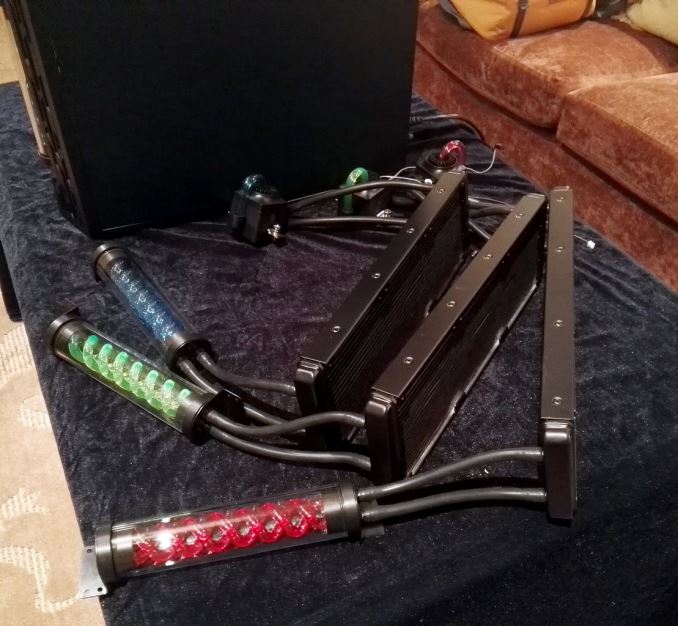
We’ve dealt with closed loop liquid coolers for computer processors for the best part of five years now, and there are users different sides of the fence regarding their utility, ease-of-use or performance. There are chassis being designed with these CLLCs in mind, such that users have enough space to cool multiple CPUs or GPUs with plenty of mounting points. Deepcool, via their brand Gamer Storm, had a case on display designed to fit their specific cooler which aims more towards the aesthetic of the boring black CLLCs we have had up to this point.
The cooler has an additional stage compared to other CLLCs, with a combination waterblock/pump, a triple 120mm radiator and then a helix shaped reservoir. The whole arrangement is designed to fit only in the Genome chassis, with the helix proudly on display on the outside, and the top of the chassis designed to accommodate the radiator.
For example here we have the white Genome chassis with a limited edition ASUS Z97 Mark S motherboard (read our review here) and white Avexir DRAM specifically built for the motherboard. I pointed out to Deepcool that here the CPU block and pipes should be white as well, to which they produced a model with that in mind but it wasn’t ready to be installed. The CPU block/pump has a design which splits them into semi-modular parts that allows Deepcool’s design team to avoid patent issues and produce new models in the future which can be an upgrade of one or the other.
I was told by Deepcool that the block has a variety of mounting mechanisms for all the major sockets, but they are currently working on an updated version to make it easier.
The chassis itself is an ATX case with a special area at the front of the case to give more room for cable routing but also for airflow. There is a bracket that can be removed for super long GPUs, and due to the design SSDs and HDDs are mounted at the bottom with the power supply.
I tell you what, the design is simple and effective. I have seen this sort of helix reservoir before so Deepcool is not unique in this, but the cooler and chassis is designed to be sold as a set in various color combinations yet to be decided. The price at retail for both should be around the $250 mark, which really puts $150-$180 in the triple-radiator cooler (with fans) and $70-$100 in the case. |
| 4:00p | CES 2016: MSI’s Golden Idea for Motherboards
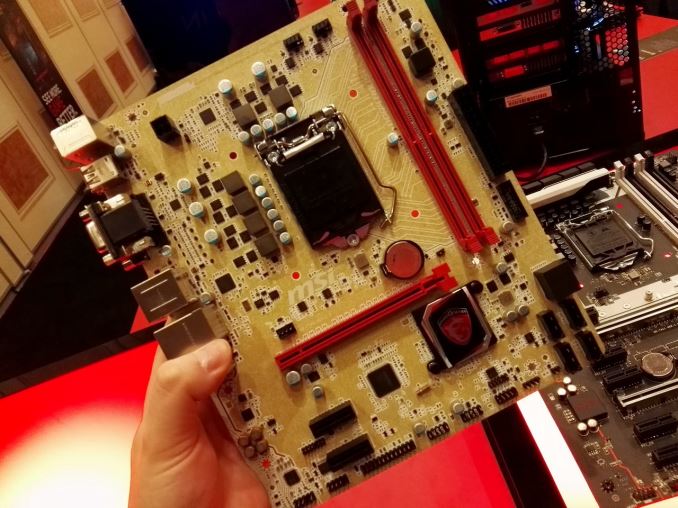
The problem with a gold motherboard color is that it often looks too much like copper, and several companies have tried it in recent years (ASUS on Z77, ECS’ Golden Series) with limited success. Back during Z77 launch, one group of users seems to not like the scheme, or couldn’t found a combination that works. There is the old gold themed specialist modded PC that looks good, but I’ll be honest and say I have not seen that many in general when red and black themes tend to win out. I have heard proponents of gold components suggest that the color scheme works in certain markets, such as China and the Middle East, but until I see those numbers I’d take it with a grain of salt. Nonetheless, for Skylake, MSI has you covered.
As part of the Gaming range, this model is aimed at the H150/B150 crowd more than the high end, and while I have heard remarks that it looks like the brown PCBs of old, that is actually a gold colored PCB that seems to have glitter embedded in it. The booth lighting didn’t help capture the effect properly, but I wonder if this isn’t part of a bigger idea. MSI has been playing around with color schemes for a while, such as the ECO and the Krait series of motherboards which are both separate from the regular Gaming line or something like the OC Certified line. It is only going to be a matter of time before we try all colors, but it makes me wonder if this model was done at the request of a regional SI who wanted a few thousand units for their customers as part of a custom order. I have seen other motherboard companies put custom product runs into the mainstream before, and this might be the case here. No word on regional release or pricing as of yet. I’m not sold on the color scheme straight away, and the glittery effect made me think about putting it in pink and slapping a Hello Kitty logo on it. I would be interested in seeing the scope of the sales though, especially where and to which retailers/system integrators. |







| << Previous Day |
2016/01/13 [Calendar] |
Next Day >> |