[Most Recent Entries] [Calendar View]
Sunday, February 21st, 2016
| Time | Event | ||||||||||||||||||||||||||||||||||||||||||||||||||||||||||||||||||||||||||||||||
| 7:20a | MWC 2016: Huawei Press Conference Live Blog 2PM CET Here we are at Huawei's Press Conference at MWC - it's Live Blog time ! | ||||||||||||||||||||||||||||||||||||||||||||||||||||||||||||||||||||||||||||||||
| 7:30a | The LG G5 Launch Event Live Blog We're here at MWC 2016 in Barcelona to cover LG's keynote, aptly named LG G5 Day. | ||||||||||||||||||||||||||||||||||||||||||||||||||||||||||||||||||||||||||||||||
| 12:00p | HP Announces The Elite x3 Windows 10 Mobile Powered Smartphone
Windows Phone has had a rough go of it of late. Microsoft first purchased, and then basically shuttered, Nokia’s smartphone division. Instead they wanted to back out of the market and allow their partners be the ones to showcase devices. Windows 10 Mobile has brought the same underpinnings of Windows 10 to the smartphone space, as well as the promise of Universal Windows Platform (UWP) apps which can run on both the desktop and mobile devices. One of the interesting features that came out of Windows 10 Mobile though is Continuum. On the desktop, Continuum allows the device to be switched into a touch first mode, for use on 2-in-1 devices, but on the Windows 10 Mobile side it kind of does the opposite. You can plug a sufficiently powerful Windows 10 Mobile smartphone into a docking station, and use it as a more traditional PC. While this is an interesting endeavour, on the consumer side I can’t see this being a hugely practical situation, although there certainly could be use cases where you could see this being useful. The one market where Continuum could be very successful though is in business. You can see a scenario where you have sales reps who travel a lot, and rather than having to bring a laptop with them or keep cubicles with desktops for them to use in the office, you could instead have them just dock their phone and get to work.
That’s pretty much the idea that HP has come up with, and they are showcasing Windows 10 Mobile as the operating system of choice to get this done. We’ve seen some of this in the past, but the level of execution here due to updates to Windows 10 and the UWP mean that it’s finally a scenario that you can envision working. Let’s start with the handset. Just recently Microsoft released the Lumia 650 as a “business” focused phone, and while I suppose you could market anything as a business device, the 650 lacks both Windows Hello and Continuum, both of which would likely be strong selling points in the market. HP has decided to not only make a phone targeted towards business, but the Elite x3 is a true hero phone for Windows 10 Mobile. This phone literally has everything you could think of, and then more. Let’s go over the basics.
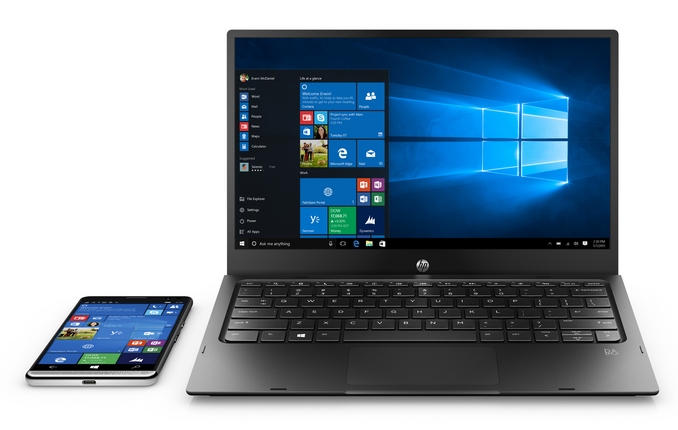
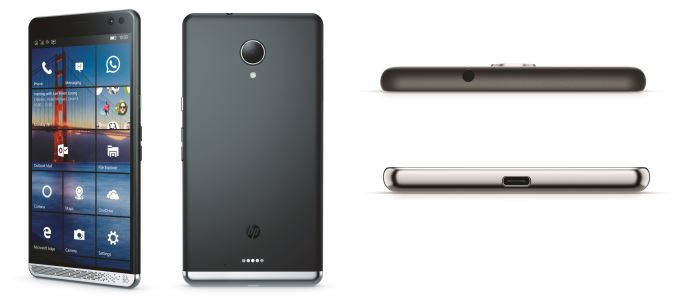
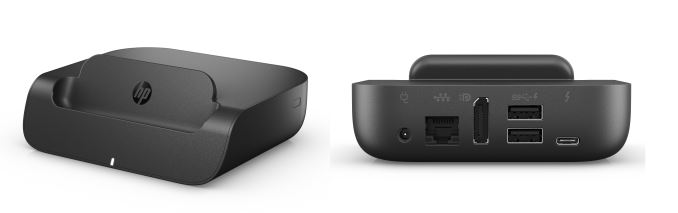
The HP Elite x3 is a phablet, coming in with a 5.96-inch WQHD AMOLED display with Corning Gorilla Glass 4 to protect it. It has a graphite exterior with Bang & Olufsen stereo front facing speakers, and three integrated noise cancelling microphones. The rear camera is a 16 MP shooter, and the front camera is an 8 MP camera with Iris scanning capabilities for Windows Hello. In addition, although the current incarnation doesn’t have it yet, the final shipping version should also have a fingerprint sensor on the back. The bottom has a USB-C connector for charging and Continuum. The body is 7.8 mm thick and weighs 195 grams, and it is IP 67 rated and designed to pass MIL-STD 810G testing. Powering the Elite x3 is a quad-core Snapdragon 820, which is the Kyro based processor set to replace the not well loved A57 based Snapdragon 810. This is Qualcomm’s first custom chip design based on 64-bit ARM. Qualcomm was the chip company to beat when their 32-bit Krait chips were around, and although the switch to 64-bit was a rough one, we will finally be able to see a proper FinFET based custom design. The Snapdragon 820 also features Adreno 530 graphics. RAM should not be an issue, with the Elite x3 sporting 4 GB of LPDDR4. Storage will be ample, with 64 GB of eMMC 5.1 as the onboard storage, and you can add another 2 TB of storage over micro SD. It also has 2x2 802.11ac wireless, NFC, and Dual nano SIMs, or nano SIM + micro SD with an adapter. Because this is targeted towards enterprise, there are some additional requirements. The Elite x3 includes dual biometrics (Iris and Fingerprint as stated earlier) and is FIPS 140-2 certified, with Secure Boot, full disk encryption with a 256-bit key, fTPM 2.0, Bitlocker, and VPN. As a smartphone, HP has basically covered everything they could possibly think of. Now for the cool part. Since the phone supports Continuum, HP is also including a docking station. This is a typical Continuum dock, and the phone sits in the dock which is powered by a USB-C cable, and offers Ethernet, two USB ports, and DisplayPort. Put this on a desk, and hook a keyboard, mouse, and monitor up to it, and you can have your mobile workers come in with just their phones, and they can plug them in and get to work.
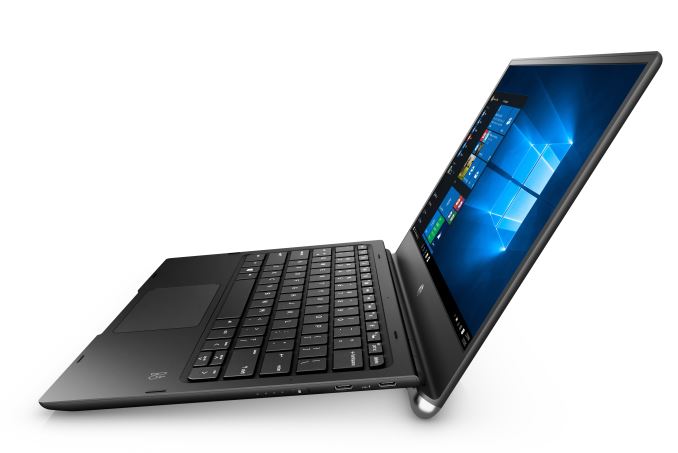
But HP has also though beyond this scenario. What about the mobile worker who generally has a phone and a laptop? Sure we’ve seen the dockable phone before in the Motorola Atrix but that was a long way from what is possible with Continuum. Since Continuum is built into the operating system, a lot less magic is needed from the OEM to make something like this work. HP will be offering the HP Mobile Extender, which is a laptop with no processing power. It is instead just a battery shell which offers some I/O. It is a 12.5-inch 1920x1080 laptop, with integrated Bang & Olufsen stero speakers. It has a USB-C connector to hook the phone up to, and it has two more USB-C ports for I/O and power in and out, along with a micro HDMI jack. The keyboard is a spill-resistant model with a drain and backlighting.
The laptop is only 13.8 mm thick (0.54-inches) and weighs only 1 kg (2.2 lbs) and it houses the 46.5 Wh battery. The battery can be used to charge the phone while its docked, as well as run the display. There is no runtime listed, but a battery that size should be able to run a smartphone for a long time, as well as whatever is required to run the display. All of this is centered on Continuum. As mentioned earlier, Continuum allows you to run your phone as a desktop PC, but the app selection is restricted to UWP apps which support Continuum. At the moment, that isn’t a huge selection, and you can’t natively run any Win32 apps. HP has a solution for this too, which is HP Workspace, whichi is an app catalog to let you access virtualized apps. App virtualization is not a new technology, so HP will leverage HP Workspace to use this existing tech and stream business apps to the phone. This is already a popular solution in business to get line of business apps out to mobile devices like tablets and phones, and HP’s version has full support for Continuum. HP’s Elite x3 is certainly a bold step forward for the company. It is embracing new Microsoft technologies much like they have in the past with the Windows Media Center PCs and Windows Home Servers over the years. This new offering is certainly compelling in the fact that they have some great looking hardware, with a focus on enterprise and solutions for business workers. Make no mistake. This phone is not going to upset the balance of power, or raise Windows 10 Mobile’s marketshare into the double digits, but HP needs to do neither of those to be successful. This is a package focused on enterprise, and the components are centered around services like their App virtualization which will generate income for HP based on subscriptions. HP doesn’t even have a price yet for the phone, and it will not ship until August. Although this may change, at the moment HP is going to sell the phone through their channels into business, so this phone is unlikely to find its way into consumers hands any time soon. But that’s actually fine. Microsoft’s big play in mobile has always been the enterprise, but it’s the one that that they seem to have ignored for the last five years. In the right context, this is a pretty interesting device. Source: HP | ||||||||||||||||||||||||||||||||||||||||||||||||||||||||||||||||||||||||||||||||
| 12:02p | LG Announces the LG G5: 5.3-inch QHD with Snapdragon 820
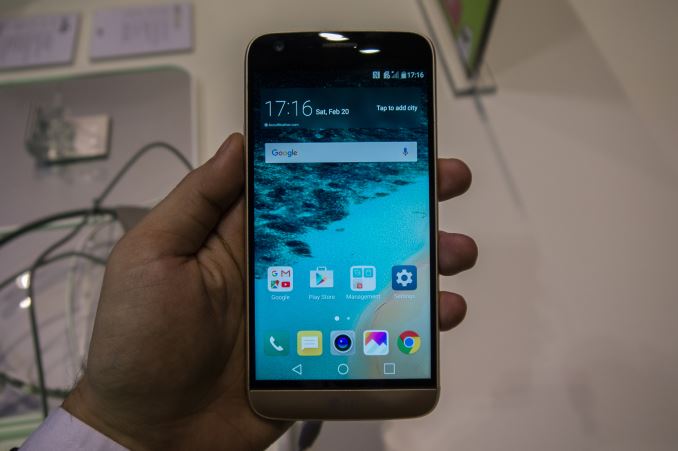
Today just before the official beginning of Mobile World Congres 2016 we were happy to attend LG's G5 launch event. The G5 is the successor to last year's much acclaimed G4. The new devices from the Korean manufacturer marks a very large change in terms of design language and build material as we the G5 adopts a new metal body. In a sense the G5 is LG's transition to premium built smartphones. Before we get back to the build-quality, let's take a look at the spec sheet.
The G5 is powered by Qualcomm's new Snapdragon 820 SoC which contains a pair of Kryo cores clocked in at 2.15GHz and a pair clocked in at 1.59GHz. The Device comes with 4GB of LPDDR4 memory. In terms of storage LG now employs UFS storage and by default comes with 32GB of NAND - we're not sure if there are plans for larger capacity devices. The microSD has been retained and now is accessible via combined SIM/microSD slot on the bottom right side of the device.
The device's design and ergonomics are astonishingly surprising and mark a very large departure from LG's past designs. For beginners, we see a reduction of the screen size back to 5.3" from the 5.5" on the G4. The screen is an IPS display with 1440p resolution but LG has visibly improved the panel as I noticed there are significant viewing angle improvements compared to the panel used on the G4. The G5 also now features an always-on mode which displays the current time and notifications. LG is able to get away with this on an LCD panel with help of a more efficienct DDIC and also local backlight illumination, meaning only part of the backlight works when the AOD is active. Furthermore LG claims the screen's brightness can reach up to 850 nits which is an astounding number - I wasn't able to verify this but the screen did seem pretty bright. Overall I was extremely impressed by the G5's screen.
The unibody design (almost unibody) of the G5 is what will be most noticed and praised as the G5's build quality rises dramatically in comparison to its predecessors. The alloy frame feels very solid and thanks to a good finish is also very grippy and comfortable to hold. The rounded edges give it a good in-hand feel and generally LG adopts a design-language with rounded features. At the top of the device we find the 3.5mm headphone jack along a IR blaster and top microphone. On the right side there's isn't much besides the bottom SIM/microSD tray. On the left side we find the volume rocker which no longer resides on the back of the device. At first I was surprised to find no power button on the phone but after closer look it's revealed that the fingerprint sensor now acts as a mechanical button, a pretty interesting and ergonomic combination of both features.
Of course one of the key defining features of the G5 is the fact that it's able to sport a removable battery all while maintaining a metal body. LG achieves this by having the whole bottom part of the phone be removable, acting as a cover to the battery which slides in. The whole mechanism was much more robust than I initially expected and has no jiggle-room whatsoever. It's also not possible to remove the slot by accident as it's held firmly in place and only opens up via a button on the left side of the device. The bottom housing contains the USB-C connector as well as the device's speakers. Both connect to the main body of the phone via proprietary connector next to the battery. It's worth mentioning that even without the battery in place the main body of the phone was well built and didn't give much in terms of flex.
Finally in terms of camera the G5 now sports a dual-sensor setup. The sensors arn't used for 3D or stereo vision but rather act as complements to each other. The main camera is a 16MP module with 78° viewing angles while the secondary unit is a 8MP module with an extremely large 135° FOV. Switching between the two units happens when one zooms in or out via the traditional pinch gesture in the camera app. Although the picture quality transition seemed seamless, there was a noticeable delay of 1-2 seconds until the viewfinder switched to the other camera. Both modules seems to employ OIS. I wasn't able to find out what sensor modules were used and if they represent an improvement to last year's G4 module. On the software side LG seems to have completely revamped its UI as it's now a visibly cleaner and less cluttered interface. The colour scheme is much brighter and icon scheme seems more attractive compared to what was found on the G4. I wasn't able to test much in terms of the performance as the display units didn't seem to allow installtion of third-party apps but it seemed fast although the default animations were relatively slow. A few browser benchmarks put the Snapdragon 820 at the same levels as what the MDP was able to achieve in Chrome, which means that LG doesn't seem to have been able to optimize the browser for the chipset. I was playing around with one of the units connected to the VR headset and the device became noticeably hot after some period of use and watching 3D videos which was a relatively worrying observation although we can't come to any conclusion before we're able to perform a full review of the device. Overall I was pretty impressed by the G5 and what LG was able to achive this generation. The G5 is able to improve on its ergonomics and premium feel all without sacrificing any of the much wanted features such as a removable battery and microSD slot. It remains to be seen how the Snapdragon 820 and the screeen efficiency end up in terms of battery longevity as the 2800mAh battery does represent a regression over the G4's 3000mAh battery. The dual-camera design is in my opinion a smart use of multiple modules and avoids more gimmicky use-cases such as stereo vision or all-focus pictures, keeping it simple by simply taking advantage of the second module as a wide-angle camera for capturing more scenery. | ||||||||||||||||||||||||||||||||||||||||||||||||||||||||||||||||||||||||||||||||
| 12:38p | MWC 2016: Samsung Unpacked Press Conference Live Blog... in VR?! We're sat in the audience awaiting the start of Samsung's yearly MWC Press Conference. Is it still a conference if there's a Gear VR headset on every seat?! | ||||||||||||||||||||||||||||||||||||||||||||||||||||||||||||||||||||||||||||||||
| 1:00p | Lenovo Announces The VIBE K5 and K5 Plus
Along with their tablet and PC announcements today at MWC, Lenovo also announced two new smartphones under their VIBE branding. The new phones are the Lenovo VIBE K5 and VIBE K5 Plus, with each device targeting a slightly different price, along with packing different specs. The details of both of their specs can be found in the table below.
To be honest, I think it's a shame that these phones never seem to make their way to North America. Looking at the specs and the price, you're really getting a lot of phone for your dollar. The VIBE K5 is powered by Qualcomm's Snapdragon 415 SoC, while the K5 Plus uses Snapdragon 616. What's interesting about Qualcomm's new SoC portfolio is that the only real difference between the best 400 series and 600 series SoCs is the clock speed, with both being octa core Cortex A53 chips. While I really can't find a functional reason for putting eight of the same cores with the same max frequency on an SoC, I suppose that it does help greatly with a device's marketability in regions like China. Both SoCs use Adreno 405, which really helps to address my complaints about the GPU performance that we've seen in devices at the low end of the market. Aside from the SoC, the other point that separates the K5 and the K5 Plus is the display. The K5 is just advertised as having a 1280x720 LCD display, while the K5 Plus is a 1920x1080 IPS LCD. The fact that the IPS specification is omitted from the K5 does concern me, but I wouldn't expect that it's using a TN panel as that would probably be more difficult to source than an eIPS or a VA panel.
In all other ways the K5 and K5 Plus are identical. Both phones have 16GB of eMMC NAND and 2GB of LPDDR3 memory, plus a MicroSD card slot for expansion. Both have a 13MP rear-facing camera, and a 5MP front-facing camera which for some unfortunate reason has a fixed focus. WiFi connectivity is your standard 2.4GHz 802.11n, which is the best you'll get at this price point. There is dual-SIM support, although it's not clear whether this is DSDS or DSDA, and what network capabilities the second SIM has. The Lenovo VIBE K5 and VIBE K5 Plus will be available in March, with the K5 priced at $129 and the K5 Plus at $149. Both phones will be available in silver, grey, and gold finishes. As usual, the phones won't be coming to the US or Canada, but they'll be available in the existing markets that Lenovo services. | ||||||||||||||||||||||||||||||||||||||||||||||||||||||||||||||||||||||||||||||||
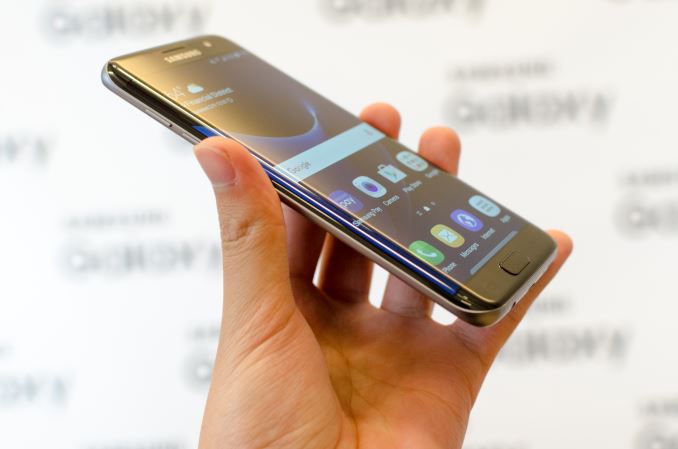
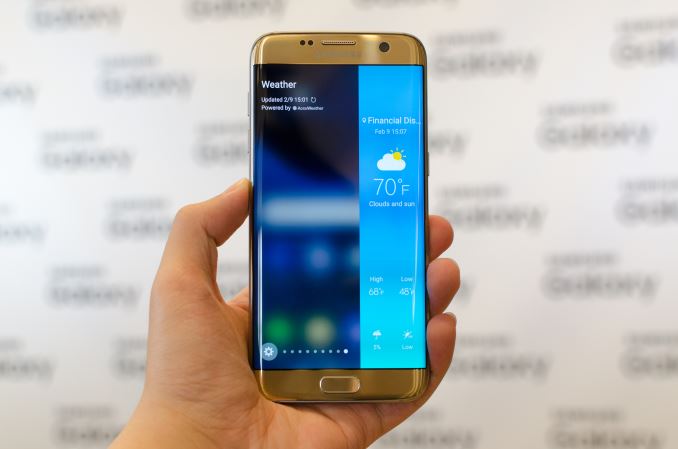
| 1:00p | Hands On With the Samsung Galaxy S7 and S7 edge
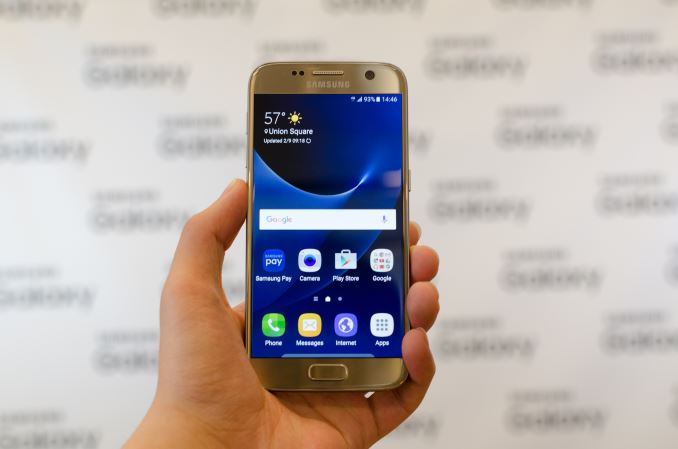
If you've followed our reviews for the past year, it was probably evident that the Galaxy S6 was one of the best phones launched last year. With one of the better designs in terms of camera, the first 14nm SoC, and a great AMOLED display, there was a lot to like, and consequently it's no surprise that it was one of the best selling Android phones for 2015. With six iterations of the Galaxy S behind them, Samsung has done a lot over the years to improve the line, however even the S6 wasn't perfect, and there were still issues that kept it out of the running from being the best possible phone that it could be, which Samsung is looking to address head-on with the new S7. For many, these issues included the lack of expandable storage, a perceived lack of battery life, and a reduction in dust and water resistance. Samsung Pay also had the potential to be a selling point for the Galaxy S6 at launch, but due to delays early adopters had yet to see the benefits of Samsung Pay. Even if I never found the camera hump to be an issue, a number of people complained about this issue as well.
With the Galaxy S7, it’s clear that Samsung has taken many of these criticisms to heart as the Galaxy S7 extends the Galaxy S6 design in many areas while resolving many of the criticisms that were leveled at it. To understand the full extent of the changes seen in the Galaxy S7, we can start with some of the basic specs.
At a high level, almost everything outside of design has seen some major changes. For the US, the 2.15/1.6 GHz Snapdragon 820 represents a return to a custom Kryo CPU architecture and a new GPU with support for Vulkan. For most regions, the Exynos 8 means a move to Samsung Systems LSI’s first custom CPU architecture in a shipping mobile SoC. In both cases, we’re looking at Samsung’s 14nm LPP process node which should provide an appreciable increase in circuit-level performance as the taller fin means better control over the channel to reduce leakage and improve drive strength, and improved silicon straining should also result in higher maximum clock rates at the same power draw due to improved carrier mobility. The Galaxy S7 also bumps RAM from 3GB to 4GB which should help reduce the rate at which applications are evicted from memory and improve multitasking performance.
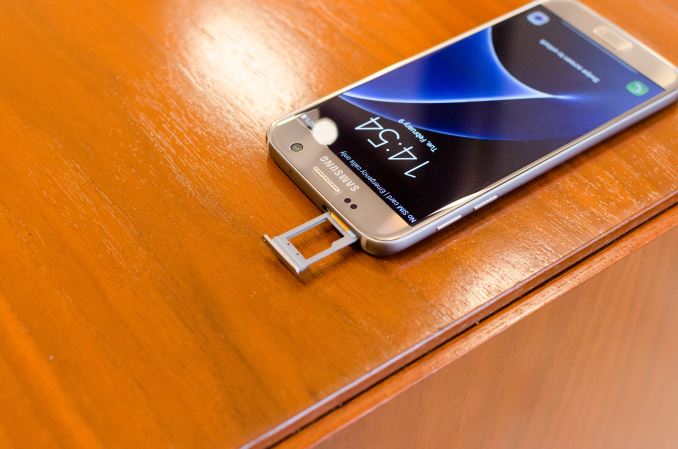
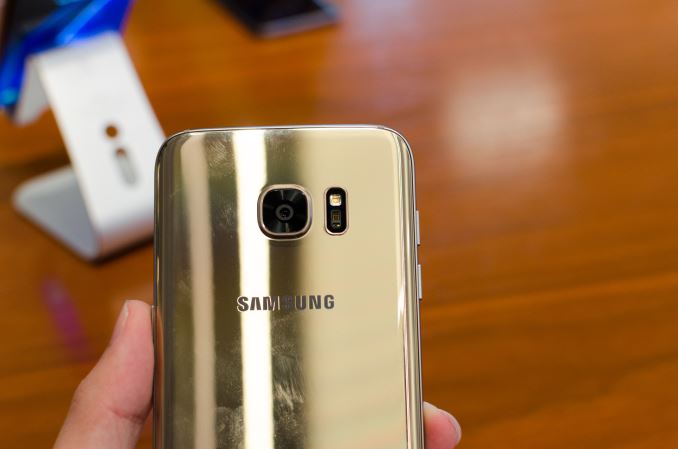
In a move to address all of the criticisms mentioned at the start of the article, Samsung has re-introduced microSD on the Galaxy S7, the battery size has jumped 18% from 9.82 to 11.55 WHr, Samsung Pay is now truly ready for users from day 1, the camera hump has been reduced by making the phone roughly 1mm thicker, and the Galaxy S7 is now water and dust resistant, rated at IP68 which means it is completely dust tight and can be submerged in at least 1m of water for an indefinite period of time.
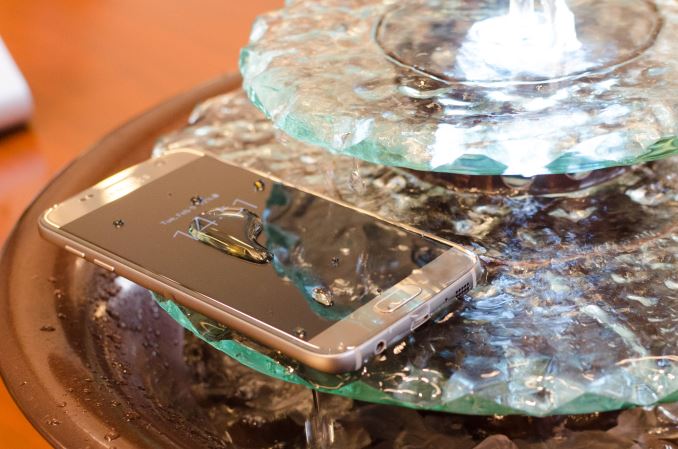
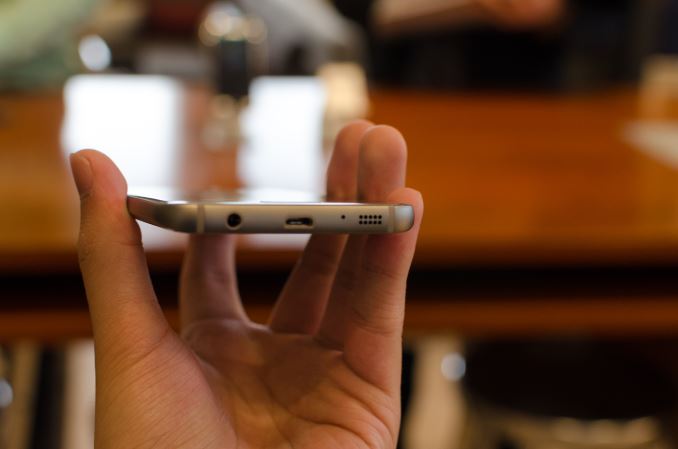
The IP68 rating is also accomplished without the use of any port covers, which is really quite a feat of engineering. I wasn’t able to test this water resistance in depth, but placing the phone in some shallow water and sprinkling water into the USB ports and headphone jack didn’t noticeably affect the device.
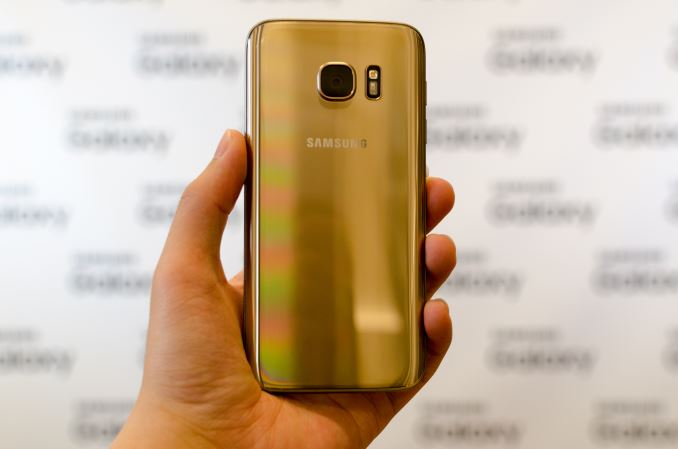
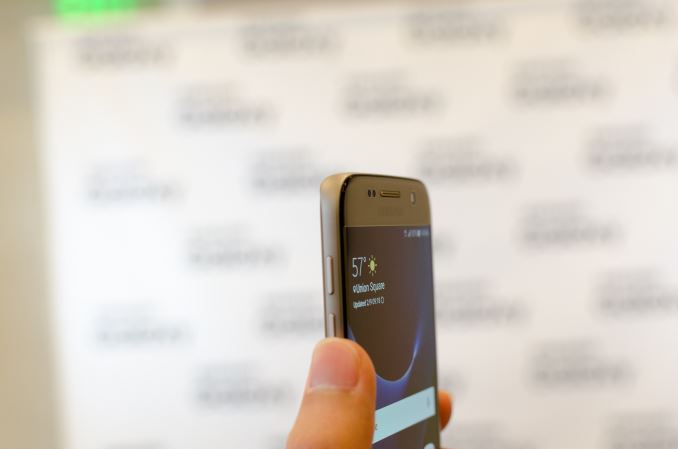
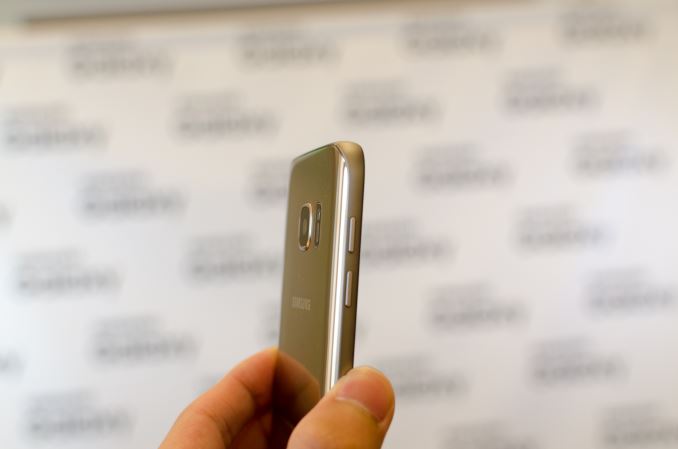
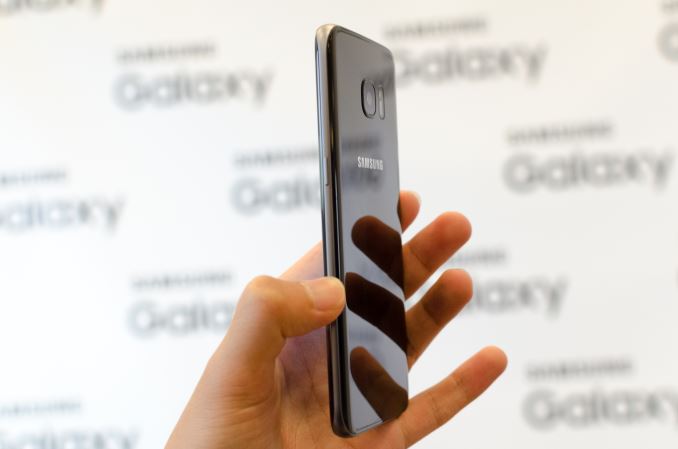
In addition to the laundry list of changes above, we see a move to better WiFi with support for MU-MIMO, and a refinement of the industrial design first introduced with the Galaxy S6. Instead of flat glass leading to a metal edge on the display, the display is now covered with 2.5D rounded glass edges which improves the feel of the device when doing edge swipes. The back glass of the phone is also 3D with curved edges as well to improve the in-hand feel which helps to make the phone feel thinner than it really is. However, I definitely noticed that the Galaxy S7 is easier to slide around on tables, so I suspect a case and screen protector will probably be necessary for those that intend to keep this device for long term use.
While all of this is great, the single biggest change from the Galaxy S6 to S7 is going to be the camera. With the Galaxy S6 review it was hard to avoid wondering why Samsung didn’t bother to integrate a camera with larger pixel size to improve low light performance, especially when camera was such a significant part of the Galaxy S6 design story with the noticeable camera hump.
With the Galaxy S7, Samsung is taking a rather bold step with a move from the 16MP, 16:9 aspect ratio sensor of the Galaxy S6 to a 12MP 4:3 aspect ratio sensor in the Galaxy S7. While sensor format is roughly unchanged at 1/ 2.6”, the pixel size is now 1.4 micron which should significantly increase the number of situations where the image quality is limited by shot noise rather than image sensor noise. Interestingly enough, Samsung Mobile has elected to forgo a move to RWB color filter array, which replaces the green subpixels of the RGBG Bayer array with clear/white color filters, despite the 3.5dB sensitivity gain promised by Samsung Systems LSI, although it might just be that such a move would entail too much risk from an image processing standpoint at the moment as Bayer color filter arrays are much more mature and well-understood from an image processing standpoint.
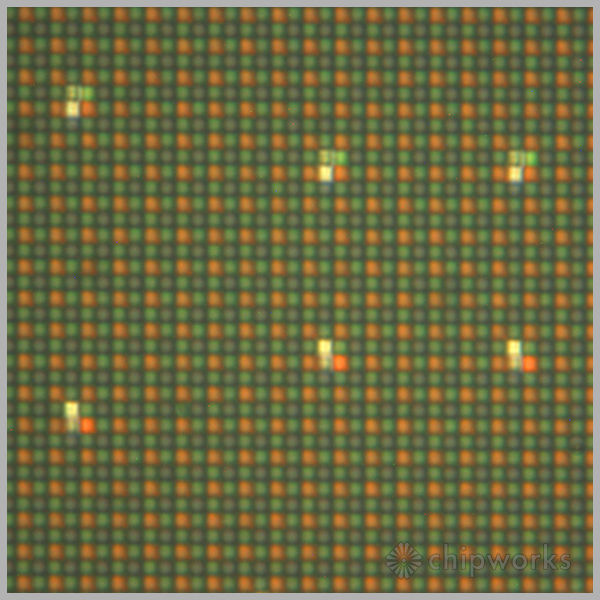
Galaxy S5 PDAF sites, Chipworks The sensor also incorporates dual pixel technology for dramatically improved PDAF usability. For those that are unfamiliar with how dual pixel PDAF works, in essence this is an extension of PDAF from just a few pixels on the sensor to every pixel on the sensor. At the CMOS image sensor level, in essence a light barrier is set up across each pixel with two photodiodes per pixel to allow for phase difference measurements while combining the output for the two photodiodes when capturing a photo. I suspect that the 1.4 micron pixel size here may not be entirely due to a desire to improve low light performance though, as a smaller pixel split in half may encounter strange quantum effects that affect image quality.
As a result, due to the sheer amount of information collected for focus on the sensor, it becomes possible to have the same speed of focus no matter where you tap to focus on the frame, and in low light rather than falling back to contrast detection it remains possible to use phase detection AF up to the limits of what the image sensor is capable of capturing. In my experience while the Galaxy S6 focuses quickly the Galaxy S7 feels like it jumps to the exact focus every time in almost an instant.
The other change to the camera is an increase in aperture size from f/1.9 to f/1.7, which should improve low light performance. I’m a bit less effusive here as while increasing aperture size does improve the amount of light captured, there is a lot of potential for distortion to get out of hand here. As the z-height of the sensor is mostly unchanged and the focal length appears to be held relatively constant it will be important to see how resolution/MTF falls off from the center and what sorts of distortions appear towards the edges in our full review. I definitely noticed that detail towards the edges wasn’t nearly as good as the center of the frame, but without a relative comparison it’s hard to say whether or not it was a problem.
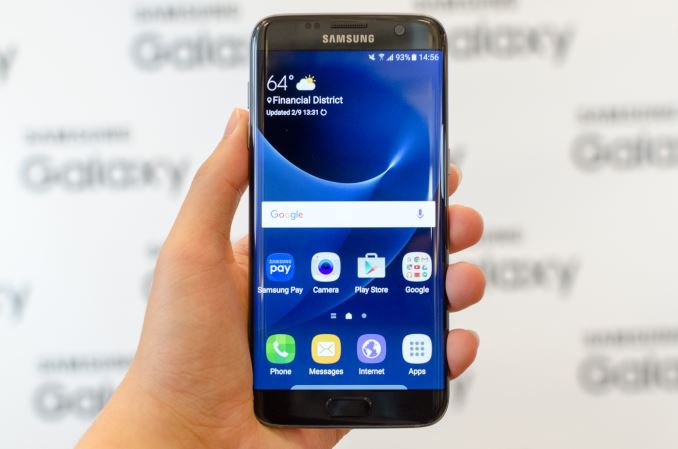
Of course, the Galaxy S7 edge also brings some extra features that set it apart from the Galaxy S7. Rather than a 5.1” 1440p display the display is a 5.5” 1440p edge display. Of course, due to the subpixel layout there will be some noticeable color shifting that results on the edges of the display but this isn’t anything that wasn’t noticeable in the Galaxy S6 edge. Whether any of these OLED displays have changes in emitter chemistry, display driver IC, or TFT backplane configuration is hard to say at this time. The Galaxy S7 edge also gains a much larger battery at 13.86 WHr which should make for a significant boost in battery life over the Galaxy S7, but at the cost of more weight and a larger device. There are also some changes to the edge features that allow for more useful information to be displayed like news and weather, but I suspect the main draw here is going to just be the neat aesthetic that comes from the edge display.
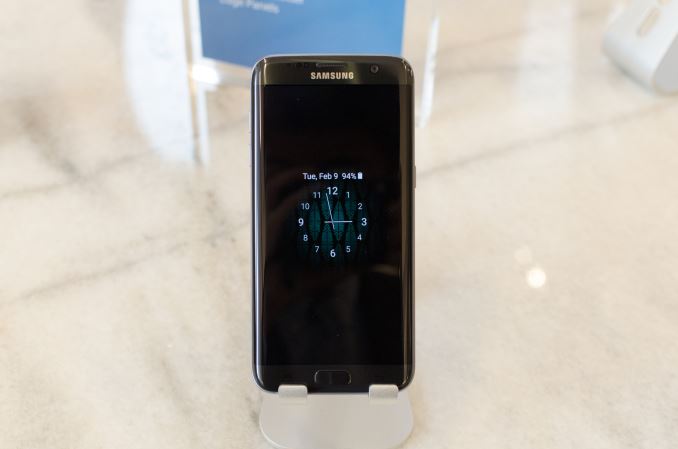
Along the same lines of the edge display, Samsung is adding extra software features like Always-On Display, which allows for display of simple things like a wallpaper, clock, or calendar along with notifications even when the phone is locked. This appears to run off of a very low power microcontroller of some sort, as the main application processor remains in sleep mode, and the only other work being done to enable this feature is a check to the proximity sensor to disable the display if something is covering it and the ambient light sensor to make sure to set brightness appropriately. The average picture level of these modes are very low as well so functionally speaking the power consumption of this feature is relatively low.
The other feature that was worth mentioning was game mode, which provides a floating button and various options like disabling notification alerts, capacitive keys, along with the ability to minimize the game without losing state and the ability to screenshot or record gameplay. This is a relatively low-key feature, but it’s nice to see nonetheless. Subjectively, although software isn’t 100% complete the Galaxy S7 felt relatively smooth, but there were some noticeable hitches here and there which could suggest that there’s still some need to optimize TouchWiz/Samsung UX for lower touch latency and fewer resource-intensive operations relative to AOSP/GPe/Nexus Android.
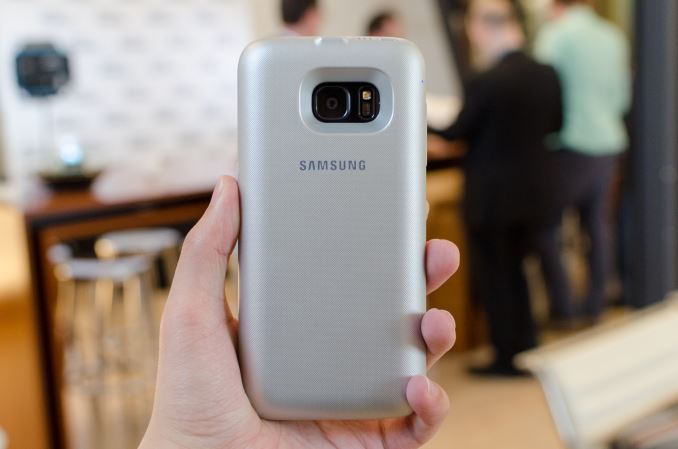
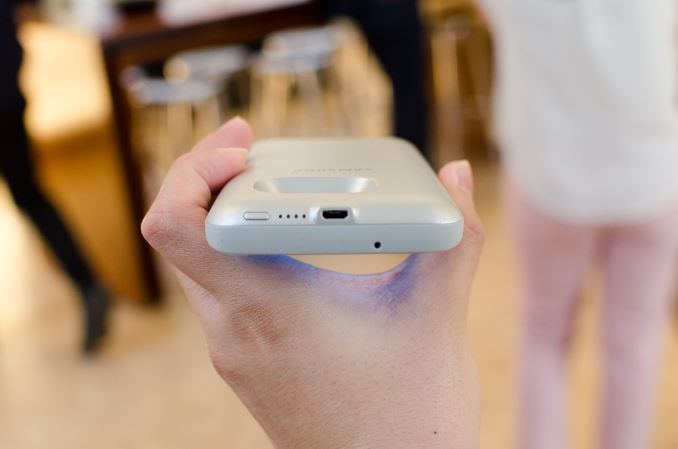
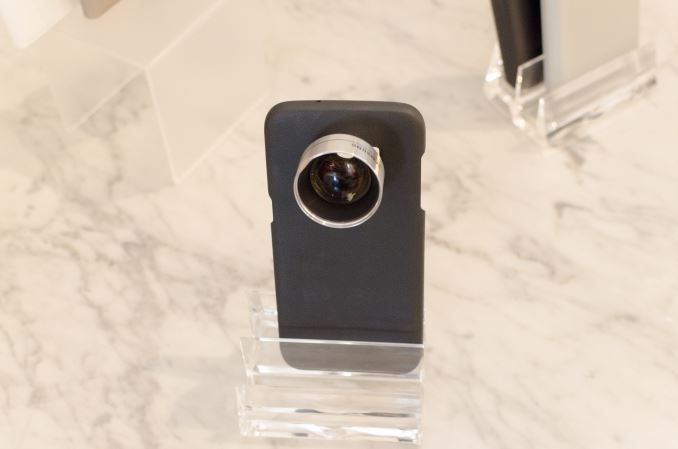
Finally, Samsung is also introducing a number of neat accessories for the Galaxy S7 and S7 edge that include interchangeable lenses mounted to a case and an extended battery that charges the device with wireless charging. I’m not sure whether these will be commonly available, but they were interesting nonetheless.
Overall, the Galaxy S7 fixes many of the issues that consumers had with the Galaxy S6, while continuing to improve upon the strengths that it had. I’m definitely happy to see that Samsung has kept some sanity with regard to screen size, and I look forward to seeing how it stacks up against the competition. The Galaxy S7 will be available in Black Onyx and Gold Platinum. The Galaxy S7 edge has the same colors as the Galaxy S7, but also adds Silver Titanium. Both models at launch will only have a 32GB storage SKU. In the US, pre-orders will begin 8AM EST on February 23 2016 and the device will go on sale beginning March 11 2016 for AT&T, Sprint, T-Mobile USA, US Cellular, and Verizon. Within the US, those that buy a Galaxy S7 or S7 edge between February 23 and March 18 will also receive a Gear VR and a 6 game bundle while supplies last. | ||||||||||||||||||||||||||||||||||||||||||||||||||||||||||||||||||||||||||||||||
| 1:00p | Samsung Announces the Gear 360: Consumer VR Content Creation
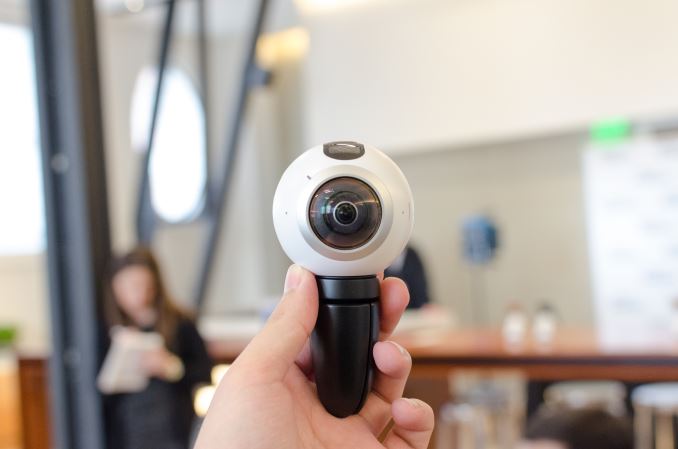
In addition to the Galaxy S7 and Galaxy S7 edge, Samsung is also announcing a camera for VR content. Rather than the extreme setups that we see with some of the current players in this space, Samsung is focusing on bringing VR content creation to the masses with the Gear 360. In essence, the Gear 360 is a sphere slightly smaller than a tennis ball that can capture video and images from every angle around it with the use of two wide-angle f/2.0 15MP cameras to produce a 30MP image for stills, or 3840x1920 video. The Gear 360 has a 1350 mAh removable battery and microSD, a standard tripod mount, basic dust and splash resistance, and can pair to Galaxy smartphones with NFC and transfer data using WiFi Direct. A companion app on Galaxy smartphones also allows for live preview of the footage, in addition to remote settings, transfer, and editing. For control of the device without a compatible smartphone, the Gear 360 has a 72x32 0.5" PMOLED display and some rudimentary buttons to control its settings. The Gear 360 will be available starting Q2 2016. | ||||||||||||||||||||||||||||||||||||||||||||||||||||||||||||||||||||||||||||||||
| 1:01p | Lenovo Launches New MIIX 310 Tablet, Yoga 510 And Yoga 710 Convertibles At MWC 2016
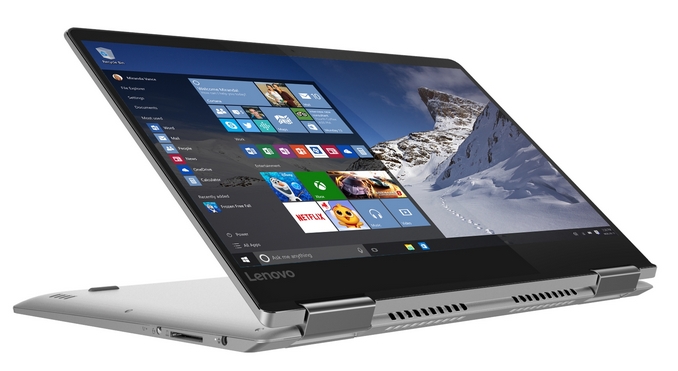
The Yoga brand has permeated much of Lenovo’s laptop lineup, and they offer some of the best convertible device experiences out there. It should really be no surprise then that Lenovo is expanding this brand further, with the new Yoga 510 and Yoga 710 models. In addition, they are launching a new Windows 10 based tablet, which is the MIIX 310.
The Yoga 900 is clearly the top of the range in Lenovo’s Yoga consumer lineup, but there is a lot of room underneath that model for some other devices. The Yoga 710 will slot in as a mid-range offering, in both an 11-inch and 14-inch model. The 14-inch version is a full Ultrabook, with 6th generation Core processors up to a Core i7 model, and the 11-inch version starts off with a quad-core Pentium but will be offered with up to a Core m5 version. The 14-inch model will also offer an optional GeForce GPU version, for those that need a bit more power for gaming or compute. Lenovo is also claiming 20% better Wi-Fi reception due to a new hinge antenna on the 14-inch 710, and up to a 256 GB SSD on this model. Both are claimed to offer up to 8 hours of battery, and the displays are 1920x1080 IPS models. Sound is courtesy of Dolby Atmos virtual surround sound.
The 11-inch Yoga 710 will start at just $499, and the more powerful 14-inch version has a starting price of $799. These will be available in May. The Yoga 510 offers the same four modes as the other Yoga models, and will be offered in both a 14-inch and 15-inch version. The lower end of the Yoga family is not as thin and light as the others in the lineup, with the 14-inch model coming in at 1.75 kg (3.85 lbs) and the 15-inch version tipping the scales at 2.08 kg (4.6 lbs). Both offer up to Core i7 processors, and optional AMD Radeon R7 M460 2GB GPUs. Lenovo claims up to 8.5 hours of battery life with these models.
The Yoga 510 14-inch version will start at $599, and the 15-inch model starts at $699. Both will be on sale starting in April.
The last Windows device announced today is the Ideapad MIIX 310. Back at IFA in September, Lenovo announced the MIIX 700 tablet, which was a 12-inch 3:2 offering competing directly against Microsoft’s Surface Pro tablets. The MIIX 310, as you’ve likely figured out from its product name, is a less expensive offering in the MIIX family. This is a 10-inch tablet which weighs in at just 580 grams (1.27 lbs) but offers a full Windows 10 experience. It has a detachable keyboard as standard, which is pretty great, and Lenovo claims 10 hours of battery life with the optional 1920x1080 display. You can also get it with up to 64 GB of eMMC and 4 GB of DDR3L RAM. Lenovo doesn’t list the processor yet but it’s likely going to be an Intel Atom based on Cherry Trail. The MIIX 310 will be on sale starting in June for just $229.
Although we all love the high end offerings, it’s the mid-range where most of the work gets done. It’s always great to see high end features like IPS displays and SSDs make their way down into the mid-range. Hopefully we can get some of these in to check them out. Source: Lenovo | ||||||||||||||||||||||||||||||||||||||||||||||||||||||||||||||||||||||||||||||||
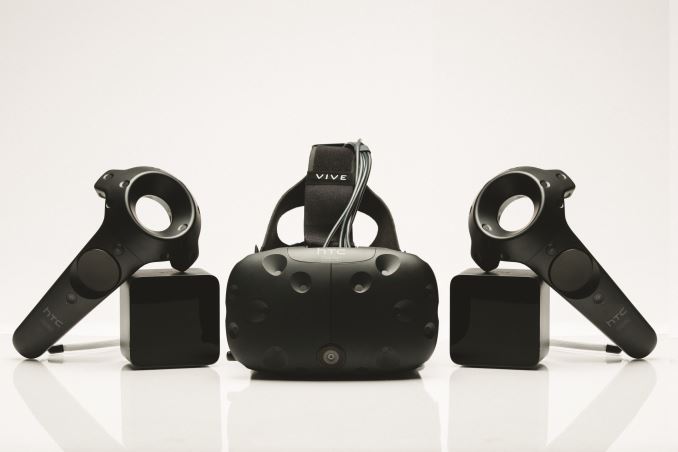
| 2:33p | HTC Vive Will Be Launching In April Priced At $799
Today HTC confirmed both the release date and price for the HTC Vive VR headset. Vive has gone through a couple of delays at this point, with an April release date being stated back in December of last year. Not only has the April date been solidly confirmed this time, but the other key unknown, the price, has also been confirmed to be $799. At first glance, a $799 price point seems awfully expensive. However, HTC and Valve are marketing the Vive as the "full experience" and note that the $799 package will include the headset, the two lighthouse base stations for room tracking, and two controllers. In comparison, the Oculus Rift does come in significantly cheaper at $599 for the headset, but the controllers for the Rift have also been delayed until the second half of 2016, and they will be an additional cost on top of the $599 price. With the Rift coming out in March and the Vive in early April, consumers looking to be early adopters of VR are going to have to decide on whether they think the additional $200 up front is worth it for the additional hardware that the Vive includes, or if they'll be betting on the Rift and waiting for its special controllers later in the year. One other thing that HTC mentioned is something called Vive Phone Services. This is essentially a feature that integrates with your iOS or Android smartphone and allows you to receive and respond to texts and calls while using your Vive. You can also check upcoming calendar invites as well, ensuring that you don't forget about what you need to do in actual reality while enjoying a world of virtual reality Of course, on top of the cost of a VR headset is the cost of a PC powerful enough to drive it. Valve is recommending that users have an NVIDIA GTX 970 or an AMD Radeon R9 290 at minimum. With that in mind, differences in cost on the order of a couple hundred dollars may be less significant than they seem when comparing the headsets themselves. The countdown on the HTC Vive product page is now just under 8 days, and when it gets to zero preorders for the Vive will open to the public. On top of the headset, base stations, and controllers, for a limited time those who purchase the Vive will get Job Simulator by Owlchemy labs, and Fantastic Contraption by Northway games. | ||||||||||||||||||||||||||||||||||||||||||||||||||||||||||||||||||||||||||||||||
| 6:15p | Early Exynos 8890 Impressions And Full Specifications
It's been an interesting day here in Barcelona as I've had the pleasure to get a hands-on with both LG's new flagship, the G5, as well as Samsung's new Galaxy S7. While Joshua's hands-on article was based on the Snapdragon 820 variant of the Galaxy S7 which we'll be seeing in US and likely Chinese markets, the samples here in Barcelona were European units based on Samung LSI's own Exynos 8890 processor. Without wasting too much time I quickly took a deeper look into one of the devices on display at the event to be able to find out some of the missing information that we've been lacking on the Exynos 8890.
The Exynos 8890 employs Samsung's own designed Exynos M1 cores. The micro-architecture at a high level resembles ARM's big cores, but Samsung seems to have made quite a few changes and improvements when compared to ARM's designs. While by now I do have a quite good idea of what the Exynos M1 looks like, we'll be covering the topic more in-depth in a future article once we'll be able to gain better insight from our own unit for proper benchmarking and power measurements. On the CPU side we find an 8-core SoC composed of 4x Cortex A53 cores running at up to 1.586GHz coupled with 4x Exynos M1 cores in a big.LITTLE configuration. The most surprising revelation was the fact that the M1 cores reach an extremely high clock of up to 2.6GHz. This represents quite a significant boost over some past rumors which had put expectations 2.3-2.4GHz maximum frequency range. The catch here is that the Galaxy S7's power management doesn't allow all four cores to run at this high frequency but rather only enables the maximum clock when there's at most 2 cores loaded. If there are 3 or more cores under high load, the CPU frequency doesn't surpass 2288MHz. On the GPU side we knew that we'd encounter a new ARM Mali T880MP12 - the currently largest Mali implementation available among existing SoCs. Back in November I theorized that Samsung would use the larger core implementation to lower the clocks of the GPU block and thus achieve better power efficiency. Indeed that's what seems to have happened as the Exynos 8890's GPU peaks at 650MHz versus the 770MHz frequency for the Exynos 7420. Hopefully this means that the new SoC will be able to maintain its peak performance for longer periods of time.
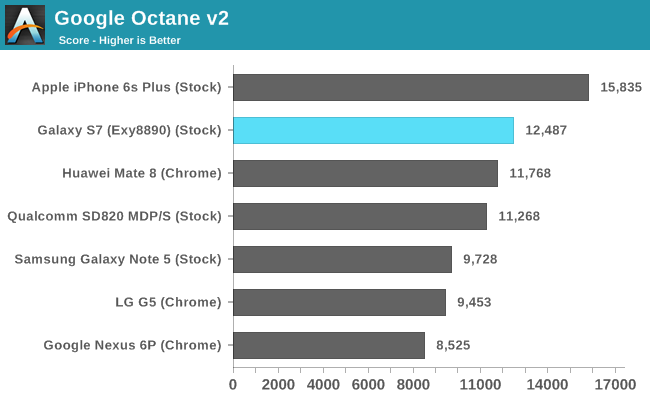
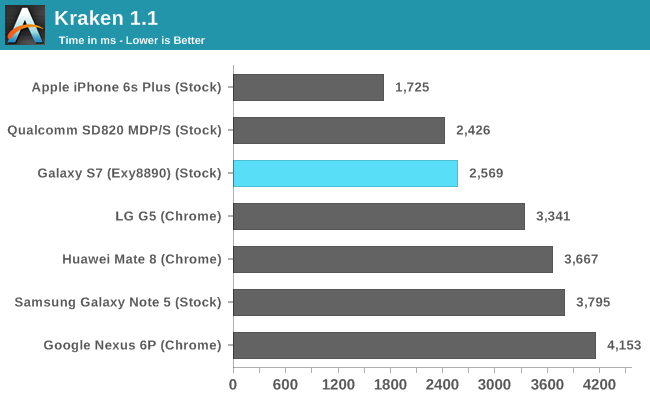
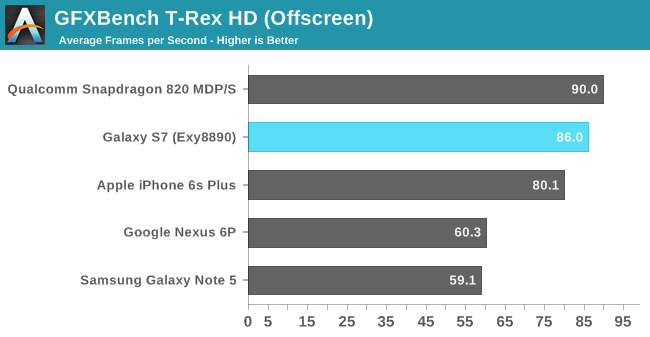
While I didn't have the time to run too many benchmarks, I did manage to run a few of our basic browser tests as well as GFXBench. We haven't had the opportunity to benchmark the Snapdragon 820 Galaxy S7 yet, therefore I included the score numbers of the MDP/S platform to represent a best-case scenario for the Snapdragon 820 until we can get apples-to-apples scores based on Samsung's browser. This still mostly due to the fact that Chrome is seemingly not yet optimized to take advantage of Kryo's new architecture, and as a result scores some rather mediocre numbers, as seen in some preliminary LG G5 numbers included in the graphs above.
Some quick GPU benchmarks also put the Exynos 8890 slightly behind the Snapdragon 820 in the MDP/S. We will still have to see if actual Snapdragon 820 devices are able to deliver the same performance as the MDP/S platform as there might be some thermal limitations coming into play. Again, we can't comment too much on the scores before we get to know each device's long-term performance and if the attained numbers are sustainable for long periods of time. One observation I made today which was particularly concerning, was that both with the Snapdragon 820 LG G5 as well as the Exynos 8890 Galaxy S7 got considerably warm after running some heavy workloads. The fact that the Galaxy S7 touts having a heat-pipe thermal dissipation system is a quite worrying characteristic of the phone and should in no way be seen as a positive feature as it points to high power draw figures on the part of the SoC. The first impression is that the performance difference between the Snapdragon 820 and the Exynos 8890 doesn't seem to be very large, therefore it will be the SoC's power draws and power efficiencies which will determine if, and which one of both will represent a superior design. Hopefully in the coming weeks and months we'll be able to get a better understanding of this new generation of SoCs so that we can paint a definitive picture of the current status of the mobile SoC space. | ||||||||||||||||||||||||||||||||||||||||||||||||||||||||||||||||||||||||||||||||
| 11:20p | Huawei Enters The PC Market With The MateBook Convertible Tablet
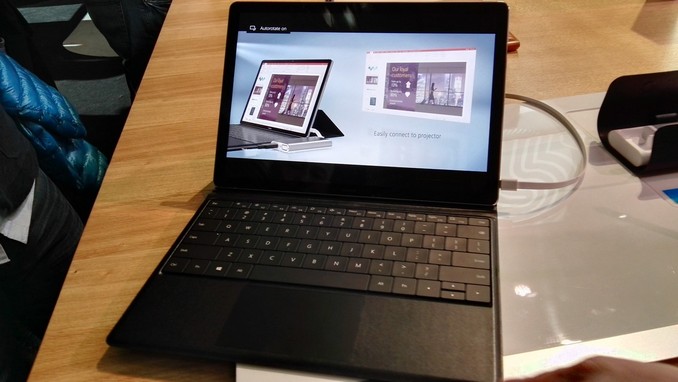
Move over Microsoft. One of the world’s largest smartphone makers has decided to enter the PC marketplace with the launch of the MateBook 2-in-1 tablet. Well, maybe not, but they have certainly taken a page out of the Microsoft playbook with their first tablet. This is a 12-inch tablet with a 3:2 aspect ratio. If that sounds familiar, that’s because it’s exactly the same aspect ratio and size as the Surface Pro lineup. Just like Lenovo and others, manufacturers are seeing the relative success of the Surface Pro and want their own piece of the action. And that’s great for all of us. Rather than compete head on with the Surface Pro though, Huawei has gone for a slightly different target. The MateBook is thinner, and lighter than the Surface Pro, and it is designed around the Core m platform, so it is completely fanless. Only the base model Surface Pro can be had with Core m. Other notable internal items are 4 or 8 GB of memory, and 128, 256, or 512 GB of SSD storage. Battery capacity is 33.7 Wh, and Huawei says this gives all day battery life, but we’ll have to see if that’s true. The tablet itself is only 6.9 mm thick and weighs just 640 grams (1.4 lbs). The MateBook also comes in several hundred dollars less than the Surface Pro, with a starting price of $699, and goes up to $1599 with Core m7, 8GB of RAM, and a 512 GB SSD. The display is a 12-inch 2160x1440 LCD.
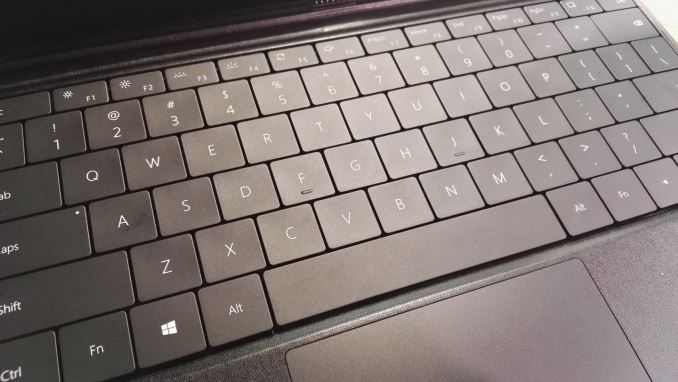
You can’t compete against Surface Pro without accessories, and the MateBook has both an active pen and click on keyboard to transform it into a laptop. The keyboard has backlit keys with 1.5mm of travel, but the actual keys themselves are very much like the Surface Pro 3 keyboard rather than the much improved Surface Pro 4 design. The tablet also lacks a kickstand, and instead the keyboard dock does some clever folding to hold the display up when it’s docked. The keyboard connects with pogo pins, so you don’t have to worry about Bluetooth connectivity for the connection, or batteries in the cover. The cover will sell for $129.
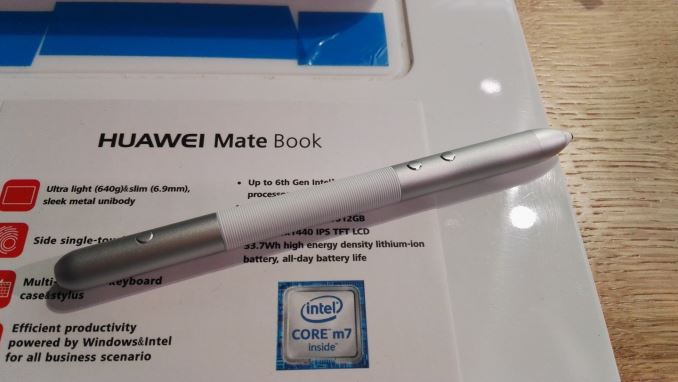
The other accessory is an active pen, and while we don’t know the pen technology at this point, Huawei does say that it has 2048 levels of pressure sensitivity. It also features a laser pointer in the pen for use during presentations. The pen charges over USB, and one hour of charge gives one month of use. It’s great to see a new entrance into the PC space, and Huawei has designed what looks to be a pretty nice tablet for their first attempt. The Surface Pro is definitely the inspiration for the MateBook, and that’s not a bad thing, but the keyboard has been improved a lot of the latest tablet from Microsoft, and the MateBook type cover appears to mimic the prior generation here. Also the display is a much lower resolution panel than the latest offering from Redmond, but it does match the well received Surface Pro 3 model. I’m very excited to see another entrant here though and hopefully we can get this in for review to see how it stacks up. | ||||||||||||||||||||||||||||||||||||||||||||||||||||||||||||||||||||||||||||||||


_575px.jpg)




| << Previous Day |
2016/02/21 [Calendar] |
Next Day >> |