[Most Recent Entries] [Calendar View]
Wednesday, February 24th, 2016
- Mushkin Impact 256GB
- Mushkin Atom 128GB
- Corsair Voyager GTX v2 256GB
- Mushkin Atom 64GB
- Mushkin Ventura Ultra 120GB
- Patriot Supersonic Rage 2 256GB
- SanDisk Extreme 500 240GB - USB 3.0
- SanDisk Extreme PRO 128GB
- VisionTek Pocket SSD 240GB
- Photos: 15.6 GB collection of 4320 photos (RAW as well as JPEGs) in 61 sub-folders
- Videos: 16.1 GB collection of 244 videos (MP4 as well as MOVs) in 6 sub-folders
- BR: 10.7 GB Blu-ray folder structure of the IDT Benchmark Blu-ray (the same that we use in our robocopy tests for NAS systems)
| Time | Event | ||||||||||||||||||||||
| 3:02a | MWC 2016: Xiaomi Media Preview Live Blog Andrei and I are at the Xiaomi event at Mobile World Congress. We believe the event starts at half-past, so stay tuned as we roll in the announcements | ||||||||||||||||||||||
| 8:00a | Mushkin Impact 256GB and Atom 128GB USB Flash Drives Capsule Review
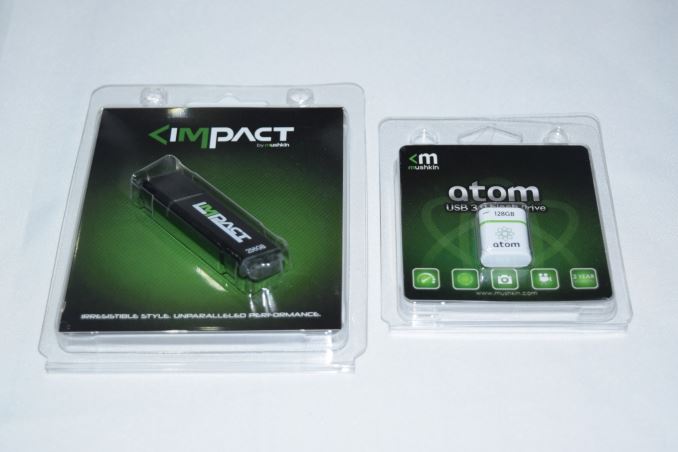
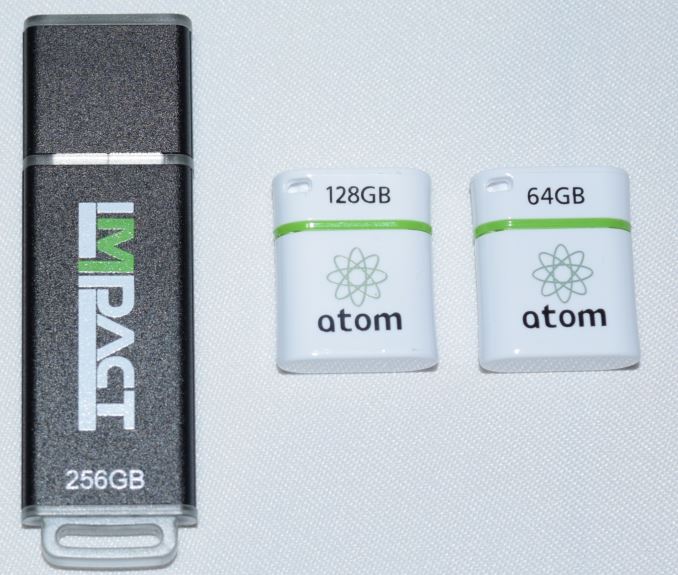
Flash drives are a dime a dozen these days, and most of them carry uninteresting specifications. In particular, flash drives advertising smaller physical footprints have tended to carry disappointing performance numbers. At CES 2016, Mushkin had two USB Flash Drives (UFDs) on display belonging to the 'small footprint' club, the Impact 256GB and the Atom 128GB. We have reviewed the Atom 64GB version before. Though we were unimpressed with the Atom's performance, the form factor was very intriguing. Last month, Mushkin showed that they had doubled the capacity while retaining the same form factor. Along with the Atom 128GB, Mushkin also showed off one of the smallest 256GB UFDs in the market, the Impact 256GB. Hardware Design and InternalsThe industrial design of the Atom 128GB is the same as that of the 64GB version. It has a small hole at one end to secure it to a keychain or anything similar. The Impact is small too, and the picture below brings out the relative sizes.
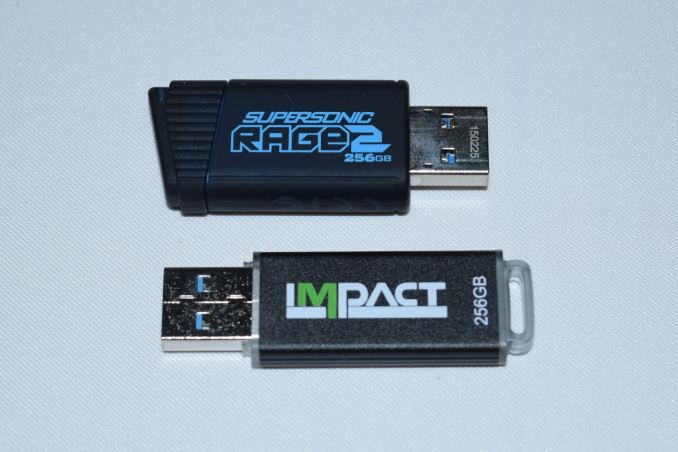
The smalled 256GB UFD that we have reviewed as yet is the Patriot Supersonic Rage 2. The Impact 256GB is of the same length, but has a slightly smaller width. It is highly improbable that the Impact 256GB might end up blocking any USB port adjoining the one it is connected to.
Unlike the Atom's plastic casing, the Impact also has an aluminum housing, and despite the lightweight nature, feels solid in hand. It also has a plastic tab at one end for attachment purposes. Without opening up the unit, it is possible to identify the controller and flash inside the units.
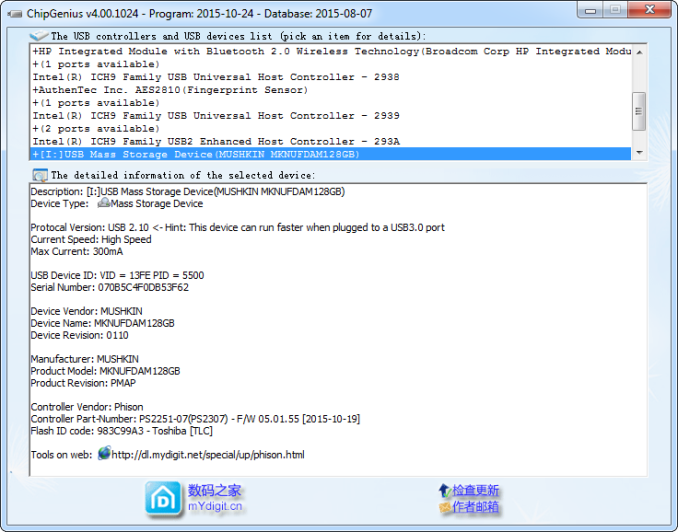
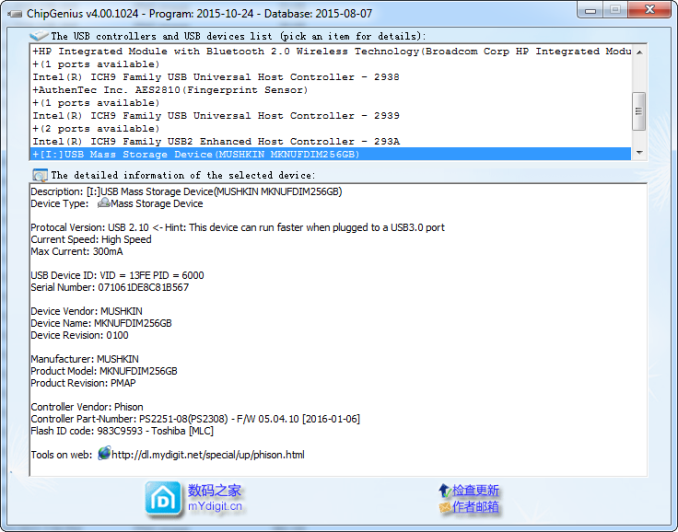
The Atom 128GB has a Phison PS2251-07 single-channel USB 3.0 flash controller and uses Toshiba TLC flash. On the other hand, the Impact 256GB comes with the dual-channel high performance Phison PS2251-08 controller and Toshiba MLC flash.
Testbed Setup and Testing MethodologyEvaluation of DAS units on Windows is done with the testbed outlined in the table below. For devices with a USB 3.0 (via a Type-A interface) connections (such as the Mushkin Impact 256GB and Atom 128GB that we are considering today), we utilize the USB 3.0 port directly hanging off the Z97 PCH.
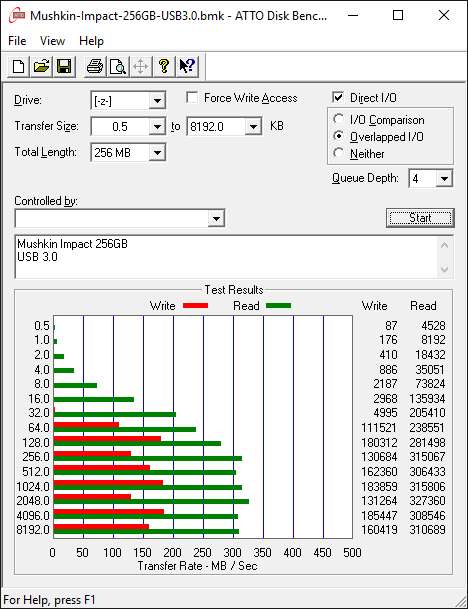
The full details of the reasoning behind choosing the above build components can be found here. The list of DAS units used for comparison purposes is provided below. Synthetic Benchmarks - ATTO and Crystal DiskMarkMushkin claims read and write speeds of 400 MBps and 310 MBps respectively for the Impact 256GB. The corresponding numbers are 180 MBps and 40 MBps for the Atom 128GB. These are unfortunately not hit with our default ATTO benchmark settings. In any case, these access traces are not very common in real-life scenarios. <select ... ><option ... >Mushkin Impact 256GB</option><option ... >Mushkin Atom 128GB</option><option ... >Corsair Voyager GTX v2 256GB</option><option ... >Mushkin Atom 64GB</option><option ... >Mushkin Ventura Ultra 120GB</option><option ... >Patriot Supersonic Rage 2 256GB</option><option ... >SanDisk Extreme 500 240GB - USB 3.0</option><option ... >SanDisk Extreme PRO 128GB</option><option ... >VisionTek Pocket SSD 240GB</option> </select>
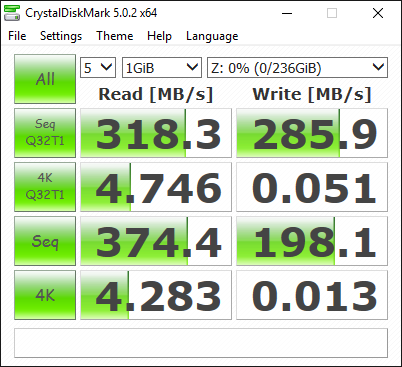
CrystalDiskMark, despite being a canned benchmark, provides a better estimate of the performance range with a selected set of numbers. Here, we can see things closer to Mushkin's claims - 375 MBps reads and 286 MBps writes for the Impact 256GB, and 191 MBps reads and 26 MBps writes for the Atom 128 GB. The native USB 3.0 flash controllers have always sruggled with very low IOPS for 4K random accesses (writes in particular). We see the Impact 256GB fall to 0.013 MBps for 4K random writes, while the Atom 128GB comes in at 0.071 MBps for that access trace. <select ... ><option ... >Mushkin Impact 256GB</option><option ... >Mushkin Atom 128GB</option><option ... >Corsair Voyager GTX v2 256GB</option><option ... >Mushkin Atom 64GB</option><option ... >Mushkin Ventura Ultra 120GB</option><option ... >Patriot Supersonic Rage 2 256GB</option><option ... >SanDisk Extreme 500 240GB - USB 3.0</option><option ... >SanDisk Extreme PRO 128GB</option><option ... >VisionTek Pocket SSD 240GB</option> </select>
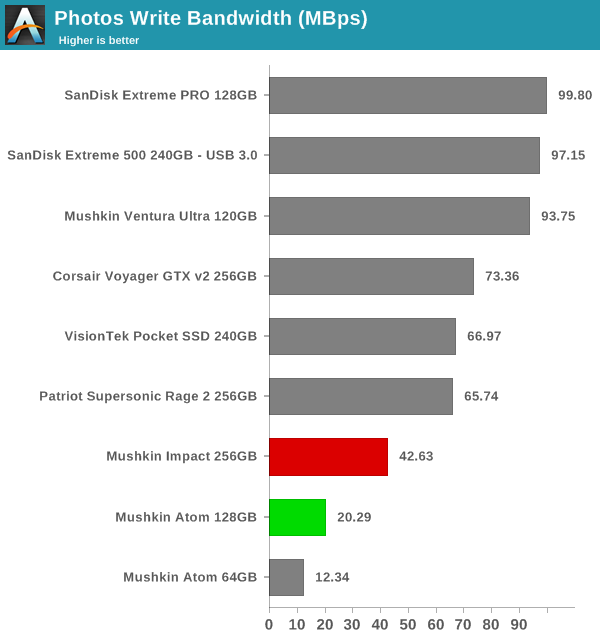
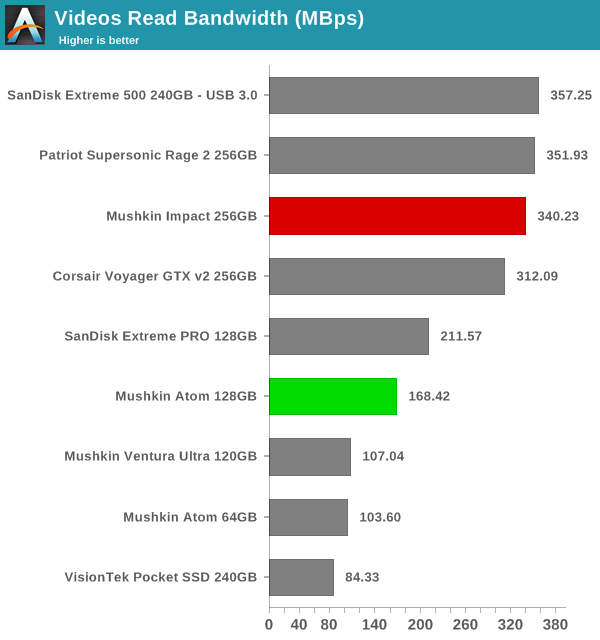
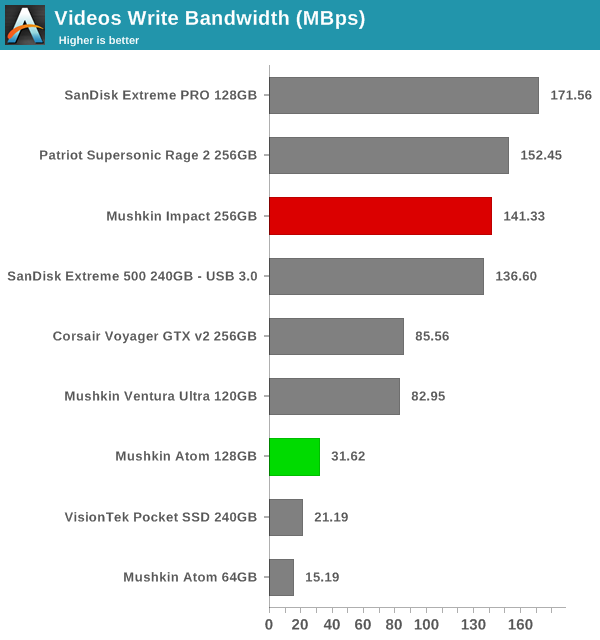
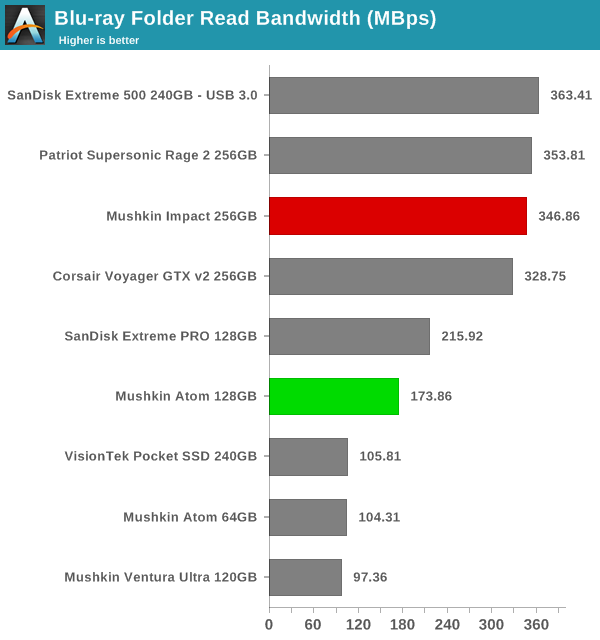
Benchmarks - robocopy and PCMark 8 Storage BenchOur testing methodology for DAS units also takes into consideration the usual use-case for such devices. The most common usage scenario is transfer of large amounts of photos and videos to and from the unit. The minor usage scenario is importing files directly off the DAS into a multimedia editing program such as Adobe Photoshop. Since these are not portable SSDs, we will be disregarding the latter use-case. In order to tackle the first use-case, we created three test folders with the following characteristics:
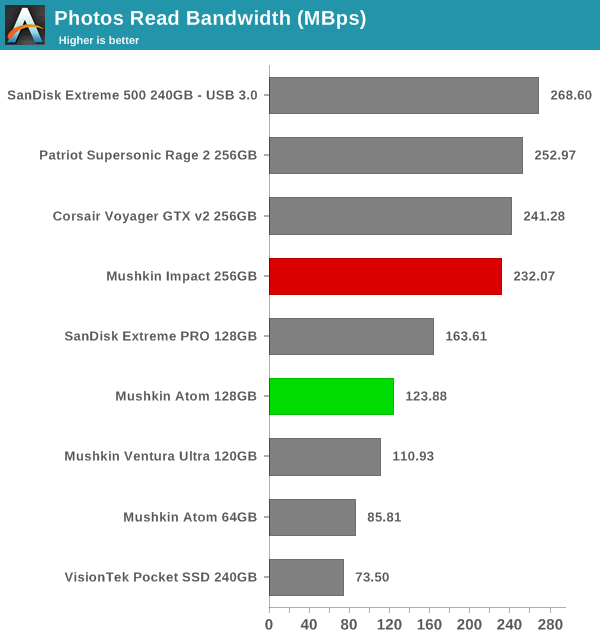
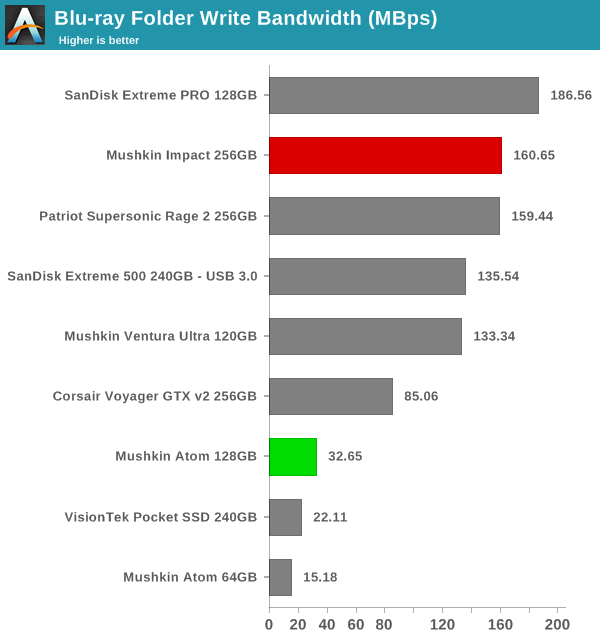
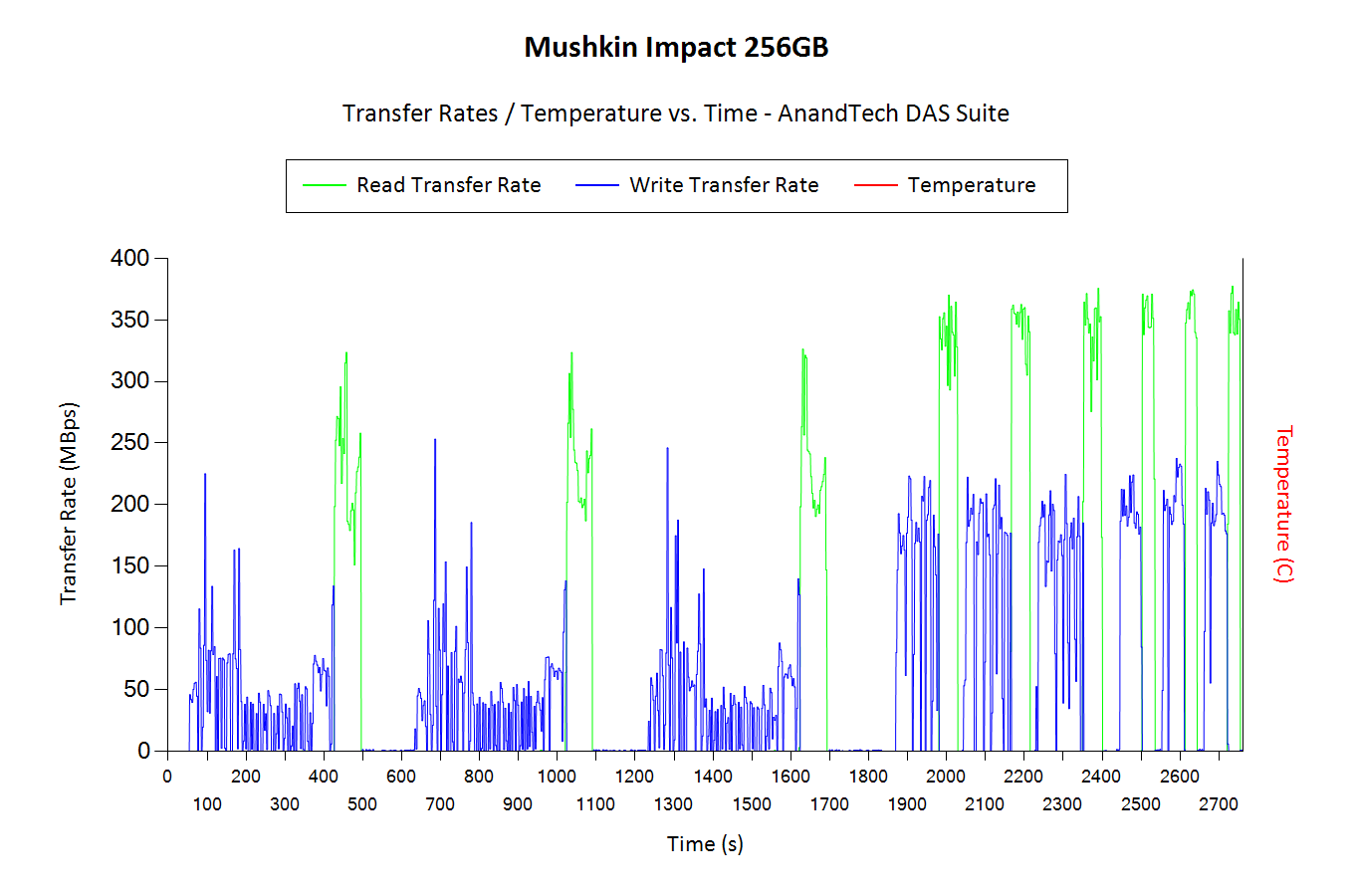
The benchmark numbers show a wide spread - for certain use-cases such as Blu-ray folder writes, the Atom and the Impact have top numbers in their respective capacity classes, but they also come in with disappointing numbers for use-cases such as copying over lots of photographs. Further down, we will see if the pricing can act as a redeeming aspect. Performance ConsistencyYet another interesting aspect of these types of units is performance consistency. Aspects that may influence this include thermal throttling and firmware caps on access rates to avoid overheating or other similar scenarios. This aspect is an important one, as the last thing that users want to see when copying over, say, 100 GB of data to the flash drive, is the transfer rate going to USB 2.0 speeds. In order to identify whether the drive under test suffers from this problem, we instrumented our robocopy DAS benchmark suite to record the flash drive's read and write transfer rates while the robocopy process took place in the background. For supported drives, we also recorded the internal temperature of the drive during the process. Unfortunately, neither the Atom nor the Impact expose the temperature details. The graphs below show the speeds observed during our real-world DAS suite processing. The first three sets of writes and reads correspond to the photos suite. A small gap (for the transfer of the videos suite from the primary drive to the RAM drive) is followed by three sets for the next data set. Another small RAM-drive transfer gap is followed by three sets for the Blu-ray folder. An important point to note here is that each of the first three blue and green areas correspond to 15.6 GB of writes and reads respectively. Throttling, if any, is apparent within the processing of the photos suite itself. The good thing here is that neither the Impact nor the Atom suffer from thermal throttling. <select ... ><option ... >Mushkin Impact 256GB</option><option ... >Mushkin Atom 128GB</option><option ... >Corsair Voyager GTX v2 256GB</option><option ... >Mushkin Atom 64GB</option><option ... >Mushkin Ventura Ultra 120GB</option><option ... >Patriot Supersonic Rage 2 256GB</option><option ... >SanDisk Extreme 500 240GB - USB 3.0</option><option ... >SanDisk Extreme PRO 128GB</option><option ... >VisionTek Pocket SSD 240GB</option> </select>
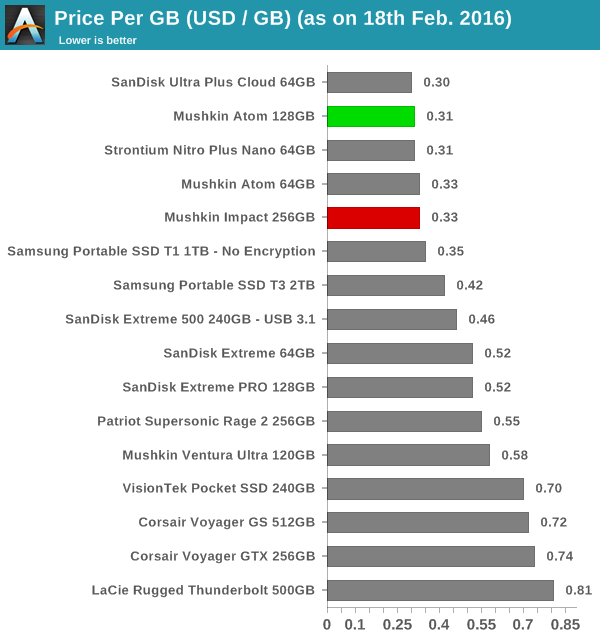
Concluding RemarksComing to the business end of the review, the Impact 256GB and Atom 128GB continue Mushkin's tradition of improving the performance and capacity of their USB 3.0 flash drives every year, while retaining the same physical footprint. The performance of the drives indicate suitability for write-once read-many scenarios. There are 128GB and 256GB portable SSDs (not in the same form factor, obviously) that have much better overall performance.Can the pricing save the day for Mushkin? We took a look at the online pricing of the various UFDs that we have evaluated so far and compared their cost per GB.
The Impact 256GB (priced at $85) is simply the most economical 256GB flash drive that we have seen so far. Given the $0.33/GB pricing, it is hard to not recommend it provided the use-case is appropriate. The Patriot Supersonic Rage 2 does provide better overall performance, but it comes in at $0.55/GB. At $40, the Atom 128GB is also the cheapest UFD in its capacity class that we have looked at in detail. Overall, the Mushkin 256GB and Atom 128GB don't impress with their benchmark numbers. However, the pricing aspect more than makes up for the average performance. | ||||||||||||||||||||||
| 1:00p | Ashes of the Singularity Revisited: A Beta Look at DirectX 12 & Asynchronous Shading We’ve been following DirectX 12 for about 2 years now, watching Microsoft’s next-generation low-level graphics API go from an internal development project to a public release. Though harder to use than earlier high-level APIs like DirectX 11, DirectX 12 gives developers more control than ever before, and for those who can tame it, they can unlock performance and develop rendering techniques simply not possible with earlier APIs. Coupled with the CPU bottlenecks of DirectX 11 coming into full view as single-threaded performance increases have slowed and CPUs have increased their core counts instead, and DirectX 12 could not have come at a better time. Although DirectX 12 was finalized and launched alongside Windows 10 last summer, we’ve continued to keep an eye on the API as the first games are developed against it. As developers need the tools before they can release games, there’s an expected lag period between the launch of Windows 10 and when games using the API are ready for release, and we are finally nearing the end of that lag period. Consequently we’re now getting a better and clearer picture of what to expect with games utilizing DirectX 12 as those games approach their launch. There are a few games vying for the title of the first major DirectX 12 game, but at this point I think it’s safe to say that the first high profile game to be released will be Ashes of the Singularity. This is due to the fact that the developer, Oxide, has specifically crafted an engine and a game meant to exploit the abilities of the API – large numbers of draw calls, asynchronous compute/shading, and explicit multi-GPU – putting it a step beyond adding DX12 rendering paths to games that were originally designed for DX11. As a result, both the GPU vendors and Microsoft itself have used Ashes and earlier builds of its Nitrous engine to demonstrate the capabilities of the API, and this is something we’ve looked at with both Ashes and the Star Swarm technical demo. Much like a number of other games these days, Ashes of the Singularity for its part has been in a public beta via Steam early access, while its full, golden release on March 22nd is fast approaching. To that end Oxide and publisher Stardock are gearing up to release the second major beta of the game, and the last beta before the game goes gold. At the same time they’ve invited the press to take a look at the beta and its updated benchmark ahead of tomorrow’s early access release, so today we’ll be taking a second and more comprehensive look at the game. | ||||||||||||||||||||||
| 2:00p | Gigabyte Announces New 17.3” Gaming Laptops with Intel Skylake Processors
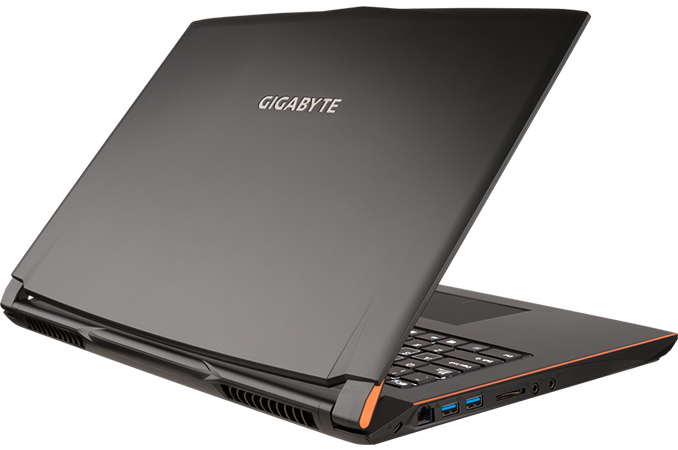
GIGABYTE has introduced its new family of desktop replacement gaming notebooks with Intel’s Skylake microprocessors. The new laptops not only feature new CPUs, but also add support for technologies like USB 3.1, M.2, HDMI 2.0 with HDCP 2.2 and some other improvements. The GIGABYTE P57 laptops are powered by the Intel Core i7-6700HQ (four cores with Hyper-Threading technology, 2.60 GHz default frequency, 3.50 GHz turbo frequency, 6 MB LLC cache, 45 W TDP, dual-channel DDR4/DDR3L memory controller) as well as Intel’s mobile HM170 platform controller hub (PCH). The laptop can be equipped with up to 32 GB of dual-channel DDR4-2133 memory, which should be sufficient for a gaming laptop. GIGABYTE’s P57 notebooks feature 17.3-inch IPS display with matte anti-glare coating and 1920x1080 resolution.
Graphics sub-system is the key piece of technology for any gaming PC. The GIGABYTE P57K is equipped with NVIDIA’s GeForce GTX 965M GPU (1024 stream processors, 64 texture units, 32 raster operations pipelines) with 2 GB GDDR5 onboard. The more powerful GIGABYTE P57W comes with NVIDIA’s GeForce GTX 970M GPU (1280 SPs, 80 TUs, 48 ROPs) and 3 GB of GDDR5 onboard. Both graphics adapters should deliver sufficient performance in games in 1920x1080 resolution. However, it is not completely clear why GIGABYTE decided to cut-down the amount of onboard GPU memory. The P37W DTR notebook from the company features the GeForce GTX 970M with 6 GB of GDDR5, whereas the P37K sports the GeForce GTX 965M with 4 GB of RAM.
Storage sub-system of the GIGABYTE P57 is similar to that of its predecessors: the laptop features a 512 GB integrated M.2 type 2280 SSD (with PCIe 3.0 x4 interface) and comes with a Blu-ray RW/DVD RW ODD that can be swapped with a 2.5” HDD or SSD. GIGABYTE does not reveal which SSD it installs by default, but claims that it has read speed of about 2000 MB/s, which points to a rather powerful model. The new DTR notebooks also come with a new keyboard that has anti-ghost backlighting as well as 30-keys rollover support and macros. Unfortunately, this keyboard does not have programmable keys, which may upset some gamers.
Since GIGABYTE’s P57 are desktop replacement gaming machines, they feature the whole set of wired and wireless communication technologies, including a Gigabit Ethernet port (with traffic management software) as well as Wi-Fi 802.11 ac/b/g/n and Bluetooth 4.1 controllers. The input/output functionality of GIGABYTE’s P57 is in line with modern laptops. The system features one USB 3.1 type-C port (I am not sure which controller is used, but if it is Intel’s Alpine Ridge, which GIGABYTE uses on the majority of its Intel-based platforms, then it will be just a matter of time before the port gets Thunderbolt 3 certification), three USB 3.0 type-A connectors, an HDMI output with HDCP 2.2 for playback of Ultra HD Blu-ray discs and output video to a compatible TV or display, a mini DisplayPort and even a D-Sub output. In addition, the notebooks are equipped with a HD webcam, a SD card reader, a microphone, two 1.5W speakers and even a SPDIF output.
The more advanced GIGABYTE P57W comes with a 75.81 Wh battery, whereas the P57K sport a 60.8 Wh battery. The notebooks can weigh from 2.7 to 2.9 kilograms, depending on exact configuration. The GIGABYTE P57W is already available at Newegg starting at $1499. | ||||||||||||||||||||||
| 4:40p | Microsoft Acquires Cross-Platform C# Toolmaker Xamarin
In what has to be the most obvious acquisition Microsoft has made in some time, today the Redmond company announced that they have signed an agreement to purchase Xamarin. Xamarin creates tools to allow mobile developers to write code in C#, and have it run as native code on iOS, Android, and Windows. This lets the developer use Visual Studio and keep one set of source code but have it run on all of the mobile platforms. Microsoft has been closely tied to Xamarin for some time, and have built in support for Xamarin into Visual Studio, Azure, Office 365, and their Enterprise Mobility Suite already, so really it seemed like this purchase was only a matter of when. Microsoft is acquiring the personnel in addition to the intellectual property of Xamarin and we should likely hear a lot more about their plans at Microsoft’s developer conference Build, which takes place the last week of March. At Build 2015, Microsoft introduced “bridges” which would let developers on iOS and Android be able to port their apps to Windows 10’s Universal Windows Platform (UWP) app framework, with Microsoft demonstrating support for Objective-C code within Visual Studio and having it compile directly into native UWP code, with the iOS bridge codenamed project Islandwood. The Android solution was quite different, and project Astoria would have Windows 10 Mobile actually have an Android subsystem so that it could run apps written for Android. Although Astoria was released as a limited beta, it appears that this has been axed by Microsoft, although Islandwood is still moving forward and is currently in preview form on GitHub. Xamarin is almost the exact opposite. Instead of trying to have developers port to Windows, instead they would be able to write in C# for Windows, and the Xamarin tools provide native APIs for iOS and Android and output code for those platforms, allowing a large amount of common code for apps developed for iOS, Android, and Windows.
We should learn more about this at Build though. The Xamarin tools should be a focal point during their announcements at the end of March. | ||||||||||||||||||||||



| << Previous Day |
2016/02/24 [Calendar] |
Next Day >> |