[Most Recent Entries] [Calendar View]
Thursday, March 17th, 2016
| Time | Event | ||||||||||||||||||||||||||||||||||||||||||||||||||||||||||||||||||||||||||||||
| 12:50a | GDC 2016: Tearing & Freesync/G-Sync Support Coming to Windows' UWP Apps
With the recent release of the first major games built for Windows’ Universal Windows Platform runtime, the current limitations of UWP has been a hot topic in technical circles. When it comes to gaming, UWP as it stands is not up to par with the Win32 API we have come to know and tolerate. To that end, with Microsoft running a block of technical sessions at today’s GDC, I checked in on the state of UWP and where Microsoft is in addressing some of the concerns that have been raised over the past couple of weeks. The overall message from Microsoft right now is to wait and see. Talking to Microsoft representatives and speakers, the company is well aware of what’s being said and wants to address it. GDC just won’t be that venue. Rather the company will be updating the press and developers on UWP at BUILD 2016, Microsoft’s annual conference that’s taking place in two weeks. And while the company’s reps can’t make specific comments at GDC on what to expect later this month, I do consider it a positive sign that they are aware of what’s going on and that they are preparing what looks to be a serious response. Meanwhile on a related note, in this year’s DirectX 12 session, Microsoft has confirmed that they are going to be addressing the current refresh interval limitations of UWP. In short, Windows UWP will be gaining support for interval immediate refreshing, otherwise known as tearing. Tearing currently isn't allowed, and while tearing is not typically desirable, there are situations where the bare minimum latency it affords may be more useful than displaying a whole frame without corruption. This will also allow Freesync and G-Sync variable refresh rate technologies to work with UWP, as the underlying issues blocking them with the current system are much similar. As it stands there isn’t an ETA on this update, however it’s something the DirectX team has taken to heart, and with a bit of luck it may be sooner than later. | ||||||||||||||||||||||||||||||||||||||||||||||||||||||||||||||||||||||||||||||
| 3:01a | Logitech Announces G610 Orion Brown And G610 Orion Red Mechanical Keyboards
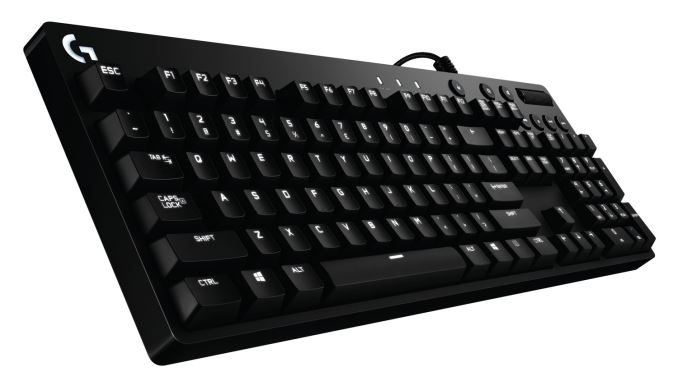
Today Logitech unveiled two new mechanical keyboards under their G branding, with the G610 Orion Brown and G610 Orion Red. As I’m sure many of you have already guessed, the different naming doesn’t refer to the color of the keyboards, but the Cherry MX switches inside. Logitech, being one of the world’s largest maker of computer peripherals, already makes mechanical keyboards with their own Romer G switches, as Ian saw at his Logitech Tech Day in Switzerland, but it must be hard to compete against the weight of the Cherry MX name, so the G610 Orion features either Red or Brown versions of the Cherry MX lineup. Logitech calls the Cherry MX the “industry standard in mechanical switches” and that would be hard to argue at this point. The switches are rated for over 50 million keystrokes, and the wide array of switch models make them a favorite of a large range of people. Logitech has chosen the Brown, which have “a tactile bump for feedback” as well as the Red, which have “a linear keypress” and since everyone seems to have their own preference when it comes to the Cherry MX switches, it’s nice to see them offering two options. Key travel is 4 mm and actuation is 2 mm, and the switches are rated for a 45 gram actuation force.
The keyboards also feature customizable backlighting, and while the light is a monochrome white, brightness levels can be adjusted on a per-key basis. The key lighting is controlled by the Logitech Gaming Software, and allows synchronization of the lighting with other Logitech G products. Other features of the keyboards are a fingerprint-masking matte texture, which is something I’d love to see on more laptops, and Logitech has gone with a 6-foot braided USB cable which not only looks better than plastic, they generally are a bit easier to work with as well. The keyboard features dedicated media keys, as well as full customization of the keyboard using the Logitech Gaming Software, including macro support for the F1-F12 keys. This and lighting can be controlled when you enable Game Mode. The keyboard itself is 153 mm x 443.5 mm x 34.3 mm and weighs 1.2 Kg.
The Logitech G Orion Brown and Red keyboards will be available this month in the US and Europe, with a MSRP of $119 or €139, which is a bit less than the Logitech G910 Orion Spark. Source: Logitech | ||||||||||||||||||||||||||||||||||||||||||||||||||||||||||||||||||||||||||||||
| 7:30a | ASUS Unveils the VivoMini VM65N: a NUC-Like mini-PC with GT 930M
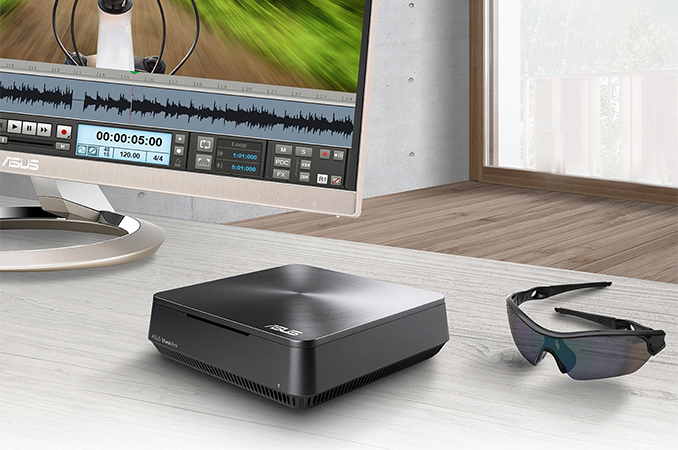
Intel’s NUC and Mini-STX form-factors are designed to build tiny PCs with decent performance with more or less standard components. However, these form-factors have traditionally not supported discrete graphics processors in any form and can integrate only one or two storage device - at present, only some of GIGABYTE's BRIX line and Zotac's mini-PCs are using GPUs in a larger chassis to achieve this, particularly due to the increased heat generation. ASUSTeK’s Vivo desktop personal computers are designed to fit between NUC and mini-ITX in terms of size and the company this week added two new models in to the lineup. The new ASUS VivoMini VM65 and VM65N PCs are going to be available with either an Intel Core i3 or the Core i5-6200U, featuring the Skylake micro-architecture as well as an unnamed Intel PCH. The systems are equipped with two SO-DIMM slots for up to 16 GB of DDR4-2133 memory, space for one 3.5-inch drive (or two 2.5-inch with optional Vivo DualBay), an 802.11ac Wi-Fi module, Gigabit Ethernet, a 4-in-1 card reader, four USB 3.0 ports, two USB 3.1 type-A ports (the VM65N only), one audio output jack, an HDMI connector, one Dual-mode DisplayPort output (capable of driving DP-to-HDMI and DP-to-DVI over passive adaptors), built-in 2x2W SonicMaster speakers and a Kensington lock.
The more advanced VM65N also comes with the NVIDIA GeForce GTX 930M mobile graphics processor (384 stream processors), with 1GB of onboard DDR3 memory and running under NVIDIA's Optimus technology. ASUS claims that this gives 56% better synthetic benchmark scores over the non-GPU version of the VivoMini. While ASUS does not position the VM65N directly as a gaming machine, it claims it could serve as a photo or video editing platform thanks to its ability to connect to three displays (one using HDMI, two using dual-mode DisplayPort). While it is noteworthy that ASUS has managed to install a discrete GPU into a tiny PC, the question is whether such a graphics chip can bring much of a benefit to a standard user beyond CUDA support.
The choice of the GPU was conditioned by its TDP of around 33W. At present, the 930M is NVIDIA’s nearly most powerful mobile graphics processor at this power and is rated at 790.3 GFLOPS. The combined TDP of the CPU and the GPU of the VM65N is 48W - if we select a single Intel CPU that comes in under this limit, we get something like the Core i5-6350HQ (45W TDP), which runs with four cores and uses the Iris Pro Graphics 580 processors for $304 – $306 (up from $281 for the i5-6200U) and comes with an additional 128MB of eDRAM. The i5-6350HQ offers 1152 GFLOPS of graphics processing power, or a 46% increase in pure performance, with a combined cost lower than that of the i5-6200U plus the 930M. The other side of the equation is CUDA support of the extra graphics chip, or a potentially better ability to drive certain display types. It has also been pointed out that splitting the power generation across two chips may be better for heat removal and heatsink/fan noise, but also makes it easier to use the same motherboard across all VivoMinis. Though it would be interesting to compare the internal designs.
VivoMini PCs from ASUS come in sub 2-liter enclosures made of brushed aluminum. The systems are larger than Intel’s NUCs, but they are still more compact that mini-ITX PCs. They can be attached to the backside of displays using standard VESA mounts (presumably 100x100mm, not confirmed), or placed on the desk.
The exact pricing of the VivoMini VM65 and VM65N is unknown. Right now Amazon sells the previous generation models, the VM62 and VM62N, starting at $458 and $1073 respectively. | ||||||||||||||||||||||||||||||||||||||||||||||||||||||||||||||||||||||||||||||
| 10:30a | Why an Overclockable Core i3 Might Not Exist: The Supermicro C7H170-M and Intel Core i3-6100TE Review When a new Intel platform hits the market, there are two primary product chains - processors and chipsets. For the most part, at least in the consumer space within a particular generation, any processor should work with any chipset, with the higher end chipsets offering more functionality at an added cost. For Skylake, Z170 it's the top model, with H170/H150, B150, Q150 and H110 filling the rest, with one more business focused. The Supermicro C7H170-M reviewed here has the H170 chipset, but also was the first to come with BCLK overclocking for non-K processors. This is our first proper look at a Supermicro motherboard in a long time, as well as our probe into the brief jump into H170 and non-K overclocking which provides some deep indicators into the current processor lineup. | ||||||||||||||||||||||||||||||||||||||||||||||||||||||||||||||||||||||||||||||
| 3:10p | Microsoft Rolls Out Windows 10 Mobile To Windows Phone 8.1 Devices
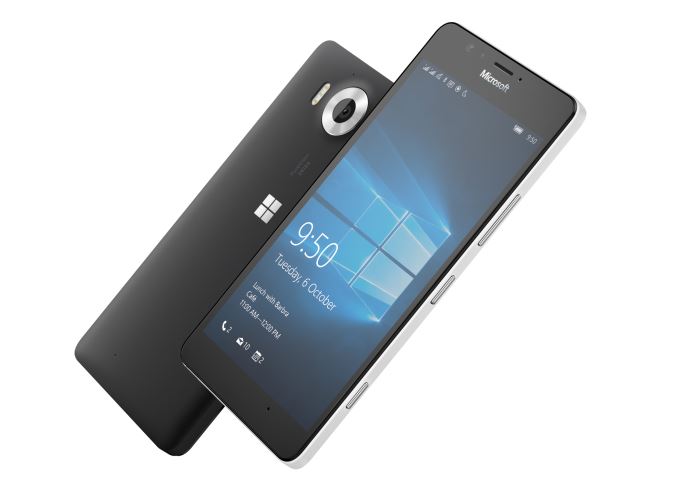
The journey of Windows 10 Mobile from announcement to release has certainly been a strange one. The OS itself was announced roughly one year ago, and around that time Microsoft stated that it would make its way to existing Windows Phone 8.1 devices in December. As December of 2015 came and went, they issued another statement which said that it would be pushed to the first part of 2016. The delays with the release of the OS were fairly well understood by users participating in the Insider beta program, as there were clearly areas that needed to be improved before the software could be widely released. However, October brought about an oddity of sorts as the Lumia 950 and 950XL launched with Windows 10 Mobile while the OS still felt unfinished to users who were beta testing it. While I won't get in to the state of Windows 10 Mobile as it launched in October, the launch of the 950 and 950XL made it clear that the OS needed to come soon to the rest of the Windows Phone user base. Today Microsoft has made good on their promise to bring Windows 10 Mobile to select Windows Phone 8 and 8.1 devices. Getting the specifics on which devices are supported is probably the most important part of the announcement, as the update does not cover all Windows Phone 8 devices, and it doesn't necessarily cover all devices that were originally eligible for the Windows Insider beta program. By brand, the devices that will receive the Windows 10 Mobile update are as follows:
I have to admit that I'd never heard of the MCJ Madosma Q501, but it's a phone for the Japanese market, so hopefully those users will be pleased with the update. As for the devices from BLU, the update is limited to the Win HD and Win HD LTE. The former of those two is a Snapdragon 200 device with two Cortex A7 cores but 1GB of RAM, which makes it clear that the limiting factor here is RAM more than processing power. Finally, there's the Lumia devices. The list of eligible devices is fairly substantial, but there's again the caveat with models that came in two versions that you need the model with 1GB of RAM. To prepare for the update to Windows 10 Mobile and confirm your phone's eligibility Microsoft recommends that you download the Update Advisor application. They've also set up a support page with some more information about the upgrade. | ||||||||||||||||||||||||||||||||||||||||||||||||||||||||||||||||||||||||||||||
| 5:00p | MSI Releases Vortex: A Mac Pro-Like SLI PC for Gamers and VR, from $2199
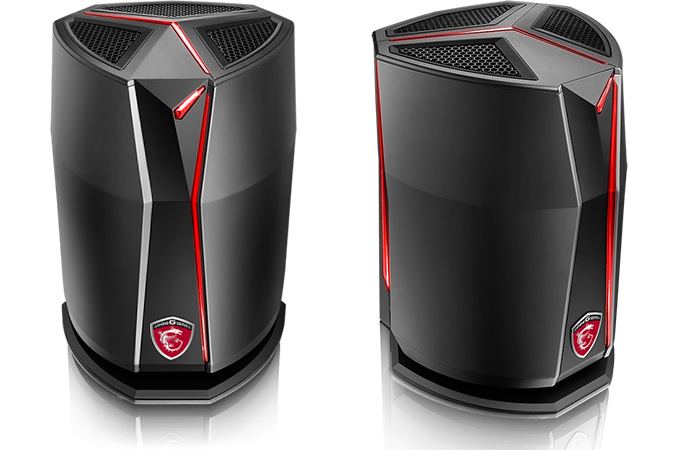
We originally laid eyes on the final design back at CES, but now MSI has begun to sell its Vortex gaming desktops in the US. The 6.5-liter systems resembles the design of Apple’s Mac Pro, using a singular fan and triangular core to pack a high-end CPU along with two GPUs and a lot of memory, offering impressive performance at a premium price. When Apple introduced its current-generation Mac Pro a little more than two years ago, the company clearly demonstrated that it was possible to build a small form-factor workstation with two professional GPUs and a multi-core Intel Xeon E5 processor with only one fan. Since then, a number of PC makers have released high-end small form factor desktops in the mini-ITX form-factor, but all of them were equipped with multiple fans and were still larger than Apple’s Mac Pro, or traditionally looked like PCs such as ASUS' GR20. Last year MSI decided to take a leaf out of Apple’s book and develop a gaming PC that would borrow Mac Pro’s triangle arrangement of CPU and GPUs as well as round design with one blower fan. The company first demonstrated its Vortex desktop last fall and has been refining its system since then. MSI showcased near final version at CES with a heavy bent on virtual reality support, but were still tinkering with the final specifications. Now MSI is finally ready to ship the Vortex.
MSI’s Vortex G65 platform is based on Intel’s Core i7-6700K processor as well as the Z170 chipset. With this combination, MSI will offer systems in two variants, with either two GeForce GTX 980 GPUs in SLI (the SLI-001) or GeForce GTX 960 GPUs in SLI (SLI-011). The MSI Vortex G65 systems are equipped with 32 or 16 GB of DDR4-2133 memory respectively, two 128 GB SSDs in RAID (M.2 form-factor with PCIe 3.0 x4 interface, no word on the exact models) and 1 TB HDD at 7200 RPM. The gaming machines also feature two Rivet Networks Killer Gigabit Ethernet E2400 controllers and one Killer Wireless-AC 1535 Wi-Fi controller (802.11ac) to support DoubleShot-X3 Pro as well as two Thunderbolt 3 ports (we're unsure if this is one controller or two at this point). As for external ports, the PCs have two TB 3, two DisplayPort 1.2, two HDMI 1.4 and four USB 3.0 connectors. There's no word if the TB3 ports also support USB 3.1, but given that it hasn't been advertised at this time we assume not. No word on the audio codec, as the rear of the chassis only has headphone/microphone jacks.
The Vortex G65 systems from MSI heavily use custom-built hardware, such as the motherboard, cooling system, power supply and so forth. Nonetheless, they still use standard Intel’s LGA1151 processors, MXM graphics modules for the GPUs, PCIe SSDs, SO-DIMM modules for memory and so on, which sounds as if they can be easily upgraded at MSI select partners and retailers (in fact, select MSI’s partners can even upgrade MXM modules). Still, owners should keep in mind that the PCs are equipped with 450W PSUs, perhaps indicating that the parts on offer are specially binned for the low power/voltage characteristics needed for the Vortex. The Vortex G65 platform should fully support overclocking, but given thermal and power consumption constraints, it is hard to expect the Vortex G65 to be a good overclocker, but that is a natural trade-off between performance, style and size.
It is worth noting that there are two really interesting things here with the GPUs on offer. Firstly, the GTX 980 in 8 GB form, as far as we can tell, has not been formally announced or released by NVIDIA. So either MSI is creating its own MXM module for this as an AIB partner, or they've pre-empted an NVIDIA announcement, or the part is a GTX 980 (notebook) with 8 GB of memory, which is currently listed at OriginPC. We had feared this was the 980M, which has 25% fewer CUDA cores, but is more common in 8GB form. Using the GTX 980 (notebook) variant makes sense, with a given TDP of 145 W per card, rather than 165 W per card on the desktop variant. Next, on the GTX 960 side: MSI puts the total VRAM at 6 GB for the SLI system, meaning 3 GB per card, which would imply a 192-bit bus. No GTX 960 variant has a 192-bit bus, nor does the GTX 960M, which means this is either a new unreleased version of the GTX 960 with an unbalanced memory allocation (which has happened before) or something more akin to a GTX 970M which does have a 192-bit bus, but they're calling it a GTX 960. It's an interesting mix of information here. We've asked for clarification. Update from MSI: For the GTX980 SLI, this is the MXM version (not the GTX980M but the GTX980). We are using the same graphics card as in our GT80 TITAN SLI. For the GTX960 SLI we are also using is the MXM version. Same MXM card we are using on the GTX970M. Since this is a “desktop” product, Nvidia new naming rule will not have the “M” in there and kick down the number to 960 [and so it has the same specifications as the GTX970M as far as CUDA cores/ROPs - ed].
Exploded view The MSI Vortex G65 system also comes with Dragon Center dashboard application, which allows to customize lighting of the PC case, monitor system performance, launch utilities and apps, fine-tune the system with personalized profiles and so on. Nahimic audio is also bundled in the package. MSI positions its Vortex G65 machines as SFF PCs capable of handling virtual reality games. The two graphics adapters can drive up to four monitors (and with Thunderbolt can connect to up to six displays), hence the system can be used not only for entertainment but also for work. At present MSI does not position its Vortex for professional applications, but it should not be a problem to build a workstation-class system of similar dimensions for the company and we would imagine some top-tier customers are already inquiring.
MSI charges $2199 for the Vortex G65 SLI-011 system with two GeForce GTX 960 graphics adapters. The top-of-the-range Vortex G65 SLI-002 with GTX 980 in SLI costs $3999, which is in line with the price of an advanced Apple Mac Pro. | ||||||||||||||||||||||||||||||||||||||||||||||||||||||||||||||||||||||||||||||
| 6:00p | ASUS Starts to Ship Its First Curved Ultra-Wide Display: ROG Swift PG348Q
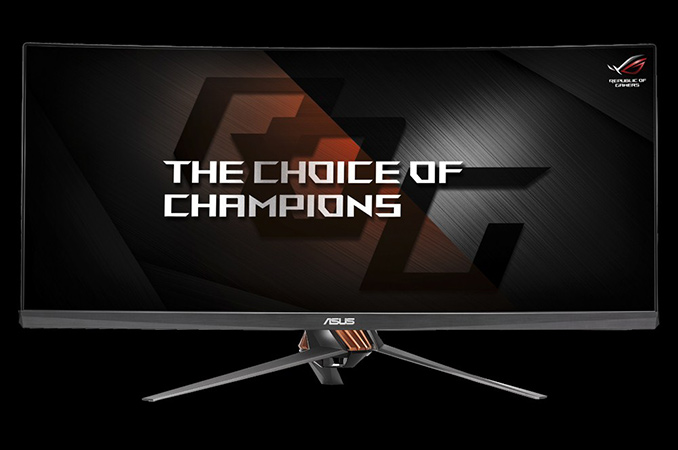
ASUS this week began to ship its first gaming curved ultra-wide display, the ROG Swift PG348Q, which the company introduced back in September and showcased at CES. The monitor, which is the largest ROG display ever, is designed primarily for gamers, features up to 100 Hz refresh rate as well as Nvidia’s G-Sync technology. The ASUS ROG Swift PG348Q display is based on an IPS panel with 3440×1440 resolution, 1000:1 contrast ratio and 300 cd/m2 brightness. The ultra-wide 34” monitor features 21:9 aspect ratio and 3800R screen curvature, which is larger than a number of 3000R panels that are currently on the market. The monitor can reproduce 1.07 billion colors and covers 100% of sRGB color space, which is not a bad result for a gaming solution. The ROG Swift PG348Q has default refresh rate of 60 Hz and everything between that and 100 Hz should be activated using a special turbo button. ASUS claims that G-Sync variable refresh-rate technology on this display actually works at up to 100 Hz, but to ensure high framerate (as well as refresh rate), a graphics card with sufficient processing performance (e.g., GeForce GTX 980 Ti and higher) is required with demanding titles.
The ROG Swift PG348Q is equipped with one DisplayPort 1.2 and one HDMI 1.4 inputs. The latter only supports 3440×1440 resolution with 50 Hz refresh rate, according to ASUS; for everything between 50 Hz and 100 Hz the DP input must be used. The display also features a 4-port USB 3.0 hub and two 2 W speakers.
The ROG Swift PG348Q will be ASUS’s largest display ever. It will also be the company’s flagship monitor for gamers for a while. Since the company does not offer non-curved gaming displays larger than 28”, one might expect to expect ASUS to introduce one or two non-gaming models in the future.
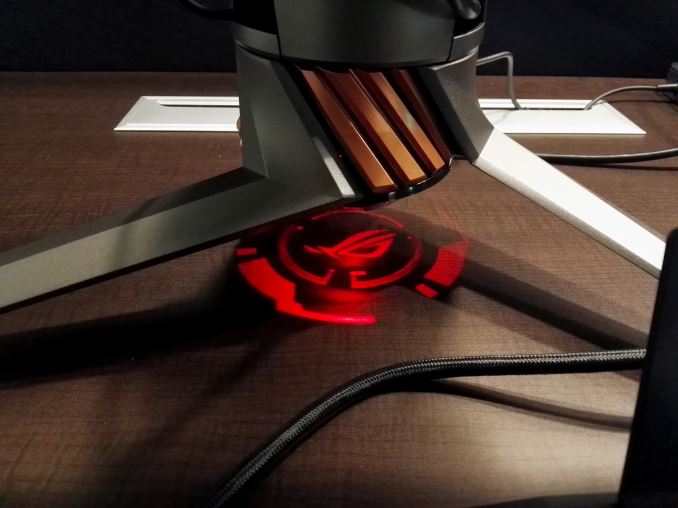
The new display uses the new ASUS ROG color scheme — plasma copper inlays on armor titanium casing as well as an LED effect on the bottom. The monitor also has an ultra-thin frame (which ASUS calls frameless design) as well as tilt, swivel, and height adjustments. Eventually, other ROG-branded displays will inherit similar design and color scheme. ASUS did not reveal the official MSRP of its ROG Swift PG348Q display and at time to press, and the product should be available at major U.S. retail stores from May. Given the fact that the monitor is a pretty unique combination consisting of a curved IPS panel, high resolution, G-Sync technology and up to 100 Hz refresh rate, this product will be in the upper echelons of monitor pricing. TechReport caught the fact that this panel is being offered by iBuyPower as an add-on option to a prebuilt system for $1200, so we would expect the full retail price to be in that $900-$1200 region. Anyone still want VR? | ||||||||||||||||||||||||||||||||||||||||||||||||||||||||||||||||||||||||||||||
| 11:40p | Microsoft Edge Gains Extension Support And Pinned Tabs In Latest Preview Build
This, well, this has been a long time coming. Windows 10 launched officially on July 29, 2015, and with it came the new web browser to replace Internet Explorer, which was named Edge. If you go back to our Windows 10 Review, Edge brought some nice features with it, but it was really lacking in functionality at the same time. From not being able to right click and save a file (that’s fixed now) to having no ability to sync across devices (sort of fixed), Edge was an improvement over Internet Explorer and a step back at the same time. For most people, the one big issue that was missing was extension support. Internet Explorer used a plug-in model, and that was deprecated with Edge, but until today there have only been mentions of Extensions coming to Edge. After much waiting, that finally changes today. Microsoft has taken the wraps off of the feature, bringing it to the Windows Insiders in a new build which came out late today. As with most new feature additions in Windows 10, the update to Edge is made available to those in the Fast Ring first, and over time it will be deployed to the other rings, and then to all users.
The Extensions were shown off at Build in 2015, so the actual coding part is known. Edge extensions are very similar to Google Chrome extensions, so developers will be able to quickly port their extensions over for Edge. At the moment there are only three extensions, but expect this to increase quickly. Microsoft specifically calls out upcoming support for popular extensions such as AdBlock, AdBlock Plus, Amazon, LastPass, and Evernote. As an avid user of LastPass myself, not having it has made using Edge quite cumbersome so I look forward to the day that this arrives. For this initial build, extensions have to be sideloaded by downloading them from the site and then installing them, but as was laid out at Build last year, extensions will be added to the Windows Store to make it easier to safely install and remove extensions as needed. Additionally, Edge is also adding support for Pinned Tabs, which keep tabs always open and on the very left of the tab bar whenever the browser is opened. Simply right click the tab bar when on a page, and you can pin it to the side. The site title bar will be just the favicon for the site, to save space on the bar.
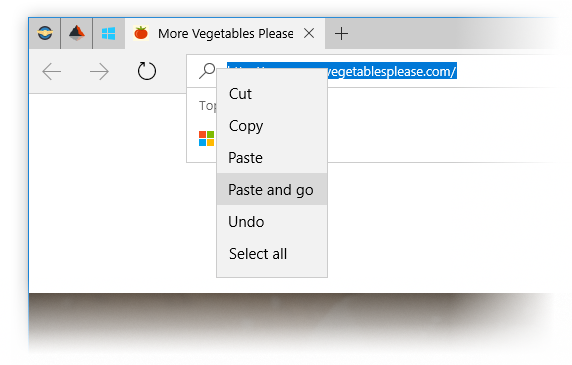
Finally, Edge in this preview build now has Paste and Go support from the context menu. I’ve heard people requesting this so I think it’s a pretty popular request.
The Fast Ring has certainly become “faster” lately, with more builds coming out than ever before. Up to this point, the new feature additions have been small as Microsoft changed core support inside of Windows 10, but with the new Redstone release set for the next couple of months, expect more features to be added in the upcoming builds. Source: Windows Blog
| ||||||||||||||||||||||||||||||||||||||||||||||||||||||||||||||||||||||||||||||













| << Previous Day |
2016/03/17 [Calendar] |
Next Day >> |