[Most Recent Entries] [Calendar View]
Friday, March 18th, 2016
| Time | Event | ||||||||||||||||||||||
| 9:10a | USB Flash Drives - Power Consumption Measurement using Plugable's USBC-TKEY The power consumed by USB peripherals such as flash drives has typically not been much of a concern. However, with OTG support on the rise, mounting external storage via USB on mobile devices has become a common use-case. The power consumed by bus-powered devices is arguably more important compared to the performance numbers in such cases. A reader comment in our recent review of the Samsung Portable SSD T3 piqued our interest, and we set out to quantitatively measure this aspect. While there are plenty of inline USB power measurement gadgets, they are not suited for the upcoming Type-C / USB 3.1 ecosystem. Fortunately, Plugable's USBC-TKEY USB 3.1 Type-C power delivery sniffer came to our rescue. Read on for the details of how we utilized Plugable's USBC-TKEY to measure the power consumed by bus-powered USB peripherals. | ||||||||||||||||||||||
| 4:00p | AMD Releases Radeon Software Crimson Edition 16.3.1 Hotfix
Following last week's release of Radeon Software 16.3 Hotfix, AMD is back again with a quick update to their driver set, bringing it to 16.3.1 Hotfix. The list of resolved issues this week is brief compared to the last few months of updates. Among the resolved issues is a problem where installed and played games were not showing up in the Radeon Settings “Gaming” tab. Meanwhile a hang in Unreal Engine 4 games has been fixed, along with issues installing the Radeon Software driver set via command line. Lastly, AMD notes that DirectX 12 applications are no longer locked to the refresh rate of the display. Alongside these fixes there is also driver support for the new Need for Speed, and a Crossfire profile update for Hitman. As always, those interested in reading more or installing the updated hotfix drivers for AMD’s desktop, mobile, and integrated GPUs can find them either under the driver update section in Radeon Settings or on AMDs Radeon Software Crimson Edition download page. | ||||||||||||||||||||||
| 4:30p | AMD Updates Gaming Evolved Client
Game streaming and recording has continued to be both a growing hobby and profession for many in recent years. Anytime there is growing interest in anything from society there comes a growing number of people willing to make tools to facilitate said interest. In this vein AMD and second-party developer Raptr have brought a few updates to their Gaming Evolved client in an effort to provide a more accessible means to record and share gameplay footage. The first of these additions is what AMD is calling the Replay feature, which is a new recording mode for the Gaming Evolved client. Replay mode will start recording the moment the game starts (or when the designated hotkey is pressed), and will then record the whole gameplay session. The significance/difference of this is that it's automatic recording of a whole gameplay session, rather than a rolling buffer for recording the last couple of minutes of gameplay, as what already happens in other modes. Though for those who want to capture both entire sessions and selected clips of the last 30 seconds, the updated client also includes a bookmark feature to do just that. All of this, by the way, flawlessly captured a video of our GTAV benchmark when I did a test run.
Going hand-in-hand with the new whote-session recording functionality, the latest update to the client also adds a basic video editor to handle the resulting video. The editor aims to make it easy to create highlight reel by simply selecting clips marked during gameplay, particularly when combined with the afformentioned benchmarks. Finally, the Gaming Evolved client had also added a set of unique integration features with both League of Legends and Counter-Strike: Global Offensive. For these games the client can use live match data to automatically identify important points and create highlights featuring all kills, deaths, and other shenanigans. And it sounds like AMD/Raptr aren't done here, as integration for further games is said to be coming soon. If you already have the Gaming Evolved client you can update new version by simply restarting your client. It’s also available to download over at AMD’s website. | ||||||||||||||||||||||
| 5:00p | Philips Begins Shipments of LCD Monitors with Quantum Dot Technology
TPV Technology, the company that produces monitors under Philips brand, has started to sell displays with QD Vision’s Color IQ quantum dot technology. What makes this notable is that QD Vision's technology is one such method being developed to significantly and inexpensively increase color gamut that displays can produce. The new 27” monitor can cover 99% of Adobe RGB color space, and is launcing at just $299. The quality of LCD monitors as well as their ability to accurately display colors depends on multiple factors, including the quality of their panels as well as backlighting. While there are panels which can cover very wide color gamuts, since typical LED backlights usually do not produce whites with a broad underlying color spectrum, color accuracy of actual mainstream monitors gets limited. Several companies, including 3M and QD Vision, propose to apply special quantum dot filters on the backlights to make them as “white” (and therefore as broad) as possible. QD Vision’s Color IQ quantum dot technology is based on cadmium selenide semiconductor nanocrystals, which can very precisely control spectral output of LED backlighting, essentially allowing light to be shifted to other wavelengths in a controlled manner. The quantum dots can be made to emit at any wavelength beyond the source wavelength with very high efficiency and narrow spectral distribution, which helps to make backlighting cleaner and thus enhance color gamut of displays. Applying quantum dot filters in any form is a relatively cost efficient task because it is basically a process step in assembly of an LCD module. However, those filters have to survive temperatures produced by LEDs, which is why they are not applied everywhere.
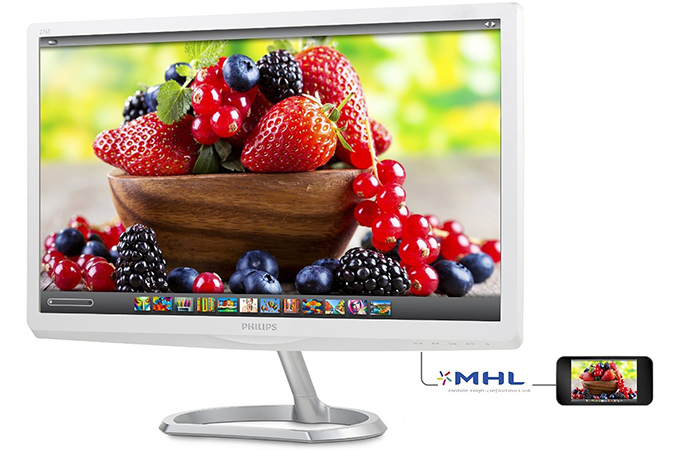
The Philips 276E6ADSS monitor is based on a 27" IPS-ADS panel with 1920×1080 resolution, 178°/178° horizontal/vertical viewing angles, 1000:1 contrast ratio (20M:1 dynamic contrast ratio), 300 cd/m2 brightness, 5 ms gray-to-gray response time and 60 Hz refresh rate. The display features a D-Sub, a DVI and an HDMI with MHL connectors along with audio in and out. Thanks to quantum dot film on the backlight of the monitor, the 276E can cover 99% of Adobe RGB color space, whereas typically inexpensive displays only show around 70% of the Adobe spectrum. The new Philips 276E monitor is made of plastic and uses a rather calm white/silver color scheme.
While the Philips 276E display is a product with a rather unique combination of low price and wide color gamut, for TPV Technology it is also a test vehicle for quantum dot technology from QD Vision. Since this is the first ever display with QD Vision’s Color IQ tech, some of its early samples had teething problems. The review unit received by AnandTech did not support constraining to the sRGB color gamut. As soon as we mentioned this fact to the manufacturer we were told that later versions should have a proper sRGB operating mode. The new monitor is already available at Amazon, B&H and some other retailers for $299. | ||||||||||||||||||||||
| 6:55p | Microsoft Extends Skylake Support On Windows 7 And Windows 8.1
Back in January, Microsoft made a rather surprising announcement that it was changing the support model for older operating systems running on the latest Skylake hardware. As part of the announcement, going forward, the latest processors and chipsets would only be supported on the current version of Windows. As of now, and for the foreseeable future, that means new chips will only be supported on Windows 10. This was a surprise because both Windows 7 and Windows 8.1 are still in their “extended support” phase, and generally that means the operating system is left as is, but security updates are done until the end of extended support. For businesses especially, many had just finished their Windows 7 upgrade and there was not necessarily a big push to start over again. But at the same time, workstations need to be replaced. As a slight reprieve, Microsoft said in January that they would provide a list of computers that would have support for Skylake until July 2017. Since then, the list has been made available here: http://windows.microsoft.com/en-us/windo There was some ambiguity about the initial notification though. After July 2017, patches that are found to cause an issue with Skylake systems would be excluded from certain security patches. But what that meant exactly wasn’t stated. Today Microsoft has both extended the diary date for the end of support, as well as provided a bit more clarity on what will happen after. First, the new end of support for the listed computers is now July 17, 2018. That is a one-year extension over the initial date. The initial 2017 date was so short that I’m sure Microsoft got some not so friendly responses from their largest enterprise customers who are most certainly going to have Skylake systems running Windows 7. July 2018 should be enough time for actual planning and testing to be done. Second, all critical patches will be addressed for Skylake systems until the end of mainstream support for the operating system, which is January 2020 for Windows 7, and January 2023 for Windows 8.1. This clears up the odd wording previously announced, and means that if you have to continue running Windows 7 on the approved machines after July 2018, you won’t be left vulnerable to a security issue that is already patched. What is not changing is the stance on future hardware. When the latest AMD and Intel processors are released, they will only be supported on Windows 10. But at least this policy is laid out ahead of time, instead of them changing the policy half way through support. Pray they don’t alter it any further. There’s a big difference between something capable of running Windows 7 and something that is supported running Windows 7, especially when you have critical infrastructure. Future hardware may run just fine on Windows 7 if you can put up with issues like Ian had installing Windows 7 on a new Skylake system when he was forced to use an optical disk. For business, they likely want to stick to the supported methods unless they have ambitious IT departments. Source: TechNet Blog
| ||||||||||||||||||||||



| << Previous Day |
2016/03/18 [Calendar] |
Next Day >> |