[Most Recent Entries] [Calendar View]
Monday, March 28th, 2016
| Time | Event |
| 8:00a | The Tesoro Sagitta & Thyrsus Gaming Mice Capsule Review
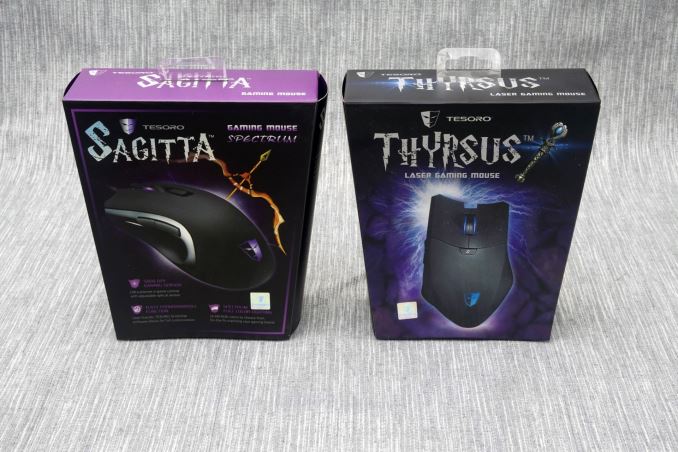
Tesoro Technology (not to be confused with Tesoro Corporation of petroleum products) is a relatively new manufacturer of computer peripherals, founded back in 2011. Our first review of their products came a year ago, with the Tesoro Lobera Supreme Mechanical Keyboard. Since then, even though the company already had many products available, they have made some serious investments, overhauling their website and releasing several new peripherals. Nearly half of those new releases were gaming mice, and today we are having a quick look at two of them in this capsule review, the Sagitta Spectrum and the Thyrsus Spectrum. Tesoro likes giving their products strong, historical names, and these two mice are no exception. For keyboards, the company is usually borrowing the names of historical and legendary swords. For their mice, the naming scheme is a little more complicated. Sagitta stands for "arrow" in Latin and is a small constellation (not to be confused with Sagittarius). The Thyrsus is a mythical Greek staff wielded by the followers of the ancient god Dionysus, a symbol of prosperity and pleasure. Tesoro attaches the "Spectrum" classification to all of their RGB lighting products. Whether these two mice can live up to their showy names, we will find out in this review. Packaging & BundleBoth mice share the same trapezoid cardboard packaging, the top cover of which can be opened to reveal the mouse and allows for some basic grip testing above the transparent plastic shroud. Pictures of the mice decorate their packaging and the most basic features are being clearly listed.
Tesoro supplies only a quick start guide and a leaflet with either the Sagitta or the Thyrsus. There are no accessories or even media accompanying either of the mice. For proper functionality, their software needs to be downloaded from the company's website.
The Tesoro Sagitta Spectrum Gaming MousePhysically, the Sagitta Spectrum is based on a very simple design, heavily resembling the legendary Microsoft Intellimouse. The top matte black cover has a soft texture and the sides feature a reflective piano black finish. Despite the symmetrical shape, the Sagitta is not meant to be used by left-handed users, as the two thumb keys are on the left side of the mouse. A third extra button can be found right beneath the scroll wheel.
At the underside of the Sagitta, we can only see the generously large gliding pads and the PixArt 3310 Optical 5000 DPI sensor. Gamers will enjoy seeing that an optical sensor is being used, as it is supposed to neutralize hardware acceleration and offer better accuracy.
Once powered on, the sides of the scroll wheel and the Tesoro logo at the front of the Sagitta are illuminated. The intensity and color of the lighting can be controlled via the software, individually for each of the two lighting points.
The software that is supplied with the Sagitta Spectrum may not be the most advanced that we have ever seen, but it is well-written and much better than we originally anticipated. The main tab of the software allows the user to program different profiles and sync them to specific programs, automatically switching the profile when a program/game has been launched. All of the buttons can be reprogrammed or even disabled. The user can select from mouse, keyboard and multimedia commands, launch external software, switch profiles or activate programmed macros. The macros can be recorded "on the fly" or through the fourth tab in the software. Unfortunately, the software records only keystrokes and mouse clicks, not mouse movements, relative or absolute. Relative mouse movements can be inserted to a macro after it has been programmed but, even if relative mouse movements would work for the kind of macro you want to program, it is exceedingly difficult to guess exactly how many pixels you want the mouse to move. Technically, the software can only be effectively used to record mouse clicks and keystrokes and, if required, to adjust the delays afterwards in order to speed up the execution of the macro. Gallery: Sagitta Spectrum Software
      The second tab of the software is the "Performance" tab, where parameters such as the DPI settings and the polling rate can be adjusted. There is no way to reduce or increase the number of DPI stages, which is set to four. The scroll and double click speeds can be adjusted, as well as the software acceleration and the lift height. The polling rate can be reduced down to 125 Hz from 1 MHz, although there is no real reason why it should be reduced with a wired mouse, unless it is to combat a compatibility problem. Finally, the lighting tab allows the user to select the color and intensity of the LED lighting beneath the company's logo and the scrolling wheel. The software offers nine colors as a basic template but allows virtually any color of the RGB scale to be selected. Aside from static lighting, the software also has four special effects pre-programmed, "breathing", "loop", "rainbow" and "Tesoro Purple", without the possibility to manually program or add more. The lighting effect and/or color of the scrolling wheel and the main logo is programmed individually, meaning that the user can program a different color/effect at each of the two lighting points. The Tesoro Thyrsus Spectrum Gaming MouseAlthough they share the same colors, the Thyrsus is physically more complex than the Sagitta, sporting an asymmetric design with a bulky body, clearly favoring palm over claw gripping. The top cover of the mouse is sprayed with a matte black paint and the surrounded body has a reflective piano black finish. At the top of the mouse, the oversized main buttons envelop the scrolling wheel. A tiny extra button can be found beneath the main buttons, near the top of the body.
Tesoro is marketing the Thyrsus towards MMO gamers, who frequently require a lot of buttons and macros. The company placed six thumb keys on the left side of the Thyrsus that can be programmed via the downloadable software. There are no buttons on the right side of the mouse.
At the underside of the Thyrsus, we can see four gliding pads, two of which are highly asymmetric. If those are worn, we suspect finding proper replacements will be significantly difficult. Unlike the Sagitta, the Thyrsus does not have an optical sensor but rather a laser sensor. The ADNS 9800 sensor is supplied by Avago, has a maximum resolution of 8200 DPI and, according to the manufacturer's specifications, zero hardware acceleration.
Exactly as with the Sagitta, the sides of the scroll wheel and the Tesoro logo at the front of the Thyrsus are illuminated. However, the lighting cannot be individually controlled via the software, meaning that programmed settings affect both lighting points simultaneously.
At the time of this review, the software that Tesoro supplies for the Thyrsus is very poor. It even lacks an installer, launching as a portable application. This actually may be an advantage if someone wants to pick up their mouse and use it with another system, for example at a friend's house, but we reckon that there will be very few such cases, in contrast with the majority of users who would prefer (or at least are accustomed to) installable software. There are only two tabs in the software, with multiple options crammed together. The "Basic Config" tab allows the users to modify the actions of every button on the mouse, its polling rate and DPI level settings, as well as the lighting. Almost every option in this tab is greatly restricted. There are five "settings", or profiles, which cannot be synced with applications and need to be changed manually. There are six DPI levels, the number of which cannot be reduced or increased, only their sensitivity level. Finally, the lighting options allows the user to select either two basic lighting effects or a single, static color. The static color can be programmed by controlling the intensity of the red, green and blue LED, which is adjustable from 0 to 3 for each color, meaning that there are "only" 64 possible configurations. Although 64 configurations are more than enough, the lack of a preview means that the user has to effectively guess the output color, as very few people can intuit the end result of having, for example, red, green and blue LEDs at 33%, 33% and 66% output respectively.
The "Advanced Config" tab is not really advanced at all. There are a few options for adjusting the cursor, scrolling and double click speeds, but no advanced options regarding the sensitivity, acceleration and lift height, even though the sensor supports those. Finally, there is a very basic macro recorder that can only record a few keystrokes per macro, then writes the macro to a file. Final Words & ConclusionAs with all of the peripherals we review here at AnandTech, I always try to use each device over the course of a few days. Especially for mice, this allows me to gain personal perspective on the long term comfort and learning curve. In the case of Sagitta and Thyrsus, as they are gaming mice, I tried to use them as much as possible for gaming sessions, logging some hours of gameplay in an action MMORPG and a real-time strategy game. The Sagitta performed very well during the gaming sessions. Even though I am used to heavier mice, the shape of the mouse was comfortable and learning curve was very short. I would not go quite as far as to claim that it felt like an extension of my hand, but the Sagitta is comfortable and performs well for casual gaming sessions. The low weight can reduce fatigue during very long gaming sessions, but some advanced users might not enjoy the impact this may have on their aiming accuracy. The software that Tesoro supplies for the Sagitta is not perfect, but it is responsive and has an adequate number of options. It was easy to adjust the settings of the mouse to my personal requirements and program a profile that would initiate once the game has been launched, changing the actions of the two thumb buttons to macros. I found the included macro recorder lacking, as my macros almost always require the input of mouse movements as well, but it was no problem to assign executable macro files to the buttons. We found the retail price of $60 for the Sagitta Spectrum to be good for a gaming mouse with an optical sensor, Omron switches and RGB lighting. There are a few more options around this price range, but good gaming mice with optical sensors usually start at the $80 mark, making the simple and very effective Sagitta a rather competitive product. Even though the Sagitta performed very well, we cannot claim that the Thyrsus impressed us. The body of the Thyrsus is bulky but exceedingly light for its size, making it difficult to perform very precise movements with. Its design forces the user to adopt a palm grip, as it is next to impossible to hold it with a claw grip and be able to effectively press all six of the thumb buttons. Even with a palm grip, the user needs to get accustomed with gripping the Thyrsus properly, counteracting the force of the thumb with the pinky finger in order to keep the mouse from moving. Even though I am accustomed to using mice with many thumb buttons, such as the Logitech G602 and the Corsair M95, I personally found this difficult, and even after a couple of hours of gameplay the Thyrsus kept feeling uncomfortable to use. Considering that the software that Tesoro currently supplies with the Thyrsus is just a portable application and that the software of the simpler Sagitta is much better, I am hopeful that the company will introduce a proper software package in the near future. The portable version that is currently available for download from the company's servers is certainly not adequate for a gaming mouse, especially for an advanced product with six thumb buttons. The Thyrsus is a good product in terms of quality, even if (in my opinion) it is too lightweight for a MOBA/MMO gaming mouse. However, considering the retail price of $70 and the currently very poor software, it is very hard to recommend it over the multiple available alternatives, such as Corsair's Scimitar ($60) and Logitech's G600 ($50). |
| 11:30p | Oculus Rift Launch Day News: New AMD & NVIDIA Drivers; Async Timewarp & Platform Restrictions Added To SDK
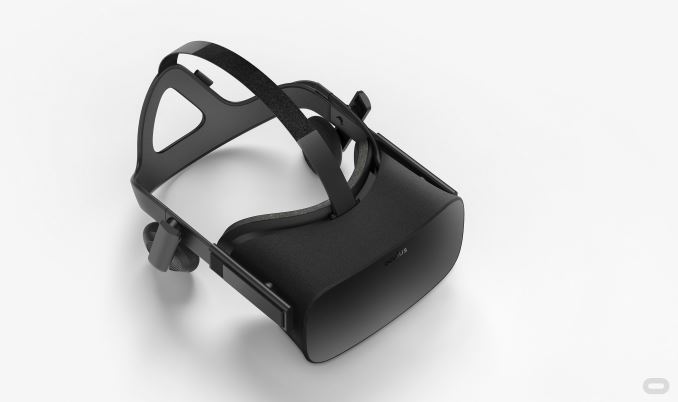
After just over three and a half years and a Facebook acquisition in between, Oculus’s first-generation Rift headset is launching today. We took a hands-on preview of the headset at GDC 2016 earlier this month and will have a formal review later, but in the meantime for those lucky backers or early pre-order customers who will be receiving their units this week, let’s talk drivers and software. As you’d expect for such a high-profile device launch, both AMD and NVIDIA have new drivers being released in part to update their support for the Rift, along with blog posts lauding the release of the device. For both companies, the launch of VR headsets represents the opening of what could potentially be a large and profitable market for high-end GPUs. The rendering requirements of VR – both in resolution and framerates – greatly surpass the common 1080p60 monitor, and the novelty of VR could further spur on additional hardware sales. So both GPU vendors are taking the launches of VR headsets over the next two weeks very seriously. Launch Day DriversStarting with AMD then, the company has released their Radeon Software 16.3.2. The big news here is of course official launch support for the Rift, including Oculus’s new 1.3 SDK (more on this in a bit). This driver is also adding support for the HTC Vive ahead of its launch next week, and AMD’s Radeon Pro Duo video card. The latter still does not have an official release date, but given the added driver support and Q2 release date, it’s clearly going to be soon.
Along with the driver release, AMD’s graphics technology group has also released a blog post on their website dubbed “Asynchronous Shaders Evolved”. In it the company offers a recap of their asynchronous shader technology implementation, and further reveals that they have assigned a formal name to their async shader prioritization capability: Quick Response Queue. AMD first talked about this ability last year when they first began discussing async shading with the public, and now in their recent drivers they have enabled the feature. Quick Response Queue goes hand-in-hand with asynchronous timewarp, which ideally is executed as late as possible and as quickly as possible to produce best results, in this case allowing AMD to send the job through at high priority without resource sharing unnecessarily slowing down the job. Do note however that Quick Response Queue is a GCN 1.1+ feature, though for the purposes of VR in particular, all of AMD’s GCN 1.0 products fall below Oculus’s recommended minimum of a Radeon R9 290. Meanwhile over at NVIDIA, they too have a new driver release with 364.72, the third release from the R364 branch. 364.72 brings launch support for both the Oculus Rift and next week’s HTC Vive, along with the various launch titles for those headsets, and all of the features present in the latest iteration of NVIDIA’s VRWorks technology. As for non-VR gamers, this is also the game ready launch driver for Dark Souls III, Killer Instinct, and Quantum Break. The company has also published a separate blog post celebrating the launch of the Rift. In the post NVIDIA announces that GeForce Experience’s game settings optimization service now supports VR settings as well, allowing the software to dial in NVIDIA’s optimal settings for playing various games in VR. Only a limited number of games have VR settings available at this time, but NVIDIA seems to have hit a decent chunk of the graphically strenuous titles – EVE: Valkyrie, Lucky’s Tale, and Chronos – while promising to add further VR games in the future. News From Oculus: Async Timewarp Now In Production, Non-Oculus Store Applications To Be Flagged As “Unknown”Tying all of this launch day activity together, Oculus has released a new blog on their developers site outlining the current state of asynchronous timewarp support for the Rift. After initially announcing their implementation of the technology just a bit over a year ago, Oculus has promoted the technology to production status for the Rift on Windows. In the post they outline a bit of the work they had to do to implement async timewarp on Windows – since it’s not a real time OS, they can’t necessarily count on getting resources allocated or jobs completed as quickly as they’d like – which in turn has involved working with AMD, NVIDIA, and Microsoft to get both OS GPU scheduling and each vendor’s GPU drivers up to snuff to handle GPU prioritization and pre-emption as they expected to use it. The blog post also confirms that Oculus is using AMD’s LiquidVR and NVIDIA’s VRWorks technologies respectively to expedite the process and access functionality not normally available via DirectX 11, which has no real concept of asynchronous shading. The blog post also confirms the technical requirements for the async timewarp. The feature works as far back as Windows 7, but owing to the significant GPU scheduling updates made with Windows 10 and its underlying WDDM 2.0 driver stack, the feature works best on Windows 10, specifically the most recent update (10586.164). In the long run here I expect that Windows 10 will be the primary platform for VR – teething issues and all – due to the combination of WDDM 2.0 and ultimately the greater flexibility offered with DirectX 12.
Meanwhile, now that async timewarp has been promoted to a production feature, Oculus is announcing that they are enabling it by default in the Oculus VR SDK 1.3. Games using this SDK will not need to do anything special to make use of the feature, which means this should allow for a fairly rapid rollout of the feature. However the post also implies that only games that are compiled against the 1.3 SDK get this feature, which is notable since the SDK was only released today. As a result it’s not clear whether any or all launch titles have async timewarp enabled at this time, or whether it’ll need to be patched in with a future game update. On a final note about async timewarp, in their blog post Oculus also spends a bit of time discussing how async timewarp works and what it’s used best for. There’s an especially good passage outlining how async timewarp’s re-warping capability to cover for missing frames (as opposed to updating head-tracking of a frame at the last second with an initial warp) is meant to be used as a failsafe option, and that developers shouldn’t use it to try to get away with games that run below 90fps. I especially like this passage – it’s the greatest summary of why you can’t cheat your way to VR that I’ve ever read – so I’ve gone ahead and reprinted it below.
Finally, on a not-quite-hardware bit of news, Epic Games’ engine guru Tim Sweeney has pointed out that with the release of the Rift and the 1.3 SDK, Oculus has implemented new security and content policies on the platform. Applications compiled with the Oculus SDK but not distributed through the Oculus Store will be flagged as coming from an unknown source, and by default will be blocked. At the same time it will still be possible to run these applications, but end-users will first need to enable applications from Unknown Sources to have them unblocked.
At first glance this appears to be an attempt by Oculus to encourage developers to adhere to their development guidelines while also building up their platform. Ala the mobile app stores, Oculus will be reviewing applications and approving/rejecting submissions based on content restrictions and adherence to best developmet guidelines. Ideally this should result in a more consistent experience for users due to applications not being allowed that don't follow Oculus's development guidelines, although the content aspect of the review process is also going to be particularly important for anything that fails their content rules (and as such can never get approved), as it means those applications will have to go the Unknown Sources path. Meanwhile, the default blocking of applications compiled via the SDK but not sold on the store will also serve to encourage developers to use the Oculus platform and distribute their applications through the Oculus Store, rather than leaving Oculus out and using another store entirely. To fray some of the concerns about the Oculus Store, Oculus is allowing developers to request keys for free, which can then be sold to users via other stores. The end result is very similar to Steam, allowing Oculus platform applications to be sold at third party stores while retaining their use of the Oculus platform. However I can’t recall a parallel of a Windows peripheral developer blocking third party applications by default, as this is typically the domain of OS vendors running closed platforms. |




| << Previous Day |
2016/03/28 [Calendar] |
Next Day >> |