[Most Recent Entries] [Calendar View]
Wednesday, March 30th, 2016
- Amount of storage needed (number of bays)
- Intended use-case
- Business-oriented or home / multimedia-focused
- Expected number of simultaneous clients
- Downtime tolerance
- Required processing power (both file-serving and apps)
- Value of invested time (in the case where there is a toss-up between the COTS and DIY routes)
- Mobile and native NAS applications ecosystem
- Asustor Storage Units
- Buffalo LinkStation and TeraStation Series
- Netgear ReadyNAS Series
- QNAP Turbo NAS Units
- Synology DiskStation and RackStation Series
- Western Digital Consumer Series
- ZyXEL Network Storage Units
| Time | Event | ||||||||||||||||||||||||||||||||||||||||||||||
| 1:00p | Apple Announces the Safari Technology Preview
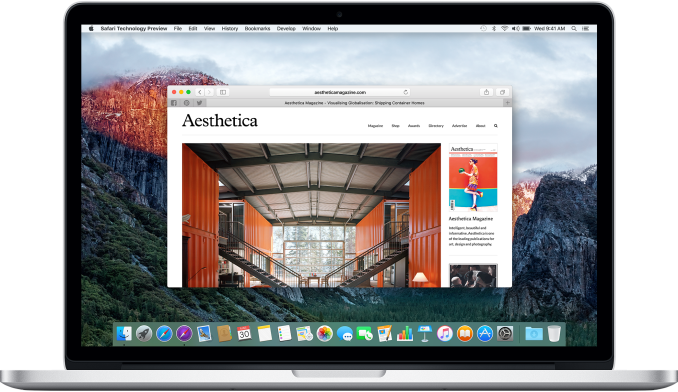
Today Apple made an interesting announcement for developers regarding Safari. Safari is Apple's browser across all of their iOS and OS X devices, and the layout engine at its core is WebKit. WebKit was originally started as a project within Apple as a fork of KHTML, a layout engine developed by the KDE project. Today it's widely employed in many browsers on many platforms, with Google and Opera formerly using it and now utilizing a fork of WebKit called Blink. Traditionally developers who want to use the latest improvements to WebKit have had to download WebKit nightly builds, which as their name implies, are builds that reflect the latest changes to the WebKit code base and are released on 24 hour intervals. This allows developers to test and develop against new features being added to WebKit, which later make their way to Safari and other WebKit-based browsers as well. Distributing nightly builds for developers is a common practice for large software projects, but in the case of Safari and WebKit it was not ideal in many ways. For one, it essentially made the version of Safari on a computer use the new nightly WebKit back end that was installed, which can lead to annoyances when trying to compare between the existing public release and the nightly build. It also disables features like iCloud integration for tabs, bookmarks, passwords, etc, as the builds are not signed by Apple.
The Safari Technology Preview is Apple's attempt to address some of these problems, and make it easier for developers to keep track of what changes are being made, and to submit feedback or bug reports based on what they experience. What the preview consists of is an application separate from Safari that uses a more up to date version of WebKit than what the public version of Safari that comes with OS X uses. It's available from Apple's developer website, and updates will come every two weeks via the Mac App Store. This makes the list of changes and additions easily accessible with each update, and because the builds are signed by Apple there's full support for iCloud integration. Having a separate application means that comparisons and regression testing between the current official version of Safari and one with a more up to date version of WebKit can be done easily. One important thing to note about the Safari Technology Preview is that, while the app is available from Apple's developer site, you don't need to be a registered developer paying the yearly iOS and OS X publishing fee to access it. Since the target audience consists mainly of programmers building websites and web applications, it doesn't make sense to limit it to developers building native apps for iOS and OS X. Apple is highlighting some key things that are new in the initial release of the Safari Technology Preview. The first is that it has what they claim to be one of the most complete implementations of ECMAScript 6 (ES6), which in less precise but simpler terms means the latest version of JavaScript, as JavaScript was standardized as ECMAScript and now can be considered an implementation of the standard itself.
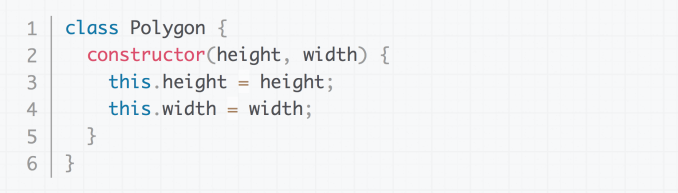
Image source: Mozilla ES6 comes with some key features for developers, including support for classes as part of the object oriented paradigm, iterators, and many new APIs. I am personally not a web developer, and the fact that JavaScript is just now adopting more explicit class declarations on top of the existing function prototype based declarations comes as quite a surprise to me. Another key feature of the Safari Technology Preview is the new B3 Just-In-Time (JIT) JavaScript compiler. B3 is the new compiler backend for WebKit's FTL JIT compiler which was introduced about a year ago with LLVM acting as the backend. At that time there was a great deal of info about the work that went into making LLVM, traditionally a production grade compiler for native applications, usable for compiling JavaScript on the fly within the constraints of something like a smartphone. Since Apple has been a major part of both WebKit and LLVM, using LLVM as the backend to achieve greater optimization of JavaScript code made sense. However, LLVM was architected as a compiler that would be used for optimizing and compiling code on large powerful desktop computers where power usage and compile times were not a large concern, as the code would simply be compiled and shipped to be run. In the context of a mobile device, you'll be visiting various sites and compiling a great deal of different JavaScript code, and so a different strategy needs to be employed. This is where B3 comes in. According to Apple, LLVM's optimizations often are overkill for the task of JavaScript compilation. There are cases where it's actually faster to just compile some lines of code and run them than to take time to optimize, compile, and then run. In these situations, there are performance gains to be made by moving away from LLVM, as you need to work on minimizing compile time rather than generating the most efficient code possible. On a high level, B3 looks at the JavaScript code that needs to be executed and decides whether it's actually worth optimizing it or not. For complex code that may be run many times it makes sense to spend the extra time optimizing, but for small groups of simple statements it may be better to just compile it without optimizations. Of course, a big question may be why you wouldn't just apply tweaks to LLVM. Apple says that B3 was designed from the ground up with a focus on quick JavaScript execution, but it wouldn't be surprising if there are ties to LLVM which already exists to provide a solid foundation.
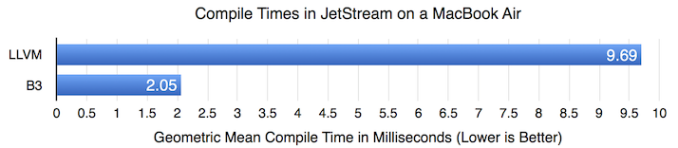
For developers and other interested parties looking for more info on B3 there's a post on the official WebKit blog about other improvements that have been made. They also highlight some improvements in compile time that have been observed with popular benchmarks, while also demonstrating the fact that performance doesn't regress from the LLVM backend despite the significant reductions in compile time. Right now B3 isn't fully ported to ARM64 and that will be necessary before we see it debuting on iOS. The last two major inclusions in the first release of the Safari Technology Preview are an updated IndexedDB implementation and support for the newest standard of Shadow DOM. The former is a way of storing data on a client device for quick access, and the changes are the result of developer feedback, with Apple claiming that the new implementation is more stable and better compliant with established standards. A simple explanation of Shadow DOM is that it provides a way for developers making websites and web apps to better define the style of widgets and controls while keeping them independent from other styling options that apply to the page. The Safari Technology Preview is available now from Apple's developer website. As mentioned before, it only needs to be installed from the developer site, with future updates coming every two weeks via the Mac App Store, with the latest changes to WebKit and Safari in tow. | ||||||||||||||||||||||||||||||||||||||||||||||
| 2:40p | Acer Unveils New Chromebook 14 with Up to 14-Hour Battery Life
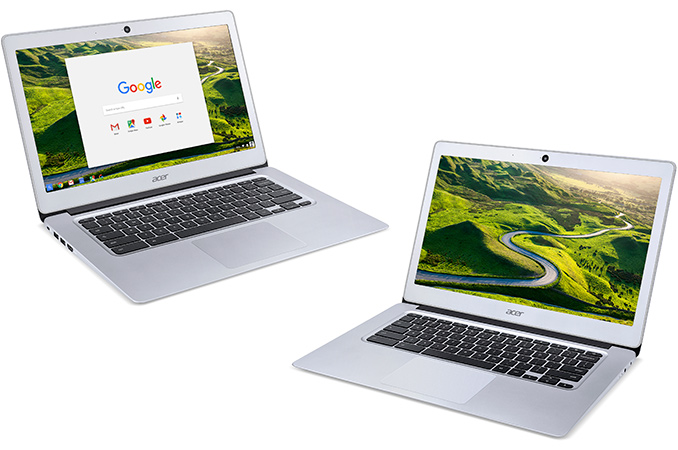
Acer this week introduced its new family of Chromebooks that wed performance with portability. The new laptops feature multi-core x86 microprocessors, 14” displays as well as aluminum chassis. Even in its most advanced configuration, the Chromebook 14 costs only $299. Acer traditionally positions its Chromebooks as solutions for students as well as customers on a budget, who need basic computing and do not want to invest a lot. Several years ago, personal computers running Google’s Chrome operating system were considered as cheap alternatives to Windows-based PCs, which is why they used affordable components and could not boast solid performance, despite the lightweight OS. Eventually, such PCs became relatively popular and manufacturers started to use more advanced ingredients, such as IPS displays or microprocessors with higher performance. Google itself introduced its Chromebook Pixel laptop in 2013 (and updated it in 2015), targeting premium buyers. The Chromebook Pixel is one the most advanced and powerful Chromebooks ever made thanks to its Core i7 “Broadwell” processor, a display with 3:2 aspect ratio as well as an aluminum body. Google’s Pixel demonstrated to other PC makers that it is possible to build premium Chrome OS-based notebooks and they followed with more advanced Chromebooks. The new Acer Chromebook 14 is not as powerful as the Pixel, but it is clearly a step into its direction with a high-resolution display as well as an all-aluminum chassis.
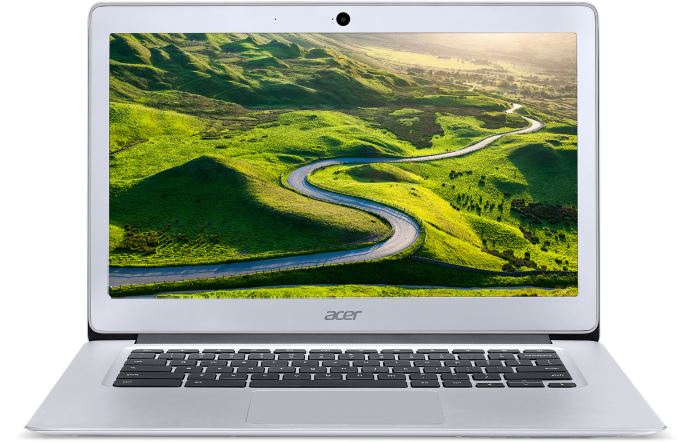
The Acer Chromebook 14 (CB3-431) features, as the name suggests, a 14” IPS display with 1920×1080 or 1366×768 resolution as well as 170-degree viewing angles and an anti-glare coating. Unlike the Chromebook Pixel, Acer’s new laptops have 16:9 aspect ratio with all of its advantages for video viewing and disadvantages for Internet surfing. The model with higher resolution can work on one battery charge for 12 hours, whereas the Chromebook 14 with 1366×768 resolution boasts with up to 14-hour battery life on a single charge. The Chromebook 14 laptops are based on Intel Celeron “Braswell” processors with two (Celeron N3060) or four (Celeron N3160/N3150) cores featuring the Airmont micro-architecture and up to 1.60 GHz clock-rate, Intel’s Intel Gen 9 graphics core with 12 execution units as well as up to 6 W TDP. Unlike Google’s Chromebook Pixel as well as Acer’s Chromebook 15, the Chromebook 14 cannot integrate a high-performance CPU featuring Broadwell micro-architecture, but that was certainly a trade-off between the price and portability.
Acer equips its Chromebook 14 laptops with 2 GB or 4 GB of LPDDR3 RAM (which is a good news for battery life), 16 GB or 32 GB of eMMC solid-state storage as well as a dual-band 2x2 MIMO 802.11ac Wi-Fi module with Bluetooth 4.2. The systems also feature a 720p webcam, a 3.5-mm mini jack, a microphone, stereo speakers, two USB 3.0 ports as well as an HDMI output. The Chromebook 14 from Acer is 17 mm thick and weighs 1.55 kilograms, which is in line with many portable laptops. Acer claims that its fanless cooling system is enough to cool-down Intel’s Celeron CPU with a 6 W TDP, which is why the Chromebook 14 has no fans at all. Acer did not say much about the price of its Chromebook 14. The launch model will be available next month with a Full HD display, 32 GB storage and 4 GB RAM starting at $299.99 in the U.S. and $399.99 (CAD) in Canada. Other Chromebook 14 models will sport lower amount of storage and RAM as well as a lower-resolution screen, but also a longer battery life. Their prices are unknown, but will clearly be different in different countries. | ||||||||||||||||||||||||||||||||||||||||||||||
| 2:50p | Windows Adds Support For Bash Scripting
With the goal of making more developers use Windows, and to help them move their workflows over to Windows, Microsoft has taken the step to enable Bash scripting natively in Windows 10. This will be a new subsystem, and not an emulation layer, with full access to native Windows functions such as the file system and APIs. Microsoft partnered with Canonical to provide an Ubuntu based subsystem into Windows. In the keynote, Microsoft spoke about how they have had lots of feedback regarding their Hosted Web App bridge which lets developers take web apps and provide them through the Windows Store as sudo-native apps. The Web Apps can have access to the Universal Windows Platform (UWP) APIs for things like Live Tiles and Cortana integration, but without a lot of the overhead of re-writing into a native app. But the feedback was that a lot of the development tools they use require Bash scripting making it difficult to do the development on Windows, hindering Web App adoption. Adding the Ubuntu subsystem into Windows is an interesting solution to this problem. Linux does a lot of things much differently than Windows, including having a case sensitive file system, among other things, so certainly some work would have been done on the back end to enable this in Windows. This, like many of Microsoft’s announcements over the last year or more, have been about making it easier for devs to work on Windows, and expanding the install base of targeted applications with bridges and Xamarin. I hope to have some more info on the Bash announcement in the next couple of days. | ||||||||||||||||||||||||||||||||||||||||||||||
| 3:00p | Foxconn Takes Control of Sharp
Foxconn Technology Group, the world’s largest contract maker of consumer electronics, announced on on Wednesday that they have officially acquired Sharp, a major maker of LCD panels and various electronics from Japan. The two companies have collaborated for many years and Foxconn took over Sharp’s television factories in Mexico, China and Malaysia as well as a stake in the company in 2012. This week Foxconn gained full control of Sharp. Foxconn (which is also known as Hon Hai Precision Industry) plans to pay ¥389 billion ($3.5 billion) for a 66% stake of Sharp, which is ¥100 billion less than was originally negotiated a month ago. That deal in February fell apart because Foxconn learnt about substantial financial liabilities that Sharp had. In the future, Foxconn will have to pay ¥100 billion ($889 million) more to get preferred stock from Sharp’s main banks and then pay liabilities that Sharp has, reports Bloomberg news-agency. Sharp has to pay Mizuho Financial Group and Mitsubishi UFJ Financial Group approximately ¥510 billion (4.53 billion) in the coming months. Besides, Sharp expects to report an operating loss of ¥170 billion ($1.511 billion) for the fiscal year, which ends on Thursday. In short, Foxconn’s total spending on Sharp will be significantly higher than $3.5 billion, but the prize that the contract manufacturer gets may be worth it.
Terry Guo, the founder and chairman of Foxconn, hopes that the acquisition of Sharp will get his company a number of significant assets: a well-known consumer electronics brand with a good product lineup, LCD display production capacities and intellectual property. “I am thrilled by the prospects for this strategic alliance and I look forward to working with everyone at Sharp,” said Terry Gou. “We have much that we want to achieve and I am confident that we will unlock Sharp’s true potential and together reach great heights.”
The buyout of Sharp will transform Foxconn into a major producer of display panels. As a result, it will be able to offer more products and services to its customers, including Apple. Right now Apple fetches LCD panels for its iPhones and iPads from companies like Japan Display Inc. (JDI), LG Display and Samsung Display. If Foxconn manages to offer the right technology at the right price to Apple, then it may get itself a new multi-billion dollar business. In fact, even if for some reason the current deal between Foxconn and Sharp fells apart before October 5, the Taiwan-based company will be given an opportunity to buy only the display business from Sharp. However, to capitalize on the display business in the long term, Foxconn will have to ensure that Sharp is able to produce OLED panels in addition to LCDs since the former are getting more popular. While contract production of electronics is what made Foxconn big and strong, the competition against companies like Flextronics, Pegatron, Quanta and others is intense. Profit margins of Foxconn has shrunk in the recent years and in a bid to cut-down its costs the company had to start using robots in its factories. Automatization of manufacturing helped Foxconn to increase its profits last year, but selling own-brand goods is generally significantly more profitable than producing hardware for others. But branded products will be a new business for Foxconn. Thanks to its volume of scale, abilities to fetch components in high volume and at favorable prices, the company may significantly reduce costs of Sharp’s electronics, which will help to increase their market share. In the recent years, Foxconn also entered the markets of system-on-chips and software (by acquiring Socle and collaborating with software makers like Mozilla), which further adds to its product building expertise. At the same time, production of branded devices may make Foxconn a competitor to at least some of its clients. For example, Sharp’s smartphones compete fiercely against Apple’s iPhone in Japan and still control a sizeable chunk of the market. Sharp’s intellectual property is particularly important to build next-generation displays and therefore Foxconn is interested in getting it. In addition, Sharp probably has a lot of patents in the field of consumer electronics, communications and software, which will come in handy when Foxconn starts to produce its own devices or develop products for others (as an ODM).
Sharp was founded in 1912 in Tokyo, Japan, by Tokuji Hayakawa. The company got its name after the ever-sharp mechanical pencil, which was invented by Mr. by Hayakawa. Sharp made the world’s first LCD calculator in 1973 and the world’s first phone with camera in 2000. Most recently Sharp began to sell the world’s first commercial UHD TV with 8K resolution (7320×4680) and was among the major driving forces behind this new tech. Unfortunately, strong yen, competition against South Korea-based CE makers and other factors significantly affected Sharp’s abilities to capitalize on its leading-edge technologies in the recent years. With Foxconn’s money and expertize in mass production, Sharp may become a much more significant maker of CE than it is today. “If you are talking about two years, it will be difficult. Three years, there is potential. Five years, then definitely,” said Kylie Huang, analyst with Daiwa-Cathay Capital Markets, reports Reuters news-agency. Financial analysts generally praised the deal, but admitted that Foxconn will have to invest in Sharp going forward in a bid to unlock the potential of the consumer electronics company. “This is positive for Sharp, although it’s hard to imagine that Foxconn won’t have to keep providing funds,” said Hideki Yasuda, an analyst at Ace Research Institute. Images by Apple, Bloomberg, Foxconn. | ||||||||||||||||||||||||||||||||||||||||||||||
| 3:25p | Microsoft Announces Windows 10 Anniversary Edition
Windows 10 is unlike previous versions of Windows in that the original intent was to have it constantly updated over its lifetime. We’ve already had one big update with the November update, back in, you guessed it, November. The second update is code named Redstone, and all of the latest insider builds have features the RS in the naming scheme. Today at Build, Microsoft announced they will be calling this update the Windows 10 Anniversary Edition, and it will be available this summer. Someone much more philosophical than myself once said “A rose by any other name would smell as sweet” and I’m sure that applies here as well. With this choice in naming schemes I don’t really know where they go on the next update, but regardless the product is going to be known as Windows 10 anyway, so maybe this doesn’t matter. We’ve known about a few of the big updates coming to Windows 10, with things like Extension support in Microsoft Edge, but today Microsoft announced a few other important pieces as well coming later in the summer. The first was better inking support. Microsoft has worked hard to ensure that inking and pen usage in Windows is as first-class as keyboard and mouse, and with this update inking will get even more powerful. There will now be an inking hub which can be opened by clicking the pen, and this hub will surface apps that support inking, as well as frequently used apps that you use with the pen.
They also showed off how writing in a sticky note can be used by Cortana to add appointments to your calendar, among other things. For instance, if you write in a note that you are meeting with Fred at 3pm tomorrow, Cortana will be able to action that information to set up the appointment for you. One other inking improvement, which is a big one, is the introduction of a software ruler. Now, this may not sound that important, but if you’ve ever tried to draw with a ruler on a Surface, you would know it’s not as natural as doing the same thing on paper. With the new software ruler, you will be able to move it around using touch, and then you can draw and the pen line will stick to the ruler. A more impressive version of this was demoed using Adobe Illustrator, where an artist can use a French Curve which is software based to accurately use it just like as if it was a physical version of the same thing. This should help inking quite a bit.
Another new feature coming with the update is Biometric support for Microsoft Edge. Using extensions added to the W3C, Edge will be able to log you into websites with any of the Windows Hello supported biometric logon methods. The demo on screen was using a fingerprint to log in. I need to ask them a few questions about this and see if it’s just a rebrand of the Passport idea already, or if this is a new thing, but since it’s based on standards in the W3C in theory other browsers could add this as well. The big downside is that sites would have to offer this support, and there’s no way to know whether may will. The last big announcement for this next Windows update is new experiences with Cortana. Cortana will now be available right on the lock screen, so you won’t need to login in order to set up new appointments or launch tasks. Cortana is also getting a lot more capabilities through extensibility, meaning Cortana will be able to take care of complete tasks for you. Demonstrated on stage was the ability for Cortana to book a hotel room for you based on an upcoming calendar appointment in another city.
Cortana is also getting its own bot. Bots are small programs that can do tasks for you. In the case of Cortana, it will be able to talk to other bots to complete tasks. In the previous example, Cortana can talk to the hotel’s bot in order to set up the room booking without needing much, if any, information from you. Bots were a bit part of the keynote, and Microsoft is announcing the Microsoft Bot Framework in order to let devs quickly and easily build powerful bots which leverage big data services in Azure, and ones that are able to do natural language interaction with people. Compared to last year, the news was a lot more tame on the Windows side, and that’s not surprising really since last year was the lead up to Windows 10’s launch, but at the same time there is plenty of things they are adding to make the experience better. There are still two more days left in Build, and I hope to get some Windows questions answered over the next couple of days. | ||||||||||||||||||||||||||||||||||||||||||||||
| 4:30p | Windows 10 Gaming Updates: DirectX 12 and Xbox One
With the Windows Anniversary Edition, Microsoft has detailed some upcoming improvements for gaming. They even brought Phil Spencer out to announce the upcoming plans for gaming on Windows. The emphasis they are putting on gaming in the last while is quite a change, and gaming on both Xbox and PC is a much bigger focus for Microsoft than in the recent history. That’s not a big surprise, since the gaming industry is one of the few bright spots in the PC market, and with the recent release of consumer virtual reality headsets, there’s a big opportunity here for all parties to improve and update the hardware and software. Right off the bat, Phil Spencer, head of the Xbox team, announced that the Universal Windows Platform would be a better platform for game developers, as well as users. On the user side, system security should be a lot more robust thanks to the sandboxed application platform used on UWP, and apps can be easily installed through the store, and removed without much fuss. Phil also announced that the UWP will be updated in May to bring the ability for end users to disable V-Sync, and it will support G-SYNC and FreeSync monitors as well. Notably, this means the sync changes will be coming ahead of the summer Anniversary update, and from what we understand this is something the DirectX team has taken to heart, which is why they have been working to get it pushed out as quickly as possible. Right now, this is likely one of the biggest issues with UWP for gaming on true gaming titles like Rise of the Tomb Raider. Microsoft has caught a lot of flack over this issue since the game launched, and it’s a basic setting that PC gamers are used to being able to adjust so this is good news. In addition, they will support multi-GPU solutions later on, possibly with the summer update to Windows.
If they want to be a serious platform for gaming, I think these are good steps, but there is plenty they can do to mimic the other platforms. With the massive install size of games, they need to be able to let people specify where the games are stored. You can work around this now, but it is clunky. They also need the ability to backup and restore games. It’s great I can uninstall Rise of the Tomb Raider quickly, but if I do want it back I have to download the entire 50 GB again. But still, even this one change is a good step, but it’s really the first step. The big announcement for Xbox One is that it will finally get access to the Windows Store coming with the Windows 10 Anniversary Update. That means by the summer, people will be able to install UWP apps onto the Xbox One, enabling a whole host of new possibilities. Apps like Netflix would then be able to share a common app with Windows 10, and companies like MLB will be able to share the Xbox One app with Windows 10. But all developers will be able to target the Xbox which will enable things I’ve never thought of. In order for developers to target Xbox and actually debug and test their applications on the big screen, the Xbox One is gaining a developer mode, allowing anyone to use their Xbox One as a dev kit. Microsoft demoed this, and first an app has to be installed to enable this, and register the Xbox as a dev kit. You can then use Visual Studio to do a remote session on the Xbox by supplying its IP address, and the app will compile and run remotely.
Xbox will also be gaining some other new features with the update, including the ability to use Cortana for voice recognition. Right now the Xbox supports basic commands over voice, such as Xbox Pause, but Cortana should enable a much broader interaction with natural language. Just like on Windows, you would be able to ask Cortana to watch Fuller House on Netflix, rather than the step by step process required now. In addition, the native controls for UWP apps will support controller input, just like they already support keyboard, mouse, touch, and pen, so no extra work will be required by the dev to enable this interaction. Microsoft said they will have more to announce at E3. | ||||||||||||||||||||||||||||||||||||||||||||||
| 5:00p | Best NASes: Q1 2016
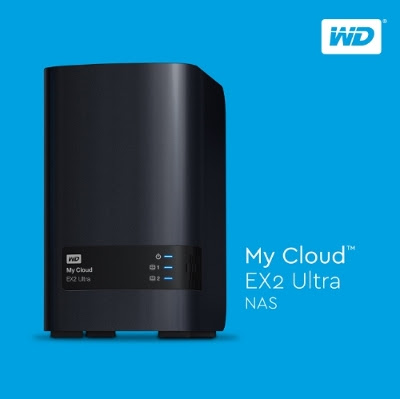
Network-attached storage vendors do not usually follow a regular yearly cadence in updating their offerings. Releases for different market segments are spread throughout the year. That said, thanks to the Consumer Electronics Show (CES) held in January, the first quarter of the calendar year provides glimpses into what vendors have in store for the foreseeable future. Some of the announced products are either available for shipment right away or get into the market later in the quarter. Today, we will take a look at the various options currently available in the commercial off-the-shelf (COTS) network-attached storage (NAS) market space. The COTS NAS market can't be simply delineated based on price and performance. As a rule of thumb, one can say that the price of a NAS increases with the number of bays in it. However, even within the same number of bays, we get NAS units spanning a wide price range. Any consumer in the market for a NAS needs to consider the following aspects before deciding upon the budget: We have evaluated a large number of NAS units (with different bay-counts) over the last several years. The lineups mentioned below (in alphabetical order) are the ones that we are comfortable recommending for purchase after putting a few of their members through long-term testing. Compared to previous years, we have removed the LenovoEMC i- and p- series, as well as the Seagate NAS and NAS Pro units, as they no longer seem to be available for purchase and no new products have been announced in the last year (even though their support forums are still active with official replies). In this guide, we present suitable options for 2-,4- and 8-bay NAS units targeting the home consumer / SOHO market. One important aspect here is that we are not going to talk about the high-end SMB market or the multitude of offerings that come with Windows Storage Server or some similar flavor. Only products based on custom OSes are being considered in this guide. Option 1 (2-bay): Western Digital My Cloud EX 2 Ultra [ Diskless: $160, 2x2TB: $350 ]Most units sold in the 2-bay market are purchased by the average consumer who wants to back up photos and videos taken with mobile devices. A performance powerhouse is rarely needed in this market segment. While the user experience with the mobile app(s) is vital, the presence of apps on the NAS itself is just an icing on the cake.
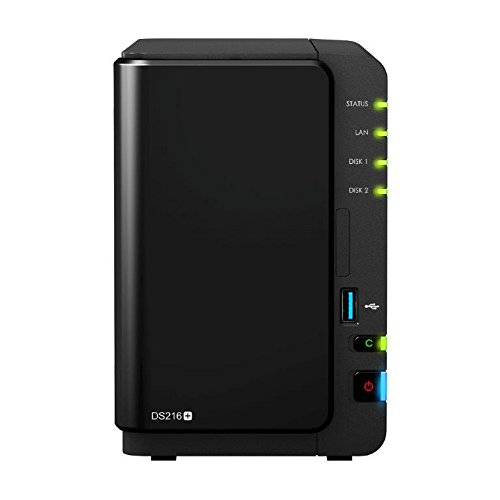
Western Digital revamped their 2-bay product line last month with the My Cloud EX2 Ultra. Compared to the previously recommended My Cloud Mirror Gen 2, this is a slightly more powerful offering with double the RAM (1GB DDR3). Models start at $160 for the diskless version and go up to $900 when bundled with two WD Red 8TB helium drives. Western Digital has also been enhancing various core features such as backup and sync capabilities in the My Cloud OS. Integrated Docker capabilities in the My Cloud OS point to the possibility of multiple easily-integrated third-party apps in the future. Western Digital is obviously a big vendor with end-user support appropriate even for non-tech savvy folks. Coupled with the plug-and-play experience, this makes it an ideal purchase for anyone who is looking to get started with network attached storage and needs basic data protection. Option 2 (2-bay): Synology DS216+ [ Diskless: $300 ]Power users wanting to experiment with btrfs and needing a more full-featured COTS NAS OS need to look no further than Synology's DSM 6.0. btrfs is available only on x86-based NAS models. The most economical Synology NAS for users wanting to evaluate btrfs for their needs is the Synology DS216+, based on the Intel Braswell platform.
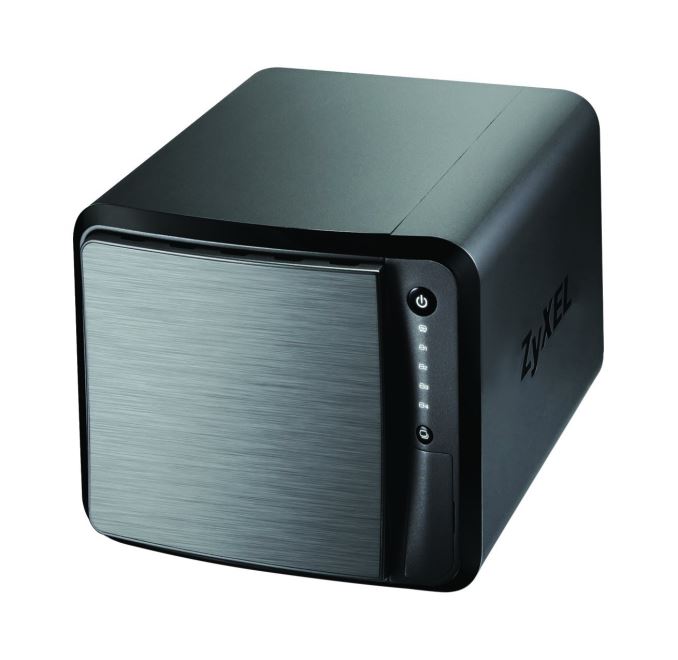
The DS216+ is not going to break any benchmark records, as it is held back by the single GbE LAN port. However, the capabilities of DSM 6.0 and the powerful x86 platform, as well as the pricing make the Synology DS216+ an interesting product to consider. Option 3 (4-bay): ZyXEL NAS540 [ Diskless: $220 ]The ZyXEL NAS540 came in for review last year, and is still under evaluation. But, we like the unit enough to be able to recommend it as an alternative to the popular LenovoEMC ix4-300d (now that LenovoEMC is no longer selling that model). The main attraction here is the price - $220 for four bays is approximately the same as what the ix4-300d used to cost when it was in the market. However, the NAS540 has double the RAM (1GB DDR3) of the ix4-300d. It also supports hot-swapping of the drives, unlike the ix4-300d.
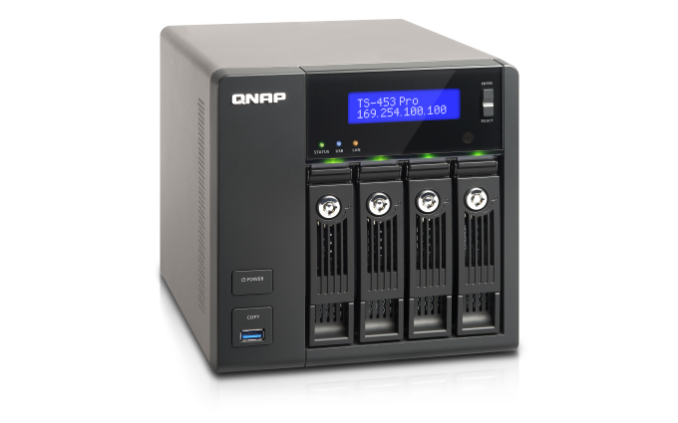
The NAS540 is a PowerPC-based unit (Freescale/NXP FS1024 (M86203G12) C2K dual-core @ 1.2 GHz). It comes with dual GbE LAN ports, a USB 3.0 port as well as a SD card slot. ZyXEL has equipped the NAS with enough features (mobile apps, remote access etc.) to make it deliver very good value for money. Obviously, one shouldn't expect the finesse and capabilities of OSes from the likes of Synology and QNAP, but, again, the price more than makes up for the missing features and sporadic firmware updates. A couple of days back, Synology announced the Marvell ARMADA 385-based DS416slim (with support exclusively for 2.5" drives). While it is definitely an interesting product (particularly for power users requiring a small, power-efficient storage box for home-based virtualization labs), the average storage-hungry consumer is better off with a traditional 4-bay unit. Option 4 (4-bay): QNAP TS-453A [ Diskless / 4GB RAM: $599 ]The first quarter of the year hasn't seen too many updates on the 4-bay front (particularly talking about x86-based models). QNAP did launch their Braswell-based units at CES. In our previous guide, we had recommended the QNAP TS-453 Pro. The Braswell version is a worthy update that we will continue to recommend for the same reasons. The TS-453A comes with four GbE LAN ports - ideal for dedicating to virtual machines running on the NAS.
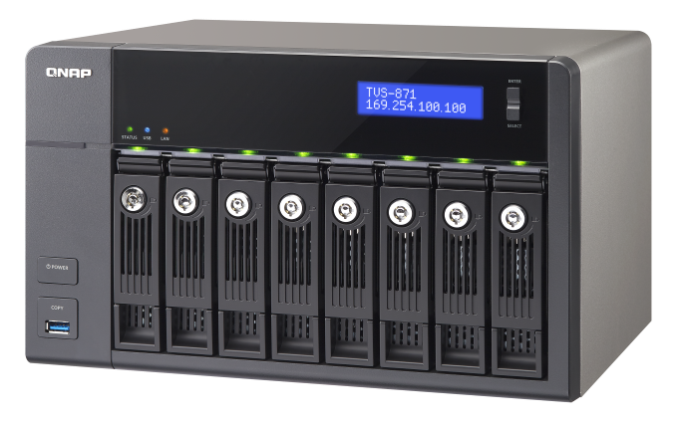
We wouldn't suggest running intensive VMs on the Intel Celeron N3150-based TS-453 Pro, but the platform is powerful enough to run Ubuntu VMs and the like for, say, acting as a home automation controller. QNAP's QTS is very rich in features (both mobile apps and the NAS apps ecosystem), and is perfect for power users. Option 5 (8-bay): QNAP TVS-871-i7-16G [ Diskless / 16GB RAM: $2199 ]Our 8-bay recommendation is retained from our previous guide. The TVS-871-i7-16G is a no-holds barred NAS sporting a Core i7-4790S Haswell processor. With 16 GB of RAM and a minimum of 4x 1GbE ports (additional 2x 10G also possible with the spare PCIe expansion slot), this NAS is ideal for running multiple intensive VMs. The 4C/8T Core i7 CPU ensures that there is enough processing power for the VMs and plenty to spare for the NAS functionality as well as apps running on the NAS itself.
The TVS-x71 units are meant for the high-end SMB market, but, in our evaluation of a TVS-871T-i7-16G unit over the last several months (review is coming out soon), we can say that it is positively drool-worthy for the high-end power users with cash to burn. The Pentium-based model comes in at $1350, while the Core i3-based one is at $1377. For a more moderately priced 8-bay system on the COTS side, one could opt for models such as the Synology DS1815+ [ $961 , Review ] or the QNAP TS-853A [ $999 ]. Obviously, going the DIY route with, say, an ASRock Rack C2750D4I board and a U-NAS NSC-800 chassis [ Review ] might make for an interesting build, but the price difference is not that big (approx. $845 vs. approx. $1000) when build time and software management aspects are considered. Honorable Mentions:Option 6 (4-bay): Netgear ReadyNAS RN214 [ Diskless: $500 ]
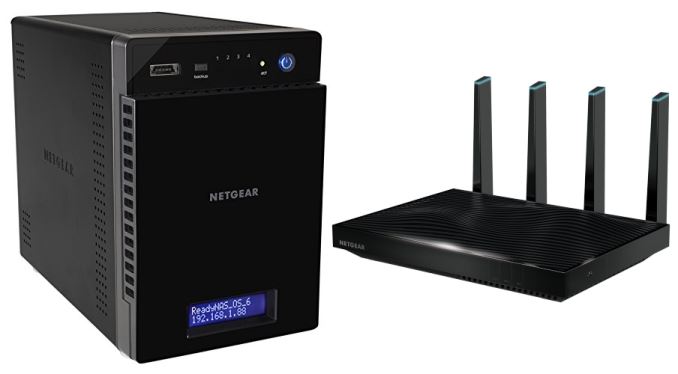
On the 4-bay side, Netgear's ReadyNAS RN214 with an updated quad-core Annapurna Labs SoC and btrfs support is an interesting option. Coupled with the newly introduced Netgear Nighthawk X8 R8500 tri-band 4x4 802.11ac router and the promise of plug-and-play link aggregation support, it presents a compelling solution for consumers in the market for a router as well as a NAS. | ||||||||||||||||||||||||||||||||||||||||||||||











| << Previous Day |
2016/03/30 [Calendar] |
Next Day >> |