[Most Recent Entries] [Calendar View]
Monday, May 30th, 2016
| Time | Event | ||||||||||||||||||||||||||||||||||||||||||||||||||||||||||||||||
| 1:41a | Computex 2016: ASUS Zenvolution Press Conference Live Blog Another hour, another Computex Press Event! Billy and I are here, and we're expecting a lot of new Zen devices.
| ||||||||||||||||||||||||||||||||||||||||||||||||||||||||||||||||
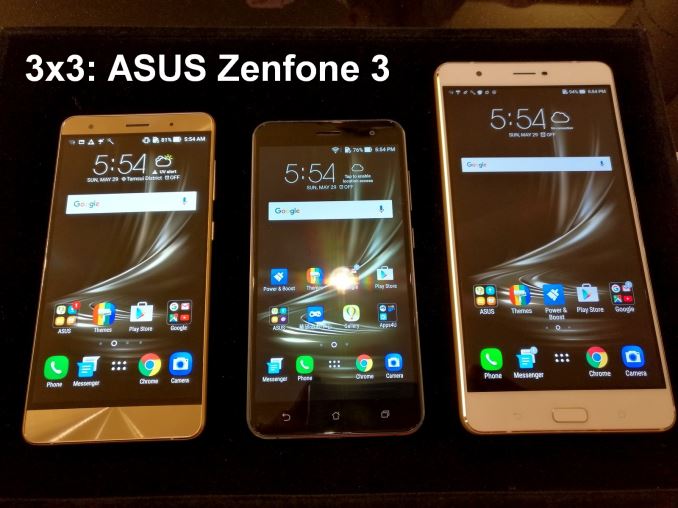
| 4:00a | ASUS Announces the ZenFone 3 Series, with 6 GB Deluxe Model and 6.8-inch Ultra Model
Today at Computex, as part of their annual Zen press conference, ASUS lifted the lid on the Zenfone 3 series. In previous Zenfone generations, the Zenfone has been one of the premier devices featuring Intel’s Atom smartphone chipset, however due to the announcement that Intel has cancelled their Atom smartphone ‘Broxton’ program ASUS is going all in with a series of Qualcomm chipsets, including the custom Kryo based Snapdragon 820 and also the first 14nm Snapdragon 625 device. The Zenfone 2 line is known for having numerous, region specific models over its lifespan. To start, the Zenfone 3 will come in three formats and sizes: the base Zenfone 3 (ZE552KL), the premium Zenfone 3 Deluxe (ZS570KL) and the media-consumption focused Zenfone 3 Ultra (ZU680KL).
We were able to get a quick preview the day before the announcement, and had some hands-on time: The black model is the base Zenfone model, featuring a Snapdragon 625 (dual 4xA53), and comes with Gorilla Glass 3.0 on the front and sides with 2.5D for the contouring on the edge. This model will feature up to 4GB/64GB, a Sony IMX298 rear camera, 2x2 dual-band 802.11ac WiFi, up to Cat 6 LTE, dual SIM and a USB 2.0 but Type-C based connector. The screen is a 5.5-inch Super IPS+ LCD, and runs Android Marshmallow with ZenUI 3.0.
The gold model is the Zenfone Deluxe, designed to be the high-end model with the main focus on the Snapdragon 820 (using Qualcomm’s custom Kryo cores, similar to the LG G5 and certain Samsung Galaxy S7 models) and having up to 6 GB of memory. So add to this on the storage of up to 256 GB, supporting the UFS 2.0 standard, and an upgraded 23MP Sony IMX318 rear camera and USB 3.0 (again, via Type-C), and ASUS hopes to be challenging some of the high-end devices. The unibody design aims for a seamless rear, with no antenna banding or windows, instead going for a small hole on the side of the phone at the top which, according to ASUS’ internal metrics, should be sufficient. The Deluxe will support Quick Charge 3.0 and has a similar 3000 mAh battery to the base model.
The large 6.8-inch Zenfone 3 Ultra is what ASUS is calling its ‘multimedia Smartphone’, aiming to combine the use case of a tablet with a smartphone. We’ve seen large smartphones before (like the Huawei P8 Max) but these tend to be region focused: I was told that the Ultra will be coming to the US in some form over the next few months. The Ultra runs a Full HD display (1920x1080) like the other two devices, but uses ‘ASUS Tru2Life’ technology based on Pixelworks’ 4K TV processor which also featured in the ZenPad S 8.0. This is supposedly an upgraded version over the ZenPad S 8.0, and it will be interesting to see Brandon’s reaction to it over the ZenPad. ASUS is equipping the Ultra with the Snapdragon 652 (4xA72, 4xA53), with up to 4GB/64GB and a 4800 mAh battery. ASUS is keen to promote that the phone can also act like a power bank and offers reverse charging. The Ultra will also come with DTS HD Premium Sound and Headphone 7:1 support, allowing for hi-res audio support up to 24-bit/96 kHz, and aiming squarely at the multimedia experience.
All three will feature fingerprint sensors, with the base model and the Deluxe having a rear touch sensor, the Ultra having a button sensor on the front, and all three supporting five fingers of recognition. They will all support ASUS’ PixelMaster 3.0 camera features: an f/2.0 6-element lens, 4-axis photo OIS, 3-axis EIS and dual tone LED flash. ASUS wants to promote its TriTech autofocus technology, enabling focus via contrast, phase and a second generation laser (capable up to 1.2m) for a 0.03-second autofocus system (ASUS states that around 250,000 pixels have left/right light detection to aid this). An 8MP front camera is on the front of all the cameras also. We’re writing this before the announcement, and we expect pricing to be specified during the presentation along with the time for device rollout. | ||||||||||||||||||||||||||||||||||||||||||||||||||||||||||||||||
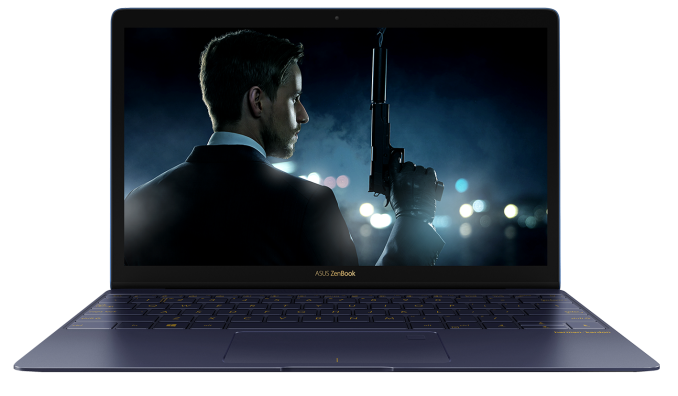
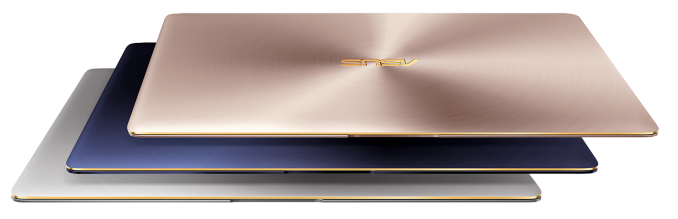
| 4:50a | ASUS Announces the Zenbook 3: A Macbook Competitor with Core i7, 16GB DRAM and 1TB SSD
Computex is already a whirlwind of announcements even for day zero. At the ASUS Zenvolution press event today, the lid was lifted on the next generation of premium ASUS Zenbook: the Zenbook 3. No release date was placed, but the specification list and feature set puts it squarely in line to compete against very popular notebooks, albeit on the premium side. The Zenbook 3 comes in at 11.9mm thin, weighing 910g, and gives a 12.5-inch display at a 1920x1080 resolution using a thin bezel display. This is similar to the XPS 13 (I’d give a nod more to the XPS 13, but it’s pretty close), but uses an aerospace grade aluminium body design similar to a Macbook but featuring a full Core i7-6500U with 16GB of LPDDR3-2133 memory. The use of a 15W Skylake-U processor means that the memory is limited to LPDDR3 rather than DDR4, which means 1.35V rather than 1.2V, but the faster 2133 MT/s memory should assist in a good number of daily tasks reliant on memory speed, such as gaming.
Storage options run up to 1TB of PCIe 3.0 SSDs (we’re double checking if these are NVMe, or SM951s), however the peak bandwidth is limited to 1700 MB/s sequential reads similar to the how Ganesh found the Intel Skylake NUCs SSD limitations – in this case the On Package Interconnect between the CPU and the integrated chipset is limited to PCIe 2.0 (though it’s worth noting that sustained writes are difficult to get above 1600 MB/s anyway).
The device will have a sole USB 3.0 Type-C port which will allow for charging and IO connectors which sounds like a Macbook, but as a difference ASUS has engineered the keyboard to allow for 0.8mm of key travel, compared to 0.4mm of the Macbook. The Zenbook 3 will have a 40 Wh battery, which ASUS rates for 9 hours of battery life but offers Quick Charge 3 which was presented as offering 60% battery charge in 49 minutes. Other features in the mix include fingerprint login through the touchpad, a harmon/kardon enhanced audio system, Corning Gorilla Glass 4 display and the colors offered will extend to Royal Blue, Rose Gold and Quartz Grey.
One of ASUS’ issues here will be that their Zenbook UX305 line, at $700, represents a nice product for most of their intended customers. The Zenbook 3 is supposed to be the stylish alternative, that also gets a significant specification boost for users that need the power. At the show, ASUS showed three different models and their price points: Intel Core i5-6200U, 4GB LPDDR3-1866, 256GB SSD: $999 The entry point is aimed at users who want the style but do not need much machine – the DRAM is severely cut back, and the SSD moves down to a SATA based M.2 SSD. The Core i7 models, from $1499-$1999, means that to get the power it can get expensive, bridging the cost between the cheaper Macbooks using Core M, the Dell XPS 13, and the more powerful Core i-based notebooks moving into higher power processors. The $1999 unit comes across as a lot, especially as an upgrade over the $1499 unit (because $500 for 500GB of PCIe SSD is a bit steep), however ASUS is hoping that the style will sell.
Personally, I run a self-purchased Zenbook Infinity (Haswell i7) that is showing its age and it actually ran out of power during the ASUS Zen press event (my 3rd of the day). On some level I think the drive to thin and light and powerful can detract from what power users might need: if ASUS makes a Zenbook 3 like device with a separate sheet battery to make it 90 Wh, I might be interested. Some users might state that a Core i-series based device and a Macbook are in two different product categories. However, during ASUS' presentation, it was constantly compared to the Macbook, and the low end price of the base model is certainly encroaching into Macbook territory. The most expensive Macbook comes with 512GB of PCIe storage and 8GB of memory for $1599 - ASUS' Zenbook 3 will give you the same storage, double the memory, ever so slightly lighter, and a full Core i7 for $100 less, although battery life is an hour in the Macbook's favor. ASUS didn’t specify release dates, and I was told that exact US pricing is yet to be finalized, but we should expect sampling during the second half of the year. When we visit the ASUS Computex booth tomorrow, we should get a chance to see the device up close. | ||||||||||||||||||||||||||||||||||||||||||||||||||||||||||||||||
| 5:27a | Computex 2016: ASUS Republic of Gamers 10 Year Press Conference The final press event of the day - the annual Computex Republic of Gamers press conference. This year is ASUS' 10 year anniversary for ROG, and as part of the celebrations have invited some of ASUS' most intense fans to Computex and the press event. Billy and I are here covering the announcements as they fly in, and we expect Jonney Shih to make another appearance as well as an Intel executive and one of their sponsored gaming teams. | ||||||||||||||||||||||||||||||||||||||||||||||||||||||||||||||||
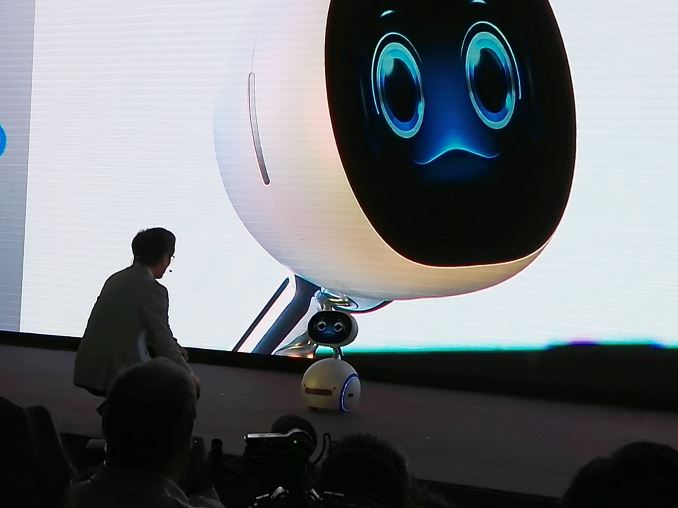
| 5:45a | ASUS Unveils Zenbo Smart Companion Robot
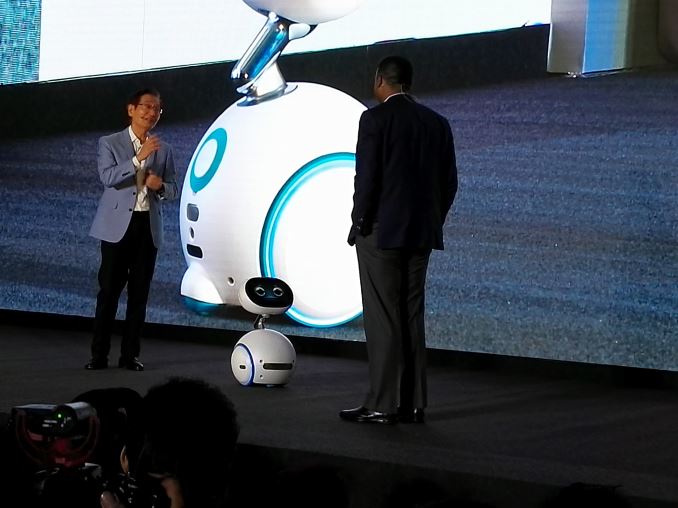
At today's ASUS Zenvolution press event in advance of Computex, ASUS unveiled a new personal assistant robot for home use: Zenbo. The core functionality of Zenbo will be voice commands similar in principle to Amazon Echo, but Zenbo is also mobile and features a display as its face.
With industrial design reminiscent of Star Wars' BB-8, WALL-E's EVE, and early iMacs, Zenbo tries to be a cute and inviting device that projects a cartoonish demeanor. ASUS used an amusing 11-minute video to showcase features and use cases planned for the robot, including reminders, controlling home automation devices, photography, voice and video calling, and online shopping. ASUS is also establishing a developer program to encourage the creation of third-party applications to add further capabilities and integration with online services. The usefulness of Zenbo will depend highly on the software ecosystem around it. ASUS does not have an established presence for speech recognition, natural language processing and online search, so they may need to rely on partners for key features. The hardware appears to suffer the same crucial weakness as Daleks: an apparent inability to navigate stairs (Ian: Can't Daleks fly now?). Other than that, it will be able to follow users around to stay within audible range and may be able to seek out the user to deliver notifications and reminders.
During the live demo of Zenbo, ASUS invited onstage the Vice President and General Manager of Intel's Client Computing Group, Nevin Shenoy, revealing Zenbo to be a collaboration between ASUS and Intel. No release date has been mentioned but the price is planned to be $599.
| ||||||||||||||||||||||||||||||||||||||||||||||||||||||||||||||||
| 6:10a | ASUS Announces the Transformer 3: Here’s a Kaby-Lake 2-in-1
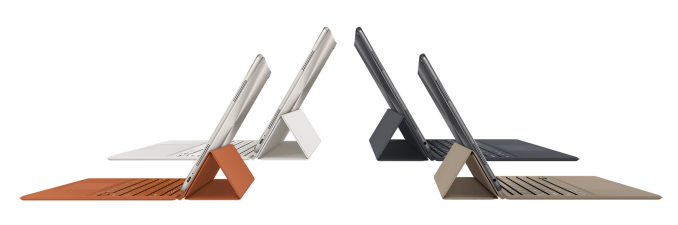
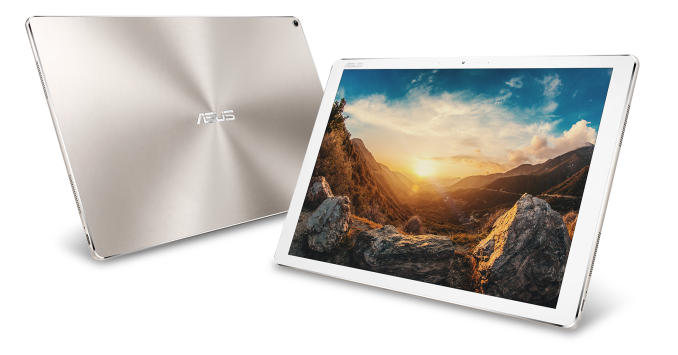
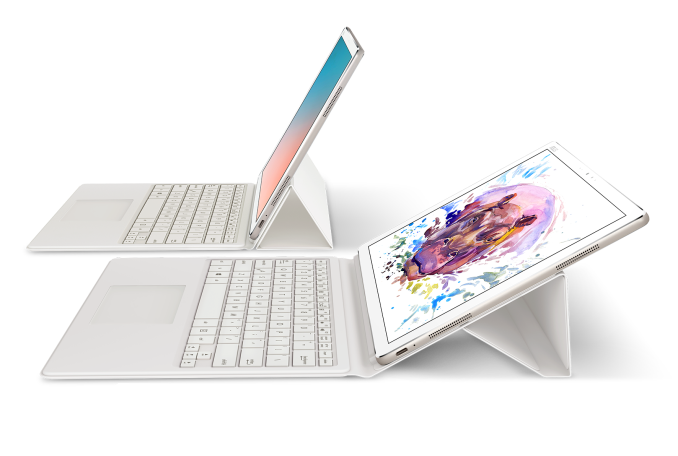
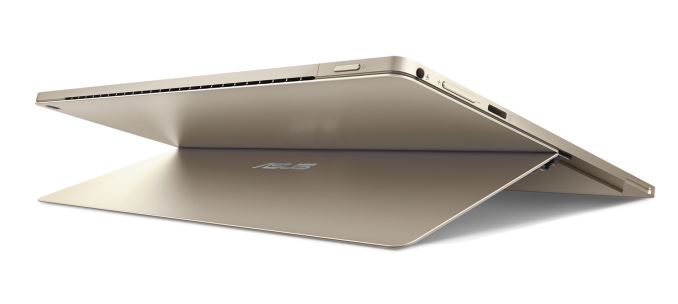
One of the surprises of ASUS’ Zen press event today, aside from the surreal nature of the anthropomorphic Zenbo, was the first announcement of a Kaby Lake-based 2-in-1 device that takes an obvious upgrade to the Transformer Book T100. The Transformer Pro 3 is ASUS’ newest take on the 2-in-1 form factor, bringing to the market another 12-13 inch super thin high-resolution design with a hinged stand, a sleeve keyboard and pen support. The Samsung ATIV Book 9, the Lenovo ThinkPad Helix 2 and the HP Envy X2 13 come to mind as competitors in the space all playing with similar form factors. Of course, ASUS’ take on this involves Kaby Lake, and as expected, no release date was given.
Aside from the mention of ASUS’ 7th Generation of CPU (Core M based on Kaby Lake we would assume), the Transformer Book 3 has a 12.6-inch display running at 2880x1920, up to 8GB of LPDDR3 of memory, up to 512GB of storage (ASUS doesn’t state PCIe, so must be SATA or other) and a USB Type-C device that also supports Thunderbolt 3. This means the Type-C port can drive dual 4K displays, USB 3.1 Gen 2 devices up to 10 Gbps, and a number of extra connectors.
ASUS is also coming out with a Transformer 3 Pro, focused more on Core i7 Skylake processors, but the Transformer 3 is aiming to be that alternative option to the UX305 by offering a more stylish device that also acts as a tablet. Both the Transformer 3 and 3 Pro will support external graphics over the Thunderbolt 3 port, with the ROG XG Station 2 currently supporting up to GTX 1080 graphics cards. In some bundles, the ASUS Pen will offer up to 1024 levels of pressure. The keyboard sleeve was compared to that of the iPad Pro, stating that the ASUS version gives 1.4mm of key travel compared to the 0.5mm of the iPad Pro solution, and the ASUS model will feature a reduced-slip glass-covered touchpad. There will also be fingerprint access in the top left corner for easy entry via Windows Hello. The device also runs an audio arrangement with a speaker in each of the four corners.
We are told that the Transformer 3 will retail from $799, giving a 256GB model bundled with the keyboard sleeve. The price for the 512GB model will be announced at a later date. As for the retail date, your guess is as good as mine.
| ||||||||||||||||||||||||||||||||||||||||||||||||||||||||||||||||
| 7:00a | ARM Unveils Next Generation Bifrost GPU Architecture & Mali-G71: The New High-End Mali Amidst the backdrop of Computex 2016 and alongside their new Cortex-A73 CPU, ARM is announcing their next generation GPU architecture, Bifrost. A significant update to ARM’s GPU architecture, Bifrost will first be deployed in ARM’s Mali-G71 GPU. Today we're taking a look at the Bifrost architecture and Mali-G71 to better understand the changes ARM has made. With a shift over from an ILP-centric design to a TLP-centric design, Bifrost marks a major change in ARM's GPU architecture, and will help ARM prepare its GPUs for future graphics and compute workloads. | ||||||||||||||||||||||||||||||||||||||||||||||||||||||||||||||||
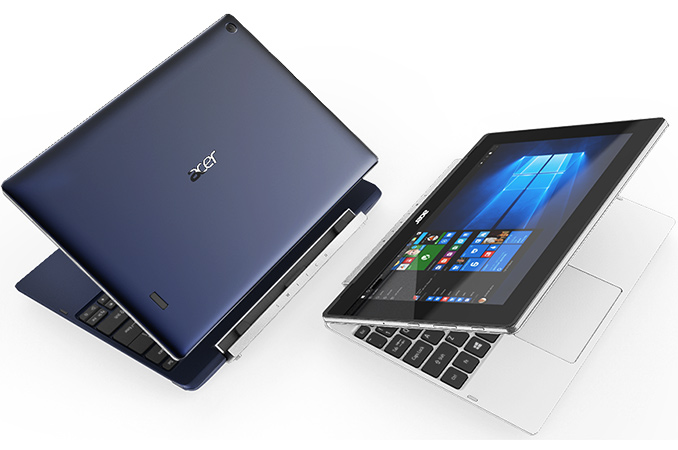
| 8:00a | Acer Unveils Switch V10 and Switch One 10: 2-in-1s for $199 - $249
Acer has introduced two new affordable 2-in-1 hybrid PCs ahead of Computex trade show. Both systems are based on Intel’s quad-core Atom processors, feature 10” multi-touch IPS displays and run Microsoft Windows 10. The new Switch V10 and Switch One computers from Acer will be available next quarter and will cost $199 – $249 in North America. Sales of hybrid 2-in-1 hybrid computers are growing rapidly these days, particularly in well-developed countries. Last year Intel said that shipments of 2-in-1 PCs (which it calls convertibles) were up 1.5 times year-over-year in North America and this year Intel expects this growth to continue, making the product category an interesting target for system builders. Since many people these days would like to have convenience of a tablet (e.g., compact sizes, touchscreen, etc.), but would like to retain physical keyboard, 2-in-1s are a way to go for PC makers, particularly in the entry-level segment as there are only a few convertibles on the market today. The new Acer Switch V10 and Switch One PCs will be among the first low-cost 2-in-1s, when they hit the market in Q3. Both Switch V10 and Switch One systems are based on quad-core Intel Atom processors (four Airmont cores, 2 MB cache, 1.44 GHz and higher clock-rates, built-in Gen8 Intel HD Graphics core with 12 or 16 execution units, 2 W TDP, etc.) and will feature 10” multi-touch displays with IPS panels and unknown resolution (given the prices, it is likely 1366x768). The two convertibles use Acer’s Snap latch-less magnetic hinge design and can be used in various modes, including notebook, tablet and tent. It is unclear whether the two PCs actually share the same common platform, but it certainly seems so.
The Acer Switch V10 (SW3-017) is a more advanced of the two convertibles introduced by the company as it seems to be a little slimmer, it comes with five colorful metal covers of white, black, aquamarine, red, and dark blue, and has a fingerprint reader on the back. The display of this 2-in-1 hybrid notebook is covered by Antimicrobial Corning Gorilla Glass, which protects the panel and has a special antimicrobial agent, which promises to protect against a variety microorganisms. The device comes with 32 or 64 GB of solid-state storage, front- and back-facing cameras as well as dual-band MIMO 802.11ac Wi-Fi. Besides, the convertible also features a USB Type-C port, which is used for data transfer at likely USB 3.0 speeds, video output and charging.
Out-of-the-box, the Acer Switch V10 comes with a slim keyboard, but those, who need additional 500 GB of storage and two USB Type-A ports will be able to buy an appropriate accessory from Acer. The price of this accessory is unknown. The Acer Switch V10 will be available in North America in Q3 starting at $249 and will reach EMEA and China (starting at ¥2,599) in September and August, respectively. Gallery: Acer Switch V10
     Next up is the Acer Switch One 10 (SW1-011), which is basic solution that features a dark grey brushed-metal cover and a little thicker design compared to the Switch V10. The device naturally integrates everything one would expect from a convertible, including flash storage, Wi-Fi, front- and back-facing cameras, a micro-SD card reader, USB ports, an HDMI output and so on.
Being aimed at kids and price-conscious buyers, the Acer Switch One 10 is set to cost $199 in North America and €249 in EMEA, when it is available in these regions in July. In China, the product will cost ¥2,299, starting from September.
Back in April, Intel introduced its new Apollo Lake platform for low-cost PC, which supports a number of tablet-oriented features (e.g., solder down Wi-Fi, eMMC, MIPI interface for camera) and could be used to build a variety of products, including convertibles, notebooks and tablets. Therefore, expect other PC makers to follow Acer with low-cost 2-in-1 designs later this year. Gallery: Acer Switch One 10
     | ||||||||||||||||||||||||||||||||||||||||||||||||||||||||||||||||
| 8:01a | ASUS Announces Transformer 3 Pro: 2-in-1 with Core i5/i7
Not to be outdone on the subject of 2-in-1s today, ASUS has announced a second 2-in-1 to complement the newly announced Transformer 3. Dubbed the Transformer 3 Pro, this portable is a more direct competitor to Microsoft’s popular Surface Pro lineup.
Although the standard Transformer 3 is not necessary a budget option, of the two Transformers it is the cheaper one, utilizing what’s likely a Core M processor and having all-around weaker specifications. However for users that need more processing power (Core i5/i7), more storage (Up to 1TB, PCIe), and more RAM (up to 16GB), the Pro offers all of this in the same form factor. The Transformer 3 Pro also brings over the rest of the feature set offered by the base Transformer 3, including a USB Type-C port with Thunderbolt 3 connectivity, and a 12.6" 2880x1920 screen.
The higher specifications – particularly the use of an Intel Core i5 or i7 processor – puts it in direct competition with Microsoft’s Surface Pro. And at 8.35mm thick, I’m curious how the cooling system on the Pro compares to what Microsoft has done, as putting a 15W CPU in such a thin form factor is by no means an easy feat. Finally, like its Core M based sibling, ASUS has not yet announced a shipping date for the Transformer 3 Pro. But a starting price has been announced, with the Pro starting at $999.
| ||||||||||||||||||||||||||||||||||||||||||||||||||||||||||||||||
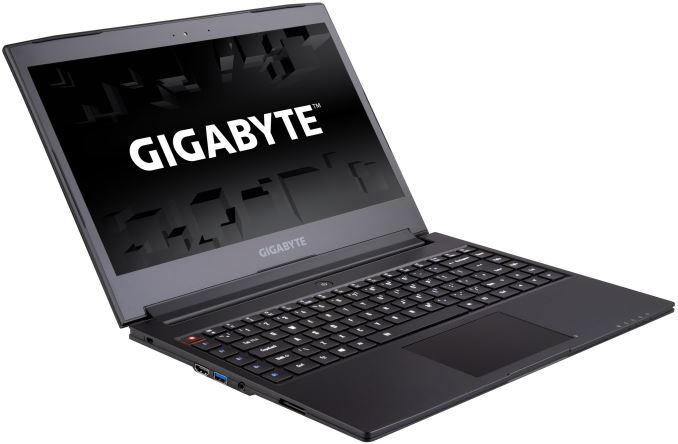
| 8:30a | GIGABYTE Aero 14: Thin Gaming Laptop with NVIDIA GeForce GTX 970M and 10-Hour Battery Life
GIGABYTE has introduced its new Aero 14 gaming laptop, which weds a relatively thin form-factor with high-performance components such as an Intel Skylake-H CPU, and a NVIDIA GeForce GTX 970M GPU, along with a high-resolution display and a claim of a 10-hour battery life. The new notebooks are designed for those who would like to have decent performance in games, but who are not ready to sacrifice mobility for gaming. The GIGABYTE Aero 14 is based on the Intel Core i7 H-series processor (four cores with Hyper-Threading technology, 6 MB LLC cache, 45 W TDP, dual-channel DDR4 memory controller, integrated Intel Gen9 graphics core) and is equipped with a 14” IPS display panel with a 2560×1440 resolution. The system can be equipped with the NVIDIA GeForce GTX 965M (1024 stream processors, 64 texture units, 32 raster operations pipelines) or the 970M (1280 SPs, 80 TUs, 48 ROPs) graphics adapters, up to 32 GB of DDR4 memory (using two 16 GB SO-DIMMs) as well as two SSDs in M.2 form-factor (with PCIe 3.0 x2 interface). For some reason, GIGABYTE decided not to reveal exact details regarding things like Wi-Fi as well as the amount of VRAM, but it is natural to expect the PC of this class to feature 802.11ac.
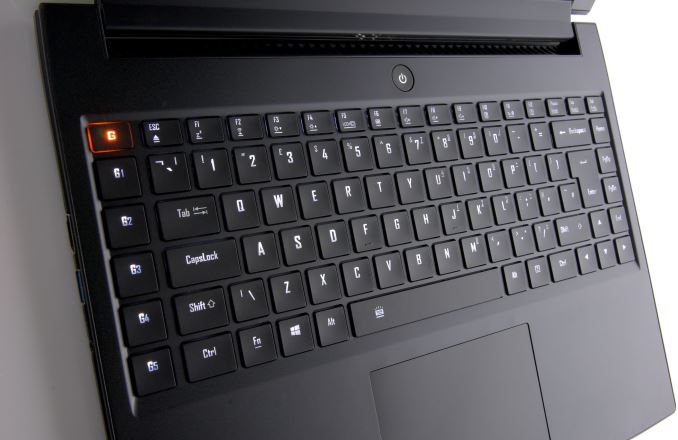
In a bid to make the system even friendlier to gamers, GIGABYTE included a keyboard featuring five programmable keys to simplify input of complex key combinations. Other I/O capabilities of GIGABYTE’s Aero 14 include one USB 3.1 Type-C receptacle, three USB 3.0 ports, a TRRS audio connector, a SD card reader, an HD webcam, built-in speakers and microphones as well as an HDMI 2.0 and an mDP display output.
The Aero 14 comes in a full aluminum chassis, though, we are not dealing with a unibody design here. GIGABYTE offers three color options for the display lid, with black, green and orange to emphasize gaming nature of the device. Despite of rather powerful hardware inside, the Aero 14 boasts with a 10-hour battery life (obviously, when the integrated graphics core is used), which is in-line with that of modern business notebooks. To make such long battery life possible, GIGABYTE integrated a 94.24 WHr lithium-ion polymer accumulator into its gaming laptop. The Aero 14 is 19.9 mm thick and weighs 1.89 kilograms, making it one of the lightest and thinnest notebooks with gaming-grade hardware inside.
The Aero 14 from GIGABYTE will, among other products, compete against Razer’s Blade, which is also relatively thin (17.9 mm) and sports a 14” display. When compared to the Aero, the Razer Blade has a higher resolution 3200×1800 display, slimmer chassis, as well as Thunderbolt 3 support. However, GIGABYTE’s machine has larger battery, potentially more DDR4 memory (because the Blade uses soldered down DRAM and cannot be upgraded), potentially higher amount of storage (thanks to two M.2 slots) as well programmable keys. Exact pricing of GIGABYTE’s Aero 14 will depend on actual configuration, but typically, gaming machines from the company are not overpriced. Gallery: GIGABYTE Aero 14
   _thumb.jpg) _thumb.jpg)  | ||||||||||||||||||||||||||||||||||||||||||||||||||||||||||||||||
| 2:00p | ZOTAC MAGNUS EN980 Detailed - A SFF VR-Ready PC with GeForce GTX 980
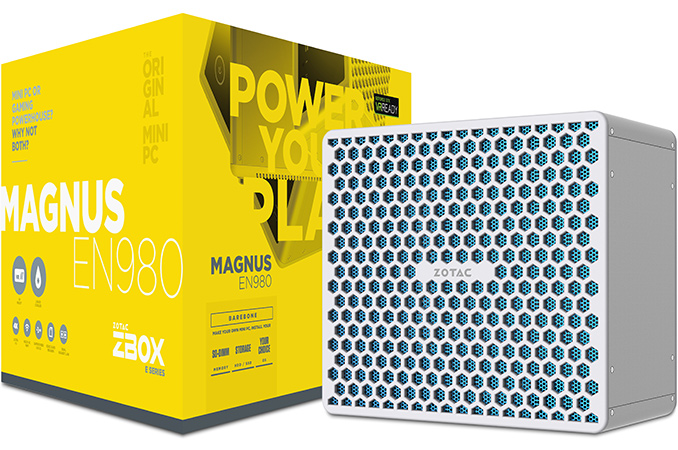
Several months ago, ZOTAC introduced its ZBOX MAGNUS EN980 PC featuring NVIDIA’s GeForce GTX 980 Notebook GPU. It was positioned as one of the world’s smallest VR-Ready systems. This week, the company disclosed the final specifications of the machine, and also gave some insight into the internal layout. The dimensions of the MAGNUS EN980 are larger compared to its predecessors. However, its performance should indeed be enough for modern VR games. The ZOTAC ZBOX MAGNUS EN980 is equipped with an Intel Core i5-6400 processor (4C/4T, 2.7 GHz/3.3 GHz, 6 MB LLC cache, 65 W TDP) as well as a custom LGA1151 motherboard with two slots for DDR3L-1600 memory. NVIDIA’s GeForce GTX 980 4 GB Notebook module, one M.2-2280 slot for a SATA SSD, a SATA connector, two Gigabit Ethernet controllers, a 802.11ac Wi-Fi / BT 4.0 module and a USB 3.1 controller make up the other important features. Zotac plans to launch three different versions - a barebones with just the CPU and GPU installed, a PLUS version with 8GB of DDR3-L and a 120GB M.2 SSD / 1TB 2.5" HDD without OS, and a WINDOWS edition similar to the PLUS, but, with Windows 10 Home pre-installed.
From a performance perspective, the MAGNUS EN980 should meet the minimum requirements that Oculus VR has set for games compatible with the Oculus Rift VR headset: it has a quad-core CPU along with NVIDIA’s GeForce GTX 980 graphics card, which outperforms the AMD Radeon R9 290 and NVIDIA GeForce GTX 970 - the minimum graphics cards recommended by Oculus VR. In addition, the PC can support at least 3 TB of storage (1 TB SSD + 2 TB HDD) and officially supports 16 GB of DDR3L memory. Besides, the socketed nature of the CPU means that users can potentially upgrade it, if desired.
The MAGNUS EN980 system has a fine set of external ports, including two HDMI (2.0?), two DisplayPort 1.2, two GbE, four USB 3.0, one USB 3.1 Gen 2 Type-A and one USB 3.1 Gen 2 Type-C. In addition, the PC has a 3-in-1 card reader (SD/SDHC/SDXC UHS II). The GeForce GTX 980 Notebook should support HDMI 2.0, so it is likely that the 'HDMI 1.4' specified in the product brochure is a typo. The user manual (PDF) also mentions HDMI 2.0 support. In any case, the system does support four simultaneous display outputs. Oculus Rift users will utilize three USB 3.0 receptacles as well as one HDMI port to connect their VR gear. Moreover, while the EN980 system is equipped with 3.5 mm audio in/out jacks, it does not have multi-channel analog audio outputs, which means that those, who would like to use 5.1/7.1 speaker systems will have to add a USB audio solution. As a result, some consumers might run out of USB ports, and might wanto to make use of a USB hub.
In terms of size, the MAGNUS EN980 (225 mm × 203 mm × 128 mm) seems to be comparable to typical mini-ITX systems and is clearly larger than any Intel NUC-like PCs, or ZOTAC's own ZBOX computers. To cool down the GPU (145 W TDP) and the CPU (65 W), ZOTAC has invented a special liquid cooling system (which slightly resembles Corsair’s low-profile H5 SF, but is clearly a different device) with a huge radiator and massive (likely 140 mm) fan. This cooling system as well as the GeForce GTX 980 module are the two primary reasons why the EN980 is a relatively large computer. To feed the PC, two external 180 W power supplies are required, which is something new in the world of SFF PCs.
The new ZBOX MAGNUS EN980 PCs is being demonstrated at Computex 2016 and will hit the market in the coming weeks. Pricing is still unknown, but, given the high performance and usage of sophisticated components, the EN980 is going to cost more than its predecessors. | ||||||||||||||||||||||||||||||||||||||||||||||||||||||||||||||||
| 9:00p | Qualcomm Launches New GigaDSL, 802.11ac Wave 2 Chipsets
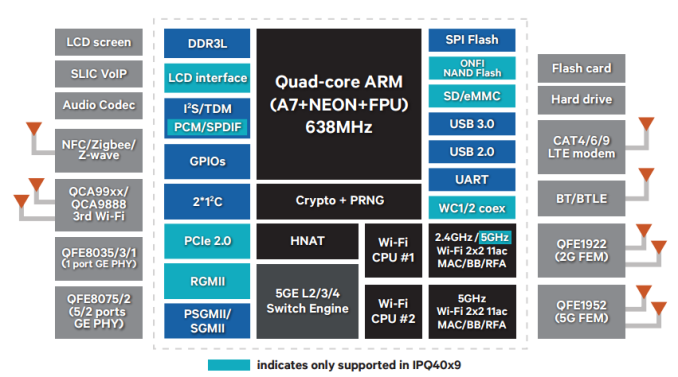
At Computex today, Qualcomm Atheros announced a few new chipsets, and it seems that as a part of their Ikanos acquisition they’ve entered the wireline business in the hopes of solving capacity issues in the last mile. While fiber should be deployed where possible, in many cases it can be expensive and impractical to run fiber optic cable, such as older apartment complexes. As a result, a 10 Gbps connection can turn into a 100 Mbps connection when using POTS lines for the last few hundred meters depending upon channel conditions and run length. G.fast or GigaDSL attempts to bridge the gap here by using techniques like self far-end crosstalk cancellation and significantly increased transmission bandwidth to significantly improve channel utilization of existing POTS lines, and the QCO5700 and QCM5720 use these technologies to try and improve bandwidth at the last hundred meters. Unlike previously launched chipsets, these are really designed to enable drop-in replacement for existing VDSL equipment, and are squarely targeted at Asian ISPs that generally have an all-fiber network but may only have POTS in a building. The QCO5700 is designed for multiple dwelling deployments like apartment buildings, while QCM5720 is designed for customer premises equipment and both chipsets can support up to 1Gbps while coexisting with existing services that may also be using the POTS line. The other notable announcement here is on Atheros’ traditional wireless business, and as a part of trying to get better connectivity for the last few feet in the home. While MU-MIMO is nothing new at this point, QCA is releasing a new tri-radio platform for routers the QCA9886 2x2 802.11ac radio. With three radios, a single router with an IPQ40x9 SoC will be able to support simultaneous 2.4 GHz, 5 GHz, and a third 5 GHz radio for range extender use. The new GigaDSL chipsets should begin sampling in June, and companies like Sumitomo Electronics, NEC, and Wave Electronics are designing or building products that will utilize the QCO5700 and QCM5720. The new QCA9886 is already sampling to vendors, and should be in routers in the near future. | ||||||||||||||||||||||||||||||||||||||||||||||||||||||||||||||||















| << Previous Day |
2016/05/30 [Calendar] |
Next Day >> |