[Most Recent Entries] [Calendar View]
Wednesday, August 3rd, 2016
- Host PCs
- AnandTech Skylake DAS Testbed (GIGABYTE Z170X-UD5 TH motherboard)
- Intel NUC6i7KYK Skull Canyon NUC
- Legacy Thunderbolt Peripherals
| Time | Event | ||||||||||||
| 9:15a | The Nixeus Moda Pro Review: A Professional Mechanical Keyboard for $55 In this review we are having a look at a low-cost mechanical keyboard, the Nixeus Moda Pro. The Moda Pro is a no-frills product that is mainly targeted to professional and MacOS system users at nearly half the price of most competitive models. | ||||||||||||
| 11:00a | StarTech.com TBT3TBTADAP Thunderbolt 3 to Thunderbolt Adapter Review
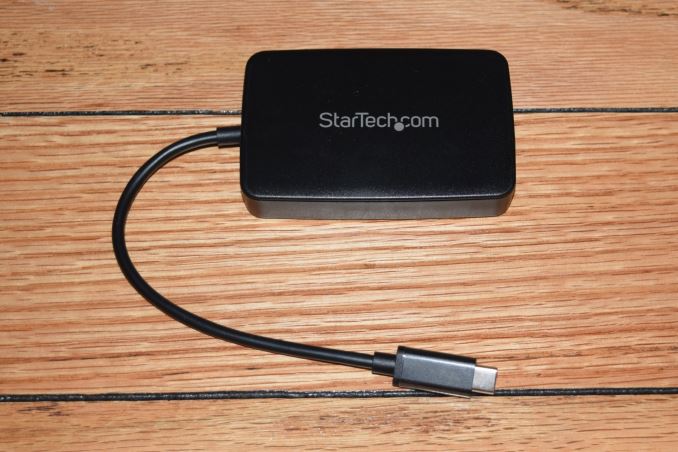
Thunderbolt 3 has got off to a great start as the premium choice for high-speed external I/O - be it external GPU docks or for taking full advantage of PCIe SSDs. Unlike the first two versions of Thunderbolt (which used a mini-Display Port connector), Thunderbolt 3 opted for a USB Type-C connector. There are a number of Thunderbolt 3 devices in the market that are currently certified for use with PCs sporting a Thunderbolt 3 port. However, there are also a large number of legacy Thunderbolt / Thunderbolt 2 products that are certified for use with both PCs and Apple devices. While introducing Thunderbolt 3, Intel promised the delivery of a Thunderbolt 3 to Thunderbolt adapter for modern TB3-equipped PCs to be able to talk to the legacy devices. There has been considerable delay in getting this product to the market since that announcement, but, the adapters have now been selling for the last couple of months. The StarTech.com TBT3TBTADAP Thunderbolt 3 to Thunderbolt AdapterThe TBT3TBTADAP is meant for use with PCs sporting the new Thunderbolt 3 Type-C interface. It can be used to connect legacy Thunderbolt peripherals to those PCs, but, not vice-versa (i.e, one will NOT be able to use it to connect a Thunderbolt 3 peripheral to a PC equipped with a legacy Thunderbolt port). The TBT3TBTADAP package comes with the main adapter and a quick-start guide. The adapter has a permanently attached 8 in. cable with a Type-C male connector at one end. At the other end, we have a female Thunderbolt 2 port.
One of the important aspects to note is that the Thunderbolt 2 port, despite physically being a mini-DP port, doesn't support mDP or DP monitors. It does, however, support Thunderbolt displays. The adapter can also be used at the top of a daisy chain of legacy Thunderbolt peripherals. Usage Impressions and Evaluation SetupPutting the TBT3TBTADAP to use is as simple as plugging in the unit into a Thunderbolt USB-C port of the PC and the legacy Thunderbolt peripheral to the adapter itself. The legacy device gets automatically recognized as a Thunderbolt peripheral on the host PC, and the Thunderbolt software (security / connection options) gets activated. It is imperative that the Thunderbolt firmware and the drivers on the host PC are up-to-date. The main focus of our evaluation was more on the qualitative aspects, rather than providing performance numbers. Towards this, we tested out the adapter with the following hardware: It is not possible to evaluate all legacy Thunderbolt devices, but, we personally tested and can vouch that the adapter works with the above hardware. The choice of legacy Thunderbolt peripherals was driven by the fact that the Rugged Thunderbolt is a bus-powered device, while the 2big Thunderbolt 2 is self-powered (connects to an AC wall outlet). In addition, the above configuration also allowed us to test daisy chaining by first connecting the 2big Thunderbolt 2 to the adapter, and the Rugged Thunderbolt to the second Thunderbolt port on the 2big Thunderbolt 2. These configurations worked without a hitch on both of our host PCs. The adapter also works with Thunderbolt displays, though we didn't evaluate that aspect ourselves. However, based on various e-tailer consumer reviews, it appears that people have reported mixed results. The root cause seems to be the host system itself. One of the most common resolutions we have seen is a hard power cycle / power on delay after upgrading the Thunderbolt firmware and drivers on the host PC. Miscellaneous Aspects and Concluding RemarksThe StarTech.com TBT3TBTADAP adapter is an active component. It consumes power from the host system in order to operate. In order to get a quantitative feel of this aspect, we hooked up the adapter to our GIGABYTE host system using the Plugable USBC-TKEY power delivery sniffer. The power consumption was tracked starting with just the adapter connected to the host PC. After some time, the LaCie Rugged Thunderbolt SSD was connected to the adapter and the CrystalDiskMark 5.0.2 benchmarks were processed on it, with a 30-second gap between each of the workloads.
We can see that the adapter consumes 0.184 W from the host system even when there is no legacy peripheral connected to it. Once a peripheral is connected, the major component of the power draw from the Thunderbolt 3 host port is dictated by the connected device and the workload being processed on it. Incidentally, we also confirmed that the adapter can do TRIM passthrough. This obviously depends on the the capabilities of the storage device being connected via the Thunderbolt link. Coming to the business end of the review, we can say that the unit fulfills one of the most important requirements for Thunderbolt 3 to succeed - a way to utilize legacy Thunderbolt peripherals with Thunderbolt 3 systems. In our limited testing with a couple of host systems and couple of legacy peripherals, the adapter managed to perform without any hiccups. That said, based upon consumer reviews online, it appears that the experience is heavily dependent on the host system and the peripheral connected to the adapter. Fortunately, StarTech.com's customer service seems to be taking a proactive role in resolving these user complaints. Based on our own issue-free experience, as well as the general feedback on various e-tailer sites, we have no hesitation in recommending the StarTech.com TBT3TBTADAP Thunderbolt 3 to Thunderbolt Adapter. It is a must-have for consumers with legacy Thunderbolt devices that need to be used with modern systems equipped with Thunderbolt 3 Type-C ports. The StarTech.com TBT3TBTADAP Thunderbolt 3 to Thunderbolt Adapter is currently available for $79 on Amazon, and carries a 2-year warranty. | ||||||||||||
| 9:00p | Toshiba Announces New BGA SSDs Using 3D TLC NAND
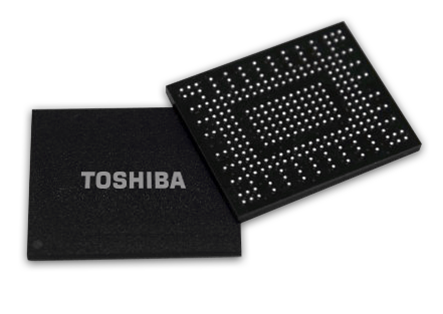
Toshiba has announced a new generation of BG series single-chip SSDs, with a newer controller and expanded capacity options thanks to the adoption of 3D NAND. The BG series is Toshiba's SSD solution for tablets and ultrabooks that need a smaller form factor than a M.2 2280 module but higher performance and capacity than eMMC solutions. Toshiba's BG1 series was first previewed at CES 2015. That first generation uses a PCIe 2 x2 link and implements the NVMe 1.1a protocol. The BG1 is available in capacities of 128GB and 256GB either as a 16mm by 20mm BGA package integrating both the SSD controller and NAND flash, or as M.2 2230 removable modules.
The new BG series switches from planar MLC NAND to Toshiba's BiCS 3D TLC NAND. The higher per-die capacity allows for the addition of a 512GB model and makes the package slightly thinner. The new SSD controller has been upgraded to operate at PCIe 3 speeds though still with only two lanes. It also now supports NVMe 1.2 including the optional Host Memory Buffer (HMB) feature. We've previously seen HMB implemented by a Marvell controller that also targets low-end NVMe applications. Toshiba has shared some details about how they plan to make use of HMB and what its impact on performance will be. The BG series uses a DRAM-less SSD controller architecture, but HMB allows the controller to make use of some of the host system's DRAM. The BG series will use host memory to implement a read cache of the drive's NAND mapping tables. This is expected to primarily benefit random access speeds, where a DRAM-less controller would otherwise have to constantly fetch data from flash in order to determine where to direct pending read and write operations. Looking up some of the NAND mapping information from the buffer in the host's DRAM—even with the added latency of fetching it over PCIe—is quicker than performing an extra read from the flash. Toshiba hasn't provided full performance specs for the new BG series SSDs, but they did supply some benchmark data illustrating the benefit of using HMB. Using only 37MB of host DRAM and testing access speed to a 16GB portion of the SSD, Toshiba measured improvement ranging from 30% for QD1 random reads up to 115% improvement for QD32 random writes.
While it looks like HMB can do a lot to alleviate the worst performance problems of DRAM-less SSD controllers, the caveat is that it requires support from the operating system's NVMe driver. HMB is still an obscure optional feature of NVMe and is not yet supported out of the box by any major operating system, and Toshiba isn't currently planning to provide their own NVMe drivers for OEMs to bundle with systems using BG series SSDs. Thus, it is likely that the first generation of systems that adopt the new BG series SSDs will not be able to take full advantage of their capabilities. Carried over from the previous BG1 series are support for TCG Pyrite and the option of full TCG Opal encryption support. The 16mm by 20mm BGA package is still only 1 gram for the highest capacity, and the maximum thickness is reduced from 1.65mm to 1.60mm. Power consumption may have increased slightly, with the new BG series SSDs drawing up to 2.8W when active compared to a specification of 2.2W typical for the BG1. The new BG series SSDs are currently sampling to select OEMs, and will be in full mass production by the end of the year. | ||||||||||||



| << Previous Day |
2016/08/03 [Calendar] |
Next Day >> |