[Most Recent Entries] [Calendar View]
Thursday, September 8th, 2016
| Time | Event | |||||||||||||||||||||||||||||||||||||||||||||||||||||||||||
| 6:00a | NVIDIA Updates to GeForce Expereince 3.0 - New UI and Features
These past several years NVIDIA has made continued efforts to create a gaming ecosystem that rivals those found in the console market. The venue for these efforts has centered around GeForce Experience and the utilities that it provides. Which has included but is not limited to: game settings optimizations, game streaming and recording, and GPU driver management. Today’s release brings a new user interface, new features, and better performance than previous generations of GeForce Experience.
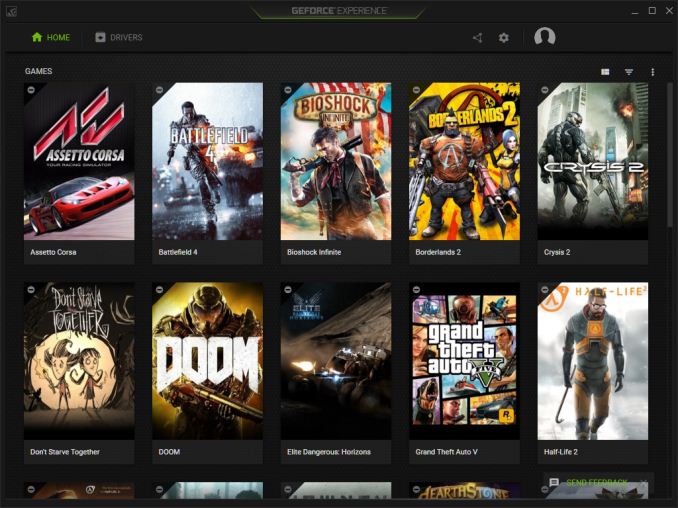
This time around NVIDIA is requiring a sign in through either Google, Facebook, or NVIDIA's own account service. This both follows through and contrasts with plans that NVIDIA announced nearly a year ago with respect to account requirements. In their original plan, NVIDIA intended to make GeForce Experience the one true portal to driver releases, making registeration a de facto requirements to get NVIDIA's frequent driver releases. Instead, NVIDIA has still opted to require a sign on for GeForce Experience, but has backed off on the driver portal aspect. Instead they continue to issue new driver releases through their web page, even though, according to NVIDIA, that the majority of their driver updates are already served through GeForce Experience. Moving on we find GeForce Experience 3.0 has a complete redesign, featuring both a new user interface and additional features. After signing in we start with the game view. By default, games are listed in a grid with a mouse over revealing buttons to hide the game, play, or view the games details. From the details view we get GeForce optimization, allowing quick and automatic configuration of many games. Gallery: GeForce Experience 3.0.5 Gallery
      If the alternative details view is chosen then we are shown a list of games on the left with the games details view to the right, again with all of the optimization options. I had to poke around a couple of minutes to find everything, but considering there is only the games list in the default home screen, a GPU driver’s tab, shadow play, settings, and account information, it doesn’t take long to explore all that GeForce experience has to offer.
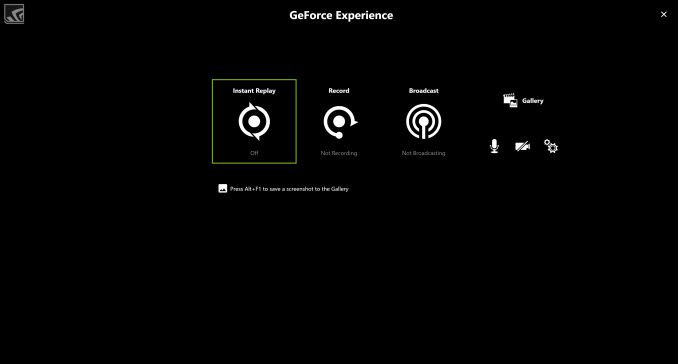
NVIDIA states that GeForce Experience 3.0 runs three times faster and uses half the memory. When putting this to the test on my machine my measurements were more like two times as fast and a third the ram. Granted, this was just a quick and informal test on my personal system and results likely will very, nevertheless it is indeed faster and in my case the new version uses a miniscule amount of ram. In fact while 3.0.5 started up with 88MB of ram is shortly settled in with only 54 MB of ram used. Within the driver tab we have our ability to update drivers and view GPU driver and NVIDIA gaming news. But more importantly, ShadowPlay has now been upgraded to the Share Overlay UI. According to NVIDIA, GeForce Experience can now record gameplay at 60fps and at up to 4K in full screen and windowed modes, with 4K DSR as an experimental feature. After recording, this footage can be uploaded either complete or trimmed back to YouTube. For live streamers GeForce Experience can livestream straight to Twitch and YouTube Gaming at 1080p60. Additionally, screenshots can be captured, edited, and uploaded to Imgur and Google Photos without leaving the game.
On top of all these social features Geforce Experience 3.0 brings in Gamestream Co-op. This allows players to not only broadcast to friends, but also play co-op and let friends take control of the game as well. Though, Henry@Nvidia over on the GeForce forums notes that this is still classified as an experimental feature, even though the beta started almost exactly a year ago. To enable this option “Allow experimental features” must be enabled from the settings menu. Gamestream Co-op and these other Gamestream Experience Share features are also available now on Optimus enabled notebooks. GeForce Experience can be updated from inside the GeForce Experience app or downloaded from GeForce.com. I’ll note that when I went to take took a look on my machine the upgrade failed, though downloading and installing GeForce experience from the website had no hitches. NVIDIA also requests that feedback and feature requests be sent in through the feedback form on the bottom right of the GeForce Experience 3.0 window or that you leave your comments in the GeForce.com Forum thread. | |||||||||||||||||||||||||||||||||||||||||||||||||||||||||||
| 7:00a | Hands On With the LG V20
The LG V20 at this point has been leaked to death, but it’s finally here. LG has been pushing through a fairly tough year, so this phone really could not have arrived at a better time with the Note7’s battery fires and recalls as the obvious alternative to the Note7. To try and start our discussion of the LG V20 we can first take a look at the specs before we jump into the other major areas of note.
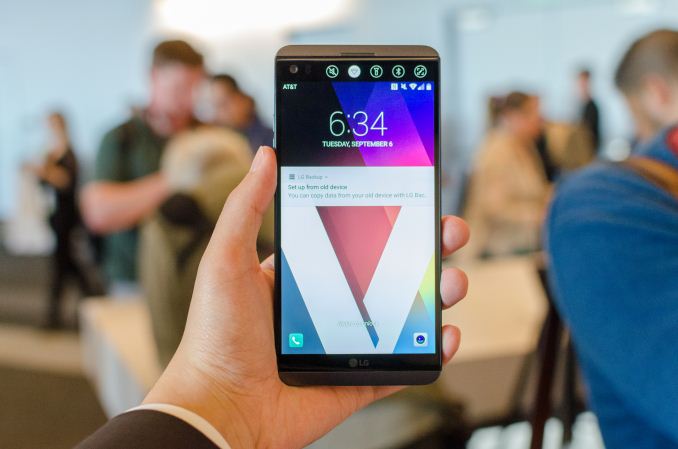
At a high level, the LG V20 honestly doesn’t look all that different from the LG G5 in a lot of ways. It shares the same SoC, the same rear camera, and retains the rear-mounted fingerprint scanner that also doubles as a power button. However, there is a bump in battery size and display size, and things like the new front-facing camera and secondary display help to differentiate it from the LG G5.
However, the single biggest change here is design. While the LG V10 had a plastic back cover and a glossy stainless steel frame, the LG V20 adopts a fairly elegant aluminum design. The phone has a metal frame to give it strength, which holds the major components and provides the screw holes for the plastic cover that helps to protect the internal components. Over this plastic cover, LG adds the aluminum back cover. This aluminum back cover appears to house the NFC antenna but not much else other than a whole host of grounding points. All other antennas are probably in the top and bottom RF windows for this device. Judging by the writing that says BYD on this back cover, it wouldn’t be a surprise to know that BYD Electronic is making these back covers for LG.
Overall, I think this phone feels like a massive step ahead the G5 when it comes to in-hand feel and overall design. LG is quite possibly the only OEM that has ever properly integrated a removable battery and an aluminum back cover at this point, and while this is a pre-production unit my subjective opinion here is that this is actually a fairly handsome design. The earpiece has this fine detail to it and it’s pushed up right along the edge of the glass. Even the LG logo is subdued, and is color matched fairly well to the plastic that flanks the display. On the back of the phone, everything is aligned fairly well. This isn’t a huge deal as far as actual purchase recommendations go, but it’s worth mentioning because it looks like LG cares about ID even if they don’t market it aggressively.
Moving past design, things like the combined power and fingerprint scanner have gotten noticeably better moving from the G5 to the V20. The button no longer has a significant amount of slack or play that I saw in many G5s, and the button clicks much more solidly now. The volume buttons also feel great, but they appear to be placed only to work well if you hold the phone in your left hand as holding the phone in your right hand doesn’t really leave any viable method of comfortably and safely manipulating the buttons. This isn’t a huge issue if you mostly set and forget volume settings though.
Booting up the display of the LG V20 reveals no significant issues with backlight bleed, but right off the bat it’s obvious that the display is on the cold side. It’s hard to say whether this display is still making the mistake of a gamut wider than sRGB when Android doesn’t support color management, but for now I’m not going to make any snap judgments even though LG is a bit notorious for not getting color calibration right.
Playing with the camera right away it’s obvious that LG has dramatically improved their camera UI for the V series relative to the G series, which makes me wonder why the G5 shipped with such a seemingly gimped camera application. The manual camera is not necessarily anything special, but manual video settings for bitrate, audio recording, and a number of image controls is really great to see and something that I haven’t seen on any other devices out there. Audio even has low cut filters for things like concerts where bass is often overwhelming for reasons beyond me. There’s extra video stabilization, but in a hands-on context it’s difficult to test these things properly.
LG is also emphasizing audio quality, with the ESS quad DAC that has a 132 dB SNR and 124 dB of dynamic range that should make it extremely difficult to notice things like hiss when the DAC is on. Voltage output is said to be double that of anything else out on the market at time of release as well which is nice to see. This is contrasted with the LG G5, which shipped with a somewhat disappointing DAC out of the box and needed the B&O module to really get good audio quality. Seeing as how a major device launch meant the loss of the 3.5mm jack altogether it’s worth mentioning that this device does have a 3.5mm jack on the bottom right of the phone.
The final thing worth mentioning given that I’ve had some time with the preproduction unit at home is that LG is now using SK Hynix’s UFS 2.1 solution, which is supposed to allow for better security between SoC and UFS device. This is also using 3D-V2 NAND which might be the first shipping implementation of 3D NAND I’ve ever seen in a smartphone. This actually leapfrogs Samsung which is impressive to say the least.
Overall, the LG V20 is a fairly interesting phone but I get the sense that it might be overlooked in the sea of other launches to come. LG UX 5.0+ is a decent redesign at first glance but may need some extra work, but the phone itself is actually fairly good at first glance. The LG V20 will be available through Verizon, Sprint, AT&T, and T-Mobile US in Titan and Silver. | |||||||||||||||||||||||||||||||||||||||||||||||||||||||||||
| 8:00a | Analyzing Sony’s PlayStation 4 Pro Hardware Reveal: What Lies Beneath A few months ago near the start of E3, Sony made an interesting revelation: that they would be releasing a higher performing PlayStation 4 console. A console intended to complement the standard/slim model, this faster PlayStation would be an unusual – if unprecedented – mid-generation update of sorts for Sony’s console family. Previous generations of consoles have offered add-ons, but a significantly faster model is something else entirely. In any case, after much speculation and a fair bit of analysis on how the PlayStation 4 ecosystem would work with multiple models, in an event in New York City this afternoon, Sony announced the new console. Dubbed the PlayStation 4 Pro, it would sit alongside the newly launched slimmer PS4 (an original PS4 with a die shrunk SoC) as a premium, more powerful entry in the PlayStation 4 family. The console is intended to cover a spectrum of use cases for Sony, including 4K TV support, HDR, better VR performance, and higher fidelity graphics on today’s 1080p TVs. As AnandTech is not a gaming website, I’m going to skip the gaming ramifications. Instead, let’s do what we do best and dive into the hardware. | |||||||||||||||||||||||||||||||||||||||||||||||||||||||||||
| 8:00a | Hands On With the Apple Watch Series 2
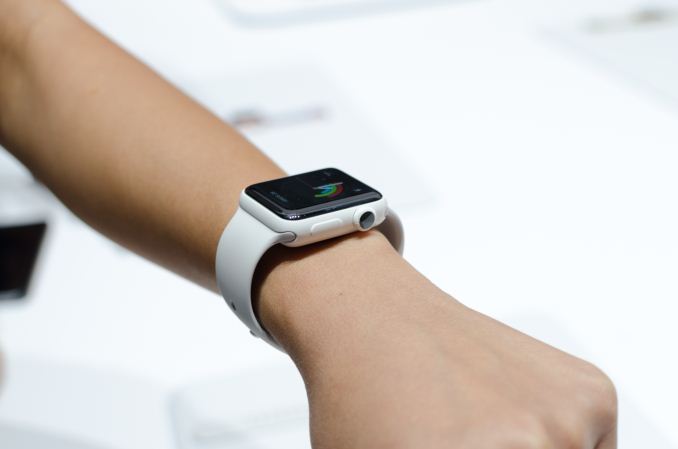
For better or worse, Apple is pushing on with their smartwatch endeavors in the form of the Apple Watch Series 2. For the most part I would say that there isn’t a ton that can be said about the new watch in the context of a hands-on, but I figured that at least some discussion of the new ceramic casing would be interesting to see.
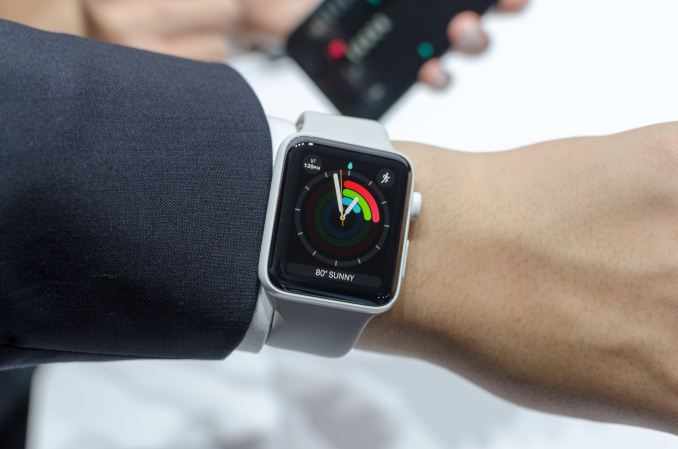
For those that are unaware of what this finish entails, the ceramic casing is much stiffer than stainless steel which makes it much harder to scratch and impervious to corrosion. It’s going to feel a lot more like glass rather than steel. However similar to glass, the ductility and malleability of ceramic is fairly low and if you really do something to damage the case it’s likely that it will shatter altogether rather than bend and deform.
In the hand, the ceramic casing of the Apple Watch Series 2 feels a lot like glass. It has a high-gloss finish like everything but the Apple Watch Sport, so it picks up your fingerprints and other sebaceous matter fairly easily and shows it quite obviously, but the white ceramic color does make it harder to see this sort of thing.
Other than the new casing, it’s hard to really see any of the new features of Apple Watch Series 2 unless you rely on canned demos, so I’ll refrain from making any comments here until we can actually test one for usability. The one interesting feature I found while playing with the Apple Watch was the ability to manually enable the water clearing speaker system, and when you do so it makes you turn the digital crown to activate the speakers and clear water from within the watch.
Other than this the changes to the watch are hard to see and when watchOS 3 hasn’t launched for the original Apple Watch it doesn’t make sense to compare the two together given the major changes in performance across OS versions.
The Apple Watch Series 2 goes on preorder starting September 9, and goes on sale September 16. Prices start at 369 USD with the usual bands with a choice of aluminum, stainless steel, and ceramic casings. | |||||||||||||||||||||||||||||||||||||||||||||||||||||||||||





| << Previous Day |
2016/09/08 [Calendar] |
Next Day >> |