[Most Recent Entries] [Calendar View]
Monday, September 19th, 2016
| Time | Event | ||||||||||||||||||||||||||||||||||||||||||||||
| 8:00a | The HTC 10 Review It probably goes without saying right now that HTC has been a troubled company for some time now. With the One M8 we finally saw that they were making a recovery, but with the Snapdragon 810 and One M9 HTC suffered a massive blow as their offerings just weren’t competitive with the Galaxy S6 or Galaxy Note5 for the time. Realistically speaking, any phone with a Snapdragon 810 or 808 just couldn’t really compete. With the launch of the Snapdragon 820, it seems that Qualcomm had finally launched an SoC that was a real improvement over the Snapdragon 801 and 805, and in the time since then we’ve seen a return to normalcy in the smartphone market. A a result, HTC has been under fairly enormous pressure to perform this product cycle as a result. Their attempt to meet that pressure is the HTC 10, which is the best of what HTC has to offer distilled into a single package. That distillation starts at the name it seems as rather than the One M10 as you might expect given that the naming scheme for the past few generations has meant that its predecessors are called the One M8 and One M9. There’s no One branding anymore, and the phone is just their tenth, and HTC is hoping that it’s a “perfect 10” in every respect. To see if it lives up to its name, read on for the full review. | ||||||||||||||||||||||||||||||||||||||||||||||
| 11:00a | An Anecdotal Musing of Brick and Mortar AMD Notebook Offerings
For any technology journalist deeply embedded an analytical content, knowing your field is a key element to how you work. If all the focus goes into the high-end, it is easy to get complacent, or living in a technology hub can feel like a bubble. This is why several times a year I wander through the local Brick and Mortar retailer to see what is on offer to users that simply walk in off the street to buy a tablet, notebook, or a casual £99 Bluetooth speaker purchase, as what happened this week. I'm in the UK, so our sole brick and mortar option is typically PCWorld, however it emulates Best Buy in a number of ways. What I Had Noticed BeforeLooking through the arrays of notebooks and laptops on offer, prior to my recent visit this week, it was very clear that pickings for AMD processors were very thin. Since the demise of netbooks, and Intel's Ultrabook strategy, almost all AMD offerings on shelves were restricted to a single unit, or under 1 in 20 on the show floor, and typically a budget device with low-quality displays, track pads, and build quality. Part of this, as I learned when a sales executive took me through a Best Buy in the US, is due to marketing in the store itself. Companies can invest in aisles all to themselves at a retailer at select stores or nationwide, or if there is an overriding feature that several companies share, they can invest in an aisle together under the feature heading. Aside from the aisles, there are end caps, pre-fabricated displays, video walls, and all manner of possibilities. Some users will be familiar with store-in-store elements from Samsung or Apple, where they pay for dedicated floorspace and dedicated salesmen to be trained in solely their product. Closer to the front door of the store costs more, too. Due to the way that these brick and mortar locations sell their internal space, those with big marketing budgets have an advantage, as well as investment from OEMs (like Intel, HP) as a bonus for large volume component purchases. It ends up being a sizeable investment to in-store sales, and more eyeballs end up on potential halo products like an Omen, an Alienware or a Zenbook. There's also an added factor, albeit anecdotal, that it might be common for sales staff to not suggest brands that have been commonly associated with low-performance in the past. Understandably, AMD has a roughshod time at this. Due to their well-documented size and budgets, being able to assist their major partners in store-focused placement is fairly difficult. Their major partners are HP and Lenovo, so with that in mind those budgets may be very region focused for some hardware configurations for sure. It's also difficult to train store staff in the hardware without investing in the shop floor as well, unless they already have a sizeable interest in the specific market. Despite that 1 in 20 figure, which has been generous in most cases (including the Best Buy right near AMD's Austin office, or the Fry's in Sunnyvale), smaller retailers that go after the second-hand market seem to have had a better ratio than that. Speaking to a few of these retailers on Tottenham Road in London, the £200 second hand AMD APU-based notebooks get a sizeable interest from students on a shoestring budget, if only for mild gaming and LAN gaming (using pen and paper is still fairly common in UK universities in lectures, apparently). These retailers tend to sell a number of low-end devices, such as Pentium, i3, A6 and A8-based with HD/900p TN panels, which might not be a sizeable representation when we normally discuss new sales, but indicates that a number of users are still cost-driven in that price range. So Why This News Post, What's Changed?Earlier this year we posted a lengthy discussion about AMD Carrizo based notebooks, and how there was a disconnect between AMD, OEMs, and repeat business through positive user experience enabled via smarter hardware decisions. We received a lot of feedback from that, especially identifying that Carrizo as a base processor offered reasonable performance when applied with the right companion hardware. As part of the launch with the 7th Generation platform after our discussions, they had said that they had worked closer with their key partners to enable better configurations to drive experiences, along with better strategies for getting eyes on the hardware. With that in mind... Typically a tech journalist's week has a few meetings, perhaps a prebrief or two, and it just so happened that a VP for an unrelated company was in London, we met nearby and we talked shop. On the way out, I ran some errands and spent some time in PCWorld. I wasn't expecting to see much - it's a small store with Apple in the front and TVs in the rear, and the selection they tend to have across their 20-30 notebooks is barely mid-range, with one or two exceptions. So expect my surprise when I found five AMD notebooks in that set, with one out of the three desktops on show being the OEM version of the A10-7860K. These weren't old systems either - four of the notebooks where the new AMD 7th Generation APU (two Bristol Ridge, two Stoney Ridge), with one being 6th Gen (Carrizo-L). #1: Lenovo Yoga 510, £430The first one that popped out near the front of the shop was the Stoney Ridge device, spotting a large 'AMD 7th Gen' sticker. This was a Lenovo Yoga 510, with a touchscreen and 360-degree hinge, being marketed as a 2-in-1.
Under the hood was an A9-9410, which is a single module 25W AMD APU using 2nd Generation Excavator cores, with a 2.9 GHz base and 3.5 GHz turbo. It has 192 streaming processors at a base 800 Mhz (more when there's headroom), but because it is Stoney Ridge there's only access to single channel memory. At least Lenovo paired it with 8GB of DDR4-2133, which is imminently better than a 4GB option.
The 14-inch 1366x768 TN panel from AUO was dire, even from a minute or two with bad viewing angles, and storage came via a 1TB Western Digital mechanical drive. WiFi was at least 802.11ac, albeit 1x1 from the QCA9377 controller.
CPU-Z showed that the silicon was the ST-A0 stepping, which suggests that AMD did a relatively good job during tapeout. Unfortunately CPU-Z 1.77 doesn't seem fully geared for * Ridge laptops (a point worth noting later), but the benchmark gave 987 for single thread and 1741 in multithread. Not having used the CPU-Z benchmark seriously before (and there not being that much a store will let you run with free will), but a cursory glance online puts the FX-6300 at 1152, and a stock i7 920 gets a score of 998 for single threaded performance. #2: HP Envy 15 x360, £630Interestingly I had originally walked past this. All the AMD official logos had been removed from the keyboard and specification list beside the notebook, which struck me as a little odd. HP is arguably AMD's biggest partner for notebooks, with the Envy and Omen being two of the most premium devices for Bristol Ridge that have been announced. Part of me might suspect this is for a reason, or it could just be a case of Hanlon's Razor and someone forgot/they weren't ready.
The Envy was the most expensive AMD notebook on display, offering a typical HP premium design ID with a near-top line A12-9700P under the hood. This uses two 2nd Gen Excavator cores for four threads, a configuration called Bristol Ridge, and runs at 2.5 GHz base with 3.4 GHz turbo on the cores. The A12 ensures the 'R7' name on the integrated GPU, but this has 384 SPs (6 CUs) rather than the full compliment, and it runs at 758 MHz for a total of 15W TDP on the processor.
HP paired the SoC with 8GB of DDR4 memory, although we were unable to determine if this was single channel (1x8GB) or dual channel (2x4GB) as CPU-Z is not currently configured for 7th Gen detection. The system has two drives - a 128GB SSD from an unknown vendor as a boot drive and a 1TB mechanical storage drive from HGST. The panel was a clear 1080p IPS, and the track pad was certainly larger than I had expected. Internal Wi-Fi is a 2x2 solution using Intel's 802.11ac 7265 controller.
One thing worth noting is that this was the only system with a Type-C connector. This is USB, and based on the logo seems to be a USB 2.0 implementation. #3: HP Pavilion, £400In the more budget section of the store were two systems, but I essentially passed over this design from HP. It uses an A9, implying Stoney Ridge and 1x8 GB of single channel DDR4-2133. This came with a 2TB mechanical drive, and looks very similar to previous HP Pavilion systems.
Further to the other HP system, this was also devoid of any AMD logos. #4: Lenovo Ideapad 310, £350However the Ideapad 310 intrigued me. It was the cheapest model on display, cheaper than both the Stoney Bridge models, but came with a 15W Bristol Ridge A10-9600P, a dual module/quad thread design running at 2.4 GHz/3.3 GHz. The APU has support for dual channel DDR4-1866, and I'd half expect this 8GB model only had one memory module, but the rear of the device had a large enough section for users to add in their own memory. The APU also has a 384 SPs (6 CU) design for graphics, running at 720 MHz.
Other specifications include an Intel 802.11ac module, an integrated DVD drive, a 1080p screen (unfortunately TN) and a 1TB mechanical SATA storage drive for £350.
There have been instances in the past where an OEM uses a bargain basement design, but sticks in the high-end processor (Like the 9800) as a big 'wow' factor, but the cooling and the build quality gives the game away after a few days of use. Nonetheless, part of me feels that another $20 on an IPS panel would actually provide a good experience, as long as the design supports dual channel memory. If that's the case, I'd stick in 32gb of what I have lying around, a spare 1TB SSD, and it would be a nicely workable system for Anandtech on the road. Maybe that's just me. #5: A HP 550-103NA Desktop, £500When AMD launched the Kaveri Refresh line of processors, sometimes known as Godavari, alongside the number of consumer-focused processors was a line of OEM-only parts. The consumer line was the 7000 series, whereas the OEM line was the 8000 series, but fundamentally it was the same silicon and same set of specifications, except the OEM-only parts were designed for the HPs, Dells, Lenovos and other system integrators with different support packages therein. For the UK at least, these tend to be online only purchases, at least anecdotally from my experience any AMD desktop in a brick and mortar store tends to be AMD FX based on the AM3+ platform. So I was quite surprised to see an AMD Kaveri Refresh system in a HP desktop with a reasonable design ID.
The system on display used the 65W A10-8750, the OEM equivalent of the A10-7860K, combined with an R5 330 discrete graphics card as a dual graphics solution (512 SPs at from the APU, 320 SPs from the discrete card). It's a slightly lopsided configuration, aimed mainly at supporting multiple screens or different connection types.
The system had 8 GB of DRAM, and I was able to barely see into the case to confirm it was in two memory modules for dual channel operation. Storage on the system was marketed as a 2TB drive, however the system did have a 128GB SSD as a boot drive as well.
Interestingly while looking through the side vents in the system, I noticed that the motherboard had been put in upside down but also reversed, similar to the Corsair 600Q that we recently reviewed. There are many reasons for this, and I asked if we could open the case up so I could see inside. Unfortunately after asking the floor manager, I was told that opening the case would break the warranty, so I wasn't able to get a better look in the internals, but it was certainly interesting to see these OEM systems on the shop floor. So You Saw Some AMD Systems, So What?As a pure observation, the fact that my singular trip showed a greater proportion of AMD designs available for eyeballs on a shop floor is an anecdotal indicator that AMD's OEMs are being bolder and/or more confident with their AMD designs. Sure, none of the ones I saw were absolute stunner systems, with a peak value of 650GBP ($717 pre-tax) and none in a real ultrabook/XPS13 style, but the numbers and variety shows a marked change in what a consumer can see when they visit a store. I spoke with the store rep who shadowed me during my visit, and I asked whether people were actively interested in any AMD systems. He replied that there was no specific interest, unless gaming was an aspect. It's worth noting that the PCWorld didn't have any of the usual MSI/Acer gaming notebooks on display, so the best gaming laptops on show would have been the products using AMD APUs. It sounded as if the only reason a laptop with an AMD APU would be actively promoted if the customer specifically said gaming was a priority. It's an interesting take, and one that AMD would gladly take. The store rep picked my brain a bit about the state of the industry, and what we might expect in the future. I recanted what we've learned over the last few weeks about Kaby Lake and Zen, as well as a little bit of VR discussion. Compared to some previous store reps I've spoken with, even though he wasn't up to speed with the absolute latest, he certainly knew about specific processors, graphics cards and general perceptions of the big OEM players in that space. Kudos to Raj, it was a fun half hour! With regards Zen notebooks in the future, Lisa Su mentioned during an August presentation that after the launch of the high-end desktop parts and AMD in servers, notebooks are expected in the second half of 2017, or essentially 12 months away. I suspect during Computex and/or IFA next year, we might start to see some interesting Zen designs for notebooks. | ||||||||||||||||||||||||||||||||||||||||||||||
| 3:00p | Enermax D.F. Vegas: Self-Cleaning Fans with LEDs
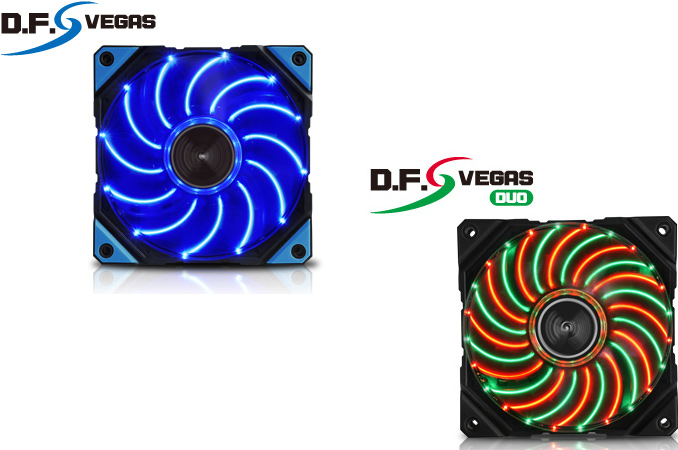
Enermax has announced that they have expanded their lineup of fans with its DFR (dust free rotation) technology, which can clean themselves up from dust, with two new models featuring LEDs. The Enermax D.F. Vegas 120-mm fans with different lighting effects are aimed at modders, who will I suspect will appreciate the self-cleaning mechanism. Perhaps one of the most annoying things when servicing PCs is removing dust from fans. Dust is definitely not a hygienic compound, but back in the day it was not visually noticeable since PC cases did not have windows and lacked any kind of lighting inside. Today, many enthusiasts run systems with transparent side panels with plenty of lighting effects and dust becomes clearly visible even after a few months of use. Earlier this year Enermax introduced its DFR technology, which they advertise as being able to keep fans relatively clean from dust for longer periods of time. Upon every startup, Enermax’s fans with DFR spin in reverse action at the highest RPM for 10 seconds before resuming their normal operation. While DFR will keep fans and heatsinks a little cleaner, fans that blow air outside of PCs cases will suck the dust into those chassis at every startup, which may not be always optimal. The Enermax D.F.Vegas (UCDFV12P-BL) and D.F.Vegas Duo (UCDFVD12P) support the company’s DFR technology and come with 12 blue or 24 red + green LEDs. The latter can work in different modes (all on, sparkle, flash and Vegas), another feature to be appreciated by modders. The D.F. Vegas series fans feature twister bearing, adjustable peak speed (1100, 1300 or 1500 RPM) to ensure optimal performance (minimum speed is always at 800 RPM) and rubber pads to minimize noise and vibration. Like other premium fans, the D.F.Vegas feature detachable blades for easy cleaning.
Enermax did not announce recommended prices for its D.F.Vegas and D.F.Vegas Duo fans, but indicated that they should hit the market in late September. Right now, the company sells its Enermax D.F.Pressure (UCDFP12P) case fans with DFR technology for $16.99 in the U.S. The D.F.Pressure fans are more powerful than the D.F.Vegas fans, but are also considerably noisier at peak speeds. | ||||||||||||||||||||||||||||||||||||||||||||||
| 7:30p | ARM Announces the Cortex-R52 CPU: Deterministic & Safe, For ADAS & More
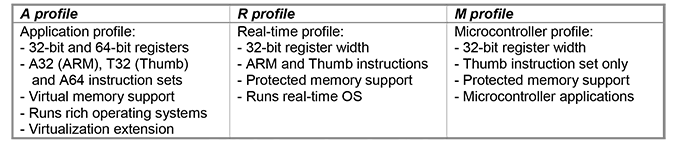
Though it didn’t attract a ton of attention at the time, back in 2013 ARM announced the ARMv8-R architecture. An update for ARM’s architecture for real-time CPUs, ARMv8-R was developed to further the real-time platform by adding support for newer features such as virtualization and memory protection. At the time the company didn’t announce any specific CPU designs for the architecture, but rather just announced the architecture on its own.
Now just under 3 years later, ARM is announcing their first ARMv8-R CPU design this evening with the Cortex-R52. An upgrade of sorts to ARM’s existing Cortex-R5, the R52 is the company’s first implementation of ARMv8-R. R52 makes specific use of many of the new features enabled by the architecture, while improving performance at the same time. ARM is pitching the new CPU core at markets that need a safety-critical CPU – a market that the Cortex-R series has been in for a while – where the deterministic nature of the CPU’s execution model is critical to ensuring quick and accurate execution.
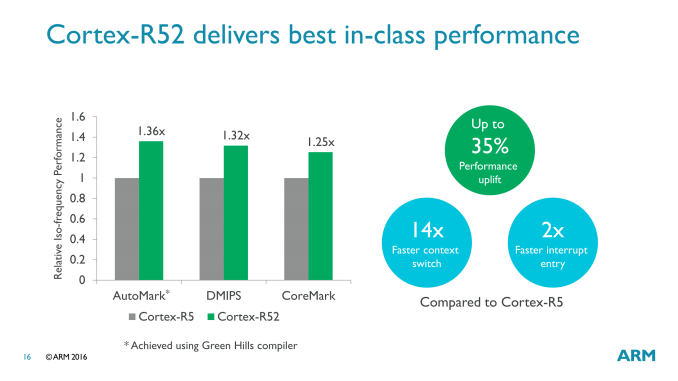
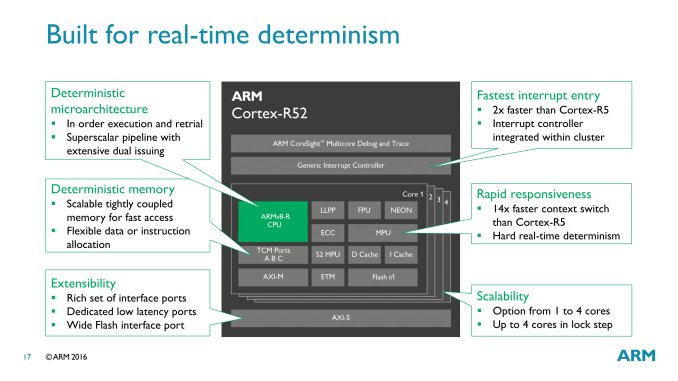
While the focus on today’s CPU design announcement is on functionality and utility over microarchitecture, ARM has revealed a bit about how the Cortex-R52 is organized under the hood. The microarchitecture is a direct evolution of the previous Cortex-R5. This means we’re looking at a dual-issue in-order execution pipeline, with a pipeline length of 8 stages. Broadly speaking, this description is very similar to that of the better-known Cortex-A7/A53 cores, which implies that this is a real-time optimized version of the basic elements in that design. As the Cortex-R series is focused on determinism and real-time responsiveness over total performance, ARM doesn’t heavily promote these cores on the basis of performance. But at least within the Cortex-R family, they are talking about a performance increase of upwards of 35% in common CPU benchmarks. More important for this market than throughput however is responsiveness: for the R52, ARM has done some specific work to improve interrupt entry and context switching performance, doubling the former and achieving a staggering 14-fold increase on the latter.
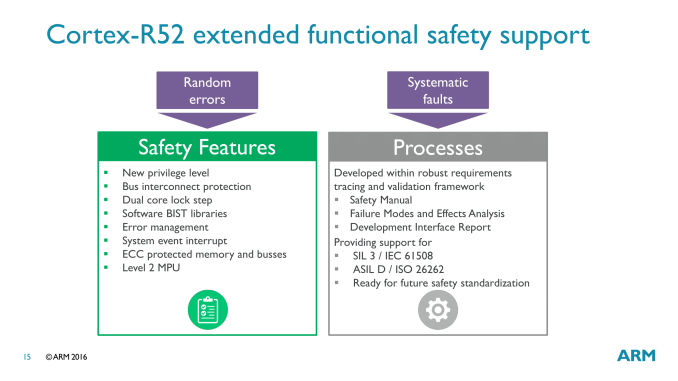
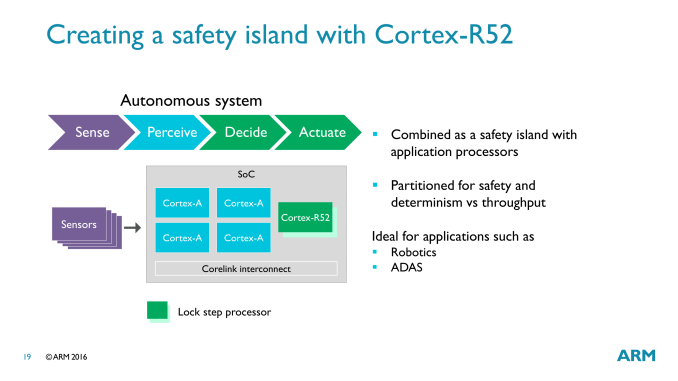
The big deal here of course is the deterministic nature of the CPU. The entire microarchitecture is optimized to avoid variable time, non-deterministic operations, which is why it’s an in-order processor to begin with. This design extends to how memory is managed as well, with ARM avoiding a virtual memory system and its associated TLB translation-misses in favor of a model they call the Protected System Memory Architecture (PSMA), which is used in conjunction with an MPU to handle memory operations without the translation. On the safety side of matters, the R52 has a few different error-resiliency features to ensure accuracy. Multi-core lock step returns for this design, allowing two R52 cores to execute the same task in parallel for redundancy. And on the memory side of matters, ECC is offered across both the memory busses and the memory itself, in order to avoid random bitflips.
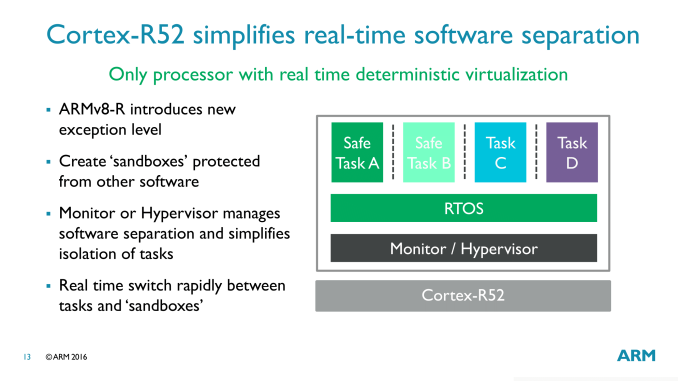
Meanwhile in terms of new functionality for hardware developers, as part of ARMv8-R, Cortex-R52 implements support for hardware virtualization. Like virtually everything else in R52, this is deterministic as well, with the hypervisor working with the MPU to offer each guest OS its own section of the physical memory space. According to ARM this is a particularly important advancement, as previous means of separating tasks on real-time CPUs were non-deterministic, which is an obvious problem for the target market.
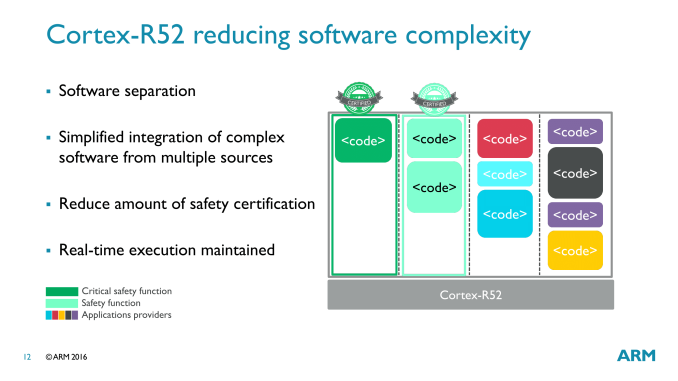
The significance of virtualization in a real-time processor is that it allows for multiple tasks to be executed on the R52 without interfering with each other. In large, complex devices (e.g. cars), this allows for fewer processors within the device, as these tasks can be consolidated onto a smaller number of processors. At the same time, the rigid separation between the tasks means that it’s possible to run both safety-critical and non-critical (but still real-time) tasks on an R52 together, knowing that the latter will not interrupt the safety-critical tasks. For cars and other devices where there is stringent safety certification, this is especially useful as it means that other tasks can be added (via their own guest OS) without invalidating the certifications of the safety-critical tasks.
This is also why ARM’s earlier context switching and interrupt entry improvements are so important. With a hypervisor now in play and multiple tasks executing on a single processor, the vastly improved ability to switch between tasks is critical for allowing multi-tasking without a major performance hit from context switching overhead. Finally, for the potential market for the Cortex-R52, ARM is pushing the big three traditional markets for real-time and safety-critical processors; automotive, industrial, and medical. All three of these make significant use of real-time functionality, and there’s also a great deal of overlap on safety as well.
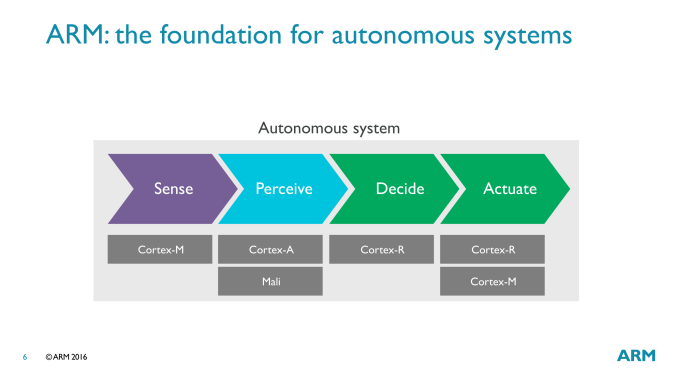
ARM is particular interested in the Advanced Driver Assistance Systems (ADAS) market, where the Cortex-R is part of a full system of ARM IP. A full ADAS setup from start to end would utilize all three processor types – M, R, and A – with the Cortex-R handling the real-time decision making and executing on those decisions, while Cortex-A would be used to handle sensor perception/interpretation, and Cortex-M would be in many of the individual sensors.
Wrapping things up, as with most other ARM IP announcements, the announcement of the Cortex-R52 is setting the stage for future products. ARM isn’t talking about specific customers at this time, but they already have a number of companies who have licensed ARMv8-R and will be in need of a CPU design to go with it. To that end, we should be seeing Cortex-R52 start appearing under the hood of various devices in the coming years. | ||||||||||||||||||||||||||||||||||||||||||||||




| << Previous Day |
2016/09/19 [Calendar] |
Next Day >> |