[Most Recent Entries] [Calendar View]
Tuesday, October 4th, 2016
| Time | Event | ||||||||||||||||||||||||||||||||||||||||||||||||||||||||||||||||||||||||||||||||
| 8:30a | AMD Announces 7th Gen Bristol Ridge PRO APUs with Extended Support
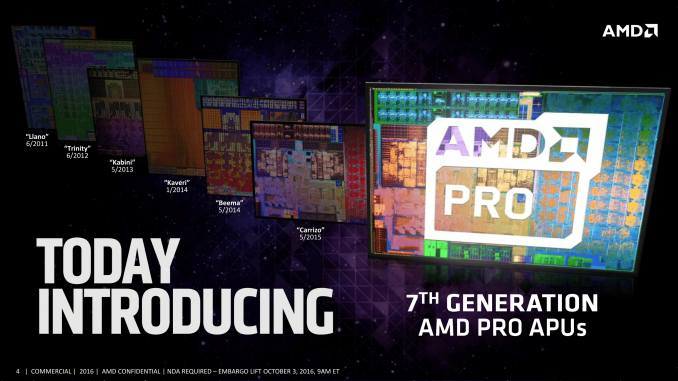
There are a number of directions for ‘professional grade’ processors in the market, varying from embedded to long-life support to server functionality. AMD’s PRO lines of processors are akin to their consumer counterparts, except they run a guaranteed lifecycle of support with ‘image stability’ (guaranteed OS images) and extended OEM warranties. AMD’s PRO line typically covers both embedded systems via the BGA lower parts and commercial/enterprise systems with socketed units. This week AMD is announcing their PRO line using the latest AMD microarchitecture, Bristol Ridge, along with continued support for customer requested features. If you’ve ever browsed for an OEM system, or in a brick-and-mortar shop, you may have come across a system labeled something along the lines of ‘PRO A8’ using an AMD APU. I recently wrote a small news piece which involved an HP system in my local store with a PRO name. These parts enable an OEM to build a particular system, either as a business-to-business sale or directly to customers, and guarantee a fixed longevity for replacements to that system. This is a requirement for a lot of government and business electronic installations – the ability to replace like-for-like in the event of failure. AMD states that the unit shipments of their PRO processor line for commercial, enterprise and the public sector has risen by 45% since mid-2014, or a 20.4% compound annual growth rate (CAGR).
The processors announced today are direct analogues of the consumer grade processors announced a couple of weeks ago, identical in specifications but with PRO in the name and a direct focus on support structures, management, virtualization, security and performance comparisons.
All these processors will support DDR4-2400 as standard, and offer USB 3.1 (10 Gbps) support via the appropriate chipset and Type-C with a re-driver chip to support reversible insertion (this is the same as the consumer platform). These new processors are all socketed parts designed for the AM4 platform for now, with BGA components likely to be declared later down the line.
With the PRO APUs, AMD uses an ARM Cortex-A5 to implement ARM TrustZone, offering software agnostic (compared to Intel which does not) support for hardware-based security. This includes Secure Boot, Content Protection, per-Application security, fTPM 2.0, and support for Microsoft Device Guard, Windows Hello, independent fingerprint security, data protection and Bitlocker, among other things. AMD supports this via the DASH management protocol, which is ultimately CPU agnostic and allows users of other DASH systems to get up to speed. AMD is positioning the APUs to be comparable to various Intel counterparts.
Performance-wise, for the launch, AMD states that in small form factors at 35W and mid-tier at 65W, performance compared to Intel is within 8% for the CPU, but AMD can offer +50-95% in graphics based or graphics accelerated workloads. In this case, AMD was positioning the PRO A12-9800E against the Core i5-6500T for the CPU comparison, and the PRO A10-9800 against the i5-6500 for the graphics comparison. We’ve asked to get these processors in for testing in order to compare.
The first systems using the new 7th Gen PRO APUs will be a set of HP Elitedesk 705 G3 systems, in Mini, SFF and mini-tower form factors. Due to the way these commercial systems are promoted, pricing and specifications will depend highly on the support contract aligned with the business customers. AMD is keen to point out that other customers will release their Bristol Ridge PRO based systems over the coming months. | ||||||||||||||||||||||||||||||||||||||||||||||||||||||||||||||||||||||||||||||||
| 9:30a | One Month With: The Huawei TalkBand B3
I think I'm getting the reason why smartwatches exist now - or at least watches in general. When I was younger, before smartphones, I wore a simple cheap watch to tell the time. When smartphones came along, I ditched the watch as it was just 'another thing to carry', and its utility was superseded by the mobile phone. Having worn the TalkBand B2, and that space now being filled by the updated B3, I'm starting to get it. I think.
When I tested the TalkBand B2, a number of its features irritated me, such as the limited two-day battery life or the fact that the screen was incredibly bright at night, waking me up every time I turned over and the screen activated. The additional step counter, calorie burner and sleep monitor were interesting add-ons that provided a tale of being glued to my desk, or walking marathons during tech industry events, but these features have regressed in their utility over the initial fascination period. Now that I'm testing the B3, it's clear that there are some useful features for a watch that doesn't quite match the email facilities of a full Android Wear/Tizen device or an Apple equivalent, but it certainly gives more than a simple time telling mechanism.
Smartwatches (or semi-smart watches like the B3) are still new enough that I am continually asked what it is like, or how I feel it compares. There's a list of pros and cons, but I find that above basic clock face, it currently augments my life in two very specific ways. Firstly, as an early morning alarm clock. On my wrist is a device on which you can set a time (via the app) and it will detect when I am sleeping in a low REM/light sleep up to 30 minutes before that set time and wake me by vibrating. This has a twofold advantage: I don't wake up from a deep sleep which would make me feel groggy due to the REM detection, and as a vibration rather than audio, my partner next to me is not woken up by any noise (unless I accidentally step on a cat / Lego making my way to the bathroom and produce four letter expletives). This benefit of a device like the B3 sounds like a minor plus, but it works wonders if the user has a set time to wake or has an early appointment to make. Unfortunately the Huawei app only has a limitation – it only lets the user set one such alarm time for that 30-minute wake-window, meaning that subsequent alarms are fixed at specific times in case you really want to snooze. It shouldn’t be too hard for the software developers to add in at least one more, for those that don’t have a regular sleep schedule.
Second, the TalkBand B3 augments my life as a Bluetooth headset. To clarify, with this watch you can take out the module with all the electronics (you need to do this to charge) while still leaving the strap on your wrist. As a Bluetooth headset, I can listen to music in one ear while keeping the other open for other noises (door bell, cat yowl, pasta boiling over) without the need for a wire or a dangling ear piece. While under the noise of cooking, I can listen to a YouTube clip, or take a meeting as the headset is very clear and easy to speak through. Perhaps this is just the utility of having a Bluetooth earpiece, as I lose the ability to tell the time when it's in use, but as part of my smartwatch I'm finding I use it almost every day in that headphone role. It also acts as a quick response if you are getting a call and your phone is in a bag/under some papers/under the cat. (Admittedly the B2 had a similar feature but I immediately disposed of the silicone insert for my ear within minutes of taking it out of the box, thinking it was just to protect the watch during shipping, but with the B3 I have found a large number of uses.) Using the B3 as an earpiece does drain the battery quicker, but only noticeably if it is constantly in use for several hours a day, and the heavier the music the more battery it consumes. For users moving from the B2 to the B3, there are a few upsides and downsides with the transition. The big upside is battery life - I'm getting 3-4 days from the TalkBand B3, rather than the 18-24hr battery anxiety from the B2. With a longer battery life and my anecdotally good charge profile with a solid bump in charge with a quick ten minutes, I never feel that worried about the battery like I did with the previous generation. It sounds weird, but the joy of not worrying about charging the device is a positive and I'm sure that 3-4 days is well on its way to not having to worry about it in general. I don't think I could manage an every-day charging watch, especially one that I can't charge at night for the sleep monitoring/alarm.
One of the downsides is the evolution of the interface. Previously on the B2, some functionality was reserved for long-hold button presses, but now this has been moved to menus or options within menus. So what previously used to be a carousel of four five screens (time, steps, calories, sleep, workout) becomes several more (options, contacts) and if the user is relying on a wrist flick to activate the watch, the flick will iterate through them – but if the B3 decides to quickly skip the time (thinking it’s a double flick), it's a much longer process to get back to the time if the other hand isn't free (or you forget to swipe the other way). This could be mitigated by having the steps, calories and sleep data all up on display at once - there's a lot of wasted space having these three as separate items which could all be condensed into one screen. Another downside, which has hit me later in testing the device, depends on how often the user wants to use the app. So, my anecdotal use case is that I rarely use the app anymore – the novelty of making sure I’ve slept enough and seeing the daily progression has lost its charm. But the other night, as I was getting into bed, I wanted to change the alarms on the watch. To do this it requires loading the app and making the adjustments. However, the Huawei Wear app has its own internal update system for software/firmware. It will not let you adjust anything without updating first, which is a slow five-minute process between the watch and the phone with two bright displays - when the immediate goal is just to go to sleep. Huawei needs to do one of a few things here - have a schedule to auto-update the firmware in the background after loading the app, and ensure the reboot the update requires doesn't cause the smart watch to vibrate. Or, auto-update the device after 5 minutes of charging. It's a small inconvenience, but when you really just want to go to sleep and change an alarm, it sticks out like a sore thumb.
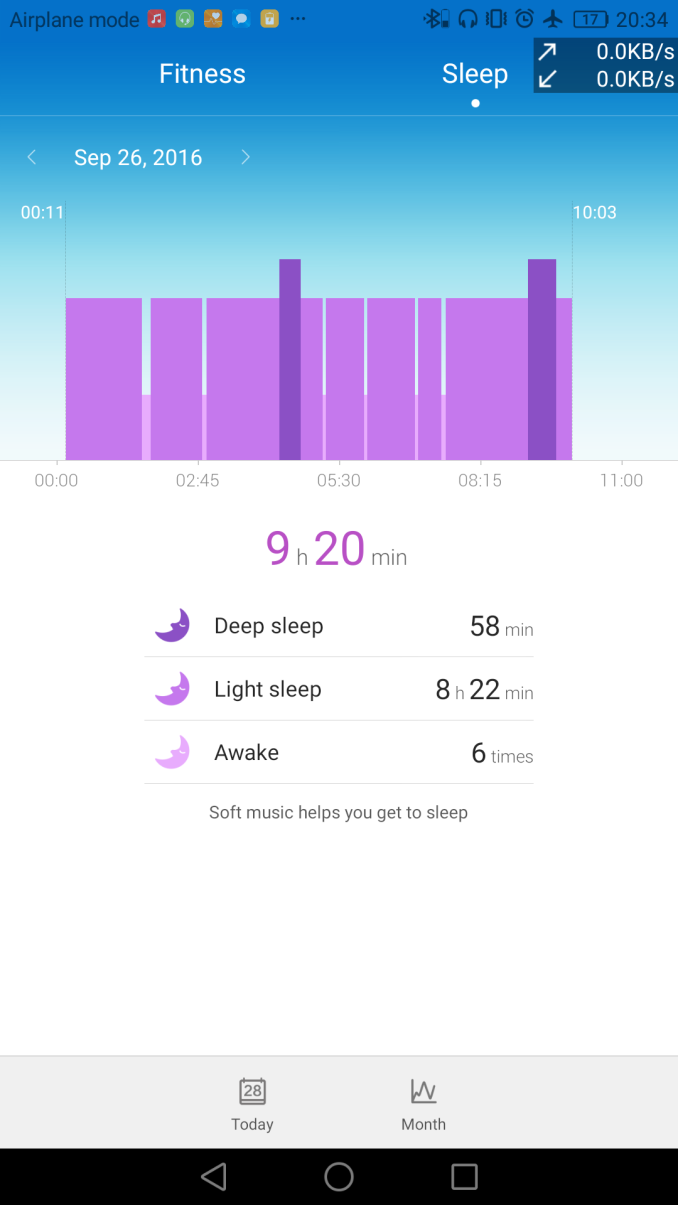
The software still remains a neutral point in the Huawei Wear ecosystem - it has gone through a few updates since our B2 experiential review, but it remains similar with steps and sleep with monthly or daily reports for viewing. Up until fairly recently, the software introduced a bug where daily step count profiles would not show for some reason, even though the data was there. That seems to be fixed now (sometimes it requires waiting 60 seconds), but ultimately Huawei does need to step up (pun intended) the potential data offering here. Being able to see per-day sleep cycles in a text format would be easier than the image below:
Also, some of Huawei's devices come with their own Health app which tracks steps for the user that carries the smartphone on them. The health app at least gives some indication that my 6867 steps so far today constitutes 374.2 kcal, equivalent to ~2.5 bowls of ice cream. That's the sort of tangential information which makes data gathering like this interesting, but here Huawei has two apps that don't talk to each other, with different features. I'd hazard a guess that this is a function of two separate software teams internally in different business units with little crossover.
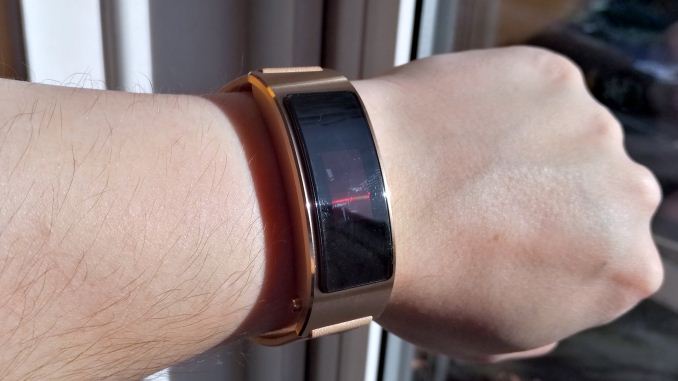
The final point to discuss is the look. While the B3 looks refined, compared to the B2 it feels like a slight regression. The black plastic module is clearly a separate part of the housing, and creates a mismatch of aluminum and plastic with a large bezel on the screen. This is in contrast to the B2, which has a full unified metal body implementation, and blends seamlessly with the rest of the device. There are advantages to doing it the B3 way one would assume (cost comes to mind), but as an aesthetic package, I'd have to give the nod to the B2. I can confirm however that the B3 can take a trip through tomato sauce and still work after cleaning (it fell out of my ear at a hotel breakfast one morning). There's also a small minor thing of the strap that came with this unit: it's starting to already break away from the main metal housing:
Despite the issues, I'm finding myself using the B3 more and more as a personal alarm clock, a Bluetooth headset for meetings, and even as a one-eared headphone for music when I need to keep the other ear unobstructed. I'd love to see a light sensor and brightness toggle, preferably as a physical button, and a base camera that detects a face in front of it and turns on automatically. Whether these are possible with the same or better battery life would be interesting to see. The battery life is the biggest upgrade, and another successive jump in the same direction would be icing on the cake. The interface, while improved, still has issues and Huawei needs to integrate the various parts of the business in order to provide a unified user experience, especially if a user goes all-in with the brand. But I'm sitting here, writing this on an airplane, with music playing in one ear on a device that's easy to put away when needed. I'm certainly seeing the appeal of this sort of smartwatch. Gallery: The Huawei TalkBand B3
      The Huawei TalkBand B3 is currently listed over at Newegg, starting at $286 going up to $520. Compared to the Samsung Gear S2, which starts at $269, it's clear that Huawei is aiming for the same market but without the full-color display and an integrated experience, and instead is going for the Bluetooth headset angle for a similar price range.
| ||||||||||||||||||||||||||||||||||||||||||||||||||||||||||||||||||||||||||||||||
| 12:00p | Live Blog: Made By Google October Phone Event We're live from Google's October phone event in San Francisco | ||||||||||||||||||||||||||||||||||||||||||||||||||||||||||||||||||||||||||||||||
| 4:30p | Google Announces Pixel and Pixel XL Phones: Snapdragon 821, 5" & 5.5" Screens, $649, Preorders Start Today
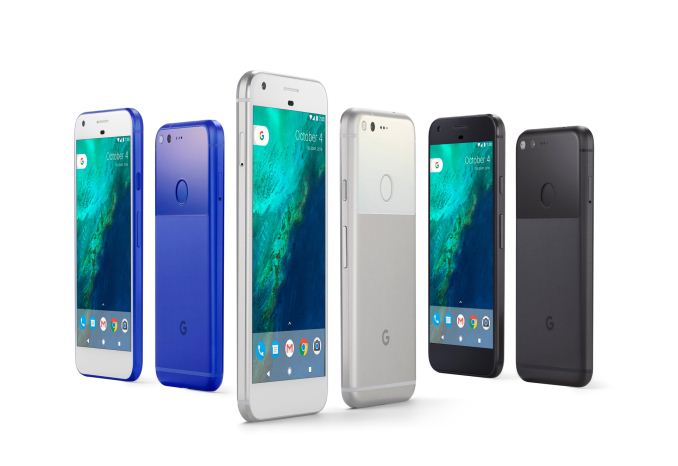
At an event today in San Francisco, Google unveiled its latest vision for Android smartphones—the Google Pixel and Pixel XL. For this generation, Google nixes the familiar Nexus name, along with the cluttered and confused Nexus model numbering system, replacing it with the newer Pixel moniker and creating a unified hardware family that also includes the existing Chromebook Pixel notebook and Pixel C tablet. Despite early rumors that Huawei would manufacture the new Pixel phones, that arrangement reportedly hit a snag and HTC eventually won the contract. Huawei partnered with Google for last year’s Nexus 6P (LG manufactured the Nexus 5X), and helped create a unique-looking, well-built phone with a few minor shortcomings. A follow-up device would be intriguing, but instead Google has come full-circle, enlisting the help of HTC who created the Nexus One, the very first Nexus phone. Though make no mistake: Google may be contracting out the manufacturing, but all of the branding is explicitly Google. The name of the event "Made by Google" says it all. Google is presenting the Pixel as their phone, not an Android phone with stock firmware as how the Nexus was originally presented. Google Pixel & Pixel XLOverall Google is introducing two phones: the Pixel and the Pixel XL. The former is the successor to the Nexus 5X, while the XL replaces the Nexus 6P. Compared to past generations of the Nexus lineup and even competing phones, these two phones are much closer in construction and specifications. Other than their sizes, display resolution, price, and battery capacity, both phones have the same internals and configurations, including the same cameras with the same capabilities. As a result the Pixel XL is for all practical purposes a bigger Pixel, with a battery and display to match.
In terms of design and market positioning, one thing to note from the very start is that unlike the mid-range(ish) Nexus phones, the Pixel phones are meant to be flagship products. This means that Google is placing a greater focus on features and design, and that they’re also pricing the phones to match. So current Nexus users who are coming from $400 phones may be in for a bit of a shock at the $649+ Pixel. The Pixel may succeed the Nexus, but it is definitely not meant to be the Nexus. The overall design for the Pixel then is another take on the rounded glass and aluminum designs we have seen in multiple phones over the years. The back of the phone uses both materials; the top-half (including the fingerprint sensor) is glass, while the bottom half is aluminum. Matt will have more on the feel in his hands-on, but at first glance it looks like it should be similar to other phones that have used this style. Meanwhile both phones will be available in a trio of colors. Taking a minor dig at Apple, Google has named these Quite Back, Very Silver, and Really Blue, with the latter being the pre-ordained “limited edition” color.
Meanwhile we’ll get to the hardware specifications in a moment, but it’s worth noting that Google is using the Pixel phones as a launch vehicle for a couple of their new technologies/initiatives. The Pixel is the first phone ready for Google’s Daydream VR platform, and pre-order customers will receive the associated Daydream View VR headset for free. The Daydream system wirelessly connects to the phone – so Google doesn’t need to worry about USB port alignments – and Google is ramping up the content side of the system with the usual mix of partnerships and leveraging YouTube’s growing capabilities.
The Pixel is also being used to launch Google’s enhanced Google Assistant functionality. The successor to the Ok Google functionality in previous generation phones, Google is further expanding what their voice-activated search and action software stack can do, with a focus on making that a core part of the Pixel phone experience. This also includes opening up the system to outside developers via a new SDK that will be launching next year, so that 3rd party developers can add actions to the system.
Under the hood, the Pixel phones pack a Snapdragon 821 SoC, which includes four of Qualcomm's custom 64-bit Kryo CPU cores. The two cores in the performance cluster have a peak frequency of 2.15GHz, while the other two cores in the power cluster have a peak frequency of 1.6GHz. Relative to the Snapdragon 808 and 810 SoCs found on the Nexus phones, this is a shift in both frequency and architecture. As Snapdragon 821 is just a new iteration of Snapdragon 820 there won’t be any surprises here, but based on what we’ve seen in other phones that have made a similar transition to 820, we should see a good performance uplift in both CPU and GPU tasks. The Pixel phones also include 4GB of LPDDR4 RAM, twice as much as the Nexus 5X, or 33% more than the Nexus 6P. Again this is pretty standard for Snapdragon 820 devices, and should provide a kick to multitasking performance under Android. The amount of internal storage has also been significantly increased. The base models come with 32GB of NAND, while the high capacity models come with 128GB. Google has not officially disclosed which flash storage technology the Pixel is using, but it’s almost certainly UFS given the SoC and the phone’s flagship status. Like the previous generation Nexus phones, there’s no micro SD card support for the Pixel phones, so high NAND capacity is important. Coming off of the Nexus 6P little has changed – that phone was already available at 128GB – while this is a 2-4x capacity improvement over the more constrained Nexus 5X. Even then, Google is being mindful that 128GB is still a finite amount, and they will be offering unlimited photo and video storage in their cloud service for free in order to alleviate any capacity anxiety. Helping to fill that capacity will be the phones’ camera. Here Google is using a 12.3MP Sony IMX378 sensor, which can capture 1080p video at up to 120fps, or 4K video at up to 30fps. Focusing the camera is provided by the usual combination of phase detection and laser detection. Meanwhile the front camera uses a smaller Sony IMX179, an 8MP sensor with slightly smaller pixels.
Somewhat surprisingly, there isn’t any OIS available on either phone. OIS is admittedly not very common on 5” and below phones, as the mechanism takes up space and Google wanted to avoid a camera hump. So the lack of OIS on even the Pixel XL may be a consequence of the shared camera model between the two phones.
That said, despite the lack of OIS, one of the major marketing points for the phone is its EIS image stabilization. Here Google claims they’re sampling the gyroscope at 200Hz in order to apply what they’re promoting as some of the best image stabilization on the market. So it will be interesting to see how well that holds up in practice. EIS has made great strides over the years, but OIS sets a very high bar in the flagship market. Overall, Google spent a significant amount of time touting the image quality of the Pixel’s camera as a key product differentiator from both their earlier phones and the competition. Google’s partners used a very similar sensor on the last-generation Nexus phones, so it’ll be interesting to see just how things compare. Meanwhile on the software/implementation side, Google is also claiming that their capture time is faster than any other phone, including zero shutter lag in HDR+ mode. Meanwhile, on the display side, the Pixel and Pixel XL use 5” and 5.5” AMOLED displays respectively. The smaller phone is a 1920x1080 display, while the larger phone bumps that up to 2560x1440. We’ll have a bit more here in our hands-on look at the phone, but in the meantime Google has somewhat frustratingly opted to define the color space in terms of NTSC. So from the specifications alone it’s not clear what these phones can do beyond the usual sRGB color space, though clearly Google is looking to offer some form of wide color gamut support. That said, as Google/HTC are sourcing panels from the usual vendors, it’s unlikely there’s anything here we haven’t seen before.
In terms of battery capacity, the smaller Pixel packs a 2770mAh battery – virtually identical to the Nexus 5X – while the Pixel XL bumps that up to 3450mAh, which is even more identical to the Nexus 6P. Google’s touting 26 hours of battery life for voice calls and 13 hours for internet browsing for the Pixel, and 32 hours/14 hours respectively for the Pixel XL. Both phones also implement USB Type-C quick charging, and Google says that the included 18W power adapter can fast charge the phone to “7 hours of use” in 15 minutes. Moving on to the modem, both Pixels are relying on the Snapdragon 821’s integrated Qualcomm X12 LTE modem, which offers up to Cat 11 performance depending on the carrier. Interestingly, in their tech specs Google notes that there will be two configurations of the phone: a North American version, and a Rest of World version. The band support for the two phones is slightly different, and this likely has something to do with Google working with Verizon as their carrier partner for the US launch. Wrapping up the specs, you’ll find the usual collection of wireless standards and interface ports. This includes 2x2 802.11ac WiFi, a USB Type-C port that supports 3.0 speeds, and a 3.5mm headset jack. Pre-orders are starting today, with units available in stores (and pre-orders presumably arriving) on October 20th. Unlike the Nexus phones, Google is going head-first into the flagship market here, so the Pixels are priced accordingly. The 32GB Pixel is $649, and the 32GB Pixel XL is $769. Bumping the capacity up to 128GB will in turn add another $100 to those prices.
| ||||||||||||||||||||||||||||||||||||||||||||||||||||||||||||||||||||||||||||||||
| 5:30p | Google Announces Chromecast Ultra: 4K & HDR for Chromecast
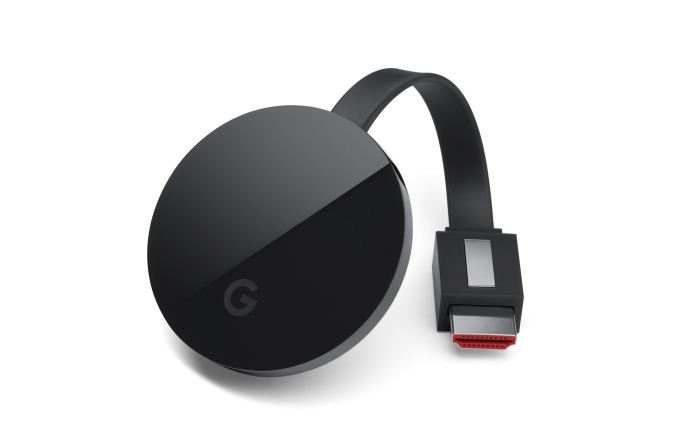
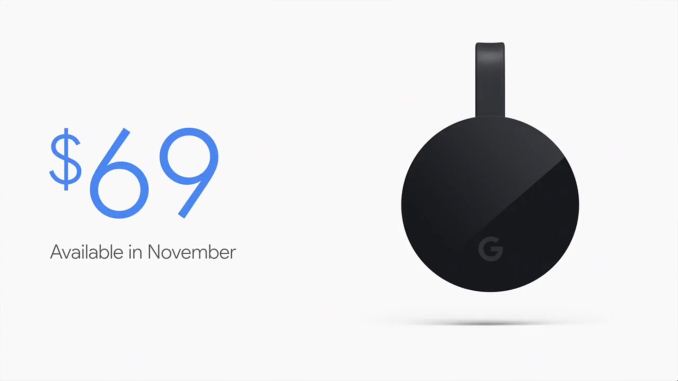
Though the big Google news for today is of course the new lineup of Pixel phones, phones were only a small part of what Google had in store. Alongside their latest in mobile products, Google also used this morning’s event to announce the 3rd generation of Chromecast, the Chromecast Ultra. The last Chromecast is more of a supplement than a replacement of the current Chromecast 2. Launching at $69, the Ultra’s major feature additions are 4K video support with HDR – essentially upgrading the Chromecast to keep up with the latest in video technology standards. Alongside the new hardware, Google has also announced that they are going to be upgrading their software ecosystem for 4K, including selling 4K movies through the Google Play store.
Unfortunately specifications on the hardware itself are limited at this time. Google isn’t saying much beyond the fact that the Ultra is capable of decoding and displaying 4K content. From the hardware capabilities alone it’s clear that the underlying SoC is something capable of decoding 4K content and outputting it over HDMI 2.0 with HDCP. This should, with any luck, also mean that we’re finally getting a Chromecast from Google that can handle 1080p60, which has been the Achilles Heel of the prior versions of the media streamer. Given that it’s a Google product, I’d also expect that VP9 support is present, while HEVC support is going to be more questionable. On the video format front, the big news here of course is that the Chromecast Ultra can handle 4K video. However Google didn’t stop there; the Ultra also supports HDR video via both the HDR10 and Dolby Vision standards. The latter is a particularly interesting development, as to date Dolby Vision support has been very rare. I’m very curious to see where Dolby Vision factors into Google’s larger plans given that they’re bucking the trend here and have their own major content distribution platform. At least for owners of TVs that support he standard, this could help kickstart its use in streaming services. Meanwhile as Google opted to spend the bulk of their efforts on updating the internals of the Chromecast, the overall design has not significantly changed since last year’s Chomecast 2. The Ultra is still a puck – albeit one that looks slightly thicker than the last – and implements a pair of antennas for improved WiFi reception. At the same time, for users and environments who can’t make WiFi work for them, Google has added Ethernet capabilities to the Ultra by placing an Ethernet port on the power adapter, giving users a wired option to fallback to. Wrapping things up, the Chromecast Ultra will be launching in November for $69. At almost double the price of the Chromecast 2, this is not going to be replacing the cheaper Chromecast, but instead serve as a premium option for 4K. At the same time, as one of the original Chromecast’s primarily selling points was its low price, it will be interesting to see how the Chromecast Ultra does now that it’s priced closer to stand-alone media streamers. For 4K this is still very much a budget option, but it’s not going to fit the impulse purchase market like the Chromecast 2 does.
| ||||||||||||||||||||||||||||||||||||||||||||||||||||||||||||||||||||||||||||||||








| << Previous Day |
2016/10/04 [Calendar] |
Next Day >> |