[Most Recent Entries] [Calendar View]
Friday, October 7th, 2016
- G-Drive with Thunderbolt (single drive enclosure)
- G-Speed Studio with Thunderbolt (four-bay enclosure with hardware RAID)
- G-Speed Studio XL with Thunderbolt (eight-bay enclosure with hardware RAID)
- G-Drive USB (single drive enclosure)
- G-RAID USB (two-bay hot-swap enclosure with hardware RAID)
- G-RAID with Thunderbolt (two-bay hot-swap enclosure with hardware RAID)
- G-Speed Shuttle XL with Thunderbolt (eight-bay / six-bay + 2 ev Series adapters hot-swap enclosures with hardware RAID)
- G-Speed Studio XL with Thunderbolt(six-bay + 2 ev Series adapters hot-swap enclosures with hardware RAID)
- G-Rack 12 and G-Rack 12 Exp expansion chassis (NAS with 12 bays + 12 additional expansion bays using G-Technology's custom NAS OS based on btrfs)
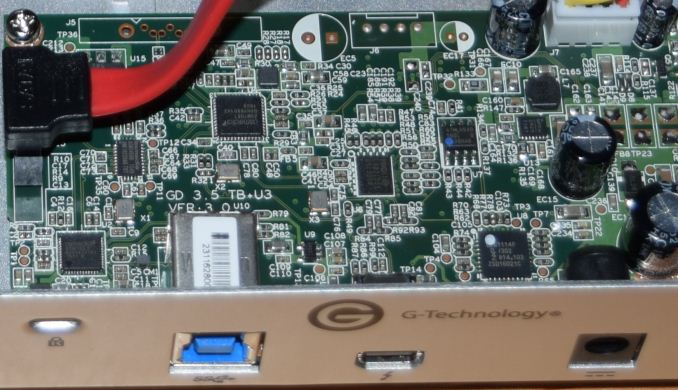
- ASMedia ASM1053 USB 3.0 to SATAII bridge chip with UASP support. It has been superseded by the ASM1153 bridge chip now, and the ASMedia website no longer carries information about the ASM1053.
- ASMedia ASM1456B SATA signal switcher: It demultiplexes the hard drive's SATA pins to either the ASM1053 USB bridge or the SATA host controller connected to the Thunderbolt controller.
- ASMedia ASM1061 SATA host controller with a PCIe 2.0 x1 uplink and 2x SATA III downstream ports.
- Intel DSL2210 single-channel Thunderbolt controller with two PCIe lanes
- NXP LPC1114F 32-bit ARM Cortex-M0-based MCU
- Photos: 15.6 GB collection of 4320 photos (RAW as well as JPEGs) in 61 sub-folders
- Videos: 16.1 GB collection of 244 videos (MP4 as well as MOVs) in 6 sub-folders
- BR: 10.7 GB Blu-ray folder structure of the IDT Benchmark Blu-ray (the same that we use in our robocopy tests for NAS systems)
- Adobe Photoshop (Light)
- Adobe Photoshop (Heavy)
- Adobe After Effects
- Adobe Illustrator
| Time | Event | |||||||||||||||||||||||||||||||||||||||||||||||||||||||||||||||||||||||||||||||||||||||||||||||||||||||||||||
| 3:45a | NVIDIA Releases 373.06 WHQL Game Ready Driver - Support for Mafia III, GoW 4 and Shadow Warrior 2
Not to miss out on the many releases this fall NVIDIA is working hard to keep our computers ready for the newest and upcoming games. In another iteration of release 370, driver version 373.06 gives us a short list of fixes and game ready support for all of the biggest releases in the next week. This time around we have a rather short list of fixes. First up for Windows 10 is improved framerate consistency in VR Games and applications. The latest driver also includes a fix for a broken FPS limiter, which experienced issues while playing in windowed mode with high FPS. In Windows 7, 8, 8.1 all had issue with the GeForce GT 720 and 705 not holding changed color settings after a system shutdown and resume. Also coming along for the ride is game ready support for this week's action-adventure game Mafia III, next Tuesday's FPS Gears of War 4, and next Thursday's FPS Shadow Warrior 2. Along with this, NVIDIA has also included an SLI profile for Iron Storm and the SLI profile for Battlefield 1 has been re-enabled. Anyone interested can download the updated drivers through GeForce Experience or on the NVIDIA driver download page. More information on this update and further issues can be found in the 373.06 release notes. | |||||||||||||||||||||||||||||||||||||||||||||||||||||||||||||||||||||||||||||||||||||||||||||||||||||||||||||
| 8:00a | G-Technology G-Drive with Thunderbolt 8TB Capsule Review
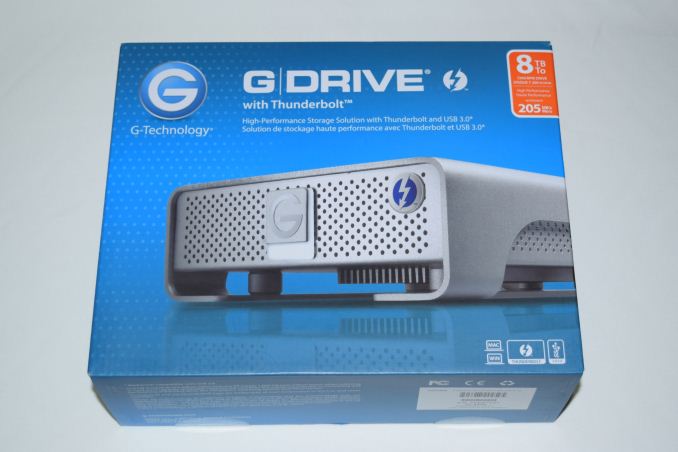
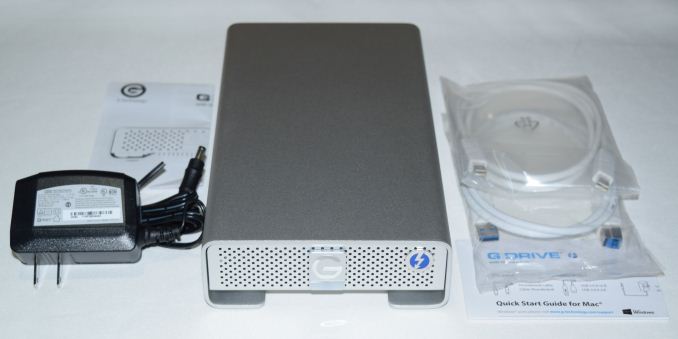
G-Technology started using HGST's helium-filled hard drives in their direct-attached storage (DAS) products earlier this year. The product lines utilizing these 8TB and 10TB drives include: We have not published any hands-on reviews of G-Technology's products till now. Keeping that in mind, G-Technology wanted to start us off with one of their basic offerings - the G-Drive with Thunderbolt. The 8TB version packs a HGST Ultrastar He8 3.5" SATA hard-drive in a sealed enclosure with one Thunderbolt port and one USB 3.0 port. At any given point of time, either device port can be used to access the drive. The G-Technology G-Drive with Thunderbolt 8TB currently sells for $600. The HGST Ultrastar He8 sells for approximately $500 (the official version with warranty from HGST), putting the cost of an all-aluminum, Thunderbolt + USB 3.0 enclosure at $100. As far as the premium for Thunderbolt peripherals go, the pricing is not outrageous. That said, we must keep in mind that the device uses the first-generation Thunderbolt silicon / mini-DP-type port. Product Impressions and Platform AnalysisThe G-Drive with Thunderbolt package comes with a 24W (12V @ 2A) adapter in addition to a Thunderbolt and a USB 3.0 cable. A quick-start guide is also included.
The industrial design of the product is excellent, and the aluminum chassis with the curved edges provides a stylish and premium look. A Thunderbolt logo in the front panel differentiates it from the other single-bay USB products in the G-Technology lineup. A white LED beneath the G-Technology logo indicates the power / hard drive access status. The gallery above shows the layout of the rear panel - a Kensington lock, a USB 3.0 Type-B female port, a Thunderbolt port, the power inlet and an explicit on/off switch. The underside also sports a ridged segment to aid in taking away heat from the component in contact with it on the inside. Getting access to the internals of the unit is a matter of removing a few screws from the frame that serves to keep the main part of the chassis raised. Unfortunately, doing so voids the warranty.
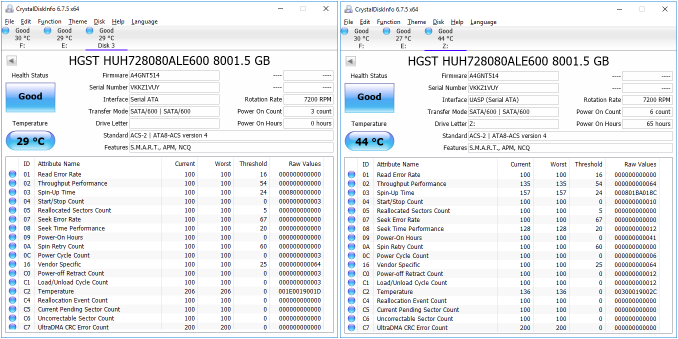
A close-up view of the board reveals the various chips making the product work. From the bottom left, we can see the following as we trace an arc to the right. Apple users are the main target market for G-Technology. Therefore, the internal hard drive comes pre-formatted in HFS. We connected the unit to our Skylake DAS testbed using a StarTech.com Thunderbolt 3 to Thunderbolt adapter. The same Type-C port in our testbed was also used to connect the unit over USB 3.0 (using the appropriate Type-C to Type-A cable adapter). After re-formatting the disk in NTFS, our first task was to take a look at the CrystalDiskInfo reports from both interfaces.
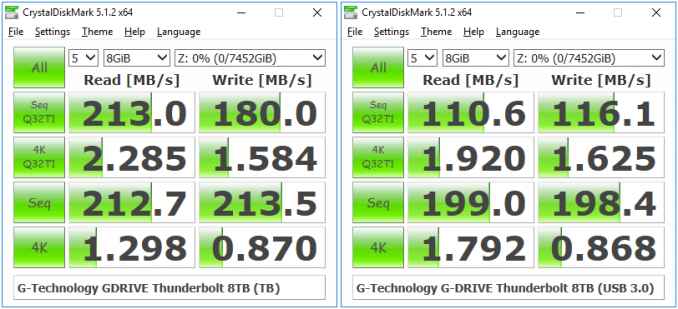
We get confirmation of UASP support over the USB interface. Over Thunderbolt, the device appears as a regular SATA drive. S.M.A.R.T read-out is supported over both interfaces for drive monitoring. Performance EvaluationOur testing methodology for DAS units takes into consideration the usual use-case for such devices. The most common usage scenario is transfer of large amounts of photos and videos to and from the unit. The minor usage scenario is importing files directly off the DAS into a multimedia editing program such as Adobe Photoshop. Prior to taking a look at the real-life benchmarks, we first check what CrystalDiskMark reports for the G-Drive with Thunderbolt 8TB over both the available interfaces.
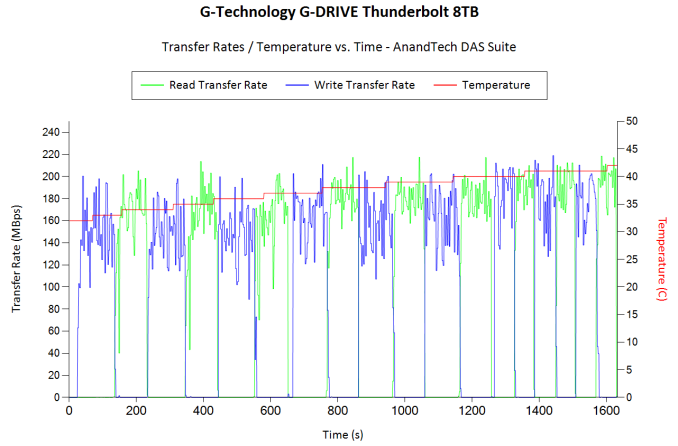
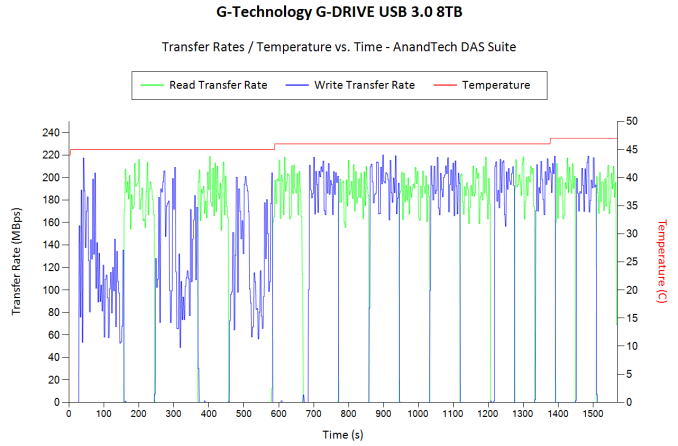
For the most part, the performance numbers meet G-Technology's claims. Sequential workloads can easily sustain 200 MBps over the fastest platter tracks. However, the USB 3.0 bridge chip seems to have some trouble with high queue-depth sequential accesses, as the results for those particular traces don't match up with what we observe over the Thunderbolt connection. This is because the ASMedia ASM1053 has a SATA II interface. SATA II doesn't support some of the advanced NCQ (native command queueing) features that are part of the SATA III specifications. However, for the 1MB sequential accesses at low queue depths, the USB 3.0 and Thunderbolt interfaces perform very similar to each other. In order to tackle the first real-life use-case, we created three test folders with the following characteristics: Each of the above folders was transferred from a RAM drive to the DAS unit and back to the RAM drive thrice. The average of the three transfer rates is recorded in the table below for each type of content.
The above benchmark run was also instrumented to record the drive temperature as well as instantaneous transfer rates during the process. The internal disk temperature never crossed 50 C even after more than 127 GB of writes and 127 GB of reads continuously.
For the second use-case, we take advantage of PC Mark 8's storage bench. The storage workload involves games as well as multimedia editing applications. The command line version allows us to cherry-pick storage traces to run on a target drive. We chose the following traces. Usually, PC Mark 8 reports time to complete the trace, but the detailed log report has the read and write bandwidth figures which we present in our performance graphs. Note that the bandwidth number reported in the results don't involve idle time compression. Results might appear low, but that is part of the workload characteristic.
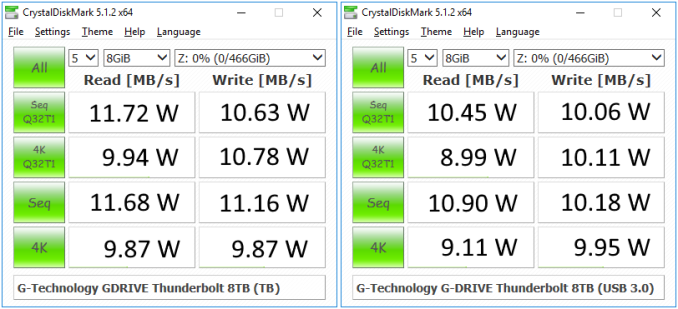
Even though these use-cases are part of the typical multimedia workflow, we don't expect this particular device to be used for such purposes. However, the results are just presented here for the sake of completeness Power ConsumptionThe G-Drive with Thunderbolt is externally powered, and the power consumption for a device that might be always attached to a host PC is definitely an aspect to investigate. The power consumption numbers for different types of workloads (as tested by CrystalDiskMark) over both interfaces are presented below. These are at-wall numbers measured using the Ubiquiti Networks mFi mPower Pro.
In addition to the active power, idle power (with the drive on as well as with the drive spun down) was also recorded. Over the Thunderbolt interface, the unit idled at 3.96 W with the drive spun down and 9.68 W with no drive accesses. Over the USB 3.0 interface, the unit idled at 3.55 W and 8.32 W for the same scenarios. Concluding RemarksThe G-Drive with Thunderbolt 8TB version is a high-capacity DAS unit with a praiseworthy industrial design. The chassis construction is stylish while being practical. The rubber feet and raised profile for the hard drive cage aid in improving the thermal characteristics. The unit is also well-built, sturdy and appears to be durable. Positives aside, we are unable to fathom the utility of this particular member of the G-Drive lineup over something like the G-Drive USB. The Thunderbolt part has no daisy chaining capabilities (there is only one Thunderbolt port). The high-speed capabilities of Thunderbolt are wasted with a single hard drive at the other end. In addition, the USB 3.0 bridge chip (ASMedia ASM1053) is a bit dated and appears to get hampered under heavy request loading in our tests because the hard drive operates in the SATA II mode when that path is active. We believe it makes better sense for G-Technology to use Thunderbolt for multi-drive enclosures only and keep single-drive ones as USB 3.0-only DAS units. Another aspect that could be improved in the current unit is the ability for end-users to access the internal drive without voiding the warranty. Coming to the pricing aspect, the G-Drive with Thunderbolt / USB 3.0 8TB version has a MSRP of $600. For the same MSRP, the G-Drive USB comes with a 10TB drive. In most scenarios, the extra 2TB will be worth much more than a Thunderbolt port connected to a product with a hard drive and no daisy-chaining capabilities. Multimedia professionals involved in photo and video capture / editing have different use-cases / usage scenarios for their data. To G-Technology's credit, they have hard-drive enclosures catering to all of those scenarios. If you are in the market for a high-capacity external DAS from their lineup, it would be prudent to evaluate the various options carefully before making a purchase decision. | |||||||||||||||||||||||||||||||||||||||||||||||||||||||||||||||||||||||||||||||||||||||||||||||||||||||||||||
| 10:00a | Xiaomi Mi Box Now Available in U.S.: Android TV 6.0 with 4Kp60 Output for $69
Xiaomi has officially started to sell its Google Android TV 6.0-based set-top-boxes in the U.S. The Xiaomi Mi Box STB boasts with a rather powerful SoC, an HDMI 2.0a (4K, 60 fps, HDR) video output, a Bluetooth remote with voice search feature as well as a $69 price tag. The combination of modern, capable hardware and a relatively affordable price will improve chances of Xiaomi’s STB to become popular among those who use Google's Android TV platform. The Xiaomi Mi is powered by Amlogic’s S905X-H SoC (four ARM Cortex-A53 cores at 2.0 GHz, five ARM Mali-450MP clusters) and is equipped with 2 GB of DDR3 memory, 8 GB of NAND flash, a wireless module supporting Wi-Fi 802.11ac and Bluetooth 4.0, a USB port as well as an HDMI 2.0a output with HDCP 2.2 and CEC. Xiaomi bundles a Bluetooth remote with a mic and voice search feature with its STB for extra convenience. In addition, the company sells its Mi Game Controller for those, who would like to play Android games on TV. Since the STB runs Android TV 6.0, it supports various popular streaming services (including those from Google, Hulu, Netflix, Pandora, VUDU and so on) and TV channels via apps (such as CNN, Disney and ESPN) out-of-the-box. Furthermore the box is also capable of acting as a Google Cast receiver, which allows it to work with applications that support casting but not stand-alone Android TV. This is especially notable since Google also announced their similarly priced Chomrcast Ultra this week, whose primary feature is 4K support as well. This gives the Mi Box a leg up on paper, since it should be able to do most of what the Chromecast can do while adding its Android TV capabilities on top of that. The hardware and software of Xiaomi’s Mi Box supports the latest codecs and standards, including VP9 Profile 2, H.265, and HDR10 (but not Dolby Vision). So owners of appropriate subscriptions and TVs can access more or less every audio/video format under the sun, including 4Kp60 video with HDR metadata or 1080p60 video with DTS 2.0 or Dolby Digital Plus audio (the STB also has an S/PDIF optical out and a 3.5-mm out for audio).
At present, there are not a lot of 4Kp60-capable Android TV media players. In fact, until now only NVIDIA’s SHIELD Android TV console supported 4K at 60 fps along with HDR, so the launch of the Xiaomi Mi Box gives owners of UHDTVs a second Android TV option. The Mi Box is nowhere near as powerful for non-video tasks, but at $69, it's considerably more affordable than the $199 console from NVIDIA. The Xiaomi Mi Box is available right now from Mi.com and will also be sold by Walmart in the coming days or weeks. Sources: Xiaomi, CNX Software. | |||||||||||||||||||||||||||||||||||||||||||||||||||||||||||||||||||||||||||||||||||||||||||||||||||||||||||||
| 10:30a | Plextor Launches S2C SSDs: 16 nm SK Hynix TLC NAND and SMI SM2258
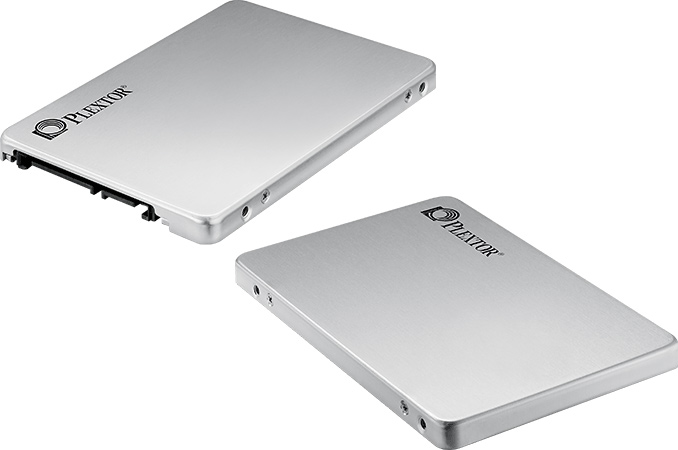
Plextor has introduced its new family of entry-level SSDs, which could become the most affordable drives in the company’s lineup in the coming months. The S2C SSDs use TLC NAND flash memory made by SK Hynix using 16 nm process technology as well as a controller from Silicon Motion. Plextor has its own history with TLC NAND-based as well as SMI-powered SSDs and the S2C family is the first time, when the manufacturer combined the inexpensive memory and an affordable controller. The company originally planned to release its first SSD featuring TLC memory in mid-2015 and even demonstrated a drive featuring Marvell's 88SS1074 controller as well as Toshiba’s TLC NAND at CES 2015. After months of evaluating the configuration, Plextor decided to proceed with Toshiba’s MLC memory and Silicon Motion’s SM2246EN controller for its M6V SSD. In April 2016, the company finally released the M7V, its first drive based on TLC NAND memory produced by Toshiba using its 15 nm process technology. The Plextor S2C is the second TLC-based SSD by the company, which targets the low-end of the market. The S2C features Silicon Motion’s SM2258 controller (which has four NAND flash channels and supports LDPC ECC technology) as well as SK Hynix’s TLC NAND made using planar 16 nm process tech, a combination found in Intel’s 540s SSDs. SMI’s SM2258 controller is a relatively new IC, which is why some SSD makers plan to use it for 3D NAND-based drives (e.g., ADATA’s SU800) because of compatibility with the memory as well as presumable low cost. Being cautious and due to slow ramp of SK Hynix’s 3D NAND, Plextor decided to use the SM2258 controller with planar TLC NAND from the South Korean company.
Plextor’s S2C drives come in 2.5”/7mm form-factor with SATA interface and are available in 128 GB (PX-128S2C), 256 GB (PX-256S2C) and 512 GB (PX-512S2C) configurations. Plextor is specing the highest-capacity S2C at up to 520 MB/s for sequential reads and up to 480 MB/s for sequential writes, but more affordable models sport slightly lower write speeds. As for random performance, we are dealing with drives capable of 98,000/78,000K read/write IOPS. Unlike many low-cost SSDs today, the S2C features DRAM cache to guarantee decent performance of write operations. In addition, Plextor promises that its S2C drives will sustain their performance over prolonged periods. The Plextor S2C will be joining in a pretty crowded party ot entry-level SSDs. The drives will naturally compete against Plextor’s own M6V, M7V and M6S Plus. In addition, they will have to rival Intel’s 540s drives, which are not only very affordable, but also come with a five-year warranty (Plextor only offers a three-year warranty with its S2C). Plextor has not announced MSRPs for its S2C drives and right now the products are absent from large U.S.-based retailers. Given performance numbers declared by the manufacturer, the S2C should be cheaper than the other entry-level drives sold under this brand. | |||||||||||||||||||||||||||||||||||||||||||||||||||||||||||||||||||||||||||||||||||||||||||||||||||||||||||||




| << Previous Day |
2016/10/07 [Calendar] |
Next Day >> |