[Most Recent Entries] [Calendar View]
Tuesday, January 3rd, 2017
| Time | Event | |||||||||||||||||||||||||||||||||||||||
| 3:01a | Lenovo Refreshes The MIIX Tablet With the MIIX 720
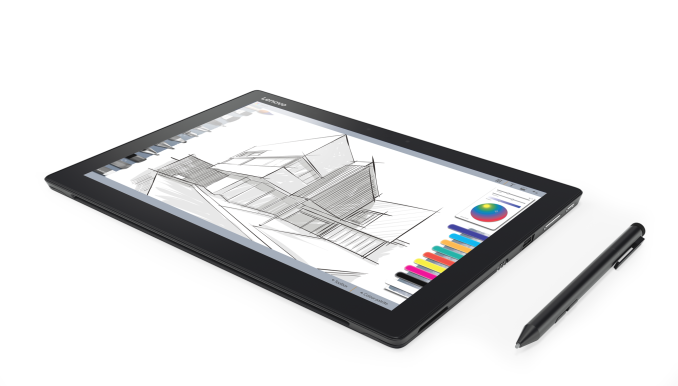
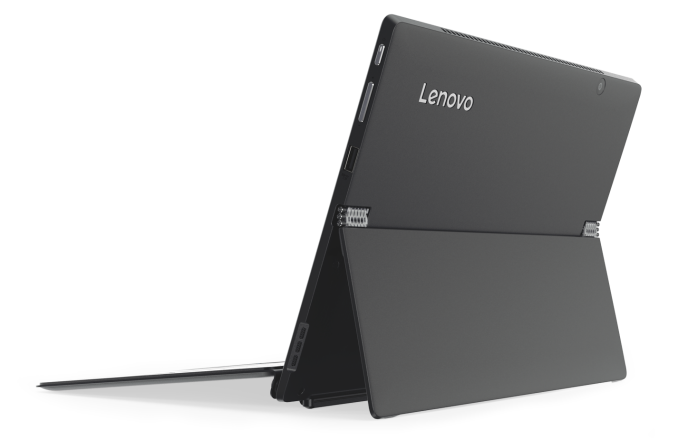
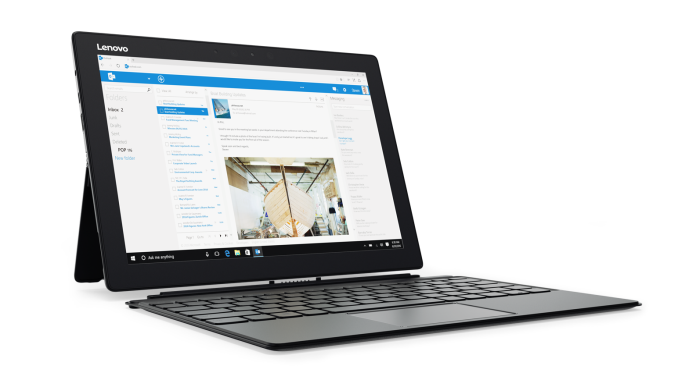
Lenovo has already announced updates to many of their business focused ThinkPad lineup, but today they are also announcing a successor to the MIIX 700 with the MIIX 720. The new model offers quite a few nice changes, but also a price bump over the predecessor. Of course, as a new product launching in 2017, the MIIX 720 upgrades the CPU to Kaby Lake, but unlike the Core m7 version in the MIIX 700, the new model appears to feature 15-Watt processors. Lenovo doesn’t list the exact CPU models available, but they do list In the HD 620 graphics, rather than the HD 615 which would be featured on the Y series, so expect the MIIX 720 to offer up to a Core i7-7500U CPU, assuming the graphics aren't a typo. Despite the higher powered CPU, the device dimensions have not changed, nor has the weight, with the MIIX 720 keeping the same 292x210x8.9mm dimensions and 780 gram weight (11.5x8.27x0.35” and 1.72 lbs). This means that they’ve added active cooling, which is a disappointment to some, but more performance, which should be pleasing to most.
The extra performance will be necessary to drive the higher resolution display, with the MIIX 720 offering a 12-inch 2880x1920 3:2 panel, which is an impressive 288 pixels per inch, which is much higher than the 214 pixels per inch of its predecessor, and even a bit higher than the 267 pixels per inch of the Microsoft Surface Pro 4. Lenovo rates the display at 400 nits brightness, and it’s got Gorilla Glass over the top. Lenovo has also outclassed the Surface Pro 4 with the inclusion of not one, not two, but three USB ports, with one USB 3.1 Type-C port, one USB 3.0, and one USB 2.0 port. It also offers up to 16 GB of DDR4 memory, and up to 1 TB of PCIe storage.
The battery is only 41 Wh, and Lenovo rates the MIIX 720 for up to 8 hours of battery life. This is a reasonable sized battery for a small tablet like this, where severe internal constraints always limit available battery capacity. The tablet also features a Windows Hello capable front-facing camera, which something that is great to see on more and more devices. Once you’ve used a device with Windows Hello, it’s really tough to go back. As with the previous MIIX 700, the MIIX 720 features a detachable full-sized, backlit keyboard, and there is a new Lenovo Active Pen 2 which will be included on the second wave of device shipments, which offers a clickable shortcut button for Windows Ink, and up to 4096 levels of sensitivity.
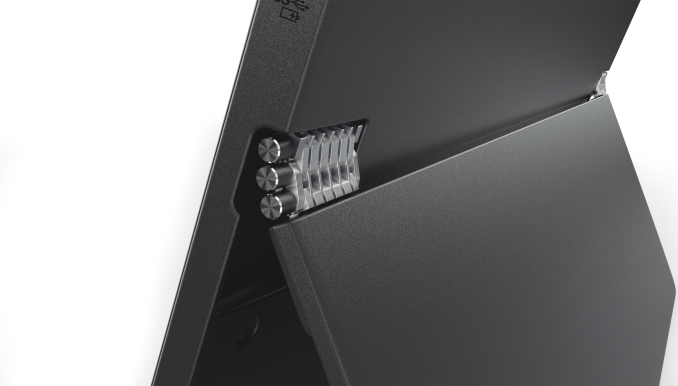
The MIIX 720 also features the watchband hinge on its kickstand, which is one of the most elegant solutions around. The new Lenovo MIIX 720 is available in either Champagne Gold or Iron Gray, beginning in April 2017 for $999.99 and up, and the Active Pen 2 will be available in February for $59.99. Gallery: Lenovo MIIX 720
      Source: Lenovo
| |||||||||||||||||||||||||||||||||||||||
| 3:01a | Lenovo Updates The X1 Lineup: Thin Bezel X1 Carbon, X1 Yoga And X1 Tablet Updates
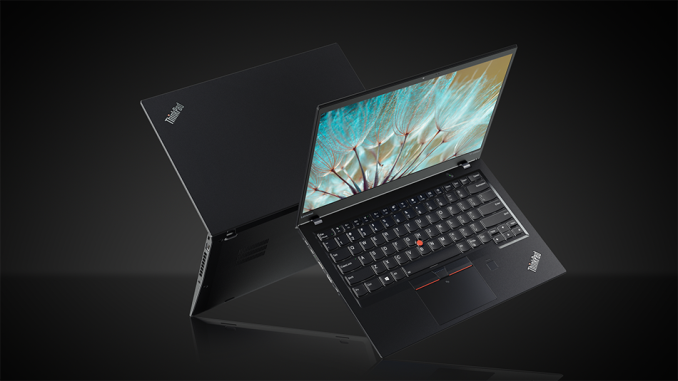
Just last week, Lenovo announced a substantial overhaul of most of it’s ThinkPad lineup. One of the main new features were a new silver color, along with USB-C and Thunderbolt 3 on many models. Today, the X1 family gets the same treatment, with the X1 Carbon, X1 Yoga, and X1 Tablet all offering new features. The X1 Carbon is now on its fifth generation, and while all generations have brought about a slimming and reduction in weight, it is this new fifth generation X1 Carbon that will be the most exciting since the original’s introduction. The X1 Carbon has always been a 14-inch notebook, starting with the first generation 1600x900 model, and up to the more recent editions which could be had with a 2560x1440 display like the 2015 model we reviewed. The 2017 offering keeps the 14-inch panel in 1920x1080 IPS or 2560x1440 IPS options, but stuffs that same panel into a much smaller laptop. The X1 Carbon has gone thin bezel, which means it’s a 14-inch notebook in the same physical space as a typical 13.3-inch model. In addition, the new X1 Carbon can now be had in the traditional ThinkPad black, or the new Silver option. X1 CarbonThe X1 Carbon also jumps on the Thunderbolt 3 train, with two USB Type-C ports both offering the high speed protocol. It also lets users continue to use their existing devices with two more USB 3.0 ports, as well as HDMI, native RJ45 (with a dongle, but not USB based), micro SD, and even a micro SIM with Qualcomm Snapdragon X7 LTE-A cellular connectivity. For more traditional wireless, Lenovo offers the Intel Dual-Band Wireless-AC 8265, which is a new take on the already excellent 8260 model that now offers MU-MIMO support. There is also an option for the Intel Tri-Band Wireless-AC 18265, which adds WiGig support on top of the normal 8265 card. WiGig allows wireless docking solutions.
The X1 Carbon’s main selling point is that it is a traditional clamshell notebook, and Lenovo removed the touch option last year, putting touch on the X1 Yoga, but the X1 Carbon tips the scale at only 2.49 lbs, or 1.12 kg, making it the lightest X1 Carbon yet.
Unlike the Dell XPS 13, which can be credited as being the first thin bezel notebook, Lenovo has added a bit of bezel to the top of the device to fit the webcam, which should make it a lot more usable to those that require a webcam. And they’ve even found enough space to add a second IR camera for Windows Hello facial recognition. Arguably one of the biggest issues with the X1 Carbon has been the mediocre battery life, but with the 2017 model, Lenovo is now claiming up to 15.5 hours of battery life on MobileMark 2014. The Broadwell based X1 Carbon was the last that we reviewed, and it did not even manage eight hours of battery life on our light test, so hopefully we can test the new model and see the difference. It’s great to see Lenovo focus on battery life, which was really the one pain point with the previous models. X1 YogaThe X1 Yoga gets its first product refresh since it was introduced last year. The changes on the X1 Yoga are not as significant as the X1 Carbon, but there are still a few nice new features to discuss. The X1 Yoga will now be available with an Intel Iris Plus Graphics 640 GPU, in addition to the base Intel HD Graphics 620, and the Iris model will feature up to 16 GB of 2133 MHz LPDDR3, up from the 1866 MHz LPDDR3 on the 620 model. The faster memory with the Iris GPU and eDRAM should help overall performance for all tasks.
The X1 Yoga also adds USB-C with Thunderbolt 3, and offers two ports like the X1 Carbon. It also offers three USB 3.0 ports, HDMI, native RJ45 (with a dongle), micro SD, and a micro SIM with the same Qualcomm Snapdragon X7 LTE-A cellular connectivity as the X1 Carbon, and it offers the same Intel 8265 or Intel 18265 WiFi options, with the latter supporting WiGig for wireless docking. The display options remain the same as the previous model, with both two IPS panels, at 1920x1080 and 2560x1440, or the OLED version is back as well, at 2560x1440. Lenovo rates the X1 Yoga at up to 16 hours of battery life with the IPS panel, or 10.5 hours with the OLED version. There is also an optional IR camera for Windows Hello login.
Lenovo has updated the keyboard, which had a retractable cage around it to lock the keys in place when the screen was flipped around. The X1 Yoga now retracts fully flat for better stability and comfort, and Lenovo claims anchoring the keys gives better durability. There is also a new ThinkPad Pen Pro with a new soft elastomer tip, to give more friction on the display and provide a more natural writing experience. The X1 Yoga continues to be a thin and portable 2-in-1, with the LCD model weighing 3.13 lbs / 1.42 kg, and the OLED version is a bit lighter at 2.99 lbs / 1.36 kg. X1 TabletAlso announced last year at CES, and seeing its first refresh, is the X1 Tablet. Like the X1 Yoga, it offers only a few changes, including Kaby Lake Y series processors, up to 1 TB SSD capacity, and battery life up to 10 hours without the 5 hours with the Productivity module. It also features a USB-C port with USB Power Delivery, but no Thunderbolt 3. There is another USB 3.0 port as well, along with a mini DisplayPort, micro SD, and nano SIM slot for the Qualcomm X7 LTE-A, or Sierra Wireless AirPrime EM7430 cellular options. For WiFi, it keeps the same options as the rest of the X1 lineup with either an Intel 8265 or 18265 solution.
While the X1 Yoga and X1 Tablet only got minor refreshes, they were also products announced just a year ago. The X1 Carbon has received a significant update for 2017, with a sleeker, lighter design, a thin bezel display, and improved battery life. We should have some hands-on time with the new devices this week at CES. Gallery: ThinkPad X1 Lineup CES 2017
      Source: Lenovo | |||||||||||||||||||||||||||||||||||||||
| 3:01a | Lenovo Announces The Alexa Powered Smart Assistant, And Smart Storage NAS
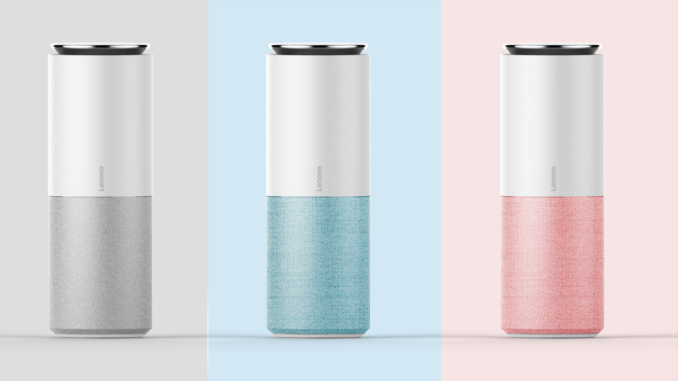
When Amazon announced the Echo, it’s likely even they were not prepared for the response to the device, and Echo is the primary funnel to Amazon Alexa, which is their intelligent personal assistant, which has been so successful in the Echo as a voice based assistant. Today Lenovo is announcing they have partnered with Amazon to bring Alexa to the Lenovo Smart Assistant. Lenovo’s take on the voice-based IoT assistant is available in three colors, and offers eight 360° far-field microphones with noise suppression and acoustic echo cancellation. All of this is to make it able to be used at up to distances of up to 16 feet, or 5 meters, away.
Lenovo will also be offering a Harman Kardon edition of the Smart Assistant, which will offer better quality speakers for an improved audio experience when using the assistant to playback music.
Some may be wondering why Lenovo would want to create such a device, but the device will be able to control Lenovo smart home devices, and is a foot in the door for them to be part of this arguably large IoT market. It will also work with many existing 3rd party products as well. The design is typical for this type of device, with a large cylinder meant to be used upright. A small footprint is ideal since these are almost certainly going to be used on a counter in a home. Lenovo’s multiple color options, as well as the Harman Kardon audio version, bring a bit more customization than perhaps you would see otherwise. The Lenovo Smart Assistant will be available in May starting at $130, and the Harman Kardan model will be priced at $180. Lenovo is also announcing the Smart Storage solution, which is a NAS device meant to be used to sync between multiple devices in the home. There’s no doubt that our digital lives create an enormous amount of data, and the Smart Storage NAS will be available with up to 6 TB of space.
The design is certainly interesting, with an upright chassis that is much more appealing to look at than most NAS on the market, and the Smart Storage smarts include the ability to use facial recognition to organize your photo library. It features dual-band wireless access, as well as Ethernet and USB 3.0 ports. Lenovo’s press material doesn’t delve too deeply into the other software features of the Smart Storage, so we’ll have to wait for some hands-on time at CES this week.
Finally, Lenovo is also offering a new interesting take on the HTPC keyboard. One of the biggest issues with a HTPC keyboard is you want it to be wireless, portable, and easy to use, but often it would be handy to have access to a trackpad or pointer control. Lenovo's solution is the Lenovo 500 Multimedia Controller, which offers a full keyboard experience, as well as a full track pad.
Where is the trackpad you might be asking? The entire keyboard is the trackpad. This gives a huge surface to use for pointer control, as well as Windows 10 gesture support, without adding extra space that would be necessary for its own trackpad. The trackpad defaults to 150 DPI, but can be set to up to 1000 DPI if needed. The keyboard connects over a USB dongle, which is on the 2.4 GHz spectrum, and it is powered by two AAA batteries that Lenovo says will give up to 8 months of use. It will be available in March for $54. Source: Lenovo | |||||||||||||||||||||||||||||||||||||||
| 3:01a | Lenovo Launches Legion Branded Gaming Laptops
While the PC market has been contracting somewhat in recent years, there is still one line where buyers need more and more performance, and that is gaming. Even looking at just 1920x1080 as a resolution, even as recently as last year’s GTX 980M would not always run games at that resolution at a solid 60 frames per second.
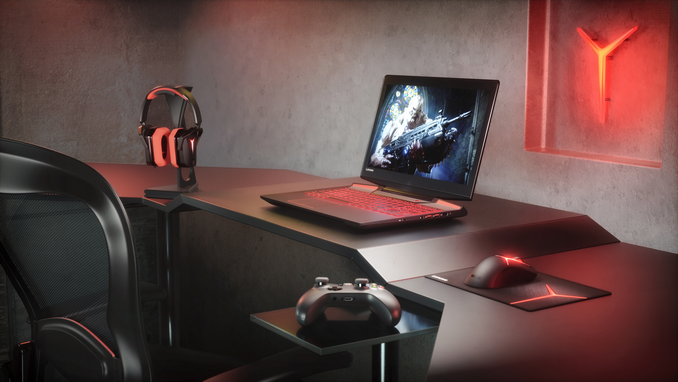
With the launch of NVIDIA’s Pascal for notebooks, that has changed, and Lenovo is announcing today a new sub-brand dedicated to gaming. Previously, their gaming laptops were under their Ideapad lineup, which is the same as most of their consumer lineup, but with new branding of Legion, Lenovo is looking to move into this lucrative market. With a true gaming brand, they want to have the same community engagement that other companies have created around their own gaming brand, and it’s a smart idea.
Lenovo Legion Y720 To launch the Legion brand, Lenovo is announcing two new laptops in the Lenovo Legion Y520 and Y720. This is certainly not Lenovo’s first foray into gaming laptops, and the new models are a spiritual successor to laptops like the IdeaPad Y700 that we reviewed last year. The Y700 had a good design, but a sub-par display and a cramped display, and it’s interesting to see how quickly Lenovo has at least addressed the keyboard – the display may be better, but it will have to wait for proper testing to see.
Lenovo Legion Y720 Lenovo has taken a very interesting approach to fit a full keyboard plus number pad into the new Legion laptops. Where most laptops, including the Y700 from last year, end up compressing the keys into too small a space, Lenovo has shifted the number pad up, creating a nice spot for the dedicated full sized arrow keys. The Zero key is still half size, but that’s not very uncommon on a notebook. It’s a smart design, and on the Y520 it continues with the red backlighting they have previously established on the Y lineup, and they’ve also added some extra lighting around the trackpad for a nice touch. The Y720 offers an optional multi-color zoned keyboard as well. The keys feature 1.7 mm of travel as well.
Both the Y520 and Y720 are 15.6-inch models, and the higher model number is a reflection of the higher performance parts in the new shell. Both models feature the 7th generation (Kaby Lake) Intel Core i7 processor, with the Y720 offering up to the i7-7700HQ quad-core model. Both offer two SODIMM slots, with up to 16 GB of RAM available from Lenovo, and more if you want to buy your own DDR4. They also both feature PCIe SSD based boot storage, as well as mechanical HDD options for bulk storage, and I would imagine the lowest end models may forgo the SSD option to save cost. The big difference is really the GPU option, with the Y520 offering up to a GeForce GTX 1050 Ti. The 1050 Ti has not been formally announced for notebooks as of the time of writing, but expect it to fall in-line with the other Pascal parts as far as the notebook performance is concerned, where it’s a bit slower than the desktop counterpart, but close enough that NVIDIA has stopped branding them separately. The Y720 offers the more powerful GTX 1060.
Lenovo Legion Y520 On the display side, the lower cost Y520 offers just a 1920x1080 display, but the Y720 offers a choice of either that or a 3840x2160 panel. The GTX 1060 is not going to be enough GPU for gaming at that resolution, especially with maximum settings, but it should be nice for lower demand games and office work. As for audio, both have 2x2W speakers, but the Y720 adds a 3W subwoofer and is the first ever Dolby Atmos PC according to Lenovo. On the battery side, the Y520 has just a 45 Wh battery, which is very small for a gaming notebook, and the Y720 bumps that up to 60 Wh. With the extra battery and performance, the Y720 tips the scales at 7.05 lbs, up from the 5.3 lbs of the Y520. Both models are fairly thin, with the Y720 at 1.14-inches and the Y520 at 1.01-inches, which should help with portability. The Y720 will be available in April for a starting price of $1400, and the Y520 will be offered in February for just $900 starting price, which is a pretty low entry point for a gaming notebook. The new Legion brand appears to be off to a good start with these new models, and we hope to get some hands-on time with them this week. Gallery: Lenovo Legion
      Source: Lenovo | |||||||||||||||||||||||||||||||||||||||
| 12:00p | Acer Introduces A Pair Of Predator Gaming Displays
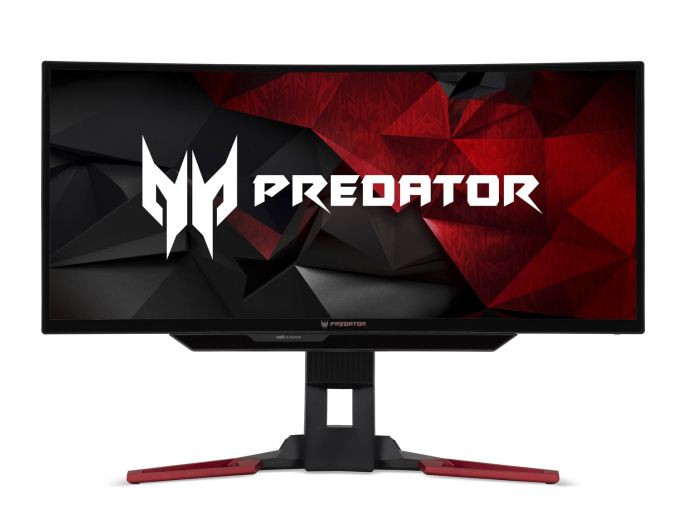
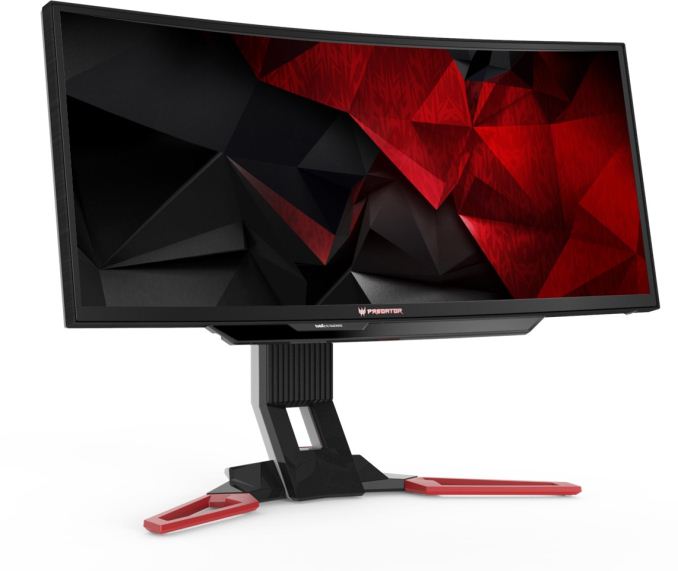
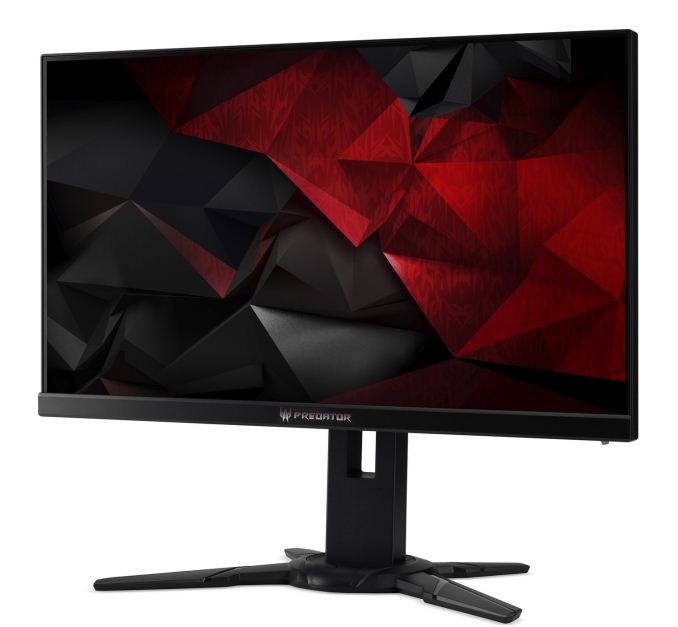
Today Acer is taking the wraps off of a couple of new products at CES 2017, and to start things off, Acer is unveiling some new gaming displays under their Predator brand. First is the 30-inch Acer Predator Z301CT, featuring a curved 21:9 panel with built-in eye tracking, and second is the Predator XB2 line, with 240 Hz refresh rate. Both models announced today feature Acer GameView technology, where you can toggle among three customizable display profiles without having to use the OSD menu, and the include features like dark boost, aim-point assistance, and the ability to select the on-screen refresh rate. They also feature Acer EyeProtect which has a blue-light filter, and ComfyView dimming. Acer Predator Z301CT
Acer is announcing the first 21:9 curved monitor with built-in Tobii eye tracking, in the Predator Z301CT. The ultrawide 21:9 display has a 1800R curvature, and 178° viewing angles. With a resolution of 2560x1080, it’s not going to set awards for display density at just 92 DPI, but features like a 200 Hz refresh rate should help them with their target market. The display also features NVIDIA G-SYNC, and two 3-Watt speakers with DTS Sound. The most interesting feature though is the built-in Tobii eye tracking, which is now supported in over 45 game titles according to Acer. Game sound and graphics will adjust based on where the player is looking, and eye tracking can also be used for after the fact training to see where you were looking when killed. The stand features swivel and tilt of -5° to 25°, as well as vertical adjustment of 4.7-inches. For those that prefer a monitor arm, the display also supports 100mmx100mm VESA mounting. The Z301CT features DisplayPort 1.2a, HDMI 1.4, and four USB ports, as well as audio output. Acer rates the display at 100% sRGB coverage, with a 300 nit brightness and 3000:1 contrast, although the contrast sound like it must be some sort of dynamic number. It is an 8-bit panel VA panel. The Z301CT will be available in February from $899.99, and in EMEA for €899. Gallery: Acer Predator Z301CT
      Acer Predator XB2 Series
The second set of displays from Acer is actually two displays, with the XB25Q being a 24.5-inch model, and the XB272 a 27-inch version. Both displays feature a 240 Hz refresh rate, along with NVIDIA G-SYNC and ULMB (Ultra Low Motion Blur). Both displays are 1920x1080 resolution TN panels, which isn’t unexpected at this sort of refresh rate. Acer claims 100% sRGB coverage though, and 1000:1 contrast, but both seem like best-case numbers. For input, there is DisplayPort 1.2, HDMI 1.4, and four USB ports, as well as audio output. The stand offers -5° to 20° tilt, 45° swivel, and 4.5 inches of height adjustment, along with a 90° pivot. The XB2 Series will be available in February for $549.99 for the 24.5-inch model, and $679.99 for the 27-inch model. Gallery: Acer Predator XB2 Series
      Source: Acer
| |||||||||||||||||||||||||||||||||||||||
| 12:00p | Acer Announces The Rugged Chromebook 11 N7: Designed For Education
Although Chrome OS hasn’t taken off in an appreciable way for the average consumer, it has certainly taken a foot hold in education, especially in the US. Today Acer is announcing a new Chromebook aimed directly at that market in the Acer Chromebook 11 N7 (C731). It has features designed for the kind of environment where durability is key. There are actually two models of this rugged Chromebook, with the C731, and C731T, with the T meaning Touch. The Touch model bumps up to an IPS display on this 11.6-inch model, and both are 1366x768 resolution. The display hinge on both will open to 180° which Acer says promotes sharing.
On the performance side, Chrome OS is pretty lightweight, and that’s good because the Chromebook 11 N7 is powered by an Intel Celeron N3060 dual-core processor. This is a Braswell based CPU, with a 6-Watt TDP, which means the device can be, and is, passively cooled. Acer offers up to 4 GB of LPDDR3, and either 16 or 32 GB of eMMC storage. Wireless is key with a Chromebook, and Chromebooks have tended to have better wireless adapters than similarly priced Windows notebooks. That continues here, with a Intel Dual Band Wireless-AC card with 2x2 MIMO and Bluetooth 4.0. There are two USB 3.0 ports, a SD card reader, HDMI, and a headset jack. Acer rates the Chromebook 11 N7 at up to 12 hours of battery life out of its 45 Wh battery, and the device is 22mm / 0.87-inches thick, and weighs 1.35 kg / 2.98 lbs.
The real key to this device though is the rugged nature of it, which promises to help schools stretch their limited IT budgets by helping with device replacements due to damage caused by students. The Chromebook 11 N7 can handled 60 kg / 132 lbs of downward force on the top cover, and it can tolerate drops up to 48-inches or 122 cm. The case also features an anti-slip pattern to help with accidental tumbles. The keyboard is spill resistant as well, with protection up to 11 fluid ounces or 330 ml of water, and it features a gutter system that routes water away from important components. The keyboard also features recessed keys which prevent students from easily removing the key caps. The devices will be available this month in North America, and February in the EMEA, starting at $229.99 and €299 respectively. Gallery: Acer Chromebook N11
 Acer wp_thumb.jpg)  closed_thumb.jpg)  front Google menu_thumb.jpg)  front_thumb.jpg)  keyboard_thumb.jpg)  left facing Google menu_thumb.jpg) Source: Acer | |||||||||||||||||||||||||||||||||||||||
| 12:00p | Acer Announces The Acer Predator 21 X: 21-Inch Curved Screen Gaming Notebook
Today Acer is announcing a beast of a gaming notebook in the Predator 21 X. This is the world’s first curved screen notebook, and it should be enough to satisfy almost any gamer’s needs. Let’s start with the display, which is certainly a stand-out feature on this device. The 21-inch panel is massive for a notebook, and for some extra cool factor, it’s got a 2000R curvature. The 2560x1080 21:9 panel offers a 120 Hz refresh rate and NVIDIA G-SYNC technology, and it’s an IPS display. It also features Tobii eye-tracking, for in-game adjustments and more. Powering this gaming notebook is an Intel Core i7-7820HK overclockable CPU, and dual GTX 1080 graphics in SLI. IT can support up to 64 GB of DDR4 memory, and Acer offers up to four 512 GB SSDs in RAID0, with two of them NVMe PCIe storage, and two SATA drives, and they still have room for another 1 TB HDD. Killer’s Doubleshot Pro supplies the network connections in both wired and wireless flavors, and there is an 88 Wh battery.
There is plenty of I/O as well, with USB 3.1 Type-C with Thunderbolt 3 support, USB 3.0 with always-on charging, and three more USB 3.0 ports. An HDMI 2.0 port is available for UHD output, along with two DisplayPorts which support G-SYNC output. There’s also a SD card reader, you know, for your camera. Following in the footsteps of the MSI GT80 Titan, the Acer Predator 21 X also features a fully mechanical keyboard with Cherry MX switches, and per-key RGB backlighting. The Acer outdoes the MSI though, with a number pad that can be flipped over to be used as a precision touchpad.
Acer has also though about audio, both on cooling system and speaker system. The cooling system features five fans, with three of them “AeroBlade” metal fans, and nine heat pipes, and to keep it clean, it features Acer’s DustDefender, which helps remove dust. Acer also allows the fans to be controlled with their CoolBoost app, so you can crank up the fans when needed. On the speaker side, Acer has a three-way speaker set, with a tweeter, midrange, and woofer, and there are a total of six speakers in the laptop, with two tweeters, two midrange, and two woofers. Acer says it will produce a “full spectrum of sound” and while I doubt that’s true, it should be an impressive step up from most laptop sound systems.
Just in case you thought they might have missed a feature, Acer is also including a Windows Hello IR camera for facial recognition login, and they include Xsplit Gamecaster software as well. There is a maintenance panel about the keyboard which will feature a blue dragon logo, and the first 300 notebooks will include a limited edition series number on the panel. Below the panel you’ll find access to the RAM modules and one of the 2.5-inch hard drives. Acer is also including a hard-shell carrying case, which is a nice perk. It will be needed, since the laptop weighs just a hair under 20 lbs. If you’re interested in the Acer Predator 21 X, shipments start in February starting at $8999. Yes, $8999. Gallery: Acer Predator 21 X
      Source: Acer | |||||||||||||||||||||||||||||||||||||||
| 12:00p | Acer Announces Aspire VX 15 And V Nitro Gaming Notebooks, And Predator 17 X Updates
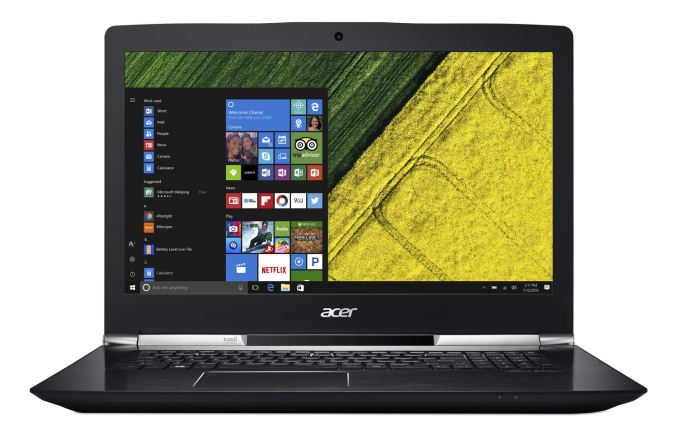
In addition to the new Acer Predator 21 X, Acer has also announced updates for their gaming notebooks that will be in the budget of more of the earth. Acer is announcing a new V Nitro 15 and V Nitro 17, along with an updated Predator 17 X, and a new value line in the VX 15. V Nitro Black Edition
The new V Nitro Black Edition laptops come in two flavors, with both a 15.6 and 17.3-inch model. Both feature IPS displays, with a base offering of 1920x1080 and optional 3840x2160. They have been updated to the latest Intel Core i5-7300HQ or i7-7700HQ 45-Watt quad-core processors, and graphics are either the GTX 1060, or GTX 1050 Ti. There are two SODIMM slots, and Acer offers up to 16 GB of memory which can be expanded to 32 GB if you buy your own RAM. Storage options include both SSD and HDD options, with the SSD as the boot drive. SSDs are either 256 GB or 512 GB of PCIe NVMe, or 128/256/512 GB SATA SSDs. The 15.6-inch model can be had with 500GB/1TB/2TB 5400 rpm hard drive options, and the 17.3 is just the 1 TB model. Cooling is provided by two fans, and buyers who purchase the GTX 1060 model will have one of those fans be an AeroBlade metal fan, and Acer has their DustDefender and CoolBoost tech to help keep things clean and cool.
Both models feature a USB 3.1 Gen 2 port with Thunderbolt 3, and DisplayPort over USB-C. There is also two USB 3.0 ports, and two USB 2.0 ports, along with Ethernet and HDMI (which is likely 2.0 but it’s not specifically stated). There is also a SD card reader. Acer includes a fingerprint reader for Windows Hello, and it’s built into the track-pad. Power is provided by either a 135-Watt adapter, or 180-Watt adapter depending on the GPU, and there is a 52.5 Wh battery or 70 Wh battery as well. The V Nitro 15 weighs 2.5 kg with the small battery, or 2.6 kg with the large battery, and the V Nitro 17 weighs 3.1 kg or 3.2 kg. The V Nitro 15 Black Edition goes on sale in February starting at $1199, and the larger V Nitro 17 Black Edition starts at $1399. Predator 17 X
Acer’s Predator line is their high-end gaming line, and the 17.3-inch Predator 17 X is near the top of the stack. It’s been updated with the latest Intel Core i7-7700HQ, or i7-7820HK CPUs, along with the NVIDIA GeForce GTX 1080 GPU. This notebook can handle up to 64 GB of DDR4-2400 with four SODIMMS slots, and there is NVMe PCIe storage or SATA SSD in RAID 0, complimented by an optional HDD for bulk storage. The backlit keyboard offers four zones of color options, and there are four speakers, and two subwoofers. Thunderbolt 3 is available as well, along with four USB 3.0 ports, DisplayPort, HDMI 2.0 w/HDCP, Ethernet, headset jack, and an 88 Wh battery. This updated Predator 17 X will be available this month starting at $2599. Aspire VX 15
It’s difficult to get into a gaming laptop for less than $1000, so when Acer launches a new product into this market, it’s great to see. The new VX 15 is a 15.6-inch notebook with a 1920x1080 IPS display, and it doesn’t skimp on the gaming power either. The base model offers an Intel Core i5-7300HQ quad-core processor, or you can opt for a Core i7-7700HQ as well. Graphics are provided by either the NVIDIA GeForce GTX 1050, or GTX 1050 Ti, both which offer 4 GB of GDDR5 RAM. Acer will provide up to 16 GB of DDR4, but there are two SODIMM slots so you can upgrade to 32 GB of needed, and storage is 128/256/512 GB SATA SSDs, and a 1 TB HDD. There is a USB 3.1 port, although it’s limited to USB 3.0 speeds, and two more USB 3.0 ports, plus a USB 2.0 port. There’s a SD card reader, and HDMI output. The 52.5 Wh battery likely isn’t going to get you Ultrabook levels of battery life, but it should get a couple of hours off the mains, and there is an Intel Dual Band Wireless-AC 8265 wireless adapter for solid connections.
The laptop weighs 5.51 lbs, or 2.5 kg, and measures 1.14 inches thick, or 28.9 mm. The best part? It starts way under $1000, with a $799 starting price. Availability is January. Souce: Acer
| |||||||||||||||||||||||||||||||||||||||
| 12:00p | Acer Announces The GX Series Gaming Desktops
While gaming laptops seem to get most of the attention, for some of us, desktops are the only way to go. You can get more performance, more storage, more RAM, and a quieter system in a well-built desktop. Today Acer is announcing the GX Series of gaming desktops for those looking for the additional capabilities of a desktop system.
Acer hasn’t provided a lot of details, so we may have to wait and see what they have at their booth at CES, but these gaming desktops feature Intel Kaby Lake processors, up to 64 GB of DDR4, and NVIDIA GTX 1070 graphics. Acer calls them VR Ready, and with a big GPU like the GTX 1070, they are right. On the storage side, most desktops tend to skip the SSD option, but the GX Series offers up to 256 GB of SSD, and a 3 TB HDD. Acer also has built-in a wireless charging deck to keep your mobile devices juiced when doing some gaming. It seems like it can’t be a gaming system without some LED lighting, and Acer has this covered too with font-facing lighting offering a “sinister red glow”.
The Aspire GX will be available in EMEA in February, starting at €799, and in China starting at ¥5,999. Source: Acer | |||||||||||||||||||||||||||||||||||||||
| 12:01p | The Intel Core i5-7600K (91W) Review: The More Amenable Mainstream Performer The Core i5-7600K, launched today, is the other unlocked processor from Intel’s 7th Generation line of Kaby Lake Processors. Kaby Lake is Intel’s third set of processors at 14nm, using the new 14+ process variant, which aims to give processors with a better frequency-voltage curve that translates into more performance, better efficiency, and the potential to push the silicon further and harder. Here is our review. | |||||||||||||||||||||||||||||||||||||||
| 12:01p | The Intel Core i7-7700K (91W) Review: The New Out-of-the-box Performance Champion The Core i7-7700K, launched today, is Intel's fastest ever consumer grade processor. Using Intel’s third set of processors at 14nm, using the new 14+ variant, we get processors with a better frequency-voltage curve that translates into more performance, better efficiency, and the potential to push the silicon further and harder. Here is our review. | |||||||||||||||||||||||||||||||||||||||
| 12:01p | Intel Launches 7th Generation Kaby Lake: 15W/28W with Iris, 35-91W Desktop and Mobile Xeon The death of Intel’s ‘Tick-Tock’ means that Kaby Lake is Intel’s third crack at their 14nm process. 14nm started with Broadwell (5th Gen, tick), introduced a new microarchitecture with Skylake (6th Gen, tock), and now is in the ‘optimization’ stage with Kaby Lake (7th Gen). This means an improved ‘14nm Plus’, offering better power efficiency and higher frequencies through a less strained transistor floorplan. Intel is launching a myriad of SKUs under Kaby Lake, ranging from mobile KBL-U at 15W and 28W through mobile KBL-H at 45W and desktop-class KBL-S at 35W to 91W. This includes three overclocking SKUs for desktop, including an i3 variant. Here’s the front page of AnandTech’s Kaby Lake launch coverage. | |||||||||||||||||||||||||||||||||||||||
| 4:42p | CES 2017 Honor Double Or Nothing Live Blog We're here at the Honor Double or Nothing event at CES 2017! | |||||||||||||||||||||||||||||||||||||||
| 4:55p | Hands On With the Huawei Honor 6X
Last year at CES, Honor announced a new mid-range smartphone, the Honor 5X, for the US market that aimed to bring premium smartphone features to a lower price point. The SoC and display were in line with expectations given the price, but it also had an aluminum unibody design, a fairly good camera, and a fingerprint scanner that, at the time, were mostly seen in high-end designs costing ~600 USD rather than ~250 USD.
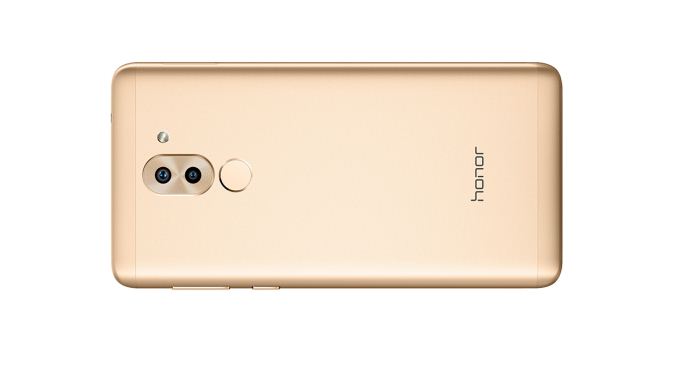
This year at CES 2017, Huawei announced that it’s bringing the Honor 6X to the US, which includes several improvements over its predecessor. It still uses an aluminum unibody construction, but it feels much more sturdy than the Honor 5X, giving it a more premium feel. The rounded corners and sides make it comfortable to hold, but also a little slippery when combined with the sandblasted finish.
The Honor 6X still uses plastic RF windows along the top and bottom on the back, like so many other Huawei designs. The plastic has a similar texture to the metal back, but the color is a little off, interrupting the smooth lines and otherwise attractive design. The capacitive fingerprint sensor on the back supports EMUI’s “touch and hold” and slide gestures, which allow you to optionally snap a photo, answer a call, or stop an alarm by holding a finger to the sensor. Sliding a finger vertically across the sensor lowers and raises the notification shade.
There’s a single-piece volume rocker and power button on the right edge that give a decent click when pressed, and there’s a 3.5mm headphone jack and noise cancelling microphone on the top edge. It’s a bit puzzling to see a microUSB port on the bottom as USB Type-C is pretty ubiquitous at this point. To its right is the single downward firing speaker.
The entire front is covered in glass, which is slightly bevelled along the edges. A plastic screen protector comes pre-applied, although it does not reach all the way to the edges. The 5.5-inch 1080p IPS LCD display has a standard sRGB color gamut and a rather cool white point that gives the screen a blue tint. Huawei lists the peak brightness at 450 nits.
Inside is a Kirin 655 SoC paired with either 3GB or 4GB of LPDDR3 RAM. It’s interesting to note how Huawei is becoming more vertically integrated, using its Kirin SoCs in more of its products. With eight Cortex-A53 CPU cores and a 16nm FinFET process, the Kirin 655 should provide good power efficiency. Internal storage gets a boost from 16GB in the Honor 5X to either 32GB or 64GB, which can be expanded with a microSD card. The 6X also gets an 11% larger battery, but unfortunately the wireless connectivity remains the same, only supporting up to 2.4GHz 802.11n Wi-Fi. On the camera side of things, the 12MP rear camera has slightly larger pixels than most phones in this segment, and also adds some neat features like PDAF that are generally only seen in higher-end devices. The depth camera is nothing particularly special here and as a result the setup looks a lot like the HTC One M8 from previous generations, especially when it comes to background defocus performance as the accuracy with which it does the background blur and how it handles progressive defocus is not particularly clean. Thankfully unlike the Honor 5X which had a fairly low frame rate preview the Honor 6X does a lot better here and has much better focus thanks to the addition of PDAF. It's also fairly obvious that the luminance noise reduction is fairly aggressive here but we'll have to see just how much of a problem it really is with a full review. The Honor 6X will be available in gold, gray, and silver with a few different memory and storage configurations. The 3GB version, which starts at $249.99, will be available for pre-order in the US on January 4 and will begin shipping January 15. It will also be available in France, Germany, Italy, Spain, United Kingdom, the Netherlands, Russia, Malaysia, the United Arab Emirates, and Saudi Arabia starting January 4 for 249 EUR. The 4GB version won’t be available until later in the first quarter and will cost $299.99 or 299 EUR. | |||||||||||||||||||||||||||||||||||||||
| 5:00p | Qualcomm Details Snapdragon 835: Kryo 280 CPU, Adreno 540 GPU, X16 LTE Qualcomm’s Snapdragon 835 is the first mobile SoC to use Samsung’s new 10nm FinFET process. It includes a number of updates, including a revamped CPU configuration, that promise to deliver better performance and power efficiency relative to the Snapdragon 820. With its focus on heterogeneous computing, the Snapdragon 835 brings advanced capabilities to virtual reality, photo and video capture, video playback, and machine learning. | |||||||||||||||||||||||||||||||||||||||
| 6:00p | AMD Announces FreeSync 2: Easier & Lower Latency HDR Gaming
Though they don’t get quite as much ongoing attention as video cards due to their slower update cadence, one of the nicer innovations in the last few years in the gaming hardware ecosystem has been variable refresh displays. By taking displays off of a fixed refresh rate and instead coupling it to the frame rate, the state of gaming on the PC has become a lot more pleasant, especially in the irksome area between 30 and 60 frames per second. As it was NVIDIA to make the first move here in 2013, AMD only ended up rolling out their own variable refresh solution in 2015. Under the brand name FreeSync, AMD leveraged the VESA’s optional DisplayPort Adaptive-Sync standard to offer variable refresh in conjunction with the major monitor manufacturers. The fact that AMD was second to the market didn’t dampen their enthusiasm (or customers’) too much, but it did mean that until recently they were playing catch-up with NVIDIA on extra features. AMD finally reached (practical) feature parity with NVIDIA just last month when they added support for borderless windowed mode. But now that AMD has caught up with NVIDIA, their attention is quickly shifting to what they need to do to get ahead and where they can go next. Which is a harder area to tackle than may at first be apparent; variable refresh is a fundamental feature, and once you have support for it, it shouldn’t require constant fiddling. The end result is that for their next monitor technology initiative, AMD is tackling more than just refresh rates. Looking to address the high-end market with a new solution for both HDR and variable refresh, today AMD is taking wraps off of this initiative: FreeSync 2. FreeSync 2: HDR Done BetterTrying to explain FreeSync 2 can get a bit tricky. Unlike the original FreeSync that it takes its name from, it’s a multi-faceted technology: it’s not just variable refresh, instead it’s HDR as well. But it’s also a business/platform play in a different way than FreeSync was. And while strictly speaking it’s a superset of FreeSync, it is not meant to replace FreeSync wholesale. Perhaps the best way to think of FreeSync 2 is that it’s a second, parallel initiative that is focused on what AMD, its monitor partners, and its game development partners can do to improve the state of high-end monitors and gaming. In terms of features then, what is easily the cornerstone feature of Freesync 2 – and really its reason to be – is improving support for HDR gaming under Windows. As our own Brandon Chester has discussed more than once, the state of support for next-generation display technologies under Windows is mixed at best. HiDPI doesn’t work quite as well as anyone would like it to, and there isn’t a comprehensive & consistent color management solution to support monitors that offer HDR and/or color spaces wider than sRGB. The Windows 10 Anniversary Update has improved on the latter, but AMD is still not satisfied with the status quo on Windows 10 (never mind all the gamers still on Windows 7/8). As a result FreeSync 2 is, in part, their effort to upend the whole system and do better. For all of its strengths as a platform, this is an area where the PC is dragging compared to consoles – the PlayStation 4 was able to add functional & easy to use HDR10 support to all units as a simple software update – so for AMD they see an opportunity to improve the situation, not only making HDR support more readily available, but improving the entire experience for gamers. And to do this, AMD’s plans touch everything from the game engine to the monitor, to make HDR the experience it should be for the PC.
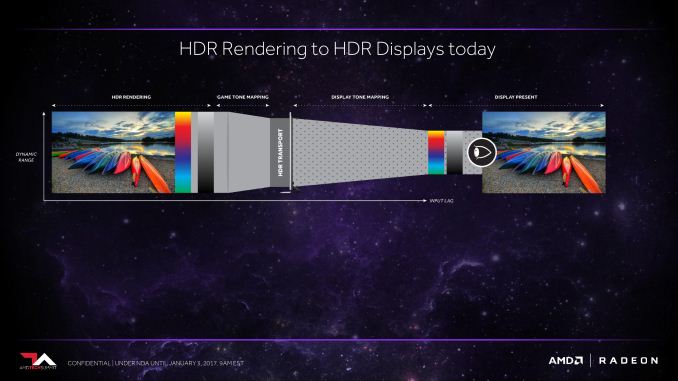
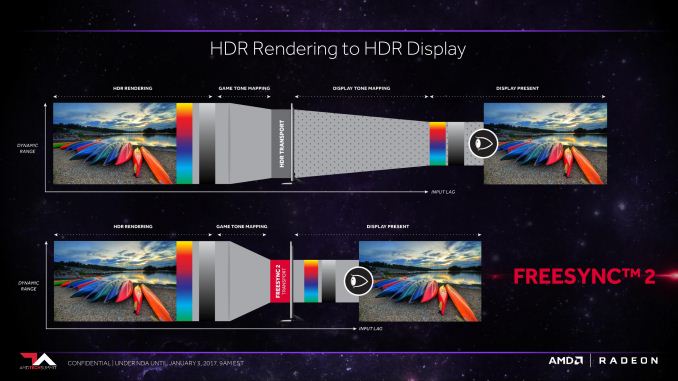
Diving into the technical details then, AMD’s solution is essentially a classic one: throw out what isn’t working and make something that works better. And what isn’t working right now? As mentioned before, Windows doesn’t have a good internal HDR display pipeline, making it hard to use HDR with Windows. Meanwhile HDR monitors, though in their infancy, have their own drawbacks, particularly when it comes to input lag. The processors used in these monitors aren’t always capable of low-latency tone mapping to the monitor’s native color space, meaning using their HDR modes can add a whole lot of input lag. And worse, current HDR transports (e.g. HDR10) require tone mapping twice – once from the application to the transport, and second from the transport to the native color space – so even if a monitor has a fast processor, there’s still an extra (and AMD argues unnecessary) step in there adding input lag. FreeSync 2 then attempts to solve this problem by upending the whole display pipeline, to get Windows out of the way and to offload as much work from the monitor as possible. FreeSync 2 in this respect, is essentially an AMD-optimized display pipeline for HDR & wide color gamuts, in order to make HDR easier to use and better performing as well.
The FreeSync 2 display pipeline as a result is much shorter (i.e. lower latency), and much more in AMD’s control. Rather than the current two-step process, AMD proposes to have a single step process: games tone map directly to the native color space of a FreeSync 2 compliant monitor, AMD’s drivers and hardware pass that along, and then the monitor directly accepts the display stream without further intensive processing. The end result is that latency is potentially significantly reduced by removing the second tone mapping step from the process.
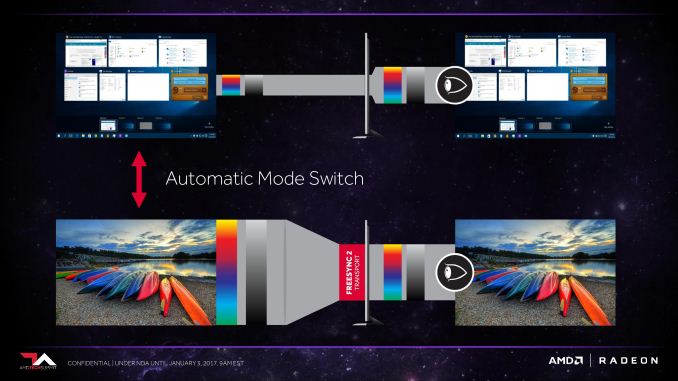
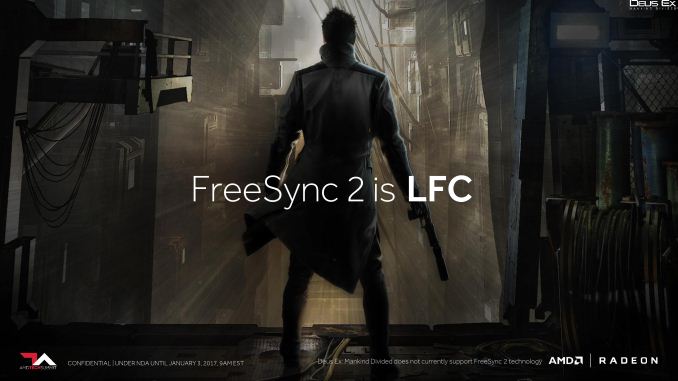
Meanwhile on the usability side, AMD’s drivers and FreeSync 2 monitors would implement a form of automatic mode switching. The idea here being that Windows in its current form really doesn’t like anything other than sRGB, so for desktop use, users are better off with their monitor in this mode. However when a FreeSync 2-compatible game is fired up, the monitor and AMD’s drivers would then switch over to the native color space automatically, and back again when going back to the Windows desktop. The ultimate idea here being to make it easier use HDR and wide color gamuts when feasible, and sRGB when not. Overall, this sounds like a reasonable solution to making HDR work in the short-term. AMD can’t fix Windows’ handling of HDR or wide color gamuts – you still don’t have a truly color managed environment on the Windows desktop for windowed applications – but it would be an improvement over the current situation by letting games and other applications call for something better than sRGB when they’re being used in fullscreen exclusive mode. However to make all of this work, AMD will need to bring together both display manufacturers and game developers, and this is likely to be the trickiest part of AMD’s plan for FreeSync 2. Under the hood, AMD makes this shortened display pipeline work by having games tone map directly to a monitor’s native space, but to do so games need to know what the specific capabilities are of the attached monitor; what color space it can render to, and over what brightness range. This isn’t something Windows’ APIs currently support, and that means AMD has to provide a FreeSync 2 API instead. And that means AMD needs to get developers on-board. The good news for AMD (and developers) is that the actual implementation of FreeSync 2 should be quite simple since most games are already rendering in HDR and tone mapping to at least SDR to begin with. Game developers only need to query for the API, tone map to the specifications AMD provides, and then from there it’s AMD and the monitor’s problem. But counting on developers to do anything extra for PC games is always a risk, one that has hurt initiatives in the past. For their part, AMD will be doing what they can: focus on the upstream engines and developer relations/evangelism. By getting FreeSync 2 support added to major engines like Unreal Engine and Unity, AMD makes it much easier for downstream developers to adopt FreeSync 2. Beyond that, it’s about convincing developers that supporting FreeSync 2 will be worth their while, both in terms of sales and improving the customer experience. On the flip side of the coin, getting monitor manufacturers on-board should be relatively easy. AMD’s original FreeSync effort was extremely successful here (to the tune of 121 FreeSync monitors), in part because AMD made it such an easy feature to add, and they are aiming for something similar with FreeSync 2. It doesn’t sound like display controllers need to be substantially altered to support FreeSync 2 – they just need to have a tone mapping bypass mode and understand requests to switch modes – which would make it easy for the monitor manufacturers to add support. And for their part, the monitor manufacturers like features like FreeSync because they can be easily implemented as value add features that allow a monitor to be sold for a higher price tag. On a final note, while the FreeSync 2 initiative as-planned requires game developers to buy into the ecosystem by supporting the related API, I did take a moment to ask AMD about whether they could do anything to better support games that might offer HDR support but not use AMD’s API. The answer, unsurprisingly, was “no comment”, but I got the distinct impression that it’s a question AMD has considered before. Without direct API support there’s still a need to do tone-mapping twice, and that would negate some of the latency benefits, but AMD could still potentially do it a lot faster than the display processors in some monitors. If AMD were to struggle with developer adoption, then that alone could still make FreeSync 2 worth it. FreeSync 2: Tighter Standards for Variable RefreshEarlier I mentioned that FreeSync 2 is really a collection of several idea/features, and while HDR is certainly the marquee feature of FreeSync 2, it’s not the only feature. With FreeSync 2 AMD will also be tightening the standards for what variable refresh functionality that approved monitors need to support. The open nature of FreeSync has led to a large number of monitors that support the technology across a wide range of prices, but it has also led to a wide variety in how useful their FreeSync implementations are. A number of basic monitors on the market only support a range of 30Hz to 60Hz, for example. And while this is still useful, such a narrow range means that these monitors don’t deliver a very good experience below their minimum refresh rate. These monitors can’t support FreeSync’s Low Framerate Compensation (LFC) technology, which requires the maximum framerate to be at least 2.5x the minimum framerate (or 75Hz for our 30Hz monitor).
As a result, AMD has tightened the standards for FreeSync 2. All FreeSync 2 certified monitors will be required to support LFC, which in turn means they’ll need to support a wide enough range of refresh rates to meet the technology’s requirements. Consequently, anyone who buys a FreeSync 2 monitor will be guaranteed to get the best variable refresh experience on an AMD setup, as opposed to the less consistent presence of LFC on today’s FreeSync monitors.
Similar to this and AMD’s HDR efforts with FreeSync 2, AMD will also be mandating a general low latency requirement for the new standard. It’s not fully clear just what this will entail, but at a high-level AMD is going to require that monitors be low latency in SDR mode as well as HDR. FreeSync 2: A Focus on the High-EndThe final shift in FreeSync 2 – and really what makes it a parallel effort as opposed to a replacement for FreeSync 1 – is how AMD will be approaching the market. The costs of meeting the HDR and variable refresh requirements for FreeSync 2 means that this is very much a play at the high-end monitor market. Budget monitors won’t be able to meet these requirements (at least not right away), so AMD’s focus is going to be on the high-end of the market. The significance, besides the parallel standards, is that it will impact how AMD goes about certifying monitors, and potentially how “free” FreeSync 2 ends up being. The additional requirements mean that AMD will need to run a more complex certification program. They will need to bring in monitors to profile their native color space and confirm they meet the latency & refresh requirements. All of which cost time and money for AMD. As a result, when questioned on the matter, AMD is not currently commenting on the subject of FreeSync 2 royalties. Presumably, AMD is pondering the idea of charging royalties on FreeSync 2 hardware. The subject of royalties on gaming hardware is not a very happy subject, nor is it one that too many companies like to talk about. NVIDIA for their part does charge manufacturers a form of royalties on their G-Sync technology – this being part of the impetus for AMD calling their variable refresh implementation FreeSync – and while no one will go on record to confirm the numbers, what rumblings I’ve heard is that G-Sync is “not cheap.” But numbers aside, at the end of the day this makes variable refresh a value add feature for NVIDIA just as much as it does their monitor manufacturer partners, as they profit from the sale of G-Sync monitors. At the same time it also means that the ongoing development of G-Sync is self-sustaining, as the program can now be funded from G-Sync royalties. There are a number of assumptions in here, but ultimately the fact that AMD isn’t immediately rejecting the idea of royalties could prove to be a very important one. Royalties at a minimum would help fund the certification program, and taken to the same extent as NVIDIA could become another revenue stream entirely. And since FreeSync 2 is aimed at high-end monitors, it would allow AMD to claim a piece of the pie on their own value add feature, as high-end monitors can fetch a significant profit of their own. Negatively however, it would also likely push FreeSync 2 monitor prices up, making them less affordable. At any rate, while AMD is pondering royalties on FreeSync 2, they won’t be giving up on the free-as-in-speech aspects of FreeSync 2. AMD tells us they will still be pushing for technological openness so that everyone can see how FreeSync 2 works, even if ultimately AMD decides to charge monitor manufacturers to make it work with their video cards. Ultimately, where exactly we’ll end up remains to be seen, as AMD is very much still in the early stages of planning with FreeSync 2. Hardware Compatibility & First ThoughtsWrapping things up, now that we’ve covered the proposed feature set of FreeSync 2, let’s talk about hardware compatibility. AMD has repeatedly touted the flexibility of their more recent display controllers, and this is once again going to be the case when it comes to FreeSync 2. Because all of AMD’s FreeSync 1-capable cards (e.g. GCN 1.1 and later) already support both HDR and variable refresh, FreeSync 2 will also work on those cards. All GPUs that support FreeSync 1 will be able to support FreeSync 2. All it will take is a driver update. Admittedly I don’t see too many Radeon HD 7790 or R9 290X owners shelling out for what will likely be an expensive generation of HDR monitors, but it’s nonetheless neat to see that AMD will be able to bring that tech to older cards. More practically speaking, this means that recent buyers of the RX 480 and other Polaris cards won’t be left out in the cold once FreeSync 2 arrives. And when will FreeSync 2 arrive? The answer to that is a bit less clear. AMD is not setting any hard dates and is not announcing any monitors today. They are only announcing the start of the FreeSync 2 initiative. They still need to finish writing the necessary driver code and bring on both hardware and software partners. The nature of their presentation makes it sound like FreeSync 2 is something that should arrive this year. Certainly the timing is right given the impending launch of HDR-capable PC monitors. But as FreeSync 2 relies on a number of external factors, I suspect AMD wants to avoid making promises they can’t deliver on alone. In the meantime AMD’s initiative will definitely bear keeping an eye on. AMD is pushing the right buttons with their plan to improve the state of HDR gaming on the PC. If they and their partners can deliver on what they propose, then it would mean that HDR gaming on the PC would shine far more brightly than it otherwise would. Gallery: AMD FreeSync 2 Presentation
      | |||||||||||||||||||||||||||||||||||||||
| 7:00p | Linksys Enters Mesh Wi-Fi Market with Velop Whole Home Wi-Fi, Expands MAX-STREAM Lineup
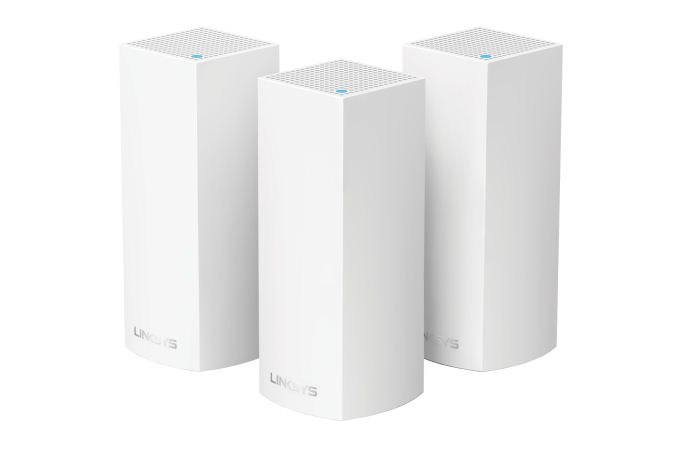
Linksys has updates in three different product lines as part of CES 2017. The new product line is the Velop Whole Home W-Fi mesh networking kit. Linksys is definitely late to the mesh party, but, the delay has enabled them to put in the most important set of features present in the currently available solutions. In the current market, Netgear's Orbi is undoubtedly one of the leading 'mesh' solutions. By placing a dedicated backhaul radio (4x4 802.11ac), and restricting the arrangement of the primary router and satellites to a star topology, Orbi provided excellent performance numbers. The adoption of Qualcomm Atheros's Wi-Fi SON firmware features also enabled a good user experience. Linksys adopts a similar platform on the software side as well as high-level operation (one channel for backhaul and another for client communication). On the hardware side, the main SoC is still the Qualcomm Atheros IPQ 4019. However, instead of having a 4x4 802.11ac backhaul radio using the QCA9984 like the Orbi, Linksys has opted to use the more economical 2x2 802.11ac QCA9886 radio. This makes the solution an AC2200-class one (we are seeing many routers in this class being launched at CES 2017). Like the Netgear Orbi, the Linksys Velop also supports beamforming, Wave 2 MU-MIMO capabilities, and can advertise itself as a 'tri-band' router.
Interestingly, the members in a Velop installation can have either wired or wireless backhaul. The wireless backhaul can be dynamically chosen based on the available communication channels (either of the 5 GHz bands or the 2.4 GHz band). This allows configuration in multiple mesh modes - point-to-point, real mesh, star, line, or tree. The self-healing aspects of Wi-Fi SON enable the most suitable path for communication in the case of a broken connection. In order to enable better performance with suitable antenna placement, the Velop units, like the Orbi, adopt a tower design. The industrial design, like that of most other mesh Wi-Fi kits, is attractive enough to not stow away in a closet (something that is very important for a good mesh Wi-Fi experience). Linksys is making the Velop available in 1-, 2- and 3-packs, starting today. The three kits are priced at $200, $350, and $500. Gallery: Linksys Velop Mesh Wi-Fi Node
   Given the hardware configuration and radio details, it looks like the Netgear Orbi might still take the performance crown for scenarios requiring around 2000 - 4000 sq. ft. of coverage. However, Velop brings across some very interesting features to the mesh market. In terms of ease of use, the product follows a mobile-first setup and usage process, as well as Amazon Alexa integration - features that are apt for the target market. The technical transparency also provides us with enough insight into the scenarios and use-cases in which it might be an effective option. Particularly, if a wired backhaul is possible, the Velop could turn out to be a very good candidate to extend Wi-Fi reach. Additional insights into the real-world performance of the Velop kits is definitely something to look out for in the near future. In other Linksys CES 2017 news, the MAXSTREAM lineup has gained some additional members - the Max-Stream AC2200 Tri-Band MU-MIMO Gigabit Router (EA8300) is the single router version of the Velop platform. The same SoC and radios are used to provide two 5 GHz SSIDs and one 2.4 GHz SSID. The router comes with 256MB of DDR3 RAM and 256MB of flash memory. Availability is slated for Spring 2017, with a MSRP of $200.
The Linksys EA8300 The Max-Stream AC4000 Tri-Band MU-MIMO Gigabit Router (EA9300) is one of the first routers based on the next-generation Broadcom network processor with a 1.8 GHz ARM v8 quad-core CPU, the BCM4908. It supports the Broadcom XStream configuration (two 5 GHz bands and one 2.4 GHz band) with Wave 2 MU-MIMO capabilities. The radio used in the EA9300 is the Broadcom BCM4365E. This appears to be a 3x3 variant of the BCM4366. Note that this radio supports the non-standard 1024 QAM for a 25% higher throughput number (1625 Mbps in each 5 GHz band for a 3x3 configuration, compared to 1300 Mbps for the standard 3x3 configuration with 80 MHz channels). The 2.4 GHz band also supports up to 750 Mbps with this proprietary scheme, allowing for the router to be advertised as AC4000 (1625 + 1625 + 750 Mbps). Availability is slated for Spring 2017, with a MSRP of $300.
The Linksys EA9300 Both the EA8300 and the EA9300 work with Amazon Alexa for a voice-activated experience. Linksys has put extra focus in the Android / iOS apps for a mobile-first setup and management process. They are also designed to provide a seamless roaming experience with a single SSID and easy connection to the Max-Stream lineup of range extenders. Linksys is also bringing a Wave 2 MU-MIMO 2x2 USB 3.0 WLAN adapter to the market with the WUSB6400M. It is also slated to come to the market in Spring 2017. The MSRP will be $60. Additional MU-MIMO client nodes can help consumers take full advantage of their MU-MIMO routers. These types of USB adapters are important for the MU-MIMO ecosystem.
On the cable modem side, Linksys is also planning to launch a DOCSIS 3.1 version - the CM3132 with 32 downstream and 8 upstream channels. In terms of the core platform, it is similar to Netgear's CM1000, which is already in the market. However, the CM3132 differentiates itself with the availability of two Ethernet ports (unlike the single one in the Netgear CM1000). Availability is slated for Spring 2017, and the MSRP will be $200. | |||||||||||||||||||||||||||||||||||||||
| 9:07p | Dell Releases The XPS 13 2-in-1 Convertible Ultrabook: Infinity Utility
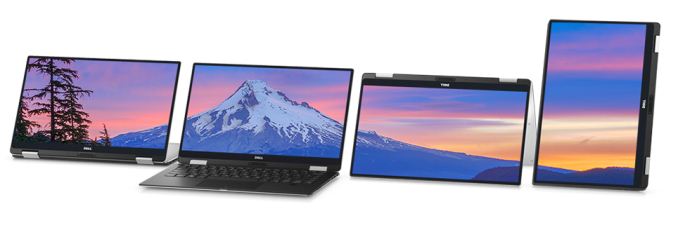
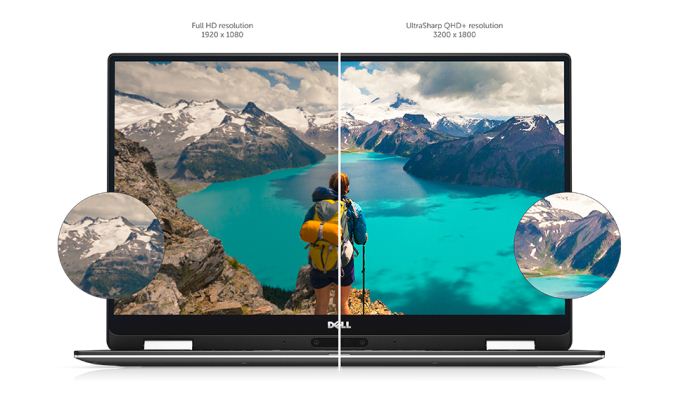
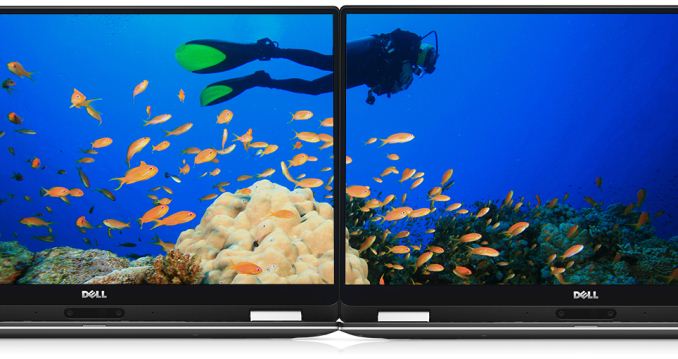
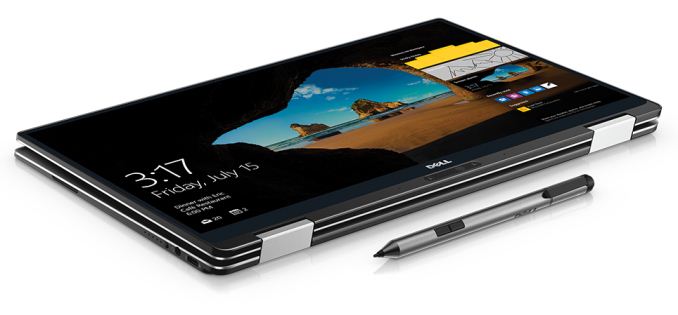
Today Dell launched a new product in its XPS lineup, building on the success of the XPS 13 Ultrabook. The new XPS 13 2-in-1 laptop offers much of the same experience of the Infinity Display XPS 13 notebook, but with the added utility of a 360° hinge. The convertible notebook category has been one of the bright spots in the PC industry as of late, and Dell has had many entrants into this field, but going with the Infinity Display based XPS 13 as a basis is certainly a great looking take on this product category. It’s built out of the same brushed aluminum and carbon fibre as the clamshell XPS 13, and it keeps the same 13.3-inch IGZO IPS display offerings as well. The base model comes with a 1920x1080 panel, and there is also a 3200x1800 version. The lower resolution model will increase battery life, but for those that like sharp images, the 276 pixels per inch is tough to ignore. There is no UHD offering, but on a smaller notebook like this, 3200x1800 is likely enough without seriously taxing the power requirements.
The original XPS 13 set new records for battery life, and the 2-in-1 promises to live up to those lofty goals. Dell is claiming up to 15 hours of battery life out of the 46 Wh battery when doing productivity tasks, or 13 hours streaming Netflix. This is helped along very much by the inclusion of Intel Core Y series processors, which have a maximum TDP of 4.5-Watts. There are both Core i5-7Y54 and Core i7-7Y75 processor choices.
The base model comes with 4 GB of LPDDR3 1866 MHz memory, and on Dell.com you can also find an 8 GB model. Dell offers 128/256/512 GB PCIe storage options as well, and they are using the Intel 8265 802.11ac wireless card on this model, rather than the Killer NIC found on the normal XPS 13. Dell has gone all USB-C on this model, with two USB-C ports on the notebook, as well as Thunderbolt 3. They’ve also kept some other IO as well, including a micro SD card slot, and a headset jack. For those that need USB A ports, Dell has included an adapter in the box. The XPS 13 also has support for an active digitizer, and they offer a pen with 2048 levels of sensitivity, joining the growing number of devices that support Windows Ink. They also support Windows Hello with a built-in fingerprint reader.
Convertible notebooks can be a problem if they get too large, and too heavy, but the XPS 13 2-in-1 does a decent job keeping slim, with an 8-13.7 mm thick chassis (0.32-0.54) and weighing 1.24 kg (2.7 lbs). The one side effect of Dell’s Infinity Display is the poor placement of the webcam, and that’s still an issue with this notebook. The good news is you can flip it into tent mode if necessary, but for heavy users of webcams, this may not be ideal. Overall, the XPS 13 2-in-1 looks like a great addition to the XPS lineup, and offers a nice choice for a thin and light convertible. The Y series CPUs should mean that its fanless, and clamping the TDP raises the efficiency quite a bit. This space is getting very crowded with great devices, but it’s hard to complain about that. The new Dell XPS 13 2-in-1 is available to order now, starting at $999. Source: Dell
| |||||||||||||||||||||||||||||||||||||||
| 9:07p | Dell Releases The XPS 13 2-in-1 Convertible Ultrabook: Infinity Utility
Today Dell launched a new product in its XPS lineup, building on the success of the XPS 13 Ultrabook. The new XPS 13 2-in-1 laptop offers much of the same experience of the Infinity Display XPS 13 notebook, but with the added utility of a 360° hinge. The convertible notebook category has been one of the bright spots in the PC industry as of late, and Dell has had many entrants into this field, but going with the Infinity Display based XPS 13 as a basis is certainly a great looking take on this product category. It’s built out of the same brushed aluminum and carbon fibre as the clamshell XPS 13, and it keeps the same 13.3-inch IGZO IPS display offerings as well. The base model comes with a 1920x1080 panel, and there is also a 3200x1800 version. The lower resolution model will increase battery life, but for those that like sharp images, the 276 pixels per inch is tough to ignore. There is no UHD offering, but on a smaller notebook like this, 3200x1800 is likely enough without seriously taxing the power requirements.
The original XPS 13 set new records for battery life, and the 2-in-1 promises to live up to those lofty goals. Dell is claiming up to 15 hours of battery life out of the 46 Wh battery when doing productivity tasks, or 13 hours streaming Netflix. This is helped along very much by the inclusion of Intel Core Y series processors, which have a maximum TDP of 4.5-Watts. There are both Core i5-7Y54 and Core i7-7Y75 processor choices.
The base model comes with 4 GB of LPDDR3 1866 MHz memory, and on Dell.com you can also find an 8 GB model. Dell offers 128/256/512 GB PCIe storage options as well, and they are using the Intel 8265 802.11ac wireless card on this model, rather than the Killer NIC found on the normal XPS 13. Dell has gone all USB-C on this model, with two USB-C ports on the notebook, as well as Thunderbolt 3. They’ve also kept some other IO as well, including a micro SD card slot, and a headset jack. For those that need USB A ports, Dell has included an adapter in the box. The XPS 13 also has support for an active digitizer, and they offer a pen with 2048 levels of sensitivity, joining the growing number of devices that support Windows Ink. They also support Windows Hello with a built-in fingerprint reader.
Convertible notebooks can be a problem if they get too large, and too heavy, but the XPS 13 2-in-1 does a decent job keeping slim, with an 8-13.7 mm thick chassis (0.32-0.54) and weighing 1.24 kg (2.7 lbs). The one side effect of Dell’s Infinity Display is the poor placement of the webcam, and that’s still an issue with this notebook. The good news is you can flip it into tent mode if necessary, but for heavy users of webcams, this may not be ideal. Overall, the XPS 13 2-in-1 looks like a great addition to the XPS lineup, and offers a nice choice for a thin and light convertible. The Y series CPUs should mean that its fanless, and clamping the TDP raises the efficiency quite a bit. This space is getting very crowded with great devices, but it’s hard to complain about that. The new Dell XPS 13 2-in-1 is available to order now, starting at $999. Source: Dell
|






 Acer wp_575px.jpg)











| << Previous Day |
2017/01/03 [Calendar] |
Next Day >> |