[Most Recent Entries] [Calendar View]
Wednesday, January 4th, 2017
- AC2200 class of products with a 2x2 802.11ac radio such as the QCA9886 connected to the PCIe interface (resulting platform has a 2x2 2.4 GHz radio (400 Mbps with 256QAM) and two 2x2 5 GHz radios (866 Mbps + 866 Mbps))
- AC3000 class of products with a 4x4 802.11ac radio such as the QCA9984 connected to the PCIe interface (resulting platform has a 2x2 2.4 GHz radio (400 Mbps with 256QAM), a 2x2 5 GHz radio (866 Mbps) and a discrete 4x4 5 GHz radio (1733 Mbps))
- ZOTAC Announces GeForce GTX 1080 for Mini-ITX PCs
- ZOTAC Launches GeForce GTX 1070 Mini for Mini-ITX PCs
- ASUS ROG XG Station 2 eGFX Enclosure with Thunderbolt 3 Launched
- AKiTiO Introduces Node: Thunderbolt 3 eGFX Box for $299
- PowerColor Announces Devil Box: Thunderbolt 3 eGFX Enclosure
- Razer Core Thunderbolt 3 eGFX Chassis: $499/$399, AMD & NVIDIA, Shipping In April
- More on AMD’s XConnect Tech: Thunderbolt 3 for External Radeons
- FLIR One family : The third generation FLIR One and FLIR One Pro for Android and iOS
- FLIR Duo and Duo R : Thermal and visible camera combo in a GoPro form-factor, suitable for mounting on drones
- FLIR C3 : Rugged and pocket-sized touchscreen thermal camera for professionals.
- ASRock X370 Taichi
- ASRock X370 Gaming K4
- ASRock AB350 Gaming K4
- ASRock A320M Pro 4
- ASUS B350M-C
- Biostar X370GT7
- Biostar X350GT5
- Biostar X350GT3
- GIGABYTE AX370-Gaming K5
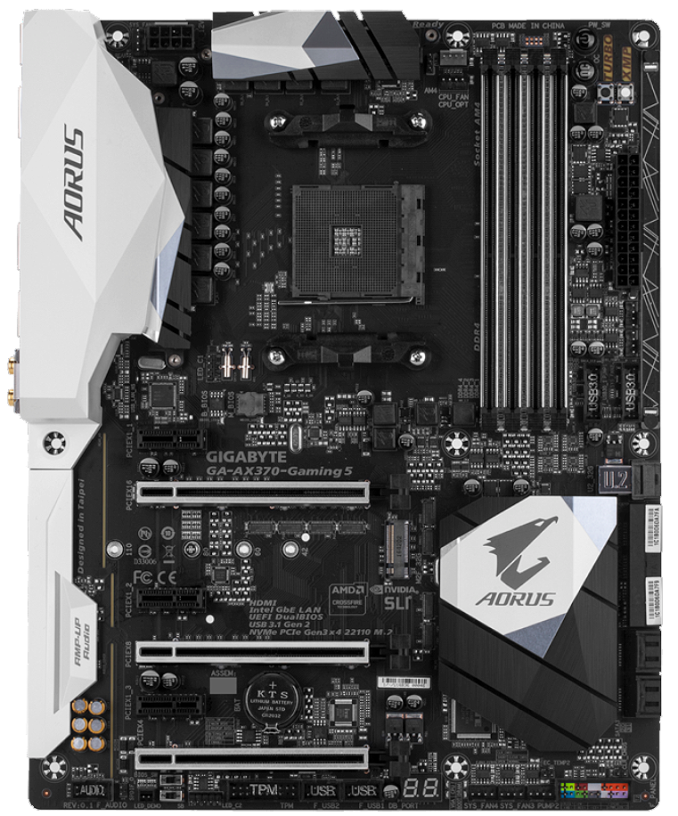
- GIGABYTE AX370-Gaming 5
- GIGABYTE AB350-Gaming 3
- GIGABYTE A320M-HD3
- MSI X370 XPower Gaming Titanium
- MSI B350 Tomahawk
- MSI B350M Mortar
- MSI A320M Pro-VD
| Time | Event | ||||||||||||||||||||||||||||||||||||||||||||||||||||||||||||||||||||||||||||||||||||||||||||||||||||||||||||||||||||||||||||||||||||||||||||||||||||||||||||||||||
| 1:50a | NVIDIA Launches GeForce GTX 1050 TI & GTX 1050 For Laptops
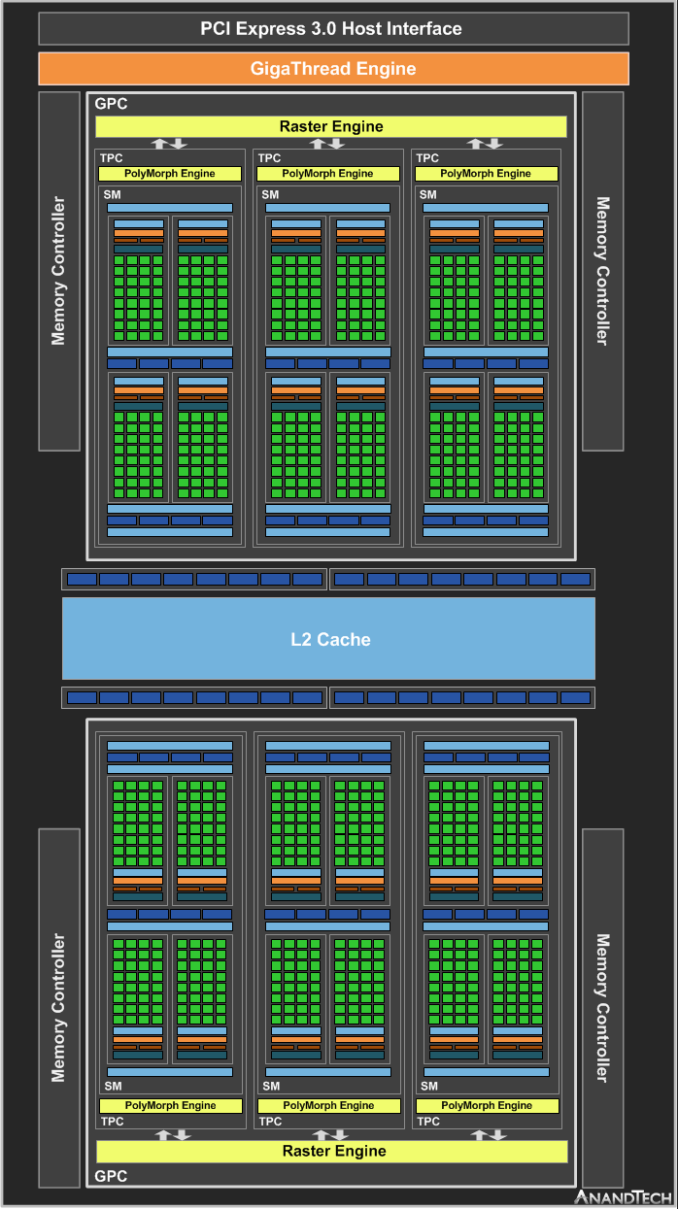
With CES kicking off this week, we have a spate of laptop-related announcements. As Intel is launching their Kaby Lake quad core (4+2) SKUs for laptops, so too are new video cards are being launched to use in those systems. To that end, today NVIDIA is taking the wraps off of their latest mobile video cards, the GTX 1050 Ti and GTX 1050 for laptops. As you might recall from last summer, NVIDIA has reworked how they are positioning and promoting their laptop products starting with the GeForce 10 series. Rather than having separate laptop SKUs with their own (lower) specifications, the 10 series’ SKUs all have (nearly) the same specifications as their laptop counterparts. This means that the launch of most laptop parts has been shifted to something of a formality – we already know roughly what their specifications will be – but it still marks an important milestone for NVIDIA and their customers as these laptop parts finally become available. To that end, NVIDIA and their partners are launching the laptop versions of the GeForce GTX 1050 Ti and GTX 1050. The original desktop versions of these parts were launched back in late October, built using NVIDIA’s GP107 GPU. The successor to NVIDIA’s now-venerable GM107 that kicked off the Maxwell generation, GP107 is NVIDIA’s mainstream performance, high-volume GPU. And GTX 1050 Ti and GTX 1050 in turn are the formal SKUs that will be the backbone of a number of mainstream gaming-capable laptops.
Looking at the individual SKUs, the GTX 1050 Ti for laptops will be the full-fledged GP107 SKU. It ships with all 6 SMs enabled, for a total of 768 CUDA cores, just like its desktop counterpart. On the clockspeed front, officially it can boost up to 1620MHz; surprisingly this is some 228MHz (16%) higher than the desktop part it’s based on. NVIDIA has already played with the clockspeeds of some of the other laptop SKUs, so that it doesn’t match the desktop clockspeed isn’t unexpected, however this is the first time we’ve seen the clockspeeds increase like this. Unfortunately I don’t have a good answer right now to explain the difference. GP107 is something of a special chip to begin with – it’s the only Pascal chip made over at Samsung on their 14nm process – so it already throws out part of the rulebook. NVIDIA of course bins parts for laptop/desktop usage, so it may just be that the better chips being held back for laptops can clock so much higher, or it could be that Samsung is producing better chips since the initial batches that defined the desktop launch a few months ago. Either way laptop clockspeeds are a lot more variable from product-to-product regardless: the design of a laptop’s cooling system has a lot more to do with sustained clockspeeds than NVIDIA’s formal specifications. NVIDIA for their part doesn’t disclose the TDPs of their laptop SKUs, so it’s impossible to say just how much cooling is required to get close to the GTX 1050 Ti’s peak performance, but it’s likely not too far removed from the desktop part’s 75W TDP.
Moving on, paired up with the GP107 GPU in the GTX 1050 Ti for Laptops will be paired with 7Gbps GDDR5 for VRAM. As is usually the case with laptops, the amount of VRAM is an “up to” specification – in this case up to 4GB – so I’m expecting we’ll see both 2GB and 4GB laptops. This in turn is running on GP107’s 128-bit memory bus, so we’re looking at 112GB/sec of memory bandwidth. Also launching alongside the GTX 1050 Ti for Laptops is its lower-end sibling, the GTX 1050 for Laptops. As with the desktop part, this is a GP107 SKU with 5 of 6 SMes enabled, trading off about 17% of the shading/texturing/geometry hardware in exchange for lower prices. However past this point, it more significantly diverges from both its desktop counterpart and faster laptop sibling. NVIDIA has disabled half of the ROPs, leaving it with 16 ROPs instead of the full 32 ROPs found on GP107. To date this is the second time NVIDIA has shipped a GeForce 10 series for Laptops part with a different core configuration, and the first time that modification has been the ROPs (and is why we say laptop parts are configured similarly to their desktop counterparts). GTX 1050 for Laptops has a low enough SM count that I’m not fully sure what the impact is of disabling half the ROPs, as the ROPs likely weren’t always being fed to begin with. At the same time, NVIDIA has never done something quite like this before, as GTX 1050 retains its 1MB of L2 cache, something that doesn’t usually happen when ROPs are disabled. So this isn’t something that can be logically reasoned out, and we’ll have to see what the benchmarks find. However I think it’s safe to say that it will certainly drive a larger wedge in performance between GTX 1050 Ti and GTX 1050 than what we’ve seen on the desktop side. In any case, unlike the GTX 1050 Ti, this SKU is going to be clocked much closer to its desktop counterpart, coming in at 1493MHz for the boost clock (~2.5% higher). On paper then, GTX 1050 for Laptops can deliver about 77% of GTX 1050 Ti for Laptops’ shader/geometry throughput, or 46% of its ROP throughput. As for memory, things are unchanged from the GTX 1050 Ti. This means “up to” 4GB of GDDR5, running at 7Gbps. Overall, given that these SKUs are meant to replace GM107 in so many designs, I’m very interested in seeing just what the real-world performance uplift is. Replacing the 3 year old GM107, GTX 1050 Ti for Laptops enjoys a significant clockspeed, ROP, and SM count advantage over parts like the GTX 950M/960M, so there’s quite a bit of potential, possibly more than we’ve seen in the desktop. Which if GP107 ends up being a major backbone part for midrange laptops like GM107 was for the past few years, would be very welcome news. Wrapping things up, like the rest of the GeForce 10 series for Laptop parts, the new GTX 1050 series parts gain access to NVIDIA’s full laptop feature set. This includes the latest iteration of Battery Boost, G-Sync support (something that might be especially useful for these lower-performance parts), and overclocking support. As for laptops featuring these new video cards, NVIDIA’s partners will be shipping laptops with them this quarter – some as early as this week – and already several have been announced here at CES. Final pricing will vary by laptop, but broadly speaking, NVIDIA expects GTX 1050 for Laptops equipped systems to start at $699. | ||||||||||||||||||||||||||||||||||||||||||||||||||||||||||||||||||||||||||||||||||||||||||||||||||||||||||||||||||||||||||||||||||||||||||||||||||||||||||||||||||
| 10:25a | Patriot Introduces LX 256 GB microSDXC Card with Class 10, U3 Certifications
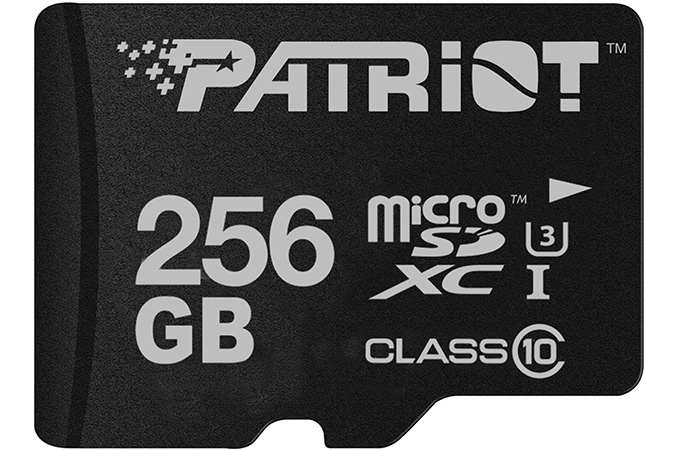
Patriot has announced its new high-capacity microSDXC card that can store 256 GB of data. The cards not only feature leading-edge capacity, but also support up to 80 MB/s write speed, which is believed to be enough for shooting videos in UHD resolutions. The new Patriot LX microSDXC card with 256 GB capacity is based on 3D NAND memory, uses the UHS bus and is qualified for sequential read speeds of up to 90 MB/s and sequential write speeds of up to 80 MB/s. The card carries Class 10 and U3 labels (meaning that its performance does not drop below 30 MB/s), but for some reasons is not certified for any V ratings despite the fact that Patriot positions it for shooting 4K UHD and FHD videos.
Patriot is among the first independent suppliers of memory cards to introduce a 256 GB microSDXC memory card. Samsung and SanDisk announced their microSDXC products with 256 GB capacity in mid-2016, but both companies produce their own NAND flash and have access to leading-edge chips. Patriot does not say what kind of memory it uses for its LX-series 256 GB cards, but if the company can buy such NAND ICs, other makers will be able to do the same as well. Therefore, expect more 256 GB microSDXC cards to hit the market shortly. Patriot’s LX microSDXC cards are backed by a two-year warranty and will be available shortly for $199.99 in the U.S.
| ||||||||||||||||||||||||||||||||||||||||||||||||||||||||||||||||||||||||||||||||||||||||||||||||||||||||||||||||||||||||||||||||||||||||||||||||||||||||||||||||||
| 10:45a | LaCie Launches Rugged and d2 Thunderbolt 3 Storage Devices LaCie at CES introduced its new storage devices with Thunderbolt 3 interface. The new LaCie Rugged Thunderbolt USB-C and the LaCie d2 Thunderbolt 3 support 2.5” and 3.5” storage devices, use Intel’s DSL6540 Thunderbolt 3 chips and can expand storage capacities of contemporary PCs up to 10 TB. The LaCie Rugged Thunderbolt USB-C: 500 GB to 5 TB Capacity, TB3 Compatibility
The LaCie Rugged Thunderbolt USB-C drives can be connected to almost any modern computer with a USB 3.0 Type-A, USB 3.0 Type-C and Thunderbolt 3 ports using a USB or a TB cable. Furthermore, the drives feature previous-generation Thunderbolt connectors to maintain compatibility and offer high performance with systems like Apple’s Mac Pro. The LaCie Rugged Thunderbolt USB-C will be available in two versions: the thinner one will support SSDs and HDDs up to 1 TB and 2 TB respectively, another is for 2.5"/15 mm HDDs and will use Seagate BarraCuda HDDs with 4 or 5 TB capacity. When it comes to performance, the SSD-based Rugged Thunderbolt USB-C will offer a maximum read speed of up to 510 MB/s, whereas HDD-based drives will offer up to 130 MB/s transfer rates.
Traditionally, the LaCie Rugged drives come in IP54-rated white and orange enclosure that protects against shocks, dust and water. In addition, the drives support AES-256 software encryption. The new LaCie Rugged Thunderbolt USB-C drives will be available this quarter starting at $249.99. The LaCie d2: Up to 10 TB Capacity, TB3 Compatibility
The LaCie d2 are a bit less flexible storage devices compared to their rugged brethren when it comes to compatibility (they do not feature older Thunderbolt connectors), but they offer higher capacities and higher performance compared to HDD-based versions of the Rugged Thunderbolt USB-C.
The LaCie d2 drives pack Seagate’s BarraCuda 3.5” HDDs with 6, 8 and 10 TB capacities (so, the top-of-the-range model is helium-filled), come with a Thunderbolt 3 interface only and are compatible with systems featuring TB3, USB 3.1/3.0 Type-C and USB 3.0 Type-A ports (with an appropriate adapter). The LaCie d2 feature two TB3 headers and can be daisy-chained with other TB3-supporting devices. When it comes to performance, the high-end model offers up to 240 MB/s data rate, the more affordable devices will be a little slower. Since the d2 drives use premium BarraCuda HDDs, they are backed by a five-year warranty. As for the pricing, it starts at $429.99 for a 6 TB model. | ||||||||||||||||||||||||||||||||||||||||||||||||||||||||||||||||||||||||||||||||||||||||||||||||||||||||||||||||||||||||||||||||||||||||||||||||||||||||||||||||||
| 10:52a | LG CES 2017 Press Conference Live Blog This looks to be a fairly general consumer electronics press conference from LG. Stay tuned. | ||||||||||||||||||||||||||||||||||||||||||||||||||||||||||||||||||||||||||||||||||||||||||||||||||||||||||||||||||||||||||||||||||||||||||||||||||||||||||||||||||
| 11:30a | G.Skill Announces Trident Z DDR4 DIMMs for Kaby Lake CPUs
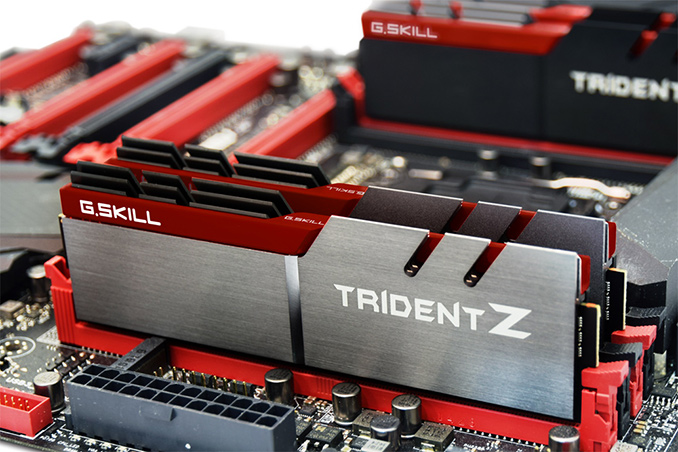
G.Skill on Wednesday introduced its new high-end DDR4 memory modules tested for compatibility with Intel’s new Core processors featuring the Kaby Lake microarchitecture. The new Trident Z modules come in 8 GB and 16 GB sizes and are rated for operations at data rates beyond 3600 MT/s per pin. For Intel’s Kaby Lake and Z270 launch, G.Skill now offers various dual-channel kits with 16 GB (2×8 GB), 32 GB (4×8 GB, 2×16 GB) and 64 GB (4×16 GB) capacities designed to run in DDR4-3600, DDR4-3866, DDR4-4000, DDR4-4133 and DDR4-4266 modes at 1.35 V or 1.4 V (the top-of-the-range kit only). Due to rather high data rates, the new Trident Z kits come with rather looser CL17, CL18 or even CL19 timings. The modules support XMP 2.0 technology that simplifies setting of correct sub-timings on platforms that support this feature. For about a year now G.Skill has been using Samsung’s 8 Gb B-die ICs for its high-end DDR4 memory modules. Keeping in mind that companies tend to be cautious with new platforms and memory controllers, it is not surprising that the new DIMMs designed for the brand new CPUs are based on familiar chips made using 20 nm process technology.
Initially G.Skill will offer Kaby Lake-optimized memory modules with its regular aluminum heat spreaders, but eventually the company will expand the lineup with DIMMs featuring RGB lighting and other enhancements. G.Skill has tested its new memory modules (DDR4-4133 32 GB kit to be exact) on the ASUS ROG Maximus IX Formula motherboard and the Intel Core i5-7600K processor to ensure compatibility with the new CPUs, but everything should work on other Kaby Lake/Z270 configurations that plan to support high speed memory. Newegg already sells G.Skill’s Kaby Lake-optimized 16 GB DDR4-4266 memory kits (F4-4266C19D-16GTZ series) for $229.99. Other modules will hit the market shortly from now and more retailers will follow.
| ||||||||||||||||||||||||||||||||||||||||||||||||||||||||||||||||||||||||||||||||||||||||||||||||||||||||||||||||||||||||||||||||||||||||||||||||||||||||||||||||||
| 12:00p | Amped Wireless Launches AC2200 HELIOS Family with Qualcomm's Tri-Radio 802.11ac Solution
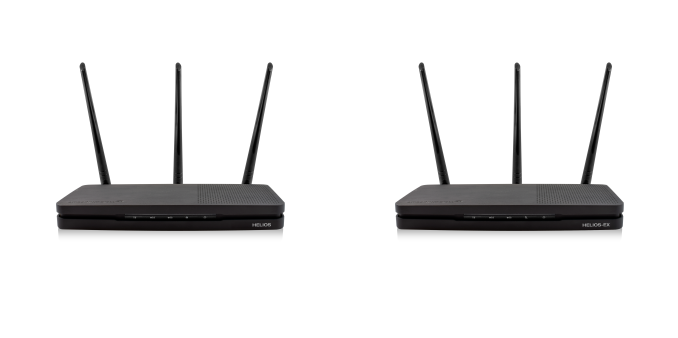
At Computex 2016, Qualcomm Atheros announced the availability of a tri-radio 802.11ac platform with Wave 2 MU-MIMO capabilities. The firmware in the platform also supported Wi-Fi SON (Self-Organizing Networks), which is fast becoming an essential requirement in mesh networks. The announcement had a quote from Amped Wireless, indicating support for the new platform. We were expecting their mesh system - ALLY - to ship with that platform, but the ALLY had no dedicated backhaul channel to provide the best possible performance. Instead, Amped Wireless has chosen CES 2017 to announce the first set of products based on the Qualcomm tri-radio platform - the HELIOS family. At the heart of the Qualcomm announcement was a highly integrated network processor SoC, the IPQ40x9. It integrates two 2x2 radios. While one radio is always set to operate in the 5 GHz band, the other one can be configured in either 2.4 or 5 GHz mode. The SoC also includes a PC interface to further connect additional radios. The Qualcomm announcement included two platforms: The HELIOS family (a HELIOS router and a HELIOS-EX extender) adopt the AC2200 platform. The router operates with two 5 GHz SSIDs and one 2.4 GHz SSID, with traffic allowed to be spread across the bands. The extender, on the other hand, uses one of the 5 GHz bands as a dedicated backhaul to connect to the main router (in that way, it is similar to the Orbi's backhaul connection - except that it is 2x2 instead of the Orbi's 4x4). Amped Wireless has given the tag 'DirectLink' to this dedicated backhaul connection. The HELIOS-EX (RE2200T) and the HELIOS router (RTA2200T) will have a MSRP of $180. The extender is slated to become available in February 2017, while the router will make its entry towards the end of this quarter. | ||||||||||||||||||||||||||||||||||||||||||||||||||||||||||||||||||||||||||||||||||||||||||||||||||||||||||||||||||||||||||||||||||||||||||||||||||||||||||||||||||
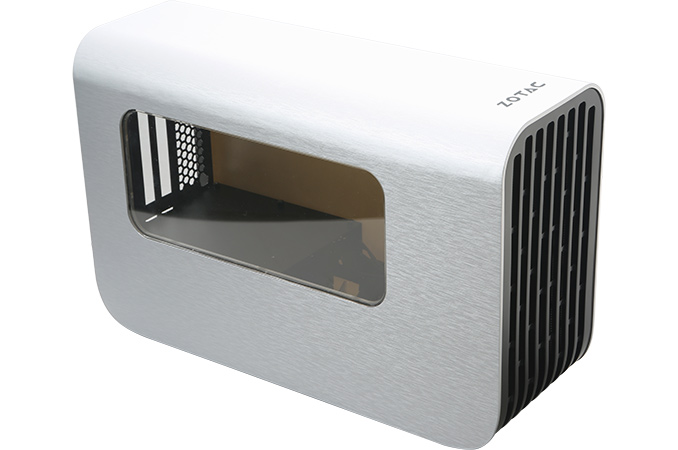
| 1:10p | ZOTAC Readies External GPU Enclosure: TB3, 400 W PSU, Due in Q2 2017
ZOTAC plans to demonstrate a prototype of its external GPU enclosure at CES this week. The eGFX chassis from ZOTAC will target notebooks, AIO and SFF PCs with Thunderbolt 3 interface, will integrate a 400 W power supply and provide additional USB ports. The device will hit the market several months from now and its final specifications are still to be determined. ZOTAC is the sixth company to announce an eGFX enclosure with Thunderbolt 3 interface, so the market of such devices seems to be getting crowded (and we expect several more companies to introduce their eGFX solutions too). Apart from ultra-thin laptops with a TB3 port (and support of eGFX through BIOS and TB3 firmware), the usual target market for this kind of devices, ZOTAC is going to position its external GPU chassis as a solution to upgrade its upcoming SFF ZBOX PCs featuring Thunderbolt 3 interface with high-end external graphics cards. At present, ZOTAC’s external graphics dock (the company does not have a brand for this product just yet, so it uses a neutral name for now) is still in development, which is why the manufacturer shares only the basic details about this device. Just like competing eGFX boxes, ZOTAC’s chassis will feature one Thunderbolt 3 port (40 Gbps) outside and one PCIe x16 electrical slot inside (operating in PCIe x4 mode, of course). As for power, it will integrate a 400 W PSU in a standard form-factor (it is unclear whether we are dealing with a shortened ATX or an SFX PSU here) that will power the video card inside. As Thunderbolt 3 can transfer up to 100 W of power, the same PSU could also power a notebook or even a miniature PC. The enclosure looks spacy enough for additional fans, but ZOTAC does not say how many of them will be pre-installed in the final product. In any case, a 400 W PSU and an additional cooler are going to provide certain potential for GPU overclocking for those who need it.
Since many ultra-thin notebooks as well as miniature PCs do not have a lot of spare USB 3.0 ports, ZOTAC’s dock will offer four additional USB 3.0 headers (with one port supporting Quick Charge 3.0). For now, ZOTAC’s dock does not support internal SATA connector for an extra 2.5” storage device (which might be needed to store games, as many PCs do not have capacious SSDs), but remember that the eGFX chassis is still in development.
At CES, ZOTAC plans to demonstrate its external graphics dock in action, therefore, things like electronics and firmware of the product are ready and everything works. The final product may be a little bit different than the one showcased at the trade show, but not radically (it may get LED lighting, grill instead of glass on the side, etc.).
At present, ZOTAC’s eGFX chassis is a work in progress and at least some of its specifications have not been finalized, which is why the company cannot announce its pricing. Right now, the manufacturer targets Q2 as the launch timeframe, so, we will have to wait a little bit for both the final specs and MSPR. Related Reading: | ||||||||||||||||||||||||||||||||||||||||||||||||||||||||||||||||||||||||||||||||||||||||||||||||||||||||||||||||||||||||||||||||||||||||||||||||||||||||||||||||||
| 2:23p | CES 2017: ASUS Zennovation Press Event Live Blog (11:30am PT) We're here with ASUS at CES for the Zennovation Press Event! | ||||||||||||||||||||||||||||||||||||||||||||||||||||||||||||||||||||||||||||||||||||||||||||||||||||||||||||||||||||||||||||||||||||||||||||||||||||||||||||||||||
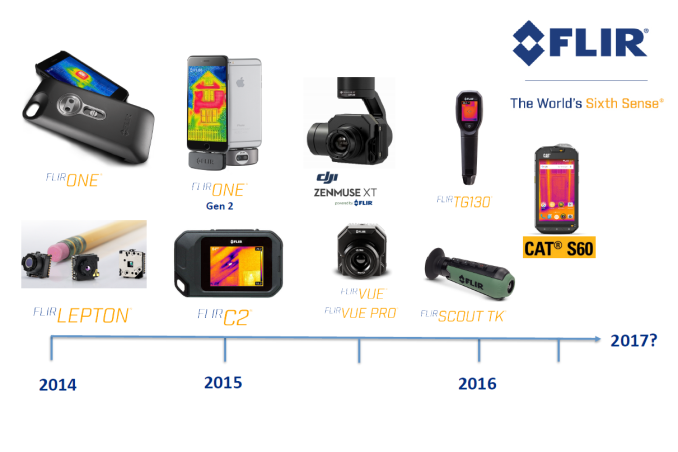
| 3:00p | FLIR One Thermal Imager Gets an Update, New Infrared Cameras with Lepton Inbound
Over the last couple of years, thermal imaging has become more accessible to the average consumer due to development of low-cost infrared sensors / microbolometers. FLIR was one of the first to make a breakthrough in this segment with the low-cost Lepton sensor. The first version with a resolution of 80x60 was introduced to the market in the FLIR One Thermal Imager for iPhone 5/5s. After a year, FLIR added a 160x120 version to the Lepton portfolio, and also used it in the second-generation FLIR One Thermal Imager (separate versions for Android and iOS). The first-generation Lepton sensor also found a place in the CAT S60 rugged smartphone. At CES 2017, FLIR is launching five different infrared cameras, all of which are based on sensors belonging to the Lepton family. The five cameras fall into three categories: The FLIR One and FLIR One Pro are meant to be used in conjunction with a smartphone. They come in two variants - one for iOS (with a Lightning connector), and the other for Android (with a USB Type-C connector). While the FLIR One is meant for the casual user / first-time thermal camera owner, the Pro version is meant for professional use-cases. Both of them feature an adjustable connector to ensure a snug fit against any compatible smartphoe model with or without an installed protective case. The following comparison table brings out the differences between the FLIR One Gen 3 and FLIR One Pro.
The FLIR One Gen 3 and FLIR One Pro are available for pre-order today for $199 and $399 respectively. The FLIR Duo and Duo R are meant for use with drones. Both of them use the 160x120 resolution Lepton sensor. The availability of a HD video camera in the units ensure that MSX is available (FLIR's proprietary blending of live images with thermal ones to provide more actionable results to the end user). There is a microSD card slot on the cameras, as well as mini-USB and micro-HDMI outputs. Real-time remote control of the camera operations is also possible with a smartphone app communicating over Bluetooth. The camera also integrates with MAVLink-compatible flight controllers.
The Duo R includes radiometry - i.e, the thermal sensor is calibrated to provide more accurate temperature readings (a tolerance of +/-2%, as compared to more than +/-5% with the non-radiometry version). The Duo has a MSRP of $999, while the Duo R retails for $1299. Both models are available for purchase today. The FLIR C3 is a standalone product meant for professional use-cases where ruggedness is important (such as home inspections and building maintenance). In that respect, it is somewhat similar to the FLIR One Pro smartphone accessory. However, unlike the FLIR One Pro, this is a completely standalone device with its own Wi-Fi radio, 3" touchscreen, and firmware running completely on the processor / microcontroller inside it. Curiously enough, despite the FLIR C3's use of the first-generation Lepton sensor (80x60), it offers full radiometry for a more accurate analysis with FLIR Tools offline. However, it only supports scene temperature range of -10C to 150C, while the FLIR One Pro does -20C to 450C. On the other hand, the thermal sensitivity in the C3 is greater (allowing for detection of subtle temperature variations).
FLIR indicated that these differences could be attributed to the ability to offload some of the processing tasks in the FLIR One Pro to the mobile phone's app processor. The FLIR C3 is slated to become available later this quarter for $699. It is great to see an increase in the number of thermal cameras using the Lepton sensors. Even though export restrictions put a limit on the video frame rate of these sensors at 9 Hz, it is not an issue for the use-cases that these cameras target. FLIR's competition for these cameras comes in the form of Seek Thermal's $500 CompactPRO (going directly against the FLIR One Pro) and the $700 RevealPRO (going directly against the FLIR C3). FLIR does have the MSX advantage and undercuts the CompactPRO's price point by $100 for the FLIR One Pro. The FLIR One Pro also comes with the more future-proof USB-C port (though the Seek Thermal's micro-USB port can easily be used with an appropriate USB-C adapter). However, Seek Thermal uses a 320x240 resolution thermal sensor in both of the above products, which is 2-4x more than what the Leptons offer. Additionally, the Seek Thermal units have been shipping for a few months now. The past couple of years in the thermal imaging market have been quite interesting. It looks likely to continue in the near future with the array of products being brought to the market by FLIR and Seek Thermal. | ||||||||||||||||||||||||||||||||||||||||||||||||||||||||||||||||||||||||||||||||||||||||||||||||||||||||||||||||||||||||||||||||||||||||||||||||||||||||||||||||||
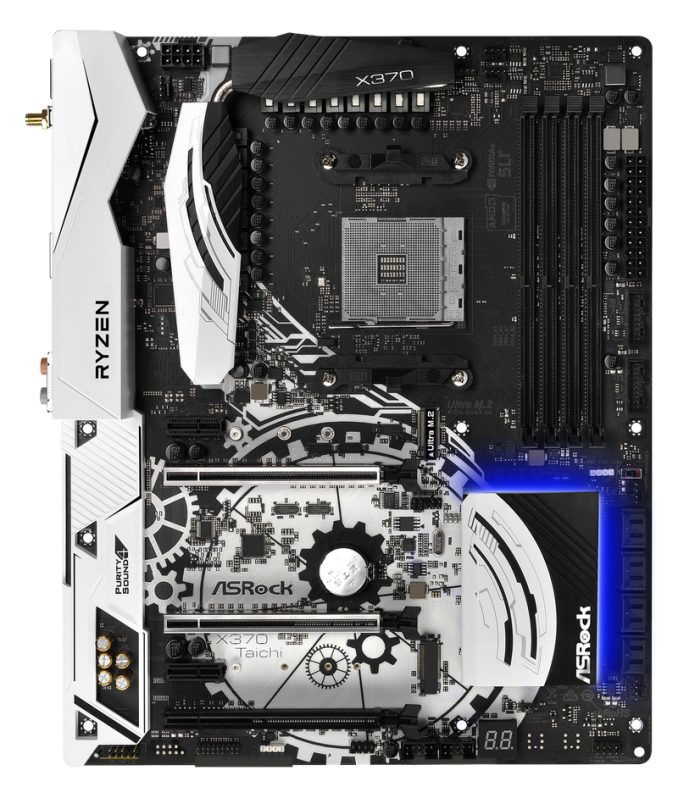
| 4:15p | AMD Announces X370 Motherboards for AM4: Laying the Groundwork for Ryzen
At the CES 2017 show today, AMD is lifting the lid on some of the upcoming AM4 motherboard designs coming to end users for Ryzen/Summit Ridge and Bristol Ridge. The sixteen boards being displayed come from the major manufacturers, and include overclocking and gaming oriented models. These boards will be the base for system integrator PC designs to come, with at least seventeen SIs coming on board for today’s announcement.
Motherboards for the 300-series chipsets, which includes A320, B350 and X370, will come in standard motherboard sizes (mITX, mATX and ATX), and the designs will feature technologies including dual channel DD4, support for NVMe drives via M.2/U.2 or PCIe, native support for USB 3.1 10 Gbps connectivity (as well as the new USB 3.1 front panel interface we’ve seen on some motherboards already), and PCIe 3.0 from the processor for external graphics or other PCIe co-processors. Formally, the motherboards being announced are:
We’re waiting for more information before we can get into the meat of this announcement. At this point it indicates that AMD’s AM4 platform should be ready to go, and we’re eagerly awaiting the processors to also reach ready-to-retail status. A number of partners at CES are talking to us about Ryzen plans, so stay tuned as we’re able to report more. Gallery: AMD Motherboards
      | ||||||||||||||||||||||||||||||||||||||||||||||||||||||||||||||||||||||||||||||||||||||||||||||||||||||||||||||||||||||||||||||||||||||||||||||||||||||||||||||||||
| 4:36p | Samsung CES 2017 Event Live Blog We're here at the Mandalay Bay Convention Center covering Samsung's announcements for CES 2017. | ||||||||||||||||||||||||||||||||||||||||||||||||||||||||||||||||||||||||||||||||||||||||||||||||||||||||||||||||||||||||||||||||||||||||||||||||||||||||||||||||||
| 5:00p | Samsung Announces Updated Notebook 9, Odyssey, and Chromebook Plus/Pro
Today at Samsung’s CES 2017 press conference there were a number of announcements for their mobile PCs. At a high level, this includes the Notebook 9 refresh, a new Odyssey gaming laptop, and Chromebook Plus and Pro.
Starting with the Notebook 9, while this laptop already has existed in name, this represents an update to the latest Intel Kaby Lake processors and features like the thin bezel and fast charge carried forward as seen in the spec sheet below.
The laptop remains under 1.8 pounds in the 13" guise due to the use of a magnesium chassis which makes this laptop feel impossibly light. There’s nothing particularly flashy in terms of features here but this looks to be an excellently executed laptop as far as display with sRGB coverage, guaranteed dE2000 average under 2.5, up to 500 nits of brightness for outdoor use, and 1080p resolution to avoid many of the pitfalls that come from shipping high DPI displays with Windows. Both sizes ship with a fingerprint scanner that scans the full finger from FPC.
The 15 inch variant also offers some interesting upgrades, such as PCIe SSD and the option for a discrete GPU, namely the NVIDIA GeForce 940MX for those that want the ability to do more processing on the go and possibly some light gaming.
From some casual use here nothing really stands out about this laptop as immediately wrong. Good design is about taking away unnecessary things, and my first impression here is that Samsung has pulled it off. However, the trackpad is a standard diving board style clickpad so if you try to press down on the top side of the trackpad it won’t click as you might expect. In order to make these laptops incredibly light there is also very little modularity as we’ve come to expect from ultrabooks.
I also noticed that the chassis has quite a bit of flex to it. Pressing down at the top of the trackpad with the force normally used to press a trackpad resulted in the top of the laptop visibly bowing inwards, and with two fingers it was fairly easy to flex the display back and forth if you maximized leverage by applying it at the edges furthest from the hinge. I suspect it will take a full review to really judge whether Samsung has gone a bridge too far here in pursuit of cutting weight.
For the Notebook Odyssey 15, Samsung is making a return to the gaming laptop market with a 15.6” laptop outfitted with Intel i7 Kaby Lake, GTX1050, 16GB of RAM in SO-DIMMs, customizable backlit keys, and a full HD display with anti-glare coating as seen in the spec sheet below.
The emphasis on this laptop is easy repair and upgrade so there’s room for a 2.5” hard drive, SSD, SO-DIMMs, and plenty of ports. The laptop is fairly portly as well to allow for the cooling system which draws air from the bottom of the laptop and exhausts it from the hinge similar to the Razer Blade. This laptop ends up being quite large and portly though, which is a bit unfortunate as it seems to me that a lot of the growth in the gaming laptop market is the rise of all-in-one gaming laptops that can not only be a great laptop but a good gaming system like the Razer Blade. The rather ostentatious gamer aesthetics contribute to the feeling that this is designed to compete with Clevo/Sager desktop replacements which is arguably a fairly saturated market.
Interestingly enough, even though it wasn’t mentioned in the briefing there was also a 17 inch variant which allows for more SSDs and appears to have a GTX1070 but Samsung representatives noted that this variant is preproduction and that the GPU spec may change one way or another. It also appears to have a mechanical keyboard with RGB lighting for each key which is pretty neat as an upgrade from the Notebook Odyssey 15.
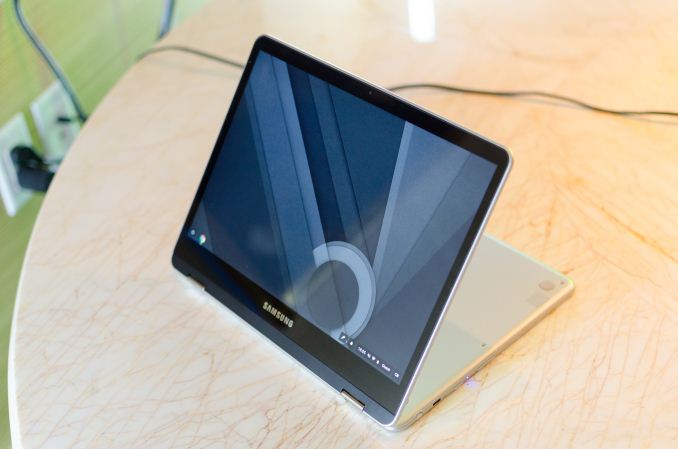
Finally, Samsung is announcing the Chromebook Plus and Pro. Both are 2-in-1 Chromebooks which feature a 360 degree hinge that makes it possible to fold the display similar to the Lenovo Yoga series. The Plus uses an ARM SoC while the Pro has an Intel processor as seen in the spec sheet below.
Both ship with a Wacom EMR stylus which allows for pressure sensitivity, and ChromeOS has a number of interesting tweaks in order to enable the use of the device as both a tablet and laptop like Android applications and automatic resizing to make things touch-friendly when the device enters tablet mode.
Interestingly enough, Google is leveraging their machine learning in order to reduce the latency of the input by predicting what the user intends to write. However, if you just draw random lines you will still see the full latency of the stylus stack. Google is also leveraging their machine learning capabilities to allow for highly accurate automatic OCR in Google Keep which can automatically convert handwriting to formatted text and make it easily searchable. For some reason neither has an ambient light sensor so there's no automatic brightness setting but there is an accelerometer and gyroscope for games and screen rotation.
All of these products are planned to reach consumers Q1 2017. | ||||||||||||||||||||||||||||||||||||||||||||||||||||||||||||||||||||||||||||||||||||||||||||||||||||||||||||||||||||||||||||||||||||||||||||||||||||||||||||||||||
| 7:00p | ZTE Announces Blade V8 Pro with Snapdragon 625, Hawkeye Phone
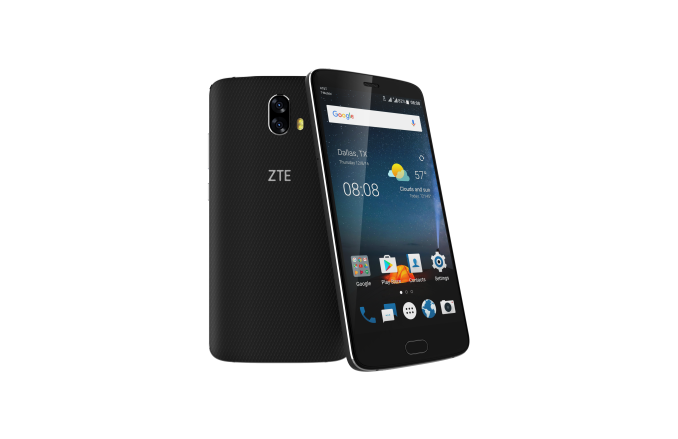
The competition for the mid-range smartphone market is fairly intense here at CES 2017. Right after the launch of Huawei's Honor 6X yesterday, ZTE is launching their direct competitor, the Blade V8 Pro, today. As you might guess, this device also has a dual camera system, a 5.5-inch FHD display, and dual SIM capabilities. In order to avoid stretching this out the usual spec table can be found below.
As seen in the spec table above, the Blade V8 Pro is basically a direct competitor to the Honor 6X. Rather than a Kirin SoC, ZTE is shipping Qualcomm’s Snapdragon 625 which goes head to head with the Kirin 655. I wouldn’t say that these SoCs are guaranteed to be similar, though, because even if they are both on FinFET nodes and have eight A53 CPUs, there are a lot of engineering details that can cause significant differences in perf/W, modem performance, and a whole host of other features such as video encode performance, ISP performance, and things like low-power islands and DSP extensions.
When directly comparing the Blade V8 Pro to the Honor 6X, the things that stand out here are the use of USB Type-C for reversible cables, much better Wi-Fi with 802.11ac and 5GHz support, and dual 13MP rear cameras to improve the quality of depth sensing. The price is also slightly lower at 230 USD instead of 250 USD as seen on the Honor 6X. However, the Blade V8 Pro has a 6% smaller battery which could be a noticeable difference if power efficiency is identical between the two and the Blade V8 Pro is 23 grams heavier which is also a noticeable difference. The Blade V8 Pro’s design is also a more traditional plastic back with a metal midframe rather than the mostly aluminum unibody used in the Honor 6X. Overall though the Blade V8 Pro is a fairly compelling competitor to the Honor 6X and it’ll be interesting to see how they compare as the obvious contenders for the midrange smartphone segment. The Blade V8 Pro will be available for pre-order today for 229.98 USD on Amazon, B&H, Newegg, and zteusa.com. The integrated Qualcomm X9 LTE modem supports the following frequency bands: FDD-LTE B2 / B4 / B5 / B7 / B12, WCDMA B1 / B2 / B5, and GSM 850 / 900 / 1800 / 1900 MHz.
Along with this announcement, ZTE also announced the name for the Project CSX phone which attempts to crowdsource a design for a phone, namely Hawkeye. The Hawkeye phone goes on preorder today for 199 USD at kickstarter.zteusa.com and will have eye-tracking and self-adhesive properties. | ||||||||||||||||||||||||||||||||||||||||||||||||||||||||||||||||||||||||||||||||||||||||||||||||||||||||||||||||||||||||||||||||||||||||||||||||||||||||||||||||||
| 7:01p | CES 2017: Intel Press Event Live Blog We're here at Intel for their CES Press Event. | ||||||||||||||||||||||||||||||||||||||||||||||||||||||||||||||||||||||||||||||||||||||||||||||||||||||||||||||||||||||||||||||||||||||||||||||||||||||||||||||||||
| 9:00p | TRENDnet Launches TPL-430AP AC1200 Wireless Access Point with HomePlug Powerline Backhaul
Extending the reach of Wi-Fi networks has become important with the rise in number and spread in usage location of Wi-Fi clients in a typical household. Typical range extenders sacrifice some performance by communicating with the main router using the same channel used for its clients. Late last year, we had evaluated various backhaul technologies being adopted in this space. Wi-Fi as a backhaul medium worked great in our particular evaluation location. However, there are scenarios in which Wi-Fi signals get attenuated very quickly (say, houses with thick brick or concrete walls). In those cases, powerline communication may present a better backhaul option. At CES 2017, TRENDnet is launching the TPL-430AP wireless access point. They will be selling it under the 'WiFi Everywhere' tag. The product uses HomePlug AV2 technology. In particular, it adopts the Qualcomm Atheros QCA7500 chipset with V2 MIMO powerline operation in the 0 - 68 MHz band. The product also includes a built-in dual-band AC1200 access point (2x2:2 802.11ac/b/g/n, with 867 Mbps in the 5 GHz band and 300 Mbps in the 2.4 GHz band). It also has two Gigabit LAN ports. An issue with some of the powerline Wi-Fi extenders in the market is the appearance of a whole new SSID and putting the onus on the customer to replicate the Wi-Fi settings from the main router (which could be from a different vendor). TRENDnet fortunately recognizes this issue and has a WPS-like setup to clone the Wi-Fi settings from the main router for simpler setup. Consumers purchasing the TPL-430AP are already expected to have a HomePlug AV2 already in their network. Otherwise, TRENDnet also offers the access point as part of a kit - the TPL-430APK includes the TPL-430 as well as the TPL-421E (a HomePlug AV2 1200 powerline adapter that has a built-in passthrough outlet). The wireless access point with powerline backhaul, as well as the kit, will be available in early Q2 2017. While the TPL-430AP will have a MSRP of $125, the kit will retail for $175. In other TRENDnet CES news, a number of new USB-C adapters are also being launched - welcome news for the USB-C ecosystem. | ||||||||||||||||||||||||||||||||||||||||||||||||||||||||||||||||||||||||||||||||||||||||||||||||||||||||||||||||||||||||||||||||||||||||||||||||||||||||||||||||||
| 9:00p | The AMD Vega GPU Architecture Teaser: Higher IPC, Tiling, & More, Coming in H1’2017 As AMD was in the process of ramping up for the Polaris launch last year, one of the unexpected but much appreciated measures they took was to released a bare-bones GPU architecture roadmap for the next few years. AMD has traditionally held their cards very close to their proverbial chest on what they’re working on next, typically only announcing a new architecture weeks before it’s set to launch in retail products. Polaris itself was a departure from that, as it was announced a good 5 months in advance, but last year’s roadmap was the first honest-to-goodness look we’ve had at AMD’s long-term plans in a long time. What did that map show us? After 2016’s Polaris would come Vega, and after that would be Navi. As a high-level roadmap it didn’t show us much – in fact other than a timeframe, the only detail attached to Vega was “HBM2” - but it was enough to help understand one of the things AMD would be doing architecturally to set Vega apart from Polaris. As for the timeframe itself, that was ambiguous at best in AMD’s roadmap. But now as we draw closer to the launch of Vega, the picture has become clearer. AMD will be hitting a yearly cadence with Vega. The first chip, which tapped out last year, will be launching in the first half of this year (H1’17). To that end, with Vega’s launch not too far over the horizon, AMD is ready to start talking about what will be their next GPU architecture. Last year at this time we got our first real glimpse into Polaris and what would become the Radeon RX 480/470/460, and this year AMD is back again with a teaser of things to come with Vega. | ||||||||||||||||||||||||||||||||||||||||||||||||||||||||||||||||||||||||||||||||||||||||||||||||||||||||||||||||||||||||||||||||||||||||||||||||||||||||||||||||||
| 11:00p | CES 2017: Xiaomi (Not) Live Blog
I'm here at Xiaomi's “A Glimpse Into The Future” CES 2017 press conference, where the company will be announcing at least one new product. This is Xiaomi’s first time presenting at CES. The fairly small ballroom is packed and apparently RF shielded. I don't have any cellular service in here, and Xiaomi does not have Wi-Fi available. So I'll be posting this "live" blog in one chunk after the event once I'm connected to the rest of the world again. Looks like standing room only at the back. A lot of press interested to see what Xiaomi is presenting. The music is loud and the bass is thumping. We must be getting close to starting. Video playing: Showing a lot of large black monoliths. “Not just a smartphone, but a door to the future.”
On stage discussing the company’s history. Founded April 6, 2010. Still a young company. Created a unique approach to designing and selling products. Three pillars: Hardware, Internet services, Mi Ecosystem (IoT platform) Xiaomi in 20 different countries/locations now.
Hugo Barra on stage He’s filling us in on the company’s recent products
Mi 5s: Uses an ultrasonic fingerprint sensor under the front glass. Requires no cutout in glass.
Mi VR: 9-axis intertial motion controller
What will phones look like in the future? Xiaomi’s answer: Mi Mix
Mi Mix has almost no bezels. Larger display with same overall footprint of phones with smaller displays. New tech in Mi Mix:
Mi 5 used ceramic for just the back, but Mi MIX’s body is full ceramic. There’s a new white version of the Mi Mix. Available in China later this year.
Now discussing Mi Ecosystem. Consists of hundreds of smart products and IoT devices. Has grown tremendously over the last couple of years. Xiaomi is working/investing with 77 companies. He says Xiaomi is world’s most successful tech incubator. Lots of different products: air purifiers (important category in China), bicycles, drones, robots
Mi Home app controls Xiaomi smart home appliances. Available for all Android devices. Can use it to see the path of Xiaomi’s vacuum cleaner.
Also displays health and fitness stats
New Mi Router: Mi Router HD
Up to 2600Mbps 802.11ac Wi-Fi with 4x4 MU-MIMO. Uses a Qualcomm IPQ8064 chip. 8TB internal hard drive.
Launching later in China for under $500 (8TB) or $200 (1 TB)
The big announcement for today: It’s thin (very) 37% thinner than Mi Mix. Thinner than iPhone 7 Thin is in, baby.
Mi TV 4 smart TV (not a smartphone!) 4.9mm at thinnest point almost no bezels
Brushed aluminum back cover, and transparent stand
PatchWall deep learning UI layer. Uses meta-data and viewing history to power personal recommendation engine. UI uses an adaptive grid based on magazine layouts. More relevant content is presented in larger, easier to notice tiles. It looks pretty slick. Now discussing modular TVs. Most TVs are completely integrated. Can’t upgrade individual components. Modular TVs separate the display from the rest of the electronics. Buy a new Mi TV Bat (sound bar), which includes the processors and ports, and connect it to your existing display.
One cable, Mi Port, connects sound bar to screen. Reduces cable clutter.
Mi TV 4 supports Dolby Atmos. Uses two upward firing speakers to reflect sound off the ceiling to provide a vertical element to surround sound.
No mention of panel specs
Mi TV 4 will be available in four sizes: 49", 55", and 65" The 65" Mi TV 4 will be priced below $2000 with the Dolby Atmos Home Theater bar, and will be below $1500 with the standard Mi TV Bar. A summary of Xiaomi's announcements for today:
And that’s a wrap. Sorry about the technical difficulties. | ||||||||||||||||||||||||||||||||||||||||||||||||||||||||||||||||||||||||||||||||||||||||||||||||||||||||||||||||||||||||||||||||||||||||||||||||||||||||||||||||||
















| << Previous Day |
2017/01/04 [Calendar] |
Next Day >> |