[Most Recent Entries] [Calendar View]
Friday, April 21st, 2017
- Toshiba Announces MN-Series HDDs: Up to 8 TB
- Toshiba Launches MG05ACA Enterprise HDDs: 8 TB, 7200 RPM, NAND Cache
- Seagate Confirms Plans for 12 TB HDD in Near Future, 16 TB HDD Due in 2018
- Western Digital Announces Ultrastar He12 12 TB and 14 TB HDDs
- Promise Launches Pegasus3 External Storage via TB3: Up to 48 TB, 1.6 GBps
| Time | Event | ||||||||||||||||||||||||||||||||||||||||||||||||||||||||||||||||||
| 8:00a | Toshiba Launches N300 HDDs for NAS: Up to 8 TB, Up to 240 MB/s
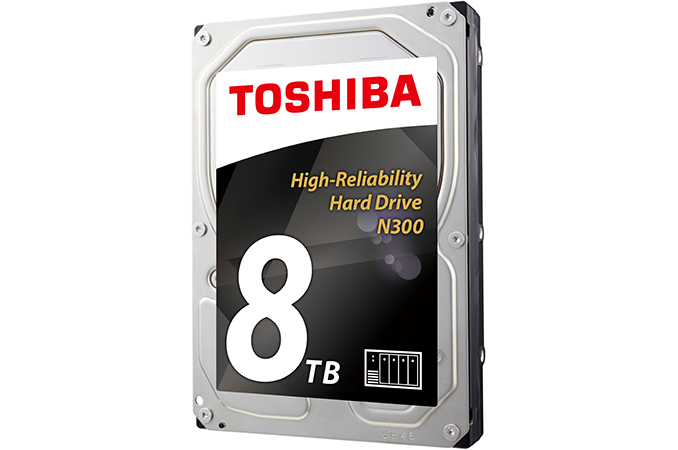
Toshiba this week launched its new lineup of high-reliability hard drives for NAS units. The drives offer up to 8 TB of capacity and are based on enterprise-grade platforms. According to Toshiba's specifications, these and are among the highest-performing 3.5” HDDs on the planet. The Toshiba N300 family of hard drives consists of three models with 4 TB, 6 TB and 8 TB capacities, a SATA 6 Gb/s interface, a 7200 RPM spindle speed and a 128 MB buffer. All three HDDs are based on a high-reliability platform that attaches a spindle to both sides of a drive (to curb system-induced vibration), has rotational vibration (RV) sensors, shock sensors and temperature sensors as well as supporting error recovery features. The new HDDs are designed for 24/7 availability, 1 million hours MTBF and have a 180 TB/year workload rating, which is in line with other hard drives for NAS devices with 8 bays and is considerably higher than the workload rating of typical desktop HDDs. Toshiba’s N300 HDDs resemble the company’s MN05-series drives introduced in February (which are also designed for enterprise-class NASes) and are likely based on the same PMR platters (perpendicular magnetic recording) with up to 1.33 TB capacity per platter (the 8 TB version features six of such discs). In addition to the same platters, the N300 drives also have the same power consumption as the MN05 HDDs, but offer slightly different performance, according to the specifications.
As for performance, Toshiba claims up to a 240 MB/s sustained data transfer rate as well as a 4.17 ms average latency time for the N300 8 TB model, which is slower compared to the MN05 8 TB. Meanwhile, since the 6 TB and 4 TB N300 HDDs use different platters, their performance is a bit lower (due to the lower areal density). Toshiba is already shipping its N300 HDDs to partners and the drives are expected to be available in stores this month. Exact prices will depend on the retailer, but keep in mind that although the N300 are aimed at consumers, they are based on advanced platforms and support numerous enterprise-grade features. Related Reading: | ||||||||||||||||||||||||||||||||||||||||||||||||||||||||||||||||||
| 8:55a | First Look: Samsung Galaxy S8 We first saw Samsung’s new 5.8-inch Galaxy S8 and 6.2-inch Galaxy S8+ at its Unpacked event a few weeks ago. During the event, we saw demos of its new virtual assistant, Bixby, and its DeX docking station, which allows the Galaxy S8 to provide a desktop-like experience by connecting to an external monitor and peripherals, but we didn’t have much time with the phones to do much more than take some pictures and try a couple of the new features. After receiving a Galaxy S8 earlier this week, we wanted to give you some feedback about its design and biometric features, as well as, an initial performance and battery life assessment before we dive into our usual in-depth testing. My biggest complaint about the design is the location of the fingerprint sensor, which I discuss in the video above. It has been relocated to the back next to the camera, making it difficult to reach and use. The new face unlock feature, the second of the S8’s three biometric authentication options, is flawed too. Despite my best efforts, I was not able to get face unlock to work, not even once. The feature, which relies solely on the front-facing camera for identification, also is not very secure, assuming it works at all. It has already been shown that simply holding a picture in front of the camera is enough to fool it into unlocking the phone. The camera really needs to be augmented with an infrared camera to detect a face’s heat signature as a liveness test, or a second, depth-sensing camera to at least detect a face in three dimensions. So far the iris scanner, which I also demo in the video above, has proven to be the easiest and most reliable biometric option.
Inside the redesigned Galaxy S8 and S8+ is either a Qualcomm Snapdragon 835 or Samsung Exynos 8895 SoC. The US and other regions that require CDMA capability will get the Snapdragon 835, while the rest of the world will get Samsung’s SoC. The new 10nm SoCs are paired with 4GB of LPDDR4 RAM and 64GB of UFS 2.1 NAND. The Galaxy S8 comes with a 3000mAh battery, the same size as the Galaxy S7, while the S8+ comes with a 3500mAh battery, slightly less than the S7 edge’s 3600mAh capacity.
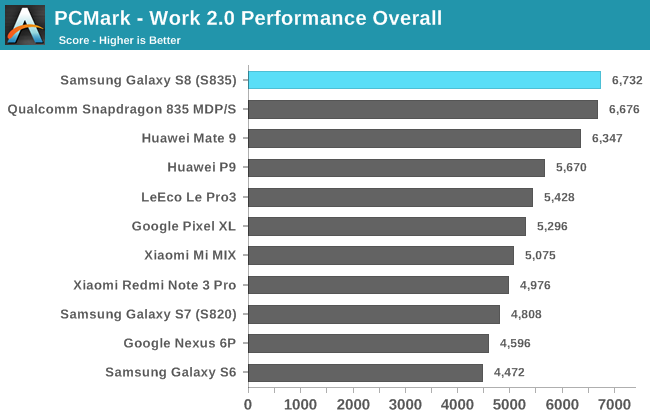
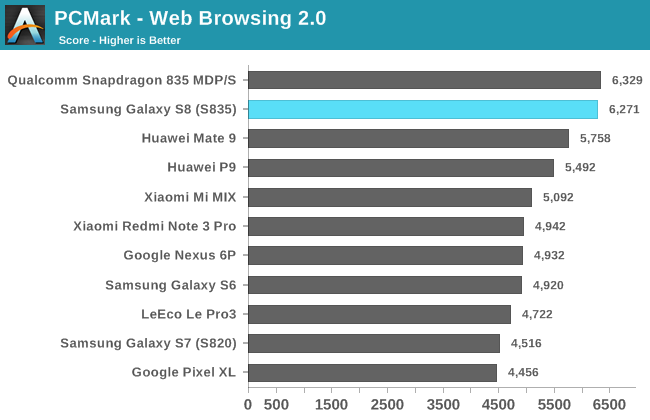
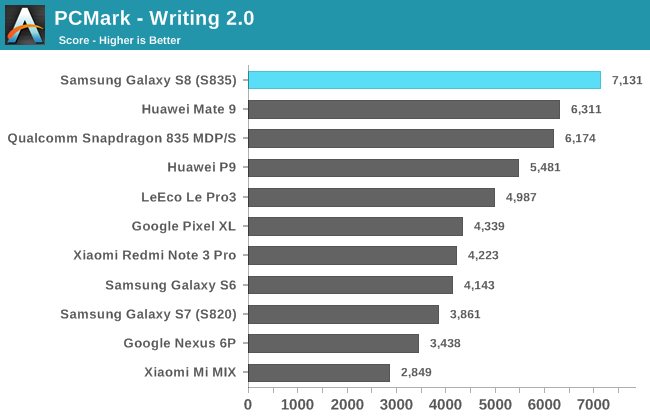
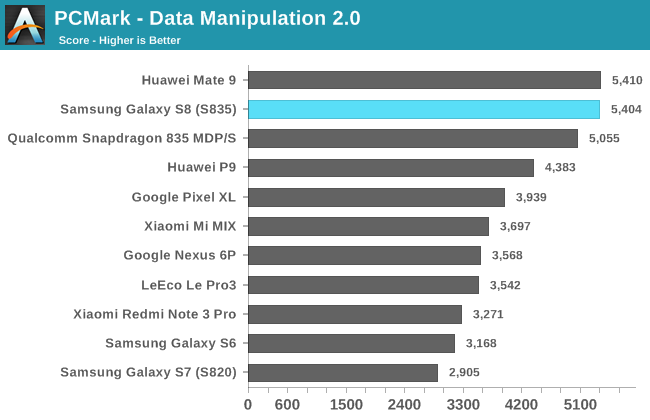
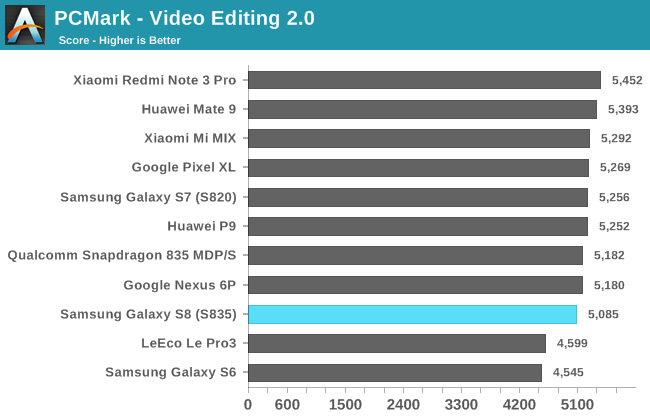
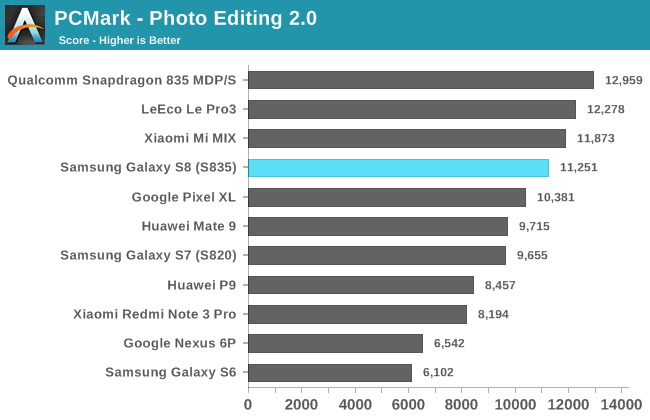
In PCMark, which is our best indicator of general system performance, the Galaxy S8 with Snapdragon 835 performs quite well, besting even the Mate 9 overall. Because this is the first S835 retail device we’ve tested, I’ve also included Qualcomm’s Snapdragon 835 MDP/S, which the company uses internally for hardware testing and software development, as a reference point. In most of these tests, the Galaxy S8 performs about the same as the Snapdragon 835 MDP/S, which is certainly a good sign. The Galaxy S8 does particularly well in the Writing test, outscoring the Mate 9 by 13% and the Galaxy S7 (Snapdragon 820) by 85%. The Writing test, which previous Galaxy phones struggle with, uses a fairly bursty workload, frequently migrating threads between the little and big cores. Perhaps this is an indication that Samsung is utilizing the big cores more aggressively than in the past. The Galaxy S8 is also 9% faster than the Mate 9 in the Web Browsing test and 37% faster than the S7 (S820).
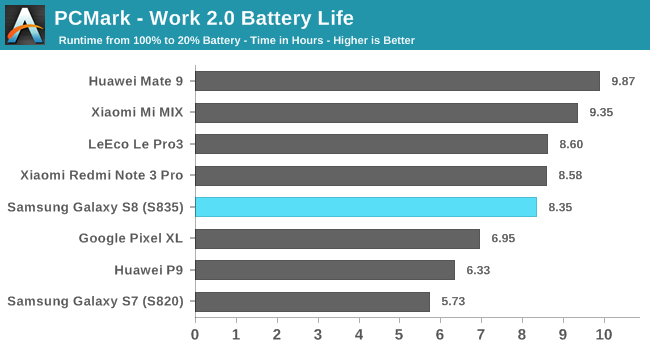
The Galaxy S8 achieves over 8 hours of screen-on-time while continuously crunching through the PCMark workloads, 46% longer than the Galaxy S7 that has the same 3000mAh battery, which suggests some nice efficiency gains from the new SoC, display, or other components. While the Galaxy S7 can struggle to last a full day on a single charge depending on how it’s used, these initial results suggest the Galaxy S8 will encounter fewer scenarios where it will need to use its fast charging or wireless charging abilities to stretch battery life till the end of the day. While we’ve only had the Galaxy S8 for a couple of days, our first impression is generally positive. It’s packed with features, TouchWiz is more refined, and it performed well in our first performance and battery life tests. A few issues are already apparent, however. Your face probably will not be smiling if you try to rely on it to unlock the phone, and the fingerprint sensor is located in just about the worst possible place. Samsung’s Bixby assistant also is not yet fully functional; fortunately, you can still use Google Assistant while you’re waiting for Bixby to mature. | ||||||||||||||||||||||||||||||||||||||||||||||||||||||||||||||||||
| << Previous Day |
2017/04/21 [Calendar] |
Next Day >> |