[Most Recent Entries] [Calendar View]
Monday, May 1st, 2017
- MSI Z270 GAMING M7
- MSI X370 GAMING PLUS
| Time | Event | ||||||||||||||||||||||||||||||||||||
| 8:00a | AT20 Giveaway Day 4: MSI Motherboards for AMD & Intel
Kicking off the first week of May, we’re back again for day 4 of our 20 day giveaway celebration of AnandTech’s 20th anniversary. Last week we gave out a lot of processors, so it’s only fitting that today something to use those processors then. Thankfully MSI has just what we need, as the PC technology has sent over a pair of their latest gaming motherboards. Need something for an Intel Core processor? Or an AMD Ryzen? The good news is that no matter what, today MSI will have you covered. The AnandTech 20th Anniversary Celebration – MSI Giveaway MSI Z270 GAMING M7
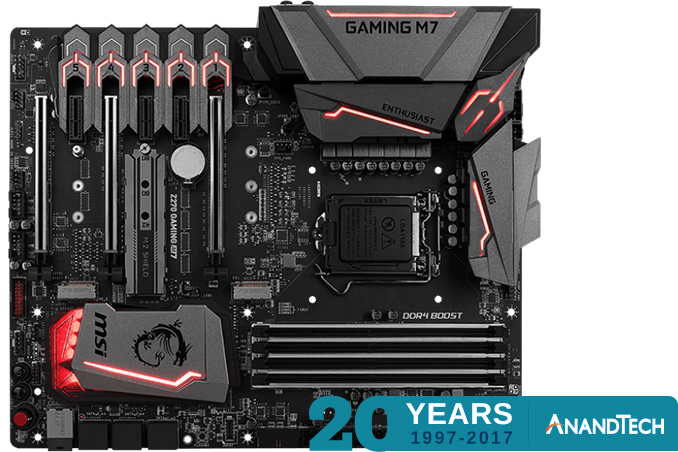
First off we have one of MSI’s high-end Z270 chipset boards for Intel’s Core processors, the MSI Z270 GAMING M7. The GAMING M7 is a full ATX board, giving it room for 3 PCIe x16 slots, and another 3 PCIe x1 slots. Along with the traditional form factor, the board also sports a trio of M.2 slots, and even a U.2 port for external SSDs. MSI has also added several third-party controllers to the board, including an ASMedia ASM2142 for USB 3.1 (Gen 2) support, a Killer E2500 controller for GigE networking, and a Realtek ALC 1220 for audio.
And as this is a high-end board, MSI hasn’t skimped on the features either. Along with their usual high-end BIOS features – including BIOS Flashback+ – MSI has also thrown in RGB lighting via their Mystic Light RGB system. MSI X370 GAMING PLUS
Meanwhile on the AMD side of the aisle, we have the MSI X370 GAMING PLUS. Based on AMD’s X370 chipset for Ryzen, this is also a full ATX board, sporting 3 PCIe x16 slots (2x 3.0, and 1x 2.0), 3 PCIe x1 slots, and a single M.2 slot. In terms of third party controllers, we’re looking at an ASMedia ASM2142 for USB 3.1 (Gen 2) support, a Realtek ALC 892 for audio, and a Realtek 8111H GigE LAN controller.
Unlike its Intel counterpart, this board doesn’t feature RGB lighting, though it still features MSI’s Mystic Light Sync controller for controlling other RGB solutions. And it come with MSI’s usual high-end BIOS features. Finally, as with our other giveaways, today’s giveaway is only open for 48 hours, so be sure to enter soon. However please note that for legal reasons, we’re only able to open these giveaways to residents of the United States. Good luck to everyone! And be sure to check in tomorrow for our next giveaway. | ||||||||||||||||||||||||||||||||||||
| 10:00a | ARM Announces Mali-Cetus, Their Next-Generation Display Processor
This morning ARM is taking the wraps off another new product in their Mali graphics portfolio: the ARM-Cetus. The oddly named product is the company’s latest generation display processor, designed for use in conjunction with ARM GPUs and other bits of Mali IP, and succeeding earlier products like the Mali-DP550 and Mali-DP650. ARM’s display processors don’t tend to attract much attention, as they’re a fairly slow-moving, low-key part of the larger display pipeline. The flip side of that is that on those occasions where ARM does make a significant technological change, it’s definitely worth noting. And in the case of the Mali-Cetus, that is very much the case as the company is rolling out a brand-new display processor architecture.
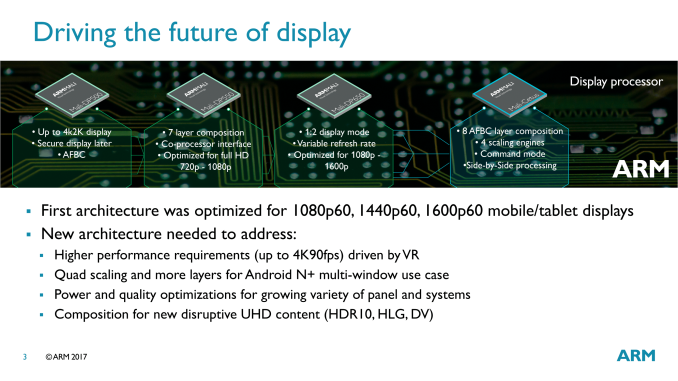
The previous Mali-DP500/550/650 display processors were all based on a common architecture, with ARM iterating on it over the years. Cetus, on the other hand, is making a clean break, something we don’t see very often in this space. ARM is doing this in order to assemble a more modern design that can incorporate features such as HDR output and high throughput modes for VR, which were not a part of the earlier display processor family. Similarly, while previous generation processors could handle 4K, they weren’t especially efficient at it relative to lower resolution modes, as ARM was aiming a bit lower. The big feature additions enabled by Cetus can be broken down to improved layering and scaling, higher performance for VR, further power optimizations, and the ability to support newer transport standards such as HDR10 and Hybrid Log-Gamma. Each of these in turn is meant to address a specific market, such as smartphones/tablets, VR headsets, and TVs/STBs.
As part of the new architecture, ARM is offering a bit more detail on the technical underpinnings of the architecture. At the same time, they’ve also changed how their processors are logically designed/broken down so that they are broken up into 5 different units: the ARM FrameBuffer Compression (AFBC) Unit, the Global Control Unit, the Layer Processing Unit, the Composition Unit, and the Display Output Unit. Each one, in turn, handles a specific type of display processing task.
The Layer Processing Unit is arguably the head of the display pipeline – especially since it contains the memory interface and buffers. It and the AFBC unit do most of the heavy lifting when it comes to memory-intensive operations, such as simple, orthogonal rotations of display layers.
However from a practical perspective, the composition unit is likely where most users will see or feel the real differences. Responsible for compositing and scaling the different layers within a UI, ARM has consistently been buffing up their composition capabilities over the years to handle Android’s increasingly complex UI and features. The Cetus display processor can now composite 8 layers – up from 7 on the previous-generation processors – and with 4 scaling engines, can scale up to 4 of those layers.
This is especially significant for Android 7, which introduced multiple/side-by-side window modes, and each of which requires its own layer. Combined with any special layering effects on a given window (e.g. window animations), and a multi-window setup can easily eat up layers, not to mention pixels as well in the case of a high resolution tablet.
Meanwhile Cetus as a whole has learned a few tricks to further improve power efficiency. One especially interesting trick is spitting up large (4K) layers into multiple smaller layers. Since Cetus contains multiple sub-units for processing multiple layers, this allows one large layer to be distributed over more hardware. The net result is that rather than having to clock up the chip and burn more power to process a large layer, the processor can go wide instead and stay lower clocked by spreading the work out, keeping down total power consumption. Finally, new to Cetus is an interface ARM is calling the coprocessor interface. ARM is primarily pitching it as a means for its customers to differentiate from one-another by using their choice of coprocessor. Over time the interface can potentially support a number of coprocessor blocks (including 3rd party blocks), but for now ARM is launching with a block of their own: the Assertive Display block. Another product of last year’s Apical acquisition, the Assertive Display block is the company’s dedicated unit for tone-mapping, which is a critical part of mapping HDR image data to today’s (and tomorrow’s) SDR displays. In turn, the combination of Cetus and the Assertive Display block makes the combined product ARM’s first HDR-capable display processor solution.
Wrapping things up, while it will take some amount of time for ARM’s new display processor to trickle down into SoCs and then finally consumer products, it should help them remain competitive in the display processor market. Besides improving their overall performance and energy efficiency, the specific features of the Mali-Cetus will enable ARM to finally supply display processor designs for VR headsets and 4K HDR TVs. The former is always an interesting market – one that is poised for rapid growth if it can find its killer app – while the addition of 4K HDR support will help ARM maintain and expand their footing in the very productive (and profitable) smart TV market, one that they have had a majority presence in for a number of years, and one where that trend is expected to continue. Gallery: ARM Mali-Cetus Presentation Deck
      | ||||||||||||||||||||||||||||||||||||
| 10:30a | Kaby Lake Motherboards at $140: MSI Z270 SLI Plus vs. ASRock Z270 Killer SLI In this review, we are having a look at two cost-effective Z270 motherboards that have been designed with gamers in mind - the MSI Z270 SLI Plus and the ASRock Z270 Killer SLI. As their names suggest, these two motherboards mainly place their marketing focus on the SLI support, and both have a retail price of under $140. We will examine their features, differences and performance in the following pages of this review. | ||||||||||||||||||||||||||||||||||||
| 12:00p | Acer Announces Holo 360° Camera with Integrated 4G LTE
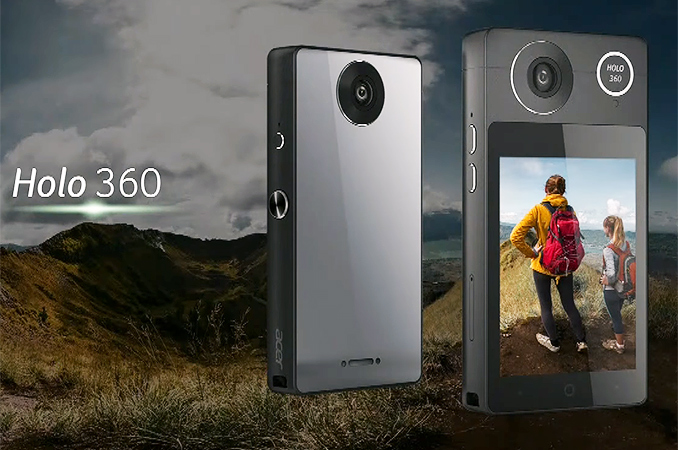
Acer has demonstrated a new camera designed to capture 360° videos and can upload content to the Internet without a PC or a smartphone. The Holo 360 camera is designed to be an easy-to-use camera for consumers,, built on top of Google's ever-dominant Android operating system. One of the key features of the camera is integrated 4G/LTE modem that can be used to upload content to the Internet. Moreover, the camera can even make phone calls. Right now Acer is limiting what they're disclosing about the Holo 360, and I suspect this means that the camera is still under active development. In particular, Acer is not sharing details about the resolutions supported by the camera's sensors, nor sharing information about processors that power the Holo 360, or even modem it uses (though keep in mind that different regions use different LTE bands). All of which points to the idea that the current version of the camera is an early prototype and its specifications have yet to be locked down. What the company is saying is that the camera can process, edit and share videos in a completely stand-alone manner: it does not need a smartphone or a computer to edit and upload content because it has integrated editing software, Wi-Fi support, as well as an LTE modem (it can even make phone calls, according to Acer). The device looks like a thick Apple iPhone 4 with two spherical cameras, a ~3” display, a slot for cards, multiple buttons and a light sensor. Given such feature set, it is not surprising that that the Holo 360 uses Google's Android, but it is unclear whether it will have access to Google’s Play Store.
Acer did not reveal MSRP of its 360° camera or its launch date. Moreover, the company provided no specifications and even did not display it alongside other products it announced at the Next@Acer event. It is a little odd for a company to announce a device and then keep it under wraps, but we have two pontential explanations for this: either development of the Holo 360 is far from completion, or the whole device is just a test vehicle for Acer’s 360° video hardware and software, which will end up in one of the company’s upcoming smartphones. While we do not know almost anything about the Acer Holo 360, it is important that the company demonstrated it at all. On the one hand, it shows that Acer believes in VR and 360° content, which is not exactly surprising as the manufacturer is working on its VR and mixed reality headsets with various partners. On the other hand, it means that Acer sees a potential market for this kind of product, either in an integrated or discrete form. The latter would be an especially interesting twist of fate, as the company used to make portable cameras many years ago. Related Reading: | ||||||||||||||||||||||||||||||||||||
| 2:01p | LG 43UD79-B Launched: 42.5-inch 4K IPS with FreeSync
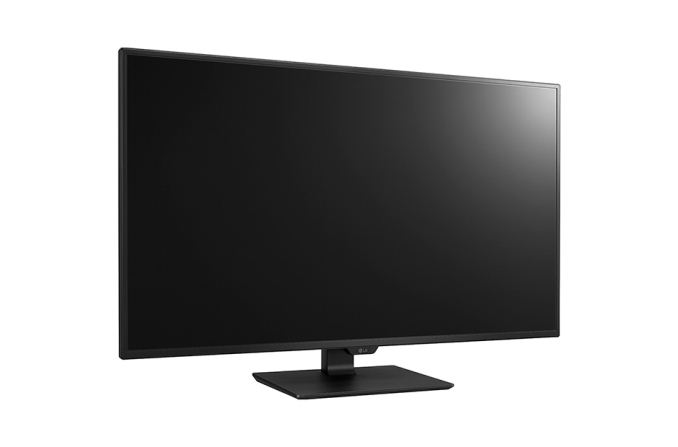
LG is about to launch a new monitor that is one of the most feature-filled monitors on the market once it arrives. Referred to as the 43UD79-B, this 42.5-inch display has a native UHD resolution of 3840 x 2160 with a conventional refresh rate of 60Hz. It features an IPS panel with a non-glare coating, a peak brightness of 350 cd/m2, a contrast ratio of up to 1000:1, and an 8ms gray-to-gray (GTG) response time. The viewing angles are wide at 178°/178°, which is typical for an IPS display. Although support for 1.07 billion colors is claimed, the lack of an explicit mention of a 10-bit panel leads us to believe that this is an 8-bit panel using A-FRC to achieve a 10-bit color depth. On the plus side, this model will ship color calibrated from the factory.
Assuming that the press release is indeed accurate, this model not only supports FreeSync variable refresh technology, but also a host of other gaming-oriented features like Game Mode, Black Stabilizer, and Dynamic Action Sync (DAS) Mode. The native 60Hz refresh rate will likely preclude this model from ever becoming a gamer favorite, but we are still glad to see that LG made an effort in catering to the gaming crowd. The peak refresh rate is likely 60 Hz for the Freesync, however LG does not specify the lower bound. Technically the specification sheet says 56-61Hz, although that is rather small for a FreeSync range.
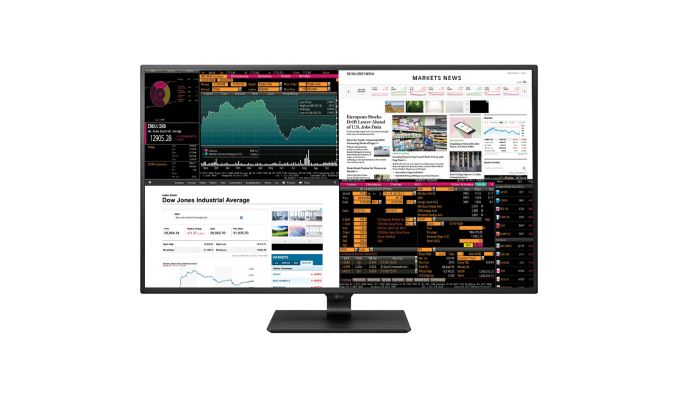
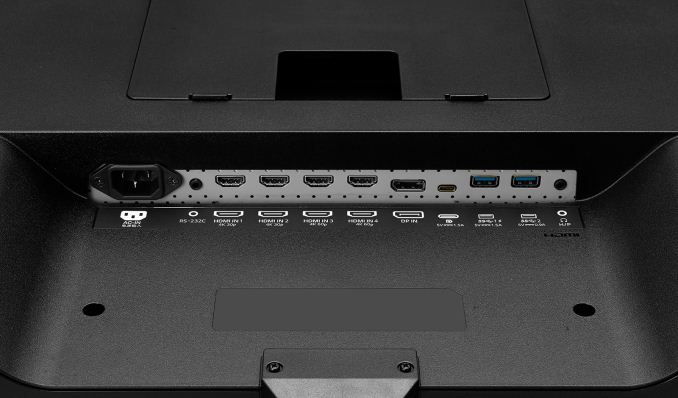
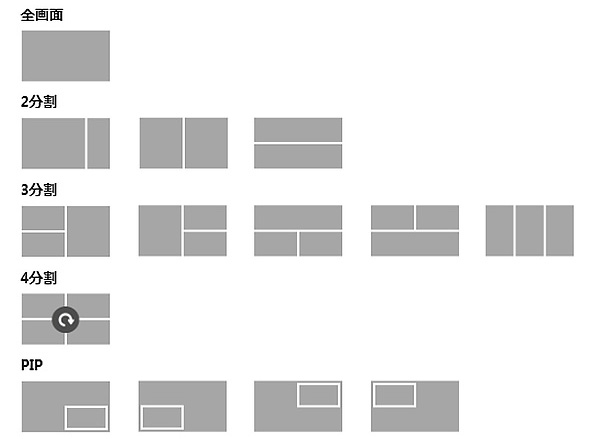
The connectivity front is where this monitor really shines. There are two HDMI 2.0 inputs (4K @ 60Hz), two HDMI 1.4 inputs (4K @ 30Hz), one USB 3.1 Type-C port that can operate in DP Alt Mode and thus carry a DisplayPort signal, and one DisplayPort 1.2a input (4K @ 60Hz) that supports the aforementioned FreeSync feature. The reason for all these inputs is that this monitor can display images from up to 4 devices at once. You can either split the screen into four 21.5-inch 1080P sections, two horizontal or vertical sections, or even three sections of varying sizes. There is also support for basic Picture-in-Picture (PIP) if you don't wish to subdivide the screen real estate.
Also present is LG's Dual Controller feature, which essentially turns the monitor into a KVM switch. Users can plug a mouse and keyboard into the two downstream USB 3.0 ports, connect the monitor to two computers, and control both systems from that single mouse/keyboard combo. Rounding out the basic specifications are built-in 2x10W Harman Kardon stereo speakers, a headphone jack, an RS-232C connector, and a small remote control. The included stand is fairly basic in that it only allows tilt adjustments.
While the press release indicates a countrywide Japanese launch on May 19th at a price of around 83,000 yen, US-based retailers are already offering preorders for $697 with an expected availability of May 9th. If that holds true, that is a very attractive price for a roughly 43-inch 4K monitor with that many built-in features and a three-year warranty. Gallery: LG 43UD79-B
      | ||||||||||||||||||||||||||||||||||||





| << Previous Day |
2017/05/01 [Calendar] |
Next Day >> |