[Most Recent Entries] [Calendar View]
Tuesday, May 23rd, 2017
- 4GB of LPDDR3 with either 500GB HDD, or a 128GB SSD+500G HDD
- 8GB of LPDDR3 with either 1TB HDD, 256GB SSD, 128GB+500GB or 128GB+1TB
- 16GB of DDR4 with 128GB SSD + 1TB SSD
- Toshiba OCZ RD400 1TB SSD
- Toshiba OCZ VX500 512GB SSD
- AOC Expands AGON Family with Curved AG322QCX and AG272FCX 144 Hz Displays
- NEC Goes for a Curved Display, Launches 3440×1440 MultiSync EX341R Monitors
- Acer Announces Predator X27 Monitor: 4K@144 Hz with DCI-P3, HDR10, & G-Sync
- Acer Predator Z271UV Gaming Monitor: 1440p, 144-165Hz, G-Sync, Eye Tracking
- Acer Introduces A Pair Of Predator Gaming Displays
- Acer Launches Curved XR382CQK Display: 37.5-inch, 3840×1600, FreeSync, & USB-C
| Time | Event | ||||||||||||||||||||||||||||||||||||||||||||||||||||||||||||||||||||||||||||||||||||
| 4:24a | Huawei Matebook 2017 Launch Live Blog: Starts 2pm CEST (8am ET) We're in Berlin today to cover the launch of Huawei's next generation of Matebook. Come back to this page at 8am ET for the Live Blog! | ||||||||||||||||||||||||||||||||||||||||||||||||||||||||||||||||||||||||||||||||||||
| 8:30a | Huawei Launching Two New Clamshell Laptops: The MateBook X and the MateBook D
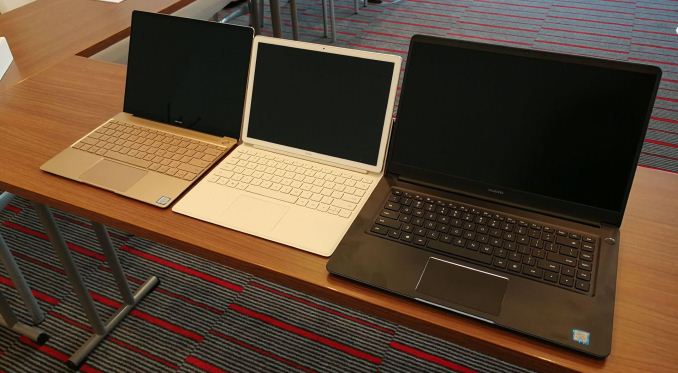
On the back of the launch of the MateBook last year, Huawei is launching a new generation using the latest hardware and diversifying the brand. As an upgrade from a single model last year, Huawei is expanding the MateBook like into three products. The MateBook X is a 13-inch ultraportable clamshell with a focus on style, thin bezels, and packing enough hardware underneath to go deep into the market. The MateBook E is the second generation 2-in-1, following on from the MateBook launched in 2016, with improvements all round, such as an adjustable hinge, a spill proof keyboard, and bundled accessories. The third element is the MateBook D, a 15.6-inch clamshell aimed squarely at the student and business markets, featuring dual storage options and a discrete NVIDIA GPU but also going with the narrow bezel design similar to the MateBook X.
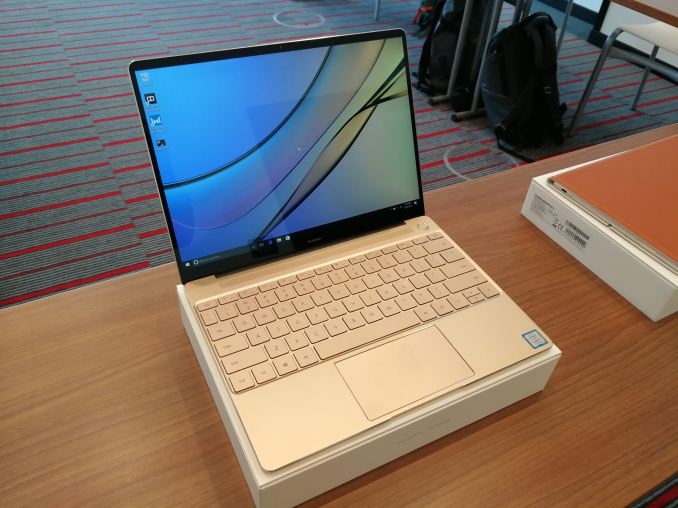
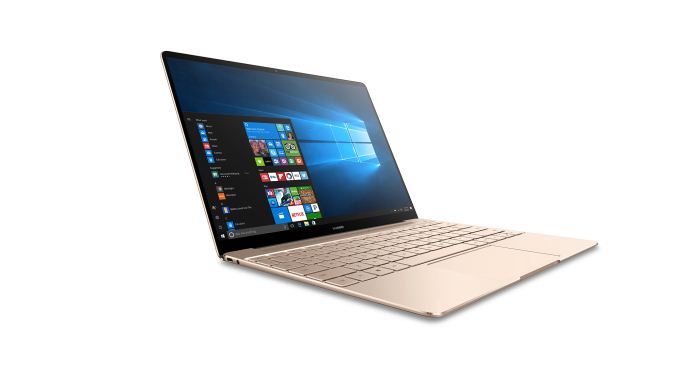
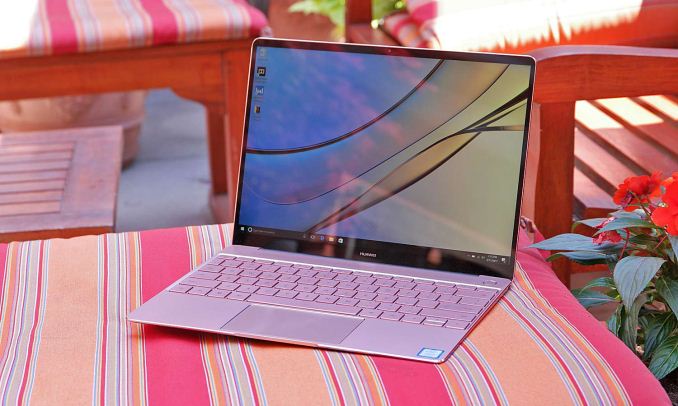
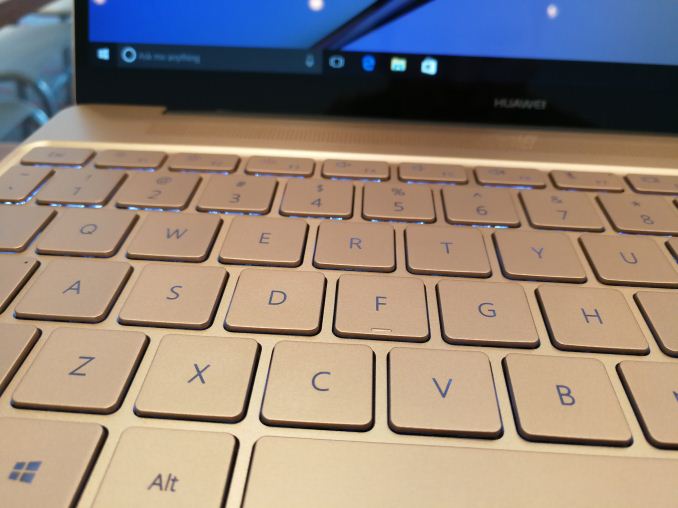
Primarily seen as a smartphone company for most of us, last year we saw the launch of the MateBook: a 12-inch 2-in-1 device with Huawei’s design ID in a thin and light form factor, but crucially a mark into the PC space. At the time, it was exciting to see a new entrant, especially one with the potential clout of Huawei: if you sell 106m+ smartphones a year, then putting some resources into a mobile PC should be something really interesting to watch. The 2016 MateBook was a good start – the visual aspect of the unit fit in neatly with the market, although there were a few hiccups for a first-generation product, such as the limited stand options, the tendency for the magnetic cover to put the device to sleep when in tablet mode, and the fact that the peak configurations were over $2000. Feedback was sought, about how Huawei should improve the products and how it should tackle this market better, and here are the results. This news covers the two laptops: the MateBook X and the MateBook D. MateBook X: The Premium ClamshellA common feature for technology journalists in this space, especially when discussing products with Chinese companies, is how the discussion usually comes to Apple’s success in the laptop market. They are in awe of the design, the utility, and the avid fanboyism that follows their products. As a result, some of the Chinese companies aim to compete in the same space – having a small slice of a large pie is still a large amount, even if it is a carrot cake. So when a user spots the MateBook X, thoughts instantly turn to if it is a Macbook Air/Macbook clone. Not quite, but it arguably looks like a premium competitor for users who want the Macbook form factor but in a Windows/PC environment.
The start of it is the aluminium clamshell, tapering to an almost point, with both the screen and the keyboard designed to try and take as much space as possible. One of the things Huawei wanted to emulate here is the thin bezel strategy, similar to the Dell XPS range, and coming in at 88% screen-to-body ratio is rather nice. There’s still a camera at the top, negating one of the issues with the XPS where the camera is pointing at your chin. The display is a 2160x1440 IPS panel (manufacturer not specified), with a 3:2 aspect ratio, wide viewing angles, and rated up to 1000:1 and 350 nits. Huawei also adds in 100% sRGB for good measure.
The heart of the MateBook X is Intel’s latest Kaby-Lake based 7th Generation CPUs, and Huawei likes to point out that while their competitors fit in the Kaby Lake-Y based processors (running at 4.5W), here Huawei is using the U based processors: the i7-7500U and i5-7200U. Technically these CPUs come out of the factory as 15W parts, but OEMs can configure the base clock in cTDP down mode for 7.5W/9.5W, which is what we suspect Huawei is doing here (awaiting confirmation). Using a U processors means getting HD 620 graphics, rather than HD 615, which should make the unit better for light graphical work. Nonetheless, users might be able to feel a base performance uplift compared to the 4.5W parts.
Storage comes via an integrated PCIe SSD, and depending on the configuration will either be 256GB or 512GB. We were unable to prize the details on who the supplier is for these drives, but we might get some hands-on time later to go through the system specifications on a demo unit. Memory is, unfortunately, a downside on the X: Huawei has decided to use LPDDR3 rather than DDR4, which means that the top spec unit hits 8GB (4GB also offered, we assume 2x2GB for dual channel) rather than 16GB which would make this device high up on a prosumer list. The debate about LPDDR3 and DDR4 at this level of device gets interesting – if one is in better supply than the other, power consumption (arguably DDR4 is much better, even though LPDDR3 has ‘low power’ in the name), power profiling, etc. It’s a discussion that I need to have with Huawei’s design teams, really – at 16GB it becomes an easy replacement for my Zenbook.
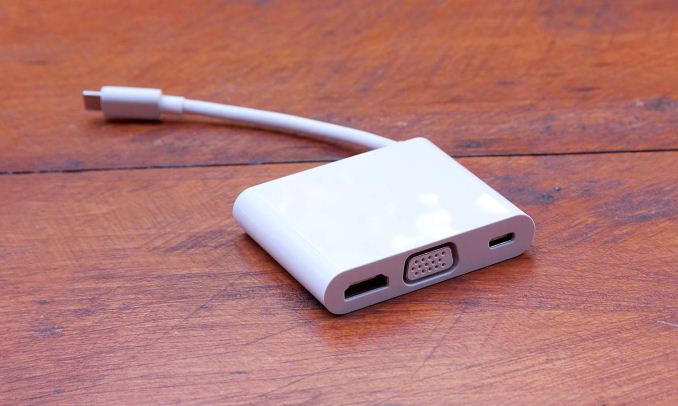
Going around the device, Huawei has supplied two USB Type-C ports, one of which can be used as a charging port for the supplied 40W power adaptor but both can be used for data. We’re told that the ports are USB 3.0 (5 Gbps), and both will work with the new MateDock 2, which is this time being supplied with the device rather than being sold separately. The MateDock 2 is like the MateDock, except it exchanges the ethernet port for a HDMI and VGA ports (with two USB Type-A as well). Also on the clamshell is a fingerprint reader for login, and a 3.5mm headphone jack. For connectivity, the MateBook X has an 802.11ac solution capable of 2x2 MIMO (we assume it’s the Intel 8265) and BT4.1, although no modem for 4G. For the audio, Huawei is promoting Dolby Atmos certification, along with Huawei’s Sound System technology. As part of our briefing, Huawei stated that they’ve been in the audio business over 10 years, but only really as a software solution. The MateBook X brings together the hardware (a Realtek codec, probably the ALC892 which would be high end for a clamshell device, though disappointing if it’s the ALC662) and software for Atmos certification. This includes dual speakers with custom drivers, as well as a dual microphone setup. The battery is listed as 41.4 Wh, which is exactly the same as the Macbook, and Huawei rates this as good for 10 hours of local 1080p video playback at 50% screen brightness (imagine me asking ‘what about 100 nits?’ to a confused Huawei rep). Gallery: MateBook X
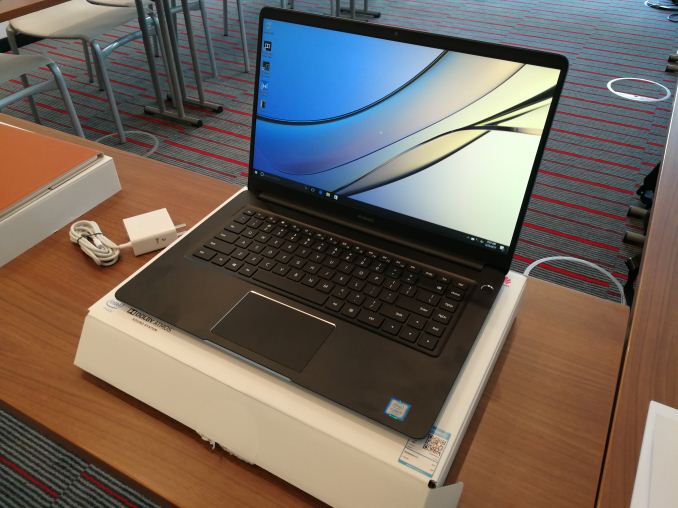
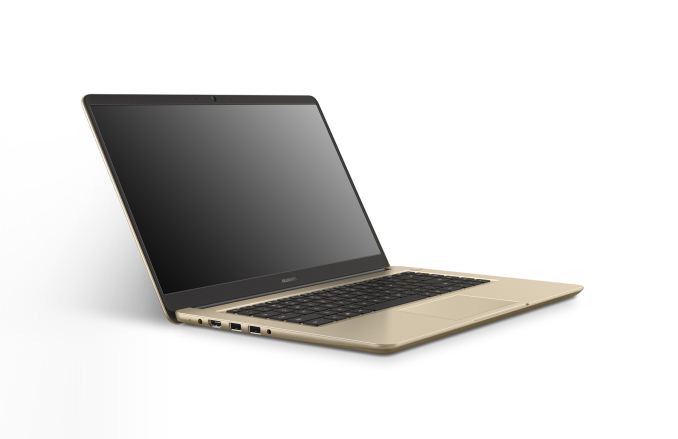
     _thumb.jpg) Pricing and availability will be announced at the press event, though we’re likely to see Macbook levels of pricing, perhaps starting at $1099+ for the 4GB/256GB model $1499+ for the 8GB/512GB model. When we get final numbers we will update. Colors will be region dependent, but expect to see one or all of Space Gray, Prestige Gold and Rose Gold. MateBook D: The Edumacation DeviceTwo of the more stable elements to the laptop space is the education sector and the office markets. These are usually reasonably decent products sold at low margins but in good volumes along with potential support packages. OEMs like ASUS, Lenovo and HP play in this space, so it is rather competitive. Huawei’s MateBook D is the first crack at taking on the established players, in a 15.6-inch narrow bezel design. A quick look at the MateBook D and you might be forgiven for thinking it isn’t a Huawei device. If you sit around Huawei devices all day, you always get a feeling of premium, and the MateBook D doesn’t necessarily give that because it’s built to a price point. That being said, a few minutes with the unit and it does actually feel quite polished from a design perspective, with the positive idiosyncrasies that as an editor I seem to notice on Huawei devices, such as the feel and the unified image. It’s bulkier than any previous Huawei device for sure, and Huawei uses that extra space for ports, fo the screen, for the touchpad, for the sound, and for battery.
At 15.6-inches, the display comes in as a Full-HD 1920x1080 and uses an IPS panel for better viewing angles. Huawei lists the panel as supporting 250 nits, 800:1 contrast, and a rather low 45% NTSC support – that would be a strangely low color support for even a basic panel (perhaps someone on the spec sheet pressed the wrong number?). Like the MateBook X, the panel aims to take up as much room as possible, with an 83% screen-to-body ratio.
Huawei isn’t stating exactly what processors are going to be in place here, except that they will be Kaby-Lake based 7th Gen processors. We suspect they will be the 15W Kaby Lake-U parts, especially given that they list the graphics as HD 620. The MateBook D will come in a variety of CPU/GPU combinations, with either integrated graphics on the CPU or with a discrete GPU: the NVIDIA GeForce 940MX. It’s worth noting that this GPU came out in 2014 and runs around 20-30W, depending on the memory configuration. We asked about DDR3 or GDDR5 for the GPU (as the latter has 2.5x more bandwidth), although they didn’t know off hand (we might get to probe later today on that). We asked why Huawei chose this over something with a better power profile, such as the NVIDIA 1030 or 1050, although the rep we were asking wasn’t entirely sure (likely a supply issue, and bad market timing). Nonetheless, the discrete GPU is optional on all models except for the very basic storage configuration. For storage and memory, Huawei is offering a variety of combinations. The chassis supports both a PCIe M.2 based SSD and a 2.5-inch HDD, and so there will be: I was told that the units are user upgradeable as well. Having the 940MX discrete GPU is an option on all configurations except the 4GB models.
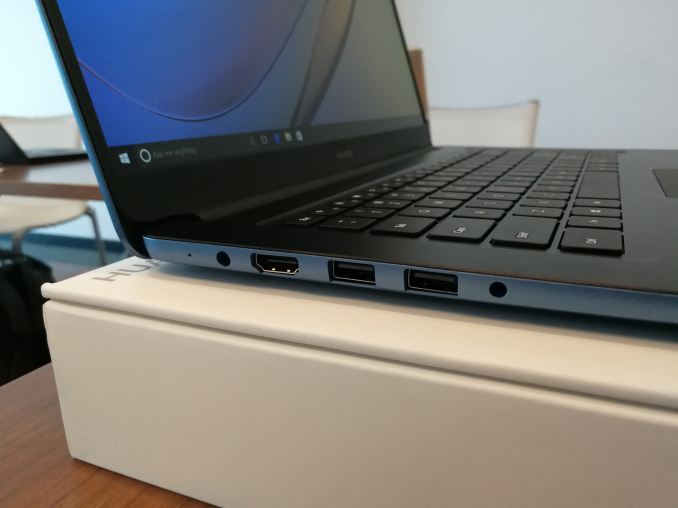
Connectivity comes via the same 802.11ac with 2x2 MIMO with BT4.1 as the MateBook X, along with the same specifications for audio: dual speakers, dual microphones, and Dolby Atmos Sound System support. For the ports on the side, there’s a DC-in jack (sorry, no USB-C for power here), two USB 3.0 Type-A ports, one USB 2.0 Type-A port, a full-sized HDMI port, and a 3.5mm jack. The battery is rated at 43.3Wh, which given the size of the device and the weight (4.2lbs, 1.9kg), seems quite low. Devices this size typically come with 50Wh+, so I’m wondering if that’s another typo on the specification sheet. Gallery: MateBook D
_thumb.jpg) _thumb.jpg) _thumb.jpg) _thumb.jpg) _thumb.jpg) _thumb.jpg) For pricing and availability, again we’re likely to hear the exact numbers at the press event (see AT’s front page for the Live Blog) and we’ll update here when we know. Colors will be region dependent, but expect to see one or more of Space Gray, Champagne Gold and Aurora Blue. It looks nice in blue. Some pictures were provided in collaboration with other Purch outlets. | ||||||||||||||||||||||||||||||||||||||||||||||||||||||||||||||||||||||||||||||||||||
| 8:31a | Huawei Launches the MateBook E 2-in-1: The Next Generation
Today we’re in Berlin to cover Huawei’s launch of the new MateBook series. For this second generation, Huawei has on offer a 13-inch clamshell aimed at premium users, a 15.6-inch device for education and office use, and their next generation 2-in-1 called the MateBook E, aimed squarely at improving the design on their first attempt back in 2016. Perhaps somewhat ironically, because I left my main laptop charger at home, I’m writing this news on that 2016 model which I carry as my backup work device. The MateBook E: Surface Says Whaaaaat?When Huawei launched the 2016 MateBook, for a first attempt, it hit the market where it needed to. Much like other vendors when making their 2-in-1s, there was some design choices that seemed a little strange but Huawei had at least nailed the quintessential Huawei look, transferring the design ID from their top of the line Mate series smartphones, into a portable PC device. It was also Huawei’s first venture using Intel CPUs in a consumer device.
What the MateBook E does, as the second-generation product, is fix those questionable points and bring everything up to the latest hardware. That means using the latest Kaby Lake-Y processors, adjusting what configurations sold the best, and giving a keyboard and hinge that users actually want. It’s a good step up from the 2016 MateBook for sure.
At the heart of the MateBook E is Kaby Lake Y, the 4.5W processors from Intel. Along with Intel’s new naming scheme, here the MateBook E gets either the Core m3-7Y30 or the Core i5-7Y54, matching the similar CPUs to the last gen but on the latest microarchitecture using updated features like Speed Shift 2. These processors come with Intel’s HD 615 graphics, and will be supplied with either 4GB or 8GB of LPDDR3 and then 128GB, 256GB or 512GB of PCIe storage. As with the MateBook 2016, this isn’t expandable.
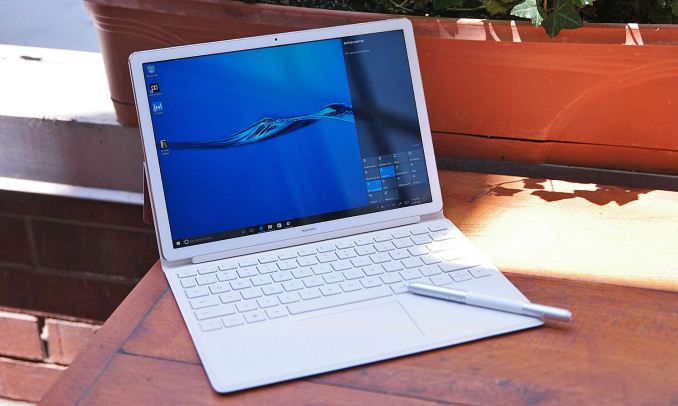
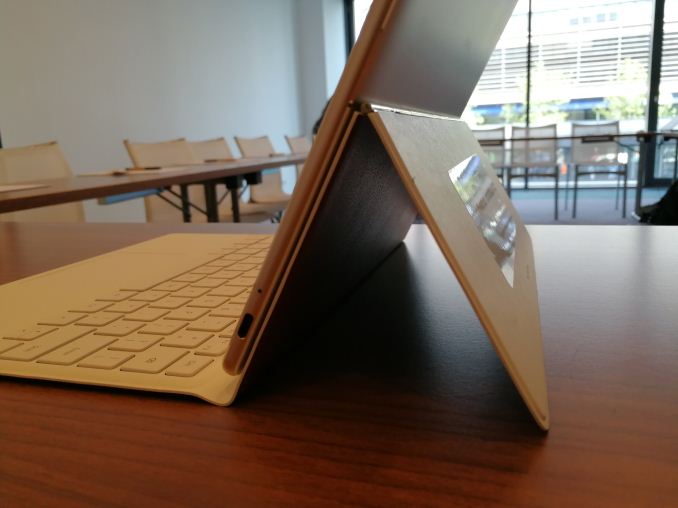
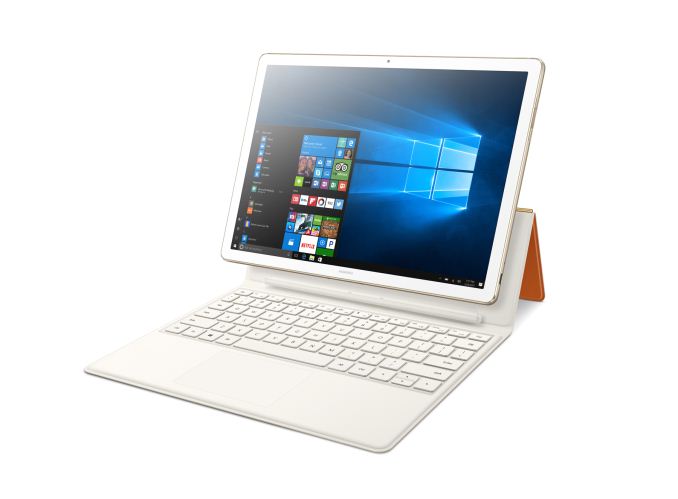
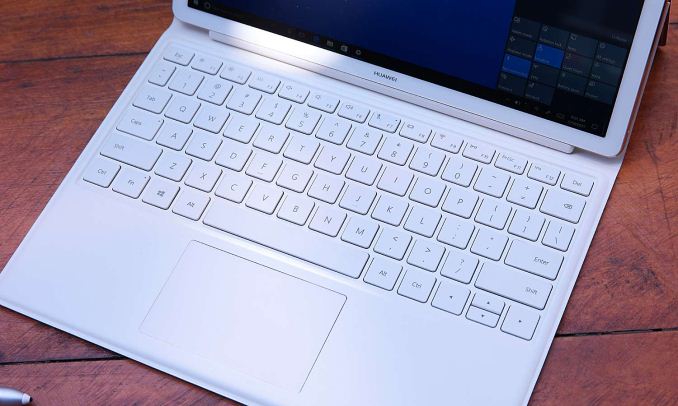
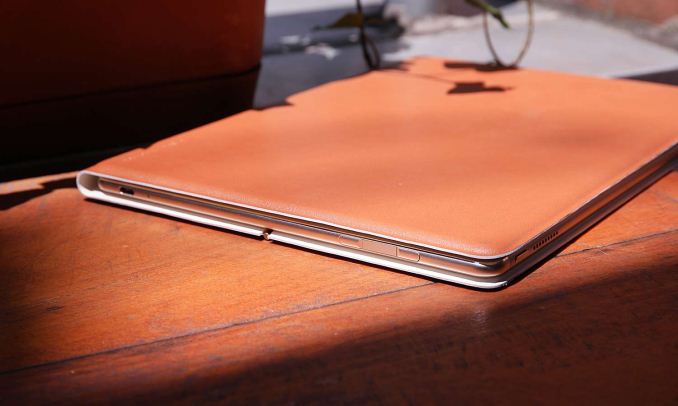
Aside from the processor update, the biggest change is in the keyboard folio. The keyboard folio now comes with the device rather than being an add-on, and the hinge is updated to allow for a full 160 degree of tilt. Unlike the Surface which integrates the hinge into the device, the hinge is part of the folio, and stays with the keyboard but aligns flush when not in use. The hinge mechanism isn’t anything special like we’ve seen with fancy designs before, but with a few minutes use it was clear that the design was sturdy for what it needed to be. The folio uses a new 3-pin connector to the MateBook E, rather than the 7-pin used in the older device (which means no backwards compatibility), and the keyboard has now changed into a spill-resistant chiclet design. I spent a few minutes with the new keyboard, and due to the reduced key travel compared to the older model, it felt a little different and perhaps not as free flowing. It will be interesting to see what others think about it.
The folio no longer goes all around the device, which means the power button should hopefully no longer be accidentally activated when closing the folio. Along with the power button is the fingerprint reader, carrying over from the 2016 model, as well as a single Type-C connector. This is used for power as well as connecting to the new MateDock 2, which also comes bundled with the MateBook E in some regions. As with the MateBook X, the MateDock 2 is updated this year as well: it exchanges the ethernet port for an HDMI output and a VGA output, making the device thinner and arguably more applicable to presentational style workflows. The new MateBook E is thinner, coming in at 6.9mm, and houses a 33.7 Wh battery (up from 32.7 Wh) which Huawei claims is good for 9 hours of video playback at 50% brightness. The speaker system is carried over from the 2016 model too, although with Dolby Audio Premium certification.
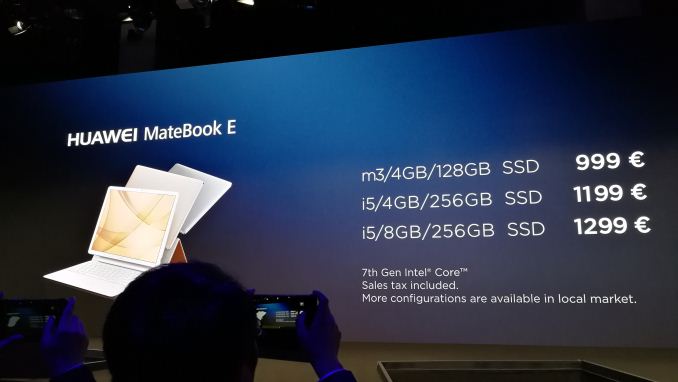
Huawei revealed pricing for a few models, with the low configuration of m3, 4GB DRAM and 128GB SSD coming in at 999 Euro. The high configuration of Core i5-Y, 8GB of DRAM and 256GB SSD will be 1299 Euro. Colors for the MateBook E will be region dependent, but you’ll see at least one of Titanium Grey (with Blue folio) of Champagne Gold (with a Brown Leather folio or a Pink folio). Some pictures were provided in collaboration with other Purch outlets. | ||||||||||||||||||||||||||||||||||||||||||||||||||||||||||||||||||||||||||||||||||||
| 9:30a | AT20 Giveaway Day 20: Toshiba OCZ Remembers Why MLC SSDs Rock
After 19 days and 30 giveaways, the end is finally upon us. That’s right, today’s the 20th and final day of our 20 day giveaway celebration of AnandTech’s 20th anniversary. So if you haven’t already won something, today is your last chance to get a prize. Closing out our epic giveaway is the crew over at Toshiba OCZ. The prolific SSD vendor has had their ups and downs, and with recent products they’re definitely on an upswing. Meanwhile all the better for today’s lucky winners, thanks to the NAND flash shortage, good SSDs are now a hot commodity. To that end, for today’s giveaway we have OCZ’s top SATA and M.2 SSDs: a 1TB RD400, and a 512GB VX500. The AnandTech 20th Anniversary Celebration – OCZ Giveaway
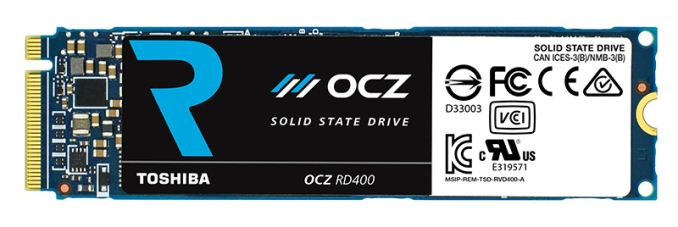
Toshiba OCZ RD400 1TB SSD
Toshiba OCZ’s flagship SSD is the RD400. Based around their own custom controller, the RD400 offers full PCIe 3.0 x4 connectivity and NVMe protocol support in an M.2 SSD, putting this at the cutting edge of SSDs. Under the hood the drive uses Toshiba’s 15nm planar MLC NAND. The 1TB version we’re giving away is a fully populated double-sided 2280 drive that’s rated for up to 210K random read IOPS and 130K random write IOPS. Or to put it in terms of bandwidth, 2.6GB/sec sequential reads and 1.55GB/sec sequential writes. Toshiba OCZ VX500 512GB SSD
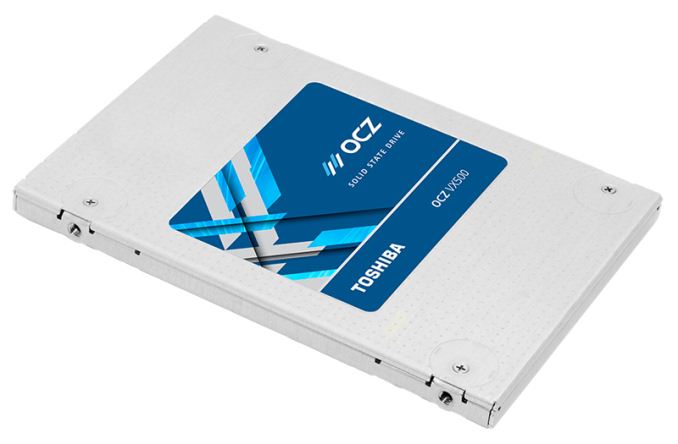
Meanwhile if you’re in need of a more common standard 2.5” SATA form factor drive, then our second prize of the day should be just what you need: Toshiba’s OCZ VX500. This drive uses the same NAND as in the RD400, but swaps out the form factor for the 2.5” SATA that so many machines still expect. The drive’s performance is tuned for client workloads, and for smaller operations the SLC cache makes it a very fast contender. However what may be the most interesting aspect is the drive’s very low power usage, which makes it a good candidate for use in a laptop. As with our 30 previous giveaways, today’s giveaway is only open for 48 hours, so be sure to enter soon. However please note that for legal reasons, we’re only able to open these giveaways to residents of the United States. Final WordsFinally, as we close out the AT20 giveaway series, I’d like to again thank all 31 of our vendors for chipping in with prizes for what is by far our biggest prize giveaway ever. In the big picture AnandTech is just a middle-man; it's the vendors who are making all of this possible so that you guys can have free hardware. And an absolutely huge thank you goes to Purch’s community team, who has been working behind the scenes to actually run the giveaways, including the drawings themselves and prize fulfillment. With nearly 100 prizes to distribute in just over 4 weeks, doing a giveaway of this scale would not have been possible without all of their hard work. | ||||||||||||||||||||||||||||||||||||||||||||||||||||||||||||||||||||||||||||||||||||
| 11:30a | Acer Predator Z35P Available for Order: Curved 35" with 3440×1440@120 Hz and G-Sync
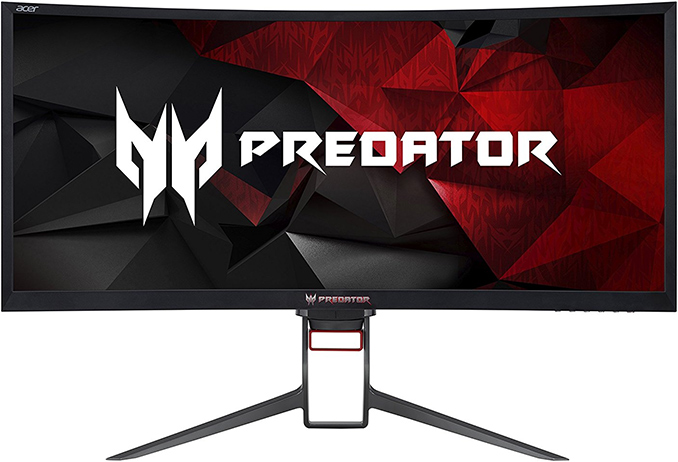
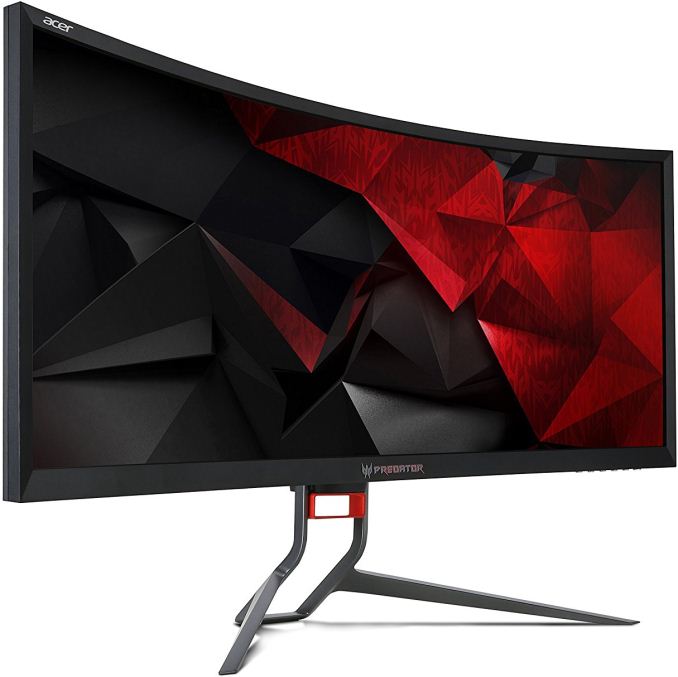
Acer has quietly launched yet another curved ultra-wide Predator display for gamers seeking a large diagonal, a high resolution and an ultra-high refresh rate. The Predator Z35P resembles its predecessor launched a couple of years ago, but has a higher resolution and a better contrast ratio. The new monitor is available for pre-orders now. Acer’s Predator Z35 was one of the first large ultra-wide curved displays featuring a very high refresh rate when it was introduced in mid-2015. Its large dimensions, along with a 144-200 Hz refresh rate, and accompanied by NVIDIA’s G-Sync technology, made it well known among demanding gamers - but its resolution of 2560×1080 was not high enough. The relatively low resolution was justified by the fact that in 2015 only ultra-high-end graphics cards could hit 200 fps in demanding titles at 2560×1080. In the mean time, graphics cards have come a long way in two years and it is time for Acer’s large curved ultra-wide monitor to get a resolution upgrade. The new Acer Predator Z35P is based on a 35” VA panel offering a 3440×1440 resolution (2.39:1 aspect ratio), a maximum brightness of 300 nits, a 2500:1 contrast ratio, a 100 Hz refresh rate, 178°/178° viewing angles, a 4 ms response time, and 1800R curvature. According to TFT Central, the refresh rate of the panel can be overclocked from 100 Hz to 120 Hz, which is not as high as the 200 Hz possible on the original Z35, but which is well beyond what non-gaming monitors can offer.
When it comes to connectivity, the Acer Predator Z35P monitor has one HDMI 1.4 port, a DisplayPort 1.2 port, four USB Type-A headers (with one USB-B input) and a 3.5-mm audio jack to drive two 9 W integrated speakers.
The new Predator Z35P does not seem to have many rivals on the market that can offer a similar combination of features: dimensions (35"), resolution (3440×1440), curvature, a very high refresh rate (up to 120 Hz), G-Sync support and so on. In fact, there are only two of them: the AOC Agon AG352UCG as well as the HP Omen X, if we do not consider slightly smaller 34"-class ASUS ROG Swift PG348Q and Acer Predator X34 (this one uses an IPS panel with 60 Hz, but it is overclockable to 100 Hz). The Acer Predator Z35P is expected to be available in the U.S. in the coming weeks for $1099.99. Amazon is taking pre-orders on the display with ETA in one to three weeks. Gallery: Acer Predator Z35P
     Related Reading: | ||||||||||||||||||||||||||||||||||||||||||||||||||||||||||||||||||||||||||||||||||||
| 1:00p | Western Digital Seeks To Intervene In Toshiba's Sale Of Memory Business
Western Digital, through its SanDisk subsidiary, is seeking arbitration to prevent Toshiba from selling off its stake in their flash memory joint venture without the consent of Western Digital. Toshiba has been suffering financially due to crippling losses incurred by its nuclear power division, and to offset those losses Toshiba has been working to sell off its memory business. Toshiba's memory business is one of the most successful parts of the company and the Toshiba-SanDisk flash memory joint venture is one of the four major manufacturers of NAND flash memory. When Toshiba announced in March their intentions to raise cash by selling a stake in their memory business, a bidding war emerged. Western Digital, Micron and SK Hynix all sought to expand their share of the NAND flash market, but Toshiba was reluctant to sell to a competitor, hoping to avoid a prolonged anti-trust regulatory approval process. The Japanese government also does not want to see the NAND flash business sold to a Chinese-controlled company. This left private equity firms as the bidders Toshiba was most receptive to, but other technology companies like Broadcom and Foxconn are bidding. After failing to meet their goal of selling a 20% stake by the end of March, and as revised estimates made it clear that 20% would not cover Toshiba's nuclear losses, Toshiba's plans shifted toward a complete spin-off and sale of their Toshiba Memory division. As of February, Toshiba valued this unit at around $18B. In late March it was reported that Broadcom and Silver Lake Partners had jointly bid to buy Toshiba Memory for about that amount, then in early April Foxconn reportedly offered $27B. Broadcom has since increased their bid to $28B. SK Hynix and Bain Capital are reported to be jointly bidding up to $13.5B for a majority stake in Toshiba Memory. The bids for Toshiba Memory have reached prices that are difficult but not necessarily impossible for Western Digital to match. Western Digital would need to fund an acquisition with significant debt, and other analysts have speculated that it may be better for Western Digital to pursue acquiring a majority stake in Toshiba Memory rather than a complete acquisition. Western Digital does have leverage in their preexisting relationship with Toshiba as co-owner of their flash memory joint venture. Western Digital is alleging that Toshiba is required to obtain Western Digital's consent before spinning off or selling Toshiba Memory, and that Toshiba's actions so far have violated their agreements with Western Digital. Western Digital has initiated arbitration proceedings against Toshiba, seeking to block further action without Western Digital's consent and to reverse the Toshiba Memory spin-off. These arbitration proceedings are undoubtedly a major frustration to Toshiba, who badly want to close a deal two months ago. Instead, they are now faced with complicated litigation over the terms of at least three joint venture agreements with SanDisk that are now controlled by Western Digital. So far, Toshiba does not appear to have responded to the arbitration demand and Western Digital claims that Toshiba has indicated they have no intention to obtain consent before selling Toshiba Memory to the highest bidder. It is not clear how long this dispute could take to settle, but there is an initial 30-day window for Toshiba to respond before the conflict escalates. If Toshiba does agree to Western Digital's arbitration request, estimates range from six months to two years for that process to resolve. By stalling or blocking competing bids, Western Digital seems to be running out the clock on Toshiba with the goal of forcing them to accept a bid from Western Digital that would not be able to win in an open auction. The longer Western Digital can prevent Toshiba from closing a deal, the more desperate Toshiba will get to raise enough cash to keep the company as a whole afloat. Western Digital has not said whether they will file for an injunction if Toshiba does not agree to participate in arbitration, so there is still a lot of uncertainty about how severe this dispute will get and how long it will last. Analysts at J.P. Morgan are optimistic about Western Digital's prospects in this dispute and are among several analysts to have upgraded their ratings of Western Digital in recent months. Despite the dispute over corporate ownership rights, the day to day operations of the Toshiba/Western Digital NAND joint venture have been largely unaffected. Both Toshiba and Western Digital are in the process of bringing products to market using their 64-layer 3D NAND flash, which has a lower cost per bit and much higher density than their 15nm planar NAND. Western Digital predicts that 40% of their wafer output this year will be 3D NAND and 75% of that will be the 64-layer generation. Due to the ongoing industry-wide NAND flash shortage, all of the NAND produced by Toshiba and Western Digital is quite profitable and the companies are being judicious in allocating supply to the most lucrative market segments. There has been some speculation that as the dispute escalates Toshiba might deny Western Digital employees access to their fabs in Yokkaichi, Japan, but Western Digital says Toshiba has not taken any such action and Western Digital employees are continuing to work alongside Toshiba employees in research and development, manufacturing, and testing. | ||||||||||||||||||||||||||||||||||||||||||||||||||||||||||||||||||||||||||||||||||||
| 4:30p | Corsair Unveils T1 RACE Gaming Chair: Five Colors, $350
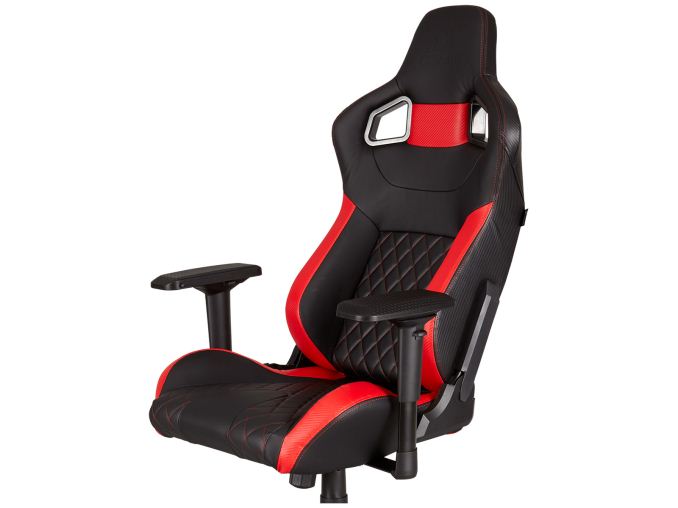
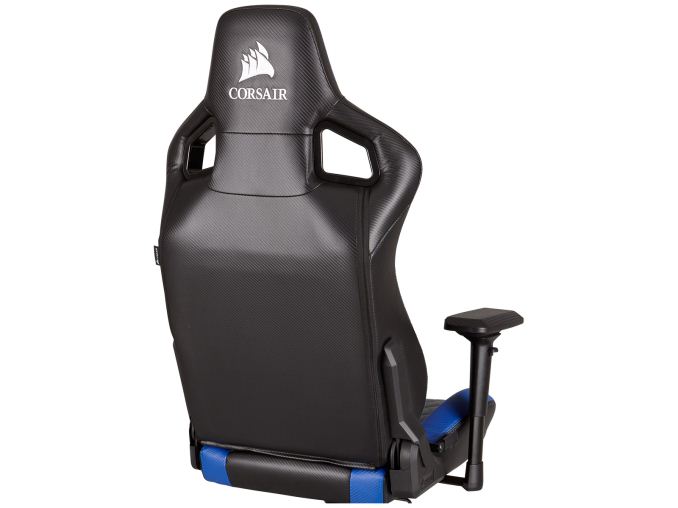
Over the years, Corsair has managed to carve a niche for itself as a purveyor of just about every PC gaming-related peripheral imaginable. That product line expands a little more with the announcement of their first gaming chair, the T1 RACE. Said to be inspired by racing seats, and placing an emphasis on comfort and durability, this new model comes with a visual flair thanks to a choice of five different color accents.
The T1 RACE is manufactured with a steel frame and dense foam cushions that are highly contoured, which should provide ample padding and support. Included are some removable neck and lumbar pillows to help during long gaming sessions. All the seating surfaces are covered in a synthetic PU leather, and as mentioned above there is a choice of either black, blue, red, white, and yellow accents and matching stitching. The textured armrests provide four levels of adjustment, and the user can move them up or down, left or right, forwards or backwards, or even swivel them to the most comfortable position.
The T1 RACE features a powerful steel class 4 gas lift for height adjustments, while the seat itself tilts up to 10° and can recline up to 180°, which means that the user can lie completely flat. The chair itself sits on a five wheel base, and the caster wheels are made from nylon should ensure smooth movement and scratch protection on just about any floor surface. On the back of headrest is an embroidered and lightly embossed CORSAIR logo. The goal behind gaming chairs is one with many accessories: do you spend $60 on a gaming mouse, or a headset? Do you spend $110 on a gaming keyboard or gaming glasses? Do you spend $350 on a gaming monitor or a gaming chair? The accessories market is one element that gaming focused vendors like on tying users in to living and breathing a particular brand. The T1 RACE Gaming Chair is available worldwide, and has a suggested retail price of $350 USD and a two-year warranty. Gallery: CORSAIR T1 RACE Gaming Chair
      Related Reading | ||||||||||||||||||||||||||||||||||||||||||||||||||||||||||||||||||||||||||||||||||||
| 6:25p | Microsoft Announces The New Surface Pro: Refined with Kaby Lake
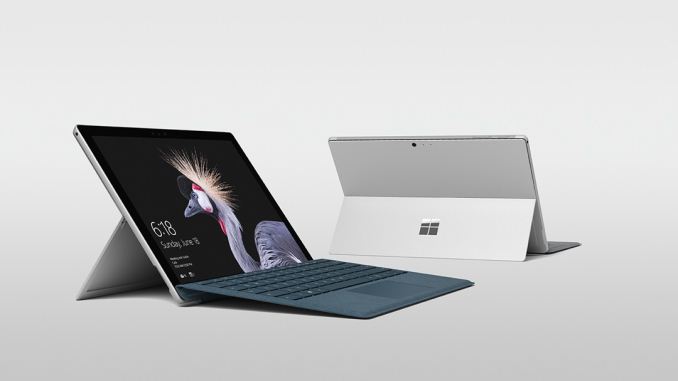
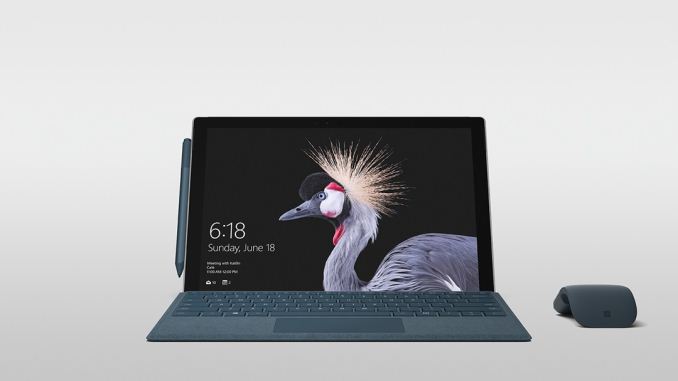
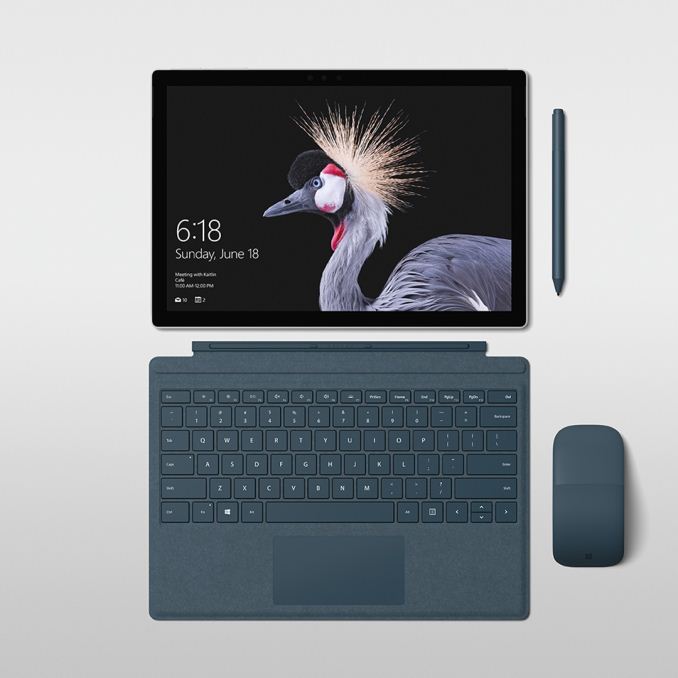
This morning in Shanghai, China, Microsoft announced the latest generation of their Surface Pro tablet. The numbering system is gone, and it’s back to just Surface Pro, but the latest generation is a long way from the original Surface Pro that came out in 2013, and it’s a design that they’ve now morphed into its fifth incarnation. Clearly they are pretty happy with the form factor, since Surface Pro hasn’t had a huge change in design since the Surface Pro 3 launched with the 3:2 display. Microsoft has had a lot of success with Surface Pro, but the previous generation Surface Pro 4 launched way back in October 2015, so this new model has been anticipated for a while.
Despite the Surface Pro still offering the same 12.3-inch PixelSense display as its predecessor, Microsoft says that there are over 800 new custom parts inside, and they’ve managed to use up 99% of the interior of the tablet to pack it with new cooling, battery, and performance. The Surface Pro 4, despite being launched 580 days ago on October 21st, 2015, was still the tablet to beat in this space, with a fantastic display, impressive performance, solid battery life, a great keyboard, pen support, and a brilliant design. It felt long in the tooth because it was, but what was available was still a solid system. The issue any company offering a system like this is that people know there will be a new version, it’s only a matter of when, so once Kaby Lake was launched, it would have been tough to recommend someone run out and buy a Surface Pro 4 since there had to be a new model coming soon. Well, it didn’t exactly come soon, but it’s here now, so let’s look at what’s new.
Unsurprisingly, Microsoft stepped up to Intel’s 7th generation Core processors, codenamed Kaby Lake. Kaby Lake doesn’t jump to new levels of performance, but it’s a nice step up from Skylake, and it offers a lot more power saving features as well. Just like the Surface Pro 4, Surface Pro will offer a Core m3 model, a Core i5, and a Core i7 with Iris graphics. Memory configurations are also the same, with a 4 GB base model, and up to 16 GB maximum with the Core i7, so LPDDR3 is still the name of the game here. Storage is also the same, at 128 GB up to 1 TB of PCIe SSD. This is a very incremental update for performance, but nonetheless it is very welcome. The battery life has gotten a boost as well, with Microsoft now claiming up to 13.5 hours in a charge, although that test was done with video playback, which is offloaded to fixed function hardware and takes the least energy to perform. The display is also the same 12.3-inch 2736x1825 PixelSense panel, which works out to 267 pixels per inch. Microsoft has focused a lot on display quality over the last several years, so it would be expected that this is a solid, accurate, display, but much like the Surface Studio, Microsoft is adding a wider than sRGB color mode to the new Surface Pro, with a toggle to choose between enhanced color and sRGB. We’re not yet sure if that means P3-D65, but hopefully it does. The move to 3:2 triggered a new category of devices, so it’s difficult to blame them for not changing what already worked so well. Framing the display are new speakers though, with Dolby Audio Premium, and Surface Pro has always done a nice job of blending the speaker grilles into the frame. Reading this, you may be wondering where the 800 new parts fit in, if it’s an incremental update on the CPU side, with the same display. Rest assured, there’s still a lot new to the Surface Pro. First up is cooling, and the new Surface Pro now extends the fanless capabilities to the i5 model as well, despite the U series CPU having a 15-Watt TDP. When the Surface Pro 4 launched, I was talking to one of the engineers at the launch event who showed off the new cooling, and was told at the time, it would be able to handle the entire 15-Watt passively if needed, but with another 19 months under their belt, they’ve clearly tweaked it a bit more to make the i5 fanless as well. The i7 will continue to offer a fan, despite the same TDP as the i5, but the main difference is that the i7 offers Intel Iris Plus Graphics 640, which will be able to stress the system much more than the HD Graphics 620 that ships with the i5 model. The m3 gets HD Graphics 615, and with just a 4.5-Watt TDP, there’s no question it can be run fanless.
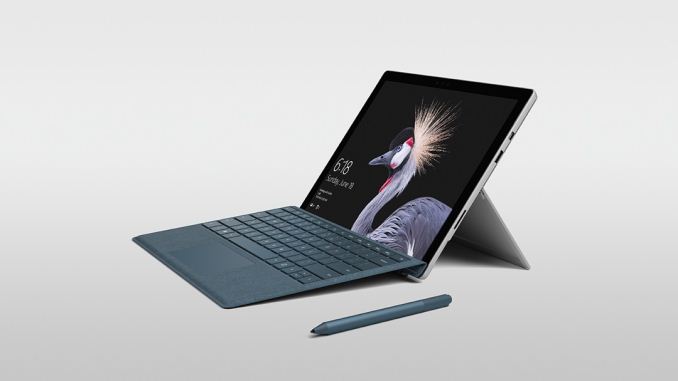
Microsoft is also evolving the hinge, again. The kickstand can now tilt back all the way to 165°, compared to 150° of the Surface Pro 4, and the reason for the hinge change is undoubtedly because the Surface Pro ships with support for the Surface Dial, which launched with the Surface Studio. Support will be added for on-screen use of the Dial through firmware for existing Surface Pro 4 users, but they won’t get the “studio” mode the new hinge provides. There’s also a new pen, except it’s no longer included with the device. The new pen now offers 4096 levels of pressure sensitivity, and lower latency than the previous model, with Microsoft tagging latency at 21 ms. It also supports tilt, which is something that wasn’t available on the previous model and was something it was often compared against. I really like the last Surface Pen, with its changeable tips, and it offered great on-screen traction and feel, so I’m excited to see the new, improved model. It's no longer included, but you can buy it for $60, and the cheapest m3 model is now $100 less than when the Surface Pro 4 launched. Plus, it's available in several colors to match the new keyboards. The last generation keyboard will still work, and likely be available, but Microsoft is touting the new Signature Type Covers, which offer Alcantara fabric over the keyboards for a softer feel, and they are available in Platinum, Burgundy, and Cobalt Blue, which happens to coincide with the colors of the new pen, if you’re into matching sets. The Alcantara is covered in a polyurethane coating to provide protection from liquids and oils, so hopefully they will hold up well. The Alcantara on the Surface Ergonomic keyboard has been pretty decent so far. There’s a lot that’s new, but there’s also some things that haven’t changed at all. The I/O ports on the Surface Pro are exactly the same as the Surface Pro 4: Full-sized USB 3.0 (Type-A), microSD, Surface Connect, Headset, mini DisplayPort, and the keyboard cover connector. What’s missing is USB-C, and Microsoft seems to be taking a hard stance here about supporting a future standard. Their concerns over USB-C are that the port is too open to interpretation, with quite a few different capabilities that could or could not be available, leading to customer confusion. It’s hard to argue with that since it is 100% true, and USB-C has kind of shot itself in the foot by being too open. Some ports support power, some don’t, and some have Thunderbolt 3, and some don’t, and just today Huawei launched a new MateBook X with two USB-C ports, and it can only charge on one of them. This kind of confusion is not ideal, and USB likely needs to come up with a good solution, soon. In an apparent attempt at humor, Microsoft will be releasing a dongle which supports USB-C, for those that need it.
Even though they do have reasons to question USB-C in the marketplace, and the fact that, today, you need to use adapters for most things, there’s still the main issue in that the Surface Pro ships with a mini DisplayPort video output. To hook up practically anything to mini DisplayPort, you need either a dongle, or a DisplayPort to mini DisplayPort cable, meaning you already need a dongle to use the port that’s there. They could have swapped that for a fully functional USB-C with Thunderbolt 3 and Power Delivery, and it could have handled the DisplayPort natively (with a dongle, of course, just like mini DisplayPort. If they included everything that USB-C can do, there also wouldn’t ever be the scenario where a customer buys something and it wouldn’t work in the Surface Pro. So I don’t fully buy their argument, but it’s also not invalid either. Other than the lack of USB-C, the new Surface Pro does offer everything that would have been expected in an update like this, with a new CPU, a slightly updated design, a new kickstand, and better battery life. Hopefully by dropping the number from the end of the name, it won’t take 19 months until the next refresh can occur, since if it’s just a CPU refresh, it should be able to be handled with little fanfare. The Surface Pro is available for pre-order today, and ships June 15th, which is the same day the Surface Laptop will be shipping. Availability is listed as “worldwide” as well, so those that had to wait for the Surface Pro 4 to become available in their region shouldn’t have to wait any longer. Source: Windows Blog | ||||||||||||||||||||||||||||||||||||||||||||||||||||||||||||||||||||||||||||||||||||





| << Previous Day |
2017/05/23 [Calendar] |
Next Day >> |