[Most Recent Entries] [Calendar View]
Tuesday, May 30th, 2017
- Kaby Lake Motherboards at $140: MSI Z270 SLI Plus vs. ASRock Z270 Killer SLI
- Linksys WRT32X Gaming Router Announced with Killer Prioritization Engine from Rivet Networks
- Dell Updates XPS 13 with Intel’s Kaby Lake, Killer Wi-Fi, Now Also in Rose Gold
- Rivet Networks Launches the Killer E2500 Network Controller: Website Detection, New UI
- Kaby Lake Motherboards at $140: MSI Z270 SLI Plus vs. ASRock Z270 Killer SLI
- Linksys WRT32X Gaming Router Announced with Killer Prioritization Engine from Rivet Networks
- Dell Updates XPS 13 with Intel’s Kaby Lake, Killer Wi-Fi, Now Also in Rose Gold
- Rivet Networks Launches the Killer E2500 Network Controller: Website Detection, New UI
- Kaby Lake Motherboards at $140: MSI Z270 SLI Plus vs. ASRock Z270 Killer SLI
- Linksys WRT32X Gaming Router Announced with Killer Prioritization Engine from Rivet Networks
- Dell Updates XPS 13 with Intel’s Kaby Lake, Killer Wi-Fi, Now Also in Rose Gold
- Rivet Networks Launches the Killer E2500 Network Controller: Website Detection, New UI
- Dell Launches 'VR Ready' XPS 27 AIO: 4K, Core i7-7700, Radeon RX 570, 10 Speakers
- The AMD Ryzen 5 1600X vs Core i5 Review: Twelve Threads vs Four at $250
- The AMD Zen and Ryzen 7 Review: A Deep Dive on 1800X, 1700X and 1700
- ASUS Launches the Zen AiO ZN270IE: A 27-inch Full HD Core i7 All-In-One
- ASUS Designo Curve MX34VQ Incoming: 34" Ultrawide Curved Display with Qi Charging
- The Microsoft Surface Studio Review
- Microsoft Announces the Surface Studio: 28-inch AIO with Touch, Pen, 4500x3000, Skylake, GTX 980M
| Time | Event | ||||||||||||||||||||||||||||||||||||||||||||||||||
| 1:30a | Rivet Networks Announces Killer Support for 10 Gbps Network Controllers
As part of several announcements today, Rivet Networks (the company behind the Killer branded network controllers, and formerly a brand under Qualcomm) is starting their Computex news with software support for upcoming platforms featuring multi-gigabit technologies. In the past few months we have seen network controllers, such as those from Aquantia, supporting new multi-gigabit standards, such as 2.5G and 5G, in a single chip (and some chips support 10G as well). In order to propagate the Killer networking infrastructure moving forward, Rivet is working with their motherboard partners to offer Killer-based software solutions on top of these new multi-gigabit controllers. To start this is a fully software-enabled enterprise tightly coupled to the motherboard vendors and certain multi-gigabit chipsets, but we were told to expect hardware solutions from Killer in the future (time-scale is TBD).
We discussed with Rivet Networks about the software solutions, which will allow users to prioritize traffic and take advantage of lower ping/fewer freezes when the network is being saturated from the same machines, compared to the current hardware solutions available. When using their own silicon and controller, Rivet stated that they are able to do more, offload more, and implement more features without impacting system performance. The software solution does a number of similar things, but it’s not complete. That being said, the venture into supporting certain multi-gigabit chipsets such as the Aquantia ones is a step forward into preparing for their own silicon. It should be noted that the collaboration is more at the motherboard manufacturer level rather than the silicon level, so Rivet has had to peel through documents and test the supported chipsets to see what features they can offer.
In discussions with Aquantia, we are expecting to see more vendors offer the AQtion solutions over the coming months, especially with the launch of several high-end desktop platforms in the mix, and these multi-gigabit solutions should be functionality plus points for some premium models. However, to have the Killer software enabled in the software stack, the motherboard vendor must work with Rivet in order to do so. With Computex this week, we’re expecting to see motherboards for Intel’s upcoming X299 platform, as well as a sneak peek or two at AMD’s ThreadRipper platform and the new chipset. I expect to see some integrated multi-gigabit solutions there as well. Related Reading | ||||||||||||||||||||||||||||||||||||||||||||||||||
| 2:12a | Intel Computex 2017 Press Conference Live Blog We are live from Intel's press conference at Computex. Intel is covering everything from massive generation of data to new PC form-factors like Compute Cards. | ||||||||||||||||||||||||||||||||||||||||||||||||||
| 3:01a | Intel Announces Basin Falls: The New High-End Desktop Platform and X299 Chipset Discussion about the High-End Desktop Space this year has been unparalleled. When an age-old competitor re-entered the field, it provided new life into a somewhat dormant platform: how to bring high-performance computing and experiences to the premium segment of the market that was not interested in the business aspect of the ‘professional’ side. Over the last several years in this space, we have seen Intel launch Sandy Bridge-E, Ivy Bridge-E, Haswell-E and Broadwell-E. Today marks the announcement for the next set of processors, named Skylake-X and Kaby Lake-X. But like the platforms before, built on X79 and X99 chipsets, these two new processor families will be covered by the new X299 chipset, code-named Basin Falls. | ||||||||||||||||||||||||||||||||||||||||||||||||||
| 3:02a | Intel Announces Kaby Lake-X Processors: High-End Desktop Getting the Latest Microarchitecture Anyone following the high-end desktop space lately will have realized that we’ve recently been tripping up over information on upcoming platforms. Intel’s successor to Broadwell-E has been expected for some time, and today Intel is announcing the new platform, Basin Falls (using the X299 chipset), as well as two new processor families: Skylake-X and Kaby Lake-X. | ||||||||||||||||||||||||||||||||||||||||||||||||||
| 3:03a | Intel Announces Skylake-X: Bringing 18-Core HCC Silicon to Consumers for $1999 There are days in this profession in which I am surprised. The longer I stay in the technology industry, they become further and further apart. There are several reasons to be surprised: someone comes out of the blue with a revolutionary product and the ecosystem/infrastructure to back it up, or a company goes above and beyond a recent mediocre pace to take on the incumbents (with or without significant financial backing). One reason is confusion, as to why such a product would ever be thought of, and another is seeing how one company reacts to another. We’ve been expecting the next high-end desktop version of Skylake for almost 18 months now, and fully expected it to be an iterative update over Broadwell-E: a couple more cores, a few more dollars, a new socket, and done. Intel has surprised us with at least two of the reasons above: Skylake-X will increase the core count of Intel’s HEDT platform from 10 to 18. | ||||||||||||||||||||||||||||||||||||||||||||||||||
| 3:30a | Rivet Networks Announces SmartByte for Dell Inspiron Systems
In recent quarters, we have seen a change in the laptop landscape of Intel and Realtek networking options. A few OEMs, particularly Dell, are now implementing Killer networking on devices such as the XPS line of notebooks and their gaming PCs. However, given the gaming roots of the Killer design, it perhaps seems out of place to put a Killer network port into a more business/enterprise aimed device like an Inspiron. To that end, Dell and Rivet Networks have implemented a solution offering the software optimization mechanisms that Killer has developed for select Dell Inspiron models in a package called SmartByte. At a high level, this is prioritization software aimed squarely for Dell’s business customers and moving to make video the higher priority for network traffic, especially when other software is using the network. In the metrics given for the software, it was claimed that with a concurrent download in place, whereas a base system would only offer a 320x180 Skype video call with 14% lost data packets, with SmartByte in place the system could support 960x540 video with zero lost packages and a 40-50% lower ping. Similarly, when trying to stream video online while hitting the limit on an internet connection, the SmartByte software should give zero stream freezes.
The SmartByte software is designed to work on both Intel and Realtek networking options offered in the Inspiron range, which leads to one obvious question which I put to Rivet Network: if you can do this all in software, why bother offering a physical Killer network solution at all? We were told that the physical solution allows for greater offload and packet examination, both freeing up resources and reducing latency, as well as tracking metrics better for optimization and a few other internal tweaks. The SmartByte software works primarily for video only, and will only work for select system IDs (so there is no instance to install on other machines). Rivet stated that the requirements for this software were for it to be simple, as in ‘one-button’ simple if a user wanted to disable it for some reason.
We were told to expect to see some Dell announcements in the coming weeks and months, with mentions of SmartByte in the marketing materials. Related Reading | ||||||||||||||||||||||||||||||||||||||||||||||||||
| 5:00a | Rivet Networks Announces Killer xTend: Turning a Gaming PC into a Switch and Wi-Fi AP
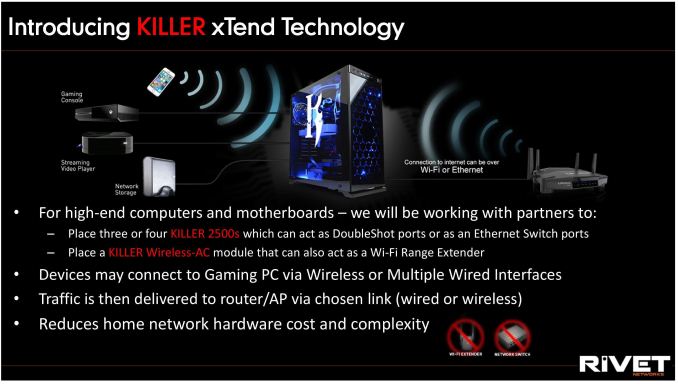
Imagine the scenario where you have a monster gaming PC, but you also use the same area to support a few internet connected consoles. Or that the Wi-Fi router for the environment doesn’t actually reach that far, and the home could help assist with wider coverage. Rivet Networks, the company behind the Killer networking chips (originally Bigfoot, before being acquired by Qualcomm then spun back out again), is offering OEMs another plus point in their product functionality by offering such a solution.
The concept is this: if a system has three network ports and/or Wi-Fi, and all the ports are Killer based (E2500 for NICs, Killer AC1535 for Wi-Fi), then Rivet will provide a license to use the new xTend software. This allows a user to run the PC in one part of the house, and forgo the $25 cost of an unmanaged network switch or $50 for a Wi-Fi extender by giving it on the motherboard. My personal example use case is the one above: having one cable from the home router to the main PC, which is then hooked up to consoles and a NAS – rather than one cable per device all going back to a router or having an extra couple of cables for a switch. Rivet’s argument here is that, for the high-end systems at least, adding a couple of network ports is relatively cheap (think ~$1 each), and given the flexibility with Intel chipsets in the Z270 platform and newer, a good gaming board should easily be able to accommodate. The implementation can use the Wi-Fi card (if one is present) to both connect to the home router and be used as an access point in one by time-slicing between the two.
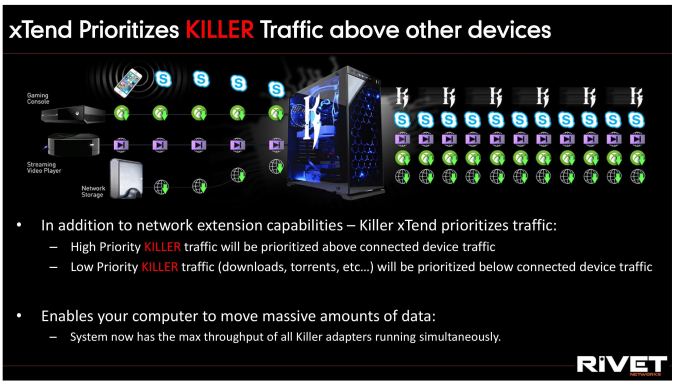
Recently the Killer software has been updated to a new UI, so if anyone uses the old Qualcomm UI then it’s worth checking out the new one (if only because I gave some small direction in the design). xTend will be built into this new UI, along with the standard priority settings that the Killer ecosystem allows for different traffic types. Nominally the Killer software offers six levels of priority, with the default being priority 4. All mass download / update systems get the lowest priority (six), while VOIP sits at the top, followed by gaming. With this xTend feature, all traffic going from other devices through the main PC will be classified as priority 4, although this may change (offering per-device configuration) in future software revisions.
Killer xTend was accidentally (?) announced with the launch of MSI’s new Z270 Godlike Gaming motherboard, which uses three E2500 network ports and the Killer 1535 Wi-Fi module. We are told to expect it to appear on other MSI products, as well as an implementation slightly different from GIGABYTE by way of a bundled PCIe card featuring up to 3 additional network ports. It would be interesting to see a PC with several of those cards included, for a home-made 24-port Killer switch. Related Reading | ||||||||||||||||||||||||||||||||||||||||||||||||||
| 6:00a | Dell Launches Inspiron 27 7775 AIO: 8-Core AMD Ryzen 7, Radeon RX 580, 4K LCD
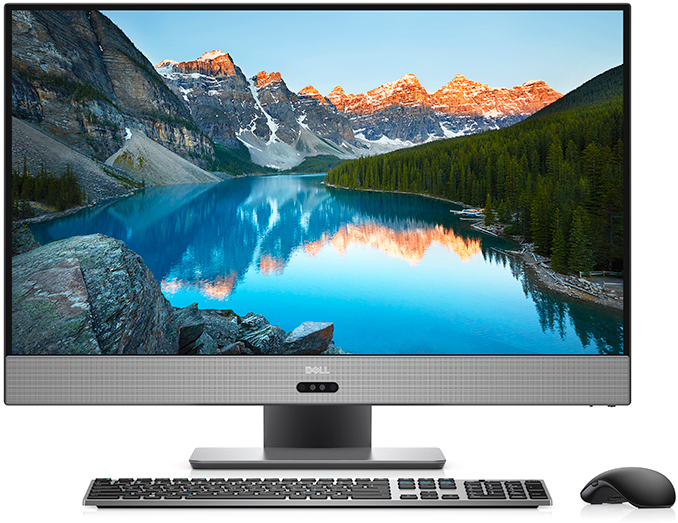
Dell has introduced its first all-in-one PC based on AMD Ryzen microprocessor. The new Inspiron 27 7000-series expands options for those seeking for a system featuring AMD’s latest CPU and is also among the first computers from a top PC OEM to feature Ryzen. Dell will offer multiple configurations of the new Inspiron 27 7775-series computers, some of which will feature a 4K display, an eight-core CPU and 32 GB of memory. Meanwhile, entry-level Inspiron 27 7775-series starts at $999.99. AIO PCs are gaining traction for many reasons these days; space-saving, style, prices and ease-of-deployment are among them. As with any growing product category, we see segmentation into numerous directions: some systems are getting more sophisticated, the others are getting more affordable and everything in the middle is getting very diverse. With its Inspiron 27 7775-series Dell is targeting two different segments: performance mainstream and premium. This is actually an uneasy thing to do in case of an all-in-one system. The former segment demands maximum value (so, customers are still somewhat price-conscious), the latter segment demands maximum performance, which comes at a price and high-TDP. Creating an AIO platform that could fit a variety of components and appeal to different kinds of audiences is a challenge and it appears that Dell has succeeded in cracking it.
The Dell Inspiron 27 7775 offers two CPU/GPU/PSU options targeted at different kinds of customers. The quad-core AMD Ryzen 5 1400 is accompanied by the AMD Radeon RX 560 with 4 GB of GDDR5 memory and a 180 W PSU. Meanwhile at the high-end there is the considerably more powerful eight-core AMD Ryzen 7 1700 paired with AMD's Radeon RX 580 with 8 GB of GDDR5 and a 330 W PSU (this one is going to carry Dell's "VR Ready" badge). Keep in mind that there will be different configurations available across the world, so you might see different combinations of CPU and GPU rather than the "base" configs mentioned above (still, the higher-end GPU requires a more powerful PSU). Dell does not explicitly disclose whether the Ryzen 5/Radeon RX 560-based AIOs come with an FHD display - whereas the Ryzen 7/Radeon RX 580 SKU features a 4K screen - but from an end-user point of view it is logical to get a higher-performance PC with a higher-res monitor.
When it comes to DRAM and storage options, everything gets a little trickier. Dell offers a variety of memory configs, including dual-channel 8 GB, 16 GB and 32 GB options as well as single-channel 8 GB, 12 GB and 16 GB options. As for storage, Dell has affordable models with a 1 TB HDD (with either 5400 or 7200 RPM spindle speed) as well as more advanced dual-drive solutions featuring a 256 GB PCIe/NVMe SSD plus a 1 TB HDD. Next up is connectivity. The Dell Inspiron 27 7775-series offers 2x2/1x1 802.11ac Wi-Fi, Bluetooth 4.1, a GbE port, one USB 3.1 Type-C connector, one USB 3.1 Type-A port, three USB 3.0 Type-A headers, two USB 2.0 ports, one HDMI output, one HDMI input, one DisplayPort 1.2, an SD/MMC card reader, a 720p webcam with an IR sensor for facial recognition, a microphone array and so forth. Finally, the systems feature a front-shooting stereo audio sub-system co-tuned with Waves MaxxAudio Pro.
Dell’s Inspiron 27 7775 will be available in different configurations across many regions and the manufacturer does not specify which machines will be available where and when. The only thing that Dell discloses is that the new units are set to be available in the U.S. already in May starting at $999.99. Related Reading: | ||||||||||||||||||||||||||||||||||||||||||||||||||
| 7:00a | ASUS Unveils Seven X299 Motherboards: Prime, TUF and ROG
Now that details about Intel's upcoming Skylake-X LGA2066 processors have been officially announced, we can finally reveal some of the new motherboards that ASUS has designed for this new HEDT X299 'Basin Falls' platform. As we have come to expect from ASUS there is a diverse range of models split between the Prime, TUF, and ROG series. Although we don't yet have access to full specifications lists, given the capabilities of the Skylake-X processors - like a quad-channel memory controller and up to 44 PCIe 3.0 lanes - all of the motherboards share certain obvious characteristics like eight DDR4 memory slots, a ton of PCIe slots, at least two full-speed M.2 slots, and both 8-pin and 4-pin CPU/EPS power connectors to handle the elevated power draw of high core count processors. Since it is the feature du jour all of the models also have some form of AURA RGB LED lightning. As you will see below, with so many PCIe lanes coming from the CPU and even more from the chipset, these X299 motherboards have an unprecendented amount of expansion and storage connectivity. | ||||||||||||||||||||||||||||||||||||||||||||||||||
| 9:00a | Toshiba Introduces XG5 Client NVMe SSD
After teasing with a demo earlier this month at the Dell EMC World conference, Toshiba is now officially announcing their first SSD based on their 64-layer BiCS3 3D NAND. This is the first generation of Toshiba 3D NAND that will be adopted across their entire range of SSDs, and the first product to get the new flash is a consumer-oriented M.2 NVMe SSD. The Toshiba XG5 is the direct successor to the XG3 and will occupy the highest of Toshiba's three tiers of client OEM SSDs. While the XG3 and its retail sibling the OCZ RD400 used planar MLC NAND, the XG5 uses 3D TLC NAND but still promises higher throughput. The Toshiba XG4 was the TLC-based counterpart to the XG3, and its role as the entry-level NVMe drive will be taken over by the BG-series NVMe BGA SSDs, while SATA SSDs will continue to be the lowest tier of Toshiba OEM SSDs. It's unusual for Toshiba to put out a press release about a client OEM SSD, but the XG5 is a major milestone for the company as they finally begin a widespread transition to 3D NAND. The preceding 48-layer BiCS2 3D NAND did technically ship, but only in a handful of niche products, while BiCS3 is planned to replace Toshiba's planar NAND in all mainstream applications. The XG5 is currently sampling to all the usual OEMs for qualification in their upcoming products, and systems using the XG5 should be on the shelves in the second half of this year. Aside from the use of BiCS3 3D NAND, Toshiba isn't sharing much in the way of technical details about the XG5. Sequential reads are rated for 3GB/s and sequential writes at 2.1GB/s, but random access performance has not been disclosed other than to say it's better than the XG3. Typical power consumption is rated at 4.6W for reads and 3.5W for writes, with idle of less than 3 mW. Toshiba won't confirm if the controller has been upgraded from the XG3/RD400 controller, but at the very least the firmware has been significantly updated. There will be XG5 models both with and without TCG Opal encryption. The XG5 will be available in capacities from 256GB to 1TB. The smaller capacities will be using Toshiba's 256Gb TLC BiCS3 dies and the larger drives will be using the 512Gb TLC parts. The 512Gb TLC could easily enable capacities above 1TB, but the OEM market currently isn't interested. When Toshiba releases a retail counterpart to the XG5 it is very likely we'll see a 2TB option in addition to the firmware tweaks and custom NVMe driver the OCZ RD400 came with. | ||||||||||||||||||||||||||||||||||||||||||||||||||
| 9:01a | NVIDIA Announces GeForce GTX Max-Q Design Initiative: High-End Gaming Meets Ultrabooks
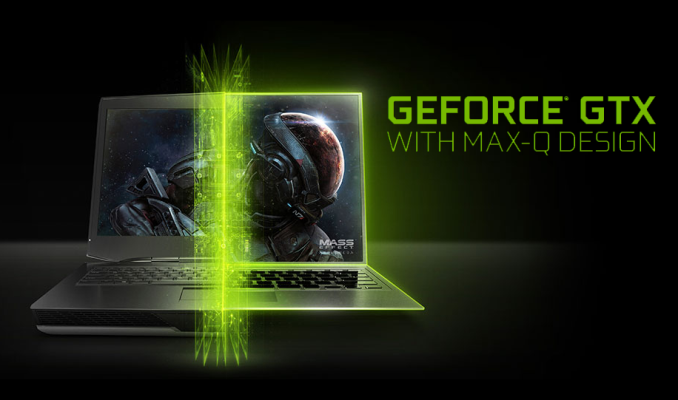
This morning as part of their Computex keynote, NVIDIA CEO announced a new initiative for high-end gaming laptop design. Called GeForce GTX Max-Q, NVIDIA is undertaking their own Ultrabook project of sorts, encouraging partners to develop thinner and lighter high performance gaming laptops, giving them better tools to do so, and then bundling it under a catchy name. The end result is that, not unlike Intel’s efforts in this space, NVIDIA wants to sell consumers on the idea that they can have their cake and eat it too with a light laptop that is still substantially more powerful than their old laptop. As a bit of historical context to this, last year NVIDIA shook up their high-end laptop branding a bit by doing away with “Mobile” video card designations. Rather than having a GeForce GTX 1080M for example, the company simply offered a laptop version of the desktop GTX 1080. Or rather, that was the basic idea behind the policy. In practice these mobile-but-not SKUs had their own specs (e.g. a GTX 1070 with an additional SM enabled), not to mention the greater thermal constraints of a laptop, and of course the use of laptop-appropriate MXM boards. Consequently from a product designation standpoint, this is a bit of a return to form for NVIDIA. They never stopped making mobile parts – and I haven’t seen any evidence that partners couldn’t try for a thin laptop before now – but now at least some of their mobile parts have a mobile designation, just that the ‘M’ stands for Max-Q instead of Mobile. Which admittedly may be a bit of a cynical read on the situation, but as there’s only a very limited amount of new tech involved – and no new GPUs – Max-Q seems to be more about branding and setting performance expectations for high efficiency (as opposed to high performance) parts. On which note, this isn’t the first place we’ve seen the name Max-Q show up, either. So I wouldn’t be too surprised if we see NVIDIA use it in more places. In any case, as part of the Max-Q initiative, NVIDIA is releasing Max-Q designs for the GTX 1080, GTX 1070, and the GTX 1060. Not explicitly stated by NVIDIA, but something I suspect, is that these designs are using new MXM cards and aren’t just a different clockspeed profile for the original cards. But at any rate, these are still the same SM and memory configurations as the original mobile parts, but now with lower TDPs and lower clockspeeds to match.
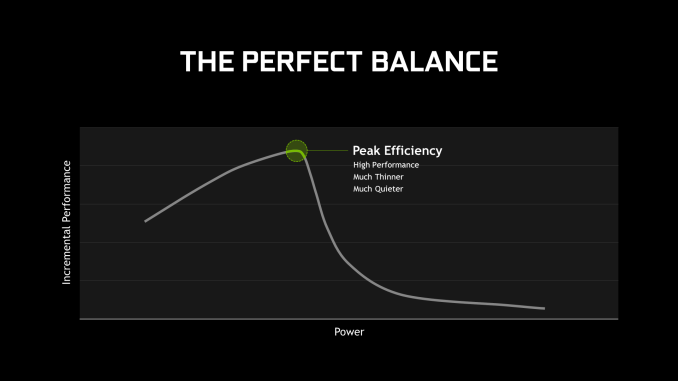
In a specification document NVIDIA released to the press, they listed both the normal and Max-Q TDPs and clockspeeds of their mobile products. I do feel this is a bit disingenuous, as mobile parts are commonly subject to thermal throttling – and few laptops could sustain the 115W+ TDPs of the original GTX 1070 and GTX 1080 – so comparing Max-Q to the desktop-like TDPs of the original parts doesn’t tell the whole story. But in any case, the point NVIDIA was looking to drive how is that while official clockspeeds have dropped by a few hundred MHz compared to the original parts (a not insignificant drop), TDPs have dropped by even more. A GTX 1080 Max-Q that tops out at 110W may only have a boost clock of 1468MHz (a drop of about 15%), but the TDP has dropped by 40W. Which ultimately is the principle purpose of the Max-Q branding from the NVIDIA side of matters: these are slower parts at the more energy-optimal point in the curve, instead of going further up the curve in the name of performance.
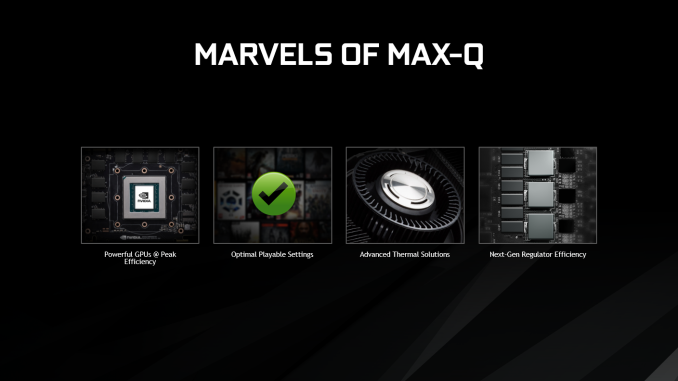
Clockspeeds aside, there are some hardware changes to mention. In discussing the Max-Q design, NVIDIA noted that they have implemented some changes over the years to reach this point. A big part of this is of course Pascal, which gives them a solid starting point for high efficiency performance. But the company has also cited improvements in voltage regulators as part of the Max-Q formula, apparently using very low loss regulators optimized for around 1 Volt(a). And this is where things get a bit fuzzy, since NVIDIA was similarly promoting power delivery improvements for their desktop GTX 1080 reference boards last year; so I’m not sure if there’s anything new here specifically for Max-Q, or if it’s just about how NVIDIA has put the pieces together for boards going into Max-Q laptops. The final piece of the puzzle then is what NVIDIA is calling “advanced thermal solutions”, which the company doesn’t go into much detail on, but notes that it’s responsible for allowing their partners to cool such powerful cards effectively, and to do so without blowing out any eardrums while blowing out hot air.
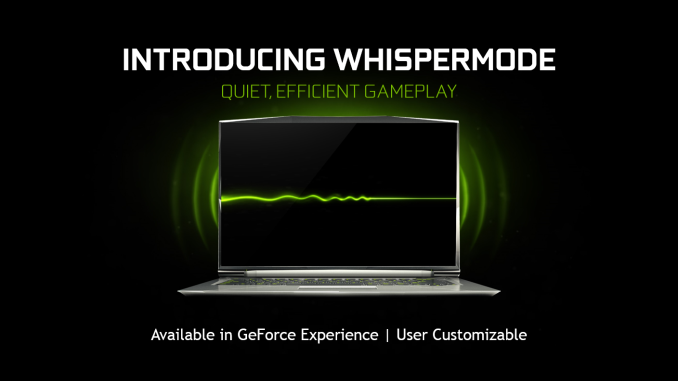
Taken altogether, I’m not sure what here is new. NVIDIA always talks up their latest wares – they’re trying to sell GPUs, after all – but there’s an implication that NVIDIA and their partners weren’t already using high efficiency regulators and good coolers on past products, which of course isn’t the case. The company has been making high-efficiency laptop GPUs for the 100W mark for a while now, and these designs have been powerful in their own right thanks to a combination of solid design and chip binning. So there’s a very fuzzy line here in terms of what’s actually new in terms of video card design, and how much of this is NVIDIA talking up what’s essentially the successor to the GTX 980M (i.e. low voltage parts). WhisperModeMeanwhile, buried in NVIDIA’s announcement is a new feature for GeForce Experience, which they are calling WhisperMode. As noted in NVIDIA’s press release “WhisperMode intelligently paces the game's frame rate while simultaneously configuring the graphics settings for optimal power efficiency.”
This description sounds almost identical to AMD’s Radeon Chill, in which case we should have a good idea of what to expect: framerate throttling combined with GeForce Experience/Battery Boost settings adjustment to turn down the image quality, lowering the overall rendering needs. What isn’t clear is whether NVIDIA is also duplicating AMD’s efforts to time frame rendering such that frames are submitted as late as possible to minimize input lag. In any case, while WhisperMode is being announced as part of Max-Q, it’s actually part of GeForce Experience. So once released, it will be available to all Pascal laptops – including existing laptops – and not just Max-Q laptops. Max-Q Design Laptops Coming June 27thLast, but certainly not least of course is the end product of all of this: the Max-Q laptops. The goal of NVIDIA’s initiative is to get their partners out promoting thin laptops with high performance GeForce video cards, and their partners have quickly jumped into action.
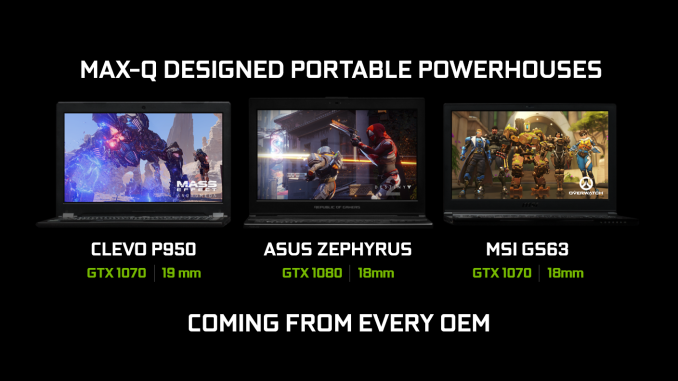
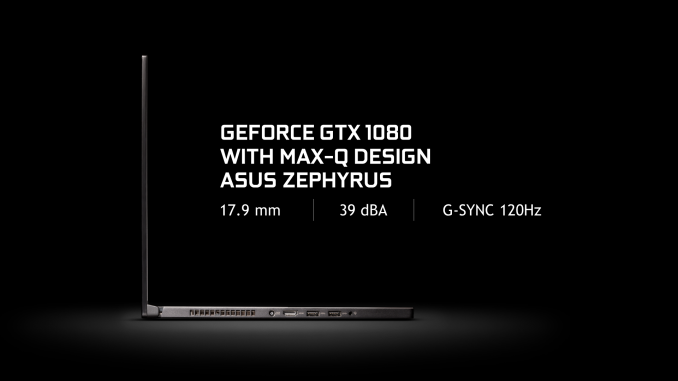
NVIDIA has not publicly announced a definition for what a Max-Q laptop should be, but there is a very common thread among all of the laptops they’ve detailed so far: under 5lbs and under 20mm thick. The marquee laptop for the program appears to be Asus’s new UX501 “Zephyrus” laptop, which NVIDIA showed off at their press conference. This is a 15.6” laptop with an Intel Core i7 quad and NVIDIA’s GeForce GTX 1080. NVIDIA has also named laptops from Clevo and MSI, which come with the GTX 1070 and have a similar build. In which case at least among the laptops NVIDIA has shown off so far, 15-inches seems like the sweet spot for this program.
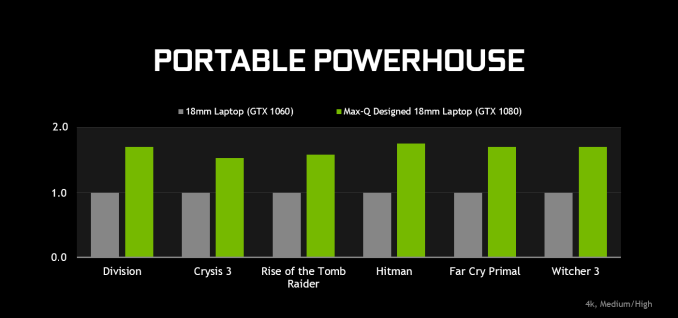
NVIDIA is promoting these laptops as having significantly better performance than existing thin laptops – in this case comparing it to an 18mm thick GTX 1060 laptop – though this seems to be more about the GPU used than the thickness of the laptop. The big question of course is just what performance such a thin laptop can sustain; even at the lower-bounds of the GTX 1080 Max-Q configuration, that’s still 90W for the GPU, along with another 35W for an Intel quad-core CPU in a cTDP down state. To NVIDIA’s credit, they definitely know a thing or two about cooling (see: reference blower), so applying that knowledge to laptops could be a boon. But sub-20mm still leaves limited room for heatsinks and fans. Anyhow, expect to see Max-Q design laptops show up later next month, on June 27th. Along with the partner designs NVIDIA is explicitly showing off at Computex this week, they have lined up many of the major OEMs for this initiative. And particularly with Clevo participating, this means their reference designs will be able to filter down to a number of smaller vendors who sell Clevo’s designs. | ||||||||||||||||||||||||||||||||||||||||||||||||||
| 12:00p | Dell Launches AMD-Powered Inspiron Gaming Desktop
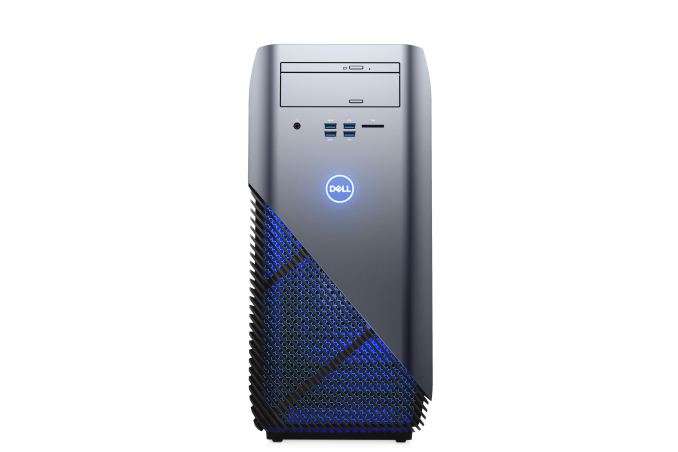
Alongside their new all-in-ones, Dell is also taking the wraps off of a new gaming desktop tower this morning. Dubbed the Inspiron Gaming Desktop, the new gaming-focused system is aimed at budget-conscious gamers with a starting price of $599. Right off the bat then, the specs turn out to be quite interesting. Instead of using Intel chips, the system will be powered by a selection of AMD processors, from the 7th-gen quad-core AMD A10-9700 APU on the low end to the more-powerful 3.8-GHz AMD Ryzen 7 1700 CPU on the high end. The choice of AMD’s processors makes sense for the low-end configuration given the budget pricing, while at the higher-end it’s an interesting show of faith on Dell’s part (though equally likely, they want to use the same motherboard throughout the line). For graphics cards, you have a choice between an AMD Radeon RX 560 GPU with 2GB of VRAM or a faster, Radeon RX 580. Or you can go the NVIDIA route and get a GeForce GTX 1060 with 6GB of VRAM. Dell is also offering a dual-GPU option, though outside of perhaps VR (which of course, Dell is promoting here as well), I’d argue a single GTX 1080 would be a better choice. Memory configurations start at 4GB, maxing out at 32GB DDR4 memory. Dell's offering several storage options, running the gamut from a 3.5-inch 500GB hard drive to a 256GB M.2 SSD. Keep in mind that the tower has five additional bays, so you can upgrade to your heart's content. Meanwhile in another surprising move for a gaming desktop, Dell is offering both Windows 10 and Ubuntu Linux as OS options.
As for the tower itself, at first glance you wouldn't be shocked if you found the Inspiron Gaming squirrelled discreetly away in someone's office. The 30.1 pound, 18.1 x 8.5 x 17.2-inch chassis is made of gray anodized aluminum with black plastic vents positioned along the sides on a slant. Dell lets you show off the system's gamer aesthetics by enabling the optional polar blue LED lighting that will emanate from between the vents. Meanwhile for cooling, the Inspiron Gaming Desktop will surprisingly offer both air and liquid cooling solutions. Wrapping things up, like the other devices Dell has announced today, the Inspiron Gaming Desktop is launching immediately, and should be available later today on Dell’s website. Sherri Smith Contributed to this Report | ||||||||||||||||||||||||||||||||||||||||||||||||||
| 8:00p | HTC & Intel Partner on WiGig Wireless for Vive VR Headset
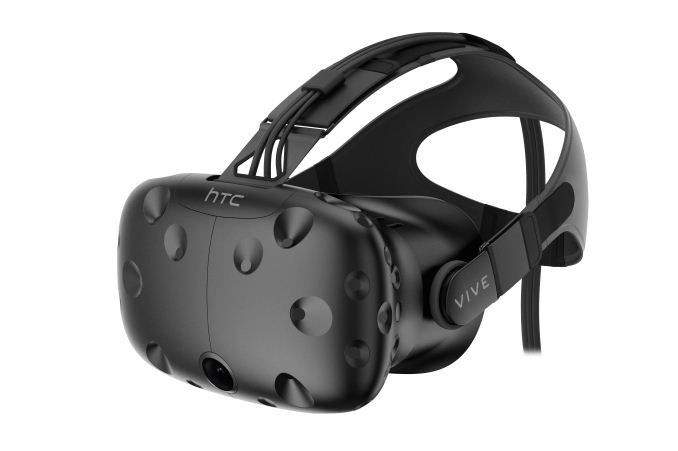
HTC's doing a little Spring cleaning, and it's starting with all the wires protruding from its headsets. The company announced today at Computex 2017 that it has partnered with Intel to create a "wireless VR accessory" for the Vive HMD. That accessory will rely on WiGig, the wireless tech Intel created to let you connect basically everything to your PC without having to plug in a single wire, and is expected to work with existing Vive HMDs. This is how HTC described the accessory in its announcement:
The extent to which the wireless VR is "seamless" depends on how much lower than 7ms latency HTC manages to get. Low latency is crucial to XR--too much can hurt your sense of immersion at best and make you feel sick at worst. The good news is we might not have to wait long to find out how well this accessory works: HTC said it's going to show off a proof of concept when it heads to E3 from June 13-15. In the meantime, we can take comfort in knowing HTC isn't the only company that's chasing that wireless VR dream. AMD acquired an Austin startup called Nitero for its wireless XR technology in April, and we recently went hands-on with Sixa's Rivvr wireless VR system. Oh, and Oculus is also working on a self-contained, untethered HMD with Project Santa Cruz. Hopefully we can bid adieu to all these wires sooner than later. Nathaniel Mott Contributed to this Report | ||||||||||||||||||||||||||||||||||||||||||||||||||
| 8:34p | Computex 2017: AMD Press Event Live Blog AMD is having a press conference here in Taipei for Computex 2017. We plan to get as near to the action as possible - come back at 10am Taiwan Time (10pm ET) to see the action. | ||||||||||||||||||||||||||||||||||||||||||||||||||
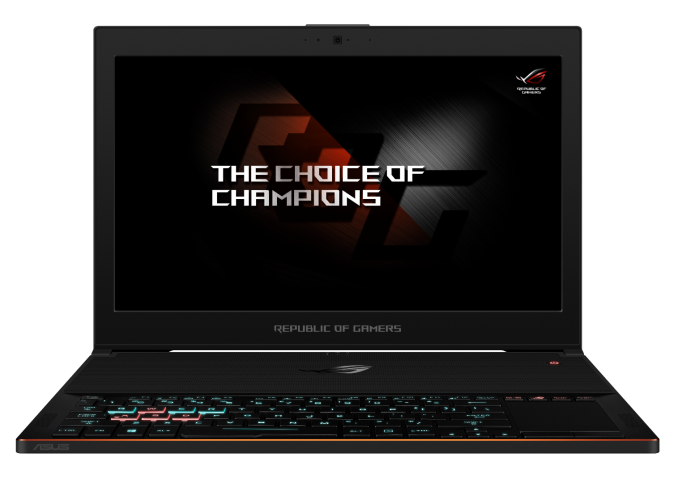
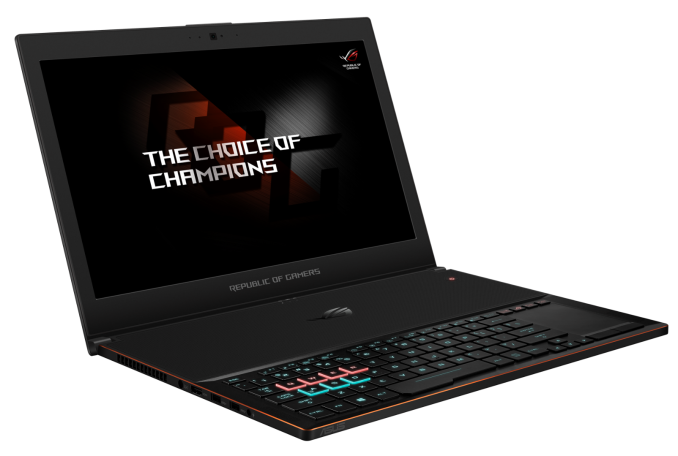
| 11:15p | ASUS Reveals The Ultra-Slim ROG Zephyrus Laptop With GTX 1080 Max-Q
Hot off the heels of NVIDIA announcing the GTX Max-Q design, ASUS is announcing the latest laptop in their Republic of Gamers lineup, with the ROG Zephyrus GX501VI and GX501VS featuring an Intel Core i7-7700HQ and NVIDIA GTX 1080 Max-Q in a design which is less than 1.7 cm thick, and weighs in at only 2.2 Kg. Although not everyone needs to go thin and light, those that do will appreciate even more performance in a new slim laptop. ASUS has a great lineup of gaming laptops, with everything from low cost, to desktop replacement designs. The ASUS ROG Zephyrus takes the high performance premium segment to a smaller, lighter design. Thanks to the GTX Max-Q GPU launch from NVIDIA, some better binning, coupled with lowered GPU frequencies, bring most of the performance of the GTX 1080 to even smaller notebooks, which would have struggled to dissipate the heat generated by this graphics solution without the larger volume for cooling a larger, heavier laptop provides.
ASUS isn’t the only one to bring GTX 1080 to a thin and light design, of course, and the key will be their cooling implementation. ASUS is touting its Active Aerodynamic System (AAS) to keep the laptop cool and quieter, and when the Zephyrus is opened, the chassis actually opens up slightly to allow greater airflow in without sacrificing the laptop thickness when it’s closed for travel, and ASUS says it allows 20% more airflow with this flexible design. Other thin and light GTX 1080 designs have been pretty loud though, so hopefully the combination of Max-Q and AAS can keep the noise levels under control.
The ROG Zephyrus features a 15.6-inch display, with a 1920x1080 resolution and 120 Hz refresh rate, and it features NVIDIA G-SYNC. Honestly, at this resolution, the GTX 1080 is generally overkill, but at least the high refresh panel should help it there. ASUS claims 100% sRGB coverage, although they tend not to worry much about panel accuracy and grayscale, so hopefully we can check it out. The rest of the laptop is what you’d expect with plenty of mobile performance. Intel’s Core i7-7700HQ provides the processing grunt, and ASUS will pair it with up to 24 GB of DDR4-2400. Storage is all M.2 PCIe based SSDs with 256GB/512GB/1TB options. ASUS has been big on the Thunderbolt train, and it’s nice to see that the Zephyrus continues this trend with one USB-C port with Thunderbolt 3 and USB 3.1 Gen2, and because that’s more the future and less the present, they also include four USB 3.1 Type-A ports. HDMI 2.0 is also available so this laptop should be VR ready if you’re into that. ASUS has moved the keyboard to the front of the notebook, which helps with their cooling and makes it feel more like a desktop system, and the keyboard features RGB lighting which appears to be in zones rather than per-key, although they do have customizable effects for the WASD and QWER key groups. As a gaming notebook, it also features anti-ghosting keys which can support up to 30 keys pressed at the same time, in case you sprout a whole bunch more fingers.
The ROG Zephyrus will be available at the end of June in the USA and Canada. The GX501VI model will start at $2699 USD, and the GX501VS will start at $2299. ASUS doesn’t specify what the two models designate, but the VS likely downgrades the GPU to a GTX 1070. Source: ASUS | ||||||||||||||||||||||||||||||||||||||||||||||||||
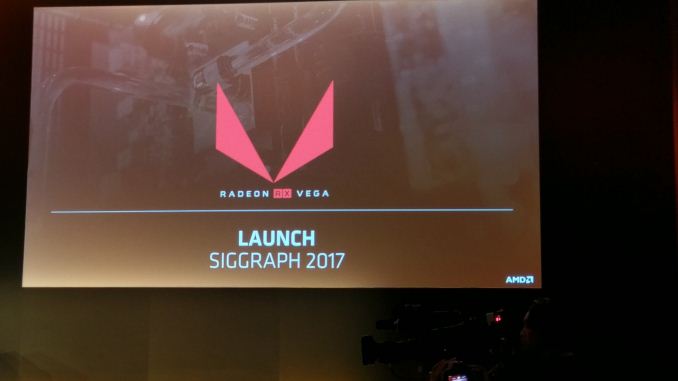
| 11:16p | AMD Vega Updates: Vega Frontier Edition Available June 27th, Vega RX to be launched at SIGGRAPH at end of July
With Computex in full swing this week, AMD’s press conference just wrapped up for the morning. While the bulk of the news in the conference was on AMD’s CPU and APU plans – where the company continues to roll out new Ryzen products – the company’s CEO, Dr. Lisa Su did have a bit to say on the GPU side of matters. First off, the previously announced Vega Frontier Edition card will be available on June 27th, just making AMD’s previous H1’17 commitment for Vega. The Frontier Edition is AMD’s first batch of Vega-based cards, and is being marketed specifically towards early adopters in the professional segment. A price has not been announced, but expect it to be high.
Second up, Lisa promised more information on the Vega-based Radeon Instinct MI25 on June 20th. This is when the company will be launching their Epyc processor for servers, so they are aligning server/datacenter announcements across product lines. Instinct won’t be launching here, but we should get at least a few more details on configurations and positioning. Finally, in the piece of news that pretty much everyone has been on the edge of their seats for, AMD has finally announced a date where they’ll announce the consumer-oriented Radeon RX Vega. The mythical card’s launch will be taking place at SIGGRAPH this year, the Association for Computing Machinery’s annual graphics conference. SIGGRAPH is an interesting choice for a venue, as it’s not a consumer event (as opposed to say E3 or IFA), but AMD is no stranger to the show, having launched their Radeon WX professional products there last year. SIGGRAPH runs from July 30th to August 3rd, so it’s almost exactly 2 months out.
For anyone looking for any further details on RX Vega however, you’re out of luck. To AMD's credit, they are clearly well aware of pent-up consumer interest in the card and they did show a demo of CrossFired RX Vegas playing Prey at 4K, but they are not revealing any additional information on the card or its specifications at this time. This information is presumably all going to come at the same time at SIGGRAPH. The million dollar question now being whether the SIGGRAPH event is a hard launch, or whether AMD will unveil the products and then have them ship a few weeks later, which would be similar to how the Polaris launch went down. | ||||||||||||||||||||||||||||||||||||||||||||||||||
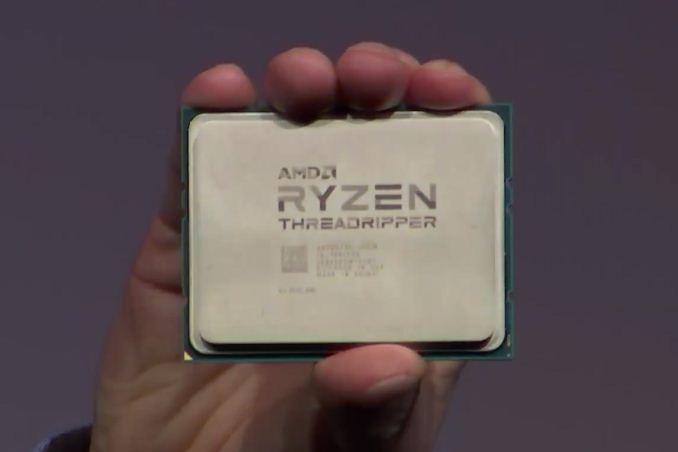
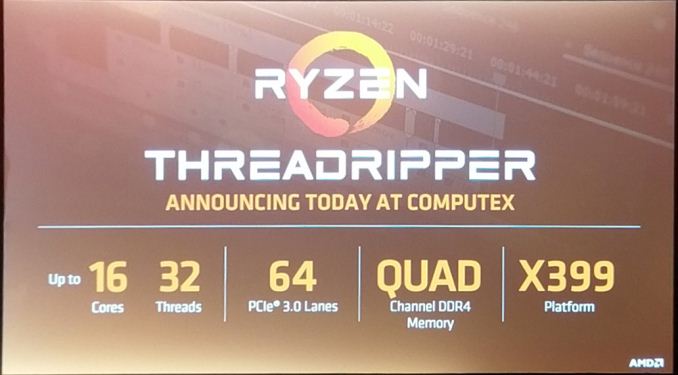
| 11:57p | AMD CPU Updates: 16 Core ThreadRipper w/64 PCIe Lanes This Summer, Epyc Launching June 20th
Wrapping up just a bit ago was AMD’s annual Computex press conference. AMD brings their A-game to Computex, and for a good reason: as a PC focused show, it gives them great exposure, but it also allows them to promote their OEM relationships, the latter of which are crucial to AMD’s survival as the CPU underdog. Computex in turn isn’t a venue for deep technical announcements, but it’s a good place to get clarity on AMD’s CPU roadmap. Starting things off then, let’s talk about ThreadRipper. AMD’s previously announced many-core CPU for the high-end PC desktop and workstation market was first announced at Financial Analyst Day a few weeks back. AMD is now in the process of slowly releasing information about the chip to build up interest ahead of its launch – which, before you ask, hasn’t been set yet and is still “this summer”.
At today’s press conference, AMD has confirmed that the 16 core processor will for most purposes be half of an Epyc processor. This means that the two die MCM chip will feature 4 DDR4 channels and a whopping 64 lanes of PCIe, with all 64 lanes being enabled for all ThreadRipper SKUs. This will be broken up into 60+4: 60 lanes directly from the CPU for feeding PCIe and M.2 slots, and then another 4 lanes going to the chipset (with an undisclosed number of lanes then coming off of it) to drive basic I/O, USB, and other features. AMD seems to be particularly relishing the point on PCIe lanes in light of the yesterday’s Intel HEDT announcement, which maxes out at 44 lanes and no chip below $1000 actually has all of them enabled.
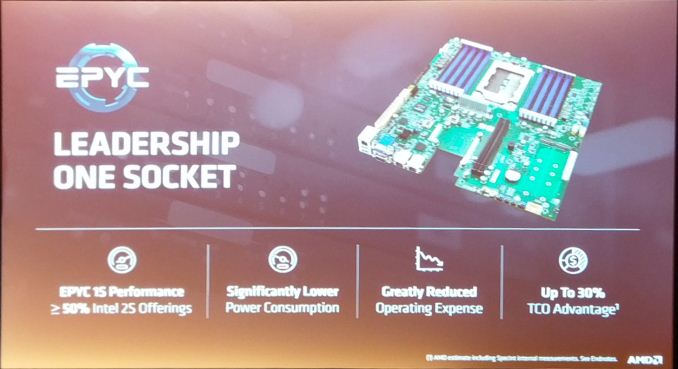
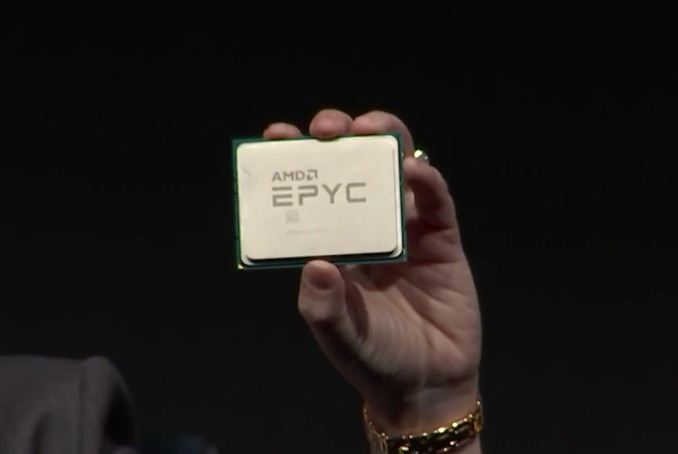
The launch chipset for ThreadRipper will be the X399 chipset (ed: at this point AMD and Intel are literally trying to one-up each other). No details have been released on it thus far, so we’ll have to see what AMD has up their sleeve. But coming so close to the Ryzen launch, it doesn’t sound like it’ll be radically different. Otherwise we’re hoping to grab some pictures of X399 boards at the show today, as those should be on display. The ThreadRipper/Epyc socket in particular should be interesting; the chip is nothing short of massive, and in the one photo AMD has released so far of an Epyc motherboard, the socket looks equally huge. Finally, not to be outdone, AMD’s 32 core & 128 PCIe lane Epyc CPU for servers has also received some news of its own. AMD’s first promising product in the server space in nearly half a decade will be launching on June 20th.
| ||||||||||||||||||||||||||||||||||||||||||||||||||














| << Previous Day |
2017/05/30 [Calendar] |
Next Day >> |