[Most Recent Entries] [Calendar View]
Thursday, June 8th, 2017
- ADATA SD700 512GB
- Corsair Voyager GS 512GB
- G-DRIVE slim SSD USB-C 500GB
- Netac Z5 512GB
- SanDisk Extreme 510 480GB
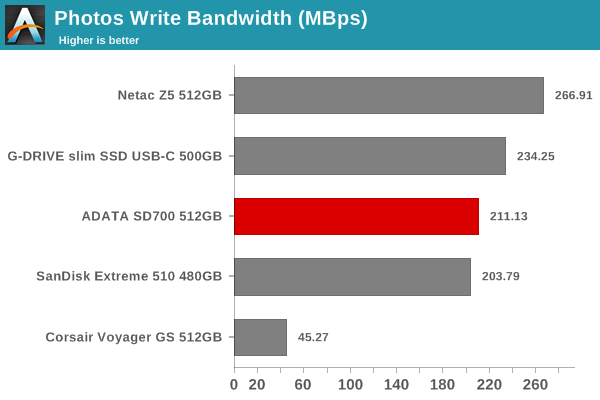
- Photos: 15.6 GB collection of 4320 photos (RAW as well as JPEGs) in 61 sub-folders
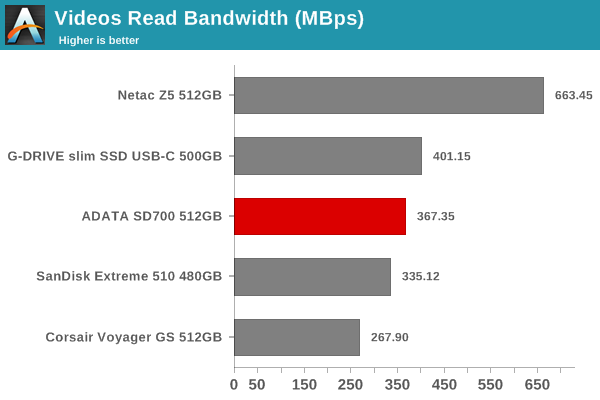
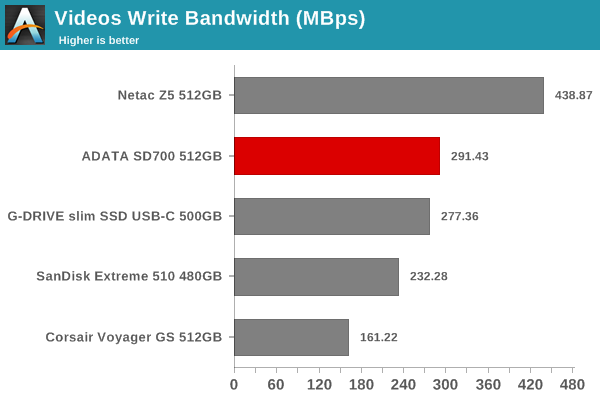
- Videos: 16.1 GB collection of 244 videos (MP4 as well as MOVs) in 6 sub-folders
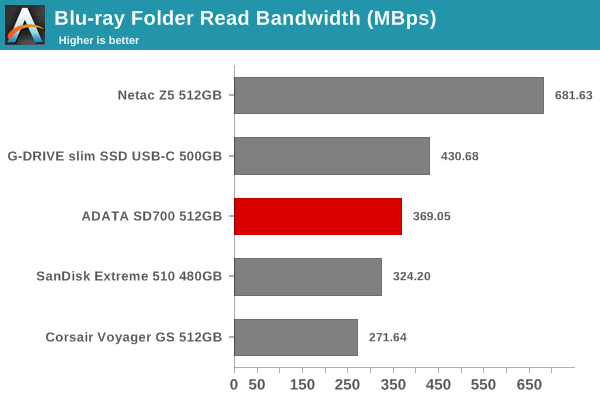
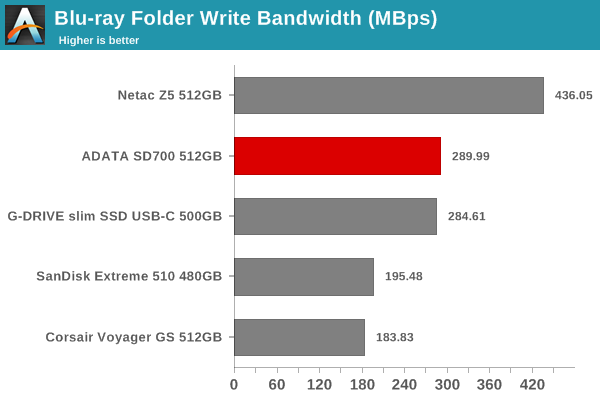
- BR: 10.7 GB Blu-ray folder structure of the IDT Benchmark Blu-ray (the same that we use in our robocopy tests for NAS systems)
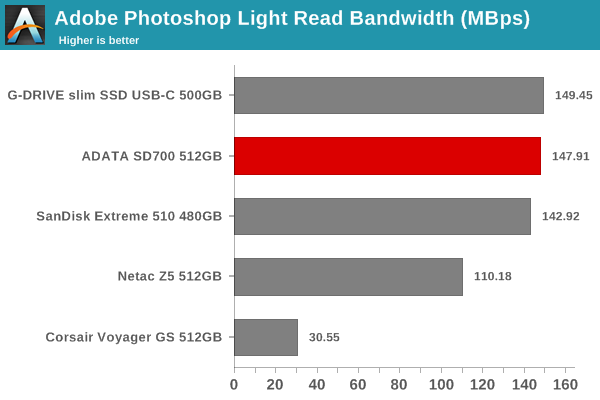
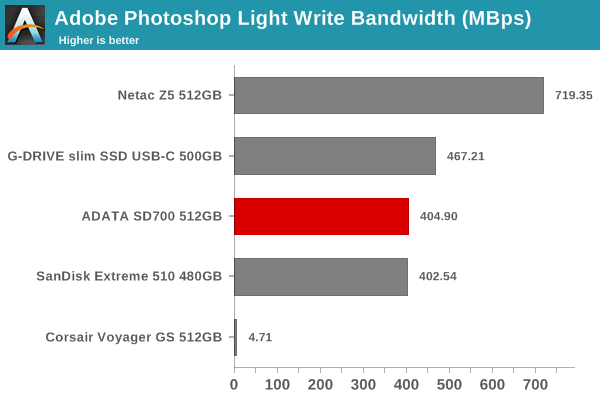
- Adobe Photoshop (Light)
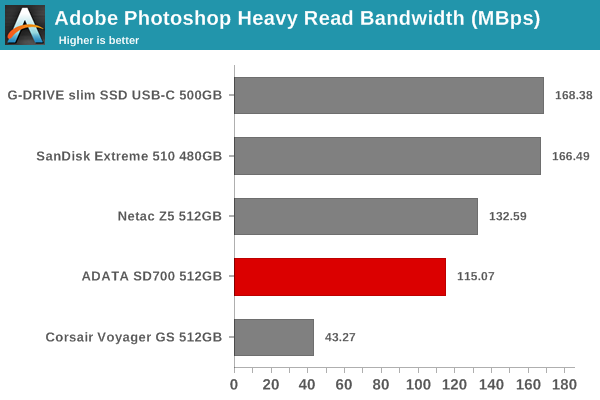
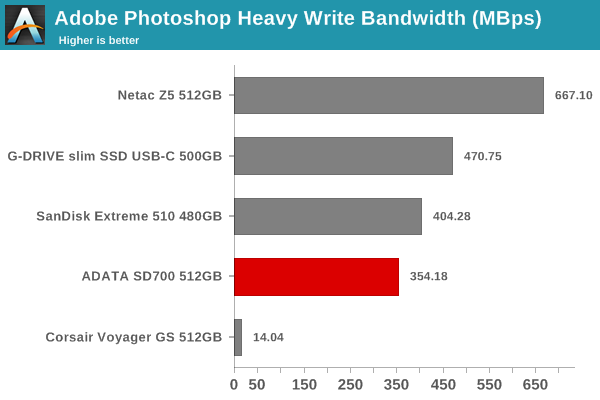
- Adobe Photoshop (Heavy)
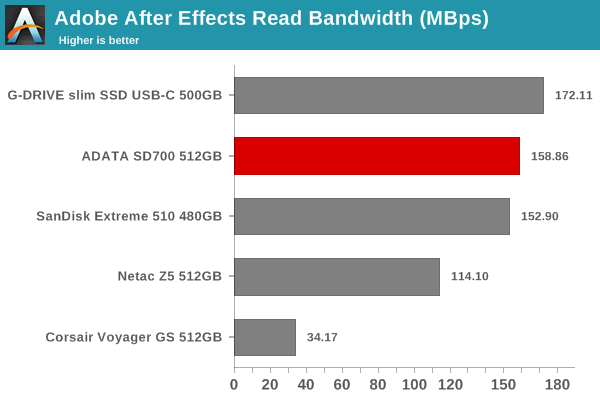
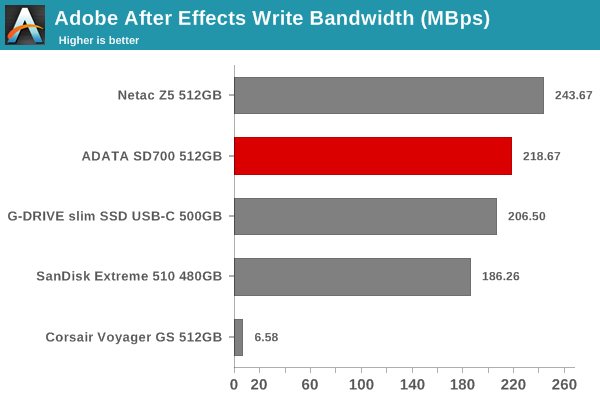
- Adobe After Effects
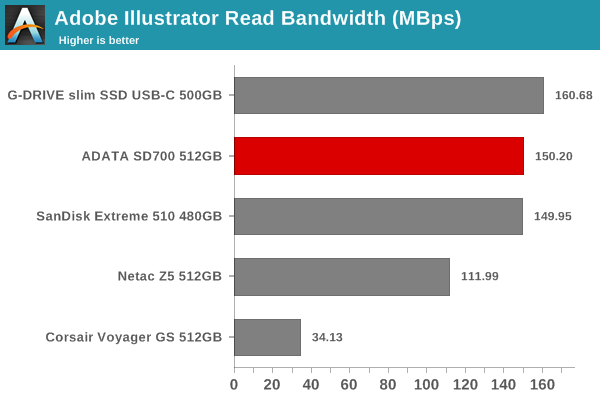
- Adobe Illustrator
- Scythe Announces Mugen 5 CPU Cooler: New Design, Fan and Mounting
- The 140mm Slim Tower CPU Cooler Roundup: Thin & Light Done Just Right
- Top Tier CPU Air Coolers Q3 2015: 9-Way Roundup Review
- Battle of The CPU Stock Coolers! 7x Intel vs 5x AMD, plus an EVO 212
- Alpenföhn Unveils Olymp: A Giant Air Cooler Rated for 340W TDP
- CPU Air Cooler Roundup: Six Coolers from Noctua, SilverStone, be quiet!, and Cooler Master
| Time | Event | ||||||||||||||||||||||||||||||||||||||||||||||||||||||||||||||||||||||||||||||||||||||||||||
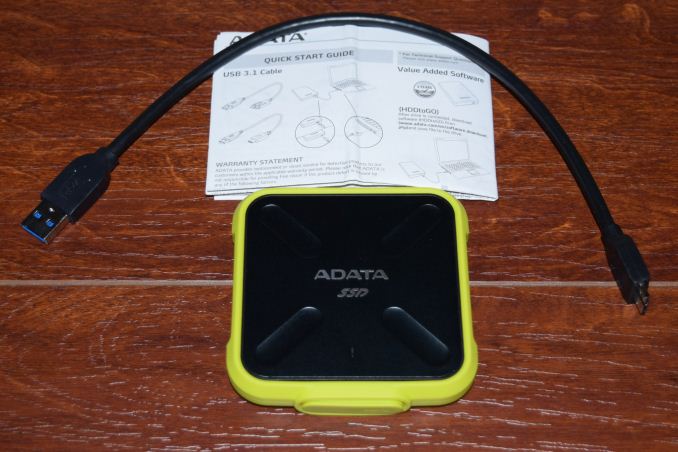
| 8:00a | ADATA SD700 512GB External SSD Capsule Review Flash-based external direct-attached storage (DAS) devices have been rapidly evolving over the last few years. The USB Type-C interface standard has prompted vendors to release updates to their lineup, but, the legacy USB 3.0 interfaces continue to remain popular. On the storage media side for SSDs, there has been a shift from MLC to TLC, and now, to 3D TLC. Flash has recently been at a premium as the foundries ramp up 3D NAND production while bringing down the MLC and regular TLC volume. This has led to SSDs and other flash-based products being sold at a premium. Amongst companies that don't manufacture their own flash memory, ADATA was one of the first to announce and ship products based on 3D NAND (purchasing the flash from IMFT's 3D NAND output). We have already reviewed the ADATA Ultimate SU800 SSDs on the internal drive front. Along with the Ultimate SU800, ADATA also launched the SD700, an IP68 rated external SSD with 3D NAND. The unit comes with either an yellow or a black jacket, and its shell makes it shockproof in addition to its dust- and water-proof nature. The ADATA SD700 has a USB 3.0 interface (micro B). There are three capacity points - 256GB, 512GB, and 1TB. ADATA claims speeds of up to 440 MBps, but doesn't reveal much in terms of internal specifications in its product page. ADATA sent us a 512GB variant for review, and we present the results of our rigorous DAS evaluation of the unit below. Buy ADATA SD700 IP68-rated External SSD 512GB on Amazon.com The ADATA SD700 comes with a short USB 3.0 Micro-B male to USB 3.01 Type-A male cable and a quick start guide.
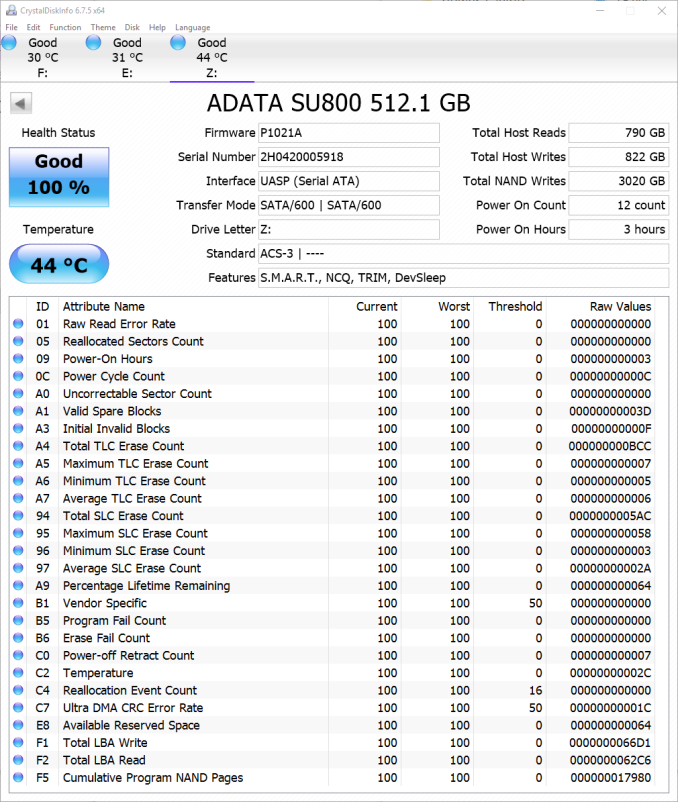
The SD700's IP68 rating is enabled by the thick jacket around the enclosure. The enclosure is indeed sturdy - I had it drop down to the floor from a 6ft high shelf by accident multiple times, and the unit was none the worse for the wear. Internally, the bridge chip used is the JMicron JMS578, which has UASP support. We have already seen this USB 3.0 to SATA III bridge chip in storage enclosures before. The SSD itself is the Ultimate SU800 using a Silicon Motion SM2258 controller with DRAM and IMFT 3D TLC flash. This information can be gathered without opening up the unit by looking at the CrystalDiskInfo information.
Testbed Setup and Testing MethodologyEvaluation of DAS units on Windows is done with the testbed outlined in the table below. For devices with a USB 3.0 (via a Micro B interface) connections (such as the ADATA SD700 512GB that we are considering today), we utilize the USB 3.1 Type-C port enabled by the Intel Alpine Ridge controller, along with a Type-C male to Type-A female connector. The controller itself connects to the Z170 PCH via a PCIe 3.0 x4 link.
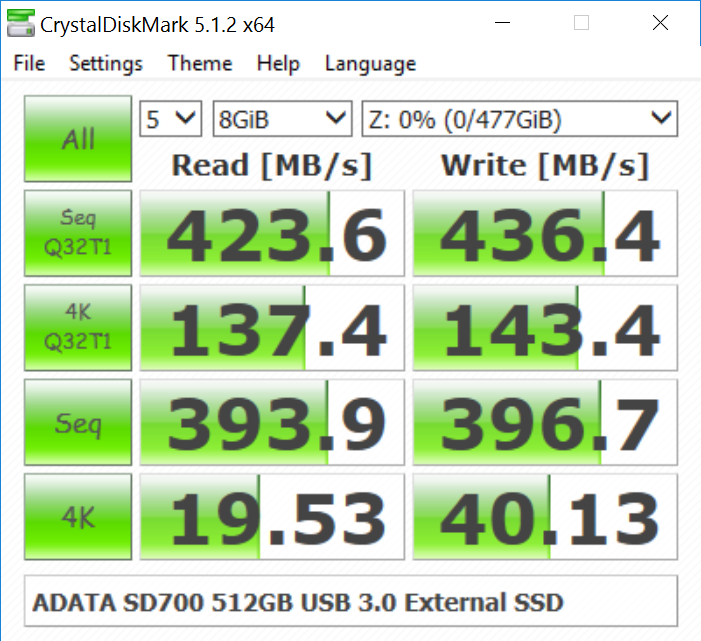
The full details of the reasoning behind choosing the above build components can be found here. The list of DAS units used for comparison purposes is provided below. Synthetic Benchmarks - CrystalDiskMarkCrystalDiskMark, despite being a canned benchmark, provides a better estimate of the performance range with a selected set of numbers. The numbers pretty uch back up ADATA's 440 MBps claims. However, as evident from the screenshot below, the performance can dip to as low as 20 MBps for 4K random reads at low queue depths. <select ... ><option ... >ADATA SD700 512GB</option><option ... >Corsair Voyager GS 512GB</option><option ... >G-DRIVE slim SSD USB-C 500GB</option><option ... >Netac Z5 512GB</option><option ... >SanDisk Extreme 510 480GB</option> </select>
Benchmarks - robocopy and PCMark 8 Storage BenchOur testing methodology for DAS units also takes into consideration the usual use-case for such devices. The most common usage scenario is transfer of large amounts of photos and videos to and from the unit. The minor usage scenario is importing files directly off the DAS into a multimedia editing program such as Adobe Photoshop. In order to tackle the first use-case, we created three test folders with the following characteristics:
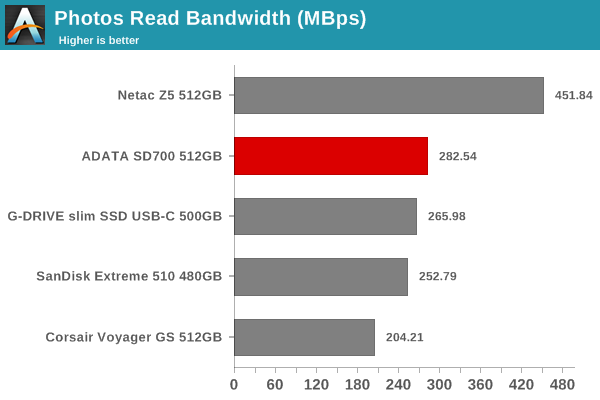
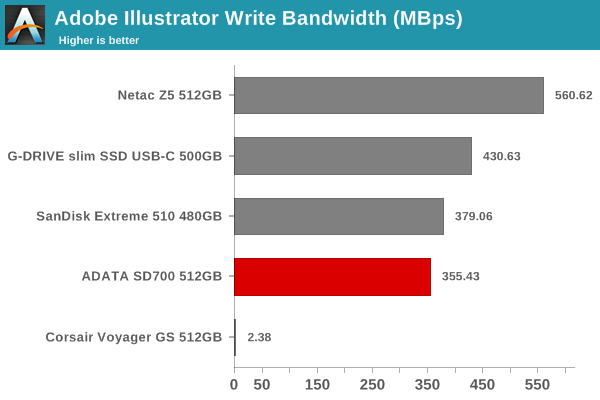
For the second use-case, we take advantage of PC Mark 8's storage bench. The storage workload involves games as well as multimedia editing applications. The command line version allows us to cherry-pick storage traces to run on a target drive. We chose the following traces. Usually, PC Mark 8 reports time to complete the trace, but the detailed log report has the read and write bandwidth figures which we present in our performance graphs. Note that the bandwidth number reported in the results don't involve idle time compression. Results might appear low, but that is part of the workload characteristic. Note that the same testbed is being used for all DAS units. Therefore, comparing the numbers for each trace should be possible across different DAS units.
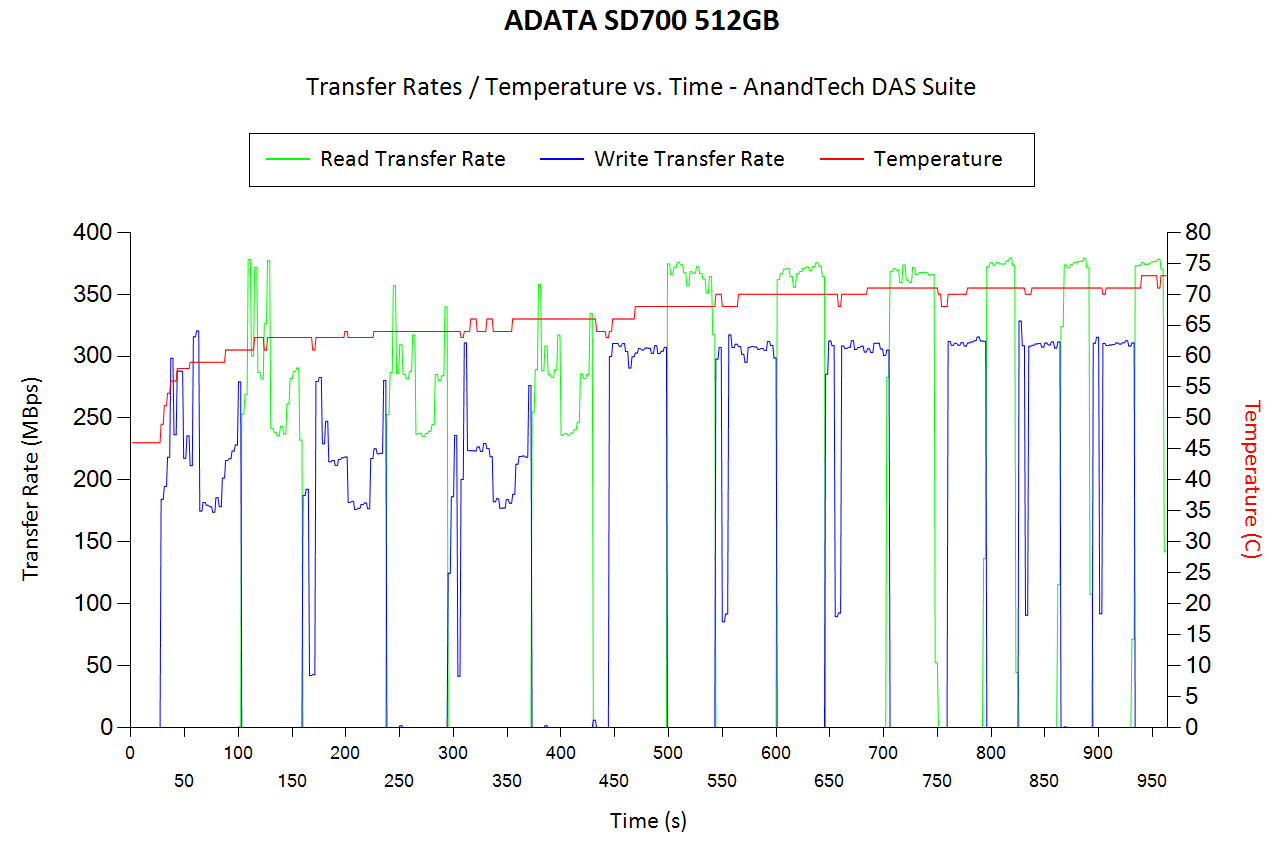
Performance ConsistencyYet another interesting aspect of these types of units is performance consistency. Aspects that may influence this include thermal throttling and firmware caps on access rates to avoid overheating or other similar scenarios. This aspect is an important one, as the last thing that users want to see when copying over, say, 100 GB of data to the flash drive, is the transfer rate going to USB 2.0 speeds. In order to identify whether the drive under test suffers from this problem, we instrumented our robocopy DAS benchmark suite to record the flash drive's read and write transfer rates while the robocopy process took place in the background. For supported drives, we also recorded the internal temperature of the drive during the process. The graphs below show the speeds observed during our real-world DAS suite processing. The first three sets of writes and reads correspond to the photos suite. A small gap (for the transfer of the videos suite from the primary drive to the RAM drive) is followed by three sets for the next data set. Another small RAM-drive transfer gap is followed by three sets for the Blu-ray folder. An important point to note here is that each of the first three blue and green areas correspond to 15.6 GB of writes and reads respectively. Throttling, if any, is apparent within the processing of the photos suite itself. <select ... ><option ... >ADATA SD700 512GB</option><option ... >Corsair Voyager GS 512GB</option><option ... >G-DRIVE slim SSD USB-C 500GB</option><option ... >Netac Z5 512GB</option><option ... >SanDisk Extreme 510 480GB</option> </select>
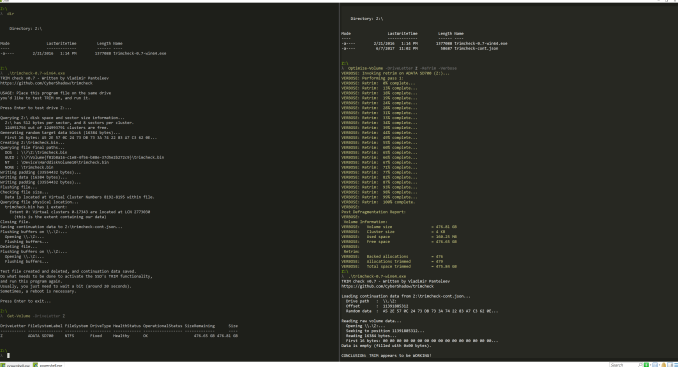
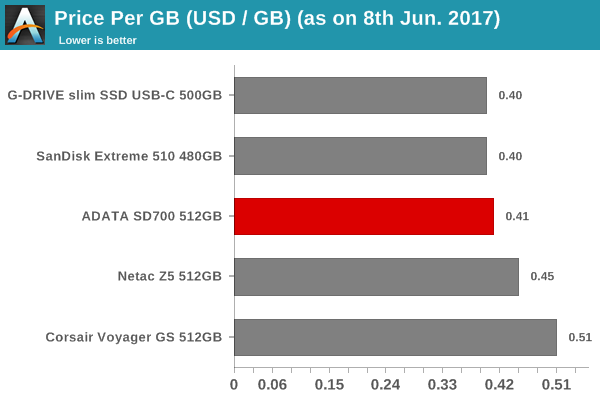
Despite getting quite hot in our performance consistency test (more than 70C), the drive doesn't throttle. Thermal issues are definitely a concern in all water / dust-proof external SSDs, and the ADATA SD700 is no different. Consumers would do well to not subject sealed SSDs (such as this one and the SanDisk Extreme 510) to extremely heavy workloads. Concluding RemarksThe SD700 continues ADATA's tradition of bring external SSDs with good value for money to the market. As icing on the cake, the SD700 carries an IP68 rating also. The performance of the drive leaves us with no doubt that it would be a great portable OS drive, even though ADATA doesn't advertise it for that purpose. After all, we have a real SSD inside - the Ultimate SU800. The JMicron bridge chip is also able to map the SCSI Unmap commands to TRIM, as our little test below shows. Moving on to the pricing, the SD700 comes in at $209. In terms of cost per GB, we find that ADATA is beat only by G-Technology / SanDisk / Western Digital, which has its own flash manufacturing facility.
It is difficult to source IP68-rated enclosures into which one can put their own 2.5" drive. Therefore, going the DIY route to create a compact product like the ADATA SD700 with all its features is not going to be a feasible solution for the product's target market. ADATA must be given credit for being one of the first companies to bring 3D NAND to consumers in a IP68-rated product. Buy ADATA SD700 IP68-rated External SSD 512GB on Amazon.com | ||||||||||||||||||||||||||||||||||||||||||||||||||||||||||||||||||||||||||||||||||||||||||||
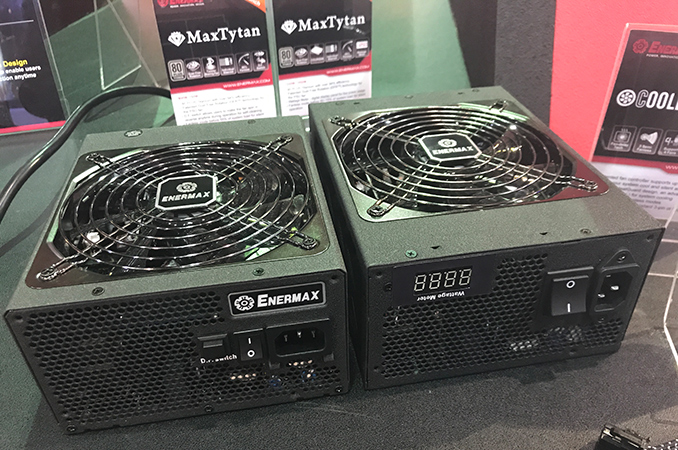
| 9:00a | Enermax Launches MaxTytan: 80 Plus Titanium, Up to 1250 W, Integrated Power Meter
Enermax announced its new flagship lineup of power supplies at Computex. The new MaxTytan series is 80 Plus Titanium rated, while the top-end models also include an integrated power meter as well as a bundled RGB lighting controller. The new PSUs are set to be available late this summer. The Enermax MaxTytan family will include four models speced for 750 W, 800 W, 1050 W and 1250 W output. All MaxTytan SKUs support the company’s DFR (dust free rotation) technology (requires manual activation on the entry-level models) and fanless operation at below 55% – 60% load. Meanwhile, the two 1 kW models feature Enermax’ Coolergenie device for system fan control and have an integrated power meter. It is not completely clear whether the power meter measures consumption of the PC or the amount of watts that the PSU consumes from the outlet, but at least it gives an idea about general power consumption (and given the 80 Plus Titanium rating, the difference between consumption of the PSU and the PC itself should not be too significant). Moreover, the MaxTytan series is the first 80 Plus Titanium consumer PSU family to support the feature anyway.
In order to get the “80 Plus Titanium” certificate, a PSU is mandated to be at least 94% efficient under a 20%, 50% and 100% load as well as at least 90% efficient under a 10% load. The latter requirement is exclusive to the 80 Plus Titanium spec and is not easy to support due to various reasons. According to Ecova Plug Load Solutions, there are 49 PSUs in the world that have the 80 Plus Titanium badge. Just for comparison, there are 481 models featuring the 80 Plus Platinum label.
The Enermax MaxTytan family of PSUs are compliant with the ATX 12V v2.4 and EPS (presumably v2.92) specifications and have two 4+4 CPU power connectors to handle dual-socket systems.
The MaxTytan feature a modular design and is equipped with individually sleeved cables, high quality capacitors rated to operate at high temperatures caused by loads of enthusiast-class PCs and so on. All the MaxTytan PSUs have enough auxiliary 8-pin PCIe connectors to power systems running two (or more) high-end graphics cards with two 8-pin PCIe power plugs. The PSUs also have multiple connectors for devices with SATA, Molex, and other power headers.
Enermax is set to kick off mass production of its MaxTytan PSUs in mid-June. Typically, devices like these hit the market about two months after the mass production starts, so expect MaxTytan to be available in mid-August. As for pricing, Enermax tells us that the entry-level model will retail for $210, whereas the top-of-the-range PSU with a power meter will cost $360.
Related Reading: | ||||||||||||||||||||||||||||||||||||||||||||||||||||||||||||||||||||||||||||||||||||||||||||
| 11:00a | Nixeus NX-EDG 27 27-inch Gaming Monitor: 1440p, 30-144Hz FreeSync
Nixeus, a Los Angeles-based consumer electronics company that was founded in 2010, has officially launched their new EDG 27 gaming monitor, which they claim is the world’s first WQHD IPS-based display with an AMD FreeSync range of 30Hz to 144Hz. Since the devil is in the details, their claim might indeed be correct. Based on our research, its principal competition either has a similar wide adaptive refresh range but a TN panel (Acer Predator XG270HU) or a 144Hz IPS panel that only supports a much narrower 35-90Hz FreeSync range (ASUS MG279Q). As a result, the Nixeus EDG 27 does indeed appear to be the only 144Hz FreeSync IPS monitor that has a 30Hz minimum refresh rate.
Focusing on some of the other specs, the Nixeus EDG 27 is a 27-inch model with a WQHD resolution of 2560 × 1440 and 16:9 aspect ratio. It features an IPS (AHVA) panel with a typical brightness of 300 cd/m2, a native contrast ratio of 1000:1, and a low 4ms gray-to-gray (GTG) response time. This a true 8-bit panel that can display 16.7 million colors, but there is no color gamut coverage details. The viewing angles are wide at 178°/178°, which is typical for an IPS display. Connectivity appears excellent with multiple inputs, namely DisplayPort 1.2a, HDMI 2.0, HDMI 1.4, and Dual-Link DVI. The FreeSync feature is only supported on the DisplayPort, but the HDMI 2.0 can handle the full 2560 x 1440 resolution at 144Hz. There is no integrated USB hub, but there are built-in stereo speakers, and both input and output 3.5mm audio jacks.
The stand was designed with ergonomics in mind, and there is height adjustment, left and right swivel, forward and back tilt, and it even pivots 90-degrees for portrait mode. Cable management features have also been integrated into the stand, while the back of the display features a 100mm x 100mm VESA mount.
Backed by a 3-year manufacturer warranty, this model should start shipping sometime next month and it will retail for about $499 USD. | ||||||||||||||||||||||||||||||||||||||||||||||||||||||||||||||||||||||||||||||||||||||||||||
| 1:00p | Cooler Master Shows Concept Coolers: Closed-Loop Heat Pipe and Flying Saucer
Hardware manufacturers use trade shows not only to display upcoming commercial products, but also to demonstrate and collect feedback on concept devices that may or may not become full commercial products. Cooler Master used Computex to demo two of its concept coolers, one of which featured a closed-loop heat pipe along with three fans, another used a large heat column and a rather unarthodox design. Although many performance enthusiasts nowadays choose all-in-one liquid cooling solutions over air coolers because of dimensions and efficiency, oversized CPU tower coolers still have their own advantages: there is no risk of leaking, they are large and therefore they can cool down chips even if their fans fail, they are rather affordable too.
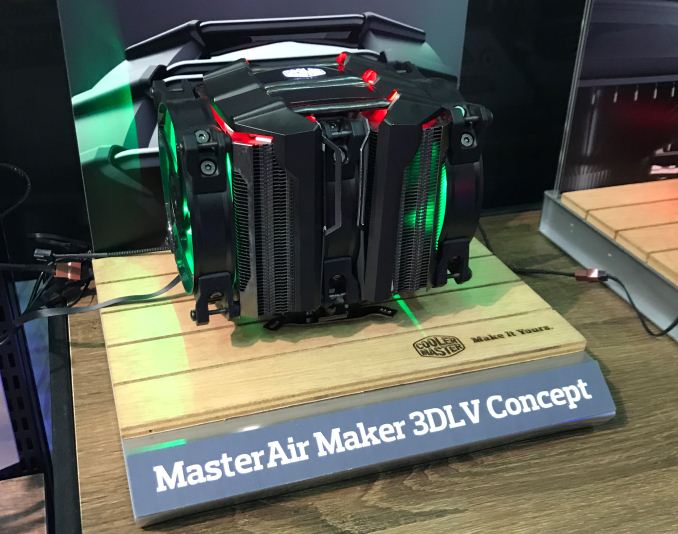
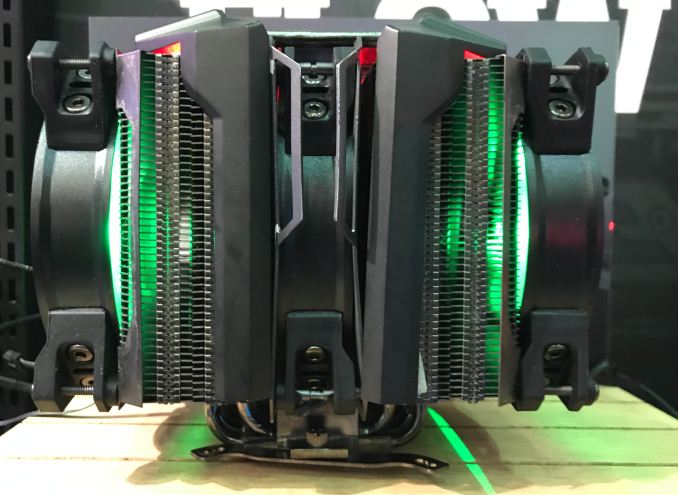
The MasterAir Maker 3DLV is one of Cooler Master’s concept coolers. It has two large radiators connected together using four closed-loop heat pipes and featuring three 120-mm fans. The main idea of heat pipes is to quickly transfer heat from the bottom of the cooler to fins located along the path of the pipes, away from the heat source. Closed-loop heat pipes have been explored by multiple companies and Zalman’s CNPS 9000-series coolers actually take advantage of them. The CNPS 9000's are round and the closed-loop heat pipes actually transferred heat to all fins. Meanwhile, CM’s 3DLV concept cooler is rectangular and does not have any fins on its top, just bare pipes and we have no idea how efficient such a configuration is. Still, three fans should ensure rather high efficiency anyway and the manufacturer promises that the cooler can remove up to 200 W of heat.
In the meantime it is unclear whether Cooler Master will actually commercialize this model, as due to its large dimensions it is not compatible with high-end memory modules that have large heatspreaders.
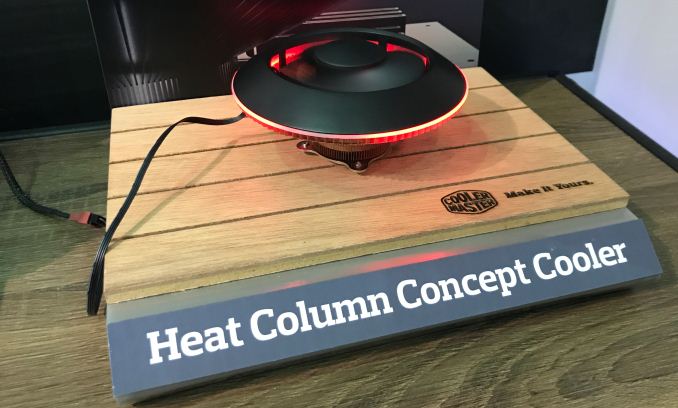
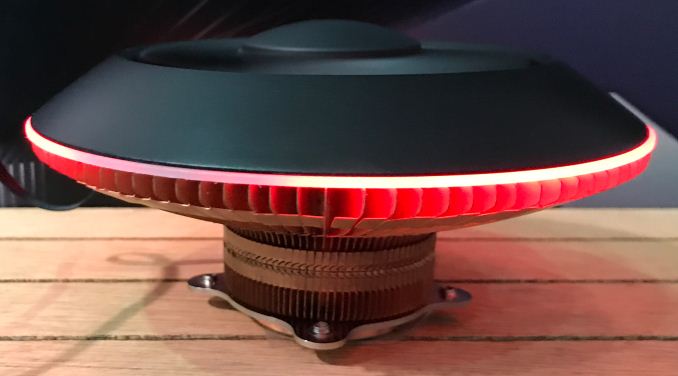
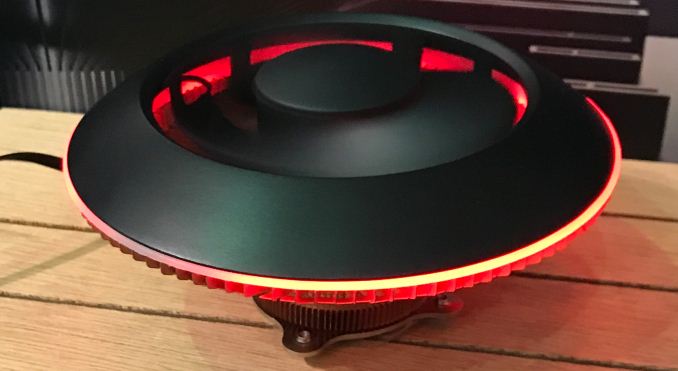
Meanwhile the Heat Column Concept is another cooler that CM demonstrated at Computex. This cooler resembled a flying saucer and featured a huge heat column on its base. The flying saucer cooler is made of copper and therefore quickly absorbs heat. The producer rates the device at 100 W TDP, which means that it can cool down all mainstream CPUs in the AM4 and LGA1151 form-factors from both manufacturers.
Cooler Master has not decided the final specs of the cooling solution or how to position it yet. One of the things the company’s engineers are thinking about are dimensions: they could make the “saucer” smaller and position it for, say, Mini-ITX system, or make it larger and then appeal to overclockers/modding community.
One of the things that the triple fan and the saucer coolers integrate is user-configurable RGB LED lighting, which is becoming an important feature. Because enthusiasts appreciate customizable lighting, it makes sense for Cooler Master to offer it not only with new cases, but also with CPU coolers. Related Reading: | ||||||||||||||||||||||||||||||||||||||||||||||||||||||||||||||||||||||||||||||||||||||||||||





| << Previous Day |
2017/06/08 [Calendar] |
Next Day >> |