[Most Recent Entries] [Calendar View]
Tuesday, August 22nd, 2017
- Gigabyte Announces H110-D3A Motherboard for Mining Rigs: The Mining Cart Rolls On
- Mining Cards Update: Zotac, Manli, and Biostar Products Formally Confirmed
- Biostar Goes Mining: New TB250-BTC PRO Motherboard and RX 470D Mining GPU
- ASUS & Sapphire Release Pascal & Polaris-based Cryptocurrency Mining Cards
- Acer Launches TravelMate Spin B1: Apollo Lake Convertible with Windows 10 S for $299
- Asus Announces VivoBook Pro 15 N580: Intel Kaby Lake CPU, up to 4K Display & GeForce GTX 1050
- ASUS PRO B9440: Durable Ultra-Thin Business Laptop with 10-Hour Battery for $999
- ASUS ZenBook 3 Deluxe UX490UA: Kaby Lake, 16 GB RAM, 1 TB SSD, TB3, 14" FHD, 2.4 lbs
- Shuttle’s X1 Now Available: NUC-Like PC With a GeForce GTX 1060 GPU
- Corsair’s ONE SFF PCs Get Upgraded: GeForce GTX 1080 Ti, 32 GB of RAM, NVMe SSD
- Zotac Unveils 2017 ZBox Magnus SFF Gaming PCs: Powered By Intel Core & AMD Ryzen
- ASUS VivoPC X Console Now Available: Core i5, GeForce GTX 1060 for $799
- MSI Upgrades Its Aegis and Nightblade PCs with Intel’s Kaby Lake CPUs
- MSI Trident 3 Announced: A Core i7 Console
- HTC Announces Snapdragon 835-Based VIVE VR Headset for Chinese Market
- Oculus Announces Six Week Sale of $399 Rift + Touch Bundle
- Oculus Rift Launch Day News: New AMD & NVIDIA Drivers; Async Timewarp & Platform Restrictions Added To SDK
- Hands On With the Retail Oculus Rift: Countdown to Launch
- Oculus Touch Controllers Shipping In December for $199
- HTC & Intel Partner on WiGig Wireless for Vive VR Headset
- GDC 2017 Roundup: VR for All - Pico Neo CV, Tobii, & HTC
| Time | Event | ||||||||||||||||||||||||||||||||||||||||||||||||||||||||||||||||||||||||||||||||||||||||||
| 8:00a | ASUS Announces B250 Expert Mining Motherboard: 19 Expansions Slots
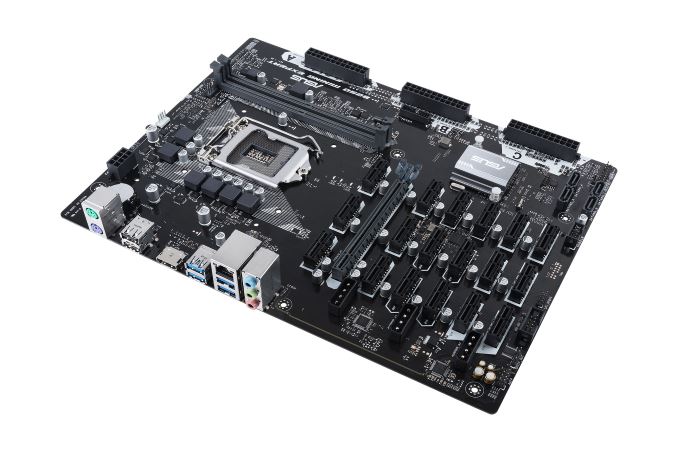
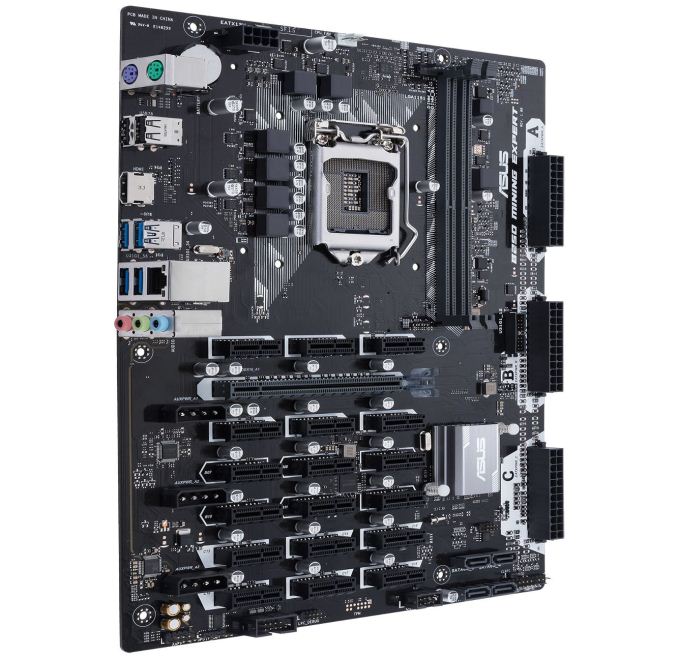
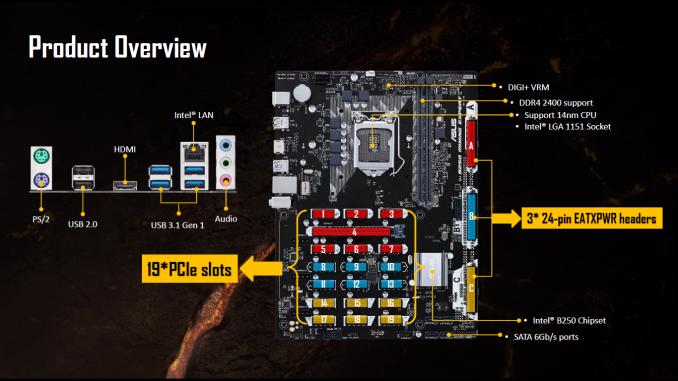
ASUS has teased their first cryptocurrency mining board, the B250 Expert Mining. It’s full of expansions slots, with 19 to be exact, to pack in the most GPUs on a single system. This large number puts it at the top of the food chain for the quantity of PCIe slots suitable for mining duties. In order to support so many slots and lower the Return on Investment (ROI), ASUS implemented a unique setup for power with a Triple ATX12V (24-Pin), PCIe slot state detection, voltage stabilization capacitors for each slot, as well as using a mining specific BIOS for increased hash rates.
The reason for a shorter ROI here is the ability to use fewer parts for a given amount of graphics cards used. In other words, the outgoing cost will be less due to fewer systems needed to be built. Only one Motherboard, CPU, SSD, and set of RAM is required for 19 GPUs, saving money and lowering initial costs. According to ASUS, users are currently only able to utilize up to 16 cards due to a limit in GPU drivers. This is accomplished by using a mix of eight AMD and eight NVIDIA GPUs. Late in 2017, a new driver from AMD is supposed to launch enabling the full complement of 19 GPUs the motherboard can handle. When using more than 13 cards, the NVIDIA GPUs will need to use mining specific (P106 based) GPUs. Of the 19 expansions slots, 18 are PCIe 3.0 x1, along with one full-length PCIe 3.0 x16 slot. ASUS separates the slots in three groups each with a dedicated 24-pin assigned to it for power. The top 24-pin covers slots 1-7 (includes the full-length slot), the middle header 8-13, with the last covering 14-19. There are also three Molex connectors for additional slot power. Along with separated power sources, each PCIe slot has its own dedicated capacitor to condition the voltage going to GPU.
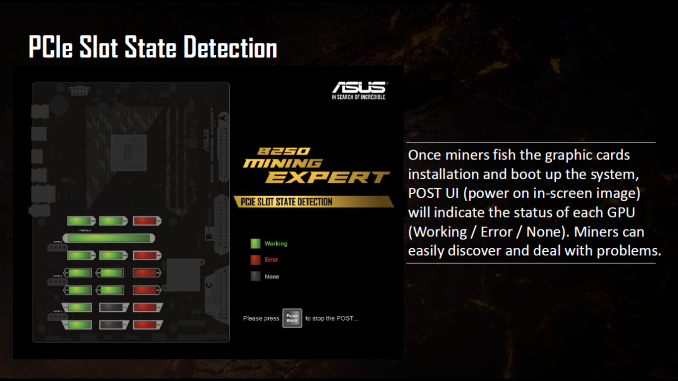
Once the system is setup, upon boot miners are able to see a POST UI (power on in-screen image). The image shows a top-down view of the motherboard expansion slots indicating the status of each GPU. There are three states; Working, Error, and None. The slots working properly show up in green, those in error are in red, while unpopulated slots are gray. This seems like a good way for miners to get a quick ‘state of the union’ upon booting the system. ASUS provided a slide showing costs savings, as well as how to properly setup graphics cards on the Mining Expert (see the gallery at the end).
Specifications wise, the ASUS B250 Mining Expert is based on the B250 chipset with its LGA1151 socket supporting Intel 6th and 7th generation processors. Memory capacity is up to 32GB DDR4 in dual-channel mode supporting speeds up to 2400 MHz. Storage needs are handled by the four SATA3 ports while there is a total of six USB3.1 and 4 USB 2.0 ports. The rear panel I/O is pretty anemic as one would expect out of a mining board, but has the basics with two PS/2 ports, two USB 2.0 ports, four USB 3.0 ports, HDMI, Intel-based LAN (I219V Gigabit), and 8 channel audio jacks driven by a Realtek ALC887 codec. The CPU gets its power through a 6 phase DIGI+ VRM. Below is a complete specifications list:
ASUS has not released pricing at the time of publication. Sample allocation and motherboard partner allocation is 8/22. Public availability was not listed but should be expected soon. Gallery: ASUS B250 Mining Expert
     Related Items: | ||||||||||||||||||||||||||||||||||||||||||||||||||||||||||||||||||||||||||||||||||||||||||
| 9:00a | ASUS Launches VivoBook W202NA: 11.6”, Apollo Lake, Windows 10 S, $279
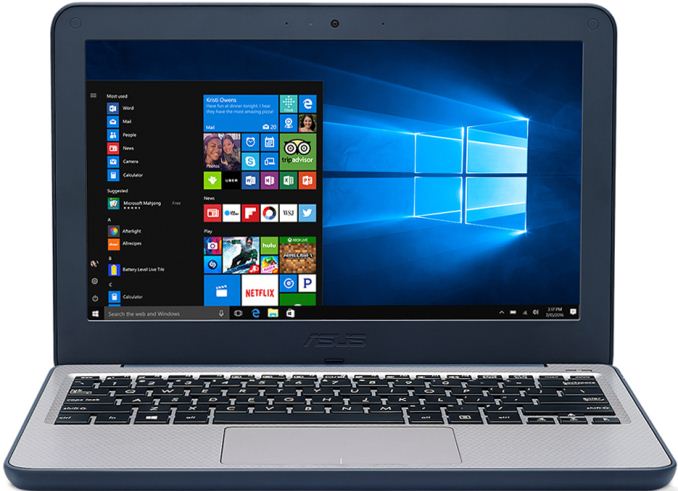
In time for back-to-school season, ASUS has announced its new ultra-low-cost PC (ULCPC aka netbook) aimed at students and consumers with a tight budget. The VivoBook W202NA rugged laptop is powered by Intel’s Apollo Lake platform, has an 11.6” display, weighs around 1.2 kilograms (2.65 lb) and has a 38 Wh battery that is quoted for up to 11 hours. The machine will be available with Windows 10 Home and Windows 10 S operating systems, both will cost less than $300.
The ASUS VivoBook W202-series laptop will exist in three different versions based on Microsoft’s Windows 10 S, Windows 10 Home and Windows 10 Pro operating systems, featuring different hardware and aimed at slightly different end-users. The Windows 10 S/10 Home notebooks are based on Intel’s dual-core Celeron N3350 SoC, are equipped with 4 GB of DRAM and are targeted at children, students and consumers. By contrast, the Windows 10 Pro-based ASUS W202 uses Intel’s quad-core Pentium N4200, has up to 8 GB of memory, up to 128 GB of eMMC storage and is designed for more demanding consumers (do not expect this SKU to be available in all regions).
Other specifications of the ASUS VivoBook W202 notebook seem to be comparable to other entry-level contemporary PCs: it features an 11.6” display with a 1366×768 resolution, an anti-glare coating and a 180-degree hinge. As for connectivity, the laptop has a 802.11ac Wi-Fi with Bluetooth 4.1 module, two USB 3.0 Type-A ports, an HDMI output, a VGA webcam, a microSDXC card reader, a TRRS audio connector, a microphone array, two 2W speakers and so on.
One of the key selling features of the ASUS VivoBook W202 is its ruggedized design. The laptop has rubber-lined edges and corners to protect internals against bumps and knocks. In addition, the notebook features an anti-spill keyboard. According to ASUS, the VivoBook W202 has survived a drop test from a height of 119 cm (3.9 feet) as well as passed extreme twist force and high-pressure test.
The ASUS VivoBook W202NA-YS02 convertible laptop featuring Windows 10 S is available immediately in North America for $279. The ASUS VivoBook W202NA-DH02 powered by Windows 10 Home will ship next month for $299. The Pentium- and Windows 10 Pro-based VivoBook W202 system will naturally cost slightly more, but such systems may not be available in all regions. Related Reading: | ||||||||||||||||||||||||||||||||||||||||||||||||||||||||||||||||||||||||||||||||||||||||||
| 11:00a | Shuttle Squeezes Desktop Graphics Card into a 3-Liter XH110G SFF PC Barebones
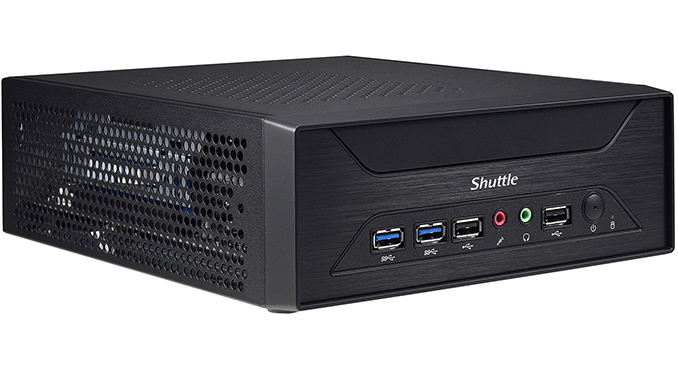
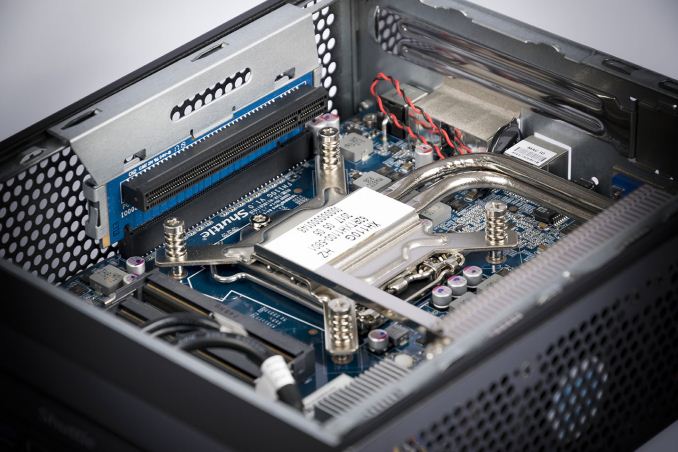
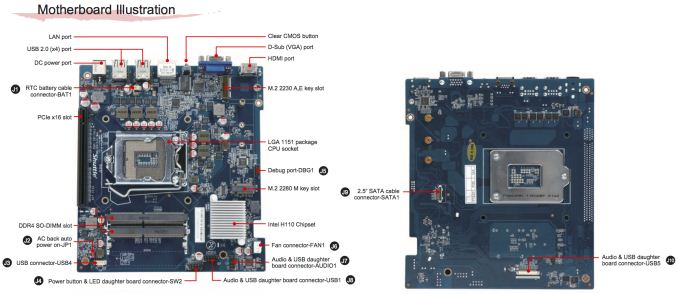
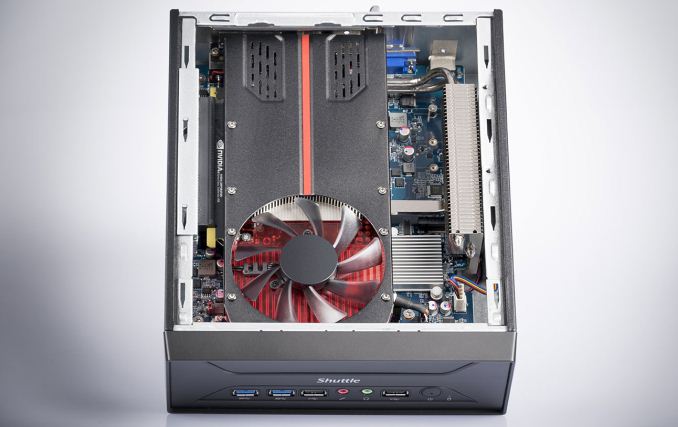
Shuttle has announced a new small form-factor barebones PC aimed at entry-level gamers as well as those who need a SFF multi-monitor setup, such as graphics professionals, traders, digital signage, control room applications, and so on. The XH110G has a volume of only three liters, but can accommodate a variety of graphics cards, assuming that they do not consume excessive amounts of power and use single-slot cooling systems, because the chassis is only 78.5 mm thick. The Shuttle XH110G is based on Intel’s H110 PCH and supports all contemporary desktop LGA1151 CPUs that Intel has to offer with up to 65 W TDP (no Xeons, no ECC memory, etc.). Therefore, the fastest processor the XH110G supports is the Core i7-7700, but given the form-factor, it is more likely that owners of the system will choose something like the Core i7-7700T with a 35 W thermal envelope. To cool down its CPU, the XH110G uses a notebook-like ICE cooling system featuring two heat pipes that take away thermal energy from the chip and transfer it to a fairly large radiator located on the right side of the chassis. The radiator is cooled down using two 60-mm fans. Typically, small high-pressure fans have very high RPMs and are noisy. Shuttle does not disclose many details about its fans, but says that the XH110G supports five fan modes for one of the fans: a PWM-controlled smart fan mode along with pre-set ultra-low, low, mid and full speed modes. Meanwhile, the second fan either rotates at a constant speed of around 1300 RPM (based on a screenshot from the BIOS manual - see the gallery below for details) or works at the speed of the first one. For extra ventilation, the XH110G chassis has many holes to ensure sufficient cooling for all components.
When it comes to DRAM and storage, everything looks pretty standard for a modern SFF PC: the XH110G has two SO-DIMM slots supporting up to 32 GB of DDR4-2400 memory, a 2.5” bay for an HDD or SSD located under the motherboard in a special bay, as well as one M.2 slot (PCIe and SATA) located on the motherboard near the fans to ensure proper cooling. Those, who would like to expand storage capacity of the XH110G further can install a USB flash drive into an external USB 2.0 port. Shuttle does not set maximum capacities for SSDs and HDDs supported by the new SFF PC, but since the thickness of the internal USB drive cannot exceed 11.5 mm, it looks like only 7-mm 2.5” storage devices are supported, which means up to 2 TB for contemporary HDDs. Keep in mind that the Intel 110 PCH has 6 PCIe 2.0 lanes, and therefore even if a PCIe 3.0 x4 SSD is used, its maximum throughput will be around 2 GB/s. This may not be a problem for entry-level systems that do not use high-end SSDs, but an advanced solid-state drive will not be a good fit for the XH110G.
Discrete graphics support is clearly a key selling point of the Shuttle XH110G. When it comes to integrated graphics outputs, the system itself has a D-Sub and an HDMI connector, which means that those who want to run two modern monitors will have to get a discrete video card. The graphics board should be installed horizontally above the CPU using a special riser card which has all pins needed for x16 operation. The card should use a single-slot cooler and its maximum length should be no longer than 208.5 mm. Shuttle officially lists AMD’s FirePro W600 and W2100, NVIDIA’s Quadro K2000 and M2000 as well as Matrox’s C680 (this one is particularly important as it can drive six displays) graphics adapters as supported, but the system can handle a great variety of graphics cards. Keep in mind though that the XH110G is powered by a 180 W external PSU and therefore maximum power consumption of a video card should not exceed around 100 W, even with a 35 W CPU. At present, the most powerful graphics adapters that can be installed into the XH110G system are the AMD Radeon RX 460 and NVIDIA’s GeForce GTX 1050 Ti.
As far as connectivity is concerned, the Shuttle XH110G looks rather basic. The system has two USB 3.0 ports on the front, and six USB 2.0 ports in total, a Gigabit Ethernet connector, driven by Intel’s i211 controller, and two 3.5-mm audio jacks. In a bid to get Wi-Fi and Bluetooth, one should buy a separate M.2-2230 WLN-M card from Shuttle (802.11ac, up to 500 Gbps, BT). In addition, the internal USB 2.0 header can be used to plug in a USB accessory, and Shuttle suggests a TV tuner or a 4G/LTE modem.
When it comes to price, the company has succeeded in keeping it low. Shuttle’s XH110G is now available from specialist retailers in Europe for €231 ($319), which is a price of a Mini-ITX case, an Intel B250-based motherboard with integrated 802.11ac Wi-Fi and a circa-400 W PSU. Shuttle’s system looks to be more compact than typical Mini-ITX builds and can be mounted to a display using a VESA mounting mechanism. However, it has a number of peculiarities when it comes to SSD performance, connectivity and support of graphics cards that may not be welcomed by enthusiasts. Gallery: Shuttle XH110G
      Related Reading: Sources of information and images: TechPowerUp, Shuttle. | ||||||||||||||||||||||||||||||||||||||||||||||||||||||||||||||||||||||||||||||||||||||||||
| 11:24a | Hot Chips: Intel EMIB and 14nm Stratix 10 FPGA Live Blog (8:45am PT, 3:45pm UTC) Today at Hot Chips we have a lot of interesting talks going on. First up is a talk on Intel's latest 14nm FPGA solution: Stratix 10 implementing HBM using Intel's latest EMIB (embedded multi-die interconnect bridge) technology that may migrate over to enterprise CPUs over the next few years. | ||||||||||||||||||||||||||||||||||||||||||||||||||||||||||||||||||||||||||||||||||||||||||
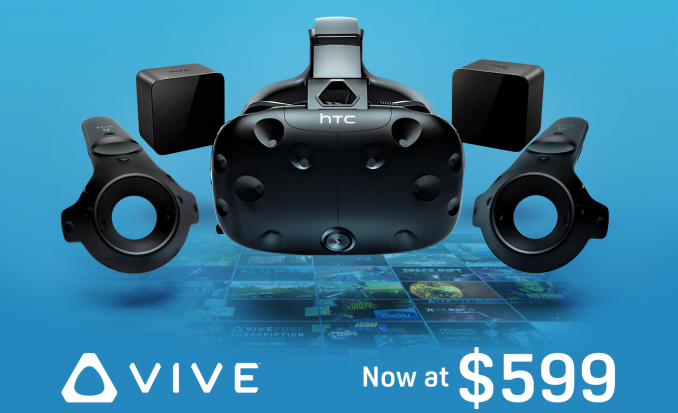
| 12:00p | HTC Permanently Cuts Price of Vive to $599
On Monday, HTC announced a permanent Vive price reduction to $599, bringing the VR headset down from its original $799 launch price. The now-$599 standard HTC Vive kit includes the headset itself, two wireless controllers, two base stations, link box, earbuds, assorted connectors, and accessories. This move comes roughly a month after Oculus’ ‘Summer of Rift’ announcements that saw the Rift + Touch bundle permanently cut to $499. Vive purchases come with complimentary copies of Google’s Tilt Brush, EverestVR, and Richie’s Plank Experience. In addition, HTC offers a one-month free trial to Viveport Subscription, where customers pay $6.99 a month for up to five titles to play. HTC also points out upcoming Vive exclusives, such as Fallout 4 VR and Doom VFR. In the background is natural compatibility with SteamVR, as Valve co-developed the Vive with HTC. Currently, the Rift + Touch bundle is still available at its $399 summer sale price. However, the Rift + Touch bundle does require an additional $59 third sensor to achieve room-scale tracking, whereas the base Vive kit accomplishes this natively. In the same vein, the Vive price drop has not affected the separate $99 Deluxe Audio Strap. As noted last October, the Rift Touch controllers are more akin to “halves of gamepads”, as opposed to the Vive wands. Beyond our first looks with both the Vive and the Rift, both setups still emphasize different aspects of the VR experience despite offering similar capabilities.
While HTC has lowered the Vive’s price to $599, the Vive remains in pole position with respect to high-end VR market share. A few months earlier, research firm SuperData outlined its expectation that the Vive would outsell the Rift by 200,000 units. Now, despite the recent Rift price cuts, SuperData observes that HTC is still shipping more Vive units, although the ‘Summer of Rift’ sale did make up some ground. In the near future, HTC has the Daydream standalone Vive and Vive Knuckles in the pipeline, with the China-only Vive Standalone already shipping. Nevertheless, price reductions for both Oculus Rift and HTC Vive bring high-end VR a step closer to widespread adoption. And for consumers, these continued price drops are the best news yet. Related Reading | ||||||||||||||||||||||||||||||||||||||||||||||||||||||||||||||||||||||||||||||||||||||||||
| 5:58p | Hot Chips: Google TPU Performance Analysis Live Blog (3pm PT, 10pm UTC) Another Hot Chips talk, now talking Google TPU. | ||||||||||||||||||||||||||||||||||||||||||||||||||||||||||||||||||||||||||||||||||||||||||
| 6:55p | Hot Chips: IBM's Next Generation z14 CPU Mainframe Live Blog (5pm PT, 12am UTC) IBM's mainframe business is a large element of their business. The z series is part of that business, and a very complex design, citing interesting and different processor design techniques. Here at Hot Chips, IBM is taking us through their latest z14 design, using a 14nm process node, optimized pipelines, pervasive encryption and other features. | ||||||||||||||||||||||||||||||||||||||||||||||||||||||||||||||||||||||||||||||||||||||||||




| << Previous Day |
2017/08/22 [Calendar] |
Next Day >> |