[Most Recent Entries] [Calendar View]
Friday, August 25th, 2017
- Kingston DataTraveler Vault Privacy 3.0 64GB
- EDGE diskGO Secure Pro 3.0 64GB
- Mushkin Atom 64GB
- SanDisk Extreme 64GB
- Strontium Nitro Plus Nano 64GB
- Photos: 15.6 GB collection of 4320 photos (RAW as well as JPEGs) in 61 sub-folders
- Videos: 16.1 GB collection of 244 videos (MP4 as well as MOVs) in 6 sub-folders
- BR: 10.7 GB Blu-ray folder structure of the IDT Benchmark Blu-ray (the same that we use in our robocopy tests for NAS systems)
- Adobe Photoshop (Light)
- Adobe Photoshop (Heavy)
- Adobe After Effects
- Adobe Illustrator
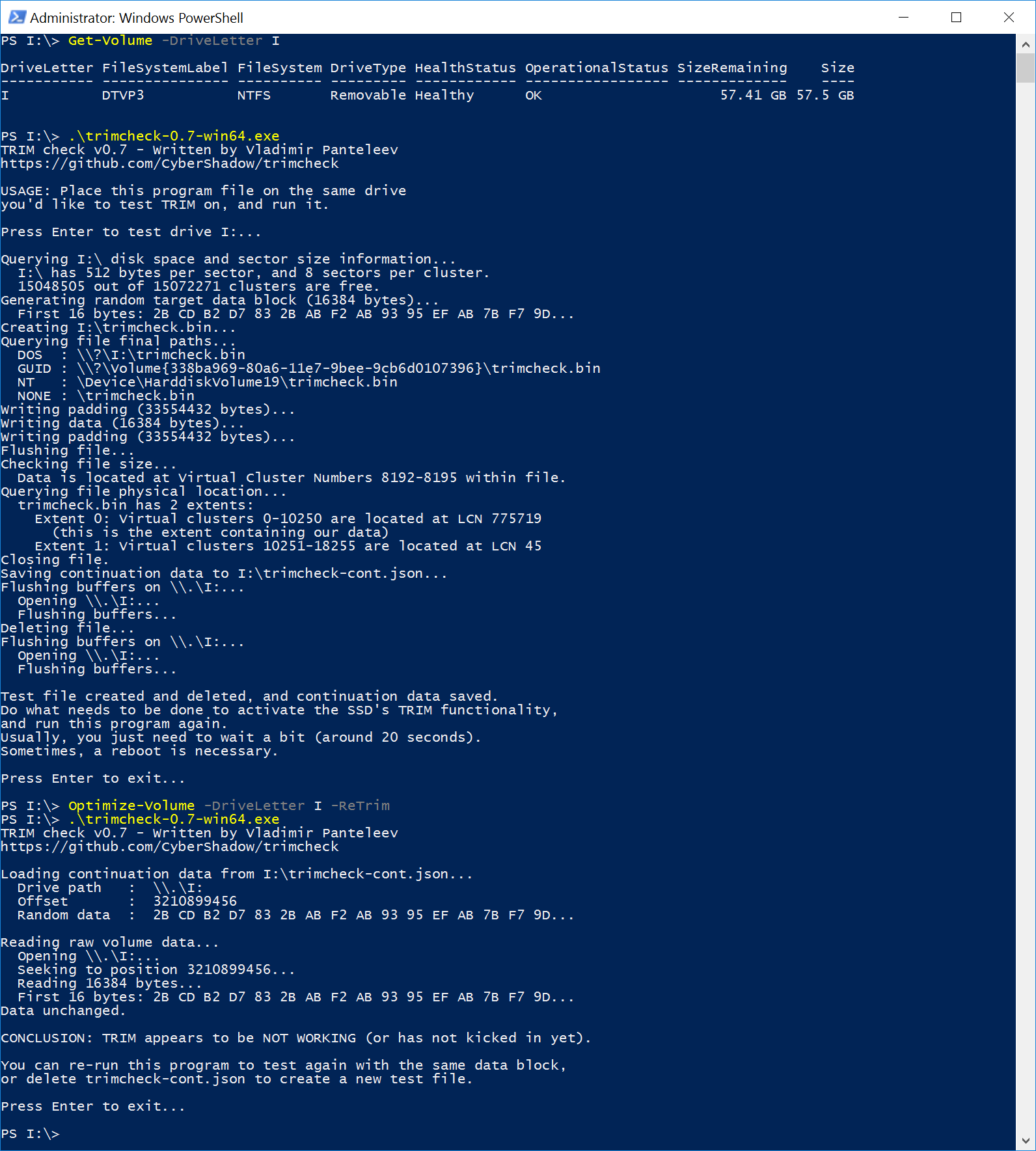
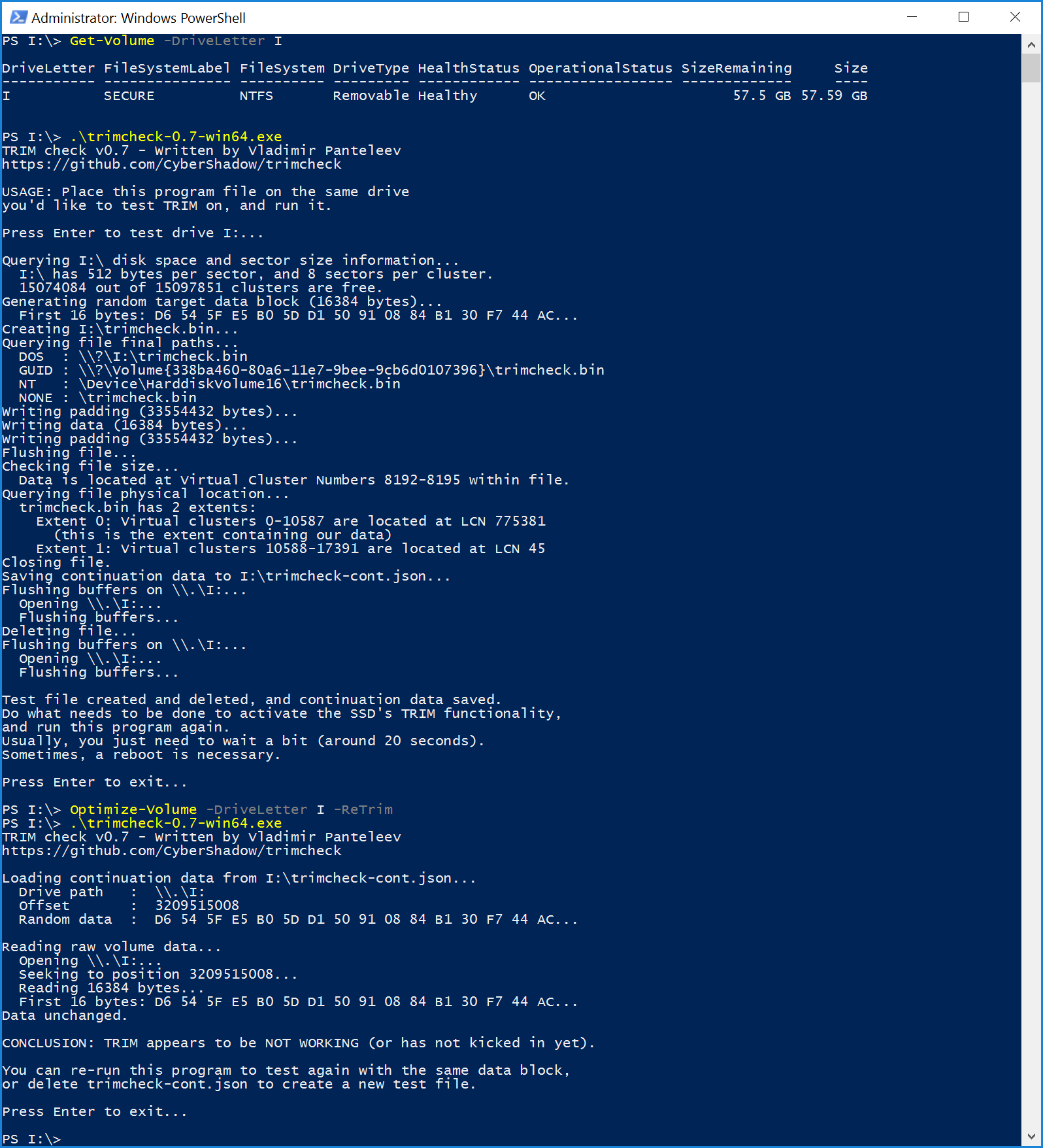
- Format the SSD in NTFS
- Load the trimcheck program into it and execute
- Use the PowerShell command Optimize-Volume -DriveLetter Z -ReTrim -Verbose (assuming that the drive connected to the storage bridge is mounted with the drive letter Z)
- Re-execute trimcheck to determine status report
- ASUS Reveals The Ultra-Slim ROG Zephyrus Laptop With GTX 1080 Max-Q
- Acer Announces Predator Triton 700 Gaming Laptop: Core i7, GeForce GTX 10 Series, & 1 TB SSD
- Razer Blade Gets Core i7-7700HQ, Adds 4K Touchscreen, 1 TB SSD Options
- Razer Re-Launches The Razer Blade Pro: GTX 1080 And 4K G-SYNC
- Lenovo Launches Legion Branded Gaming Laptops
- Western Digital Launches New My Passport Ultra HDDs: New Enclosure, Up to 4 TB
- WD Adds Helium-Filled 10 TB NAS HDDs to WD Red, WD Red Pro Lineups
- Western Digital Expands Purple Lineup with a 10 TB Helium-Filled HDD
- Western Digital Introduces Its First Helium-Filled HDDs for Consumer Applications
- Western Digital Announces Ultrastar He12 12 TB and 14 TB HDDs
- Western Digital Adds Helium-Filled WD Gold 10 TB HDD to Lineup
- Intel’s "Knights Landing" Xeon Phi Coprocessor Detailed
- Intel @ SC15: Launching Xeon Phi “Knights Landing” & Omni-Path Architecture
- SuperComputing 15: Intel’s Knights Landing / Xeon Phi Silicon on Display
- TYAN Shows Two Skylake-SP-Based HPC Servers with Up to 8 Xeon Phi/Tesla Modules
- Supermicro Releases Intel Xeon Phi x200 (KNL) Systems: Servers and a Developer Mid-Tower
- ASRock Rack Launches the 2U4N-F/X200: Four 72-core Knights Landing Xeon Phi CPUs in 2U
- Intel Announces Knights Mill: A Xeon Phi For Deep Learning
| Time | Event | ||||||||||||||||||||||||||||||||||||||||||||||||||||||||||||||||||||||||||||||||||||||||||||||||||||||||||||||
| 8:00a | Silicon Motion Roadmap: Lots Of NVMe SSD Controllers
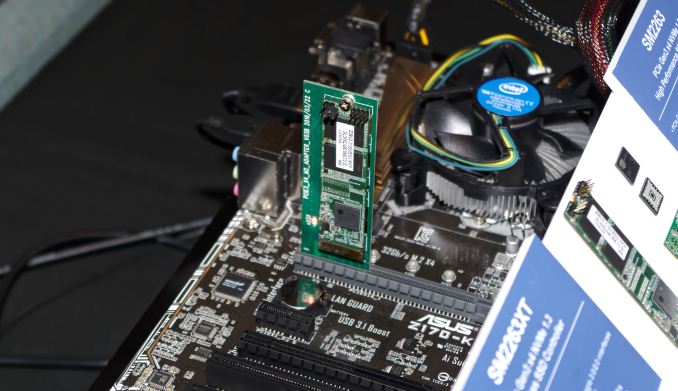
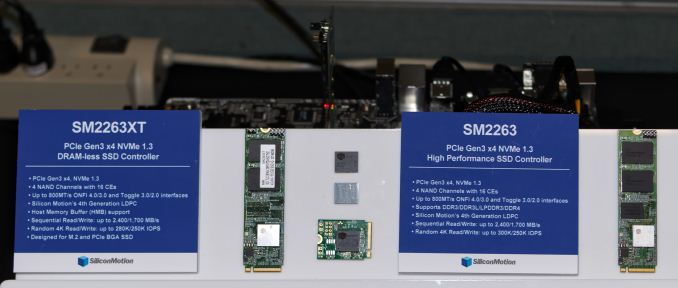
At Flash Memory Summit (FMS) this month, Silicon Motion demonstrated several of their upcoming NVMe SSD controllers and engineers presented several of the technologies Silicon Motion has developed for these controllers. Between the exhibit and the technical presentations, a total of six upcoming SSD controllers were mentioned. Currently, most SSDs using Silicon Motion controllers feature either the SM2258 SATA controller or the SM2260 NVMe controller. The SM2258XT is a DRAMless variant of the SM2258. Silicon Motion's new SM2259 SATA controller recently debuted in the Intel SSD 545s, but hasn't been spotted in any other consumer products yet and there are still new SM2258 products being announced. Silicon Motion hasn't shared much information on the SM2259 and it doesn't even appear on their website yet, but thanks to the presentations at FMS we now know that one of the key improvements over the SM2258 is Silicon Motion's second-generation LDPC encoder. Like the SM2260 NVMe controller, the SM2259 uses a 2kb codeword size instead of the 1kb codeword size used by the SM2256 and SM2258 SATA controllers. As a result of the larger codeword size and other changes to the LDPC system, the SM2259 can offer much higher error correction throughput and tolerate a higher error rate than its predecessors. The improved performance comes at the cost of requiring significantly more die area on the controller and higher power draw, but our test results from the Intel SSD 545s indicate these tradeoffs were worthwhile. Silicon Motion's upcoming generation of NVMe SSD controllers will have four members to cover a broader range of the market than the current SM2260. The low-end NVMe SSD market will be served by the SM2263 and its DRAMless counterpart SM2263XT. These controllers still use up to four lanes of PCIe 3.0, but are equipped with only four channels on the flash interface side, the same as Silicon Motion's SATA controllers. The DRAMless SM2263XT will also be used for BGA SSDs that stack the NAND flash on top of the controller in a single package. Both the PCIe x4 16mm by 20mm package standard and the PCIe x2 11.5mm by 13mm package standard are usable by the SM2263XT for BGA SSDs. As with most DRAMless NVMe controllers, the SM2263XT supports the NVMe Host Memory Buffer feature that allows it to use a small portion of the host system's DRAM to avoid most of the performance penalties that DRAMless SATA SSDs suffer from.
The most direct successor to the SM2260 will be the SM2262. This is another 8-channel controller intended for high performance client and consumer SSDs. The SM2262 uses the same package and pinout as the SM2260 but will offer much higher performance. Reliability and write endurance should also be improved due to the inclusion of the same LDPC upgrades present in the SM2259 SATA SSD controller. Lastly for the upcoming generation, the SM2262EN will be a higher-performance counterpart to the plain SM2262. The -EN version is intended to help Silicon Motion break into the enterprise SSD market, but given its performance specifications it will probably also be used in several enthusiast-oriented consumer SSDs. To help ensure the SM2262EN is suitable for the enterprise market, Silicon Motion has added end-to-end data path protection including ECC on all the internal SRAM buffers. The other three controllers in this generation also get this benefit due to the shared architecture across the product family. Future NVMe controllers beyond the -62/63 generation will include the SM2264 and SM2270. These haven't been officially announced but a few details have been released. At Computex our friends at Tom's Hardware spotted a roadmap showing SM2264 as their first controller supporting PCIe 4.0. With four PCIe lanes and an eight channel flash interface, the SM2264 would be the successor to the SM2262 (and possibly also the SM2262EN). Both the SM2264 and SM2270 will feature Silicon Motion's third-generation LDPC encoder, now supporting 4kb codewords as part of an error correction system designed to meet the needs of QLC NAND. When paired with QLC NAND, the SM2264 and SM2270 will allow Silicon Motion to compete in the new product segment of capacity-optimized PCIe SSDs. Most of these will be enterprise SSDs, but if the more optimistic projections for 64+ layer 3D QLC NAND write endurance are to be believed, QLC may also have a place in the consumer SSD market.
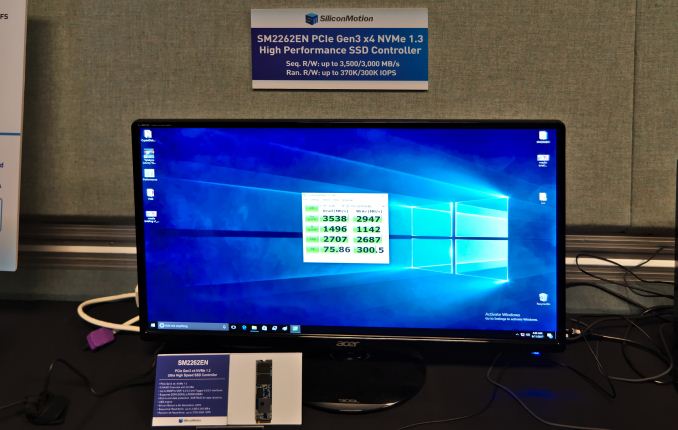
Silicon Motion didn't have much to say at FMS about the timeline for these controllers. However, the fact that there were live demos of both the SM2263 and SM2262EN speaks volumes. The hardware for the upcoming generation is ready and the firmware is not entirely polished but is good enough to deliver record-setting performance when paired with Intel's 64-layer 3D NAND. With current speeds of around 3.5GB/s for sequential reads and 3GB/s for sequential writes (at QD32, as measured by CrystalDiskMark) and with random read and write speeds of about 75MB/s and 300MB/s respectively at QD1, the SM2262EN has a serious chance of challenging even Samsung's NVMe SSDs in just a few months time. The limiting factor will most likely be availability of 64-layer 3D NAND.
The SM2264 was previously revealed to be planned for the end of 2018, which means it could start showing up in products in the spring of 2019. The PCIe 4.0 hardware ecosystem will still be in its infancy at that time, so SSD vendors will probably not be in a hurry to deploy SM2264 except for use with QLC NAND. Since the SM2270 controller was not shown on any of Silicon Motion's roadmaps and was only mentioned in the context of the third-generation LDPC encoder, we don't have any indication of which market segments it will target or when it will be available. | ||||||||||||||||||||||||||||||||||||||||||||||||||||||||||||||||||||||||||||||||||||||||||||||||||||||||||||||
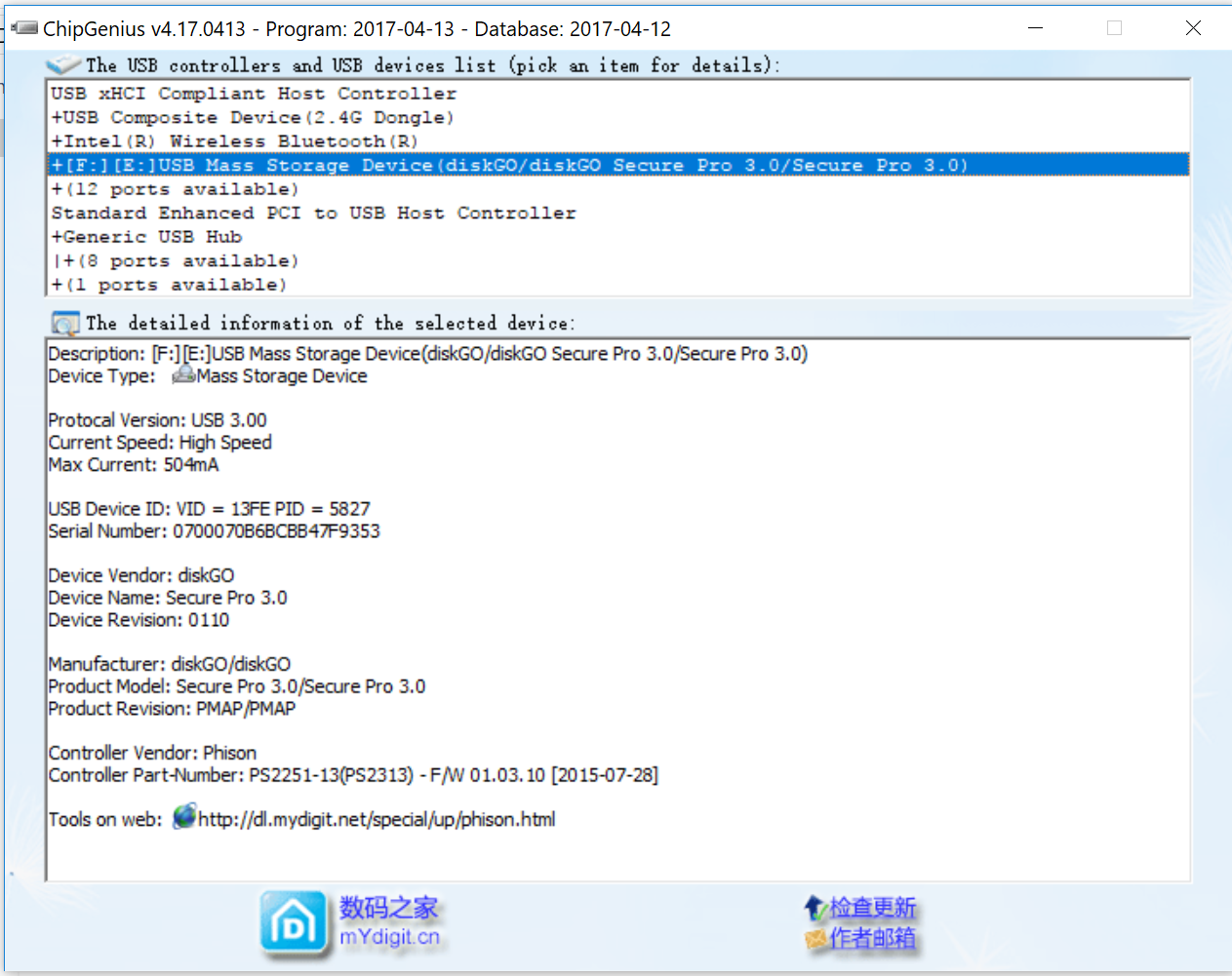
| 8:30a | Kingston DataTraveler Vault Privacy and EDGE diskGO Secure Pro Secure USB Thumb Drives Review Thumb drives are the most commonly used flash-based storage devices, thanks to their compact form factor and affordability. In our series of direct-attached storage reviews, we have taken a look at number of devices that offer hardware encryption with no performance impact. They have all been SSDs behind a USB - SATA bridge, with the onus of encryption falling on the SSD controller. Compact thumb drives usually use a native controller (i.e, directly translating the flash interface to USB without an intermediate SATA link). There are exceptions such as the Corsair Voyager GTX and the Mushkin Ventura Ultra, but, most people wouldn't consider them compact. Compact thumb drives with hardware encryption are relatively rare, and command a significant price premium. They are valued by SMBs and enterprises due to the strong focus on data security. In today's review, we take a look at the 64GB variants of two products targeting this market - the Kingston DataTraveler Vault Privacy 3.0 and the EDGE diskGO Secure Pro 3.0. Introduction and Usage ImpressionsThe Kingston DataTraveler Vault Privacy (referred to as DTVP30 here onwards) and the EDGE diskGO Secure Pro 3.0 (diskGO for the remainder of the piece) are both compact thumb drives. They come with a USB 3.0 male interface. The main selling point is the 256-bit AES hardware encryption in XTS mode on both units. In terms of size, the DTVP30 comes in at approximately 78mm x 22mm x 12mm. The diskGO is slightly smaller (58mm x 22mm x 10mm). The diskGO comes with a retractable USB connector, while the DTVP30 comes with a removable cap on the connector. There exists the possibility of misplacing the cap, but, it does provide more protection against dust compared to the diskGO. The DTVP30 also comes with a small lanyard. Instead of disassembling the thumb drive to get the internal details, we took a look at the ChipGenius report for the two drives (reproduced below). Both the DTVP30 and the diskGO use the Phison 2313 controller with the 1.03.10 firmware.
Given that the controller and firmware version are the same in both products, it is not surprising that the user interface is also similar. Upon connecting to a system, both products mount a CDFS read-only volume automatically. This permanent volume contains the necessary program to unlock the thumb drive and use it in the computer. The gallery below shows the process with the DTVP30. Kingston provides support for using the drive under Windows, Mac, and Linux. In addition to the unlocker programs for various platforms, a manual is also included in the CDFS volume. Plugging in a new drive and starting the unlocker program takes the user through a compulsory password setup process. The user can also enter contact information for easier recovery of a misplaced drive (that other users might not be able to unlock, anyway). The diskGO UI is very similar, except for the fact that only Windows and Mac are supported currently. The entire locking and unlocking processes are essentially the same between the DTVP30 and the diskGO. Readers might note that this strategy of mounting a read-only volume to store the programs for securing the contents is similar to that of the Samsung Portable SSD T5. The key here is that both the DTV30 and the diskGO make it mandatory to use encryption., while the feature is optional for SSDs such as the T5 or the WD My Passport SSD. Testbed Setup and Testing MethodologyEvaluation of DAS units on Windows is done with the testbed outlined in the table below. For devices with USB 3.0 (via an attached Type-A male interface) connections (such as the DTVP30 and the diskGO that we are considering today), we utilize the USB 3.1 Type-C port enabled by the Intel Alpine Ridge controller. It connects to the Z170 PCH via a PCIe 3.0 x4 link. A Type-C male to Type-A female cable is also used to connect the thumb drives to the motherboard's Type-C port.
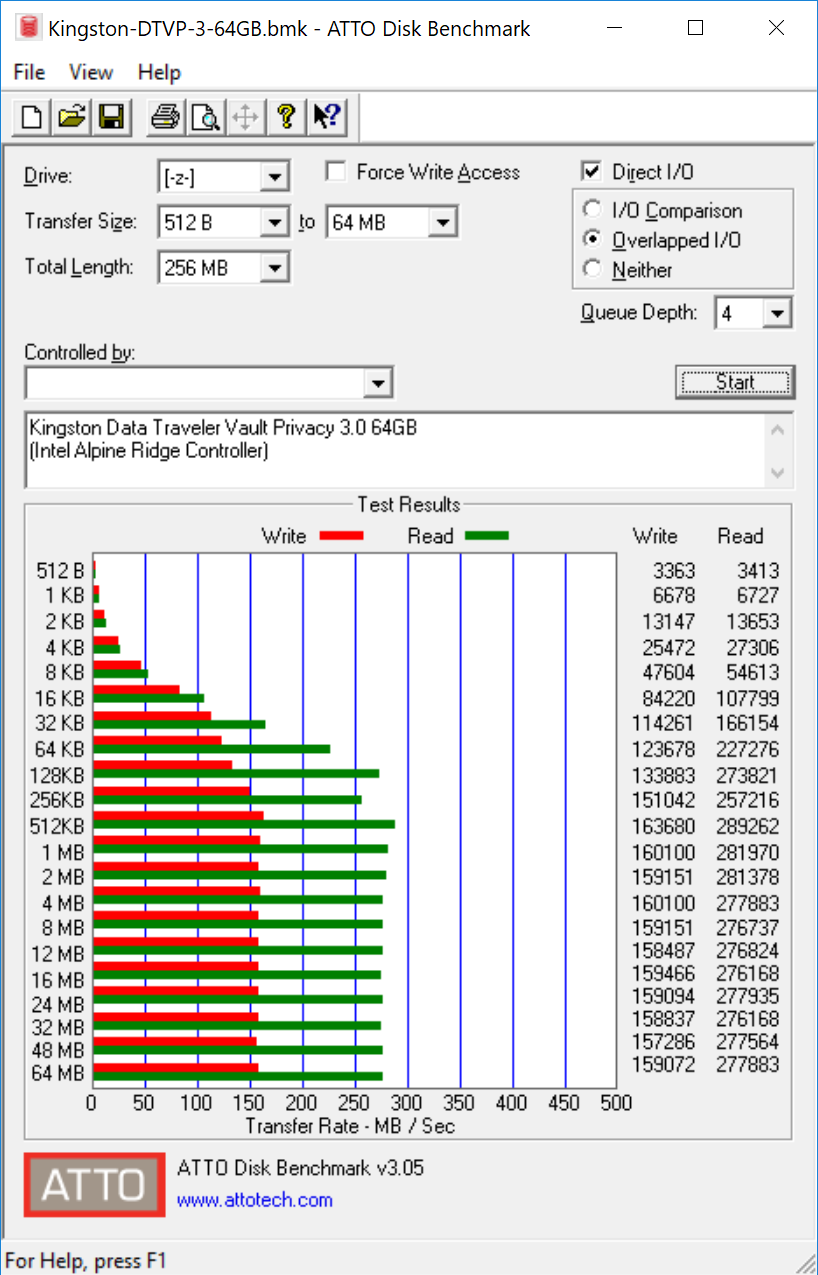
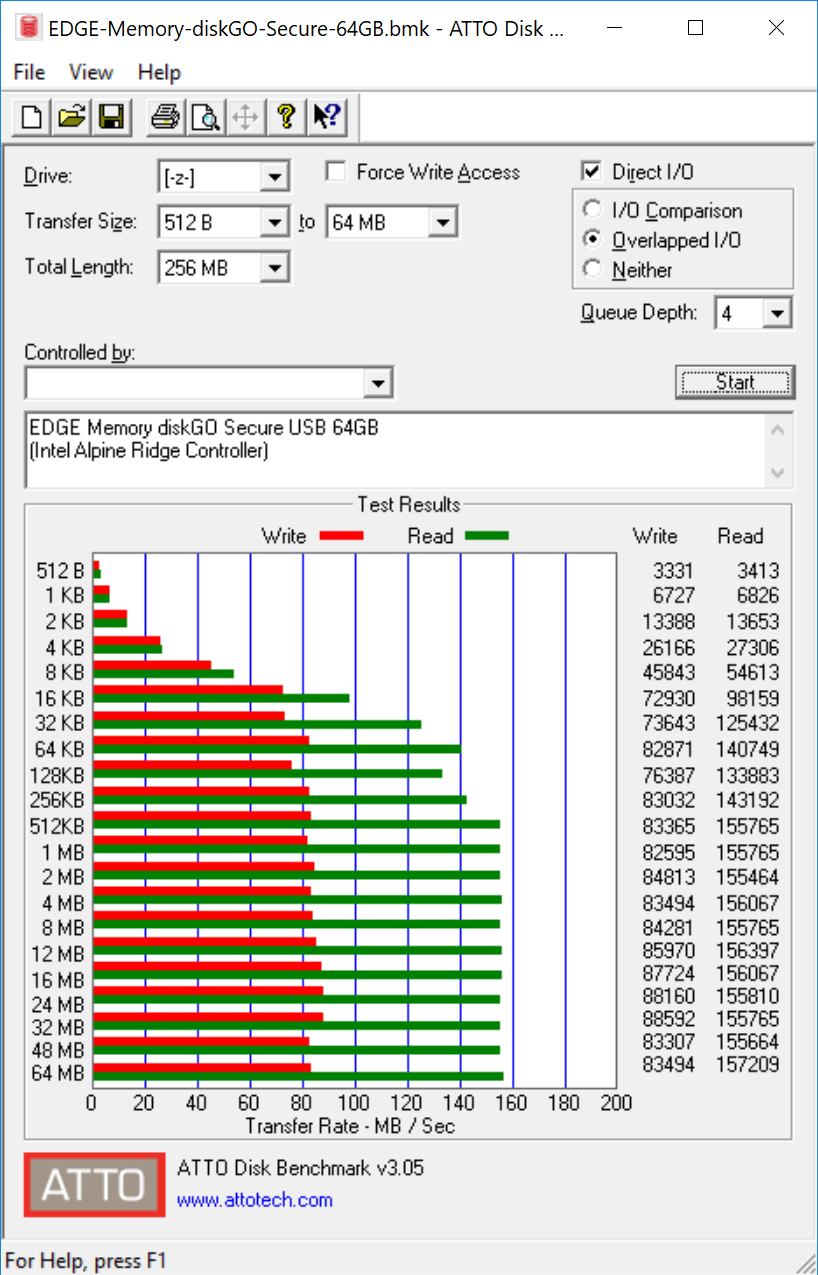
The full details of the reasoning behind choosing the above build components can be found here. The list of DAS units used for comparison purposes is provided below. Synthetic Benchmarks - ATTO and Crystal DiskMarkThe DTVP30 64GB version has claimed read and write speeds of 250 and 85 MBps respectively. On the other hand, the diskGO claims only 120 / 60 MBps for the same. These numbers are backed up by the ATTO benchmarks provided below. Unfortunately, these access traces are not very common in real-life scenarios.
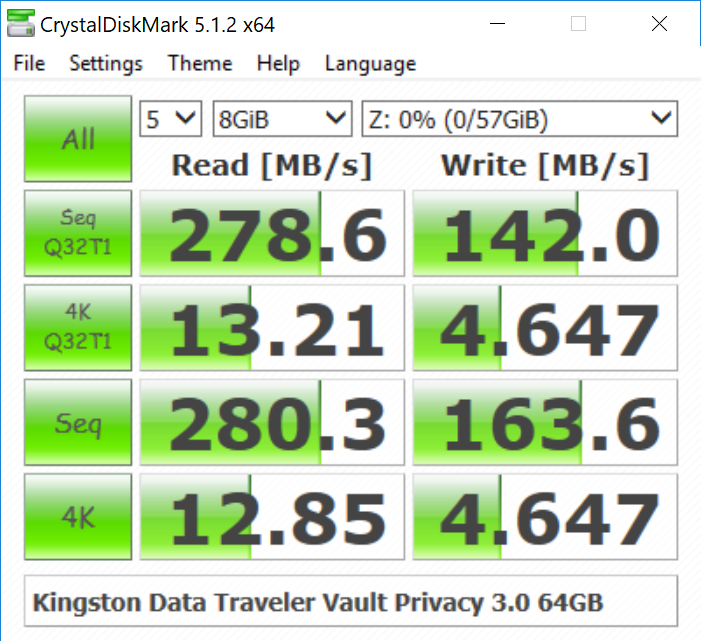
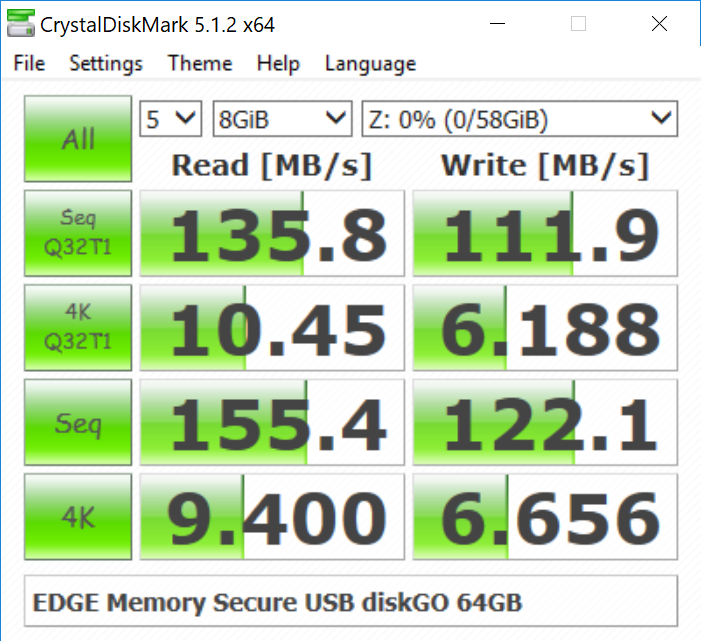
CrystalDiskMark, despite being a canned benchmark, provides a better estimate of the performance range with a selected set of numbers. As evident from the screenshot below, the performance can dip to as low as 4.6 MBps for the DTVP30, and 6 MBps for the diskGO when it comes to random 4K accesses. Since the queue depth has negligible impact on the performance (i.e, numbers for 4K and 4KQ32T1 are similar), we can infer that the thumb drives do not support UASP (USB-attached SCSI protocol).
Benchmarks - robocopy and PCMark 8 Storage BenchOur testing methodology for DAS units also takes into consideration the usual use-case for such devices. The most common usage scenario is transfer of large amounts of photos and videos to and from the unit. The minor usage scenario is importing files directly off the DAS into a multimedia editing program such as Adobe Photoshop. These scenarios also cover typical office usage for transferring a large number of electronic documents and the like. In order to tackle the first use-case, we created three test folders with the following characteristics: <select ... ><option ... >Photos Read</option><option ... >Photos Write</option><option ... >Videos Read</option><option ... >Videos Write</option><option ... >Blu-ray Folder Read</option><option ... >Blu-ray Folder Write</option><option ... >Expand All</option> </select>
In general, the DTVP30 manages to have a healthy lead over the diskGO, but, the margin is usually narrow for write workloads. For the second use-case, we take advantage of PC Mark 8's storage bench. The storage workload involves games as well as multimedia editing applications. The command line version allows us to cherry-pick storage traces to run on a target drive. We chose the following traces. Usually, PC Mark 8 reports time to complete the trace, but the detailed log report has the read and write bandwidth figures which we present in our performance graphs. Note that the bandwidth number reported in the results don't involve idle time compression. Results might appear low, but that is part of the workload characteristic. Note that the same testbed is being used for all DAS units. Therefore, comparing the numbers for each trace should be possible across different DAS units. In these workloads, we find that the diskGO inches ahead with the writes, but, the DTVP30 still retains an advantage for reads. <select ... ><option ... >Adobe Photoshop Light Read</option><option ... >Adobe Photoshop Heavy Read</option><option ... >Adobe After Effects Read</option><option ... >Adobe Illustrator Read</option><option ... >Adobe Photoshop Light Write</option><option ... >Adobe Photoshop Heavy Write</option><option ... >Adobe After Effects Write</option><option ... >Adobe Illustrator Write</option><option ... >Expand All</option> </select>
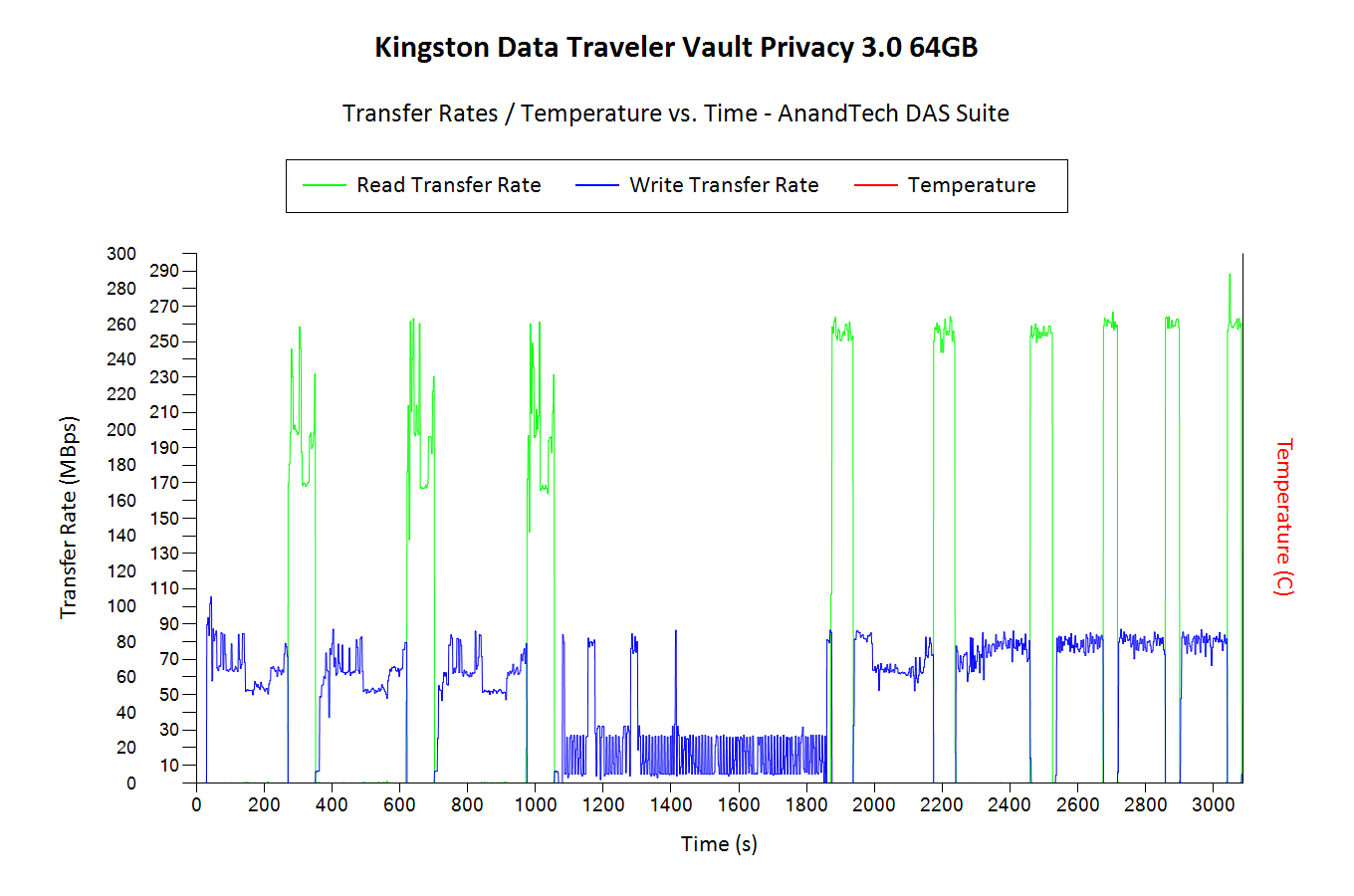
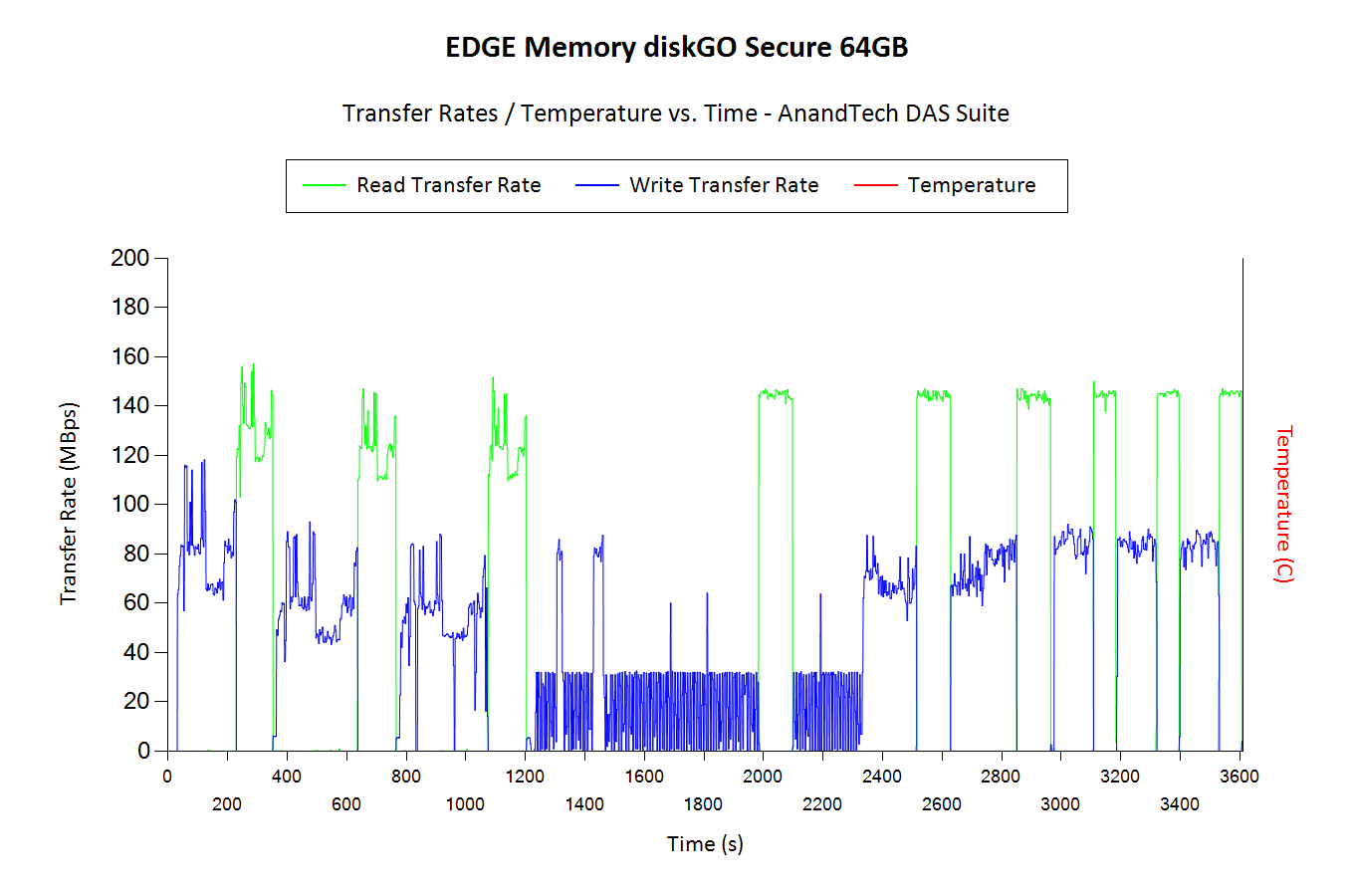
Performance ConsistencyYet another interesting aspect of these types of units is performance consistency. Aspects that may influence this include thermal throttling and firmware caps on access rates to avoid overheating or other similar scenarios. This aspect is an important one, as the last thing that users want to see when copying over, say, 100 GB of data to the flash drive, is the transfer rate going to USB 2.0 speeds. In order to identify whether the drive under test suffers from this problem, we instrumented our robocopy DAS benchmark suite to record the flash drive's read and write transfer rates while the robocopy process took place in the background. For supported drives, we also recorded the internal temperature of the drive during the process. The graphs below show the speeds observed during our real-world DAS suite processing. The first three sets of writes and reads correspond to the photos suite. A small gap (for the transfer of the videos suite from the primary drive to the RAM drive) is followed by three sets for the next data set. Another small RAM-drive transfer gap is followed by three sets for the Blu-ray folder. An important point to note here is that each of the first three blue and green areas correspond to 15.6 GB of writes and reads respectively. Throttling, if any, is apparent within the processing of the photos suite itself.
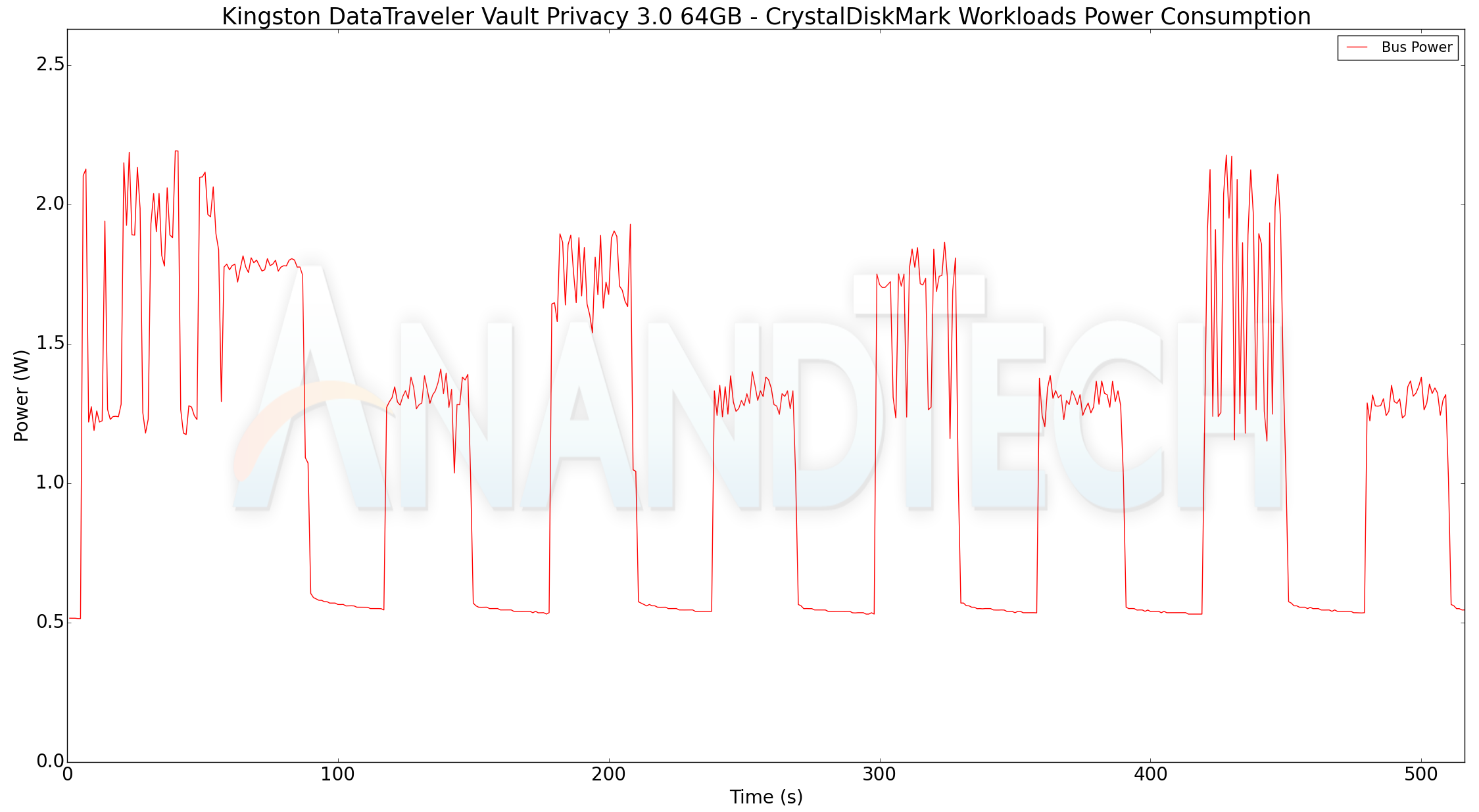
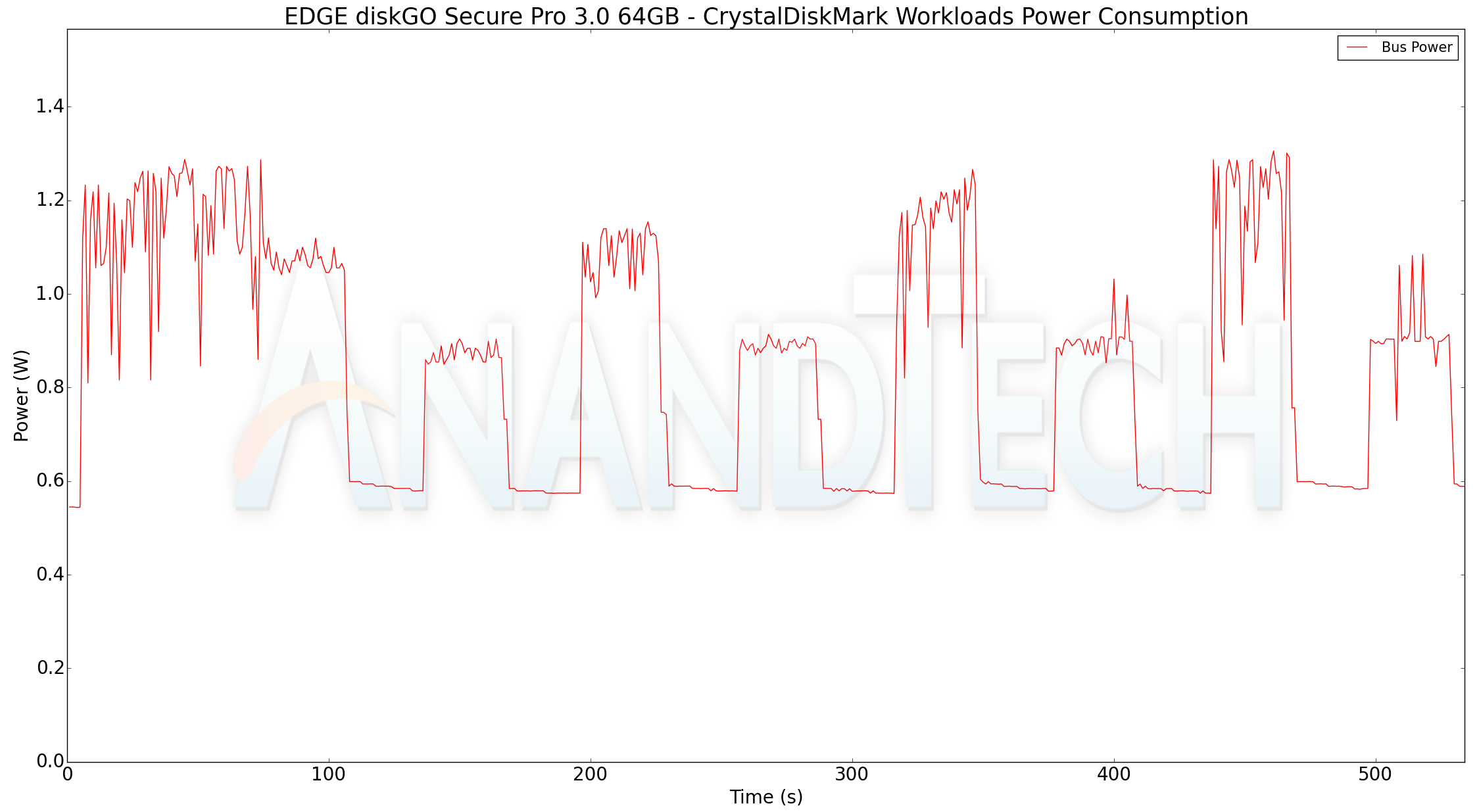
We note that both the DTVP30 and diskGO start to throttle in a similar manner after the same amount of data has been written. Given the same controller and firmware, it is hardly surprising. The throttling is not entirely a show-stopping issue because we find that it gets triggered after more than 50GB of read and write traffic within a short time interval. This is definitely not the intended use-case for the secure USB drives such as the DTVP30 and the diskGO. In any case, both drives manage to recover performance fairly quickly. Miscellaneous Aspects and Concluding RemarksThe DTVP30 and the diskGO are both bus-powered devices, and it is given that the peak power consumption can't go beyond 5W. It is still relevant to take a fine-grained look at the power consumption profile. Using the Plugable USBC-TKEY, the bus power consumption for both drives was tracked while the CrystalDiskMark workloads were processed. The workloads were set up with an interval time of 30s.
The DTVP30 has a peak power consumption of 2.19W, and idles at around 0.52W. The corresponding numbers for the diskGO are 1.31W and 0.54W. Support for TRIM is an oft-requested feature in flash drives. It is important to maintain long-term performance consistency. Neither Kingston nor EDGE claim support for TRIM for the drives being reviewed today. CyberShadow's trimcheck is a quick tool to get the status of TRIM support. However, it presents a couple of challenges: it sometimes returns INDETERMINATE after processing, and, in case TRIM comes back as NOT WORKING or not kicked in yet, it is not clear whether the blame lies with the OS / file system or the storage controller / bridge chip or the SSD itself. In order to get a clear idea, our TRIM check routine adopts the following strategy: Conclusions can be made based on the results from the last two steps. As expected, these thumb drives do not support TRIM.
Features such as TRIM and UASP often require driver support. For the use-cases targeted by the DTVP30 and the diskGO, it is preferable to avoid relying on the OS driver behavior (as users might not have administrator privileges to load them also). Moving on to the pricing aspect, we find that the 64GB diskGO retails for around $70, while the 64GB DTVP30 comes in at a hefty $190 (approximately). These prices make it significantly expensive on a cents/GB metric compared to thumb drives without encryption capabilities.
Readers might be wondering why the DTVP30 commands almost a 3x price premium over the diskGO at the same capacity while using the same controller and firmware. Obviously, a 2x improvement in read performance (real-world improvements are not that much better) can't be the only reason. A little bit of digging into the nature of the secure thumb drives market reveal that businesses and agencies looking into such products come with a host of requirements such as TAA compliance (i.e, an aspect that decides whether a given product is suitable for U.S. government use) and even FIPS-197 certification. The diskGO and DTVP30 are both TAA-compliant. Only the latter has FIPS-197 certification. In our communication with Kingston and EDGE Memory, it emerged that FIPS certification is a very costly endeavor. Avoiding it helps the diskGO target a lower price point. The DTVP30 also employs a dual-channel configuration with MLC flash and comes with wider OS support. The lower performance of the diskGO is due to its single-channel configuration. That said, the diskGO also uses MLC flash (15nm or A19nm). Due to these reasons, the Kingston DataTraveler Vault Privacy 3.0 emerges as a more widely-applicable contender for use-cases that require secure USB drives. Casual users and businesses that don't need FIPS-197 certification / top-class performance will be quite happy with the value proposition of the EDGE diskGO Secure Pro thumb drive. | ||||||||||||||||||||||||||||||||||||||||||||||||||||||||||||||||||||||||||||||||||||||||||||||||||||||||||||||
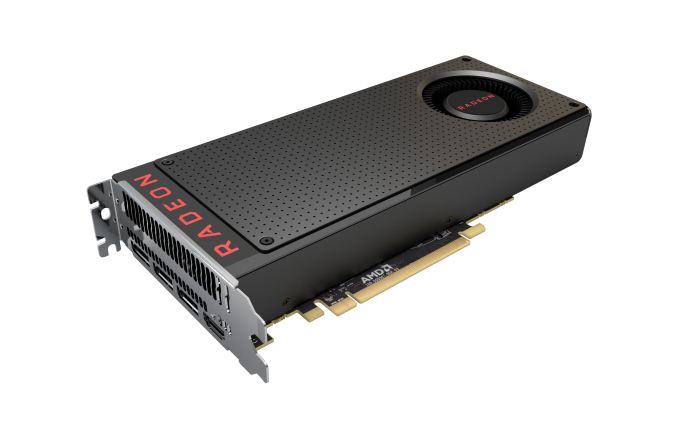
| 11:00a | AMD Releases Radeon Software Crimson ReLive Edition 17.8.2
This week, AMD has released Radeon Software Crimson ReLive Edition 17.8.2, quickly following up on this Monday’s 17.8.1 release and the last Monday’s launch of Radeon RX Vega64. This quick update addresses some fairly important issues: several unresolved RX Vega bugs and new game driver support. Although it is focused on polishing RX Vega related matters, 17.8.2 is a unified driver like 17.8.1, and applies for both RX Vega-based cards and other products. Featuring Driver Version 17.30.1071 (Windows Driver Store Version 22.19.673.0), Radeon Software 17.8.2 brings support for F1 2017, which launches the day after this driver release, as well as PlayerUnknown’s Battlegrounds Early Access and the Destiny 2 Beta. The game support is largely focused on the Radeon RX Vega64, with AMD citing up to 4% performance improvement for F1 2017 and up to 18% performance improvement for PUBG compared to the previous 17.8.1.
Moving on to bug fixes, AMD has taken care of two key unresolved RX Vega issues. Radeon WattMan should now reach applied overclock states on RX Vega cards, and in addition, the “Reset” option in the Radeon Settings Gaming tab will always properly set HBCC to the default disabled state. For other Vega issues, AMD has fixed random corruption in Microsoft desktop productivity applications on RX Vega graphics, as well as fixing an issue where the display may go blank or black after upgrading or installing with RX Vega cards. Lastly, Eyefinity configurations can be properly created through the Eyefinity Advanced Setup option. Radeon Software Crimson ReLive Edition 17.8.2 is available for Windows 10 (64-bit and 32-bit) and Windows 7 (64-bit and 32-bit). The updated drivers for AMD’s desktop, mobile, and integrated GPUs are available through the Radeon Settings tab or online at the AMD driver download page. More information on this update and further issues can be found in the Radeon Software Crimson ReLive Edition 17.8.2 release notes. | ||||||||||||||||||||||||||||||||||||||||||||||||||||||||||||||||||||||||||||||||||||||||||||||||||||||||||||||
| 12:00p | Lite-On SSDs At FMS: New Controllers And TSV NAND Packaging
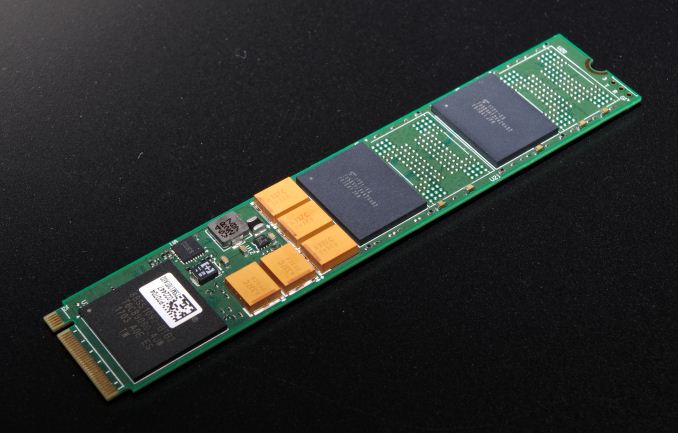
Lite-On (including its consumer SSD brand Plextor) is one of the largest SSD vendors that is not vertically integrated. They don't manufacture NAND flash memory and don't design their own SSD controllers. Their strategy for competing against the vertically-integrated giants relies on picking the right technologies that are available on the open market and making the most of them with in-house firmware development. This makes Lite-On a great source for second opinions about new NAND flash and SSD controller silicon; they have to make their own judgments about whether new technologies are as great as the manufacturers claim, and they get to do so long before we get retail products to test. Lite-On's plans for exhibiting at Flash Memory Summit earlier this month were upended by the fire that closed the show floor for the entire duration of the conference, but they did manage to show me some of the products and prototypes from their booth. The most predictable product Lite-On had to show was the new iteration of their EP series of entry-level enterprise NVMe SSDs. Lite-On is still using Marvell's 88SS1093 "Eldora" controller, but now pairing it with Toshiba's 64-layer BiCS3 3D TLC NAND flash. The result is a M.2 22110 drive with capacities up to 2TB, write endurance rated at 1DWPD, and performance that's nothing special for a read-oriented enterprise NVMe drive. Power consumption and price are likely the new EPX's best aspects, but Lite-On hasn't disclosed those numbers. A consumer-oriented version of this drive—shortened to the M.2 2280 form factor by the removal of power loss protection capacitors and equipped with client-oriented firmware—has not been announced but will likely show up in a few months or at CES2018 as the successor to Plextor's M8Pe or M8Se. Next, Lite-On had an EP-series prototype with two significant changes from the EPX. This prototype featured Marvell's new 88SS1092 "Eldora Plus" controller, and it's the first use of this controller we've encountered. More interestingly, the prototype was equipped with Toshiba's 3D NAND packaged using through-silicon vias (TSVs) instead of traditional wire bonding. Toshiba announced this flash memory last year and showed a die at FMS 2016, but we haven't heard much about this line of R&D recently. Most SSDs—especially M.2 SSDs—need to stack several NAND flash dies in each package in order to reach acceptable capacities. Stacking NAND dies with TSVs gives a higher quality connection between the dies than wire bonding, which allows for faster or lower-power communication between the NAND and the SSD controller, and potentially also for taller die stacks. Lite-On has verified Toshiba's claims by measuring a 20% power reduction and 30% performance improvement for their SSD equipped with TSV flash. Products from Lite-On using TSV flash could appear as early as this year given how substantial the power and performance benefits seem to be, but it is not clear how the cost and manufacturing volume of the TSV flash compares to the mainstream dies intended for traditional packaging. Toshiba is the only NAND flash manufacturer that has talked much about using TSVs, and they appear to have a substantial lead in incorporating TSV packaging into their NAND flash. This could translate to a significant advantage for Toshiba in a year or two when SSD vendors are planning how to make multi-TB M.2 SSDs capable of PCIe 4 speeds.
Lite-On is continuing their collaboration with controller designer CNEX Labs to develop the Open Channel SSD concept and bring it to market. An open channel SSD allows the host system to bypass the traditional flash translation layer (FTL) and directly manage the allocation of the underlying flash memory. Moving most of the FTL from the SSD to the host system's CPU means the drivers running on the host have to be a lot more complex, but this arrangement brings substantial opportunities for optimization because the OS and applications can better cooperate with the FTL. Lite-On's AD2 SSD is a M.2 PCIe SSD using the CNEX Westlake+ controller to implement an open channel SSD using the LightNVM architecture, which extends the NVMe protocol. LightNVM support is built in to recent versions of the Linux kernel and NVMe tools, so the market might be ready for broader availability of open channel SSD hardware than CNEX's development kits. The long-term prospects for the LightNVM open channel SSD approach are not clear: the NVMe standard has been gradually adding support for application-level I/O hints and instructions to enable many of the same performance optimizations an open channel SSD is desirable for, and the increasingly popular NV-DIMM approach allows just as much low-level access as a LightNVM open channel SSD, but through a very different interface.
The last drive Lite-On showed off was a prototype M.2 SSD using Microsemi's Flashtec NVMe2108 NVMe controller. Microsemi's Flashtec controller line (previously owned by IDT then PMC-Sierra) has been dominant among the largest high-end enterprise SSDs, with controllers offering up to 8 lanes of PCIe connectivity and 16 or 32 channel flash interfaces. The Flashtec NVMe2108 is Microsemi's smallest SSD controller yet, and their first that is suitable for M.2 SSDs. The Flashtec NVMe2108 controller exists in a more mainstream market segment where Microsemi faces far more competition. The 8-channel flash interface on the NVMe2108 controller matches that of most NVMe controllers for M.2 and U.2 SSDs. Lite-On did not share detailed performance information about this drive, but they have achieved random read speeds of over 500k IOPS, which is the fastest that any user of this controller has achieved so far. | ||||||||||||||||||||||||||||||||||||||||||||||||||||||||||||||||||||||||||||||||||||||||||||||||||||||||||||||
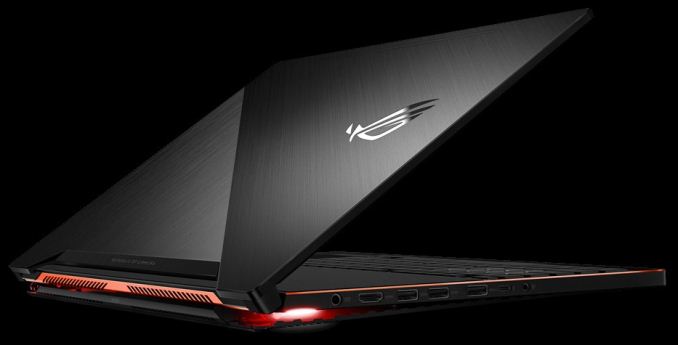
| 1:00p | ASUS ROG Zephyrus with Core i7-7700HQ and GeForce GTX 1070 Available for $2299
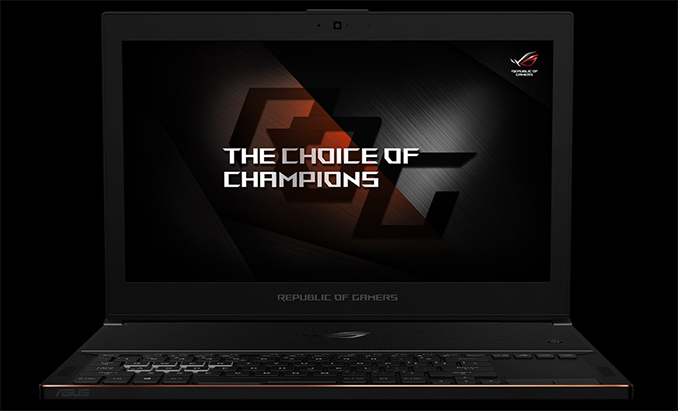
ASUS has started to sell a more affordable version of its flagship ROG Zephyrus gaming laptop it launched earlier this year. The new model retains all the features of the top-of-the-range SKU when it comes to dimensions, weight, power consumption and other peculiarities, but it costs 15% less and comes with a slower GPU as well as a lower-capacity SSD. When ASUS launched its ROG Zephyrus gaming notebook in late May, the company announced two models priced at $2699 (GX501VI) and $2299 (GX501VS), but only disclosed the specifications of the flagship model that hit the stores this July. So while we knew that both models would share the same 1.8-cm thick chassis featuring a 15.6” FHD display with a 120 Hz refresh rate, and other chassis-level features, we didn't know how the component selections would differ between the two laptops. Until now. Recently, ASUS has finally started to sell the “affordable” GX501VS mode, and it appears that it is specifications are not that different when compared to the fully-fledged ROG Zephyrus GX501VI. The cheaper model features the same Intel Core i7-7700HQ CPU and 16 GB of RAM. What's changes is that ASUS has swapped out the GPU and SSD for a GeForce GTX 1070 Max-Q and a 256 GB of solid-state storage respectively. This means the GX501VS packs a bit slower GPU and half the SSD capacity, but nets a $400 (15%) savings in the process.
Since the key features of both machines are the same: a sleek form-factor, desktop-like performance, a display with a 120 Hz refresh rate featuring G-Sync, Thunderbolt 3 support and upgradeability, the cheaper version may get rather popular in its niche simply because not everyone needs maximum performance on a laptop (and some may actually prefer a less power hungry GTX 1070). The ASUS ROG Zephyrus GX501VS is now available for $2299 from Amazon and directly from ASUS.
Related Reading: | ||||||||||||||||||||||||||||||||||||||||||||||||||||||||||||||||||||||||||||||||||||||||||||||||||||||||||||||
| 2:00p | Cryptomining Demand Drives Exceptionally High Graphics Card Shipments in Q2 2017
This week, Jon Peddie Research (JPR) reported significantly higher discrete GPU shipments for Q2 2017, attributing the historically unprecedented increase to cryptocurrency mining, specifically to Ethereum mining. As opposed to the cryptocurrency mining demand of a few years ago, JPR notes that the ASIC-resistant nature of Ethereum mining has especially encouraged GPU mining. In terms of discrete desktop graphics market share, AMD gained a few percentage points from NVIDIA, bringing the current balance to AMD’s 29.4% versus NVIDIA’s 70.6%. In context, the GPU and PC markets fluctuate in a relatively consistent seasonal pattern: shipments trend flat to down in Q1, notably down in Q2, notably up in Q3, and up to flat in Q4. According to JPR, Q2 2017 has seen an unprecedented 31% increase in discrete GPU shipments from Q1, the first time in over eight years that Q1-to-Q2 shipments have seen an increase at all. Discounting the minor increases during the recession, Q2 has always been the seasonally weak quarter for graphics card shipments.
Drawing a contrast to the limited Bitcoin and Litecoin mining impact on 2013 shipments, JPR identifies the memory-intensive Ethash, Ethereum’s hashing algorithm, as deterring ASIC development for Ethereum mining, and in turn any sudden GPU-displacing bust. That is, during the Bitcoin boom, low cost ASICs displaced GPUs. Consequently, JPR does not see a repeat of market cannibalization by used mining cards. While the diminishing return-on-investment (ROI) will eventually flatten out Ethermining-fueled GPU demand, this quarter saw a direct and significant Ethermining/cryptomining impact on discrete graphics demand. On the back of that cryptomining demand, discrete GPUs have regained market share over integrated GPUs (iGPUs). Weak iGPU and desktop PC shipment numbers continue to reflect the overall declining PC market, while the high-end gaming PC sector continues to be the bright spot for the market. Overall, GPU shipments increased by 7.2% from last quarter.
Vendor-wise, JPR reports that AMD’s overall unit shipments increased 7.8% quarter-to-quarter, Intel’s shipments increased 6.3%, and NVIDIA’s shipments increased 10.4%. As mentioned earlier, AMD did gain market share in discrete desktop graphics, but still remains below last year’s market share level.
For AMD, their market share is back to Q2 2016 levels of around ~30%. The past year has seen launches of NVIDIA’s Pascal-based consumer cards, as well as of AMD’s Polaris-based RX 400 and 500 series cards; of the latter, the Polaris-based cards were explicitly a volume-play, and did not target the high-end market. To that end, the GTX 1070 and above did not have competition until this month, with AMD’s launch of RX Vega cards, and on the face of it, while Polaris has improved AMD's market share against NVIDIA, it has not made a dramatic difference. As the next few months roll on, the RX Vega cards, as well as Vega 11-based cards, will play a large role in AMD’s aspiring return to its historical 35% – 40% discrete desktop GPU market share. For cryptomining demand, the remarkable impact on discrete graphics shipments does match up with general reports of mainstream graphics card shortages. When we looked at the discrete graphics market in Q2 and Q3 of 2016, the cryptocurrency mining demand then was nothing like this quarter. Now that the Ethereum mining mania has been quantified into numbers, it has revealed some of the context and reasoning behind cryptomining cards, cryptomining motherboards, and Radeon Pack bundles. And what the numbers reveal is that Ethereum GPU mining has been ridiculous in every sense of the word. While Ethereum itself will die down eventually, it is anybody’s guess if GPU cryptomining booms will be firmly part of graphics card economics. | ||||||||||||||||||||||||||||||||||||||||||||||||||||||||||||||||||||||||||||||||||||||||||||||||||||||||||||||
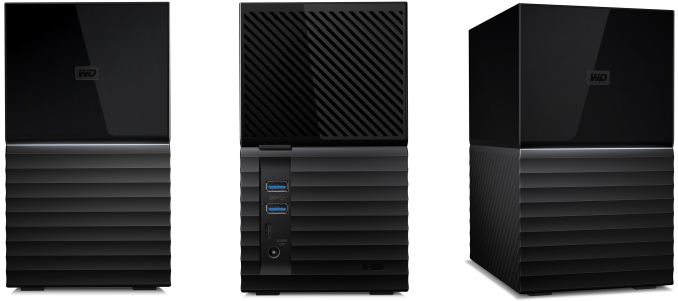
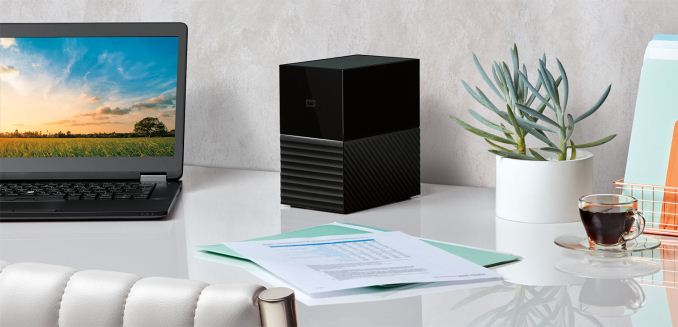
| 3:00p | Western Digital Launches New My Book Duo Storage Systems: 360 MB/s, USB-C, 20 TB
Western Digital has released its new My Book Duo external storage systems for consumers. The new devices run two 3.5” WD Red HDDs in RAID 0 or 1 mode and have capacity of up to 20 TB. The drives come in a new enclosure that uses a USB 3.0 Type-C port to connect with hosts (hosts can use USB-C to USB-A adapters as well) and has an additional USB 3.0 Type-A port on the backside to connect other devices. The WD My Book Duo storage systems are based on WD's Red series hard drives, running them in RAID 0 for extra performance or RAID 1 for redundancy. The WD Red HDDs have a 5400 RPM spindle speed and feature 64 MB, 128 MB, or 256 MB of cache. Internal transfer rates of WD Red drives vary from 147 MB/s to 210 MB/s depending on the capacity, and therefore performance of the WD My Book Duo systems will vary as well. Western Digital declares maximum performance of the new My Book Duo at 360 MB/s, which should be achievable by most of the models in the lineup.
Western Digital does not disclose which RAID controller it uses inside the My Book Duo storage systems, but states that it supports hardware AES-256 encryption. To password protect the external drives, users will have to use the WD Security software. Speaking of software, the manufacturer ships the My Book Duo products with the WD Backup suite, which automatically backups data from Windows-based PCs as well as from cloud services, such as Dropbox, Google Drive, OneDrive, Facebook, and Instagram. With Macs, users will have to use Apple’s Time Machine program. In addition, the WD My Book Duo comes with WD's Drive Utilities suite, which monitor and manage the health of the enclosed HDDs.
When it comes to overall size, Western Digital’s My Book Duo does not seem to be too bulky: it is 180 mm tall (7.09”), 100 mm wide (3.94”) and 160 mm deep (6.3”). The My Book Duo storage systems come with external power adapters — a 36 W wall-wart style power adapter for 12 TB model and below as well as a 48 W power brick for 16 TB and 20 TB SKUs. The latter is a bit strange because the WD Red 8 TB and 10 TB HDDs are filled with helium rather than traditional air, and consequently their power consumption is lower than the previous-generation lower capacity WD Red drives.
Western Digital has already begun shipments of its new My Book Duo storage systems for consumers. The devices are available from WD.com and from select retailers. The top-of-the-range 20 TB model costs $799.99, the entry-level 4 TB version is priced at $259.99, and a mid-range 12 TB SKU carries a $419.99 price tag. All the WD My Book Duo storage systems are covered by a three-year warranty.
Related Reading: | ||||||||||||||||||||||||||||||||||||||||||||||||||||||||||||||||||||||||||||||||||||||||||||||||||||||||||||||
| 8:00p | NVIDIA Releases 385.41 WHQL Game Ready Driver: ShadowPlay Highlights for PUBG
After promising an August 24th Game Ready driver for Destiny 2, NVIDIA has delivered by releasing driver version 385.41, focused primarily on game updates. This edition brings Game Ready support for the following titles: Destiny 2 PC Open Beta, PlayerUnknown’s Battlegrounds (PUBG), ARK: Survival Evolved, F1 2017, Pro Evolution Soccer 2018 (PES 2018), and Quake Champions Early Access. In addition, 385.41 brings ShadowPlay Highlights and NVIDIA GameWorks/ShadowWorks technology HBAO+ to PUBG. With ShadowPlay Highlights debuting in LawBreakers for the 384.94 release, PUBG becomes the second game to support the feature. In a nutshell, ShadowPlay Highlights requires GeForce Experience and automatically captures gameplay video and screenshots, allowing for easier sharing and uploading. For PUBG, ShadowPlay Highlights needs to be enabled in the PUBG Graphics settings, and then enabled in GeForce Experience.
The usual Game Ready support comes for ARK: Survival Evolved, which leaves Early Access on August 29th, and F1 2017, which launched this Friday for PC. For PES 2018, which launches in the second week of September, NVIDIA has also included Ansel support. To recap, Ansel is NVIDIA’s own ultra-high resolution screenshot utility with an artistic flair, able to capture 360 degree 3D images.
Following the focus on games, 385.41 sees SLI profiles added or updated for the following titles: Destiny 2, LawBreakers, ARK: Survival Evolved, Faith of Danschant, Secret World Legends, and Starpoint Gemini Warlords. Whisper Mode profiles were also added for F1 2017 and Destiny 2 Beta. Lastly, a 3D Vision profile was added for PES 2018, rated ‘Excellent.’ Wrapping things up, NVIDIA has removed the nvtray process, effective for GeForce Experience 3.9 and later. Similarly, the NVIDIA Tray icon has been eliminated from Windows Task Manager. For bug fixes, this release features only one, addressing GTX 970 framerate drops during Quantum Break gameplay. The updated drivers are available through the GeForce Experience Drivers tab or online at the NVIDIA driver download page. More information on this update and further issues can be found in the 385.41 release notes. | ||||||||||||||||||||||||||||||||||||||||||||||||||||||||||||||||||||||||||||||||||||||||||||||||||||||||||||||
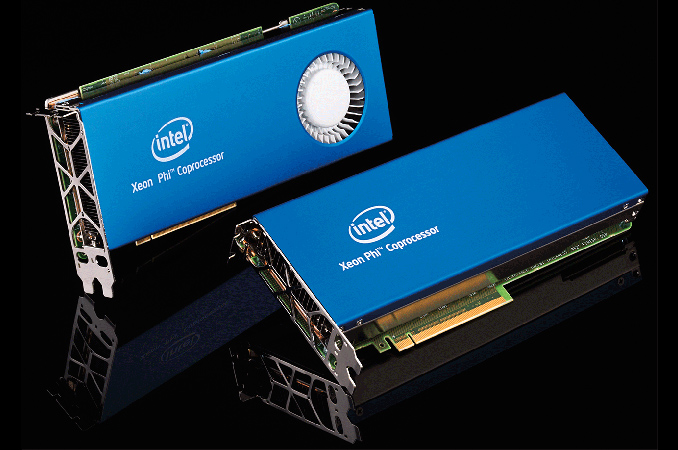
| 9:15p | Intel Discontinues Xeon Phi 7200-Series ‘Knights Landing’ Coprocessor Cards
Intel has announced that it had discontinued its Xeon Phi 7200-series coprocessor cards codenamed Knights Landing. The PCIe cards have never became mass market products, so their EOL will hardly be noticed by many. The company says that adoption of its Xeon Phi 7200-series processors in LGA3647-1 form-factor is growing and it does not believe that the PCIe versions will become nearly that popular. The products in question are the Xeon Phi 7220A, 7220P and 7240P coprocessors, which were used for software development by various close partners of Intel, but were never released as commercial products (even though TYAN was ready to support Intel’s PCIe coprocessors). With that in mind, Intel discontinued the SKUs on August 24 immediately without initiating a lengthy EOL program that would enable partners to order additional units, presumably because none of the cards were ever shipped commercially in any viable quantity. By contrast, Intel's Xeon Phi 7200-series CPUs are shipping and will be available going forward. Before Intel initiated the EOL process for the Xeon Phi 7220A, 7220P and 7240P add-on cards, the company removed references about the boards from its website. When asked about the reasons, an Intel representative said that the chipmaker decided not to offer the products for the general market, but Xeon Phi remains a key element of Intel’s product stack.
The statement by Intel, posted on a forum rather than in a press release, reads as follows: “Intel continually evaluates the markets for our products in order to provide the best possible solutions to our customer’s challenges. As part of this on-going evaluation process Intel has decided to not offer Intel Xeon Phi 7200 Coprocessor (codenamed Knights Landing Coprocessor) products to the market. Given the rapid adoption of Intel Xeon Phi 7200 processors, Intel has decided to not deploy the Knights Landing Coprocessor to the general market. Intel Xeon Phi Processors remain a key element of our solution portfolio for providing customers the most compelling and competitive solutions possible.” Intel did not provide an exact reason for why it decided not to make the Xeon Phi 7200-series cards available for the mass market. But here is some food for thought. Compute performance of the Xeon Phi 7220A, 7220P and 7240P PCIe coprocessors is slightly under 3 TFLOPS FP64, which is below 3 – 3.4 TFLOPS offered by numerous Xeon Phi LGA processors. Furthermore the coprocessor cards by their very nature have much more limited I/O options than their socketed counterparts, relying on a single PCIe x16 link back to the host, versus a socketed processor having 36 PCIe lanes of its own to directly attach to peripherals. Conversely, socketed Knights Landing doesn't support multi-processor setups (there's no QPI link), so the coprocessor cards could be used for density, just with much more limited connectivity. Given that HPC is a key element for Xeon Phi, one could consider density being a key angle for the product, so discontinuing the PCIe product (via a forum post intially then a PCN but still no press release) seems a little odd. At least for now, Intel does not want to compete against add-on PCIe compute accelerators with its Xeon Phi products. A big question is whether it actually needs to, given the stand-alone capabilities of Xeon Phi and its performance characteristics. But that is a completely different conversation. Related Reading: | ||||||||||||||||||||||||||||||||||||||||||||||||||||||||||||||||||||||||||||||||||||||||||||||||||||||||||||||


















| << Previous Day |
2017/08/25 [Calendar] |
Next Day >> |