[Most Recent Entries] [Calendar View]
Wednesday, August 30th, 2017
| Time | Event | |||||||||||||||||||||||||||||||||||||||||||||||||||||||||||||||
| 6:00a | Dell Updates Inspiron 15 7000 Gaming Notebook: GeForce GTX 1060 and Thunderbolt 3
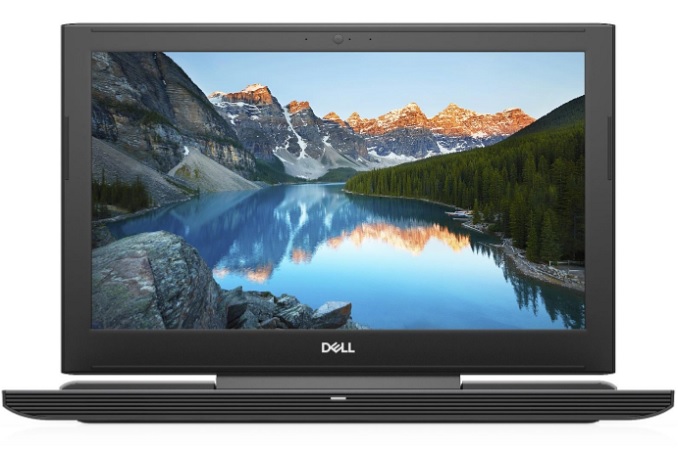
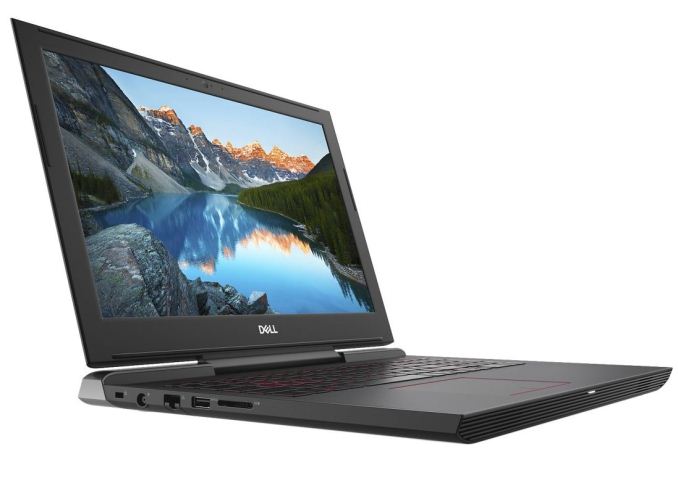
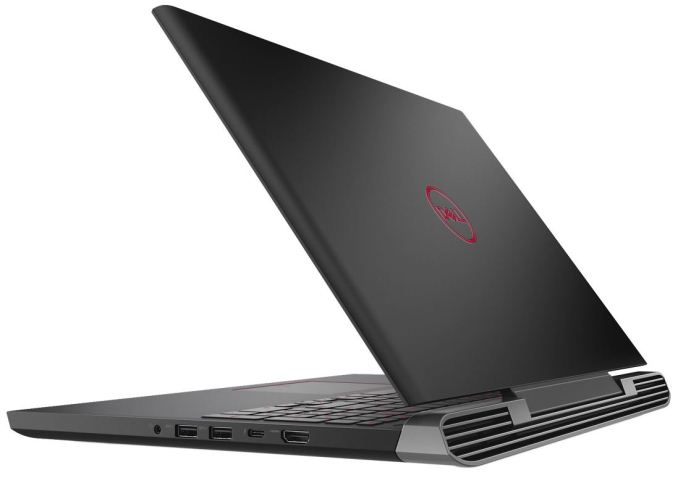
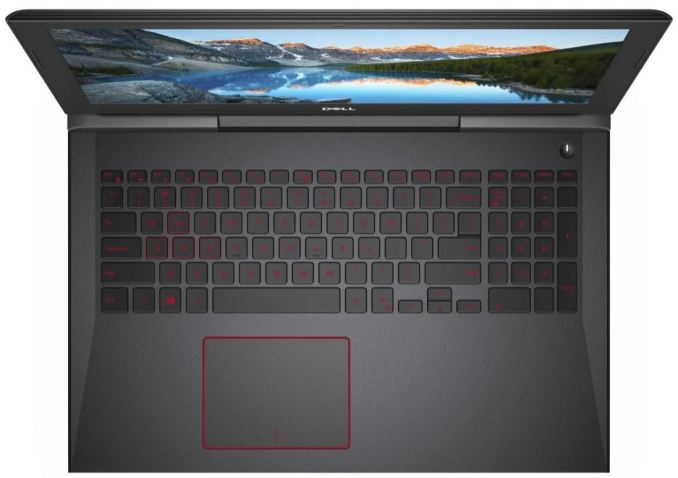
This morning at IFA, Dell is taking the wraps off of their updated Inspiron 15 7000 Gaming notebook. The entry-level gaming laptop is receiving a bump in specifications as well as a mid-generation facelift. The original model, the 7567, was first presented at CES and proved to be a capable gaming laptop for full HD gaming, said to have an above average battery life and came in with aggressive pricing. Meanwhile the model Dell is introducing today, the late-2017 model 7577, is receiving several updates, including a faster graphics card option in the NVIDIA GeForce GTX 1060 6GB, a quick-charge 56 Whr 4-Cell battery, 2x2 802.11ac WiFi, an IPS display in the base configuration, and a Thunderbolt 3 port (USB3.1 Gen2 Type-C port with support for Thunderbolt and DisplayPort). Dell also updated the chassis a bit. The most apparent physical change is the restyled, black, front and rear vents giving the laptop a more high-end aesthetic than the red grills used before.
The GTX 1060 is going to be a welcome addition to the family considering it is supposed to be a gaming laptop. The 1050Ti is a capable card at 1080p, but the GTX 1060 (60W, 10W more than the 1050Ti) will allow for higher framerates and/or higher settings in many titles. The extra performance it provides breathes a bit more life into the mainstream gamer. Though even with the faster GPU, the fact that Dell still offers an optional 4K IPS display on what's pitched as a gaming notebook is a little odd; the GTX 1060 just doesn’t have enough horsepower to drive that many pixels at high quality settings in many titles. Surprisingly, Dell has moved to a 56 WHr, 4-Cell quick-charge battery in lieu of the 74WHr 6-Cell battery on the previous version. Given that internal volume and battery capacities are closely linked, it's not obvious at this second what Dell has installed in place of the additional battery cells. In any case, the company says that the battery lasts up to 7 hours and 3 minutes when equipped with the high-end configuration (i7, GTX 1060, 16GB Memory, UHD screen, SSD + HDD – tested using Mobile Mark 14 battery life). On the other hand, this is a gaming laptop and is generally plugged in using AC Power. The quick-charge battery will go from 0% to 80% charge in 60 minutes.
Another change to the Inspiron 15 7000 Gaming laptop is the inclusion of multiple radio antennas in the chassis in order to support 2x2 stream WiFi, increasing the laptop's WiFi speed and range versus the 1x1 solution used in the previous model. Dell also added Thunderbolt 3 connectivity via USB3.1 Gen2 Type-C port. It can support a 5K external display, dual 4K externals displays, or other high-bandwidth Thunderbolt peripherals (external GPU perhaps?).
Meanwhile, Dell has done away with the previous model's entry-level 1080p TN panel, and instead the laptop's base configuration now starts with their 1080p IPS Anti-Glare LED-backlit panel. Customization options still include the company's 1080p IPS Truelife LED-backlit Touch Display, along with a 4K UHD panel that is also IPS Anti-Glare LED-backlit. 7567 RevisitedMost everything else remains the same from the 7567 version. Drive configurations are anything from a single 1TB HDD to 512GB PCIe SSD. Mixed configurations of HDD and SSDs are also an option. System RAM capacity remains the same with options from 4-16GB 2400MHz DDR4; Up to 32GB. Connectivity outside of the Thunderbolt/USB Type-C port also is unchanged with an HDMI2.0 port, 3x USB3.1 Type-A (one with PowerShare), a Noble lock slot, 2-in-1 SD card reader, Gigabit Ethernet, and a 3.5mm headphone/mic port. Even the LED-backlit keyboard has been carried over. Complete Specifications are found in the table below (major changes in bold).
Dell tells us that the new model will be available in the US on September 12th, with prices starting at $999. Related Items: | |||||||||||||||||||||||||||||||||||||||||||||||||||||||||||||||
| 6:19a | IFA 2017 Launch Press Conference Live Blog
We're here for the main IFA trade show press conference. | |||||||||||||||||||||||||||||||||||||||||||||||||||||||||||||||
| 9:00a | CPU Buyer's Guide: Q1 2017
In our series of Buyer Guides, here’s the latest update to our recommended CPUs list. All numbers in the text are updated to reflect pricing at the time of writing (3/19). Numbers in graphs reflect MSRP. CPU Buyer's Guide: Q1 2017As we move through to the second quarter of the year, we have had two major updates to the desktop CPU landscape. First, Intel launched its Seventh generation of Core-based CPUs, known under the Kaby Lake name, using a refined version of their 14nm process that allowed for some frequency gains over the previous generation Skylake microarchitecture. Then AMD made their biggest CPU launch in five years, with a renewed attack on high-performance computing with the Ryzen 7 family. After spending so many years fighting 32nm and 28nm on Bulldozer based microarchitectures, AMD introduced not only a new core design but also a new process (GlobalFoundries' 14nm) with FinFET based technology. Both of these launches have drastically shaken up our recommended CPU lists moving into Spring and Summer.
For all the information about Intel's Kaby Lake and AMD's Ryzen, our deep dive reviews are open to all readers and we highly encourage enthusiastic users to give them a once over, to understand how the hardware performs and why. The AMD Zen and Ryzen 7 Review: A Deep Dive on 1800X, 1700X and 1700 In our CPU Guides, we consider certain environments and budgets and give you our pick of some of the best processors available, supplying data from our Benchmark Database where possible. As a result, our recommendations are as follows:
The majority of our recommendations aim to hit the performance/price curve just right, with a side nod to power consumption as well. Here's a breakdown of those recommendations: Peak Gaming / VRIn the midst of the launches this quarter, the talk of CPUs that are suitable for Virtual Reality has died down to some extent. Now that AMD has parts on the shelf that are unquestionably suitable, it just comes down to what price can you enter into VR, or at what level can you be future proof as VR gaming becomes more demanding. Even with this is mind, a non-VR gaming machine that wants to be ahead of the curve has similar demands, especially as DirectX12 titles are in the pipeline. Single thread performance still helps here, especially for the simpler casual games and driving high frame rates.
The king of the crop is the Intel Core i7-7700K. It boasts the highest per-core performance of any x86 processor, and then heaps on a lot of frequency as a result. A good processor will run up to 5 GHz with a nod for overclocking, giving a user the best premium VR experience today. At $350 list price, plus some more for a good cooler and a decent motherboard, an i7-7700K should provide a premium gaming system for several years to come. If you want to go through AMD, then the latest Ryzen 7 1700 is a good option here at $329. It doesn't quite match the single threaded performance of the Intel CPU, but offers double the threads which will be more important as games get more complex. A good 1700 can also overclock near to 4.0 GHz, saving some money over the more expensive 1800X are $499. As an added benefit, the price of the 1700 also includes AMD's Wraith Spire stock cooler, suitable for high ambient environments, and has RGB lighting. Smart Gaming / VRFor users looking for a nicer price on their wallets, moving slightly down the stack can retain most of the expected performance and retain some significant savings. It won't give you the premium frame rates, but the cost savings can easily be justified for user budgets where it could mean the difference for the next GPU upgrade. For this segment from Intel I've chosen the Core i5-7500. At a list of $202, it provides four full cores at 3.4 GHz with a turbo up to 3.8 GHz, but also has 6MB of inclusive L3 cache. With no hyperthreading, each thread gets the full use of all the cores resources, ensuring fewer potential bottlenecks. The Core i5-7400 would be another option, however the difference in frequency (400 MHz base, 300 MHz turbo) in favor of the i5-7500 is worth the $10 difference. The i5 will happily power the biggest GPUs on the market, only breaking a sweat with the most demanding titles at extreme settings. For AMD, no current CPU on the shelves really fits the bill here. So it puts me in an awkward position of pointing to a CPU that isn't out yet: the Ryzen 5 1600X. AMD has announced that this CPU will be on shelves on April 11, and based on our Ryzen 7 testing, we can make good estimates on performance. The 1600X is a six-core processor with hyperthreading, giving a full twelve threads, and runs at the same frequencies as its bigger brother, the 1800X. In our performance/price predictions, it sails above any other AMD offering, and should be highly competitive on single thread performance with the low-end Intel Core i5 parts. We really want to get this part in for testing ASAP. Smarter GamingFor users after a sub $1000 monster rig, or something a bit more conservative around $700, here are our 'smart' gaming recommendations. The CPUs here will still drive a single graphics card at near peak performance at higher resolutions and good settings, although cranking up the details on AAA games might be a selective process. Nonetheless, eSports titles will still run as smooth as you like with these processors.
Again, starting with Intel, I've pulled out the Core i3-7100 at $117. This is a dual core part with hyperthreading, running at 3.9 GHz. At that frequency it rises high up the charts for single thread performance, nearly matching the vastly more expensive Core i7 and Core i5 overclockable processors. For DirectX9, DirectX10 and DirectX11 games, where single thread performance helps drive a good GPU, something like the i3-7100 can provide best-in-class results. For this segment, AMD does have much to play with right now. At this level of performance AMD's strength is price, so as the FX CPUs are being sold at low cost, something like the FX-6300 on sale and a cheap AM3 motherboard can be picked up for very little. The FX can't compete on single threaded performance with Intel, but by having three modules and six threads, it might be happy when users require multitasking during their gaming, such as watching video on a second monitor or light streaming with eSports. Cheap GamingFor those on a tight budget, where trying to get a reasonable gaming system under $300-$500 is a must, we have to look at the entry level processors. A number of system integrators will use these parts for their entry level builds, often paired with cards such as an RX 460, or a second-hand GTX 700-series card, a standard hard drive, some small amount of memory and a generic PSU/case. Having a base level of performance is critical here though, given the type of games these systems are designed for tend to be several years old, or indie titles. Starting with Intel again, and to be honest they have recently launched somewhat of a surprise processor for this market. The Pentium G4560 is essentially a Core i3 by any other name, given it has two cores and four threads, but a slightly reduced L3 cache. The G4560 has a list price of $64 (retails at $80) and runs at 3.5 GHz - that's a dual core Kaby Lake processor only 900 MHz off of the top Core i7 for less than one-fifth of the price. Previous Pentium processors did not have hyperthreading, but this one does - Intel hasn't given any specific reason for the change, but it's one we will gladly take. Intel's Pentium is hard to beat in so many ways, AMD does not particularly have an answer. The nearest thing we can get to it, until we see what price points Ryzen 3 will hit, is the Athlon X4 860K. This is one of AMD's APUs with the GPU disabled, but also comes with AMD's 95W near-silent cooler. While the last iteration, called Excavator, performs quite well in the context of AMD's APU line, but there's still a sizeable jump north of 40% performance gap that Intel can take advantage of. The upside here is perhaps the motherboard could be cheaper. Integrated GraphicsNot many users take the line of integrated graphics because GPUs like the RX460 are relatively cheap and usually outperform what is on offer. Nonetheless, almost all mainstream CPUs come with integrated graphics for several reasons: invest now in a good CPU then later in a GPU, or the amount of space limited in the system is small, or features such as QuickSync or OpenCL are needed for the user workloads.
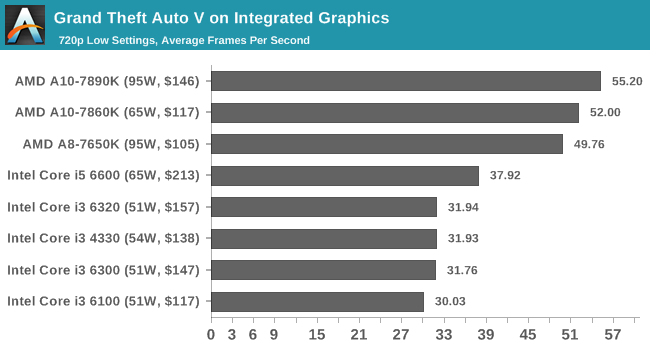
The champion of this world is the AMD A10-7890K. Technically Intel has higher performing parts in Broadwell-based eDRAM processors, but these are 3x the cost and difficult to find anywhere due to the limited launch. AMD's A10-7890K thus sits at the top of that stack, giving somewhat near RX460 levels of performance that is more than suitable for eSports such as League of Legends, DOTA2, CS:GO or Rocket League at very honest settings. Users who still need to save a few $$ from the A10-7890K can look the A10-7860K instead. This APU offers a small step down in performance, but was one of the last A10 parts produced fully aimed at PC builders trying to hit the performance/price metrics. CPU WorkstationSometimes all you need is raw CPU power. Whether it is rendering, compute, encryption, or a varied office or enterprise load, CPU performance is king. This is where the worlds of the mainstream processors and the high-end desktop collide, given that the high-end usually gives more cores and more performance, but the price rises faster than you can think. Finding the right balance is key, especially when a user can potentially justify spending above the odds if it means processing their clients faster. | |||||||||||||||||||||||||||||||||||||||||||||||||||||||||||||||


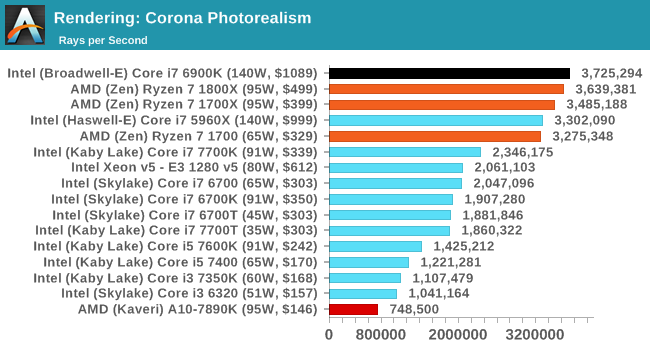
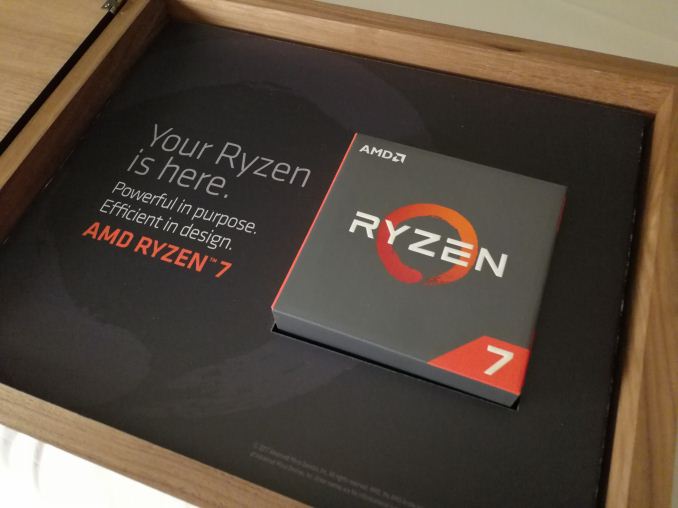
While the Ryzen 7 1800X is fun, it is actually the lower ranked Ryzen 7 parts that are better for performance per dollar. The Ryzen 7 1700 has a slight performance deficit to the 1800X, by virtue of being 3.0G/3.7G rather than 3.6G/4.0G, but it comes in at only two-thirds of the price. At $329, and coming it at 90% of the overall performance of the 1800X, the 1700 is a better choice for workstation users that still look to save a few pennies.
Memory Workstation
One of the downsides of the Ryzen 7 CPUs is that they only have dual channel memory controllers. At two modules per channel, that lends them to 64GB for maximum DRAM capacity. Sometimes a workstation needs so much more, and that is where the only direction to turn is Intel, but there will be a platform premium on CPU and motherboard as a result.
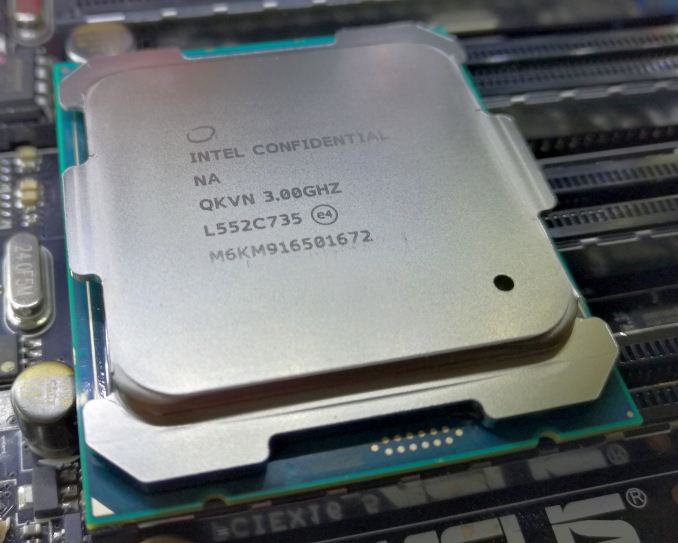
Intel has a few options, and users willing to trawl through the second-hand market can find some HEDT bargains, but for users buying new there are a couple of options. First up is the Core i7-6800K, which is Intel's low-end HEDT part from the latest launch. This is a six-core processor on Intel's Broadwell microarchitecture, with 28 PCIe 3.0 lanes, but will run up to 128GB of un-buffered memory. It runs at the same price as AMD's Ryzen 7 1800X, but in exchange for two cores the user gets double the memory capacity and a few more PCIe lanes. It is worth noting that the cheapest platform cost for this CPU, the X99 platform, will also be higher than the cheapest AMD variant.
Consequently, if you want 1800X performance but still need more than 64GB of DRAM or more than 16 PCIe lanes, then Intel's i7-6900K is your option. It has an MSRP of $1049, although at the right moment it might be on sale for just under $1000. This 140W TDP part will require a decent cooler, as well as an X99 platform underneath it. For a workstation user that needs it all, the Core i7-6900K will be overly sufficient, unless you try and find something like the Core i7-5960X (the previous generation 8-core CPU) on sale.
One to Watch
I'll be honest, the initial plan was to launch this Q1 list last week. I'm in a little bit of trouble for delaying, but I think it was worth it as we can now talk about AMD's latest announcement on Ryzen 5. The Ryzen 5 processors are quad-core and hexa-core parts using AMD's latest Zen microarchitecture, and are available at prices such that where Intel offers four cores and four threads, AMD can offer six cores and twelve threads. This 3x difference is somewhat neutered by Intel's Kaby Lake having better single core performance, but overall the Ryzen 5 CPUs are predicted to make a splash on the scene. Here is our graph of predicted performance per dollar for these CPUs:
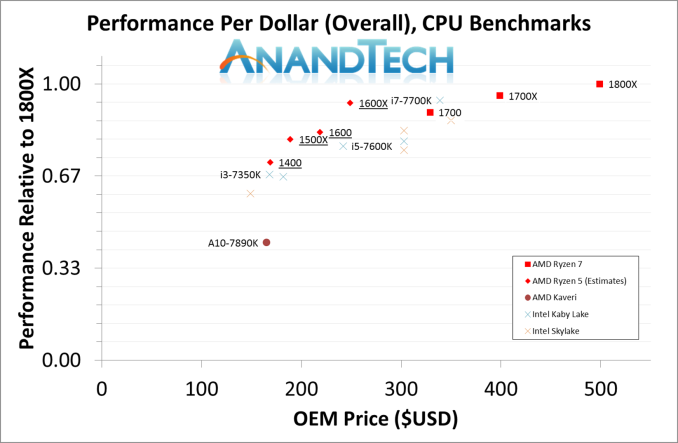
For this chart, we can basically draw a straight line from the Ryzen 7 1800X to the Ryzen 5 1500X, which covers five of AMD's new CPUs. The major outlier is the AMD Ryzen 5 1600X, which sits way above this line. We're desperately waiting to get hold of one, to see if it can live up to predictions. We'll see where the data takes us for final conclusions, but this processor is definitely on our one-to-watch list. The Ryzen 5 family will be available from April 11th.

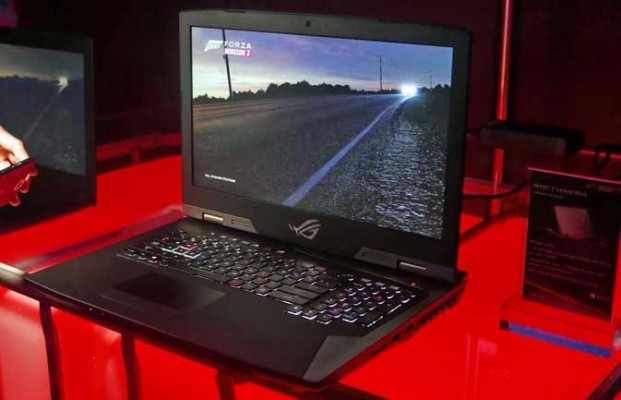
This year at IFA there is a lot of laptop and notebook announcements. Most of them will be geared towards Intel’s new 8th Generation notebook processors that were announced last week, but there is still plenty of room for large and beefy gaming machines to take to the stage. In this category comes the ASUS ROG Chimera, a new laptop geared towards ‘twitch’ gamers that specialize in games that reward quick reactions.
Underpinning the laptop is going to be the display. For ‘twitch’ gaming, resolution and quality are arguably less important than smooth and quick gameplay, so the ROG Chimera comes in with a 144 Hz display combined with G-Sync variable refresh rate compatibility. The display is only a 1920x1080 resolution in a 17.3-inch form factor, which is moving away from the trend of higher resolution screens coming to laptops. Some might point to standalone monitors that can have higher resolutions than this, although finding one in a 17.3-inch form factor is going to be difficult. We suspect that this is a TN panel – when we get around to ASUS’s booth later in the show we’ll take a look.

Other hardware in the system comes via Intel’s Core i7-7820HK, the quad core mobile part that allows overclocking (ASUS states up to 4.3 GHz), and a GTX 1080 8GB mobile graphics module with a maximum boost of 1974 MHz. The keyboard incorporates a full keypad, and from what we can see a number of USB ports and video outputs. At this point ASUS is being cagy at the rest of the specifications, barring support for Xbox Wireless, so we’ll update this post when we get something more or some hands on time. Pricing and launch were not discussed.
Main image from Andrew Freedman, Laptop Mag
Related Reading
We're here for Samsung!
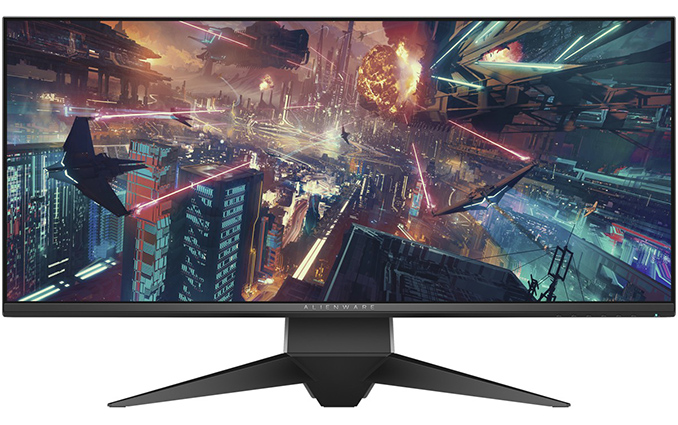
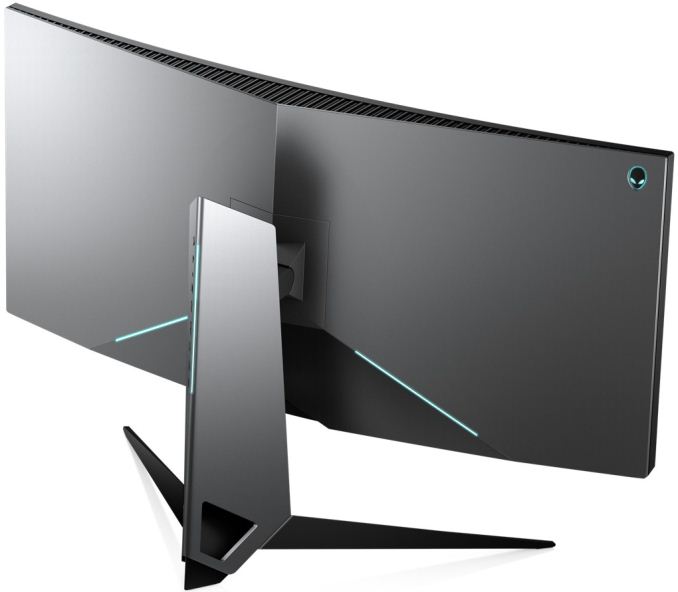
Among their many IFA announcements this week, Dell’s Alienware group has introduced two ultra-large displays aimed at gamers. The monitors measure 34” in diagonal and feature refresh rates of over 100 Hz. In accordance with the recent industrial trends, the monitors feature NVIDIA’s G-Sync dynamic refresh rate technology, AlienFX RGB lighting, and thin bezels.
The Alienware AW3418DW will be the company’s new flagship IPS-based display boasting with a 3440×1440 resolution, a 120 Hz refresh rate (when overclocked), a 4 ms GtG response time, a 1900R curvature, 178°/178° vertical/horizontal viewing angles and NVIDIA’s G-Sync technology. When it comes to brightness, contrast and color accuracy, we are dealing with rather typical specifications for this class of monitors — 300 nits brightness, a 1000:1 contrast ratio and 99% of the sRGB coverage. As for connectivity, the display has one DisplayPort 1.2 and one HDMI 1.4 input, a quad-port USB 3.0 hub (with one upstream port) as well as 3.5-mm audio connectors. The Alienware AW3418DW is available immediately and carries a $1,499 price tag.
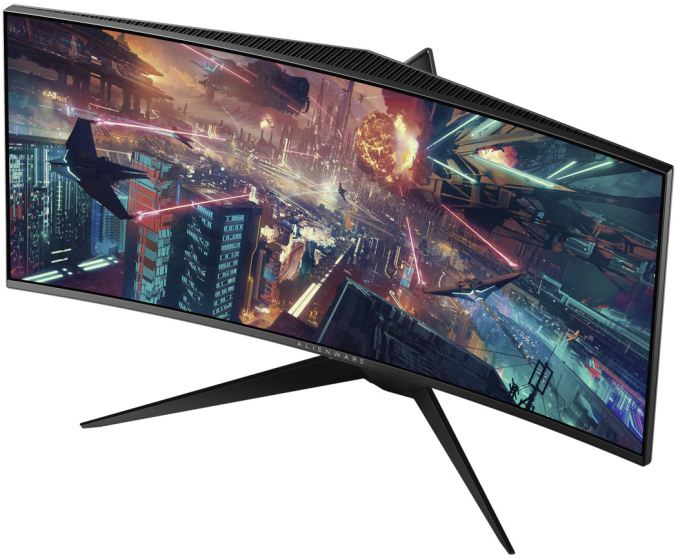
From outer design point of view, the Alienware AW3418HW haa a lot of similarities with the more advanced AW3418DW: it has the same diagonal size, AlienFX RGB lighting, cable management, a die cast metal stand and so on. Under the hood however, the lower cost 34” curved display is completely different from its more advanced brother. The AW3418HW has a 2560×1080 resolution, a 160 Hz refresh rate (when overclocked) with G-Sync treatment, a 4 ms response time and a 3800R curvature. Given a lower resolution, the AW3418HW will be significantly cheaper than the AW3418DW — it is going to cost $1,199 when it becomes available later this holiday season.
| Alienware's 34" Curved Displays | ||
| AW3418DW | AW3418HW | |
| Panel | 34" IPS | 34" |
| Native Resolution | 3440 × 1440 | 2560 × 1080 |
| Maximum Refresh Rate | 120 Hz overclocked | 160 Hz overclocked |
| Response Time | 4 ms | |
| Brightness | 300 cd/m² | unknown |
| Contrast | 1000:1 | |
| Viewing Angles | 178°/178° horizontal/vertical | unknown |
| Curvature | 1900R | 3800R |
| Pixel Pitch | 0.233 mm | 0.31 mm |
| Pixel Density | 109 ppi | 81.72 PPI |
| Anti-Glare Coating | Yes | |
| Color Gamut | 99% sRGB | unknown |
| Dynamic Refresh Rate | NVIDIA G-Sync | |
| Inputs | 1 × DP 1.2 1× HDMI 1.4 |
unknown |
| USB Hub | 4-port USB 3.0 hub, one USB Type-B upstream port |
|
| Audio | audio in/out ports | |
| Power Consumption | Idle: 0.5 W Typical: 60 W |
unknown |
| RGB Lighting | AlienFX programmable RGB LED lighting | |
| Launch Price | $1499.99 | $1199.99 |
The new ultra-wide 34” monitors from Alienware will complement the company’s 25” display it announced earlier this year. As it appears, the company sees demand for screens designed specifically for gaming, which is why it is expanding the lineup. It is evident that when designing its displays Alienware focuses primarily on features important for gamers: maximum refresh rate with dynamic refresh support, curvature, but not high resolution per se. Such approach makes a great sense because not every gamer has a graphics card that has enough processing horsepower to run the latest games in a 4K resolution (or similar) at 120 – 160 Hz, which is why the monitors like AW3418DW and AW3418HW have all chances to become popular among those who spend a lot of time playing games.
Related Reading:
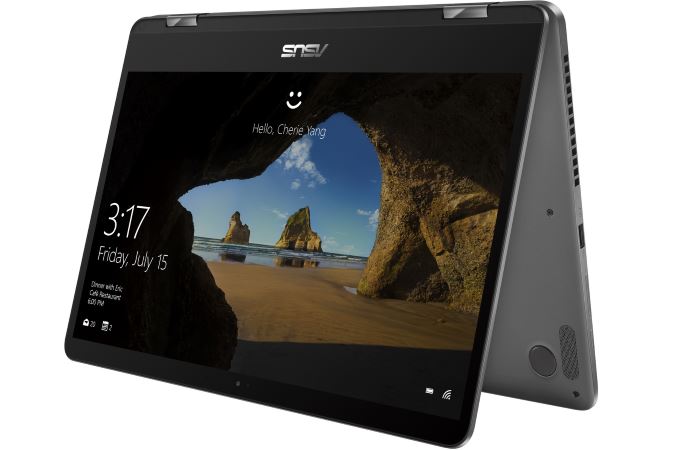
Continuing our coverage of IFA 2017, ASUS has announced the release of two new 2-in-1s. First, the Zenbook Flip 14; ASUS touts this to be the worlds thinnest 2-in-1 laptop. And the Zenbook Flip 15, said to be the most powerful Zenbook Flip ever using the latest 8th Generation Intel Core processors. Shawn Yen, ASUS’ Senior Product Director said on stage at IFA, “the major objective of this product is bringing the benefits and versatility of a 2-in-1, with the mobility of an ultrathin. Marry those two benefits together and empower user’s needs for graphics." And in comes the latest generation Zenbook Flips.
Asus Zenbook Flip 14
The Zenbook Flip 14 UX461 is very thin and light for a convertible laptop measuring just 13.9mm(.55") thick and weighing 1.4 kg (3.1 lbs). The 8th generation CPU is a Core i7-8550U 4C/8T chip with a base processor frequency of 1.8GHz and a maximum turbo frequency of 4GHz. The Flip 14 can be configured with up to 16GB 2400 MHz DDR4 RAM and 1TB PCIe SSD for fast storage. It also includes a fingerprint reader and speakers tuned by Harmon Kardon. Additionally, the Flip 14 includes a discrete GPU, the NVIDIA MX150, which helps with graphically intensive tasks an onboard graphics solution may find problematic. Even with more powerful hardware inside, battery life is said to be up to 13 hours.
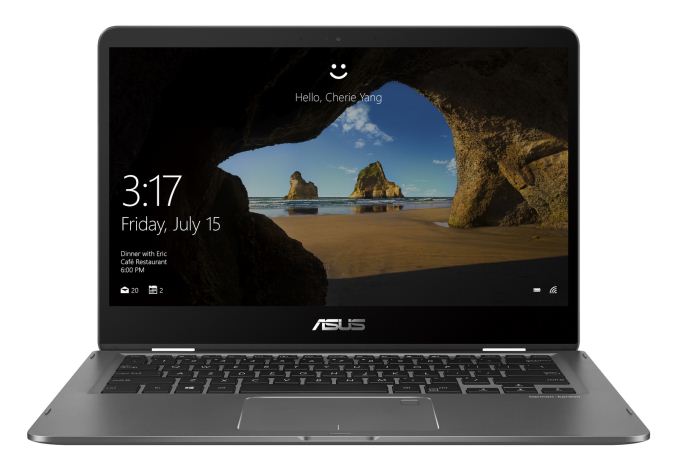


The chassis styling has changed a bit going away from the brushed aluminum look and going with more of a medium gloss flat finish instead. The Flip 14 has two color options in Icicle Gold and Slate Grey (pictured above). ASUS’ NanoEdge technology makes its way to the 14-inch 1080p display making it very thin. The result is a 13-inch footprint from a 14-inch laptop. The Flip 14 will start at 799€ (~$900) and ASUS has not provided dates for availability.


Asus Zenbook Flip 15
The ZenBook Flip 15 UX561 is a 15.6” 2-in-1 following similar themes to the 14, but instead is designed to be a larger, high performance laptop. The nod here goes to its use of the same i7-8550U 4C/8T 1.8GHz-4GHz processor and NVIDIA's GeForce GTX 1050 graphics. Asus mentions it can be up to two times faster (Cinebench R15) than the previous generation UX560 which used an i7-6500U (dual-core with hyperthreading) from a previous generation. The GTX 1050 is a decent upgrade on the performance side and saves power over the GTX 950 used before.



The Flip 15 can be configured with up to a 512GB SSD, a 2TB hard drive, and 16GB 2400 MHz DDR4 RAM. It also has precision stylus support, as well as Thunderbolt 3 ports for advanced peripheral attachment. The new 2-in-1 uses NanoEdge bezels and offers an optional 4K UHD resolution screen. There are also two color options here, Smoke Grey(pictured) and Pure Silver. The ZenBook Flip15 starts at 899€(~$1000), and like the Flip 14, we're still waiting on hear on when precisely it will hit the market.


Related Items:
| << Previous Day |
2017/08/30 [Calendar] |
Next Day >> |