[Most Recent Entries] [Calendar View]
Saturday, September 2nd, 2017
- Alignment
- Point Cloud Generation
- Mesh Building
- Texture Building/Skinning
- StarTech Unveils Dual-Display Thunderbolt 2 Docking Station with 12 Ports
- AKiTiO Displays Thunderbolt 3 to 10GBase-T Adapter
- CES 2017: GIGABYTE’s Thunderbolt 3 to 8x USB 3 Dock
- StarTech Launches USB Docking Station With UHD Display Support
- StarTech.com TBT3TBTADAP Thunderbolt 3 to Thunderbolt Adapter Review
- Satechi and StarTech USB 3.1 Gen 2 Type-C HDD/SSD Enclosures Review
- Lenovo Reveals Yoga 910 Convertible: Intel’s Kaby Lake Meets 4K Display and Ultra-Thin Form-Factor
- The Lenovo Yoga 900 Series Launched: The ‘Thinnest’ Core Laptop and a 27-inch Portable All-In-One
- Lenovo’s Yoga Book Convertible Scraps Physical Keyboard in Favor of Touch-Sensitive Surface
- Lenovo Yoga Tab 3 Plus: Snapdragon 652, 10-Inch 2K Display, JBL Speakers and USB-C
- Lenovo Updates The X1 Lineup: Thin Bezel X1 Carbon, X1 Yoga And X1 Tablet Updates
- The Lenovo ThinkPad X1 Yoga Review: OLED and LCD Tested
| Time | Event | ||||||||||||||||||||||||||||||||||||||||||||||||||||||||||||||||||||||||||||||||||||||||
| 7:24a | IFA 2017: Huawei Artificial Intelligence Keynote Live Blog (8am ET, Noon UTC) Huawei has a keynote at IFA this year. Having quietly announced the Kirin 970 and its new Neural Processing Unit yesterday without a word through the regular press channels, we're expecting to here Huawei's future march into AI from Richard Yu, CEO of Huawei's Consumer Business Group (CBG). | ||||||||||||||||||||||||||||||||||||||||||||||||||||||||||||||||||||||||||||||||||||||||
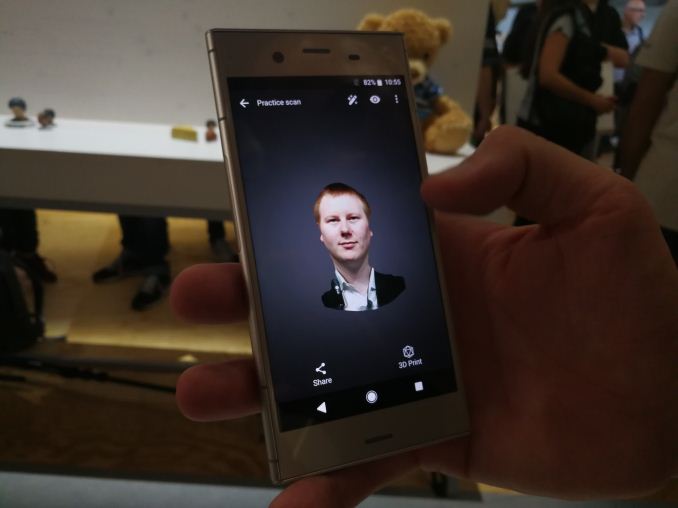
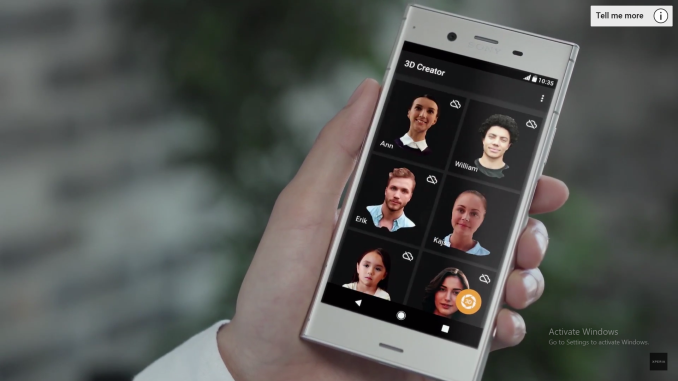
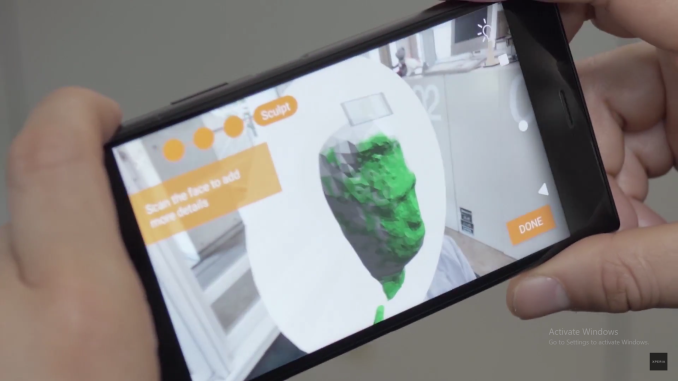
| 9:15a | Generating 3D Models in Mobile: Sony’s 3D Creator Made Me a Bobblehead
In a show like IFA, it’s easy to get wide-eyed about a flashy new feature that is being heavily promoted but might have limited use. Normally, something like Sony’s 3D Creator app would fall under this umbrella – a tool that can create a 3D wireframe model of someone’s head and shoulders and then implement a 4K texture over the top. What is making me write about it is some of the implementation. Normally in a single photo, without subsequent depth map data, creating a 3D model is difficult. Also, depth data would only show points directly in front of the camera – it says nothing about what is around the corner, especially when it comes to generating a texture from the image data to fit the model. With multiple photos, by correlating points (and perhaps using internal x/y/z sensor data), distances can be measured for identical points and a full depth map can be done taking the color data from the pixels and understanding which pixel would be where in that depth map allows the wireframe model to be textured.
For anyone who follows our desktop CPU coverage, we’ve actually been running a benchmark that does this for the last few years. Our test suite runs Agisoft Photoscan, which takes a set of high-quality images (usually 50+ images) of people, of items, of buildings and of landscapes, and builds a 3D textured model to be used in displays, games, and anything that wants a 3D model. Normally this benchmark is computationally expensive: Agisoft splits the work into four segments: Each of these segments has dedicated algorithms and the goal here is to compute as fast as possible. Some of the algorithms are linear and rely heavily on single thread performance, whereas others, such as Mesh Building, are very parallel which Agisoft implements via OpenCL. This allows any OpenCL connected accelerator, such as a GPU, to be able to increase the performance of this test. For low core count CPUs this is usually the longest part of the full benchmark, however the higher core count parts move into other bottlenecks, such as memory or cache. So for our Agisoft run in those benchmarks, we use a 50 image set of a building with 4K images. We get the algorithm to select 50000 points from each image, and use those for the mesh building. We typically run it in OpenCL off mode, as we are testing the CPU cores, although Ganesh has seen some minor speedup on this test with Intel’s dual-core U-series CPUs when enabling OpenCL. A high end but low power processor, such as the Core i5-7500T, takes nearly 1500 seconds, or 25 minutes to run our test. We also see speed up based on cache sizes and DRAM frequency/latency, but major parts of the app either rely on single thread performance exclusively or multithread performance exclusively.
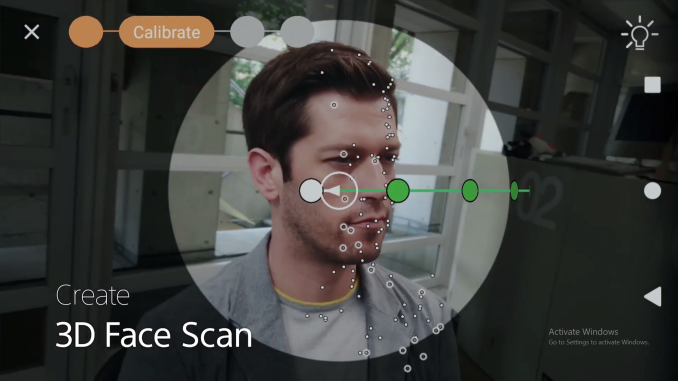
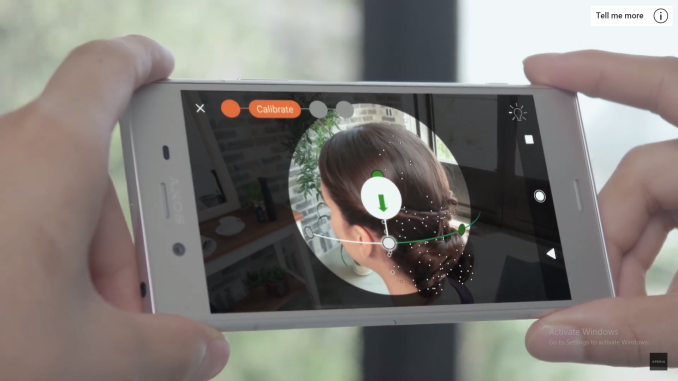
Sony’s way of creating the 3D head model involves panning the camera from one ear to the other, and then moving the camera around the head to generate finer detail and texture information. It does this all in-situ, computing on the fly and showing the results in real time back on the screen as the scan is being done. The whole process takes a minute, which compared to the method outlined above, is super quick. Now of course, Sony’s implementation is limited to just heads, rather than something about buildings, and we were told by Sony that their models are limited to 50000 polygons. During the demonstration I was given, I could see the software generating points on the head and it was obvious the number of points was in the hundreds in total, rather than the thousands per static image, so there is a perceptible difference in quality. But the Sony modeling implementation still gives a good visual output.
The smartphones from Sony that support this feature are the XZ series, which have Snapdragon 835 SoCs inside. Qualcomm is notoriously secretive about what is under the hood on their mobile chips, although features like the Hexagon DSP contained within the chip are announced. Sony would not state how they are implementing their algorithms, if they were leveraging a compute API from the Adreno GPU, a graphics API, the Kryo CPUs, or something from the special DSPs housed on the chip. It also leads two different questions: do the algorithms work on other SoCs, or can other Snapdragon 835 smartphone vendors develop their own equivalent application?
Sony’s goal is to allow users to implement their new facial model in applications that support personal avatars, or exporting to 3D printing formats for real-world creation of a user’s head. My mind instantly pointed to who would use something like this on scale: console players, specifically on the Xbox and Nintendo devices, or for special games such as NBA2k17. Given Sony’s exists in the console space with their own Playstation 4, one might expect them not to play with competitors, although the smartphone department is a different business unit (and other Snapdragon 835 players do not have a potential conflict). I was told by the booth demonstrator that he doesn’t know of any collaboration, which is unfortunate as I’d suspect this as being a good opening for this tool. I’m trying to probe for more information, from Sony on the algorithm or Qualcomm on the hardware, because how the algorithm is implemented on the hardware is something I find interesting given how we’ve tested desktop CPUs in the past. It also puts the challenge to other smartphone vendors that use Snapdragon 835 (or other SoCs) to see if this is a feature that they might want to implement, or if there are apps that will implement this feature regardless of hardware. Related Reading | ||||||||||||||||||||||||||||||||||||||||||||||||||||||||||||||||||||||||||||||||||||||||
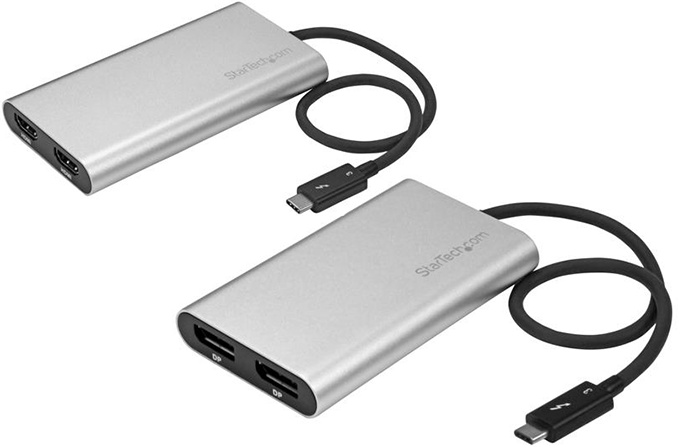
| 11:00a | StarTech's Thunderbolt 3 to Dual 4Kp60 Display Adapters Now Available
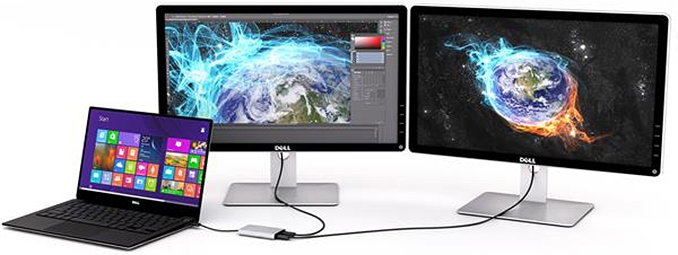
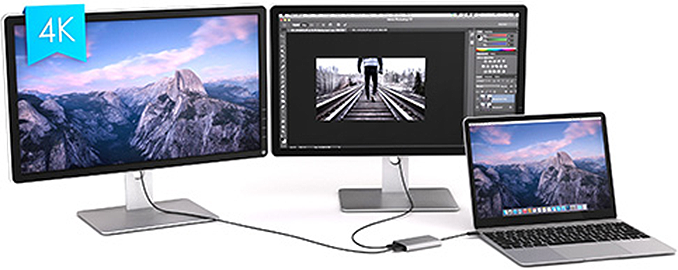
StarTech's new family of Thunderbolt 3 adapters that let one TB3 port to drive two 4K 60Hz displays are now available for sale. One of the adapters supports two DisplayPort 1.2 outputs, whereas another features two HDMI 2.0 headers. The devices are bus powered and do not use any kind of image compression technologies. When Intel introduced its Thunderbolt 3 interface two years ago, the company noted that one cable can drive two daisy chained 4Kp60 displays using one TB3 cable - as TB3 can carry two complete DisplayPort 1.2 streams - greatly simplifying dual-monitor setups. The reality turned out to be more complicated. At present, there are not a lot of displays supporting Thunderbolt 3 USB Type-C input along with an appropriate output to allow daisy-chaining another monitor. Makers of monitors are reluctant to install additional chips into their products to save BOM costs and keep designs simple, essentially concealing one of the features of the TB3 interface. Meanwhile, each TB3 controller supports two DisplayPort 1.2 streams, so to drive two 4Kp60 displays, some PC makers even integrate two TB3 ports into their ultra-thin laptops to support two 4Kp60 outputs, whereas others go with four. The new adapters from StarTech solve the problem and get two DisplayPort 1.2 or HDMI 2.0 headers from a single TB3 connector.
Earlier this year StarTech introduced two devices: the Thunderbolt 3 to Dual DisplayPort Adapter (TB32DP2T), and the Thunderbolt 3 to Dual HDMI 2.0 Adapter (TB32HD4K60) for customers with monitors featuring DP or HDMI inputs. StarTech does not disclose much about internal architecture of the devices, but I understand that they feature a Thunderbolt 3 controller that “receives” two DisplayPort signals from the host via TB3 and then re-routes them to either two DP outputs or two HDMI 2.0 outputs using appropriate LSPCons. Moreover, the TB3 to Dual DisplayPort adapter can even handle a single 5K monitor by using both outputs. The new adapters are compatible with Apple macOS and Microsoft Windows-based PCs. Meanwhile, one thing to keep in mind is that the adapters do not support DP or HDMI alt modes over USB-C and they can only use TB3 ports.
Related Reading: | ||||||||||||||||||||||||||||||||||||||||||||||||||||||||||||||||||||||||||||||||||||||||
| 1:00p | GIGABYTE Unveils GeForce GTX 1080 Mini ITX 8G for SFF Builds
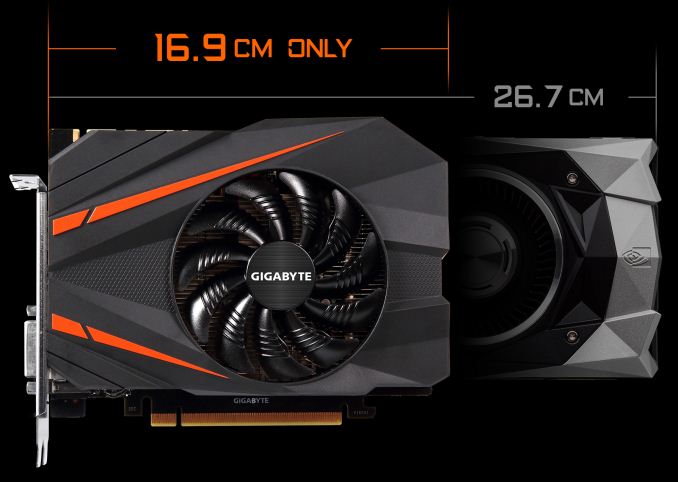
GIGABYTE has outed their GeForce GTX 1080 Mini ITX 8G, the newest entrant in the high-performing small form factor graphics space. At only 169mm (6.7in) long, the company’s diminutive offering is now the second mITX NVIDIA GeForce GTX 1080 card, with the first being the ZOTAC GTX 1080 Mini, announced last December. While the ZOTAC card was described as “the world’s smallest GeForce GTX 1080,” the GIGABYTE GTX 1080 Mini ITX comes in ~40mm shorter, courtesy of its single-fan configuration. Just fitting in the 17 x 17cm mITX specifications, the GIGABYTE 1080 Mini ITX features a semi-passive 90mm fan (turning off under certain loads/temperatures), triple heat pipe cooling solution, and 5+2 power phases. Despite the size, the card maintains reference clocks under Gaming Mode, with OC Mode pushing the core clocks by a modest ~2%. Powering it all is an 8pin power connector on the top of the card.
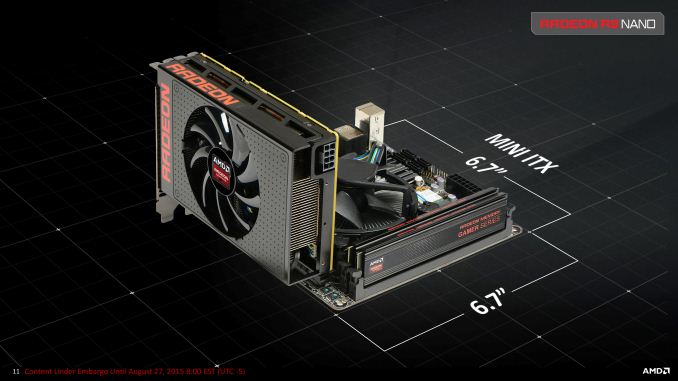
The dimensions of the GIGABYTE GTX 1080 Mini ITX actually match GIGABYTE’s previous GTX 1070 Mini ITX and 1060 Mini ITX cards, as well as their OC variants. This is in line with mid-range and high-end mITX cards generally bottoming out at ~170mm lengthwise to match the mITX form factor specification, with the exception of the petite 152mm Radeon R9 Nano, a card made even smaller due to the space-saving nature of HBM. This is a non-trivial distinction, as graphics card dimension measurements often do not include the additional length of the PCIe bracket and sometimes delineate length of the PCB rather than the cooling shroud. In any case, the 211mm long ZOTAC GTX 1080 Mini actually extends over mITX motherboards. For SFF enthusiasts, these millimeters matter.
In the meantime, the GIGABYTE GTX 1080 Mini ITX will be the fastest 169mm long card. For the competition, with the R9 Nano no longer in production, the Vega-based Nano has only been teased at SIGGRAPH 2017 so far. Details on pricing and availability have not been announced at this time. | ||||||||||||||||||||||||||||||||||||||||||||||||||||||||||||||||||||||||||||||||||||||||
| 3:00p | Lenovo Launches Yoga 920 Convertible: 13.9” 4K LCD, 8th Gen Core i7, TB3, 3 Pounds
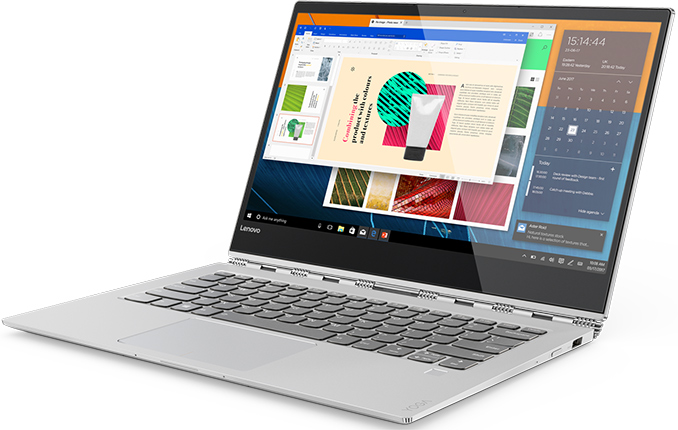
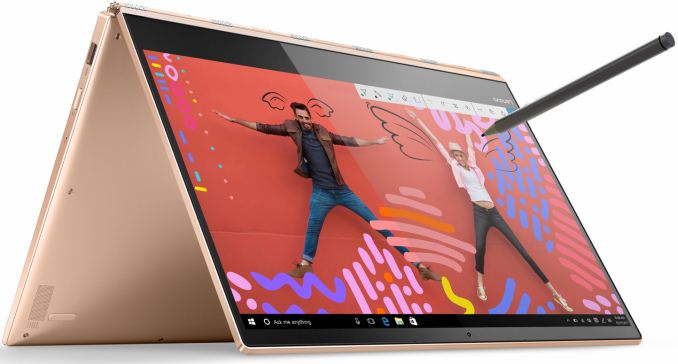
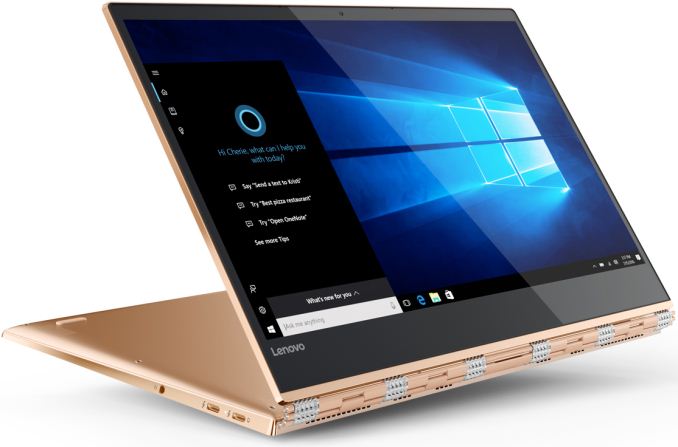
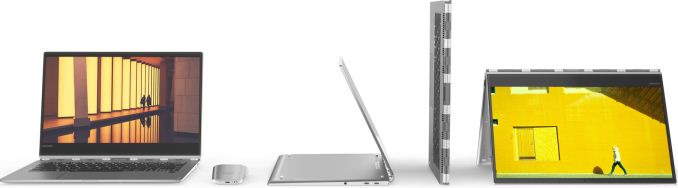
Lenovo this week announced its new Yoga 920 convertible laptop that became more powerful due to Intel’s upcoming 8th generation Core i-series CPUs with up to four cores, better connected thanks to two Thunderbolt 3 ports, yet slimmer than its predecessor. The new model inherits most of the peculiarities of the previous-generation Lenovo Yoga 900-series notebooks and improves them in various ways. The new Lenovo Yoga 920 is the direct successor of the Yoga 2/3 Pro, Yoga 900 and the Yoga 910 convertible laptops that Lenovo launched in 2013 – 2016. These machines are aimed at creative professionals, who need high performance, 360° watchband hinge, touchscreen, reduced weight and a long battery life. Over the years, Lenovo has changed specs and design of its hybrid Yoga-series laptops quite significantly from generation to generation in a bid to improve the machines. This time the changes are not drastic, but still rather significant both inside and outside.
The new Lenovo Yoga 920 will come with a 13.9” IPS display panel featuring very thin bezels and either 4K (3840×2160) or FHD (1920×1080) resolution, which is exactly the same panel options that are available for the Yoga 910. In the meantime, Lenovo moved the webcam from the bottom of the display bezel to its top. Besides, it reshaped the chassis slightly and sharpened its edges, making the Yoga 920 resemble Microsoft’s Surface Book. Changes in external and external design of the new Yoga vs. the predecessor enabled Lenovo to slightly reduce thickness of the PC from 14.3 to 13.95 mm (0.55”) and cut its weight from 1.38 kilograms to 1.37 kilograms (3.02 lbs).
Internal differences between the Yoga 920 and the Yoga 910 seem to be no less significant than their external designs. In addition to the new Core i 8000-series CPU (presumably a U-series SoC with up to four cores and the HD Graphics 620 iGPU), the Yoga 920 also got a new motherboard that has a different layout and feature set. The new mainboard has two Thunderbolt 3 ports (instead of two USB 2.0/3.0 Type-C headers on the model 910) for charging, connecting displays/peripherals and other things. In addition, the new mobo moves the 3.5-mm TRRS Dolby Atmos-enabled audio connector to the left side of the laptop. Speaking of audio capabilities, it is necessary to note that the Yoga 920 is equipped with two speakers co-designed with JBL as well as with far field microphones that can activate Microsoft’s Cortana from four meters away (13 feet). As for other specifications, expect the Yoga 920 to be similar to its predecessor: up to 16 GB of RAM (expect a speed bump), a PCIe SSD (with up to 1 TB capacity), a 802.11ac Wi-Fi + Bluetooth 4.1 module, a webcam, as well as a end-to-end encrypted Synaptics fingerprint reader with Quantum Matcher compatible with Windows Hello.
The slightly thinner and lighter chassis as well as different internal components made Lenovo to reduce capacity of Yoga 920’s battery to 66 Wh from 79 Wh, according to TechRadar. When it comes to battery life, LaptopMag reports that it will remain on the same level with the previous model: 10.8 hours on one charge for the UHD model and up to 15.5 hours for the FHD SKU.
Lenovo will offer an optional Lenovo Active Pen 2 with 4,096 levels of pen sensitivity with its Yoga 920. The stylus will cost $53 and will enable people to draw or write on the touchscreen.
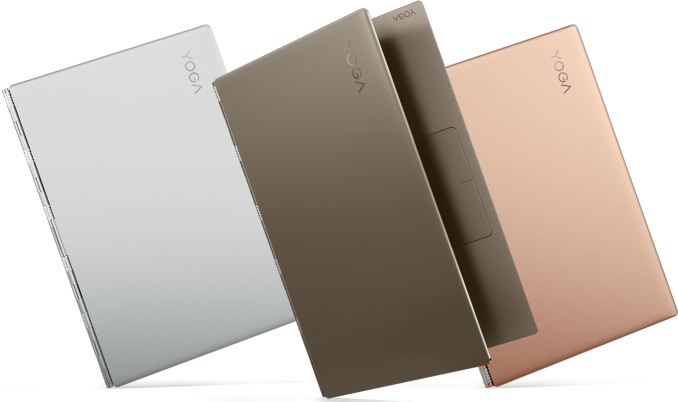
The Lenovo Yoga 920 convertible laptops will be available in silver, bronze and copper colors later this year starting from $1329 (a slight price bump over the predecessor). By contrast, the Yoga 910 came in silver, gold and dark grey (which the manufacturer called gunmetal).
Gallery: Lenovo Yoga 920
      Related Reading: | ||||||||||||||||||||||||||||||||||||||||||||||||||||||||||||||||||||||||||||||||||||||||









| << Previous Day |
2017/09/02 [Calendar] |
Next Day >> |