[Most Recent Entries] [Calendar View]
Thursday, September 14th, 2017
- GlobalFoundries Details 7 nm Plans: Three Generations, 700 mm², HVM in 2018
- Intel to Equip Fab 42 for 7 nm
- Samsung and TSMC Roadmaps: 8 and 6 nm Added, Looking at 22ULP and 12FFC
- ARM Launches DynamIQ: big.Little to Eight Cores Per Cluster
- ARM Announces Mali-G72: Bifrost Refined for the High-End SoC
- ARM Announces Mali-G72: Bifrost Refined for the High-End SoC
- HP Announces Omen X Laptop: 17.3” LCD, Core i7 + GeForce GTX with Overclocking
- HP Expands Commercial VR Strategy: Z VR Backpack and Immersion Centers
- HP Launches Elite x2 1012 G2 2-in-1: 12.3-Inch Display, Kaby Lake, 1 TB SSD, 16 GB LPDDR3, TB3
- HP Z2 Mini G3 Announced: Miniature Professional Workstation with Xeon and Quadro
- HP Introduces HP ENVY 13 Laptops with Kaby Lake, USB-C, New Battery, $849
- HP Updates The Z240 Workstation With The Core i7-6700K
| Time | Event | ||||||||||||||||||||||||||||||||||||||||||||||||||||||||||||||||||||||||||||||
| 9:00a | One Design, Two Products: The SanDisk Ultra 3D (1TB) and WD Blue 3D (1TB) SSD Reviews, with BiCS 3D NAND The first 3D NAND SSDs from Western Digital and its SanDisk subsidiary have arrived. The same mainstream SATA SSD with 3D TLC is being sold under two names, but either way it is a big step forward: SanDisk's 64-layer BiCS3 3D NAND enables faster performance and lower power consumption. | ||||||||||||||||||||||||||||||||||||||||||||||||||||||||||||||||||||||||||||||
| 11:45a | TSMC Teams Up with ARM and Cadence to Build 7nm Data Center Test Chips in Q1 2018
TSMC has announced plans to build its first test chips for data center applications using its 7 nm fabrication technology. The chip will use compute cores from ARM, a Cache Coherent Interconnect for Accelerators (CCIX), and IP from Cadence (a DDR4 memory controller, PCIe 3.0/4.0 links). Given the presence of the CCIX bus and PCIe 4.0 interconnects, the chip will be used to show the benefits of TSMC’s 7 nm process primarily for high-performance compute (HPC) applications. The IC will be taped out in early Q1 2018. The 7 nm test chips from TSMC will be built mainly to demonstrate capabilities of the semiconductor manufacturing technology for performance-demanding applications and find out more about peculiarities of the process in general. The chip will be based on ARMv8.2 compute cores featuring DynamIQ, as well as a CMN-600 interconnect bus for heterogeneous multi-core CPUs. ARM and TSMC do not disclose which cores they are going to use for the device - the Cortex A55 and A75 are natural suspects, but that’s a speculation at this point. The new chip will also have a DDR4 memory controller as well as PCI Express 3.0/4.0 links, CCIX bus and peripheral IP buses developed by Cadence. The CCIX bus will be used to connect the chip to Xilinx’s Virtex UltraScale+ FPGAs (made using a 16 nm manufacturing technology), so in addition to implementation of its cores using TSMC’s 7 nm fabrication process, ARM will also be able to test Cadence’s physical implementation of the CCIX bus for accelerators, which is important for future data center products.
As reported multiple times, TSMC’s 7 nm manufacturing process will be a “long” node and the foundry expects the majority of its large customers to use it. By contrast, the current 10 nm technology is aimed primarily at developers of smartphone SoCs. TSMC projects that its first-generation CLN 7FF fabrication technology, compared to its CLN16FF+, will enable its customers to reduce power consumption of their chip by 60% (at the same frequency and complexity), increase their clock rate by 30% (at the same power and transistor count) and shrink their die sizes by 70% at the same complexity. Sometime in 2019, TSMC plans to start making chips using its CLN7FF+ process technology with EUV for critical layers. TSMC claims that the CLN7FF+ will enable the company’s customers to further increase transistor density while improving other areas, such as yields and power consumption. TSMC does not disclose which of its 7 nm process technologies announced so far it is going to use for the test chip, but the use of EUV for test chips is something that cannot be excluded. For example, GlobalFoundries claims that they use EUV to accelerate production of test chips. On the other hand, since design rules for CLN7FF and CLN7FF+ are different, it is highly likely that TSMC conservatively uses the former for the test chip. TSMC’s CLN7FF process tech passed qualification in April and was expected to enter risk production in Q2 2017, according to TSMC’s management. The foundry expected 13 CLN7FF tape outs this year and it is projected that the fabrication technology would be used commercially starting from Q2 2018. Therefore, taping out the test vehicle using the first-gen DUV-only 7 nm process in Q1 2018 seems a bit late for early adopters who intend to ship their 7 nm SoCs in the second half of next year. Meanwhile, early adopters (read: Apple, Qualcomm, and some others) get access to new process technologies long before their development is completed and final PDKs (process development kits) are ready. Keeping in mind that the test chips feature a CCIX and PCIe 4.0 buses, it is clearly designed to show advantages of TSMC’s 7 nm process technologies for HPC applications. In fact, this is what TSMC says itself:
Related Reading | ||||||||||||||||||||||||||||||||||||||||||||||||||||||||||||||||||||||||||||||
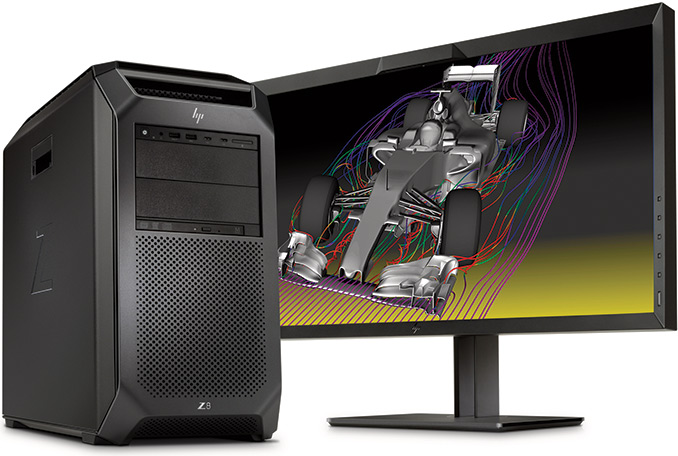
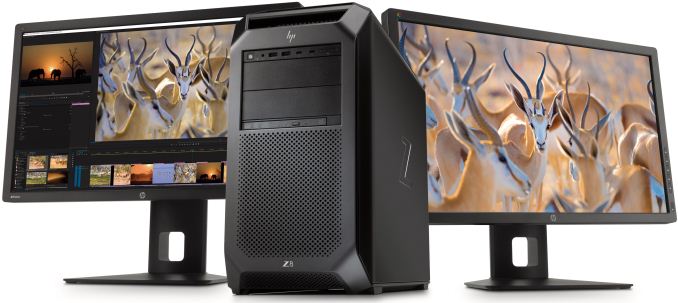
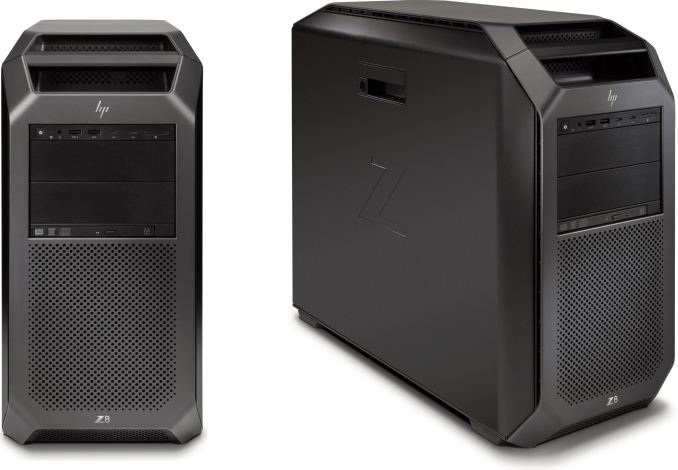
| 2:00p | HP Updates Z8 Workstations: Up to 56 Cores, 3 TB RAM, 9 PCIe Slots, 1700W
HP has updated its most powerful dual-processor Z8 workstation line with the latest components. The new systems contain up to two Intel Skylake-SP Xeon CPUs with up to 56 cores in total, up to 3 TB of DDR4 RAM, terabytes of storage as well as up to 9 PCIe slots along with optional TB3 and 10 GbE support via add-in cards. The HP Z8 workstation will be the pinnacle of HP’s computers for personal and professional use and its price in high-end configurations will surpass even the top-of-the-range gaming PCs. Historically, most high-end workstations relied on server platforms to support more than one CPU and thus offer higher performance than any consumer desktop. The emergence of dual-core and then multi-core CPUs a little more a decade ago changed the workstation market quite quickly and significantly. In a world with quad-core CPUs, 4-way workstations did not make a lot of sense for 99% of the users and therefore they quickly became extinct. Moreover, by now, even 2-way workstations became rare. Today, the vast majority of workstations use one multi-core CPU that provides enough compute horsepower for professional workloads, whereas GPU-based accelerators are used for tasks like simulations. Nonetheless, there are still users who need maximum x86 performance and who therefore require 2-way workstations — and the HP Z8 is aimed precisely at such users. While the Intel Xeon Scalable processors with extreme core count were developed primarily with servers in mind, the Z8 is a system that people put on their desks and therefore it has a number of specific requirements regarding noise levels, features, security, compatibility with components and so on.
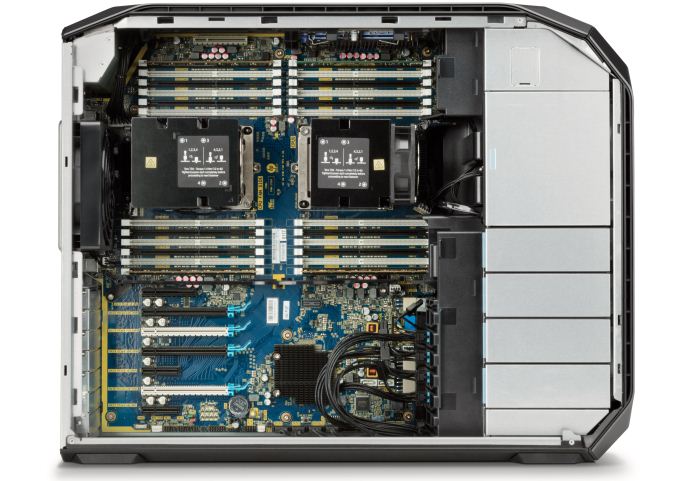
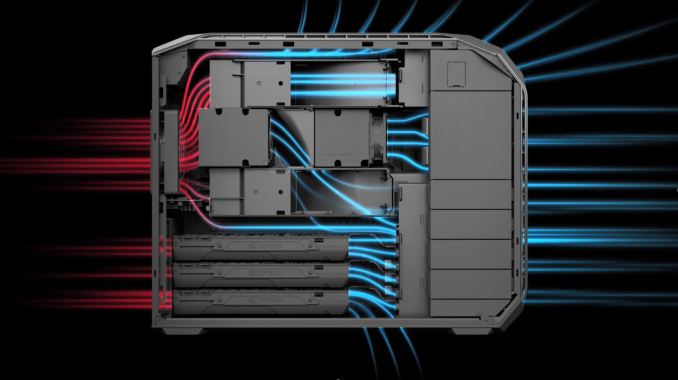
One of the key components of all PCs is its microprocessor. When it comes to the HP Z8, it is based on up to two Intel Xeon Platinum 8180 with 28 cores and 205 W TDP each, which means that the system has to remove 410 W of thermal energy only from CPUs, and this requirement had a significant impact on the design of the whole system. The company did not want to use a liquid cooling system, so it had to design an air cooling solution capable of cooling down two extremely hot CPUs as well as up to 24 DDR4-2666 memory modules. Each processor has its own radiator equipped with a high-pressure air fan (which speed is regulated by BIOS in accordance with system temperature monitored by numerous sensors). In addition, the system has multiple airflow vents on the front and on the top as well as one fan that exhausts hot air on the back. According to HP, such a chassis architecture ensures that the second CPU does not re-use warm air from the first one, but since they are located in close proximity, one will always affect another with its heat. Finally, the system has additional fans that cool down other components and produce more airflow within the chassis.
Speaking of other components, the HP Z8 supports plenty of them — whatever one might want. First off, the system has four PCIe 3.0 x16 slots for graphics cards or SSDs (up to AMD Radeon Pro, NVIDIA Quadro P100 or GP100, up to 4 TB HP Z Turbo Drive Quad Pro, etc.) three PCIe 3.0 x8 (two are non-hot swap) slots for SSDs and two PCIe 3.0 x4 slots. In addition to PCIe-based storage, the Z8 also features four 2.5”/3.5” bays for SATA/SAS SSDs or HDDs as well as two external 5.25” bays that can also accommodate drive form-factor storage devices using appropriate adapters. Those who need it, HP may also install an SD card reader as well as a slim DVD or Blu-ray ODD.
When it comes to connectivity, the HP Z8 has all the bases covered. By default, the system supports two GbE connectors (powered by Intel controllers), an 802.11ac Wi-Fi + Bluetooth module (Intel Wireless-AC 8265 controller), two USB 3.1 Type-C ports and two USB 3.1 Type-A ports on the front, four USB 3.1 Type-A ports on the back, multi-channel audio connectors (a Realtek HD ALC221 controller) on the back, a TRRS audio connector on the front and so on. Meanwhile, owners can optionally order to install two 10 GbE controllers, a Thunderbolt 3-supporting add-in-card and a variety of custom components for various industries and workloads (an external audio solution for a 5.25” bay, for example). Since many businesses and enterprises require robust security for all of their machines, the HP takes everything seriously and ships the Z8 with a whole set of security features that it calls HP SureStart. The system features secure authentication, full volume encryption, TPM 2.0, has a Kensington lock and so on.
All the CPUs, GPUs, SSDs and other components require a lot of power and HP Z8 has plenty of it. The manufacturer offers 1125 W, 1450 W or 1700 W internal PSUs with up to 90 % efficiency. The PSU is located in a compartment behind the motherboard, so chances are that HP uses proprietary units.
Now, time to talk about availability and pricing. HP intends to ship the HP Z8 workstations in October. An entry-level model with one CPU, a basic GPU and storage will cost $2,439. Meanwhile, once the system is equipped with two Xeon Platinum 8180 CPUs, NVIDIA Quadro P100/GP100 graphics, multiple PCIe SSDs, 3 TB of DDR4 memory, several 12 TB HDDs and various advanced I/O capabilities (TB3, 10 GbE, etc.), its price will easily hit tens of thousands of dollars. It's normally at this point that a vendor such as HP states that the high-end models are likely to be sold under B2B contracts, where per-unit costs are not as severe. One OEM has told us that only 5% of sales of their high-end workstations come through direct sales for onlike pricing. Gallery: HP Updates Its Dual-Processor Z8 Workstation: Up to 56 Cores, 3 TB RAM, 9 PCIe Slots, 1700W
      Related Reading | ||||||||||||||||||||||||||||||||||||||||||||||||||||||||||||||||||||||||||||||
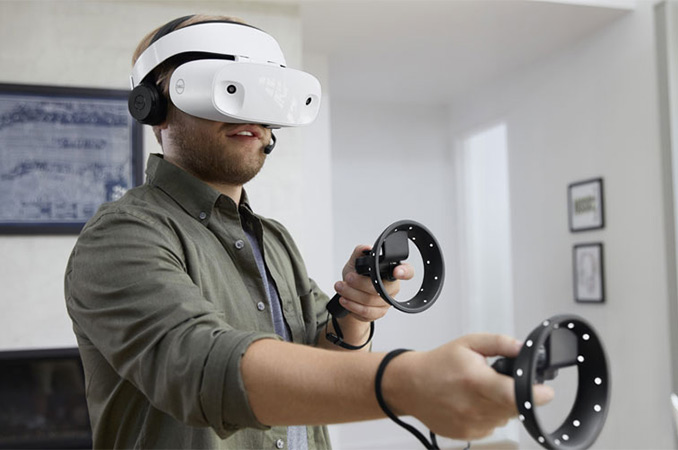
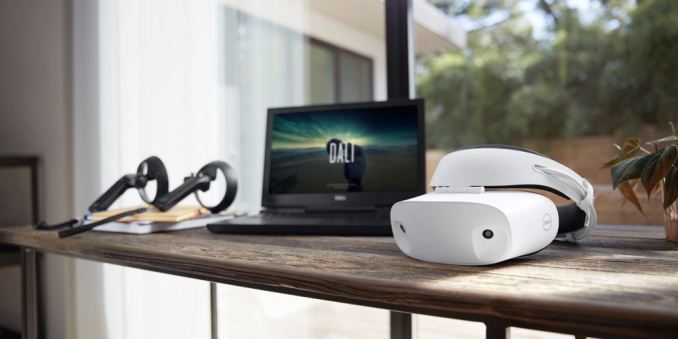
| 4:00p | Dell’s Visor Available for Pre-Order: A Mixed Reality Headset, Ships in Mid-October
Dell has begun to take pre-orders on its Visor headset for Windows Mixed Reality applications. The company will start shipments of the device in mid-October, just in time for Microsoft’s Windows 10 Creators Update that arrives on October 17 and ahead of the holiday season. Starting from September 14, Dell’s Visor WMR headset is available for pre-order from Dell.com/Visor in the U.S. and from PCWorld in the U.K. The headset itself is priced at $349.99, the controller kit costs $99.99 and a Visor with controllers is priced at $449.99. In the U.K., the whole kit is available for pre-order at £429.99. In order to play non-controller based AR/VR games on the Visor, users will also have to get an Xbox One controller. Dell will start to ship its Visor product on October 17, 2017. In addition, the company plans to make the device available in BestBuy stores and directly from Microsoft (online and offline). Dell’s Visor AR/VR headset complies with Microsoft’s requirements for headsets compatible with the Windows Mixed Reality platform: it connects to Windows 10-based PCs using HDMI and USB cables, it features two 1440×1440@90 Hz LCD panels (for a total resolution of 2880×1440) and two cameras to capture the outside world. While ergonomics and industrial designs of WMR-compliant headsets from Dell, Acer, ASUS and Lenovo are different, internally they end up being very similar.
The shipments date of the Dell Visor coincides with the launch date of Microsoft’s Windows 10 Creators Update, which will bring support for Windows Mixed Reality headsets to end users. That said it is highly likely that other makers of WMR gear will try to ship their products around the time of the official launch of the platform. In the meantime, Dell seems to be the first with pre-orders. Related Reading | ||||||||||||||||||||||||||||||||||||||||||||||||||||||||||||||||||||||||||||||
| << Previous Day |
2017/09/14 [Calendar] |
Next Day >> |