[Most Recent Entries] [Calendar View]
Monday, August 13th, 2018
- The Lenovo ThinkPad P70 Review: Mobile Xeon Workstation
- Lenovo Unveils ThinkPad P52: 8th Gen Core or Xeon, Quadro 3200, and 128GB RAM
- Lenovo’s ThinkPad T580 Launched: Quad-Core CPU, 4K LCD, 32 GB RAM, Up To 27 Hrs Battery Life
- Lenovo Announces New ThinkStation P520/P520C and ThinkPad 52s: Up to 18 Core Xeon-W, Quadro Graphics
- Lenovo Unveils ThinkPad P52: 8th Gen Core or Xeon, Quadro 3200, and 128GB RAM
- Lenovo Unveils New ThinkPad X1 Carbon, X1 Yoga Laptops: 8th Gen Core, Dolby Vision HDR
- Lenovo Re-Engineers ThinkPad X1 Tablet: 13-inch LCD, Quad-Core i7, TB3, 9.5 Hrs
- Lenovo’s ThinkPad T580 Launched: Quad-Core CPU, 4K LCD, 32 GB RAM, Up To 27 Hrs Battery Life
- Lenovo Announces New ThinkStation P520/P520C and ThinkPad 52s: Up to 18 Core Xeon-W, Quadro Graphics
| Time | Event | |||||||||||||||||||||||||||||||||||||||||||||||||||||||||||||||||||||||||||||||||||||||||||||||||||||||||
| 12:01a | Lenovo’s Unveils ThinkPad P72 Workstations: Thinner DTR with Intel Hex-Core CPUs
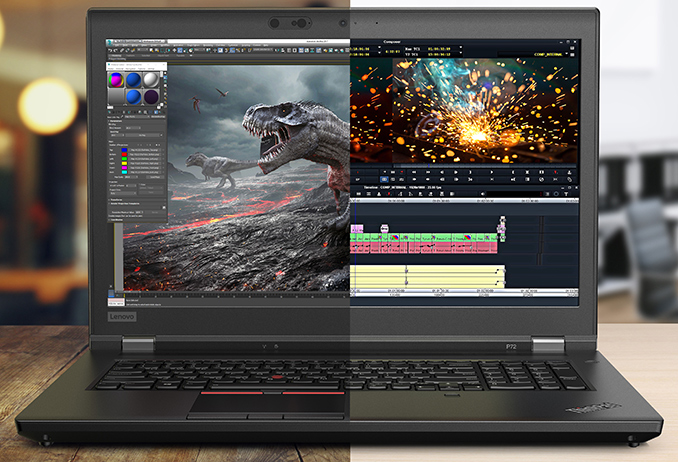
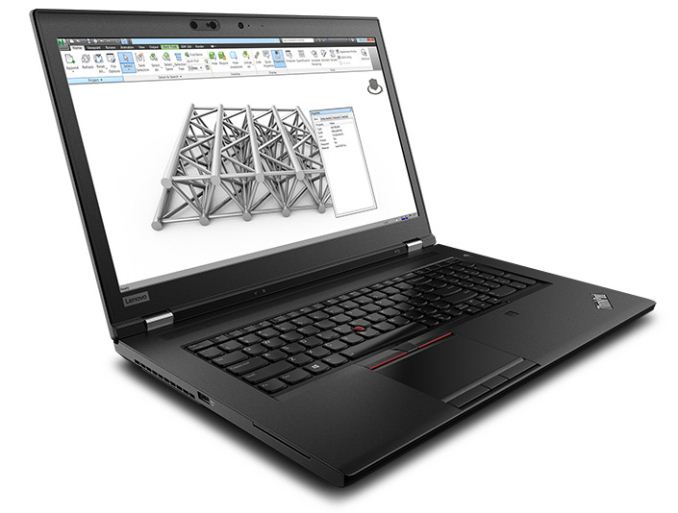
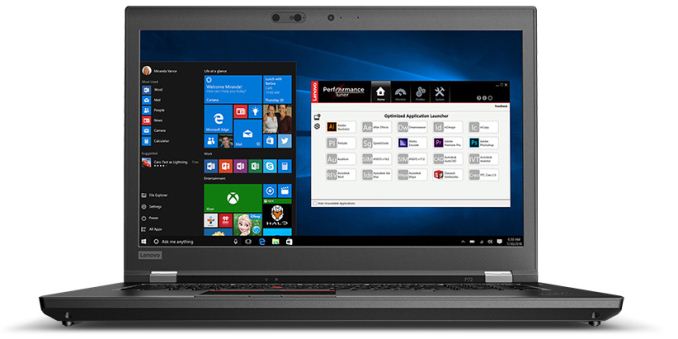
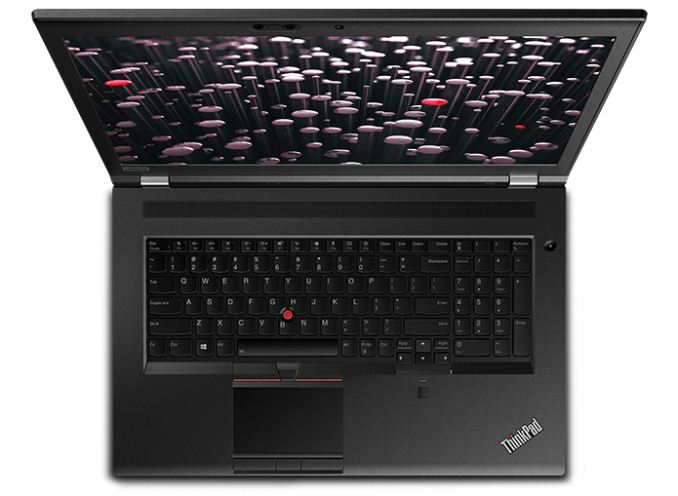
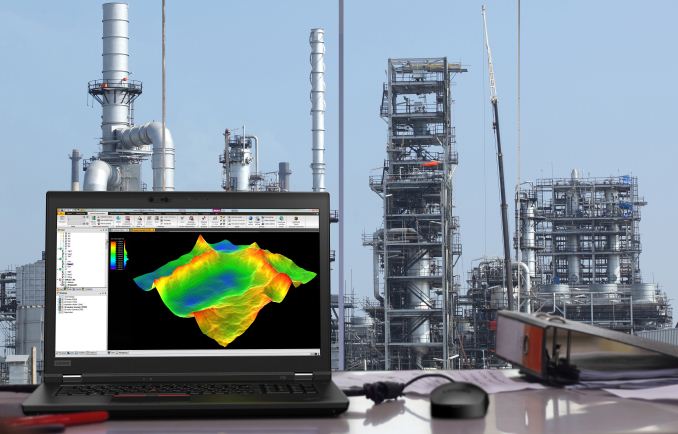
Lenovo today is unveiling a new version of its 17.3-inch ThinkPad P7-series highi-end portable workstations. The flagship of Lenovo's desktop replacement-class workstation laptops, the ThinkPad P72 has a new design that's a little thinner than predecessors, and more importantly has received significant performance bumps thanks to the inclusion of an Intel six-core CPU, NVIDIA’s new Quadro graphics card, and other improvements. Replacing the now outgoing P71, the Lenovo ThinkPad P72 is powered by Intel’s hex-core 8th Gen Core and Xeon processors, as well as NVIDIA’s latest Quadro P5200 discrete graphics with 16 GB of GDDR5X memory. Lenovo aims its ThinkPad P7-series mobile workstations at the oil and gas, automotive, and financial industries, which is where powerful CPUs and GPUs are more than welcome. Meanwhile, with a six core processor and a 9 TFLOPS of graphics under the hood, the ThinkPad P72 can be considered an “every duty notebook” as it has enough horsepower for almost any task.
The ThinkPad P72 can accommodate up to four SO-DIMMs carrying up to 128 GB of DDR4-2667 memory (up from 64 GB on P71), up to 6 TB of storage with RAID 0 or 1 support, as well as a 16 GB Optane Memory caching SSD for an additional speed bump. Lenovo's marketing material ahead of today's launch is a bit ambiguous on the matter, but it looks like the HDD option is for secondary storage, while the laptop uses an NVMe SSD for primary storage and booting.
Just as before, Lenovo will offer two LCD options with its ThinkPad P72 portable workstation. Premium SKUs will come with a 17.3-inch 10-bit IPS LCD with a 4K Ultra-HD (3840×2160) resolution, a 400 nits brightness, and covering 100% of the AdobeRGB color gamut. Models that need to be cheaper and/or run on a battery longer will be outfitted with a non-touch Full-HD (1920×1080) IPS panel offering a 300 nits brightness and full coverage of the sRGB color range.
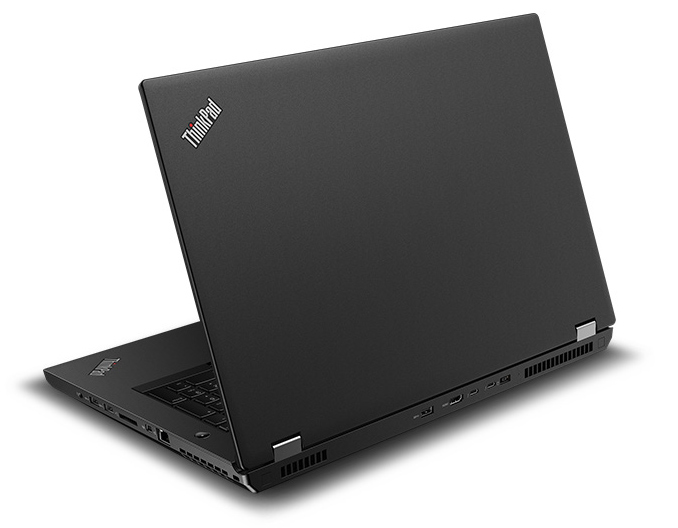
Connectivity-wise, the new Lenovo ThinkPad P72 brings everything one would expect in a 2018 DTR laptop. The notebook is equipped with Intel’s Wireless-AC 9560 802.11ac Wi-Fi solution featuring up to 1.73 Gbps throughput over 160 MHz channels as well as supporting Bluetooth 5.0 tech. On the wired side of things, the laptop has two Thunderbolt 3 connectors (run by an unknown controller), three USB 3.1 Gen 1 Type-A ports, a GbE header, two display outputs (HDMI 2.0, mDP 1.4), an optional smart card reader, a 4-in-1 card reader, and a TRRS audio connector.
Meanwhile when it comes to the chassis and overall aesthetic design, the always conservative Lenovo has put together a new chassis that generally tries to sustain their classic ThinkPad look. To that end, the latest ThinkPad P72 generally resembles its predecessor, the ThinkPad P71. The main difference between the two mobile workstations is thickness: at a 25.9 mm (1 inch) z-height, the the new one is about 5 mm thinner (0.2 inch). Losing half of a centimeter is a big deal as this naturally makes the new system a bit more portable overall. Meanwhile, the weight of the new unit is exactly the same as the weight of its predecessor — about 3.4 kg (7.5 pounds).
Although machines like the ThinkPad P72 will sit on desks most of the time, they are none the less portable machines, so Lenovo hasn't skimped on the battery. The P72 is equipped with a 99 Wh battery, which for all practical purposes is also the largest battery a laptop can be equipped with, due to airline regulations. I'm not immediately sure whether this is one battery or two – we sometimes seen "split" battery designs in DTR laptops – so based on Lenovo's materials it's not clear whether this is one battery or the maximum capacity of adding up built-in and removable batteries. At any rate, the manufacturer does not disclose the amount of time the P72 can work on one charge as it depends on exact configuration, but typically a 99 Wh battery can enable well over 15 hours of operation under light workloads. The Lenovo ThinkPad P72 will hit the market at the end of August at prices starting from $1,799.
Related Reading: | |||||||||||||||||||||||||||||||||||||||||||||||||||||||||||||||||||||||||||||||||||||||||||||||||||||||||
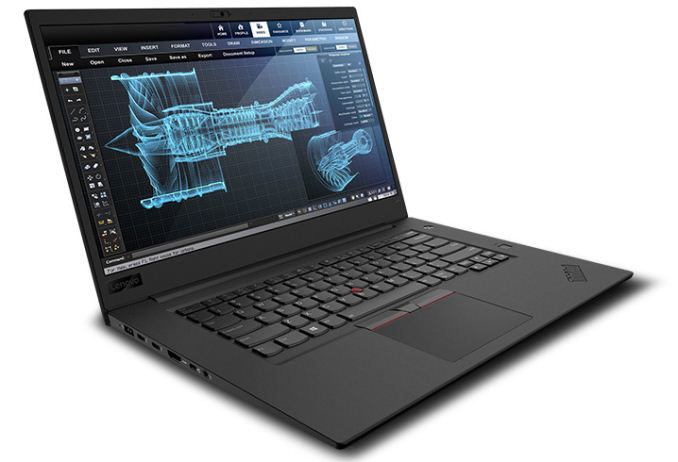
| 12:02a | Lenovo Launches Ultra-Thin ThinkPad P1: X1 Carbon Meets Workstation
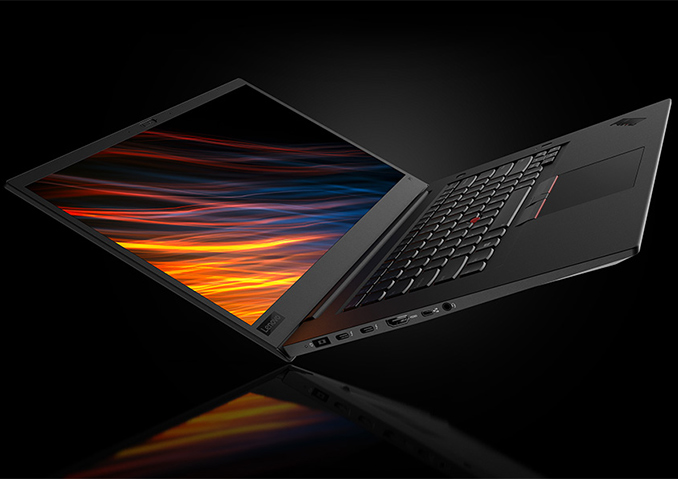
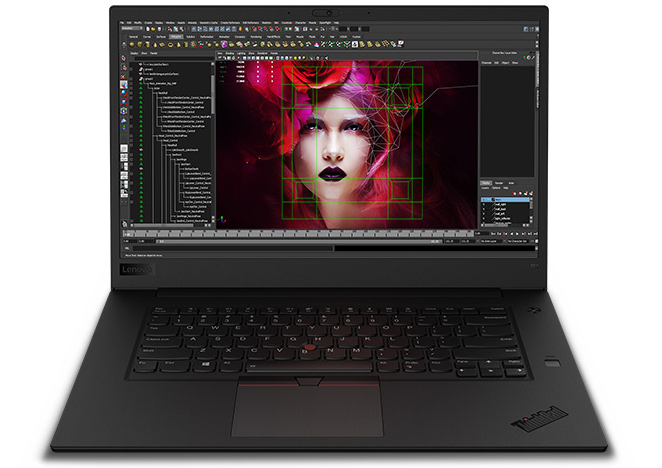
Lenovo on Monday introduced its new ThinkPad P1 workstation, which brings together a 4K 15.6-inch display, high performance, and portability. The system can integrate Intel’s latest Core or Xeon processors with up to six cores, NVIDIA’s Quadro discrete graphics, as well as a massive amount of DRAM and solid-state storage. At the same time, the P1 is one of the thinnest and lightest laptops of its class on the market today. The Lenovo ThinkPad P1 mobile workstation is based around Intel’s 8th Core i5/i7/i9 or Xeon processor accompanied by up to 64 GB of DDR4-2667 (with or without ECC) and up to 4 TB solid-state storage. It is noteworthy that Lenovo uses user-upgradeable SO-DIMM memory modules, not soldered-down chips, like many other PC makers do with ultra-thin laptops. When it comes to graphics, models with discrete GPU feature NVIDIA’s Quadro P1000 or P2000. Cheaper versions could potentially rely on Intel’s UHD 620 iGPU, but Lenovo is not announcing any such products today.
Lenovo intends to offer two display options with its ThinkPad P1. The more advanced SKUs are outfitted with a multitouch 15.6-inch 10-bit IPS LCD with a 4K Ultra-HD (3840×2160) resolution, a 400 nits brightness, and covering 100% of the AdobeRGB color gamut. The more affordable models will come with a non-touch Full-HD (1920×1080) IPS panel featuring a 300 nits brightness and covering 100% of the sRGB color range.
Moving on to connectivity. On the wireless side of things, the Lenovo ThinkPad P1 has Intel’s Wireless-AC 9560 802.11ac Wi-Fi solution featuring up to 1.73 Gbps throughput over 160 MHz channels as well as supporting Bluetooth 5.0 tech. As for hardware interfaces, the ThinkPad P1 is equipped with two Thunderbolt 3 ports (unknown controller), two USB 3.1 Gen 1 Type-A connectors, a mini GbE header (requires a dongle), an HDMI 2.0 output, an optional smart card reader, a 4-in-1 card reader, a webcam, a fingerprint scanner, and a TRRS audio port.
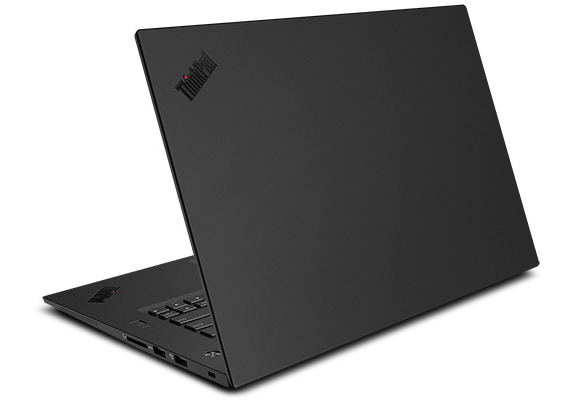
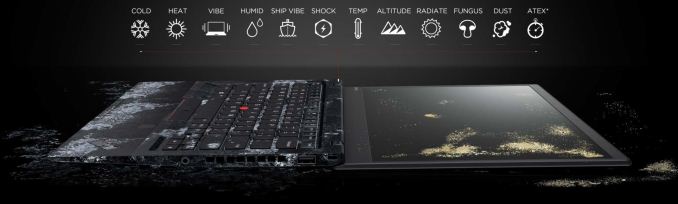
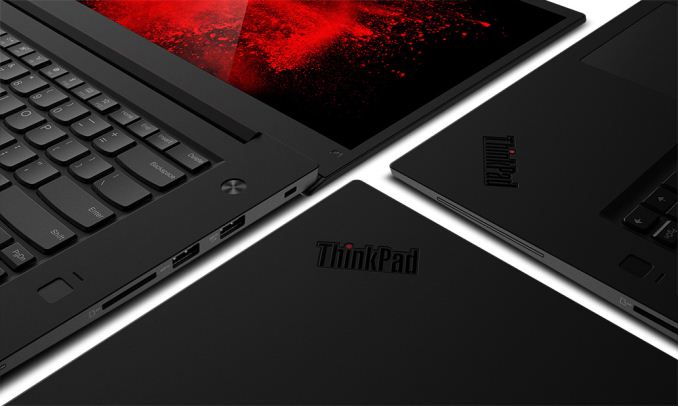
When it comes to design, the Lenovo ThinkPad P1 takes a lot of pages from the popular ThinkPad X1 Carbon series. It also comes in black carbon fiber chassis that is rugged enough to take bumps of everyday use by a road warrior. Lenovo says that the new ThinkPad P1 can withstand cold, heat, humid, dust, fungus (ed: !), shocks and other harsh environments, just like its smaller brother. Besides, the two flagship ThinkPads also have similar ergonomic keyboards.
Usage of carbon fiber enables Lenovo to make the laptop thinner and lighter than most 15.6-inch notebooks available today: it is just 17.8 mm (0.7 inch) thick and it weighs 1.7 kg (3.76 pounds). When compared to the latest MacBook Pro 15.6-inch, the latter will be thinner (at 15.5 mm/0.61 inch), but heavier (at 1.83 kg/4.02 pounds). Meanwhile, the ASUS ZenBook Pro 15 UX550 is both thicker (18.9 mm/0.74 inch) and heavier (1.86 kg/4.1 lbs) that the new ThinkPad P1.
All ThinkPad P1 models will come equipped with an 80 Wh battery, but the company does not disclose their battery life, possibly because there will be too many different configurations. It is noteworthy that Lenovo bundles a special miniature 135 W charger with a proprietary connection with the P1, and the laptop cannot use USB-C for charging. Lenovo will begin to ship the ThinkPad P1 in late August, prices will start at $1,949.
Related Reading: | |||||||||||||||||||||||||||||||||||||||||||||||||||||||||||||||||||||||||||||||||||||||||||||||||||||||||
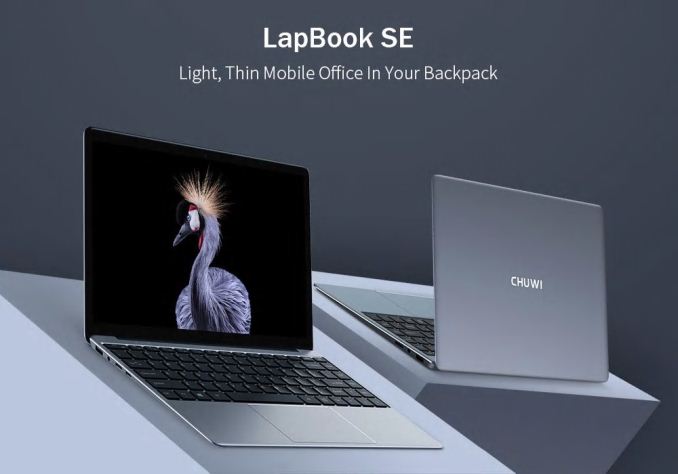
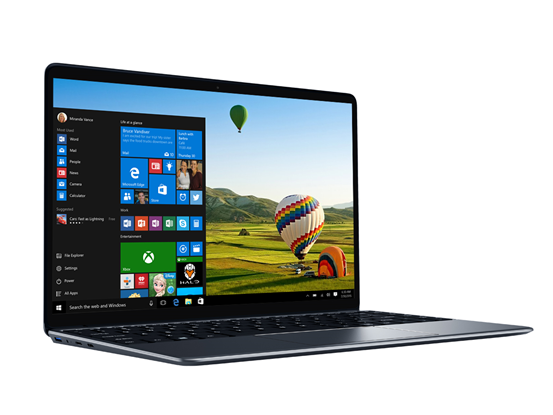
| 8:00a | Chuwi Launches The LapBook SE: Gemini Lake And SSD For $300
It’s been a bit of a wait to see the latest Intel Gemini Lake SoC to find its way into laptops, but Chuwi has now released the LapBook SE, which features the Intel Celeron N4100 processor, which is four of the latest Atom cores. Chuwi has also added some new features to improve their low-cost device lineup even further. The LapBook SE features 4 GB of LPDDR4 RAM, and ironically this is one of the first laptops available with LPDDR4, since Intel’s Core processors only support LPDDR3 at the moment. There’s also 32 GB of eMMC storage, along with 128 GB of SSD. Chuwi was likely taking the more is better approach, but I would have preferred to see it with just the SSD, and it’ll be interesting to see if you can configure it that way after purchase.
The LapBook SE has a 13.3-inch 1920x1080 IPS display as well, continuing their trend of providing a good display even in a low-cost machine. And, as a nice upgrade, there’s also a backlit keyboard. Unfortunately it doesn’t appear that the SE includes a USB-C port, which Chuwi has been using for charging on some of their products. The LapBook SE does offer HDMI and USB-A, along with an SD card reader and headset jack.
Chuwi tends to offer more for less, and with a good amount of storage, an IPS display, and the quad-core Gemini Lake processor, the LapBook SE should slot nicely into the bottom end of their range. We should be getting one for review as well, so if you have any questions about it, please let us know in the comments. Source: Chuwi | |||||||||||||||||||||||||||||||||||||||||||||||||||||||||||||||||||||||||||||||||||||||||||||||||||||||||
| 8:59a | The MSI MEG X399 Creation Motherboard Review: The New 16-Phase Shark In Town With the highly anticipated launch of AMD's second generation Threadripper processors, it gives motherboard vendors the incentive and justification to release more boards. As there aren’t tons of Threadripper 2-validated boards to currently choose from, MSI has released the new MEG X399 Creation with content creators and designers the targeted focus. This review aims to explore what the X399 Creation has to offer and see what all the fuss is about. | |||||||||||||||||||||||||||||||||||||||||||||||||||||||||||||||||||||||||||||||||||||||||||||||||||||||||
| 9:00a | The AMD Threadripper 2990WX 32-Core and 2950X 16-Core Review If you live by the workstation, you die by the performance. When it comes to processing data, throughput is key: the more a user can do, the more projects are accomplished, and the more contracts can be completed. This means that workstation users are often compute bound, and like to throw resources at the problem, be it cores, memory, storage, or graphics acceleration. AMD’s latest foray into the mix is its second generation Threadripper product, also known as Threadripper 2, which breaks the old limit on cores and pricing: the 2990WX gives 32 cores and 64 threads for only $1799. There is also the 2950X, with 16 cores and 32 threads, for a new low of $849. We tested them both. | |||||||||||||||||||||||||||||||||||||||||||||||||||||||||||||||||||||||||||||||||||||||||||||||||||||||||
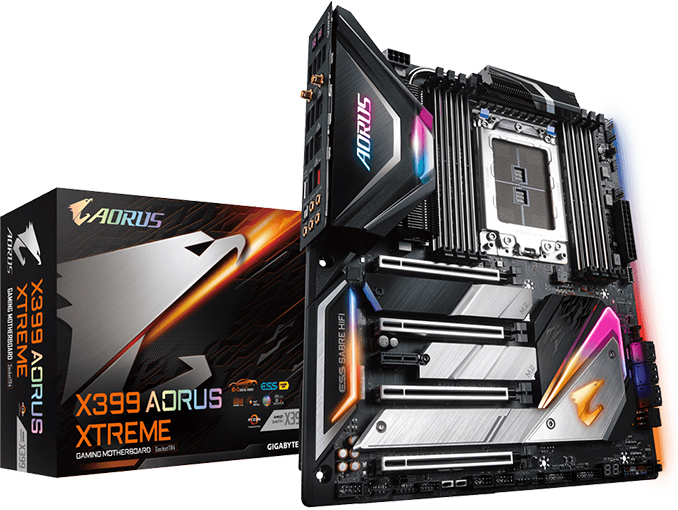
| 12:00p | GIGABYTE Ships X399 Aorus Xtreme: A Chariot for Threadripper 2
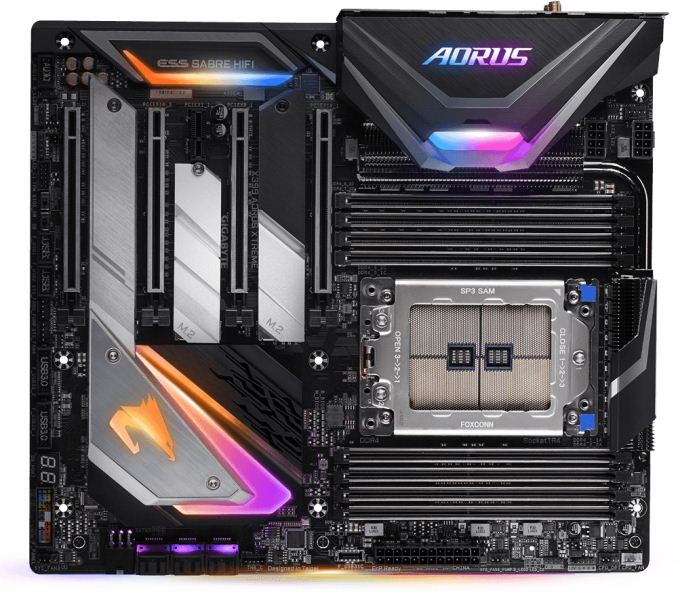
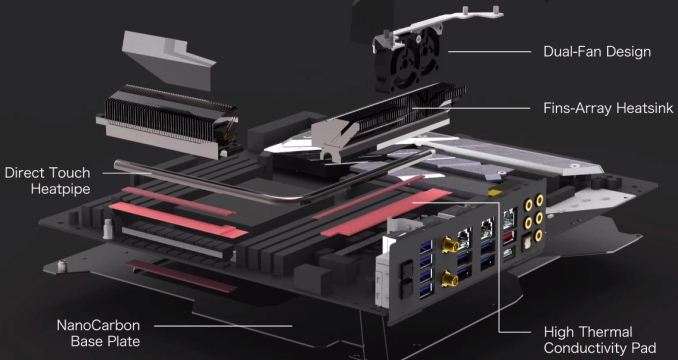
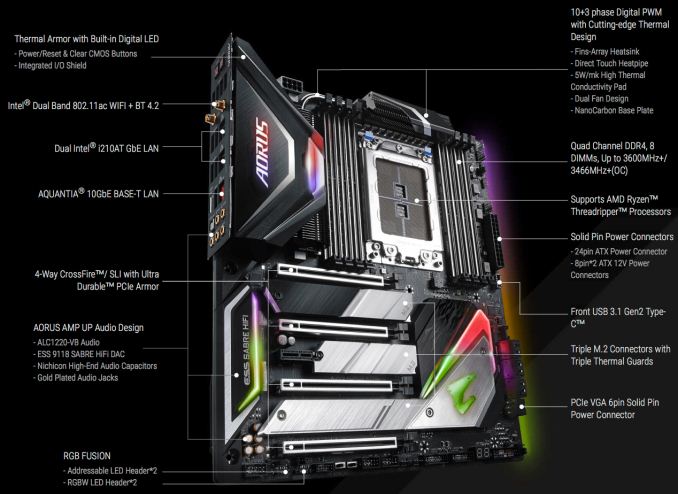
With the first AMD Threadripper 2 processors hitting the market today, GIGABYTE has started shipments of its flagship X399 Aorus Xtreme motherboard for AMD’s new chips. The motherboard comes in EATX form-factor and packs pretty much everything that one might want from a high-end desktop, including plenty of slots for add-in cards and additional SSDs, 10 GbE connectivity, an 802.11ac Wave 2 Wi-Fi controller, a high-end audio DAC, and so on. Flagship features also means flagship pricing, however, as GIGABYTE will be selling their uber Threadripper 2 board for $449. The GIGABYTE X399 Aorus Xtreme was designed specifically for AMD’s latest Threadripper 2 processors, meaning it can handle their 250 W TDP and then some, providing some additional headroom for overclocking. To ensure the latter, the mainboard has two 8-pin EPS connectors, something typically found on dual-socket and extreme enthusiast platforms. The motherboard has a 10+3-phase VRM featuring 50A IR3575 power ICs, solid state inductors, and polymer aluminum electrolytic capacitors. The VRM is covered with passive coolers featuring a direct contact heat pipe, multiple aluminum fins for a better heat dissipation as well as two 30-mm fans that kick off at low RPMs once the PWM reaches certain temperature. In addition, GIGABYTE installed a massive heatsink on the X399 chipset that not only cools down the chip, but plays an important aesthetic role as it has embedded RGB LEDs. Speaking of RGB, there are several other zones featuring RGB LEDs, but it is noteworthy that GIGABYTE did not make its top-end platform look like a Christmas tree.
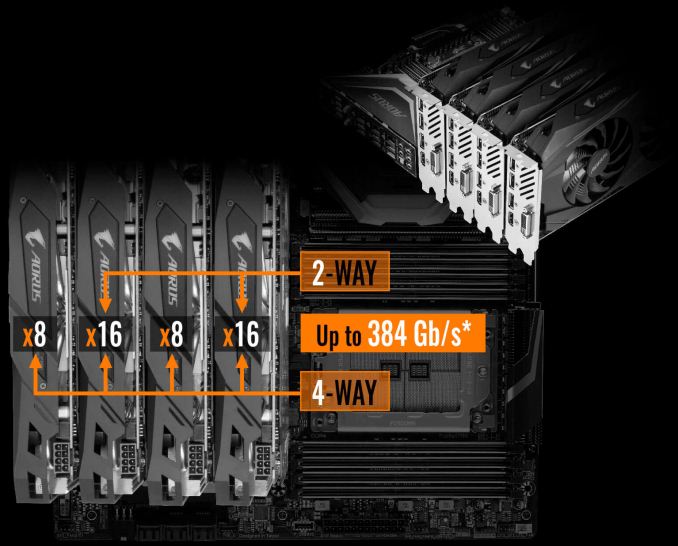
The X399 Aorus Xtreme motherboard is equipped with eight memory slots supporting 128 GB of DDR4-3600 memory (when overclocked). Besides, the platform carries four PCIe x16 slots supporting graphics cards and high-end SSDs (see exact PCIe configuration in the table below), three M.2. PCIe 3.0 x4 slots for SSDs (equipped with metallic heat spreaders), and one PCIe 3.0 x1 slot. In addition, the mainboard has six SATA ports for HDDs and SSDs.
Moving on to network connectivity capabilities of the X399 Aorus Xtreme because this is something that GIGABYTE may be proud of. First off, the motherboard has one 10 GbE port powered by the Aqunatia AQC107 chip. In adition, it has two GigE ports powered by Intel i210AT controllers. To top it off, the platform is outfitted with Intel’s Wireless-AC 9265 802.11ac Wave 2 controller, which supports 2 spatial streams with up to 867 Mbps data transfer rates. Four network connections on one PC sounds like a bit of an overkill, but the target audience for modern high-end desktops is all about overkill.
The audio subsystem of the X399 Aorus Xtreme is another differentiating feature of a high-end product. The 7.1-channel subsystem is based on Realtek’s ALC1220-VB codec outfitted with the ESS9118EQ DAC that features a 125 dB SNR and supports popular lossless formats, such as FLAC and ALAC. The audio tract uses Nichicon audio capacitors, has five gold plated audio jacks as well as a Toslink S/P DIF.
When it comes to USB ports, GIGABYTE’s X399 Aorus Xtreme has eight USB 3.1 Gen 1 Type-A connectors, one USB 3.1 Gen 2 Type-A port, and one USB 3.1 Gen 2 Type-C header on the back. Besides, four USB 3.1 Gen 1 and four USB 1.1/2.0 ports are available through internal USB headers (assuming that you can find the right front panel, of course). GIGABYTE’s X399 Aorus Xtreme motherboard is now available for pre-order from leading retailers, including Amazon and Newegg. The mainboard carries an MSRP of $449, which although is expensive, is also still a fraction of the price of the $1799 flagship 2990WX processor that GIGABYTE no doubt expects many of these boards to be paired with.
Related Reading: | |||||||||||||||||||||||||||||||||||||||||||||||||||||||||||||||||||||||||||||||||||||||||||||||||||||||||
| 5:00p | Enermax Unveils LiqTech TR4 II LCS: A 500W TDP Threadripper 2 Cooler
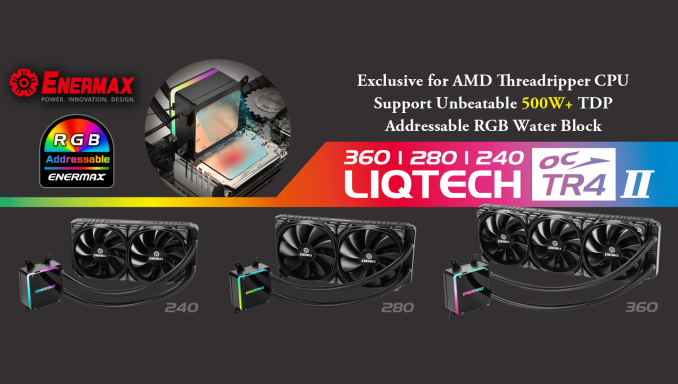
Enermax on Monday introduced its new LiqTech TR4 II closed-loop liquid cooling systems, which are designed for use with AMD’s latest Ryzen Threadripper 2 processors. Just like its predecessor, the new LCS covers 100% of processor’s IHS surface and can dissipate up to 500 W, which is well above AMD’s official 250W TDP specification. And following the latest trends, the new lineup also features addressable RGB LEDs. The new Enermax LiqTech TR4 II Threadripper 2 lineup consists of LCSs featuring 360, 280, and 240 mm radiators outfitted with multiple fans of appropriate sizes. Being aimed primarily at AMD’s latest Ryzen Threadripper 2 processors, the coolers can dissipate an excessive amount of heat. Enermax is rating the coolers to remove up to 500 Watts of heat, which is twice (or more) the processors' official TDP. Architecturally, the new LiqTech TR4 II feature the company’s micro-channel-based design with a shunt channel (the firm calls it SCT) that maximizes cooling performance, something that the original LiqTech TR4 AIO AIO cooler did as well. Meanwhile, the main difference between the two LCSes are addressable RGB LEDs featured on the latest models. The LEDs are controllable using a control box that the manufacturer supplies as well as software from makers of motherboards (yet, Enermax does not say which ones). Enermax plans to start sales of the LiqTech TR4 II LCS this month. The top of the range 360mm model costs $160 at leading retailers like Newegg. Others will start at $140. Related Reading: | |||||||||||||||||||||||||||||||||||||||||||||||||||||||||||||||||||||||||||||||||||||||||||||||||||||||||
| 6:56p | NVIDIA SIGGRAPH 2018 Keynote Live Blog (4pm Pacific) Kicking off momentarily will be NVIDIA's 2018 SIGGRPAH keynote. This is a bit of an unusual event for NVIDIA, as while they present at SIGGRAPH every year, it's normally a lower-key affair. Instead, this year the man himself, NVIDIA CEO Jensen "the more you buy, the more you save" Huang is giving a full keynote address at the show. | |||||||||||||||||||||||||||||||||||||||||||||||||||||||||||||||||||||||||||||||||||||||||||||||||||||||||
| 8:20p | NVIDIA Reveals Next-Gen Turing GPU Architecture: NVIDIA Doubles-Down on Ray Tracing, GDDR6, & More Moments ago at NVIDIA’s SIGGRAPH 2018 keynote presentation, company CEO Jensen Huang formally unveiled the company’s much awaited (and much rumored) Turing GPU architecture. The next generation of NVIDIA’s GPU designs, Turing will be incorporating a number of new features and is rolling out this year. And while the focus of today’s announcements is on the professional visualization (ProViz) side of matters, we expect to see this used in other upcoming NVIDIA products as well. And by the same token, today’s reveal should not be considered an exhaustive listing of all of Turing’s features. | |||||||||||||||||||||||||||||||||||||||||||||||||||||||||||||||||||||||||||||||||||||||||||||||||||||||||
| 10:30p | NVIDIA Announces Turing-Powered Quadro RTX Family: RTX 8000, 6000, & 5000 Arrive In Q4’2018
Alongside today’s announcement of their new Turing GPU architecture, NVIDIA has also announced the first three products that will use the first Turing GPU. Breaking from tradition, NVIDIA has announced the workstation-class Quadro parts first. Part of the new Quadro RTX family, the Quadro RTX 8000, RTX 6000, and RTX 5000 are NVIDIA’s fastest workstation cards yet, and are set to arrive in the fourth quarter of this year. For complete details on the Turing architecture, please see our companion article. But in short Turing is an evolution of the Volta architecture, taking everything that made the GV100 fast, and then improving on it. For professional visualization (ProViz) users, the big news here is that the cards feature hardware ray tracing acceleration, thanks to the combination of NVIDIA’s new RT cores, and the tensor cores brought over from Volta. Used together, the new cores can be used to speed up ray tracing, and then implement further post-processing tricks to cut down on the amount of work required to generate a photorealistic image. The new GPUs and resulting Quadro cards are also the first NVIDIA cards to get GDDR6 memory – up to 48GB of it – doubling the amount of memory available versus NVIDIA’s Quadro P6000, and also offering a significant bandwidth increase at the same time. Going one step further, NVIDIA has also included support for NVLink, their proprietary multi-GPU cache coherent interlink, which will allow Quadro RTX cards to be installed in pairs and share their frame buffer memory. NVLInk isn’t as good as local memory, but with a reported 100GB/sec of bandwidth between the two cards, it’s also nothing to sneeze at. As a result of these features NVIDIA is aiming very hard at the visual effects industry (e.g. movie and TV production), as they are some of the most demanding users in terms of performance needs, and have some of the deepest pockets as well. NVIDIA of course is no stranger to this market, but this is the biggest play they’ve ever made for it. They greatly want to bend users away from CPU-based ray tracing farms and on to more compact GPU farms. This also means that NVIDIA has been pushing very hard behind the scenes to get software ready for their cards and the underlying RTX ray tracing functionality. While we’re still in the very early days, NVIDIA has already lined up Autodesk, Adobe, the Chaos Group, Dassault Systèmes, and of course Epic Games (among others) to support the technology in some fashion. There’s still a definite chicken-or-the-egg element in play, but NVIDIA is making a concentrated effort to get the proverbial eggs out there.
All told, there are 3 Quadro RTX cards initially launching. The Quadro RTX 8000 and RTX 6000 are nearly spitting images of each other; both offer the same GPU performance and memory bandwidth thanks to the combination of 4608 CUDA cores, 576 tensor cores, and GDDR6 memory. The difference between the two is that the RTX 8000 is equipped with a full 48GB of VRAM (24 chips in a clamshell configuration), while the RTX 6000 has just 24GB of VRAM. It’s only in the final card of the stack, the RTX 5000, that NVIDIA offers a lower performing card for less money. This partially-enabled card gets 3072 CUDA cores, 384 tensor cores, and 16GB of GDDR6. At this point we’re still waiting on more information on power consumption for these cards. But the images NVIDIA has released thus far shows them using a typical NVIDIA blower configuration, so expect sub-250W parts. Meanwhile NVIDIA has confirmed that all of the cards come with 4 DisplayPort 1.4 outputs. Along with that, all of the cards will feature a 5th output: a VirtualLink-capable USB Type-C port. The recently introduced VirtualLink standard is a USB-C alt mode, and it allows a single cable to carry all of the video, data, and power a VR headset requires, allowing headsets to be directly tethered to a video card without requiring multiple cables. There are no VirtualLink-capable headsets yet, but with Oculus, Valve, and Microsoft all backing the standard, it will only be a matter of time. Wrapping things up, the new Quadro RTX cards will be available in Q4 of this year. Prices start at $2,300 for the RTX 5000, and quickly get more expensive from there. An RTX 6000 will set buyers back $6,300, while the flagship RTX 8000 will be a full $10,000. | |||||||||||||||||||||||||||||||||||||||||||||||||||||||||||||||||||||||||||||||||||||||||||||||||||||||||



| << Previous Day |
2018/08/13 [Calendar] |
Next Day >> |