[Most Recent Entries] [Calendar View]
Friday, August 17th, 2018
- Adobe® Acrobat® Pro DC
- AutoIT 3.3.14.2
- BowPad64-2.3.3 installer
- Google Chrome™
- Microsoft® Excel® 2016
- Microsoft® OneNote® 2016
- Microsoft® Outlook® 2016
- Microsoft® PowerPoint® 2016
- Microsoft® Word® 2016
- Windows Zip
- Adobe® Photoshop® CC 2017
- Adobe® Lightroom® Classic CC
- CyberLink PowerDirector® 2015
- Adobe® Acrobat® Pro DC
- Adobe® Lightroom® Classic CC
- Adobe® Photoshop® CC 2017
- CyberLink PowerDirector® 2015
- Google Chrome™
- Microsoft® Excel® 2016
- Microsoft® OneNote® 2016
- Microsoft® Outlook® 2016
- Microsoft® PowerPoint® 2016
- Microsoft® Word® 2016
- Processor: Intel® Core™ i3-7100 @ 4.20 GHz
- Operating System: Microsoft Windows 10 Pro x64 (build 1709)
- RAM: 1x4GB DDR3
- Graphics: Intel® HD Graphics 630
- Audio: Integrated High Definition Audio
- Storage: 128GB capacity, M.2 SATA
- Networking: Integrated Gigabit Ethernet
- Cooler Master Announces ML120R/240R AIO Liquid Coolers: Addressable RGB
- Cooler Master Launches Wraith Ripper Cooler for Threadripper 2 CPUs
- NZXT Expands Kraken AIO Lineup: Their First 360mm AIO, New Kraken M Series
- EVGA Releases CLC120 CL11 AIO CPU Cooler: Simple and Affordable
- Cooler Master Announces MasterLiquid ML120L RGB and ML240L RGB CLC: Lighting Up The Night
- Complete the Sweepstakes entry form - 1 entry
- Sign up for the AnandTechForums - 1 entry
- Visit AnandTech on Facebook - 1 entry
- PowerColor Shows Off Tiny Thunderbolt 3 External GPU Boxes Money Can’t Buy
- Razer Launches Core X TB3 eGFX Enclosure: Cost-Down Version Complements Core v2
- ASUS Launches XG Station Pro TB3 eGFX Chassis: 330 W, 2.5-Wide Cards
- ZOTAC Unveils AMP Box and AMP Box Mini eGFX TB3 Chassis
- Razer Launches Core v2 TB3 eGFX Enclosure: Dual TB3 Controllers
- PowerColor Announces Gaming Station: The Devil Box’s Spawn, TB3 eGFX Enclosure
| Time | Event | ||||||||||||||||||||||||||||||||||||||||||||||||||||||||||||||||||||||||||||||||||||||||||||||||||||||||||||||||||||||||||
| 8:00a | BAPCo Publishes SYSmark 2018
One of the bigger consortiums for developing benchmarks is BAPCo. Over the years the company has released a variety of benchmarking tools, such as MobileMark, TabletMark, and SYSmark. This latter software tool is run by a number of high profile OEMs to categorize their systems, and used by numerous government agencies to gauge performance on systems with key metrics. Today BAPCo is announcing its next generation of SYSmark, known as SYSmark 2018. The BAPCo consortium is a non-profit consortium, with members including Dell, HP, Hitachi, Intel, Lenovo, Microsoft, Pegatron, Samsung, Toshiba, WD, Winstron, and others. The goal of the consortium is to develop objective performance benchmarks, using high profile and common tools as the baseline for the metrics. By virtue of being a high-profile non-profit, and working at government level procurement, BAPCo has had significant success in its benchmark deployments.
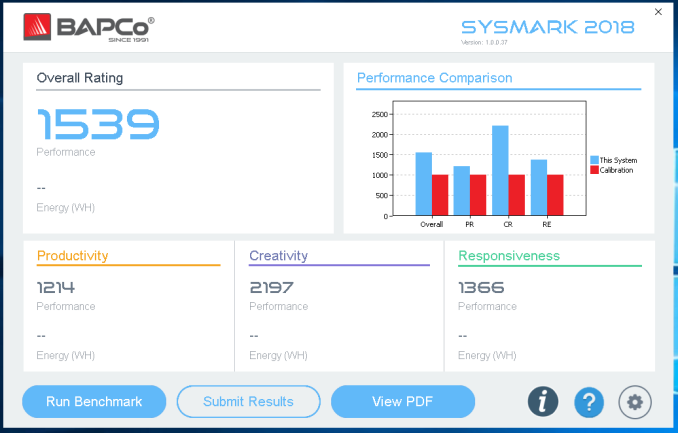
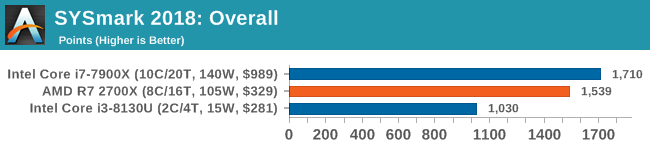
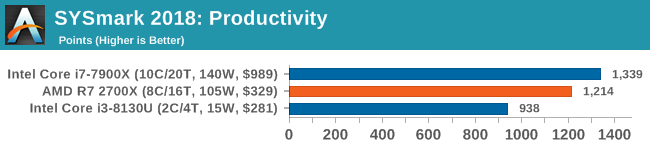
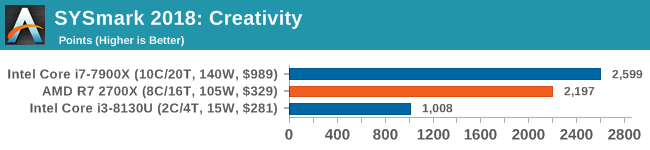
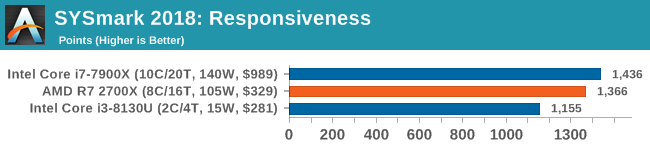
Software such as SYSmark 2018 takes a number of software utilities, such as Photoshop, Office, Chrome, and PowerDirector to profile a system with four metrics: an overall score, a productivity score, a creativity score, and a responsiveness score. Recent updates in the last edition enabled power measurement during benchmarks using a Watts Up! meter, which also comes through in the 2018 edition. The new edition has the following tests (taken from the manual): 1. ProductivityThe Productivity scenario models productivity usage including word processing (mail merge, document comparison, and PDF conversion), spreadsheet data manipulation (data modeling, financial forecasting), and email creation/management, presentation editing, software development (compiling code), application installation, and archiving files. 2. CreativityThe Creativity scenario models editing digital photos (creating HDR and panoramic photos), cataloguing digital photos (organizing catalog, use of facial detection to group people), and editing digital video (create a timeline from various source clips and transcode the output). 3. ResponsivenessThe Responsiveness scenario includes activities such as multiple application launches, web browsing with many tabs open, and task switching. Standard System ComparisonThese benchmarks blur the lines between synthetic and real-world, though often land on the side of real-world. By condensing the results into a single number, it can offer an easy way to reflect on the scale of performance, although it also obfuscates some of the nuance. The results are compared to a base system score of 1000 points, which for this generation will be a low-end Dell Optiplex 5050 Tower: This is a step up from SYSmark 2014 1.5, which used an i3-6100 and a spinning hard-drive. With this default system, the i3-7100 has a nice and fast single core performance, is a quad core, but will be let down by the single channel memory. New features for SYSmark 2018 include the ability to uninstall the software, run the tests from the command line, and also enable post-processing of sub-test data. All three of which should help reviewers and testers automate into our scripts. We ran the benchmark on a number of test systems we have set up, and scored the following:
BAPCo’s benchmark suites are approved by the consortium members before being released. It must be pointed out that AMD left the consortium after SYSmark 2012 was launched (NVIDIA and VIA also left). This came about due to disagreements about the nature and weighting of the workloads that seemed beneficial to the competition. Despite this, SYSmark is still considered by many as a major benchmark for various markets, and since AMD’s newest high performance x86 processor came to market, results in the last generation SYSmark 2014 SE were competitive. Related Reading | ||||||||||||||||||||||||||||||||||||||||||||||||||||||||||||||||||||||||||||||||||||||||||||||||||||||||||||||||||||||||||
| 9:30a | SSD Form Factors Proliferate At Flash Memory Summit 2018
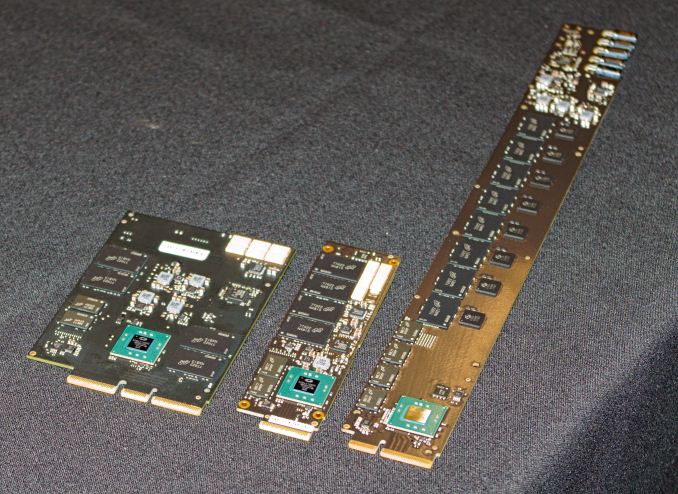
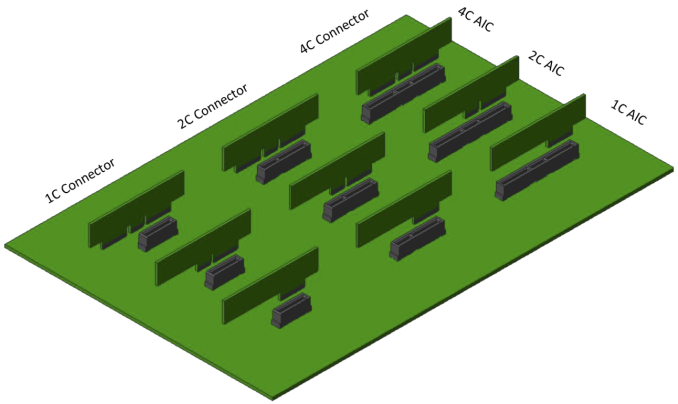
Last year, Intel and Samsung proposed new form factors for enterprise/datacenter SSDs with the goal of overcoming the shortcomings of the existing M.2, U.2 and PCIe add-in card form factors. Samsung's NF1 form factor (previously known as NGSFF) had little presence at Flash Memory Summit this year without Samsung's participation in the show, but the derivatives of Intel's Ruler design were all over the place. Unfortunately, the Ruler has spawned not just one industry standard, but a whole family of new form factors. Working with SFF, the committee originally formed to standardize the 2.5" hard drive form factor, Intel's Ruler has led to the Enterprise and Datacenter SSD Form Factor (EDSFF) family of standards. Why new form factors?The existing form factor options for enterprise SSDs have proven inadequate for datacenter needs. It is increasingly common for servers to use several types of SSD (boot drive, performance tier, capacity tier), and that usually requires using more than one SSD form factor. Each has its own downsides: 2.5" SATA, SAS, U.2: Drives with the same 7mm thickness that consumer SATA drives use are relatively limited in maximum PCB area for NAND flash packages, and internal volume for power loss protection capacitors. Increasing the thickness up to 15mm allows for bulky capacitors and two PCBs stacked inside the drive's case, but this severely compromises the ability to cool the drive. Backplanes for 2.5" drives tend to be a severe airflow obstruction. PCIe add-in cards: Half-height half-length (HHHL or MD2) cards have plenty of PCB surface area for large amounts of flash and heatsinks that can handle 40W or more. Full-height cards increase these limits even more. This is the only current option for PCIe x8 or wider interfaces. Hot-swapping is possible with many cards, but this does little good when the cards are not accessible from the front of the server. M.2: Enterprise SSDs typically use the M.2 22110 card size that is longer than the 2280 card used by client/consumer drives. The extra space allows for higher drive capacities or power loss protection capacitors. However, the power and thermal limits are still severely constraining. Delivering more than 8W with only a 3.3V supply requires careful system design to ensure that enough current can be provided without the voltage dropping out of the required 5% tolerance. Dissipating 8-12W usually requires heatsinks that detract from the density advantage of such a small form factor. Hot-swapping is only possible by installing M.2 drives in some form of carrier module that further inflates the space occupied by each drive.
| ||||||||||||||||||||||||||||||||||||||||||||||||||||||||||||||||||||||||||||||||||||||||||||||||||||||||||||||||||||||||||

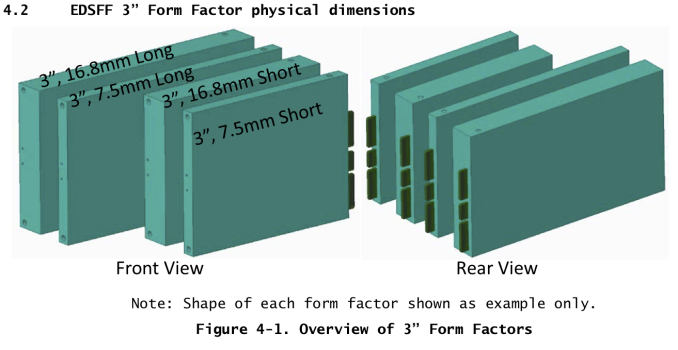


| SSD Form Factor Comparison | ||||||
| Form Factor | Approximate Dimensions (mm) |
Typical SSD Power Limit |
||||
| 2.5" U.2 | 70 | 100 | 7-15 | 25 W (15mm) | ||
| 3.5" | 102 | 147 | 26 | |||
| PCIe HHHL | 68 | 168 | 19 | 40-75 W | ||
| M.2 22110 | 22 | 110 | 5 | 8.25 W | ||
| EDSFF 1U Short | 32 | 112 | 6-8 | 12 W | ||
| EDSFF 1U Long | 38 | 319 | 9.5 | 25 W | ||
| 38 | 319 | 18 | 40 W | |||
| EDSFF 3", 7.5mm |
Short | 76 | 105 | 7.5 | 20 W | |
| Long | 76 | 142 | 7.5 | 35 W | ||
| EDSFF 3", 16.8mm |
Short | 76 | 105 | 16.8 | 40 W | |
| Long | 76 | 142 | 16.8 | 70 W | ||
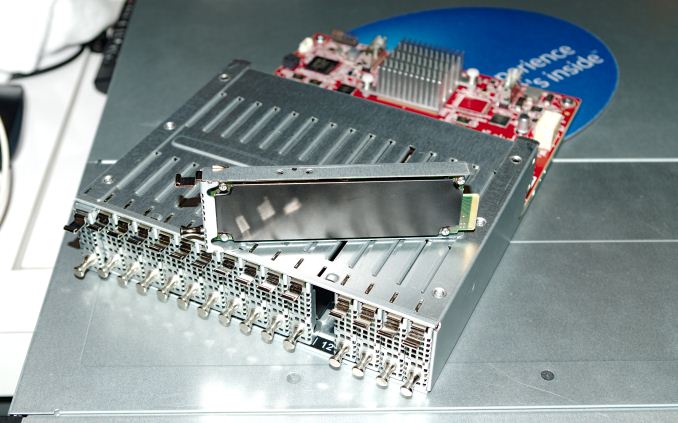
Almost all of the EDSFF hardware on display at Flash Memory Summit was using the 1U drive sizes. It appears that the 1U Short size will be the most popular, and the 1U Long will mostly be reserved for storage-oriented servers and JBOF enclosures. However, Intel did demonstrate a 1U Long accelerator card using a large Altera FPGA, taking advantage of the extra power and cooling provided by the thicker 1U Long variant.

The 3"/2U form factors are most likely to be used by servers designed to support a flexible mix of storage and compute/accelerator modules. The thicker 3" form factors could also potentially expose I/O connectors on the front of the server for things like network cards, but the current standard doesn't have anything to say about such applications.
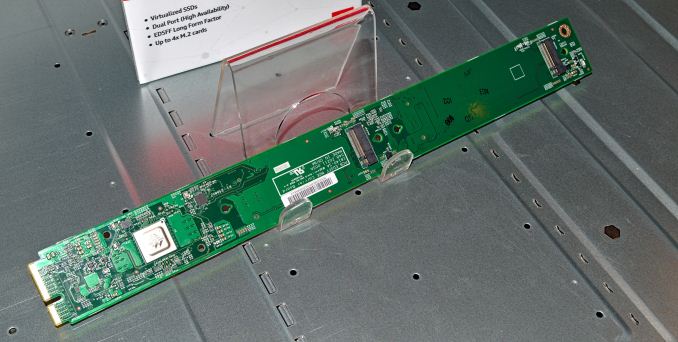
1U Long quad M.2 carrier board with Marvell 88NR2241 NVMe Switch
Microsoft Azure has been using pre-standard 1U Long Ruler cards as carriers for 4 M.2 drives in some of their systems, but the complexity makes those merely a short-term transitional solution. They have qualified one native EDSFF 1U Long SSD and put it into production, and are working on qualifying three more drive designs in that form factor. They are also looking into using the largest 3" form factor as a replacement for PCIe HHHL cards. HPE is considering adopting the 3" form factor for their next generation of servers, and many other vendors are keeping an eye on the EDSFF standards but have been less specific about their plans.
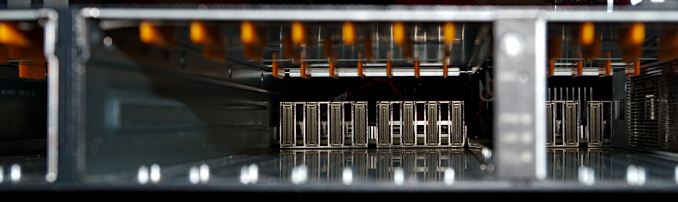
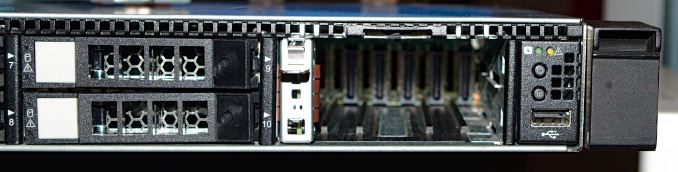
The servers on display at FMS did not all use EDSFF form factors exclusively. We saw a 1U server with traditional 2.5" bays, but the last two bays had been replaced by a 6-drive bay for EDSFF 1U Short drives.
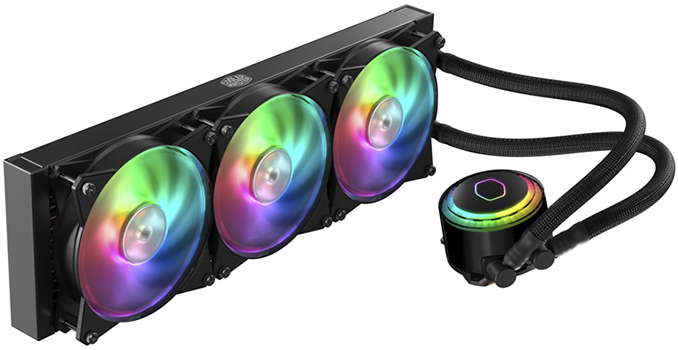
Cooler Master this week introduced its new closed-loop liquid cooling solution featuring customizable RGB LED lighting and a 360-mm radiator. The MasterLiquid ML360R RGB is the company’s first cooler with such a large radiator and is therefore among the most capable liquid cooling systems (LCS) that Cooler Master has released to date. Following the latest trends, the new cooling system has 36 independently controlled RGB LEDs: 12 in the pump and eight in every fan.
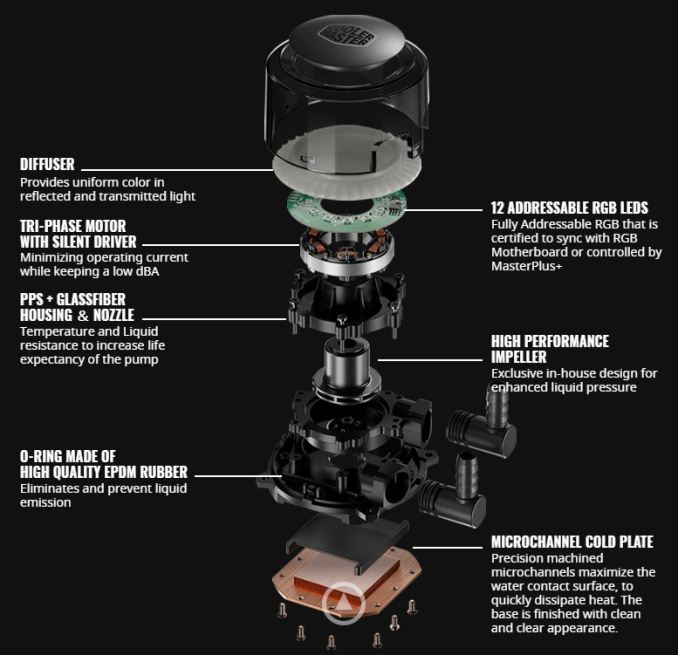
The Cooler Master MasterLiquid ML360R RGB resembles the company’s MasterLiquid ML240R RGB (240 mm) and ML120R RGB (120 mm) LCS units introduced earlier this year. The key component of all MasterLiquid coolers launched in 2018 is the company's latest cylinder-shaped CPU block/pump that is made of PPS (Polyphenylene Sulfide) as well as glass fiber. The pump uses a tri-phase motor that produces no more than 15 dBA of noise, it has a microchannel copper cold plate and features two chambers for warm and cold coolant. As for tubing, all new MasterLiquid LCS use sleeved, double-layer FEP (Fluorinated Ethylene Propylene) tubes that are said to be both flexible and reliable.
When it comes to compatibility, Cooler Master’s latest coolers are compatible with modern processors from AMD and Intel, including chips in AM4 and LGA-2066 packaging, but excluding TR4 CPUs.
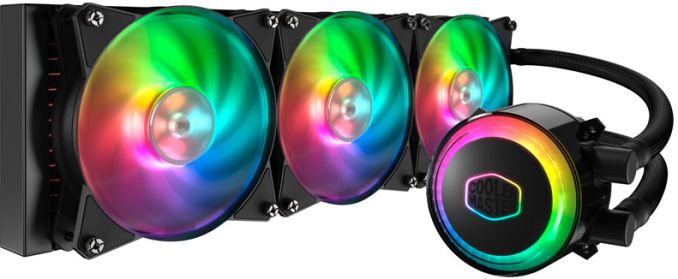
Cooler Master does not disclose the maximum amount of thermal energy that the MasterLiquid ML360R RGB can dissipate, but typically 360-mm radiators outfitted with three fans that feature speeds between 650 and 2000 RPM are enough to handle overclocked high-end desktop CPUs.
As noted above, all 36 RGB LEDs used for the MasterLiquid ML360R RGB can be independently controlled using the company’s proprietary MasterPlus+ software as well as programs from ASUS, ASRock and MSI.
| Cooler Master's MasterLiquid ML360R RGB | |||
| CPU Socket Compatibility | Intel: 2066, 2011-3, 2011, 1151, 1150, 1155, 1156, 1366, 775 |
AMD: AM4, AM3+, AM3, AM2+, AM2, FM2+, FM2, FM1 |
|
| Radiator | Material | Aluminum | |
| Dimensions | 394 × 119 × 27.2 mm | 15.5 × 4.7 × 1.1 inches | ||
| Fan | Dimensions | 120 x 120 x 25mm | |
| Speed | 650 ~ 2000 RPM (PWM) +/- 10% | ||
| Air Flow | 66.7 CFM (Max) | ||
| Air Pressure | 2.34 mmH2O (Max) | ||
| MTTF | 160,000 Hours | ||
| Noise Level | 6 ~ 30 dBa | ||
| Connector | 4-Pin (PWM) | ||
| Pump | Dimensions | 83.6 x 71.8 x 52.7mm | |
| MTTF | 70,000 Hours | ||
| Noise Level | < 15dBa | ||
| Connector | 3-Pin | ||
| Price | $159.99 | ||
| Warranty | 2 Years | ||
Cooler Master’s MasterLiquid ML360R AIO LCS carries an MSRP of $159.99 and is available immediately from Newegg. Eventually, the product will be available from other retailers and in different countries.
Related Reading

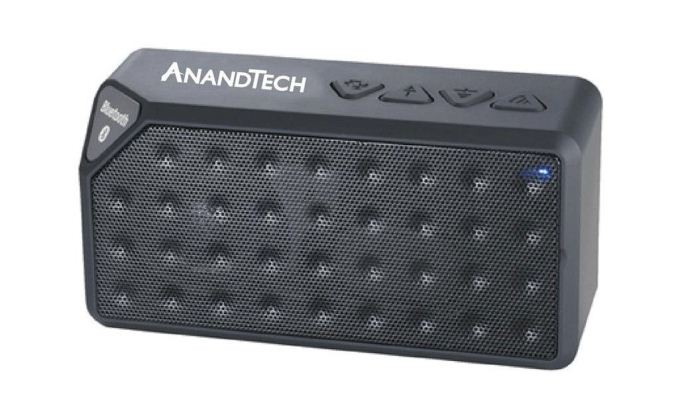
Kicking off this busy Threadripper 2-centric week, on the community side of things our awesome AnandTech Forums community team has put together a new giveaway to celebrate the AnandTech community. To that end, the community team is holding an AnandTech swag giveaway, with prizes including Bluetooth speakers, Amazon gift cards, and T-Shirts. So if you like AnandTech and would like to win some free stuff, please be sure to stop by our forums to enter the contest.
Hey there AnandTech members!
As we wrap up for the summer, our team wanted to take a moment to keep on keeping on for our forums users with some hot swag!
This giveaway will be running from 12 pm EST August 13 to 12 pm EST August 23rd Eastern Standard Time.
Be sure to enter the giveaway linked here for your chance to win. The sweepstakes will run until 12pm EST on August 23rd. Please be sure to read the Terms & Conditions for a full understanding of the giveaway.
There are three ways to enter the sweepstakes:
Potential winners will be selected by us in a random drawing on or about August 24th, 2018 from among all eligible entries received.
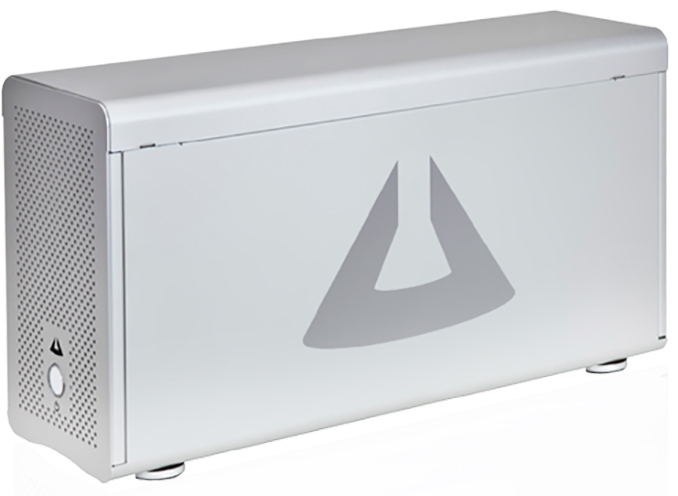
One Stop Systems has introduced its first external boxes for video cards, which will be offered with factory-installed NVIDIA Quadro professional graphics adapters. The Magma ExpressBox 3T-V3-eGPU enclosures are compatible with both Apple macOS and Microsoft Windows-based PCs.
The OSS Magma ExpressBox 3T-V3-eGPU enclosures enable one 250W graphics card to operate with a laptop using a Thunderbolt 3 interface. To ensure quality power supply for the boards, OSS equips its eGFX boxes with a 400W PSU with two auxiliary PCIe power connectors. Furthermore, the enclosures feature a blower with a hot-swappable fan for cooling.
It is noteworthy that the OSS eGFX boxes do not integrate any USB hubs or other value-adding devices sometimes found on such enclosures, possibly because the manufacturer wanted to guarantee maximum stability and reliability of its solutions aimed at AI, CAE, and graphics professionals.
One Stop Systems will offer its Magma ExpressBox 3T-V3-eGPU boxes with in four configurations with NVIDIA’s Quadro P4000, Quadro P5000, Quadro P6000, and Quadro GV100 graphics cards. Prices of these solutions will range between $2,350 and $12,100 once they become available in the coming months.
| OSS Magma ExpressBox 3T-V3-eGPU Boxes | |||||
| EB3T-V3-EGPU-GV100 | EB3T-V3-EGPU-P6000 | EB3T-V3-EGPU-P5000 | EB3T-V3-EGPU-P4000 | ||
| Card | Quadro GV100 | Quadro P6000 | Quadro P5000 | Quadro P4000 | |
| PSU | 400 W | ||||
| Price | $12,100 | $8,100 | $3,600 | $2,350 | |
Related Reading:
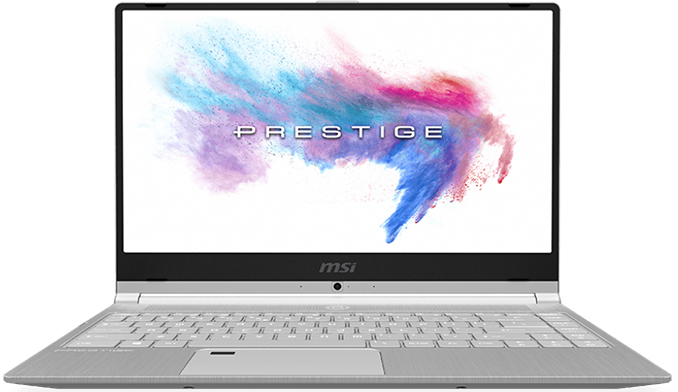
MSI has started to ship its ultrathin Prestige-series laptops that it introduced in early June. The new PS42 models feature a 14-inch display, a quad-core CPU, and a discrete GPU in select models. MSI positions the new notebooks primarily for business users who need maximum portability, which is why the laptops are thinner and lighter than most 13.3-inch mobile PCs.
The MSI Prestige PS42 notebooks feature a 14-inch IPS Full HD display and are based on Intel’s quad-core Core i5-8250U or Core i7-8550U processors. Depending on exact model, the notebooks may be outfitted with 8 or 16 GB of single-channel DDR4-2400 memory, a 256 to 1 TB SSD featuring a PCIe 3.0 x4 interface, and NVIDIA’s GeForce MX150 dGPU (PS42 8RB SKUs only). The latter certainly offers better performance in games than Intel’s UHD 630 iGPU, but do not expect it to run modern games at high FPS using this chip.

Apart from its 14-inch display and a discrete GPU, two key selling points of MSI’s Prestige PS42 are its weight and thickness. The laptop weighs around 1.19 kg (2.623 lbs), which is in line with Lenovo’s latest X1 Carbon. Meanwhile, the notebook has a z-height of 15.9 mm (0.62 inches), which is 1 mm thicker than Apple’s latest MacBook Pro 13.3-inch. Considering the fact that the PS42 comes in a brushed aluminum chassis, it is logical to expect the notebook to feature a solid build and be fairly durable too. Meanwhile, to minimize dimensions and weight, MSI has to stick to a 50 Wh battery that provides up to 10 hours of operation on one charge, enough for a day, but not exactly long by today's standards.
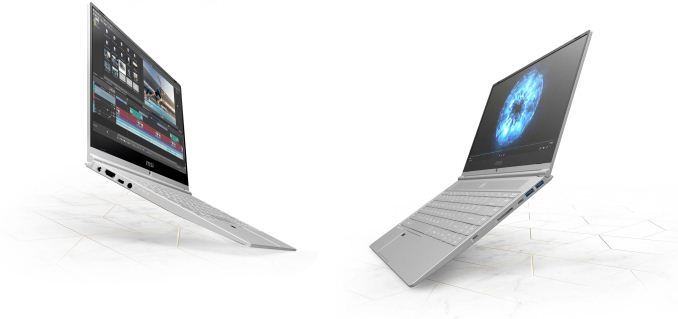
On the connectivity side of things, the MSI Prestige PS42 offers a pretty standard configuration for business laptops. For wireless comms, the notebook has an Intel Wireless-AC 3168 1×1 802.11ac Wi-Fi + Bluetooth 4.2 controller. When it comes to physical ports, the laptop is outfitted with four USB 3.1 Gen 1 Type-A and Type-C headers, an HDMI 1.4 output (so, 4Kp30 only), an SD card reader, and a TRRS audio connector. Naturally, a 720p webcam (albeit located beneath the display), a microphone array, and stereo speakers are also present.
| General Specifications of MSI's Prestige PS42 | |||
| PS42 8RB | PS42 8M | ||
| Display | Diagonal | 14" | |
| Resolution | 1920×1080 | ||
| Type | IPS | ||
| CPU | Intel Core i5-8250U (4C/8T, 1.6 - 3.4 GHz, 6 MB cache) Intel Core i7-8550U (4C/8T, 1.8 - 4 GHz, 8 MB cache) |
||
| PCH | integrated | ||
| Graphics | NVIDIA GeForce MX150 with 2 GB GDDR5 GP108, 384 SPs |
Intel UHD 630 | |
| RAM | 8 - 16 GB DDR4 (single channel, 1 SO-DIMM slot) | ||
| Storage | M.2 SSD | 256 GB 512 GB 1 TB |
|
| Interface | PCIe 3.0/NVMe | ||
| Wi-Fi | Intel Wireless-AC 3168 1×1 802.11ac Wi-Fi | ||
| Bluetooth | Bluetooth 4.2 | ||
| USB | 2 × USB 3.1 Gen 1 Type-A 2 × USB 3.1 Gen 1 Type-C |
||
| Display Outputs | 1 × HDMI 1.4 | ||
| Audio | 2 × 2 W speakers Microphones 3.5-mm audio jack for headset Nahimic 3 software enhancements |
||
| Fingerprint Reader | Yes | ||
| Other I/O | 720p HD webcam, SD card reader | ||
| Battery | 50 Wh | ||
| Dimensions | Width | 32.2 cm | 12.67 inches | |
| Depth | 22.2 cm | 8.74 inches | ||
| Thickness | 15.9 mm | 0.62 inches | ||
| Weight | 1.19 kg | 2.623 lbs | 1.18 kg | 2.601 lbs | |
MSI this month started to sell its Prestige PS42 laptops worldwide. The notebooks are available in different configurations depending on the region and reseller. For example, Amazon currently offers three configs from $899 for the most simplistic version and $1,349 for the most advanced one.
| MSI's Prestige PS42 Laptops Available at Amazon | ||||
| PS42 8M-064 | PS42 8RB-060 | PS42 8RB-059 | ||
| CPU | Intel Core i5-8250U 4C/8T 1.6 - 3.4 GHz 6 MB cache |
Intel Core i7-8550U 4C/8T 1.8 - 4 GHz 8 MB cache |
||
| GPU | Intel UHD 630 | NVIDIA GeForce GTX 1050 with 2 GB GDDR5 | ||
| RAM | 8 GB DDR4 | 16 GB DDR4 | ||
| Storage | 256 GB SSD | 512 GB SSD | ||
| Price | $899 | $1,099 | $1,349 | |
Related Reading:
| << Previous Day |
2018/08/17 [Calendar] |
Next Day >> |