[Most Recent Entries] [Calendar View]
Wednesday, November 21st, 2018
- AOC to Launch Curved QHD Displays with 0.5 ms Response Time in 2018
- Acer XZ1-Series Curved Gaming Displays: WQHD, 144 Hz, FreeSync, HDR10
- Acer Announces Nitro XV273K Monitor: 4Kp144, DisplayHDR 400, FreeSync
- Acer Unveils Predator XB273K 4Kp144 DisplayHDR 400 Gaming LCD
- ASUS Comments on Intel Shortages, U.S.-China Trade War
- Intel Investing $1B to Meet 14nm Demand: Prioritizing High-End Core and Xeon
- Intel Announces Q3 FY 2018 Earnings: Record Quarter
- Intel to Split Manufacturing Group into Three Segments
- AmpliFi Instant (a $100 Instant Router, and a $180 Instant Wi-Fi System that includes a mesh point that is very similar to the router in terms of industrial design and features.)
- AmpliFi HD (a $150 AmpliFi HD Mesh Router, a $120 AmpliFi MeshPoint HD, and a $340 AmpliFi Mesh Wi-Fi System that includes a HD Mesh Router and two MeshPoint HDs.)
- QNAP Announces TS-332X Three-Bay NAS with 10 GbE
- QNAP Launches 16-Bay AMD Ryzen-Based TS-1677X NAS with 10 GbE
- QNAP Launches TS-963X NAS: x86 NAS With 9 Bays & 10 GbE/Multi-Gig Ethernet
| Time | Event | ||||||||||||||||||||||||||||||||||||||||||||||||||||||||||||||||||||||||||||||||||||||||||||||||||||||||||||||||||||||||||||||||||||||||||||||||||||||||||||||||||||||||||
| 8:00a | Best PC Power Supplies: Holiday 2018
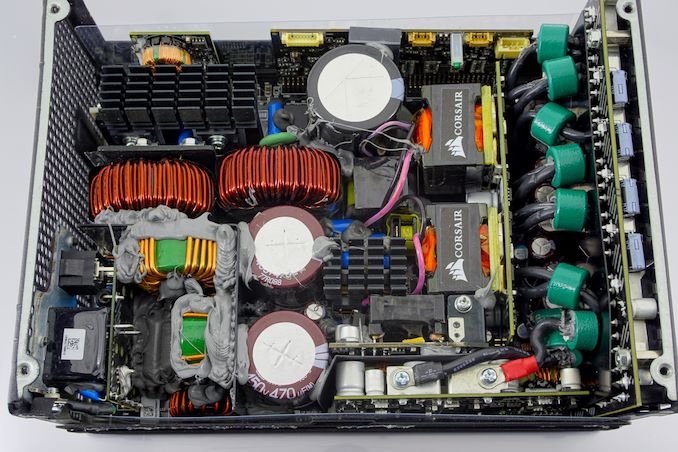
Now that you've picked out your CPU, it's time to start picking out the rest of your system components. And perhaps the most humble but overlooked of these components is the power supply unit (PSU). Available in a wide range of sizes and power capacities, there are a number of great PSUs out there, but choosing between them can be a challenge. So today we're bringing you our annual PC power supply guide, to help you sort figure out what the best options are, be it a low-wattage unit for a small form factor PC, or a hulking kilowatt unit for the most powerful PC. | ||||||||||||||||||||||||||||||||||||||||||||||||||||||||||||||||||||||||||||||||||||||||||||||||||||||||||||||||||||||||||||||||||||||||||||||||||||||||||||||||||||||||||
| 9:30a | Acer Unveils KG1 Displays with Sub-1ms Response Time
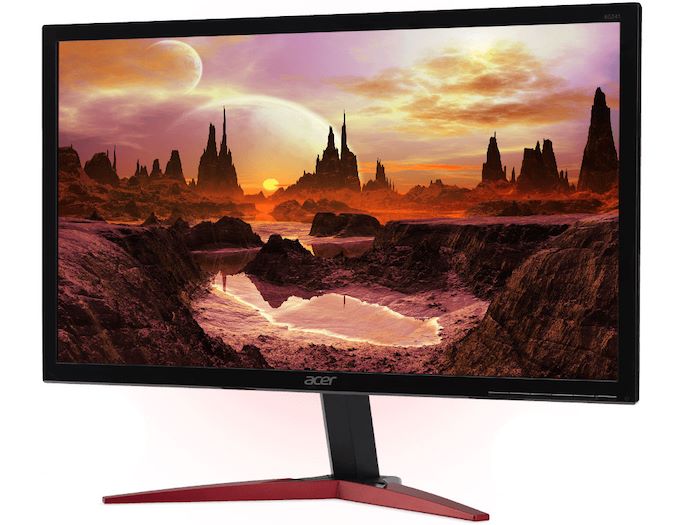
Acer Japan has introduced a lineup of gaming displays featuring a response time below 1 ms. The Acer KG1 family includes seven models featuring a 23.6, 24,5 and 27-inch diagonal and set to target different price segments. The Acer KG1 monitors rely on non-glossy Full-HD (1920x1080) TN panels featuring between 0.5 ms and 0.8 ms GtG response times, depending on exact SKU. These are blistering response times, and if the specifications listed here are accurate – and with the grain of salt that monitor response time specifications have historically been overestimated – then we're talking about panels can finish a grey-to-grey transition in as little as one-fifth the time of an actual frame update. Meanwihle, since we are dealing with TN technology, the monitors feature a rather standard 250 – 400 nits brightness, a 1000:1 contrast ratio, as well as 170°/160° horizontal/vertical viewing angles. Acer is listing an sRGB color space for these monitors, though as they're clearly all-in on response times, we'll have to wait and see just how much of that color space they can actually cover. Being aimed primarily at gamers, Acer’s KG1-series displays support AMD’s FreeSync dynamic refresh rate technology as well as various gaming-oriented functions, such as AcerAimPoint crosshair, an FPS counter, BlackBoost technology that makes faced-paced scenes look sharper, and so on.
When it comes to inputs, the KG1 displays have a rather standard set of connectors, including DisplayPort 1.2 and HDMI 1.4/2.0 headers. Meanwhile, some models are also outfitted with legacy D-Sub and DVI-D connectors. Moving on to pricing of the KG1 monitors. Being unique, Acer’s new displays with a sub-1 ms response time carry a premium price tag for Full-HD LCDs. The cheapest KG251QGbmiix model costs ¥19,000 ($169) without VAT, whereas the most expensive KG271Fbmiipx SKU is priced at ¥50,000 ($444) without taxes. Acer Japan has not announced when the KG1 displays will be available on other markets, though it is logical to assume that the company will try to capitalize on its exclusive panels.
Related Reading: Sources: Acer Japan, Hermitage Akihabara | ||||||||||||||||||||||||||||||||||||||||||||||||||||||||||||||||||||||||||||||||||||||||||||||||||||||||||||||||||||||||||||||||||||||||||||||||||||||||||||||||||||||||||
| 10:00a | The Mushkin Source 500GB SATA SSD Review: A Value Proposition For An Everyday PC QLC SATA SSDs haven't quite hit the consumer market just yet, so the most affordable entry-level SSDs are still DRAMless designs with TLC NAND. The Mushkin Source is a current-generation example that provides only modest improvements over older DRAMless SSDs, but is adequate for most home systems. | ||||||||||||||||||||||||||||||||||||||||||||||||||||||||||||||||||||||||||||||||||||||||||||||||||||||||||||||||||||||||||||||||||||||||||||||||||||||||||||||||||||||||||
| 11:35a | Short Supply of Intel’s Gemini Lake Confirmed by PC Maker
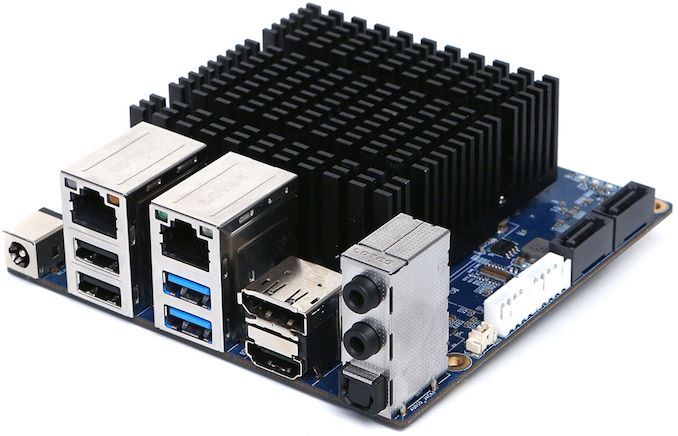
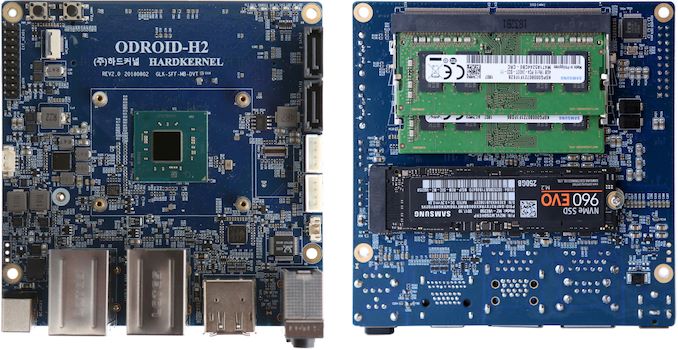
Intel has publicly admitted that demand for its processors exceeds supply, which is why it is currently prioritizes shipments of its higher-end Core and Xeon products over cheaper chips. Various manufacturers of actual PCs are now confirming the backlog in orders, giving us additional details to the story. As it appears, shortages of Intel’s Gemini Lake SoCs for low-cost PCs are so severe that the earliest opportunity for some of the PC makers to get the chips will be in February or March. Earlier this week a company named Hardkernel launched its first x86-based Odroid-H2 compact PC platform, a device akin to a Raspberry Pi. The 4.3 inch × 4.3 inch platform is based on Intel’s quad-core Celeron J4105 SoC and can be equipped with up to 32 GB of DDR4-2400 memory, an M.2 SSD, and has an essential set of wired I/O interfaces (DP 1.2, HDMI 2.0, two GbE ports, two USB 3.0, two USB 2.0, 3.5-mm audio jack, and an S/PDIF).
The launch was labeled a success and the first batch of 2,000 units was sold in 24 hours. As it appears, the company did not expect demand to be so high, so it did not prepare more units. Apparently, Hardkernel cannot order more Gemini Lake SoCs from Intel right now. The chip giant reportedly said that it would be able to deliver the chips in February or March, but could only provide a more exact delivery schedule in January. “We have very small problem now,” the company said “We have sold out all our first production lot in 24 hours. We are so sorry for that. In fact, we conservatively prepared only 2,000pcs of H2 boards because we could not predict this situation. We are contacting Intel for the lead time of the Gemini Lake processor. Due to Intel's serious supplying issue these days, they can supply the Gemini Lake SoC in February or March 2019. […] They also mentioned that they can give us a firm delivery schedule in January.”
Considering the fact that Gemini Lake is an entry-level product, it is not surprising that it sits rather low in Intel’s list of priorities. In fact, a rumor has it that Intel is considering to outsource some of its low-end SoCs to contract makers of semiconductors, though considering all the complexities with re-spinning the chips for someone else’s process technology, this is something that will be a hard thing to do. One thing that particularly attracts attention is the volume of SoCs that Hardkernel might require. The first batch was only 2,000, so it is unlikely that the second batch would hit 20,000. Meanwhile, Intel does not seem to have spare Gemini Lake SoCs at all, which once again emphasizes the scope of the company’s problems. Related ReadingSource: Hardkernel (via FanlessTech) | ||||||||||||||||||||||||||||||||||||||||||||||||||||||||||||||||||||||||||||||||||||||||||||||||||||||||||||||||||||||||||||||||||||||||||||||||||||||||||||||||||||||||||
| 1:00p | Ubiquiti Extends Amplifi HD Mesh Networking Family with Gamer's Edition
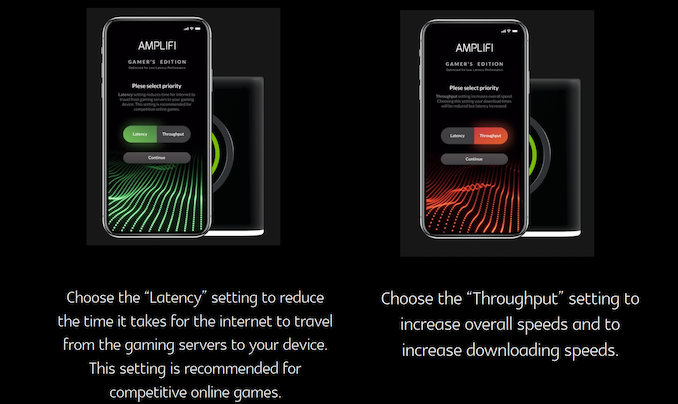
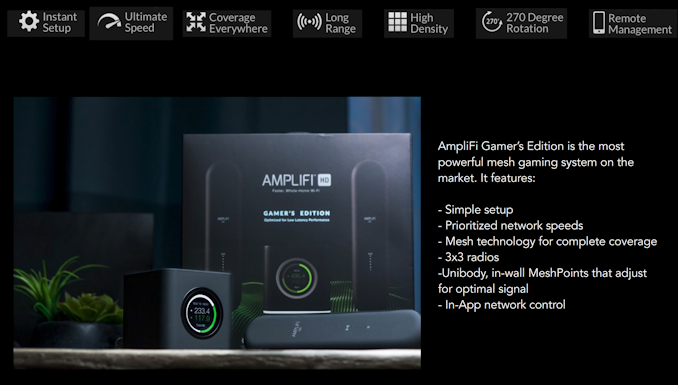
Mesh networking and whole-home Wi-Fi systems have bcome a major segment in the home networking market over the past couple of years. Ubiquiti Networks has carved a name for itself in the enterprise networking space with its UniFi lineup. In 2016, they launched the AmpliFi product line to target the consumer market. The AmpliFi Whole-Home Wi-Fi products fall under two categories: In addition, AmpliFi also has a $100 Teleport portable hardware extension that creates a seamless VPN tunnel to the home network when connected to an external network (wired or wireless). Different consumers have different needs - while power users may have wired switches spread across multiple rooms and discrete access points, the average consumer needs a quick and easy to set up system that provides hassle-free coverage. While Ubiquiti's UniFi system caters to the former, the AmpliFi lineup with its touchscreen displays and mobile app-based setup process targets the latter market segment. Today, Ubiquiti is launching the AmpliFi HD Gamer's Edition. The internal hardware is the same as the existing AmpliFi HD, but, the firmware comes with a few QoS tweaks targeting online gaming in general and cloud-gaming services in particular. Co-branded with NVIDIA, the AmpliFi HD Gamer's Edition's GeForce NOW QoS mode automatically detects latency or frame losses and de-prioritizes other traffic to ensure satisfactory online gaming sessions.
The AmpliFi HD Gamer's Edition will be available starting today for $379. It is priced higher than the $340 of the standard edition. The extra value is delivered in the firmware features and additional hardware tweaks - a black exterior and LED lighting at the base that gamers may find to be attractive. The standard MeshPoint HD units have a 170 degree rotation ability with the adjustable antenna on top of a magnetic connector. On the other hand, the Gamer's Edition MeshPoint HD is a uni-body design with a 270 degree rotation capability that allows for more optimal positioning.
Compared to the regular AmpliFi HD, the firmware is tuned specifically for gamers' needs with latency and throughput going hand-in-hand. Currently, Ubiquiti is not planning on adding these features to the regular version. So, the ability to control and optimize the behavior of the mesh network for gaming is the biggest value brought in by the new app customization for the Gamer’s Edition. The competition is currently targeting the gaming market by re-purposing traditional Wi-Fi routers. Ubiquiti / AmpliFi appears to be the first vendor to market with a mesh Wi-Fi offering catering to the gaming market. The pricing is very competitive given the marriage of mesh Wi-Fi and gaming features. That said, it will take Ubiquiti some more time to get the firmware features on par with what is offered by the likes of DumaOS, though. | ||||||||||||||||||||||||||||||||||||||||||||||||||||||||||||||||||||||||||||||||||||||||||||||||||||||||||||||||||||||||||||||||||||||||||||||||||||||||||||||||||||||||||
| 1:01p | Best CPUs for Workstations: 2018
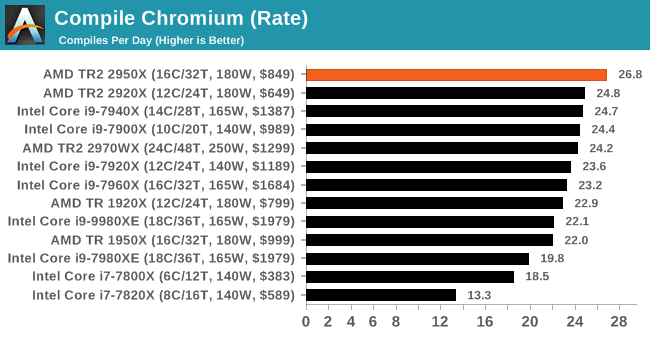
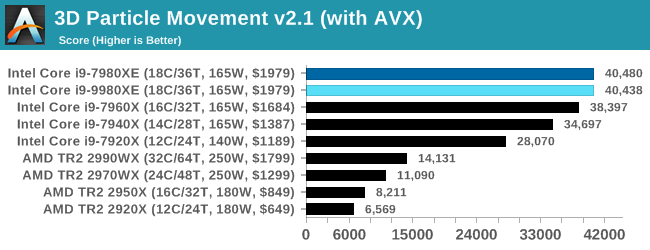
In our series of Best CPU guides, here’s the latest update to our recommended workstation CPUs list. All numbers in the text are updated to reflect pricing at the time of writing. Numbers in graphs reflect SRP for AMD and 1k pricing for Intel. Best CPUs for Workstations 2018Sometimes choosing a CPU is hard. So we've got you covered. In our CPU Guides, we give you our pick of some of the best processors available, supplying data from our reviews. Our Best CPUs for Workstations guide mostly covers workstation processors available to consumers, although some server products cover both segments.
The majority of our recommendations aim to hit the performance/price curve just right, with a side nod to power consumption as well. Best Overall Choice:
| ||||||||||||||||||||||||||||||||||||||||||||||||||||||||||||||||||||||||||||||||||||||||||||||||||||||||||||||||||||||||||||||||||||||||||||||||||||||||||||||||||||||||||
| 4:30p | QNAP Launches Mustang-200 Compute Accelerator for Network Attached Storage
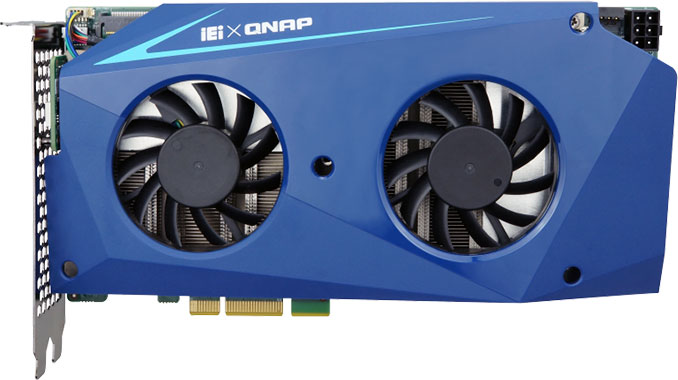
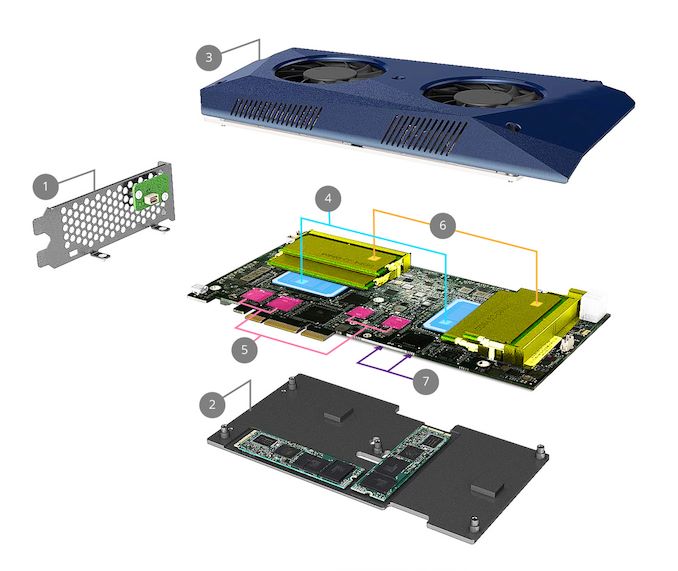
QNAP has released a special-purpose accelerator based on two Intel CPUs that is designed to significantly boost the processing capabilities of NAS boxes and even PCs. QNAP’s Mustang-200 can speed up access to data located on a NAS box, but can also be used to increase image processing capabilities of NASes used for surveillance, run AI and ML apps, or speed up virtual machines. The QNAP Mustang-200 accelerators are PCIe 2.0 x4 cards based on two Intel Kaby Lake CPUs (Core i7-7567U, Core i5-7267U or Celeron 3865U) outfitted with their own 4 - 16 GB of DDR4 memory as well as 512 GB Intel 600P SSDs (Core i5/i7 only). Each node has its own 10 GbE NIC and runs its own copy of QNAP’s mQTS operating system, thus offering a familiar functionality to those who use NAS products from QNAP.
By adding a Mustag-200 card, owners of QNAP NASes can increase the processing power of their systems from one processor to three, which can be used by a variety of applications supported by mQTS. Since the cards have their own resources, administrators can deploy different applications on different nodes using the Mustang Card Manager program and physically isolate them from each other. It is noteworthy that the Mustang-200 accelerators can be installed not only into NAS boxes, but also into regular PCs and be used for a variety of applications.
QNAP’s Mustang-200 cards are now available to customers with compatible NAS machines. Prices have not been published yet. Related Reading: Source: QNAP | ||||||||||||||||||||||||||||||||||||||||||||||||||||||||||||||||||||||||||||||||||||||||||||||||||||||||||||||||||||||||||||||||||||||||||||||||||||||||||||||||||||||||||



| << Previous Day |
2018/11/21 [Calendar] |
Next Day >> |