[Most Recent Entries] [Calendar View]
Tuesday, May 21st, 2019
- ASUS Launches the ZenFone 5: Now With Added Notch
- ASUS Announces ZenFone AR and ZenFone 3 Zoom
- ASUS Chief Exec Jerry Shen Steps Down
| Time | Event | ||||||||||||||||||||||||||||||||||||||||||||||||||||||||||||||||||||||||||||||||||||||||||||||||||||||||||||||||||||||||||||||||||||||||||||||
| 9:00a | ASUS Launches the ZenFone 6: 6.4-Inch Flagship Phone With Motorized Flip-Up Module Camera
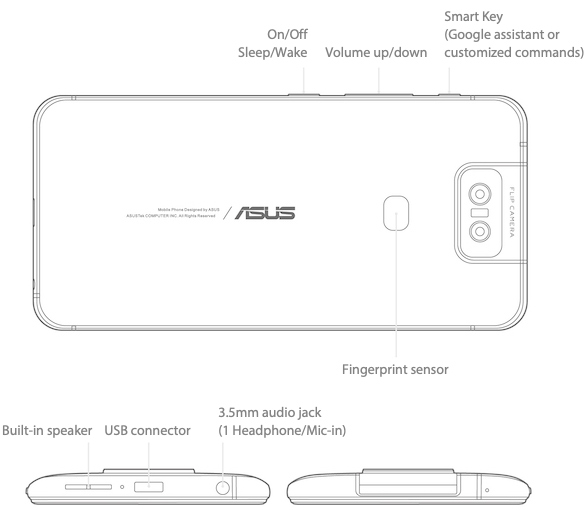
ASUS has introduced its new high-end smartphone, the ZenFone 6. The new handset is based on Qualcomm’s top-of-the-range Snapdragon 855 SoC, and perhaps most interesting of all, a motorized 180° flip-up camera module. Featuring a huge NanoEdge 6.4-inch display with a 92% screen-to-body ratio, the ASUS ZenFone 6 looks like one large screen as it does not feature any notches or water drops. The LCD can cover 100% of the DCI-P3 color gamut, supports HDR10, a maximum brightness of 600 nits.
The key feature of the phone is its motorized 180° flip-up camera module, which incorporates a 48 MP Sony IMX586 RGB sensor as well as a 13 MP 125° ultrawide sensor. The camera can be used not only for regular photos, but flipped-up for high-quality selfies. In addition to a rather unique form-factor, the camera supports new HDR+ Enhanced, Super Night and Auto Panorama modes.
The ZenFone 6 is based on Qualcomm’s Snapdragon 855 SoC (Adreno 640 graphics, quad-channel LPDDR4X, X24 LTE modem, etc.) that is paired with 8 GB of RAM, 256 GB of UFS 2.1 NAND flash storage (expandable with microSD), and a 5000 mAh battery. To ensure snappy operations, ASUS has also incorporated its OptiFlex technology, which the company says accelerates app launches and reloads by keeping them in RAM, while also promising to save power in idle mode. When it comes to connectivity, the ZenFone 6 supports 4G/LTE, 802.11ac Wi-Fi, Bluetooth 5.0, NFC, Wi-Fi Direct, USB Type-C, GPS, GLONASS, and Galileo. Meanwhile, the smartphone has a fingerprint reader on the rear (that promises to unlock the phone in 0.3 seconds). The ASUS ZenFone 6 (ZS630KL) with 8 GB of RAM and 256 GB of NAND will be available later this year for $560 in the US and €499 in Europe. Other configurations will also be available, but their prices will be announced at launch.
UPDATE: The ASUS ZenFone 6 does have a 3.5-mm audio jack. Related Reading: Source ASUS Press Release | ||||||||||||||||||||||||||||||||||||||||||||||||||||||||||||||||||||||||||||||||||||||||||||||||||||||||||||||||||||||||||||||||||||||||||||||
| 10:45a | The Honor 20 Pro: A Quad-camera Hands-On Review As a sister brand of Huawei, Honor in the last few years has seen quite a rising success in terms of delivering high value devices. In fact Honor’s smartphones have become so popular that the brand by itself is able to take a notable amount of marketshare percentage in multiple markets, aiming to become #3 in some countries. Today Honor is announcing the new Honor 20 Pro – a continuance of the company’s mainline series which made it so popular to begin with. The new Honor 20 Pro takes elements from Huawei P30’s series, such as new camera systems and adds its own touch, deriving design decisions from this year’s Honor View20. The Honor 20 Pro continues to use the 48MP sensor we first saw in the View20 and adds a 3x optical zoom module, a new wide angle camera module, and curiously enough a new dedicated macro camera module. We’ve had the phone for a few days and were able to do some camera testing as well test essentials such as the battery life of the phone. | ||||||||||||||||||||||||||||||||||||||||||||||||||||||||||||||||||||||||||||||||||||||||||||||||||||||||||||||||||||||||||||||||||||||||||||||
| 11:00a | GIGABYTE AM4 Motherboards: PCIe 4.0 Ready for Ryzen 3000
In preparation for the launch of AMD's next generation of Ryzen processors, GIGABYTE has released a wave of firmware updates for its X470 and B450 AM4 socket motherboards. The new firmware adds listed support for AMD's Ryzen 3000 series (Matisse) processors prior to launch. | ||||||||||||||||||||||||||||||||||||||||||||||||||||||||||||||||||||||||||||||||||||||||||||||||||||||||||||||||||||||||||||||||||||||||||||||
| 9:15p | A New Approach To Updates: Windows 10 May 2019 Update Available Today
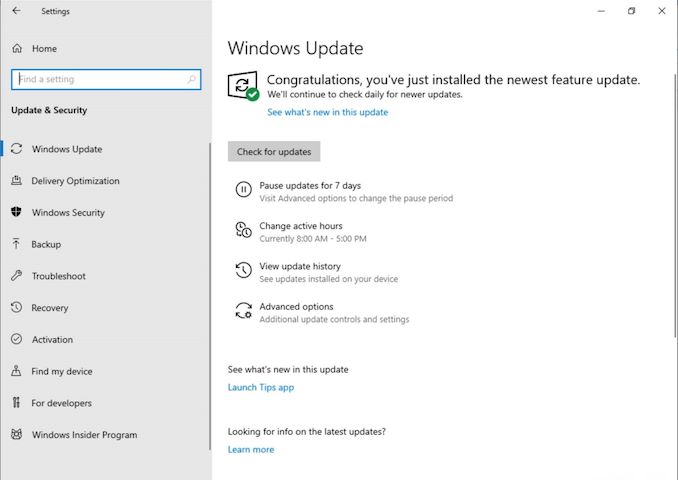
For those eager to get the latest and greatest production build of Windows 10; good news. For those who would rather watch from the sidelines until the kinks are worked out; good news. Today Microsoft has officially launched the spring 2019 update for Windows 10, affectionately called the Windows 10 May 2019 Update. There’s a few new features under the hood, but the biggest change to Windows 10 this time is not a new feature you may or may not use, but instead a new approach to updates. And, after almost four years of users not being in control, Microsoft has put the control back in the hands of the people using their OS. Finally. I’m not going to pine on about days gone past, but one of the biggest changes to Windows 10 when it launched was that the update system was going to be better. Improved. More reliable. Except it wasn’t. Some changes, such as the cumulative updates, have been a huge relief for people setting up new machines, since they no longer needed to update their computer for several days. An update comes every month which should have everything you need to get you to current in one batch. This was a win for end users. However, Windows 10 also brought about a new idea called feature updates, where occasionally, a new version of Windows would come down the same pipe as a normal update. Assuming everything was well tested, the update should install with little fanfare, but as we know that’s not been the case. Windows is on far too many machines to make any update easy, and Microsoft’s feedback mechanism for update issues was not being monitored as it needed to, which lead to multiple feature updates with enough major problems that even the last update from October is only now being pushed out to some machines.
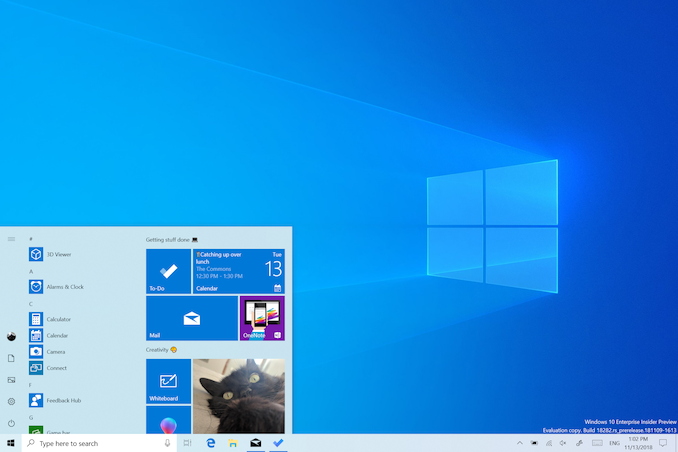
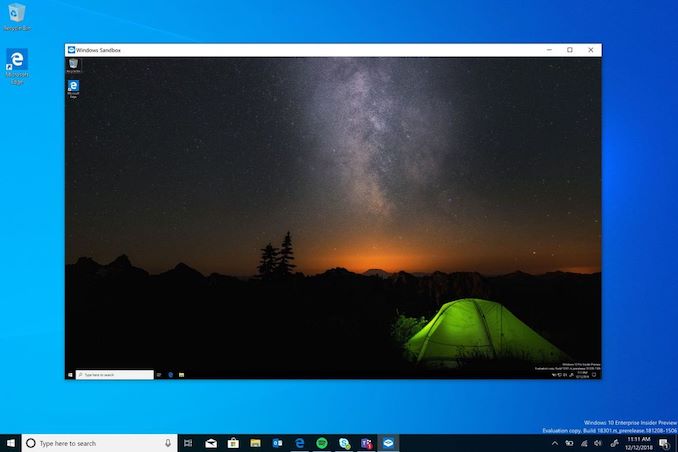
So today we get Windows 10 1903, or the May 2019 Update, and home users will finally get an option to pause updates even if they are using Windows 10 Home. It’s a small step, but coupled with a very measured rollout, hopefully this will be the smooth update Microsoft has been craving for the last couple of years. For those looking for further transparency, Microsoft has a Windows release health dashboard, which shows the status of current known issues, letting you know ahead of time if you may have an incompatible piece of software or hardware. There are of course new features as well, since this is in fact a feature update for Windows 10. There’s a new light theme, providing a refreshing look for Windows 10 which pairs nicely with the dark mode that arrived a couple of versions ago. Cortana is no longer part of the search bar, and now lives on its own app icon on the task bar. More default applications can now be removed. There’s more complex features as well, such as Windows Sandbox, which allows you to run an application in a virtualized container for testing without it having access to the system files. Think of it like Hyper-V, but without the complexity. It’s not as powerful as Hyper-V, but it’s also much easier to set up and use.
There’s a few other features as well that we’ll go through in a more comprehensive article after we’ve had time to dig through some of the new abilities. That being said, updates are now offering fewer and fewer big changes, which makes sense due to the maturity of Windows 10 now. Plus, with the lack of stability, it makes sense to offer less user-facing features that are more stable, rather than continue to offer a multitude of new things that may or may not get used. For those looking to get a jump-start on the upgrade process, Windows 10 May 2019 Update is currently rollout out via Windows Update where you can just check for updates, and you’ll receive it if your computer doesn’t have any blocking hardware or software. Microsoft is taking a very measured and cautious approach here, which is the right thing to do. For those that don’t want to wait for Windows Update, you can always check out the Windows 10 Download page to get the update right now. Source: Windows Blog | ||||||||||||||||||||||||||||||||||||||||||||||||||||||||||||||||||||||||||||||||||||||||||||||||||||||||||||||||||||||||||||||||||||||||||||||




| << Previous Day |
2019/05/21 [Calendar] |
Next Day >> |