[Most Recent Entries] [Calendar View]
Tuesday, September 8th, 2020
- Seamless Variable Refresh Rate
- Refresh Rate Mode Switching
- Set at 120 Hz in user options, low ambient brightness (low lux)
- Set at 120 Hz in user options, high ambient brightness (high lux)
- Set at 60 Hz in user options low ambient brightness (low lux)
- Set at 60 Hz in user options, high ambient brightness (high lux)
| Time | Event | ||||||||||||||||||||||||||||||||||||||||||||||||||||||||||||||||||||||||||||||||||||||||
| 9:00a | SiPearl Lets Rhea Design Leak: 72x Zeus Cores, 4x HBM2E, 4-6 DDR5
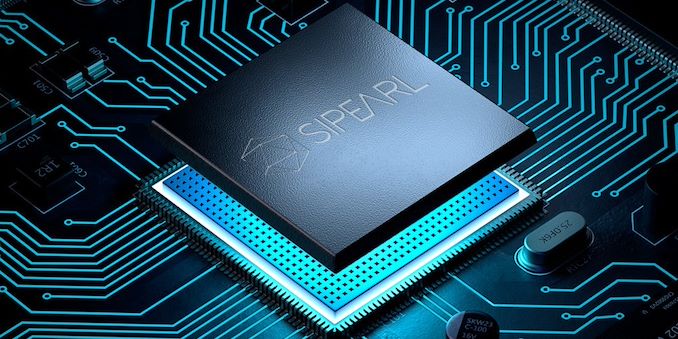
In what seems to be a major blunder by the SiPearl PR team, a recent visit by a local French politician resulted in the public Twitter posting in what looks like the floor plan of the company’s first-generation server chip project “Rhea”. During a visit of Alexandra Dublanche, a local Île-de-France politician and vice president of economic development and other responsibilities for the region, the PR teams had made some photo-op captures of a tour of the office. Amongst the published pictures includes a shot of the company’s Rhea server chip project with some new, until now unreleased details of the European Processor Initiative-backed project.
| ||||||||||||||||||||||||||||||||||||||||||||||||||||||||||||||||||||||||||||||||||||||||
| 12:00p | EVGA Launches Z490 Dark K|NGP|N Edition: Built for Overclockers
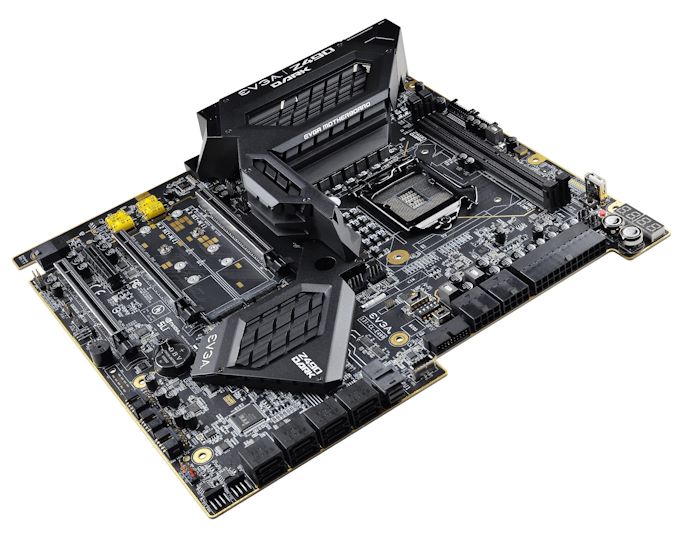
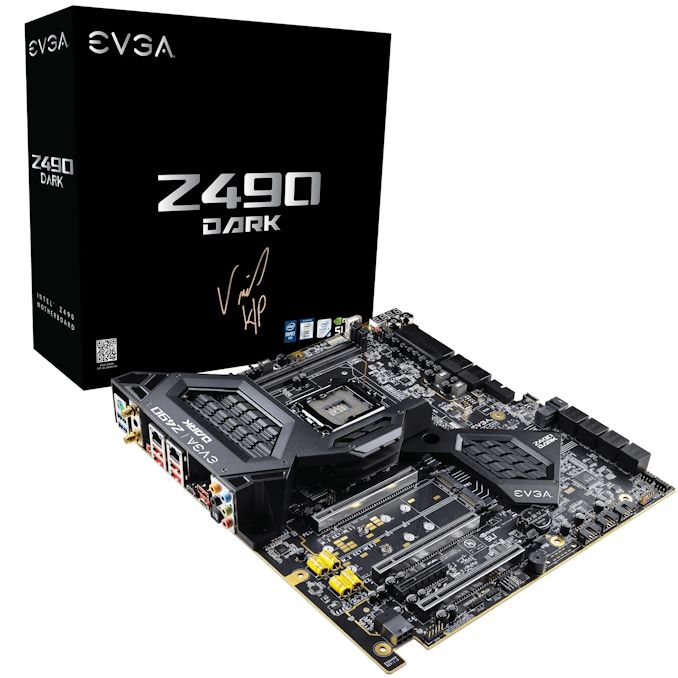
One of the biggest names on the extreme overclocking scene is Vince 'K|NGP|N' Lucido, who is highly regarded as one of the best sub-zero overclockers. He is a longtime employee of EVGA, and collaborates exclusively with its hardware team to develop unique overclocking-centric hardware. The latest collaboration is the EVGA Z490 Dark K|NGP|N - a limited edition motherboard with an 18-phase power delivery designed for overclocking. There is also more conventional features such as two PCIe 3.0 x4 M.2 slots, eight SATA ports, U.2 port, with a 2.5 G Ethernet controller and Wi-Fi 6. One of the most interesting elements on the EVGA Z490 Dark is its unconventional desktop design, with just two memory slots mounted horizontally across the top, just above the transposed LGA1200 socket. The 90-degree angle is usually done for airflow reasons with specific chassis in mind, and only two memory slots assists in memory-latency driven workloads. The memory slots are qualified up to 64 GB of DDR4-5000, although for this board it wouldn't be a surprise to see overclockers push speeds further. The socket is also better angled for easier mounting of the large copper pots that sub-zero overclockers use with liquid nitrogen. Overclocking features for this sort of board usually extend to driving extra power, sometimes even external voltage control, as well as monitoring tools for accurate thermal and voltage measurements.
For storage there is a pair of PCIe 3.0 x4 M.2 slots, with a single U.2 port and eight SATA ports with six of these supporting RAID 0, 1, 5, and 10 arrays, while an ASMedia SATA controller powers the other two ports. Three full-length PCIe 3.0 slots operate at x16, x8/x8, and x8/x8/+4, with a secondary half-length PCIe 3.0 x4 slot. The top right-hand corner features two 2-digit LED panels that monitor CPU voltage and temperature, with a power and reset button also added. Focusing on networking, the Z490 Dark is using a pair of Intel-based Ethernet controllers, one I225-V 2.5 GbE and one I219-V Gigabit, with an Intel AX201 providing both Wi-Fi 6 and BT 5.1 device support. The audio codec looks 'amped' as well. The limited-edition EVGA Z490 Dark K|NGP|N model is currently available for $600 direct from EVGA, with a limit of two per household. This is $100 more expensive than the standard EVGA Z490 Dark model ($500), although the K|NGP|N variant is likely to use perhaps better binned components to ensure extreme overclocking consistency. Both models come with a 3-year manufacturer warranty. Related Reading | ||||||||||||||||||||||||||||||||||||||||||||||||||||||||||||||||||||||||||||||||||||||||
| 12:30p | Samsung's Note20 Ultra Variable Refresh Rate Display Explained In August 2020, Samsung launched the new Note20 Ultra – an interesting device that we have on our review test bed. It's safe to say that over the last few generations, there hasn’t been all that much exciting about the Note line of devices - the phones typically use the new silicon and camera technologies that were introduced in the Galaxy S-series of the same year, and the Note lends on its form factor, only improving upon the design and software experience around the S-Pen. This year’s Note20 Ultra, based on our testing, generally also follows the same formula, but with the important exception: the Samsung Note20 Ultra has, according to the company, the first mobile variable refresh rate (VRR) screen in the industry. What is Variable Refresh Rate, or VRRThe refresh rate, in its broadest definition, is a property given to a display with regards to how frequently a display will update itself with the latest data supplied from the graphics processor. A standard display, either on a smartphone or on a computer monitor, often refreshes at 60 times per second, or at 60 Hz, with the delay between each frame at 16.66 milliseconds. This 60 Hz is a static refresh rate, and fixed for the lifetime of the product. Over the last decade, display manufacturers have built screens with different refresh rates depending on the content: for content that is static, the display could choose to refresh at 33.33 milliseconds, or 30 times per second, and save power; for content that is active, like a video game, if the game can be rendered quickly enough, the display could refresh at 13.33 milliseconds (75 Hz) or 11.11 milliseconds (90 Hz) or 8.33 milliseconds (120 Hz). Displays can also be made with multiple different refresh rates. Depending on the product, such as a simple PC monitor, then both 30 Hz or 60 Hz might be supported. Gaming devices might go the other way, and offer modes that run at 30 Hz, 60 Hz, 90 Hz, and 120 Hz, all within the same panel. These modes might be user selectable, or activate when specific applications are running. In the gaming ecosystem, these are known as 'high refresh rate' displays. Where variable refresh rate displays differ is that they can often support a wide range of frame time delays on a very granular basis. On the specification sheets for these displays, the refresh rate might be give as a range, such as '60 - 90 Hz', incidicating that the display can support any value between these two numbers. The better displays strive to support larger ranges, however when it comes to the smartphone market, the term 'variable refresh rate' has been a bit abused in recent times, as there are two ways to implement a variable refresh rate display. The two methods are known as: The difference between the two is important. In a Seamless VRR display, the refresh rate is expected to change on a frame-by-frame basis as required by the system. For a 'VRR-enabled' but non-seamless display, it relies on changing the refresh rate mode between different values - the display panel will operate in either a “normal” or “high-refresh-rate” mode, but the switching between the modes is not a continuous process. For these panels, the 'range' of the refresh rates supported is fairly discrete, such as fractions of the main refresh rate, whereas a Seamless VRR display is designed to be a continuous support from a standard refresh rate to a high refresh rate with all in-between. For the most part, smartphone vendors have been playing down which one of these two they have been using, advertising both as 'variable refresh rate'. If a phone vendor has claimed to support variable refresh rate, it has been misleading, as no device until now has supported a 'seamless variable refresh rate' that switches on a per-frame basis, which is typically what we would consider a true VRR solution to be. What these companies are doing instead is that they are using refresh rate mode switching, which is a rather important distinction. Samsung Note20 Ultra: Seamless VRRBy contrast, Samsung with the new Note20 Ultra claims to have achieved seamless VRR, and I’ve been very curious to get my hands on a device and finally unveiling how this is implemented and if it delivers on its promises.
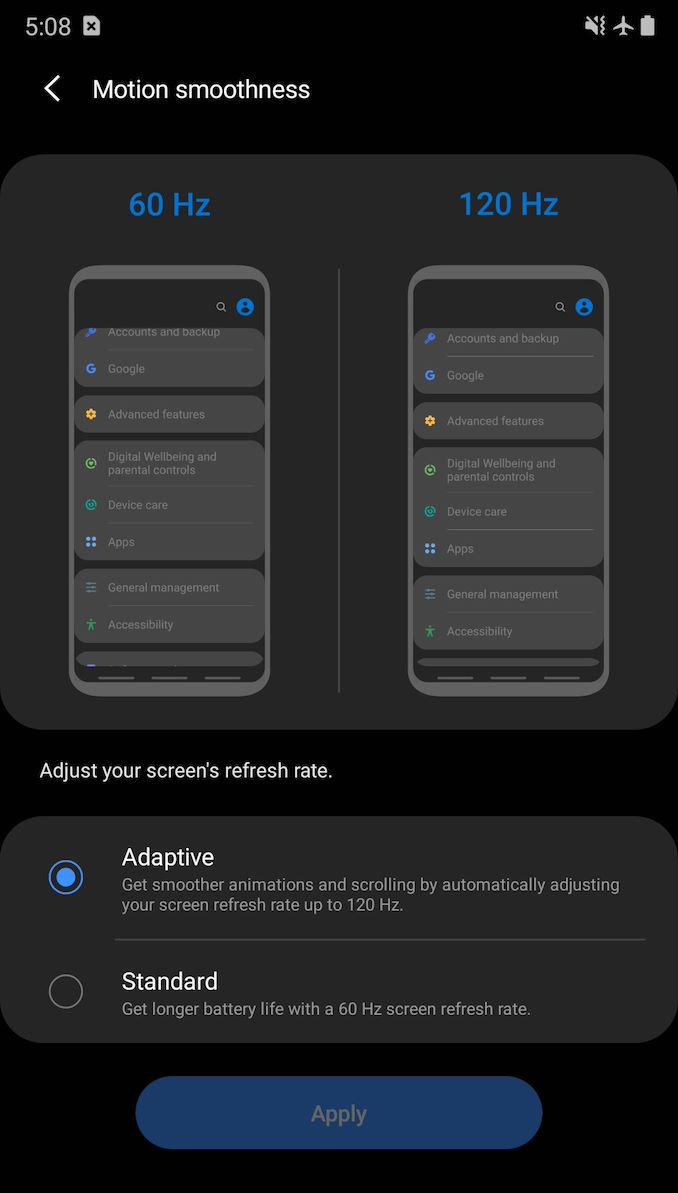
Starting off, the first thing a user might notice on the Note20 Ultra, compared to an S20 device, is that its high-refresh-rate mode is called “Adaptive” rather than “High”. The decription text is specific in that it now states the refresh rate will go “up to” 120Hz instead of outright stating 120Hz on the S20 series devices. So far so good. Investigating Seamless VRRDigging into the software, we find some key indications on Samsung's display mode options.
From a software perspective, you’d normally expect Samsung’s advertised refresh rate modes from 1Hz to 120Hz to be exposed to the system, however this is not the case, and the phone features the same resolution and refresh rate modes that were also available on the S20 series. As from the data above, this means 48 Hz, 60 Hz, 96 Hz, and 120 Hz. However, the key difference between the S20 series and the Note20 Ultra is that its refresh rate mode is described as operating in “REFRESH_RATE_MODE_SEAMLESS” instead of “REFRESH_RATE_MODE_ALWAYS”. In that regard it does look like things are working correctly. However one key component of variable refresh rate displays are the lower refresh modes to help save power. As shown on the list above, the 'lowest' refresh rate advertised is 48 Hz. So I went searching.
When interacting with the phone, it is possible to catch when the OS switches its refresh rates. For the above log, I was in the Samsung browser on a webpage - a situation I would expect to be in a high refresh rate when scrolling, but a lower fresh rate when idle, and a smooth seemless transition between the two. When I tapped the screen to interact with it and scroll, the system switched over to 120Hz refresh rate (represented with ID=2). Four seconds later, it switched back to a 60Hz mode (shown as ID=4). This is actually quite odd in that this really isn’t what you’d expect from a seamless VRR implementation - these would appear to be preset refresh rate modes baked in into the operating system and integrated with user interactions. Perhaps more importantly from a battery life perspective, we would expect the switch down to the lower refresh rate to happen almost immediately, within a frame or two. The 4-second delay from the phone being in the 120Hz mode and then being placed into the 60 Hz mode, even though it’s a static screen, isn’t what we expect from a VRR implementation, seamless or otherwise - it should happen essentially immediately on the following frames of any kind of animation, interaction, or screen movement. This needed more investigation. It All Comes Down To New Panel TechnologyResearching things further, and diving into the display panel’s drivers, we find a few further mentions and evidence of Samsung’s newer panel technology found in the Note20 Ultra. First of all, we have confirmation that Samsung calls the new panel technology “HOP” – which we assume stands for the rumoured 'Hybrid Oxide and Polycrystaline' technology that Samsung has been teasing. This is similar to LTPO (Low Temperature Polycrystalline Silicon), but uses a new backplane technology that allows for faster switching transistors, also lowering power consumption. Furthermore, Samsung’s key feature in achieving lower refresh-rate seems to be dubbed “LFD” or low-frequency-drive. At first, it’s a bit confusing as LFD doesn’t really seem to have any kind of interaction with the user-space VRR implementation. From our analysis, LFD seems to be something that solely works at the panel and display driver (DDIC) level. Based on the output shown below, the LFD operating modes do showcase that it is programmed to work with Samsung’s advertised low operating frequencies, all the way down to 1Hz. The low frequency driver operation also seems to be a sub-mode underneath the higher level VRR operating modes, with these being the actual modes that the phone switches between in a finer manner using the MIPI-DSI interface.
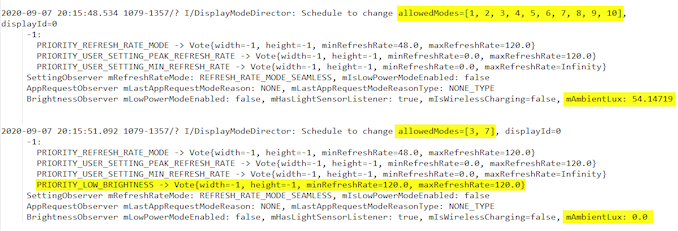
The driver comments note that the Note20 Ultra’s panel is capable of “self-scanning”, and that in order to maintain the lower frequency refresh rates it makes use of frame insertions for non-changing content. It looks like this is based on a fixed set of frequency multiples and dividers, so the mechanism isn’t capable of arbitrary refresh rates, but has a fixed set of operating frequencies below the maximum 120Hz. This ultimately puts it somewhere between the 'mode switching' and Seamless VRR definitions, however with the granularity it does offer a wider array of refresh rates for the display than almost all (if not all) smartphones on the market today. One problem (from our perspective) with this LFD mechanism is that it is seemingly completely transparent to user-space, so there’s no good way to verify that it’s active or working - the OS simply states that you’re either in the 120Hz or 60Hz VRR modes, however with LFD on top the actual refresh rate can be different. One way to verify this externally is simply to measure the end-result that the new panel technology is meant to bring to the user: lower power consumption. It’s also here that we encounter some of the quirks in Samsung’s implementation. Confirming Seamless VRR: Measuring Display Power ConsumptionAt first when I got my hands on the Note20 Ultra, I was somewhat disappointed when the results I obtained for power wasn’t any different to the S20 series between the 60 and 120Hz modes. Everything looked and measured the same, with a large power penalty kicking when switching over to the 120Hz mode, even on static screen content. This was the one scenario where the new VRR mechanism was supposed to bring great benefits. I had reached out to Samsung Display about the matter, under the assumption that perhaps Samsung Mobile had not implemented the VRR as advertised. Initially I received back some questions asking me about the test conditions, among which they also asked about the ambient brightness, which I found weird thing to ask. Sure enough, altering the ambient brightness in my office / the brightness level that the phone’s light sensor picks up, does dramatically change the power behaviour of the phone. Here is a video showing the effect of the ambient brightness adjusting the power used by the display, where I cover the light sensor with a block. When displaying a pure black static image in the phone’s Gallery app, I saw a drastic change in power consumption between when the phone is in a brighter environment compared to when you cover up the top part of the device and the light sensor. Looking into more detail through the phone’s OS logs, the device does look to actively track the light sensor values all the time, even when in manual brightness, and enters a special mode when it senses a darker environment:
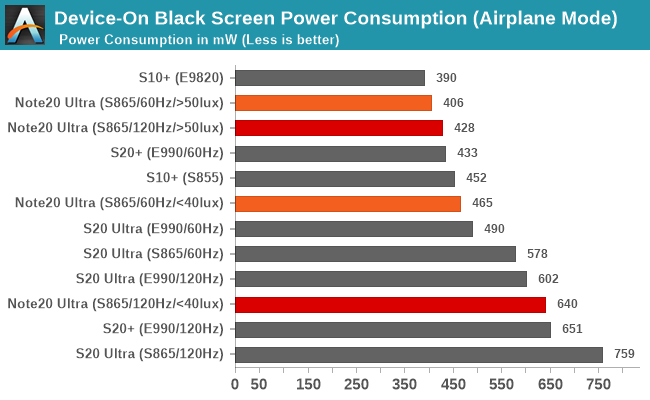
In particular, it looks like whenever the phone senses an ambient brightness level below 40 lux, it will force the phone to only operate in its 120Hz modes, with an additional flag that also sets the minimum refresh rate to 120Hz. By contrast, in a higher brightness setting, the “normal” operating mode has what looks to be a minimum of 48Hz. The power behaviour measured on the phone now seemingly makes a lot more sense, and in a little “D’oh” moment I also realised that when I first measured the device the phone had this low brightness flag all the time as it was measuring below 40 lux in my office. It turns out that the time of day you work in, and the brightness of whereever you work, will now affect the power consumption of the display on your phone. Measuring the base power consumption of the phones again, under different lighting conditions, we see the first factual evidence of Samsung’s new VRR/LFD benefits:
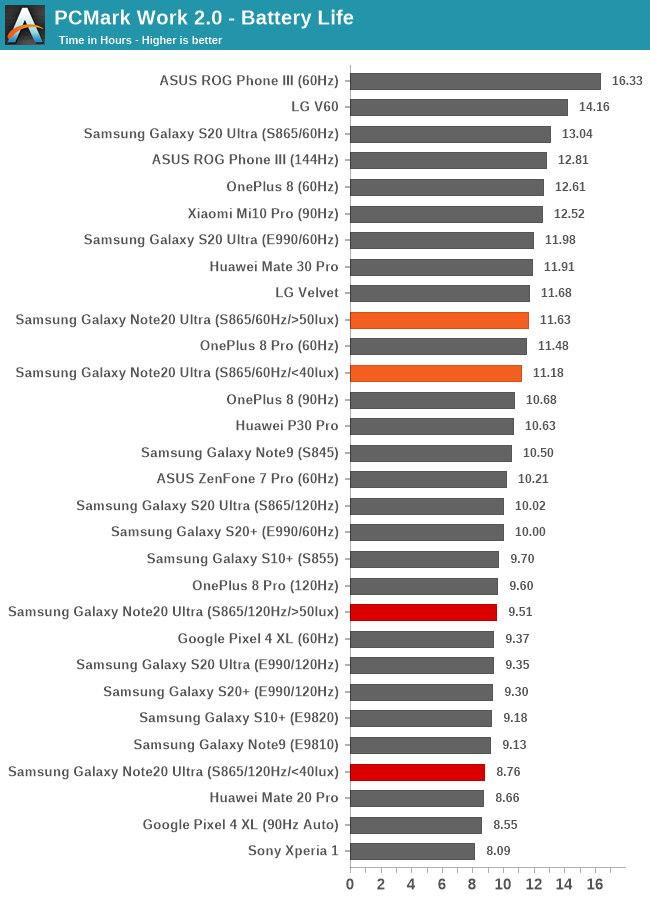
When in a dark environment, and forced into the 120Hz mode, the Note20 Ultra’s power consumption isn’t all that different from the S20 series (I’m still not sure why the Snapdragon S20U here fares so badly). This means that there is a large ~180mW power penalty that is present at all times, even on a black static screen, because of 120 Hz. That penalty comes from the measured power, with 640 mW and 465 mW in the respective 120 and 60Hz modes. When under a little brighter ambient conditions, the panel is finally allowed to showcase its technology advantages, and power consumption drops drastically. In the 120Hz mode but with the minimum refresh rate now in the regular '48 Hz' setting, the power figure drops from 640mW to 428mW, which is a massive 220mW drop. The 60Hz mode also seems to see a power benefit as well. In our tests, the power consumption drops from 465 to 406 mW. This would indicate that indeed LFD is working in the background and reducing the panel’s refresh rate to below 60Hz – although we have no way to accurately measure exactly how low it goes. It Also Depends On The ContentAs noted, having the phone operating under dark conditions does look to disable the 'seamless' variable refresh rate display, and consequently the operation that allows the phone to go into lower frequency modes. But that’s not exactly correct in all circumstances. In the above video snippet, we see that the device still kicks back in into a low refresh rate as long as the on-screen content and brightness exceeds a certain level, even if the light sensor measures 0lux. The problem is that this isn’t based on the specific screen brightness level that the user might select, or the auto-brightness might choose. It actually relies on the screen content too, which affects the screen brightness, as the phone will also jump between switching back into low-frequency mode or staying at a more power hungry high-frequency mode. In that instance, the the refresh rate mechanism is based on the average picture level (APL) as well. The Effect on Battery LifeBased on everything we've learned so far, it comes to pass that there are now four corners to the battery life on the new S20 Ultra: Each variant, due to Samsung's seamless VRR implementation (which is only seamless in high brightness and/or bright content), will give a different level of battery life. Make sure to ask your favorite smartphone reviewer which one they are using. In terms of our battery life tests, in order to showcase the differences in the results for the Note20 Ultra, I first fell back to PCMark. Here we see some mixed results. In terms of absolute figures, the phone doesn’t get great results - it comes below the S20 series devices. It is worth nothing that the Note20 Ultra has a 10% smaller battery than the S20 Ultra, as well as a different processor - the new Snapdragon 865+ in the Note20 Ultra is more power hungry and less efficient than the regular Snapdragon 865 in the S20 Ultra, but both of these aspects are something to be covered in the full review.
When it comes to the difference in the battery runtimes between running the phone in a dark or a bright environment, we do see differences, albeit they’re somewhat small. In the 60Hz maximum refresh mode, VRR/LFD gains the phone an additional 4% of battery life. In the 120Hz mode, we see a larger 8.5% jump in runtime.
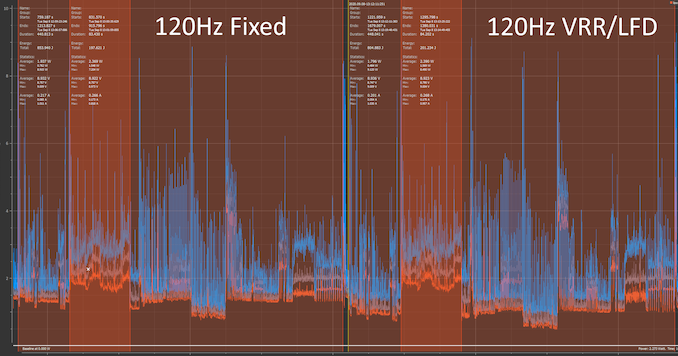
Looking at the power draw graph in PCMark in the 120Hz modes, we do see a drop in power from an average of 1.937W to 1.796W at 200cd/m² screen brightness. The one thing to note here is that there’s no material difference during the video editing section of PCMark, with the power results been the two modes falling within 21mW. What this points out to is that in more regular non-video content the battery life gains could be larger than what’s experienced here in this battery test. First ImpressionsOverall, I think Samsung’s new display technologies, such as the VRR and LFD on the Note20 Ultra, make for a big leap in terms of the capabilities of high-refresh rate smartphones today. However there are quirks, and the biggest negative here is the fact that underneath a certain ambient brightness, Samsung disables its VRR. At a 40 lux ambient brightness, which is still relatively bright for indoor use-cases, we can see the VRR disabled. Users can download a lux meter app right now for their current smartphones and test it around the environment to see which scenarios apply and which don’t. Personally this is a bit disappointing, as the biggest advantage of an VRR implementation was to get rid of the fixed large power penalty of the 120Hz mode – a penalty which in absolute terms represented a bigger power draw percentage during lower brightness usage of a device. This is compared to high on-screen brightness conditions, where power draw is dominated by luminance power, where the 120Hz penalty represented a smaller percentage of total power, and thus represents a smaller gain thanks to VRR. The good news is that Samsung introduced a technology that is, from our perspective, software agnostic. There are some interactions between the higher level VRR on the OS side and the lower-level LFD technology on the panel side that we wish there was more insight to at the user level, however it’s a nice technological leap which manages to narrow the power penalty of higher refresh displays, and in turn should further popularise the feature. So the final question is as to why Samsung has this VRR limitation in low ambient light conditions? I have reached out to Samsung Display to find out why this limitation exists, but I haven’t heard back yet. I should note that 'faking' a bright environment via shining a light onto the light sensor didn’t result in any noticeable picture quality differences at any brightness – but I’m sure there’s some corner case out there which does result in some degradation as otherwise I can’t explain the limitation’s existence. We will be following up with a full Note20 Ultra (Snapdragon S865+) review soon. Related Reading: | ||||||||||||||||||||||||||||||||||||||||||||||||||||||||||||||||||||||||||||||||||||||||
| 2:55p | ASRock Industrial's 4x4-BOX UCFF PC Series Goes Premium with Ryzen 4000U Renoir APUs
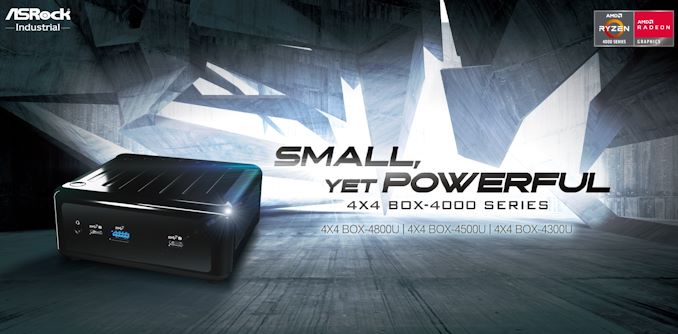
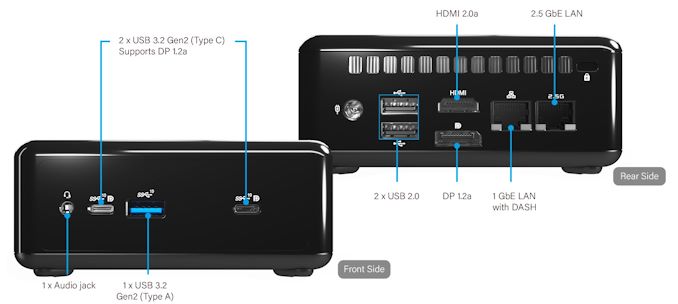
ASRock Industrial has been at the forefront of AMD-based UCFF PCs, being one of the first to bring out systems based on the Ryzen Embedded APUs in mid-2019. In fact, their boards have been adopted by vendors such as OnLogic in their ML100G-40 systems. These 4x4 BOX systems definitely got the footprint right, matching the Intel NUCs in that department. However, the performance of the Embedded R-Series made them a better fit for embedded systems with single-purpose use-cases. On the general purpose computing front, they could not match up against the large variety of Intel-based NUCs with different performance profiles. Today, this aspect is being rectified with the launch of three new SKUs in the 4x4 BOX-4000 series. These systems use the latest AMD Ryzen 4000U series APUs with TDPs ranging from 10W to 25W. In addition to the markets served by the first-generation 4x4 BOX systems (digital signage, kiosks, thin clients, and other embedded applications), the 4x4 BOX-4000 series will also make its presence felt in the general-purpose small form-factor computing space. The second-generation systems have a slightly smaller foot-print, coming in at 110mm x 117.5mm x 47.85mm. The system is slightly heavier by around 300g, coming in at 1kg. The specifications of the three SKUs are reproduced in the table below. The move to Ryzen 4000U brings premium features to the UCFF PC space - in fact, surpassing the features offered by Intel NUCs in the same form-factor - these include support for NBASE-T with a 2.5 Gbps LAN port (backed by the Realtek RTL8125BG controller), native support for DDR4-3200 without overclocking, and support for four simultaneous 4Kp60 display (including two via the front-panel USB Type-C ports) outputs. Intel's AX200 module brings in Wi-Fi 6 support. Another welcome upgrade is the support for M.2 2280 PCIe NVMe SSDs (the first-generation SKUs only supported 2242 and 2260)
In addition to usage as a UCFF desktop PC, the 4x4 BOX-4000 series also targets embedded applications. As a result, it is equipped with a watchdog timer and is rated to run at temperatures of up to 40ºC. It also comes with a TPM module.
The 4x4 BOX-4000 series UCFF PCs are not the first to use the AMD Ryzen 4000U APUs in this form-factor. The Asus PN50 was introduced a few weeks back, though its availability in the North American market has not been confirmed. Given that the first-generation 4x4 BOX series has been available for purchase at many US e-tailers, it does look like the 4x4 BOX-4000 SKUs from ASRock Industrial are going to be the first set of AMD Ryzen 4000U-series based UCFF PCs on this side of the pond. In addition, the premium features of the 4x4 BOX-4000 series is sure to invoke keen interest in the SFF computing community. | ||||||||||||||||||||||||||||||||||||||||||||||||||||||||||||||||||||||||||||||||||||||||


| << Previous Day |
2020/09/08 [Calendar] |
Next Day >> |