[Most Recent Entries] [Calendar View]
Thursday, September 23rd, 2021
- Hub functionality in addition to the daisy-chaining scheme prevalent in previous Thunderbolt versions
- Active cables up to 2m in length and supporting up to 40Gbps speeds - maximum possible based on the host / device interfaces (Thunderbolt 3 active cables with non-Thunderbolt 3 Type-C devices are often limited to USB 2.0 speeds)
- Port #1 - DIY Thunderbolt 3 SSD using the TEKQ Rapide and the WD_BLACK SN750.
- Port #2 - PowerColor Gaming Station eGFX Solution with the PowerColor Radeon RX Vega 56 Nano.
- Port # - USBC-HDMI connector on to a LG34WK95U configured to display a 3840x2160 desktop at 60 Hz (8-bit RGB)
| Time | Event | ||||||||||||||||||||||||||||||||||||||||||||||||||||||||||||||||||||||||||||||||||||
| 9:00a | Plugable TBT4-HUB3C Thunderbolt 4 Hub Capsule Review
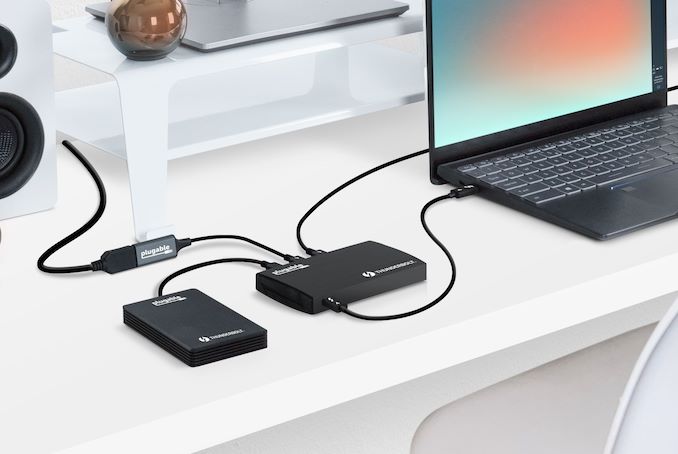
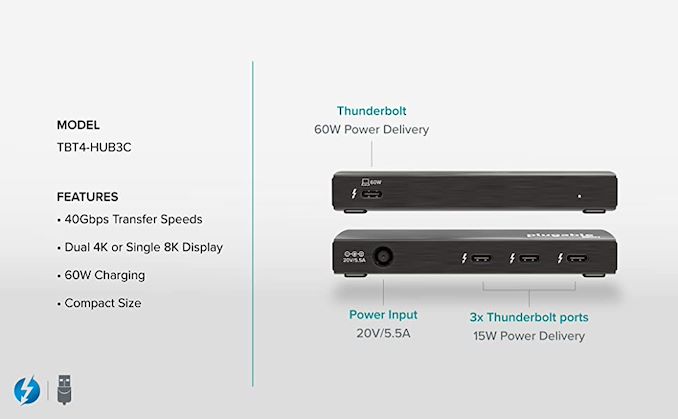
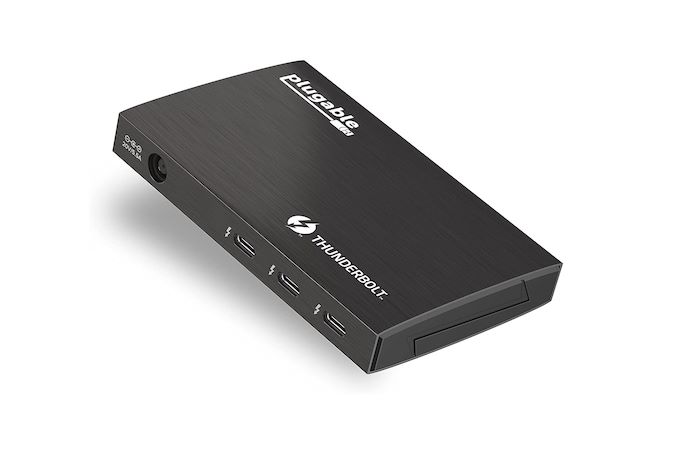
Plugable is introducing its Thunderbolt 4 product lineup today, with the TBT4-HUB3C Thunderbolt 4 Hub leading the pack. Joining it are two Thunderbolt 4 cables - the 2m. long TBT4-40G2M, and the 1m. long TBT4-40G1M. Intel had provided detailed updates on Thunderbolt 4 in mid-2020 before releasing it in Tiger Lake-based products. As peak bandwidth (40Gbps) didn't get an upgrade over Thunderbolt 3, many consumers just considered it a branding update. In fact, under the hood, the specifications were being fine-tuned to bring in some features from the USB world. It is these new features that Plugable is focusing on: The TBT4-40G2M (active) and TBT4-40G1M (passive) are Intel-certified Thunderbolt 4 cables, priced at $59 ($49 after coupon application) and $34 ($29 after coupon application) respectively. The pricing premium is due to increased certification costs (the factory is required to get random manufacturing lots repeatedly tested for Thunderbolt 4 cables, compared to only the initial manufacturing run previously). These cables complement the Thunderbolt 4 flagship from Plugable - the Goshen Ridge-based TBT4-HUB3C. The JHL8440 Goshen Ridge controller used in the hub is a quad-port solution - one upstream, and three downstream ports.
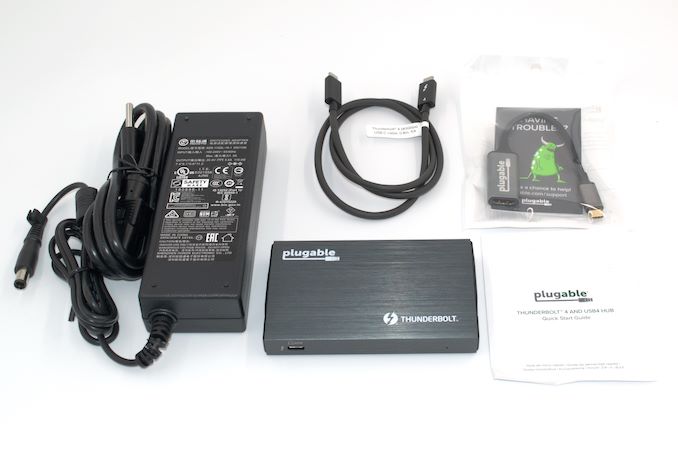
The TBT4-HUB3C comes with a 0.8m passive Thunderbolt 4 cable, a 110W power brick, and a bundled USB-C to HDMI adapter supporting resolutions up to 4Kp60 with HDR. The main hub itself is quite tiny compared to the power brick, measuring just 118 mm x 18 mm x 73 mm. Despite the small size, the unit has a solid look and feel with its brushed finish. The hub tips the scales at 201g, light enough to be considered pocketable.
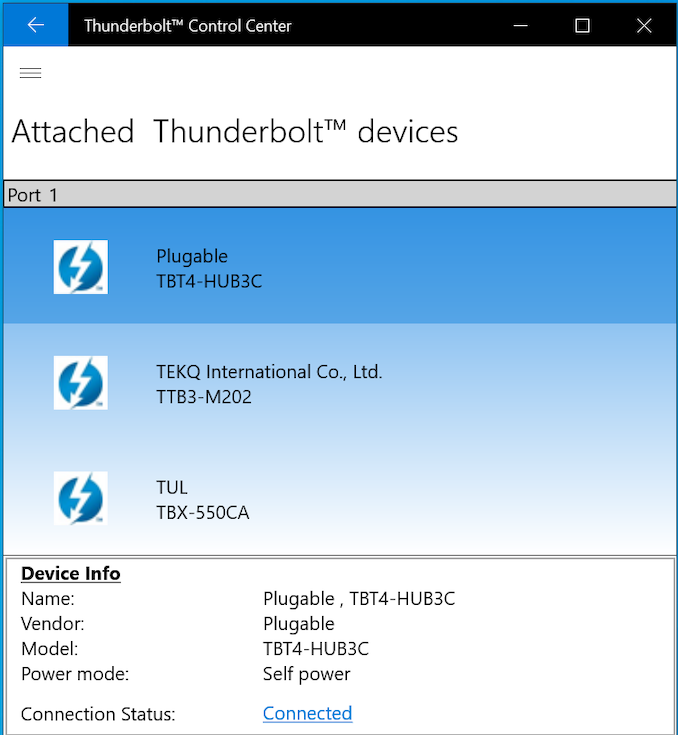
Plugable also bundles a USBC-HDMI adapter (USB-C male to HDMI 2.0 female converter supporting DisplayPort Alternate Mode from the USB-C side) with the package. The intent is to route the incoming display signals from the host to one of the downstream Thunderbolt 4 ports, and then on to a HDMI monitor. This also brings out the benefits of the hub scheme - With daisy chaining no longer in the picture for most deployments (each spoke in the hub can still be a daisy chain in Thunderbolt 4), users do not need to worry about the placement of different Thunderbolt peripherals / displays in the chain. Additionally, it allows the peripherals to be disconnected independent of each other - something not possible in the chain topology without interrupting the links to peripherals intended to be kept active. Performance TestingThe number of use-case scenarios for Thunderbolt 4 hubs such as the Plugable TBT4-HUB3C are too many to count. Our performance evaluation is restricted to the configurations specified below. The upstream port of the TBT4-HUB3C is connected to the Thunderbolt 4 port of the ASRock Industrial NUC BOX-1165G7 - a risky choice, given that the port is only certified for USB 3.2 Gen 2 / DisplayPort Alternate Mode. The downstream ports were connected as per the list below. The Thunderbolt Control Center can be use to approve connected devices. All primary connections to the Thunderbolt port (other than the displays and associated routing fear) are visible in it.
Various workload combinations were processed to determine the real-world effects of bandwidth sharing between the peripherals connected to the hub. The DIY Thunderbolt 3 SSD was subject to a fio workload, while the eGPU in the Gaming Station was subject to an OpenCL bandwidth test (transferring data from the host to the device VRAM, and back).
It must be noted that the Thunderbolt data rates are bidirectional - logically speaking, we have a 40 Gbps link from the host to the device, and another 40 Gbps link from the device to the host. As part of our experiments, we attempted to activate traffic in pairs - one set with the display routing turned off, and another set with the USBC-HDMI part active. It can be observed that activating the display output link reduces performance for the host-to-device traffic from 20.57 Gbps to 13.78 Gbps, while total used bandwidth on the host to device side moves up from 20.57 Gbps to 28.5 Gbps. On the return side, the maximum bandwidth seen turned out to be 22.11 Gbps. Investigation of 5K display outputs from the hub's downstream port, and its bandwidth implications will be covered in future reviews. Concluding RemarksThe Plugable TBT4-HUB3C brings out the capabilities / advantages of Thunderbolt 4 over previous Thunderbolt versions in an effective and user-friendly manner. The hub functionality brings Thunderbolt and traditional consumer understanding of USB functionality to the same table, and this can only be good for the market as USB4 begins to gain traction. The TBT4-HUB3C is able to support 40 Gbps in total over the three downstream ports without favoring one port over the other. While we evaluated a number of interesting use-cases involving displays, Thunderbolt SSDs, and eGPUs, the possibilities enabled by the hub are much more varied. With backwards compatibility - we even tested functionality of the device as a USB 2.0 hub when connected to a USB 2.0 port - in the picture, it can be safely said that the hub's functionality is limited only by the features of the upstream host port.
At $174 (after applying a $15 off coupon on the $189 MSRP), the hub presents a great value proposition in this space. Plugable is a bit late to the Thunderbolt 4 market, as other Goshen Ridge solutions have been available in the market for a while now (though supply chain issues have meant that actual availability has been limited). All the Thunderbolt 4 hubs / docks use the quad-port JHL8440 to full effect, enabling one upstream Thunderbolt 4 port, and three downstream Thunderbolt 4 ports. For $230, the CalDigit Thunderbolt 4 Element Hub tags on additional USB 3.2 Gen 2 ports. Razer has two docks - a 10-port version with a SD card slot, audio jack, an Ethernet port, and three USB 3.2 Gen 2 ports for $320, and a RGB version of the same for $330. The Kensington SD5700T priced at $330 is similar to the Razer dock, but with an additional USB-A charging-only port. The closest competitor to the Plugable TBT4-HUB3C is actually the OWC Thunderbolt Hub that has a similar form-factor and ports layout. It does have a USB 3.2 Gen 2 Type-A port in addition for its $179 price point. Despite undercutting the OWC unit by $5, Plugable has managed to include a $20 value addition in the USBC-HDMI adapter. Overall, Plugable has an effective entry-level Thunderbolt 4 product bound to expand market adoption and understanding of the latest Thunderbolt 4 and USB4 ecosystem. We look forward to the company expanding its offerings and create a TBT4 lineup similar to what they currently carry for Thunderbolt 3. | ||||||||||||||||||||||||||||||||||||||||||||||||||||||||||||||||||||||||||||||||||||
| 10:00a | Samsung's new 200MP HP1 Sensor: Sensible, or Marketing?
This week, Samsung LSI announced a new camera sensor that seemingly is pushing the limits of resolution within a mobile phone. The new S5KHP1, or simply HP1 sensor, pushes the resolution above 200 megapixels, almost doubling that of what’s currently being deployed in contemporary hardware in today’s phones. | ||||||||||||||||||||||||||||||||||||||||||||||||||||||||||||||||||||||||||||||||||||
| 1:00p | EVGA Releases the X570 Dark: First Ryzen Motherboard from EVGA, Built for OC
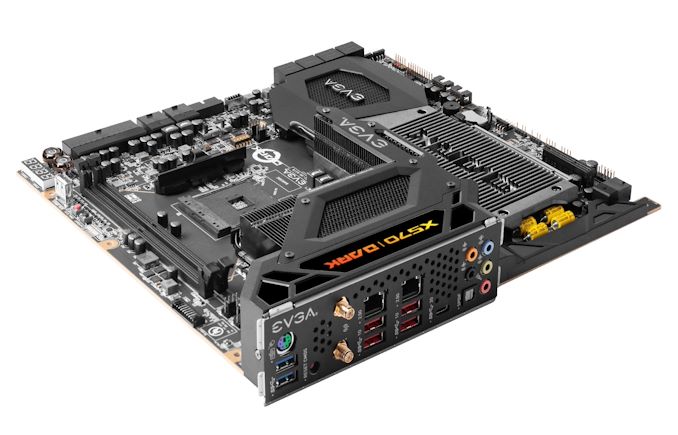
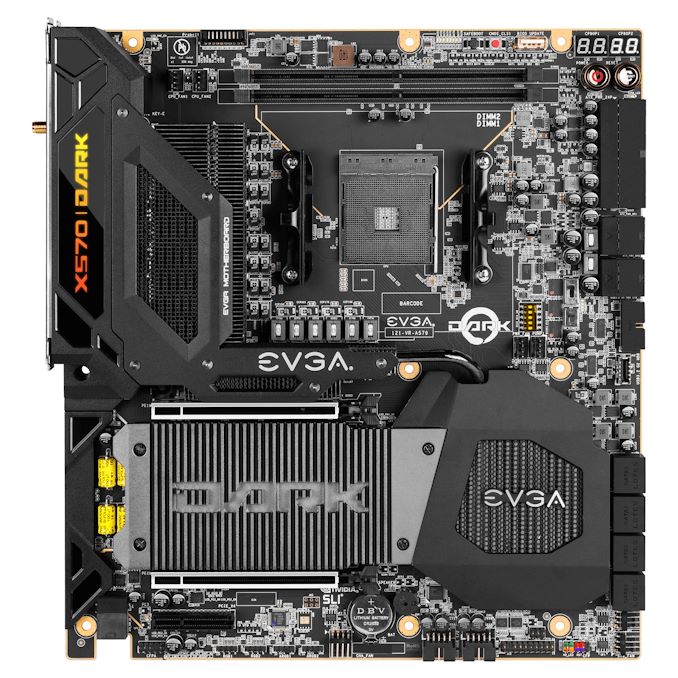
Back in July, we reported that EVGA was teasing its first AMD-based motherboard since the AM2+ days. Fast forward to now, and that dream of an EVGA model for AMD's Ryzen processors led by in-house engineer and extreme overclocker Vince 'KINGPIN' Lucido is now a reality. The EVGA X570 Dark benefits from a large premium 17-phase power delivery (14+2+1) designed for pushing Ryzen 5000 to its limits and support for up to DDR4-4800 out of the box across two memory slots to minimize latency. The EVGA X570 Dark, as expected, is primarily suited to extreme overclockers, with a variety of performance-enhancing features across the large E-ATX sized PCB. One of the most notable design characteristics includes a transposed AM4 CPU socket for better support when mounting an LN2 (liquid nitrogen) pot, and an empty CPU socket area to minimize risks when insulating for sub-ambient cooling. All the major power connectors are also at right angles, to be less of an issue when extreme overclocking for records.
EVGA uses a 16-phase power delivery organized into a 14+2 configuration, with fourteen premium 90 A power stages for the CPU section. It's a slightly different design to accommodate the transposed socket as it stretches around the bottom of the AM4 socket. It is using active VRM cooling with two cooling fans and uses a 10-layer PCB design. The 17th power stage is for the memory. Providing power to the CPU is a pair of 8-pin 12 V ATX CPU power inputs. Some of the most notable features of the EVGA X570 Dark include voltage monitoring points at the top of the board, as well as a variety of switches to enable/disable features that might be critical to sub-zero overclocking stability. For end-users wanting to have a daily system, there are dual PCIe 4.0 x4 M.2 slots, eight SATA ports with support for RAID 0, 1, and 10 arrays, as well as 2.5 GbE wired and Wi-Fi 6 wireless networking. Looking at PCIe support, EVGA includes two full-length PCIe 4.0 slots operating at x16 and x8/x8, with a half-length PCIe 3.0 x4 slot. Other features include a Realtek ALC1220 HD audio codec backed by EVGA's NU audio solution, eight 4-pin cooling headers, a passively cooled chipset heatsink, and two USB 3.2 G2 Type-A, four USB 3.2 G1 Type-A, and one USB 3.2 G2 Type-C port on the rear panel. The EVGA X570 Dark is currently available to purchase directly from the EVGA website for $690. This isn't a cheap motherboard, but overclocking-focused motherboards such as this come at a hefty premium. Although it has plenty of features for a daily Ryzen 5000 based system, the hope is that it provides the substance for extreme overclockers looking to push Ryzen 5000 silicon to its limits. Our review of the EVGA X570 Dark will be coming very soon - it arrived a couple of days ago and is currently on our testbed! Related Reading | ||||||||||||||||||||||||||||||||||||||||||||||||||||||||||||||||||||||||||||||||||||



| << Previous Day |
2021/09/23 [Calendar] |
Next Day >> |