Add this feed to your friends list for news aggregation, or view this feed's syndication information.
LJ.Rossia.org makes no claim to the content supplied through this journal account. Articles are retrieved via a public feed supplied by the site for this purpose.
| Tuesday, August 30th, 2016 | |
| LJ.Rossia.org makes no claim to the content supplied through this journal account. Articles are retrieved via a public feed supplied by the site for this purpose. | |
| 2:27 pm | Five very quick tips to building a loyal ecommerce customer base A few weeks ago, we discussed how ecommerce and retail companies can best acquire new customers via Facebook Lookalike targeting. So now that you’re building your customer base, let’s study how best to keep that very valuable base engaged. Remember, your existing customers are a constant stream of revenue. We know they already like your products; now we want to make sure we continue to showcase new products and sales and in general stay top of mind with them. This creates loyal customers and tons of repeat revenue – without that first layer of acquisition costs. The balance can be tricky, though; how do you re-engage your customers without bombarding them with the same ads and messaging? How do you give them space but also encourage them to return to your site? There are a few main things to keep in mind when setting up your re-engagement efforts: Choose your platformsGiven we know who our customers are, I recommend using Facebook custom audiences (on both Facebook and Instagram) and Google’s customer match targeting options (Gmail Sponsored Promotions and RLSA are those I would most highly recommend).
Use data to determine your re-engagement intervalsTo calculate how often you should show your ads to customers, determine when they tend to come back to your site after purchasing. Do you typically see purchases made 15 days after the first purchase? 30 days later? Longer? This is when you should begin re-engaging with your customers. Focus on creativeWe want to make sure we are providing the user with a good reason to come back to our site. You’ll want to showcase your products and ensure you are not showing the same ad over and over again. Refresh creative consistently to show new product as well as top sellers. Use sales and promotionsAlways hit your customers when you have a sale going on. This is typically the most successful of re-engagement efforts. Loyalty rewards programs are great for this, too; since you’re not spending to acquire these customers, you should have a bit of margin to play with for loyalty-based discounts and incentives. Get smart with your first-party dataThis part is important: we don’t want to just hit our entire customer base and treat them as equal. We need to segment our customer list by identifiable characteristics. For example – AOVs (do they purchase more expensive products or cheaper products?), Gender, Product categories or type, etc. By segmenting out our audience type, we can better tailor our creative and the product we show to our customers to better suit their needs/interest. Smart segmentation allows us to truly speak to our customers with relevant and tailored messaging, products, and overall user experience, which helps with both CTRs and CVRs. For example, let’s say you are an ecommerce shop with a variety of different products – from expensive handbags to shoes to clothing. By segmenting out users who purchase expensive handbags, you can then re-engage them with creative around ‘the newest/trendiest’ handbag – or your annual handbag sale. There are other benefits associated with your customer base, of course – notably mining characteristics of that base to create lookalike targeting in the pursuit of new customers. But I’ve seen all too many brands pay too little attention to the five steps outlined above. Don’t leave all that juicy revenue out there; get smart about re-engaging and watch your numbers climb.  |
| LJ.Rossia.org makes no claim to the content supplied through this journal account. Articles are retrieved via a public feed supplied by the site for this purpose. | |
| 1:30 pm | Why understanding frequency is key to success with Facebook advertising How do you ensure that your Facebook ad campaign is working as hard as it possibly can? For Facebook advertisers, it can be easy to get stuck into the multitude of statistics and metrics that your campaigns generate. For those that are analytically minded, Facebook marketing can feel like being a kid in a candy shop, but can be equally daunting to the uninitiated. Reach, the number of unique individuals have seen your post, gives you an indication of just how far your ad has been seen, but it doesn’t really give you much of an indication of how effective it is. It’s a similar story for impressions, which tells you how many times your ad has been served. The key metric is the latter divided by the former – frequency. Frequency is a measure of how many times a user has been exposed to your post, and acts as an indication of how effective your targeting is. If your frequency is low, you are arguably targeting too wide an audience, investing too little to reach your target audience, or a combination of the two. There are different ways of viewing frequency, and Facebook divides your campaigns into three levels; you can view the frequency for each ad, each group of ads (an ad-set) or each campaign (a collection of ad-sets). Ad level frequencyAd level frequency is the simplest level of frequency analysis. In the example below, each dot refers to a unique user, with the encompassing circle representing one ad. As users who have already seen the ad are served it again, the impressions increase. However, because the number of users hasn’t increased, so does the frequency (because a greater number of impressions are served to a static number of users).
In this example, we have 19 unique users (represented as individual dots), with an ad that has been served a total of 27 times (once to 13 people, twice to four people and three times to two users). This generates a frequency of 1.42. Ad-set level frequencyAd-sets are designed to group ads together, making it easier for advertisers to organise and manage multiple campaigns, and manage their collective spend and targeting. This allows the targeting for many ads to be changed quickly and efficiently. That might be great for campaign management, but it’s not so brilliant for frequency management. Ad-sets track all of the users who have visited all ads and if an individual is served several ads from an ad-set, that will still only count as one unique user. One user that sees five ads would be considered as “one unit” of reach, five units of impressions and so that individual’s frequency would be classed as ‘five’.
In this instance everything within the larger oval is the ad-set.
Confused yet? As both ads in this ad-set are served with the same targeting, they’re just as likely to be served either ad. Adding new ads within ad-sets would only compound the problem, so you should look at limiting ad volume within ad sets wherever feasible. Campaign level frequencyA cursory look at the next level of frequency reporting potentially complicates matters further. In campaign level frequency analysis, we have a situation where a campaign may include several ad-sets, each with their own targeting. That’s not really an issue when each ad-set includes mutually exclusive targeting, typically when negation is applied, but as we can see from the example below, many targeting approaches will overlap. After all, your audiences may have many interests. A user may be a fan of a specific confectionary brand page already, or they may not – they can’t be both. However, complications arise when the targeting may seem mutually exclusive at first glance, but in actuality it isn’t. A fan of chocolate may also be a fan of candy, which means that they are likely to see ads from both ad sets.
In the above example, ad-set one (to the left) has two ads, as does ad-set two (to the right). Ads one and two, in ad-set one, have 31 unique users between them. As some individuals have seen each ad several times, their impressions is at 71, giving that ad-set a frequency of 2.09. Ad-set two (to the right) has 35 unique users, and 82 total impressions, giving that ad-set a frequency of 2.34. However, some of those users will feature in both ad sets, so the campaign as a whole has 54 unique users, and 153 impressions. That’s a frequency of 2.8, which is a step up from both ad-sets. So how does this work in practice?Let’s take an example of the sweet company wanting to promote their latest line of confectionary products. Of the two products that they want to promote, one includes gelatine based products, and the other contains chocolate products, the brand therefore creates a campaign with two distinct ad-sets: one aimed at gelatine lovers, and one at chocolate lovers. One of our target audiences, Tom loves gelatine, whilst another member of audience, Dick, loves chocolate. However, poor Harry loves Turkish Delight. Unlike Tom and Dick, he gets targeted by both the gelatine product ads and the chocolate product ads. While Harry is technically well served by the targeting, he gets an ad about milk chocolate, then an ad about jelly beans, rather than just one type of confection. That may not sound like a huge problem, but it doesn’t give you a true indication of your Facebook ad strategy. So what level should you listen to?Campaign level frequency will provide you with the truest picture, but that alone won’t tell you the full story behind your campaigns.
Check your campaign. If it’s got a low frequency, then no problem. If it’s starting to creep up, then look at the ad-set level. If the ad-set levels are fine, then the first thing to look at would be to see if and where your targeting is duplicated. If one or more of your ad-sets are high in frequency, then look at your ads. See if you have too many, turn them off, review how broad or narrow your targeting is, and look to either expand, or turn the ad-set off completely. Why is high frequency an issue?With the average internet user exposed to 1,707 banners each month (Comscore), campaigns can be serving your ads to people who just aren’t paying attention to them. They come up in their feeds, but they don’t get seen or actioned upon, leading to what is sometimes known as “banner blindness”. Banner blindness (individuals learning to sub-consciously recognise, and then ignore your Ads), and campaign fatigue (signs of the campaign being less effective as time goes on) can be disastrous for your ads campaigns. It leads to soaring costs and diminished returns, but this isn’t the worst case scenario for a campaign. If users receive several iterations of an ad over and over again it can start to feel like spam, and breeds negative sentiment towards the brand. Even worse, given that the ads are being displayed on a social platform, it’s easier for users to vent their frustrations as comments that remain visible to all future audiences. So just what should your frequency be?There’s a fine line, and much debate, on whether or not individuals will get annoyed, or whether they’ll see an ad enough times to be finally convinced to click. The size and type of targeting that you’re doing will ultimately determine what the optimum frequency should be. Smaller campaigns, focusing on a smaller number of individuals, will naturally reach a higher frequency, but if the ads are more accurately targeted, a higher frequency might be less of an issue. If you focus on an audience that loves bear shaped gelatine products in London only, but the ads are tailored to the London Gelatine Bear Emporium just around the corner from where the audience lived, they may take more kindly to seeing the ads more often. While it’s less likely to reach a higher frequency as quickly, broader targeting may start to annoy users who see the ads multiple times. Users may become much more sensitive to how often they’re seeing the ads, given the drop in relevance with the targeting. Non-specific ad copy is for anyone, and being told about sweets 11 or 12 times when you’ve seen the message, taken it on board, and decided to do something about it (even if that decision is to ignore it) the message serves only to frustrate an audience. As a rule of thumb, a frequency between five and ten for an entire campaign is still acceptable, but you have to review this at a campaign level to ensure it encompasses every individual that sees every ad, and not just focussing on either ad set one, or ad set two. Splitting the report up will count a unique user every time they’re served an ad, giving false duplicates. Only viewing at campaign level with no other splits (demographic/day by day/device etc.) will show the true story. So how do you avoid ad frequency mayhem?Having established that there is no defined “right or wrong” answer to the frequency conundrum, how do we go about ensuring that we can at least control our ad campaigns? There are some key stages to go through: Do your targeting homeworkUnderstand your audience and use some of the extensive tools that are available to you in order to find them. The more you know about your audience, the better your targeting can be. Plan your targeting coexistenceCould there be any cross-over between your ad-sets? If so, try to separate one group from the other to minimise the risk of duplication. Choose your budget wiselyIf an audience is particularly niche, track the reach, and campaign duration. If you plan to reach 100 people a day, are expecting £1 cost-per-click and the campaign lasts seven days, then £700 for the campaign will need every single user to click on the ad (or for some users to double click). Calculate your possible CTR and if it’s unrealistic, plan ahead by reducing spend or widening your targeting pool. Manage campaigns, ad sets, and ads properlyDon’t setup several campaigns to target specific groups of people that will likely contain similar users. For example a group that likes chocolate, and a group that likes Mars Bars – one of these groups will largely encompass the other. Frequency won’t show up at an ad-set level report as Facebook will tally each individually, and your folly will only appear under the campaign level reporting. Know how to report on frequencyLook at the big picture. Don’t review frequency on a day by day basis, ad by ad, or even ad-set by ad-set (each splits up your unique users). Look at the whole campaign. Limit ad volumeA large volume of ads pushes Facebook to serve as many of them as possible to the same audience, increasing the likelihood of frequency jumping high. While you may be tempted to include many ads to A/B test your creatives, don’t do this to an excessive level. A couple of ads per ad-set should be your limit. Trust your creative! Review your ad relevance scoreIf some of your ads have a low score, it’s likely not resonating with the audience, so remove it. This removes the ad from collecting additional reach. Will Conboy is head of marketing communications at Stickyeyes and a contributor to SEW. This article was co-written with Jonathan Hemingway. |
| LJ.Rossia.org makes no claim to the content supplied through this journal account. Articles are retrieved via a public feed supplied by the site for this purpose. | |
| 11:31 am | Google AdWords: the dos and don’ts of callout extensions Callout extensions are a really important component of Google AdWords, and they can be incredibly useful in describing what your business has to offer that may not be clear by your links and description alone. Take the example below from Google:
“Acme Electronics” uses AdWords and is able to list their website in the first line, general business description in the second line, and then the third line offers three “call-out” phrases where they can let users know about special services they offer which set them apart from the competition. It is a non-clickable addition to your listing, similar to rich snippets. In this case they have chosen three callout extensions:
It is clear that in order for callout extensions to be useful, you want to pick things that are not only relevant to what your company offers, but also things that are going to stand out and set your company apart from the rest. So what are the best practices? How can you take this opportunity and make it work for your business? Read below to get a feel for how to be most successful: Getting started with callout extensionsNot only are callout extensions included in your AdWords advertisement options, but if you aren’t using them, you are still paying for this space that just simply isn’t being used. To get started you will want to sign in and open your AdWords account. Look at your campaigns tab and then click on “Ad Extensions” to the campaign where you want to make this addition. Then you will want to view your “callout extensions” from the dropdown menu. Callout Extensions can be implemented at account, campaign, or ad group level. See the screenshot below as an example:
Once you have filled out 2+ callout extensions (although 3-4 is recommended), the page will look something like this:
As you can see in this example above, four different callouts are being used by the AdWords account above:
Anywhere from two to four of these four callout extensions will appear at the bottom of the ad, just like the Acme example above. Remember that callout extensions may not always show on your ads either – AdWords use several factors to determine how many callouts will actually show at any given time (if any at all). Unfortunately these factors are unknown, but that being said, the basics are easy with callout extensions and it takes practically no time to get them set up. The hard part is getting creative and figuring out exactly what it is that you need to do to develop the correct callout extensions for your business specifically. Keep in mind that callout extensions are nothing new, but some of the dos and don’ts have changed, so learn the latest best practices below. Do: highlight services you offerDo you offer free shipping? 24/7 customer service? Price matching? These kinds of services that are exactly what you want to highlight in callout extensions. People love to know that when they choose a business, they are going to be getting some benefit with you that they won’t get from someone else. When it is right in the ad itself, people are more likely to click and move forward with your company. Do: create multiple callout extensionsOne thing that really helps for optimizing callout extensions is to create four or more extensions for each campaign. The more that AdWords has to work with, the more optimized your ads are going to be. You shouldn’t have less than 4 callout extensions on any campaign, and the more the better! Do: be unique and creativeOriginality and uniqueness are the basics for developing callout extensions because they are going to draw attention that other companies in your industry do not have on their campaigns. One of the most challenging parts is actually thinking of two-word phrases that will capture attention. There are a ton of callout extension “lists” online that can help to get you started, but you really want to choose something that is original and eye-grabbing. In the AdWords account above for an advertisement photographer, the phrase “nationally recognized” is effective because it sets their studio apart from other photographers with credibility. Try to think of things that other businesses may not necessarily have when stacked up against you. You can also implement custom callout extension scheduling so you can have certain extensions only run in the morning, during holidays, or whatever is going to optimize your specific campaigns. Don’t: go overboard on charactersThe limit for characters on callout extensions is 25, but I would recommend only using 12-15 characters for each callout extension that you add. You want them to be readable and really eye-catching. When you go overboard on this you limit the chances that 3 extensions are actually going to fit nicely side by side. Don’t: use title casingTitle casing means that you capitalize: All of The Letters in the Sentence or Phrase. While this might be tempting to do, studies have shown that it is actually more effective to only capitalize the first word of the phrase in Google AdWords callout extensions. This is because it is easier for people to read three side-by-side, and it puts more emphasis on each individual phrase. Although this might feel a little awkward, it is definitely best practice in this case. Some examples!Below are a list of callout extensions that could be useful. Keep in mind that you must offer these services and have them be relevant to your industry in order to actually use them as callout extensions:
The takeawayCallout extensions are a great opportunity to add more to your existing ad. In fact, you can even hack the system and use them as an additional line on your ad if you want to. The important thing is to make sure that you are using callouts to the fullest and taking every opportunity you can to make them unique, useful, and stand-out compared to other competitors in your industry. Make sure that you highlight the services you offer that make choosing your company the best deal. Most importantly, make sure that you implement multiple callout extensions (more than 4), so that AdWords can optimize your ads in the most useful ways. And lastly, keep the character limit low and don’t use title case. Hopefully these dos and don’ts will get you on track and help your callout extensions to be more optimized than they are currently! Do you have any other thoughts on callout extension advice? Let us know in the comments section below! We would love to hear from you. Amanda DiSilvestro is a writer for HigherVisibility, a full service SEO agency, and a contributor to SEW. You can connect with Amanda on Twitter and LinkedIn. |
| Monday, August 29th, 2016 | |
| LJ.Rossia.org makes no claim to the content supplied through this journal account. Articles are retrieved via a public feed supplied by the site for this purpose. | |
| 12:34 pm | 40 free digital marketing tools to help grow your business If you’re just starting out with a business, or looking for tools to help you grow, there is a huge array of digital marketing tools, platforms and services available online. But if you have a small budget to work with or you aren’t sure which are the right tools for you to be investing your money into – or maybe you just want to bolster your digital marketing without spending too much – then how can you narrow your options down? To help out, we’ve put together a hefty list of 40 free digital marketing tools that can help you grow your business, in every area of marketing: from email to events, content to social media. This is partly a refreshed and updated version of the excellent list of 50 digital marketing tools to grow your start-up put together by Bryan Eisenberg last year, and incorporates many of his picks as well as suggestions from the comments section. If you know any great free tools that have been helpful in your own digital marketing efforts, please suggest them in the comments! General sales & marketingHubspotHubspot is an inbound marketing software platform, much of which is free to use. Its free sales software allows you to build email templates, a shared library of sales content and documents, integrate with Gmail and Outlook, schedule emails and more. Hubspot also offers a free Customer Relationship Management (CRM) software which integrates with it. If you’re minded to upgrade, the Pro version starts at $50 per person per month. (Suggested by Luke Hamon)
|
| LJ.Rossia.org makes no claim to the content supplied through this journal account. Articles are retrieved via a public feed supplied by the site for this purpose. | |
| 1:44 pm | Why do big US companies take mobile less seriously than Chinese companies? If you want to know how seriously any public company takes mobile, then take a look at the annual/quarterly reports. While top Chinese retailers, banks and internet companies are keen to share their mobile success with their investors, their US equivalents are often shy to reveal their numbers… especially the biggest US retailers. While researching a series of in-depth m-commerce reports for ClickZ Intelligence, I needed to establish which of the world’s biggest countries are really making headway with mobile. The results are worth sharing. The methodology was simple1) Use Forbes’ Global 2000 as a guide. 2) Stick to US and Chinese companies (as they dominate the Forbes list). 3) Concentrate on consumer facing businesses where mobile isn’t the core business, but should be a very significant sales channel, so retailers, restaurant chains, banks and internet companies are in; but mobile companies and oil companies and manufacturers are out. 4) Then check the latest annual (2015) and quarterly statements (Q1 and Q2 2016) to see which detailed mobile performance – only hard numbers; PR fluff was ignored. The results were striking:
The US retailers were a big shock – especially Amazon. In 2016, you have to ask: why we couldn’t find any indication of mobile performance in financial reports of the US top retailers? And, more importantly, you have to ask: why aren’t investors and analysts asking the same thing? The more financial reports you look at the more you come to the conclusion: Chinese companies – and their investors – take mobile more seriously. They saw the mobile opportunity earlier; they made it a priority to re-engineer their companies to take full advantage; and now they want investors to benchmark them on their impressive mobile performance. Alibaba: the benchmark in mobile performance and reportingThis month the Chinese ecommerce retail market place Alibaba redefined what it means to be “mobile first” announcing that it has 427 million mobile monthly active users (MAU) – out of a total of Alibaba’s 434 million total users. In the latest quarter (Q2, 2016), mobile accounted for a stunning 75% of value of all goods bought and sold on the platform and 75% of its revenues. Just to put Alibaba’s 427 million mobile users into perspective:
The wake-up call for all companies is twofold
Financial investors and analysts loved Alibaba’s results. On announcement of the Q2 results, the stock leaped to its highest level for 18 months. This is the carrot: impressive mobile performance is increasingly a factor (one of several) that encourages investors to purchase stock. The question is: when will US investors / analyst start to use the stick to punish (US) companies that keep their mobile numbers a secret? US investors are becoming well acquainted with, and increasingly attracted to the Chinese retail and internet companies such as Alibaba, JD.com, Baidu and Tencent (all of which detail impressive mobile performance in their financial reports; all of which saw their share price improve on the latest results. Three out of four are quoted on US markets: Alibaba is listed on the NYSE; JD.com and Baidu on Nasdaq (Tencent is listed on HKSE), which means they’ll remain front of mind. For share price performance, see: BABA; JD; BIDU; and 0700.HK (Tencent). Stick and carrot – Facebook’s mobile storyAny US company that doesn’t believe how seriously US investors take mobile needs to look at Facebook’s recent financial history. One of the main reasons Facebook’s share price went into freefall post its 2012 IPO was that investors were very unimpressed with its mobile story. One of the main reasons they love it now is because they are impressed with its mobile numbers. As recounted by Fortune in 2015:
Today Facebook wants to be measured on its mobile record. In its Q2 2016 results statement it couldn’t shout louder about its mobile success: Second Quarter 2016 Operational Highlights
Second Quarter 2016 Other Financial Highlights
The phenomenal rise of Facebook’s stock price, see FB, from mid-2013 tells you everything you need to know about investor attitude to mobile. How the largest companies rack up on mobile transparencyBy way of research we looked at the recent annual and/or quarterly reports and earning statements of relevant companies from the world’s biggest public companies according to Forbes, which is dominated by Chinese and US companies, to see to what extent (if at all) mobile performance is displayed. The Forbes rankings are based on a mix of revenue, profits, assets and market value. Chinese banks:Three Chinese banks occupy the top three Forbes rankings, with a fourth in sixth ranking. All four appear to have made mobile banking a priority over recent years and the numbers are staggering. At the end of 2015, they have 590 million mobile banking customers between them. That’s 1.8 times larger than the population of the United States.
US banks:Three of the top four US banks share mobile banking numbers. Although mobile customers are dwarfed by the vast numbers of their Chinese counterparts are a significant proportion of their total user base.
Brian Moynihan Chairman and CEO, Bank of America explains to shareholders why mobile banking is so important:
Chinese retailers:China’s highest ranking retailers on Forbes list are Alibaba (rank 174) and JD.com (rank 800). Despite their lowly ranks, compare to US companies such as Walmart (rank 15), these are no small fry.
Most interesting is the news that Alibaba now makes more money from each of its 427 million mobile user than from non-mobile customers. (Source Q2, 2016 results)
Unlike its rival, JD does not reveal what proportion of revenue or GMV is mobile or the number of mobile users. But it does declare that an impressive 79% of its orders placed on mobile. (Source: Q2, 2016 results) Like its rival Alibaba, JD’s earnings were well received by investors.
US retailers:Compared with the mobile details (and outstanding mobile performance) shared by the Chinese retailers, the details shared by US retailers is disappointing. Searching through the 2015 annual report and quarterly earnings statements (up to August 18 2016), we were unable to find mobile performance numbers of any descriptions for the following US retailers and restaurants.
There were two US retailers/restaurants sitting outside the top 10 that revealed some details of mobile performance:
Chinese internet companiesThere are two prominent internet companies in China, Tencent Holdings (Forbes rank 201) and the Baidu (rank 349):
US internet companiesThe two prominent Internet companies in USA are Alphabet, the company formally known as Google, (rank 27) and Facebook (rank 188). The contrast is remarkable.
Sundar Pichai, CEO Google, investor briefing Q2 2016:
Room for improvementWe look forward to the time when US companies feel confident enough about their mobile numbers to share them in their financial reports; or the time when investors start to insist on it. N.B. This study was not an in-depth research project, it was based on observations from the companies’ financial reports. If any of these retailers share numbers elsewhere / or would like to share their mobile numbers, please contact the author Andy Favell who will be very happy to update the ClickZ readers. Read the reports:
This is Part 28 of the ClickZ ‘DNA of mobile-friendly web’ series. Here are the most recent chapters:
Andy Favell is ClickZ columnist on mobile. He is a London-based freelance mobile/digital consultant, journalist and web editor. Contact him via LinkedIn or Twitter at Andy_Favell. |
| Friday, August 26th, 2016 | |
| LJ.Rossia.org makes no claim to the content supplied through this journal account. Articles are retrieved via a public feed supplied by the site for this purpose. | |
| 2:25 pm | Five most interesting search marketing news stories of the week Welcome to our weekly round-up of all the latest news and research from the worlds of search, search marketing, and beyond. In this week’s round-up, we have two big changes for mobile on Google, plus some more insight into a change that Google made to its AdSense policy recently. And if you’ve ever thought about switching off from technology altogether, it turns out you’re not alone: more than 30% of internet users have taken a ‘digital detox’ in the past year. Google to penalize annoying mobile interstitialsAl Roberts reported for Search Engine Watch this week on how Google is taking aim at sites with annoying mobile interstitials (an item which displays before or after the expected content, like a pop-up ad) by penalising them with lower rankings. Starting on 10th January 2017, Google will adjust its algorithm so that sites “where content is not easily accessible to a user on the transition from the mobile search results may not rank as highly.” A post on the Google Webmaster Central blog provided some examples of techniques that Google thinks are harmful to the user experience on mobile:
Say goodbye to the ‘Mobile-Friendly’ label in Google SearchIn the same blog post in which Google laid out its plans to penalise unfriendly interstitials, Google announced that it would be getting rid of the ‘mobile-friendly’ label which has been a mainstay of the mobile search page for the past two years. Designed to help users find content “where the text and content was readable without zooming and the tap targets were appropriately spaced”, Google has decided that the ‘mobile-friendly’ label has outlived its purpose now that 85% of pages in the mobile search results now meet this criteria. Score one for the mobile web! Google removes its AdSense ad limit policyGoogle was recently spotted changing its ad placement policies for AdSense to remove the ‘ad limit per page’ section. Search Engine Journal reported on the change this week, and contacted Google to confirm that it had indeed removed the limit on advertising. From Search Engine Journal:
Search Engine Journal’s article delves into Google’s reasons for the change, which includes reducing the amount of slideshow-based content designed to get around the ad limit, and encouraging advertisers to use new mobile-friendly ad units. SEJ writer Matt Southern considers whether publishers might begin to abuse their advertising privileges now that the limit has been lifted. But I can’t help noticing that the new guidelines also make the terms under which Google can penalise content a lot more subjective. Will this cause problems for publishers when they run afoul of rules they didn’t even realise have changed? AMP now supports A/B testingGoogle’s Accelerated Mobile Pages (AMP) initiative continues to evolve. At the beginning of this month, Google announced that AMP support is being rolled out across the entire organic search results page on mobile. Kenny Chung has taken a detailed look at who benefits from implementing AMP in the wake of the update. Now, The SEM Post’s Jennifer Slegg has reported on a change that might make implementing AMP more appealing to businesses and marketers: AMP now supports A/B testing.
You can read the full announcement on AMP’s blog here.
One third of UK internet users have taken a ‘digital detox’Finally, we have some interesting revelations from Ofcom’s 2016 Communications Market Report about the popularity of ‘digital detoxing’ in the UK. According to the report, 15 million UK internet users, or 34%, have spent a period of time offline in order to strike a healthier balance between technology and offline life. The report also found that digital detoxes were most popular with the most wired-in age group: 16-24-year olds, 52% of whom have taken a digital detox in the past year. On the flip side, 34% of internet users say they “would definitely not like to do a digital detox”. Luke Richards gives more details about the report’s findings on digital detoxing and what they mean in his article for Search Engine Watch. |
| LJ.Rossia.org makes no claim to the content supplied through this journal account. Articles are retrieved via a public feed supplied by the site for this purpose. | |
| 12:44 pm | What is corporate storytelling and why is it important? Persistence is the quality that often gets attributed to any type of success in marketing and sales. Most professionals will tell you that you have to repeat the same message over and over again until you get satisfactory results. But is this really true? What if your message is wrong? This is where corporate storytelling comes into play. Stories have existed since the dawn of time and were used to entertain and educate. They are one of the strongest driving forces in the universe being able to start revolutions, unite people and bring joy. Good stories persist throughout the ages. When it comes to corporate storytelling, the principles are the same as with traditional stories. The main difference is that you are using them to promote a product or a service or to position a brand. Stories usually come in a form of text. However, it is also possible to tell a good story about your company through a video. In fact, as videos become more and more important in terms of SEO, corporations slowly turn to this type of promotion. Here are some of the main elements of a good corporative story and reasons why we introduce them.
Good corporate storytelling should include:1) A heroSimilarly to classic fairy tales, every story requires a main protagonist. They will overcome all the obstacles. At the same time, this person has to be relatable. In the end, if we are unable to connect to them, we will soon lose interest. Some companies use subtle messages indicating that the main protagonist is in fact the consumer. You are the one that needs to overcome obstacles by using a certain product or service. 2) A main plotOne of the biggest challenges of modern marketing comes in a form of short attention spans. Given that we are living in a world littered with advertisement where everything is easily attainable, there are only a handful of things that can truly shock us or attract our attention. That being said, good plot is the necessity which will leave a reader (or a viewer) intrigued waiting to see what will happen at the end. 3) Drama and obstacles to overcomeDynamic storytelling is imposed by the modern society. In order to intrigue the reader, there has to be some kind of a twist. Drama is necessary as a method that will involve reader emotionally attaching him to a product. 4) A trustworthy message that’s simple and consistentIf you are promising more than you can deliver, consumers will see your story as a ploy and will not get hooked. The message has to be believable. Besides that, it also has to be simple. Otherwise, the consumer might not understand the meaning behind it. Lastly, it has to be consistent. This is not as important for an individual message; however, it is crucial if you wish to build a brand. As you can see, the elements of a corporate story coincide with those of a classic one. However, the reason for its existence is completely different and one may even call it selfish. Nevertheless, you cannot deny its power. Creating a sense of achievementEach time there is a new and revolutionary product being launched, a mass of people will gather in front of the stores. All of this is a result of good storytelling. People are not that attracted to the product itself. Instead, they are intrigued by all its benefits. In a sense, by purchasing said item, they will have a sense of achievement.
As we previously mentioned, they will be emotionally engaged in a story that the company presents. They will feel as the main protagonist managing to overcome all the obstacles and finish their quest. However, do not think that consumers are foolish or gullible. They will only acquire a product or a service that will help them improve their life. Regardless of a story, you have to have a “hook” that will persuade them why something that are you are offering will have such an incredible impact on their lives. Like with all marketing campaigns, the consumer is at the forefront. Storytelling in the internet eraCreating a great video or article is only the beginning. Your product represents the basis upon which the story is being told. But, if there is nobody to receive the message, all your efforts will be in vain. Always remember that corporate storytelling is directed towards revenues. That being said, the more people read your story, the higher the chances to make additional profit. When creating content, you have to consider SEO. With that in mind, your content has to look impressive, to be well written, to consist relevant information and most importantly, to be sharable. To sum it up, it has to be link-worthy. Your story has to inspire people. You have to create an impression that by sharing your content, individual is able to help others. This is crucial because everybody wants to feel like a hero. And with your story, they are able to be just that. Liking and sharing needs to be a part of a story. Furthermore, you have to find a way to reward the reader for passing on the message. That way, you are providing all the experience which the real story provides: creation of a hero, plot twist, anticipation and reward for protagonist’s sacrifices. If you wish to create a brand consciousness, you have to create a story that can continue on. It can come in several parts or it can be created in a way so that a viewer anticipates additional messages. This way, you are able to keep individual engaged for a longer time and instead of connecting to a particular product, he will become emotionally attached to a brand. Keep in mind that promotion of a brand requires some additional considerations. If one of your stories is bad or if it doesn’t provide the necessary stimuli to a reader, the entire campaign may flop. Similarly, the message needs to be clear and consistent so that the person can connect the dots between the individual stories. Risks are much higher but so are the rewards. ConclusionStorytelling is and will remain one of most impactful ways of promoting your content. All of us are emotional beings and we like to let our imagination run free. Stories are an amazing catalyst that ignites that passion and imagination letting us visits those magnificent worlds. By exploiting those emotions, you are able to position your product in their minds creating an emotional need for your product which is usually much stronger than the rational one. Nikolay Stoyanov is one of Bulgaria’s top SEO experts with more than eight years of practicing SEO and a contributor to ClickZ. This article was previously published on our sister website ClickZ. |
| LJ.Rossia.org makes no claim to the content supplied through this journal account. Articles are retrieved via a public feed supplied by the site for this purpose. | |
| 10:50 am | Seven innovative social media marketing tools you should be using Is your social media marketing campaign a little lackluster? Are you getting results, but not nearly to the scale you would prefer? Many marketers face this problem, especially given the constantly evolving nature of social media. What makes social platforms so unique is that they are impacted almost entirely not by the features they provide, but how people use them. Twitter was developed to be a micro blogging platform, but users constantly find ways around the character restriction. Facebook was meant for only communicating with people the user knows in real life, but the average user now has dozens of people they have never met on their feed. Since social media is ultimately defined by how it is used at any given moment, it can be hard to customize a marketing campaign to properly meet its complexities. But that doesn’t mean it is impossible; with the right tools, it become infinitely easier to achieve. Here are seven innovative social media marketing tools that you have to check out. 1. Yotpo Instagram Curation
Yotpo has just launched a cool Instagram tool to play with. I don’t really think there’s an alternative. The tool lets you search Instagram using as many search terms as you want within one search results page. You can interact with search results in two ways:
Finally, you can display curated Instagram photos on your product pages using Yotpo widget that helps you convert more visitors into customers and building loyalty. 2. UpContent
Content curation is a pretty steady part of social engagement at this point. But it is also one of the more time consuming, and that means your ability to take part in it, while still focusing on proper branding, is a little bit limited. I like UpContent because it makes the process a million times easier and faster. They have some really great filters that customize your searches beyond the usual ‘most related’ and ‘most recently uploaded’. Plus it integrates with both Hootsuite and Buffer, both tools most of us have at this point. 3. Introduce
When are you most active on Twitter? What have your favorite influencers been up to? What are the stats of the competition on the social network? Introduce answers all of that and more, with nothing but a Twitter handle and approximately ten seconds of analysis time. Find out anything you need to know about someone’s Twitter habits, including your own. It makes customizing your strategy much easier, if you know what others are doing. This tool will make relationship building and lead generation on Twitter much easier! 4. Wiserbots
Facebook has been opening their chatbot service up to brands on a mass scale, and a lot of people are taking advantage of it. Unfortunately, making automated chatbots can be a difficult process. We are talking about artificial intelligence, after all. If you don’t have the expertise to make an AI, or the money to hire someone to do it for you, what you need is a tool that makes it easier. Wiserbots is that tool. It guides you through the process, automates much of it, and lets you make a smarter bot to boot. 5. Linkedin career app
There are actually several LinkedIn apps that you can choose from, and any one of them might be useful to you. But my personal favorite is LinkedIn Job Search. Did you know that almost two-thirds of Fortune 500 CEOs prefer LinkedIn as their choice social network. This makes Linkedin a goldmine for finding a dream job in an interesting startup! You can search out jobs in your professional network, get notified of new career opportunities and use your existing connections to be approved. If you want to find a better way to network on a B2B level, this is definitely how to do it. You will get access to various tricks on how to improve your employability by completing your profile, adding achievements and requesting recommendations. Writing a solid Linkedin resume is actually huge. I’ve always envied people who can describe their career path with lots inspiration and creativity. I am not like this. I hate talking about myself. Here are some tips on improving your Linkedin profile if you are on a job hunt and planning to use the app. 6. BundlePost
What if you could create tailor made posts, properly researched and hashtagged, for 3 – 5 days ahead of schedule, and do it all in 20 minutes max? Well, you would probably lose your mind, because scheduling posts is one of the most annoying and time consuming parts of social media marketing, right? BundlePost allows you to do this, automating much of the process so you can do more, in less time, with better results. Leaving your time open to engaging in a meaningful way with your audience. 7. PhotoSync
It may sound kind of funny, but out of everything that drives me crazy about social media marketing, it is moving images and videos from one place to another. Because Instagram only works on mobile, it throws off my entire process. I hate using the Hootsuite mobile app, which is how I was doing things before. Now I just sync up all of my media through all of my accounts and devices using PhotoSync. It has made my days much less frustrating. Do you have an innovative social media marketing tool you think belongs on this list? Have you used one of the tools above? Let us know in the comments. |
| Thursday, August 25th, 2016 | |
| LJ.Rossia.org makes no claim to the content supplied through this journal account. Articles are retrieved via a public feed supplied by the site for this purpose. | |
| 1:49 pm | Five common keyword research mistakes you need to avoid Before you dive into keyword research for your site, you should know about these common mistakes that many businesses and SEO firms make. Avoiding these mistakes can save you time, help you re-think your marketing strategy, and drive the right customers to your site. 1) Picking keywords that are irrelevant to your customersPeople often pick keywords with high search volumes in their field, but don’t pay enough attention to the relevancy of these keywords to their target customers. You need to choose keywords that match your customer’s concerns. For example, if you’re targeting affluent families who are searching for good schools for their kids, you shouldn’t pick keywords like “low cost public schools ny” or “affordable schools ny”. These families aren’t searching for those keywords. Instead, you should optimize for keywords such as “best schools ny” and “elite boarding schools ny” Each of your target customers have different needs and concerns, and they use different words when they search. You need to understand your customers and the language they use. Remember, each searcher has an intent, and is looking for something. Your page needs to provide the answer. 2) Focusing on too specific keywordsIf you have a large site with lots of possible keywords combinations, you might be tempted to optimize for every little combination you can, in an attempt to cover them all. For example: type, color, price, size, etc. Do the math. This can lead to an unlimited amount of possible keywords. Many of these lengthy combinations have low search volumes, with no one even searching for them. Also, targeting too many keywords can distract you from most important keywords. Focus on the keywords that have good search volumes and the potential to drive business. Keyword quality is more important than keyword quantity.
Don’t aim at generic keywords, or too specific keywords. It’s best to start with niche keywords that people use to search and buy your products/services. These are the “low-hanging fruit” keywords that lead to customers who are easiest to close first. What are the highly specific long-tail keywords that pertain to your industry? Google calls this the “I want to buy” moment. Once you have your best keyword groups, you can always expand them to target broader groups with various search intents.
Example of a niche keyword: “art class for kids” 3) Selecting only a few big keywordsAnother mistake that large websites often make is focusing on only a few top keywords. You only see this kind of approach in black-hat SEO claims, like “get top rankings for 30 big keywords” because black hat tactics (such as link networks) are often used to push rankings for a single keyword at a time.
Trying to compete for “leather womens shoes” would be a waste of time for many businesses An online marketplace with over 100,000 pages of content once asked us to do SEO for their list of 30 keywords. This SEO strategy just doesn’t make sense. 100,000 pages should be optimized for 300,000 – 500,000 keywords, in order to drive a big amount of traffic and grow the business. We often follow a simple rule of thumb: each page should be optimized for 3-5 keywords, so the number of keywords is roughly planned by the amount of content. 4) Finding keywords based on existing site structureWhen beginning keyword research, most people look at the main pages and major sections of their website, and then start to look for keywords for those pages. They then optimize those same pages for the keywords they found. The problem is that you can miss out on a lot of great keywords that the current site structure and site content hasn’t covered. The purpose of good keyword research is to find all possible keywords that your prospective customers are using to find you, and that has nothing to do with your site structure. Your customers might be looking for very relevant content to your business, that’s not on your website at all! When doing good SEO, you should actually have to modify your site structure, and create entirely new sections and pages that are better optimized for the right keyword groups. For a school consulting website, we found many strong keywords for a specific audience, like “boarding school for boys” and “boarding school for girls” which were not on the site at all. We created new sections and pages for these important keywords. Had we relied on the existing site structure, we’d miss out on many of these valuable keywords.
5) Putting the wrong keywords on the wrong pagesOnce you’ve grouped your keywords, you need to figure out where to place them on your website. This process is called keyword allocation, and it’s a critical step in the keyword research process. A common mistake is adding irrelevant keywords to pages whose content doesn’t match the keywords, or pages that don’t match the search intent. For example, users who search for “boarding schools in usa” are usually from overseas. Therefore, the page optimized for that keyword should indicate the value for international families who want to send their kids to US schools. On the flip side, users who search for “top private schools in upper east side nyc” are usually people who understand the neighborhood, so the page content should adhere to their different needs. The keyword “boarding schools for girls” should be allocated to a page that concerns school girls. It’s not simply about putting keywords on a page, it’s about matching each keyword with search intent and web page copy. Mike Le is the Co-Founder and COO of CB/I Digital, a digital agency in New York that offers digital marketing and digital product services for clients. You can connect with Mike on LinkedIn and Twitter. |
| LJ.Rossia.org makes no claim to the content supplied through this journal account. Articles are retrieved via a public feed supplied by the site for this purpose. | |
| 2:15 pm | Why mobile commerce sites should be designed for context If you want your m-commerce project to deliver the results you’re expecting, context should be front and centre of your design. Across all industries, mobile traffic is eating into PC web traffic in a big way, even in economies which have a large installed base of consumer PCs. But ecommerce sites aren’t seeing mobile web visitors, particularly those who use smartphones, converting to mobile shoppers with the same success as PC shoppers. As Andy Favell writes in ClickZ Intelligence’s new report, ‘The DNA of a Great M-Commerce Site Part 2: The 12 Pillars of Mobile Design’:
One of the most consistent mistakes made with mobile site design is a failure to take into account the differing circumstances, needs and intentions of smartphone users; in other words, their unique context. The difference between smartphone and PC users isn’t just a smaller screen size – it’s a whole new set of variables.
Google’s guidelines for its search quality evaluators emphasise the importance of taking context into account for mobile users. So how does context impact the way you cater for m-commerce customers, and what can you do to tailor your design to their needs? Why design for context?A customer using a PC to access your website is likely to be doing so in a limited number of settings. Most often they’ll be at home or at work, possibly in an internet café, or using a laptop somewhere like an airport or coffee shop. Even if you imagine that they might be out and about, there are still relatively few plausible scenarios in which they could be logging in, and they don’t differ from one another that wildly. But with mobile, and particularly smartphones, the number of possible scenarios suddenly increases exponentially. Your customer could be travelling, working, moving around the house and multi-tasking, walking to your location, walking to a rival’s location… In each case, the context drastically alters the way in which this customer might be approaching and interacting with your site. Andy Favell explained in a recent article for ClickZ, ‘When will responsive websites respond to user context?’ why cross-platform homogeneity – taking the same approach to design across differing platforms – doesn’t make sense.
Taking a user’s context into account is considered to be a no-brainer for targeted advertising, and the conversions it delivers prove that targeting works. Facebook has achieved great success from advertising thanks to its ability to fine-tune its adverts according to who a user is and what they might be doing.
Google is increasingly using the data it collects on users and their search histories to contextualise the results it provides them and make them more relevant. And programmatic advertising is currently making waves with the promise of being able to determine at high speed who to target based on digital cues received about the user. The online world is increasingly trending towards high levels of personalisation as our ability to gather and interpret data about users improves. And for m-commerce, this also seems like the logical next step. As Favell writes in ‘The DNA of a Great M-Commerce Site Part 2’:
How to design for context in m-commerceIn part two of the ‘DNA of a Great M-Commerce Site’ report, Andy Favell gives a series of tips on how to personalise your mobile offering to users whilst not over-targeting to the point that users find it irritating. He advises:
The epitome of a personalised m-commerce experience is a site that adapts fully to user context, based on signals such as who a person is, where they are, what device they are using, what they like and what they are doing. While there are very few examples of websites who are doing this well at the moment, the concept isn’t too far-fetched. A handful of retailers in the US have already invested in developing native apps which deliver a different experience to the user when they are away from a store versus when they are in-store. The most innovative of these will switch to “Store mode” as the shopper enters a store location, activated by geotechnologies like bluetooth beacons.
A number of US retailers have personalised their m-commerce offerings with a dedicated “store mode”, which includes features such as scanning products to check pricing and availability | Image by Intel Free Press, available via CC BY-SA 2.0 DMI’s 2015 ‘In-store Mobile Experiences’ report sets out why a properly personalised in-store mobile experience can be so beneficial to retailers. According to the report, 82% of high-income shoppers said that an improved mobile in-store experience would make the shopping experience better. And 74% of young people aged 18-35 said that they would spend more money at a store that provided an improved in-store mobile experience. Standout performers in the US – which included Walgreens, Home Depot, Nordstrom, Walmart, Target and American Eagle among other brands – offered in-store features such as scanning products to unlock information on pricing and product availability; integrating loyalty programs into the in-store experience; in-store mapping; product recommendations; and reserving a dressing room. These are all location-dependent personalisation features, but there are other mobile signals you can use to divine information about your user’s context and tailor your m-commerce site to them in subtle ways. In ‘The DNA of a Great M-Commerce Site Part 2’, Ronan Cremin, CTO of DeviceAtlas, writes:
As both Favell and Cremin point out, it’s important not to go overboard with personalisation, as too much can risk alienating the user, especially if wrong assumptions are made. But don’t let this put you off trying altogether. Context is everything in mobile design, and even small adjustments can go a long way towards creating a frictionless user experience and improving your m-commerce sales and conversions. You can read the full ClickZ Intelligence reports here:
This article has been adapted from a post originally published on our sister website ClickZ: Why context is king in m-commerce. |
| LJ.Rossia.org makes no claim to the content supplied through this journal account. Articles are retrieved via a public feed supplied by the site for this purpose. | |
| 12:50 pm | How to make speed a core part of your traffic and conversion strategy Speed can make more of a difference to the success of your online business than anything else, yet very few people talk about it. If you can increase the speed of your site, traffic can increase and conversion can double. Here I won’t just be talking about your website speed, but the overall “speed experience” of your online business. A 2015 Microsoft study that surveyed 2,000 people and monitored brain activity of 112 additional people with EEGs, revealed that the average human attention span has reduced to eight seconds, from 12 seconds in the year 2000. Interestingly, declining attention spans is affecting online transactions as well. Here are some interesting statistics on what happens when you delay people’s access to your website:
The above statistics point clearly to the impact site speed has on conversion and traffic, but it doesn’t end there. It isn’t a secret that Google now uses site speed as one of its ranking factors. If you run an online business, making speed a priority can single-handedly double your traffic and conversions. Here are some tips for you: 1) Optimize your site load timeThe very first step towards ensuring a faster experience with people who interact with your brand online involves optimizing your site load time. As established by some of the stats listed above, website speed plays a core role in whether people stay on your website or buy from you. In fact, an Akamai study found that 47% of people expect a web page to load within two seconds. Here are some ideas to make your site load faster:
2) Create a mobile (or responsive) version of your siteMany website owners focus only on desktop visitors and ignore mobile visitors. The interesting fact, however, is that there are more mobile internet users today than desktop internet users. This is why it is very important for you to create a mobile version of your website.
Mobile devices do not have the same capacity as desktop computers, so websites – in the original form they are designed for desktop visitors – will take much longer to load on a mobile phone than on a desktop computer even with the same internet speed. By creating a much smaller mobile site, or by optimizing your site to be responsive for all devices, you can deliver a much faster website to mobile users. 3) Use a completeness meter on your websiteResearch shows that 75% of people would love to have a progress bar, or some sort of indication of their level of progress, when using a website. Even when you’ve done your best, you can’t control everything – issues happen when it comes to technology. Sometimes there will be a delay from your payment processor, or your website might just be unusually slow. Regardless, people are more likely to leave your website – if it is slow – when they are uncertain of how long it will take for their issue to be resolved. The solution to this is to use a “completeness meter.” A completeness meter, such as a progress bar, will let users know how much longer they have to wait before their issue is resolved; due to the fact that they are now certain about how long they have to wait, they feel a lot less impatient and are likely to continue with their transaction on your site. 4) Reduce your signup forms and pagesMost people think about site load time as the only factor to consider when optimizing a website for speed, but that’s far from it. Even your sign up forms and checkout pages matter. If you want people to respond more to your offer, reduce the number of hoops they have to jump through; this mean you should reduce the number of form fields users have to fill, the number of questions you ask users, and the number of pages they have to go through. This will result in a much faster experience for your users, and less is more in this case. 5) Optimize your customer support response timeMost importantly, you should optimize your customer support response time. Research shows that 53% of people expect brands to respond within an hour of reaching out to them on Twitter. Research also shows that people expect you to respond to their emails within 24 hours. Usually, customers can still request a refund if they are not satisfied. Most importantly, disgruntled customers can do a lot of damage to your brand by spreading the word about their bad experience to others. Speed optimization doesn’t just end with your website; it is important to maintain a quality attitude to speed even after people become customers. John Stevens is the CEO of Hosting Facts. He’s a regular contributor to Entrepreneur, Adweek, Internet Retailer and SEW. |
| Wednesday, August 24th, 2016 | |
| LJ.Rossia.org makes no claim to the content supplied through this journal account. Articles are retrieved via a public feed supplied by the site for this purpose. | |
| 2:55 pm | How to use emojis in your marketing campaigns Emojis have taken over a significant part of online communication, with people using them in order to express a feeling, a taste or an interest without using a long written description. The term ’emoji’ has become so popular that it was named by Oxford Dictionaries as Word of the Year for 2015, which means that we were not surprised when we noticed an increase of branded messages including emojis. It’s common for brands to attempt to be part of a trend, and some of them excel in it, but there’s always the risk of trying too hard and in no relevant context. The rise of emojis in branded messagesAccording to Socialbakers and its analysis of the top 500 brands, 59% of them included emojis in their tweets in 2015, while also 40% of them included them in their Facebook posts.
Image source: eMarketer Appboy analysed the brands using its service and saw an increase of 777% on the use of emojis in branded campaigns from 2015 to 2016. Meanwhile, 92% of the online population has used emojis at least once, which proves how the small symbols turned into the new internet slang.
Image source: Emogi It’s interesting to observe the reasons that people use emojis and it seems that it’s not just about being fun and casual. In fact, people may use an emoji in order to improve online communication, to be understood, to add a sentiment, or simply to express themselves as fast as possible in the most appropriate way. This becomes important for brands, as it may help them understand the motives behind the emoji use for their target audience and whether they should start adding them to their marketing messages.
Image source: Emogi Should your brand use emojis?Emojis may help a brand add a personal element to its marketing messages and create an additional appeal to its audience, but this doesn’t mean that every case is similar. Before you jump on the excessive use of emojis as a way to increase your relevance, you may need to consider:
Thus, the use of emojis depends on:
and it may be adjusted depending on the set content strategy, or a particular campaign. Moreover, there’s also the case of using emojis in an email marketing campaign, which leads to further debate on whether they are adding value to your message. Once your brand is ready to include emojis in its next campaign, you might need some inspiration on the best possible uses to do so. Or else, you may need to learn from other brands’ mistakes on what to avoid. Brands already doing excellent emoji workDomino’sDomino’s has created one of the most popular emoji-related campaigns when it asked for customers to order pizza by tweeting the relevant emoji. People had to sign up through the site to enable the option of ordering through Twitter and from that point, a simple tweet featuring the pizza emoji led to an instant order, which was confirmed through a direct message. Thus, a simple symbol was easily incorporated in their sales funnel and the audience turned into customers in the most creative way.
|
| LJ.Rossia.org makes no claim to the content supplied through this journal account. Articles are retrieved via a public feed supplied by the site for this purpose. | |
| 2:11 pm | How to use Facebook Ads to find and recruit new employees How are you recruiting new employees? Are you using job recruiters? If so, you know their finder fees are ridiculously high. Typically it will cost you 20% of your new employee’s first year salary. Isn’t there a cheaper route? Why can’t we just find employees through social media? When you think recruiting and social media, most people think of LinkedIn. Many companies believe this myth that you have to do all your recruiting on LinkedIn. Honestly, LinkedIn is a site most people use only when they’re out of work and searching for a new job. So your search for employees on LinkedIn will actually end up excluding people who aren’t actively job-hunting. Often the best employees already have jobs. Some of the greatest employees we’ve hired actually weren’t even looking to change jobs!
Can you recruit employees on Facebook?Facebook is the platform where everyone spends the most time. More than a billion people log into Facebook every day. You can encourage your employees to share job openings on their Facebook page. But this won’t accomplish much. Your organic reach on Facebook is limited to friends of your employees. You need people who live near your office. You need people with certain skills. The number of people who are actually qualified for any open job is low. It’s highly unlikely that your current employees will be connected with someone who is absolutely perfect for the job – and even if they are, that person could easily miss it in their news feed. If you’re serious about adding top talent to your team (fast), you need to reach a bigger audience on Facebook. You need to use Facebook Ads. Creating Your Facebook Recruiting AdAny great Facebook Ad needs great visuals. So my biggest goal was to make WordStream look cool to future employees. I took some photos during a company party to help highlight our culture and show off a few of our people. In the ad copy, I said that WordStream was hiring for all departments, listed a few of our amazing perks, told people to message me if they were interested, and linked to our job page. And then I posted it to my wall and boosted it with Facebook Ads:
This is where the ad targeting comes in. People who have heard of you may not realize they’re in your key demographic and that you’re hiring. Targeting Your Facebook Recruiting AdFacebook’s ad targeting is mind-blowing. You just have to know exactly who you’re looking for when you’re recruiting for new team members. For most companies, location is critical. So you can do geographic targeting within a few miles of your office:
Demographics are another critical element of Facebook ad targeting. What age group are you targeting? If you want someone who is entry-level, you’ll want to target a younger crowd (early to mid-20s). In addition, you can target your ads so they show based on a Facebook user’s employer, job title, industry, and office type:
Want someone with a certain educational background? You can add education-level targeting. Interests are another important aspect of Facebook ad targeting. You can target your recruitment ad to people who have certain interests. For example, I targeted my ads to people who were interested in stuff like C++ programming, inbound marketing, and PPC, because people who are interested in these things would also be interested in finding and applying for a great new job that aligns with their passions.
You can even use remarketing to reach people who have visited your site before and are already familiar with your brand. After all the targeting options for the ad I created, I narrowed down my market, and it was actually quite large (almost 40,000 people reached) plus super relevant. My Facebook recruiting experiment: the resultsFirst off, check out the relevance score on this ad: a 7 out of 10.
The relevance score shows you how well your audience responds to your ad. Engagement on this ad was awesome:
This is pretty incredible engagement for a recruitment ad! On Facebook, engagement is the key. The higher your engagement, the higher your rewards from Facebook. This is why you need to know exactly who you want to hire. Targeting your audience based on the demographics, interests, and behaviors that fit your open position will result in more relevant ads and higher engagement. Had I simply targeted this same post to anyone with a Facebook account, the results would have been far less impressive. The engagement rate would be lower and the costs would be higher. That’s because the higher your relevancy score, the lower your cost per engagement will be. In addition to winning big with our new hire, Justin, the same Facebook ad attracted interest (and about 20 resumes) from several other good applicants. Ultimately it was actually much cheaper in our case to have found our talented hire through Facebook rather than using a recruiter or LinkedIn ads. So next time you’re looking to fill a role in your company, give Facebook Ads a try. Facebook ads + $200 and great targeting = awesome hires! This article was originally published on the WordStream blog, it’s reprinted with permission: How to use Facebook Ads to recruit top talent. |
| LJ.Rossia.org makes no claim to the content supplied through this journal account. Articles are retrieved via a public feed supplied by the site for this purpose. | |
| 1:19 pm | 12 video SEO tips to help improve your search rankings Video content has skyrocketed over the past few years, and therefore it’s time to examine how adding SEO to your videos can impact rankings. Video is everywhere and this is both a blessing and a curse, especially if you’re trying to stand out from the rest of the crowd at the top of search engine results pages. So consider the following video SEO tips to help put you ahead of the competition… 1) Add valueAs common as it may sound, your content should be relevant to your audience, adding value that will convince the users to dedicate the right time to watch your video. The more quality videos, the bigger the chances to serve as an authority, build a trusting relationship with your audience and increase the conversions. 2) Host video to your own domainIf you are creating video content to improve the ranking of your site, then you need to host the video to your own domain, in order to ensure that search engines don’t direct the traffic to another site. Let’s say for example that you prefer to upload the video on YouTube and add a link back to your site in the description. This may be a good idea if you’re trying to expand your reach, but in terms of SEO, search engines will crawl the Youtube video first, rather than your site. Moreover, it may be a good idea to create a new page for each video, as Google mentions that this makes the indexing easier. 3) Create interactive contentHow about adding the necessary interactive elements to your videos to activate the viewers? Whether it’s the actual content, an annotation, or the caption, there are many ways that you can “gamify” a video to make it more interactive and engaging, helping grab the users’ attention. You can even split the video into shorter clips, allowing your viewers to pick which one they prefer to watch, a strategy which has been implemented in many successful campaigns. 4) Create relevant metadataYour video should provide the necessary details to help search engines index it and according to Google, the title, the description and the thumbnail are the most important pieces of information. Metadata offers more details about the video title, the description, the length of the video and its file name. Video title has to be short and concise, while the description may provide more details and keywords, boosting the ranking of your content. Last but not least, make sure the file name of your video is relevant, instead of a generic one like “video415.mph”, as this is another way to describe your content for search engines. Here’s more advice on how to optimise video for YouTube. 5) Optimise with keywordsKeyword research may also occur in video SEO and it may help you discover the most relevant content for your target audience. Is there a particular keyword, or phrase that could lead to better results? What’s the best way to describe your video? Feel free to experiment with different keywords and always remember to create descriptive, but also legible content, helping both your audience, but also the search engines. 6) Focus on the thumbnailThe video’s thumbnail is among the first things that users will notice and it might affect their decision whether they’ll actually click on the video.
How about picking a thumbnail that is clear and relevant to the content of your video? 7) Make “shareable” contentIt’s not just about creating an interactive video, it’s also about producing content that your audience will appreciate. “Shareable” content is unique, creative and adds value for its target audience, making the sharing easier and the reach bigger. It’s the quality of your content that will make your video stand out from the rest, and a clear call-to-action may also affect your site’s authority, with new links and mentions. 8) Add a video transcriptA full video transcript is the written version of your video and it can be very useful if it also includes the right use of keywords, helping search engines learn more about your content. You can either include a transcript to the audio portion of your video, or you may also add it to the description box, along with the HTML of the page. This not only helps search engines to discover your content, but also the readers who may prefer an overview of your video. 9) Create a video sitemapA video sitemap provides all the necessary data about your video’s content and it provides the details the search engines need to get a clearer picture of its context.
A video’s sitemap is another way to present the video’s title, description, subject, duration and it may even provide more specific details, like an indication of the country restrictions, any expiration dates, platform restrictions or live streams. It serves as an extension to your site’s general sitemap and although it may often be overlooked in video SEO, it is an important step to help your video’s ranking. 10) Repurpose videoThere are many ways to use an existing video and this may extend its “lifespan” and its reach. For example, you may create a 10-minute video on your site, offering tips about video SEO. Your goal is to push this page to the rankings and increase the awareness and the traffic to your site. Instead of simply promoting the particular page, which you should do anyway, you may also upload a preview of this video to your Facebook page for example, leading your audience to your site for more details. Moreover, you can create an infographic, a slideshow, or shorter videos, all leading to the main source of content: your site. It is a great opportunity to reach a wider audience and promote your main content, helping them discover your page in the most interesting and relevant way. 11) Allow embedding of your videoIf users want to embed your video to their site, or their blog, it means that they like it enough to include it on their page. This is already a win for your content and it may lead to a boosted page ranking on SERPs. Thus, make it easy for your audience to embed your video, as you’re earning more inbound links to help your SEO efforts. 12) Share on social mediaDon’t be afraid to promote your content as much as possible to all the relevant channels, as this is the best way to spread word about it and reach the right audience. This may lead to more viewers, new links, bigger traffic and of course, better positioning on SERPs. Feel free to reach the right people that may find your content interesting, or even to use your network to promote it accordingly. Even paid promotion may be useful, if you think that this can contribute to your goals. Social authority cannot be overlooked and in fact, it may be a great way to boost your video’s SEO efforts. TakeawayThere are numerous ways to apply search optimisation for your video content, but it all comes down to quality once again, as the starting point for your strategy. It’s the actual content that will grab the audience’s attention and its optimisation can ensure that you are rewarded for your dedication with a higher position on SERPs. Once you are creating relevant content of high quality, then it’s time to start applying the above tips to get your message noticed, both by users and search engines. |
| LJ.Rossia.org makes no claim to the content supplied through this journal account. Articles are retrieved via a public feed supplied by the site for this purpose. | |
| 11:58 am | Google to penalize annoying mobile interstitials Last year, Google unleashed Mobilegeddon on the world in an effort to make the web more accessible by favoring mobile-friendly sites in the mobile SERPs. Now, Google is upping the ante by taking aim at sites that use intrusive interstitials. Starting January 10, 2017, Google will update its algorithm so that sites “where content is not easily accessible to a user on the transition from the mobile search results may not rank as highly.” In a post on the Official Google Webmaster Central blog, Google Product Manager Doantam Phan provided examples of techniques that Google isn’t a fan of:
Some common techniques won’t be penalized. These include legal notices, login dialogs on password-protected sites, and banners that don’t take up too much screen real estate and can be dismissed easily. Reactions show rift between users and publishersNot surprisingly, many cheered Google’s announcement, hoping that it will help bring about an end to tactics that frequently annoy end users. But not everyone is thrilled. Rafat Ali, the founder of travel news site Skift, remarked on Twitter that “Now Google wants to define how publishers run our audience acquisition strategies. Will hurt email newsletters most.” While he noted that the popup his site uses to invites readers to sign up for an email newsletter doesn’t appear on the first page a reader visits and therefore believes “we’re insulated for most part,” he also had some choice words for Google.
Obviously, publishers will want to monitor Google’s update carefully, lest they find themselves penalized. But Google’s Phan noted that “this new signal is just one of hundreds of signals that are used in ranking” and added, “the intent of the search query is still a very strong signal, so a page may still rank highly if it has great, relevant content.” That suggests the penalty might not be significant, or won’t affect some publishers as much as others, so publishers will need to wait until next year to see how this update pans out. |
| Tuesday, August 23rd, 2016 | |
| LJ.Rossia.org makes no claim to the content supplied through this journal account. Articles are retrieved via a public feed supplied by the site for this purpose. | |
| 3:13 pm | Voice UI and intelligent assistants: trends to watch out for next Earlier this year, a report from Consumer Intelligence Research partners (CIRP) pegged the sales of Amazon’s Echo at more than 3 million units. Echo of course uses Amazon’s cloud based AI “Alexa” to answer questions, play music/games, control smart devices including home automation systems and of course re-order products off Amazon. More importantly, awareness of this device and others like it continues to accelerate.
In fact, according to CIRP, awareness of Echo more than doubled though the course of last year from 20% in March 2015 to more than 50% by year’s end. While an aggressive and memorable ad effort featuring Alec Baldwin, Dan Marino, and Missy Elliot may have contributed to Echo’s increasing awareness and popularity, its value proposition, robust and growing functionality and perceived promise are ushering in a new era – the AI, Machine Learning and voice UI era. Here are a few trends and predictions to look for as we prepare for this exciting wave which will most certainly become ever more present in our everyday lives and tasks. Trends in intelligent assistantsListening to Amazon’s Charles Kindel at the Eniac M1 Summit confirms, Amazon has big plans for its cloud based omnipresent AI technology. Those plans include how this intelligent assistant can be integrated into and can interact with other IOT devices and services be it your smart phone/watch/home, gaming/music systems and even cars, as is the case with Ford SYNC. Clearly Amazon believes Echo and “Alexa” is so much more than just a product, it’s a framework and platform that will be open to a growing number of outside developers. Expect tens of thousands of developers to jump on the bandwagon in the coming years as they look to integrate Alexa into their own products as this technology moves quickly into the mainstream. But don’t be fooled, Amazon won’t be alone and it’s not the only game in town. Both Apple with its Siri, Microsoft with its Cortana and Google with the Google Assistant and Google Home offering will compete aggressively here, particularly given their dominance on the mobile/smartphone OS front.
Given that advantage and footprint, it will be particularly interesting to see how Amazon will explore ways in which Alexa can be more deeply integrated into Apple, Google and Microsoft powered smartphones. It should also not come as a big surprise if Amazon looks to both acquire and build solutions to support the continued adoption of its intelligent assistant Alexa. The company’s strong track record to continually experiment and innovate remains part of its culture. Bigger and bigger successes, such as AWS and Echo/Alexa, will only fuel bigger bets and experiments, and rest assured, Alexa-related investments and innovations are forthcoming. Finally, because these voice UI’s and intelligent assistants continually listen for key words and are collecting more and more info about its users to be helpful, privacy concerns have arisen. Hopes and fearsWhile each company has assured users the data is not stored or shared, the always listening and learning capabilities can be unsettling. Look for greater notice, data access and controls to be integrated into all solutions as our intelligent assistants become an increasing part of our lives. We are on the threshold of a new era lead by AI, NL and machine learning and the emergence of the voice UI somewhat depicted in the Spike Jonze movie HER is yet another step closer to reality. |
| LJ.Rossia.org makes no claim to the content supplied through this journal account. Articles are retrieved via a public feed supplied by the site for this purpose. | |
| 1:57 pm | Seven strategies for building a thriving community around your blog The secret to creating an outstanding blog is to cultivate a strong community of fans that helps generate new traffic. In this post, I will lay out some tips to creating a bustling community around a blog. I’ll also share tips on monitoring community growth and how to use it to your advantage. Why should you create a community around your blog?Here are the benefits to having a community of bloggers or readers around your blog.
How to build a community around your blog1. Build it on a single powerful ideaIf you speak in a crowd, nobody will listen to you, but if you are talking to a group of like-minded people, they will applaud you. It is the same with blogging. Blogs focused on a specific topic are generally more successful. Writing blog posts on one topic (say, sports) for a week and another (like astronomy) for the next week will drive your readers away. They will find it difficult to connect with you. Make sure your blog is about something you are passionate about. Passion spreads like a wildfire, and is a powerful emotion to connect your idea to the right audience. This helps to cultivate an audience who knows what you feel and understands what you write. This very sense of being connected will build the foundation of your community. Problogger’s Darren Rowse has successfully evolved his blog problogger.net because he is focused on one single idea – blogging.
Rowse never tries to merge it with his other passion, photography and has a separate blog for this. The second blog too has a large community around it but with a very different audience set.
2. Make them feel comfortableLectures are boring and so are one-sided blogs. Nobody likes to read a blog that rants about its success and strategies and does not include the readers in it. Such blogs eventually die out. If you want people to be active in your community you have to make them comfortable and feel at home. Here’s how… a) Be personal Nothing connects more with your readers than being personal. Being personal doesn’t mean sharing private details, it means writing as though you are communicating. Make your tone humanized. Tell stories related to the post. Use words like we, you and me so that it comes across as if you are talking directly to your reader. b) Be approachable Give your readers the privilege to reach out to you as and when they want. This will invoke a sense of being heard. You can also encourage your subscribers to speak to you via email. For example, Noah Kagan, the man behind Appsumo, encourages his subscribers to speak about their experiences with him.
This creates an emotional bond with his subscribers and helps to grow his community.
3. Include your audience in your blogsAfter your audience is comfortable interacting with you and your blog, make them feel more included by creating a strategy to weave your readers into every thread of your blog. Here’s how: a) Ask readers to comment After writing a blog post, encourage your readers to take part in it. Ask them for solutions about the problem you address in your post. People like to be seen as a source of knowledge. Give them this chance by asking them how they would solve the issue being discussed in your blog. b) Quiz people Quizzes are smart and fun ways to keep your readers hooked to your community. According to OkDork, eight out of the top 10 most shared content in 2015 were quizzes. The increased share count is also a factor that people love your content, which pushes the blogs popularity even higher. This is because people love to share things that boost their own credentials and identity. For example, this marketing buzzwords quiz on the ClickZ website has been a top trending post for the past two weeks. (Have you taken it yet?)
4. Brew an ongoing challengeAn ongoing challenge, like this 30 days to powerful blogging, is a good example of how to use a challenge to build a community around your blog.
Challenges are great because all the members of it have the same pain point. They have similar issues and similar goals. Through this, they develop an emotional bond. In the end, you are solving a common problem for your readers with your own challenge. 5. Offer valueOne of the biggest problems in community building is expecting too much from the community. You need to add value to the community by offering solutions to your followers. Your community members are more likely to recommend you if you offer something that is valuable. You can do this by: 1. Writing in-depth posts on your blog. You do not want your readers to go to a second blog for solutions to the same problem. 2. Giving exclusive industry insights. Social Media Examiner uses a weekly post to display all the noteworthy social media news and reviews of new social media tools launched that week.
This helps the reader to save time. 3. Giving a blog backlink can be the best way to tell your fellow bloggers and influencers that you care for them. This way you can use influencer marketing in your blog community building. But beware, only link to articles that are high quality and useful to your blog readers. Linking unrelated posts and low-quality ones will do more harm than good. 6. Monitor ROI and lever your connectionsYou should always measure your efforts in a campaign and see if you are working in an effective way. A good place to start is measuring conversions and the number of people you were able to connect with. You can also track your strategies to see what worked and what did not. If social media isn’t your thing, try an organic traffic method. You can also try email lists to communicate with your community members. 7. How to use your community powerThere is no harm in benefitting from your community. This holds true for so long as you are providing them with value. Do this by:
Over to youA thriving community is always a proof of a great valuable blog. The most popular blogs already use this hack to increase their readership and ranks. With the above tips, I am sure you can build a community around your blog and use it to increase your traffic and sales. If you have any questions around anything I have discussed today, feel free to get in touch by commenting in the comments section below! I would love to hear from you. Please note: this is an abridged version of an original post published on our sister site ClickZ: How to build a community around your blog. |
| LJ.Rossia.org makes no claim to the content supplied through this journal account. Articles are retrieved via a public feed supplied by the site for this purpose. | |
| 12:40 pm | Understanding how users, not algorithms, search online will help your SEO Studying how end users, not algorithms, search for solutions online can help improve your SEO efforts. Coming from a background in neuroscience, I’m still learning about the technical side of search engine optimization. I know a little about the terminology thanks to an array of online communities and experts like my ConsumerAffairs colleague and SEO expert, Jessica Sanford. I’ve read the Google Search Quality Rating Guidelines from cover to cover and understand more about the content and signals Google looks for to signify quality websites. I know what’s at stake when it comes to the impact of SEO… User behaviour on the first SERPAround 84% of all clicks on search engine results pages (SERPs) go to the ads and results above the fourth organic result. Of those, more than 32% go to the first organic result, with the second result claiming fewer than 12% and click through rates (CTR) decreasing dramatically from there. Dropping from the first to the second or third spot on SERPs can have a tremendous impact on revenue, leaving businesses scrambling to find the cause. And just so you know ConsumerAffairs has skin in this game—more than 80% of the traffic to ConsumerAffairs comes from organic search. What I’m still not sold on is the obsession we seem to have with figuring out and gaming Google’s well-guarded search algorithm. What we get wrong about Google
Entire companies have been built (and have subsequently crumbled) around exploitable quirks in Google’s algorithms—stuffing pages full of keywords at the cost of making sense, gathering backlinks through less-than-honest methods, etc.—and it seems like every time Matt Cutts says something into a microphone it lights up the blogosphere with 1,000-word posts dissecting every word. The reason this focus on figuring out how Google calculates SERP rankings feels wrong to me is that, for all of our effort, we forget about one thing that Google never seems to: the user. Moz co-founder Rand Fishkin wrote about this disconnect as early as 2007:
One of the reasons Google has been so wildly successful (Google owns more than 65% of the organic search market, with its closest competitor, Bing, controlling around 33%) is that it never seems to lose track of this fact. Google’s goal, as a business, is to understand exactly what search users are looking for and to provide the most accurate answer to their questions.
In his study on the search giant, John Battelle described Google’s goal to become a “database of intentions” able to understand your “desires, needs, wants and preferences.” Google pursues this goal maniacally, and I would wager that having to serve SERPs with more than the exact item you’re looking for (which would be shown as a single link) is probably a mark of shame as it strives to make perfect predictions. With Google’s intentions so clear, it baffles me that so many companies are still focused on figuring out the algorithm rather than creating quality content designed to answer audience members’ questions. And yet, here we are, with brands poised to spend $65 billion on SEO in 2016, much of which, according to Foxtail Marketing CEO Mike Templeman, will be wasted on efforts that are either fruitless and will eventually be penalized by Google’s engineers. Defining search engine intent and values of queries for your businessThere have been some earlier attempts by search engine experts to provide a taxonomy of search engine intent (SEI). Fishkin segmented queries into four groups of intent:
Although the first two types of queries could be important to your business, the last two are queries with high purchase intent—meaning the most likely to end with consumers handing over their credit card numbers—which makes aiming the content of your site and your Adwords campaigns to rank for these queries very important. How does one figure out the relevant search queries with high intent?Based on traffic or average cost per click (CPC), based on what previous competitors use for keywords (via SEMrush or Spyfu), or based on budget limitations that force you into pursuing only low-volume long tailed keywords? My proposed solution, although it seems simplistic, is to ask end users what their search queries would be based on certain intentions (so they make the keyword list for you) and in asking what they think is a “fair price” (internal reference price) for the item that they are trying to find. With that intentional information plus the traffic/costs information you have for those search queries, you can decide if those keywords are worth going after based on making a profit or loss with the fair price they have in mind. That’s what I think would be efficient. But talk is cheap and I suppose, being a data scientist, I should probably have some numbers to backup my claims. What I have collected is far from definitive, but it does provide a nice pilot to give you a feel for applying search engine intentions (SEI) to your SEO practices. Studying search engine intentAfter a screening process which included a battery of questions testing basic SEO knowledge, I was left with 57 participants who completed the survey and “failed” the SEO test. I wanted to study participants who failed the test (which included the question “what does SEO stand for?”) because I wanted to results that represented the average consumer, rather than those who work tirelessly to understand how to get their page to rank higher in SERPs. I gave participants the following task: Below are some scenarios that I want you to imagine yourself in (even if you don’t have a kid or a pet in real life). In the two spaces provided for each scenario, I want you to answer the following:
With that task in mind, I gave participants 20 intentions to provide answers to, from needing to buy a new washing machine to wanting to buy gold as an investment. We then used Google Adwords and Bing Ads keyword planners to look up the traffic, estimated clicks and estimated cost per click for every search query our participants came up with. We calculated the profit/loss for each search query based on the following equation: Profit/Loss = [Fair Price x Daily Clicks x Assumed Click to Sale Rate] – [Daily Clicks x Average CPC] What we learned about search engine intent1) Click-to-sale rate determines if you should use Google Adwords or Bing Ads for your PPC campaignsOne particularly interesting conclusion I teased out of this data set was how click-to-sale rate is critical for determining if you should run your paid campaigns on Google Adwords, Bing Ads, both or neither. For low-converting verticals, Bing will routinely lead to more profit than Adwords (which will usually be a net loss). But, when the click-to-sale rate gets closer to 10%, Adwords is clearly the more profitable platform. The big caveat is that even at a 10% click-to-sale rate, there are still categories that net a loss on one or both platforms. 2) Organic search is more profitable than PPCI used paid advertising metrics to help valuate what these search queries are worth in the organic search context of SEO. If we extrapolate these numbers based on our internal data, the profits from the organic would be much higher than what is stated in these sheets, and this is an important point. Wordstream gives a good list of high-intent keywords in two categories: buy now keywords, and product keywords. Buy now keywords which include queries like:
These are typically expensive campaigns to run in Adwords and difficult to rank for in organic search. Product keywords include comparison queries like:
These keywords, although highly competitive and difficult to rank for on your own, present a unique opportunity. As marketing manager Danica Jones wrote in a recent post on Search Engine Watch, third-party review sites rank high for coveted root and consumer-focused queries, so using these listings to present a positive and transparent brand experience is one of the most cost-effective ways to climb the ranks and increase SERP (search engine results page) real estate quicker than more traditional SEO efforts. Investing in third-party listings can be more cost effective than running pay-per-click advertising for high-intent keywords. And while an ad may reach the right person at the wrong time, consumers who use review sites are by and large using review websites to actively research before a purchase (70% according to an internal survey we conducted). ConclusionThere is still so much that can be taken from this study, and our team wanted to share it with peers in the spirit of focusing more on our end users and less on algorithms. We want to empower you to run similar studies for your relevant verticals (where you can collect thousands of responses to intentions). Ultimately this method could prove helpful for the individual needs and focus of your own company. Study the end user’s intentions and stop spending an outsized amount of time trying figure out search engine algorithms. This is the real focus of Google’s efforts to perfect their search engine, and if the experts are focusing on the end user, we should probably follow suit. |
| LJ.Rossia.org makes no claim to the content supplied through this journal account. Articles are retrieved via a public feed supplied by the site for this purpose. | |
| 11:27 am | One-third of UK internet users have taken a ‘digital detox’ The 2016 Communications Market Report from Ofcom has shed some fresh light on the latest behavioural trends of UK consumers and how they are connecting with traditional and digital media. As expected, this latest offering is a comprehensive digest which draws on a range of primary and secondary research looking at – among other things – our TV viewing habits, how we use our mobile phones and how we’re going online. But it is the section dedicated to digital detoxing which is generating headlines. Much has been written about the yearning for, and challenge of, spending time away from the digital environment. Michael Harris’ The End Of Absence is a good read on the subject and I spotted the seemingly less academic How to Unplug guide on a shelf in Debenhams just a couple of days ago. Even a cursory search online provides a stream of organisations (digitaldetox.org, digitaldetoxing.com, itstimetologoff.com etc.) who offer advice as well as specially disconnected getaways for the digitally addicted. But to date, little hard data looking at how broad populations are making moves to reintroduce analogue activity time into their increasingly digital lives has been published. So this latest Ofcom data will no doubt please the detox assistants and commentators alike. A third of UK netizens have taken a digital detoxThe key trend among UK internet users is that a sizeable proportion are making a conscious decision to allocate time for offline pursuits in their lives. More than 30% say they have taken time away from digital at least once in the past year. 11% say they have taken a digital detox as recently as during the past week.
Intriguingly, it’s the UK’s most connected demographic – 16-24 year olds – who are most likely to make moves to spend time offline. More than 50% of internet users in this age group have purposefully disconnected in the past year according to the research. A third say they’d never want to detoxThe flipside of this data is that around a third of UK internet users stubbornly insist that they “would definitely not like to do a digital detox.”
This leaves a further third, a kind of middle-ground of the connected UK population, who appear at least intrigued by the prospect of a period without using their phones, tablets and computers. Most of these admit they “might like to” give digital detoxing a go, while 10% of UK internet users say they “would like to do a digital detox” but have not yet found the opportunity to take the plunge. Why consumers are changing their habitsPerhaps some of the more surprising takeaways from the research are the fairly mundane reasons UK internet users are giving for choosing to take time away from the digital world. The most common reason cited was simply “to spend more time doing other things,” according to 44% of detoxers. 38% said they wanted “to spend more time talking to friends and family.” Notions of reconnecting with the natural world or trying to live healthier lives were not mentioned, despite digital detox websites being fairly keen to appeal to such desires. How consumers are detoxingPrecisely how UK consumers are re-injecting offline time into their digital lives will be of particular interest to the aforementioned detox-assisting companies offering holidays and retreats from the over-connected world. 16% of UK internet users say they have chosen to go “on holiday to a destination with no internet access”, while 9% have opted to venture “to a place with no connectivity at all”.
But a vast majority of those detoxing are implementing more everyday strategies. Setting specific rules which keep certain times free from digital intrusions is the key way to disconnect, with 36% simply forcing themselves to refrain from looking at their phones and/or tablets during mealtimes. One in ten also agree that they consciously regulate how much time they spend online. Are we benefitting from digital detoxing?The good news for those planning a detox and those who are trying to promote the need for taking time away from digital is that Ofcom finds UK consumers who have detoxed have a very positive response to such activities.
More than 30% of digital detoxers said they “felt more productive” and/or “got more useful things done.” Nearly 20% “found it liberating.” And around 25% said they “enjoyed life more.” Such responses will be keenly noted by the detoxing companies promising ways ‘to discover new ways to look at the world, each other and ourselves’ and giving ‘people the permission to pause, reflect and reconnect with what’s most important to them.’ I’m also reminded of the summing up in Harris’ The End Of Absence in which he writes:
This latest Ofcom data certainly signposts an increasing hunger among the UK population to re-inject some offline time into their online lives. Negative responses to digital detoxing were visible too, if fewer in number. But ultimately, it is good to see that the means to engage in offline time is within our reach even if we’re seeing digital and connected technology still managing to become increasingly entwined with our lifestyles. |
| Monday, August 22nd, 2016 | |
| LJ.Rossia.org makes no claim to the content supplied through this journal account. Articles are retrieved via a public feed supplied by the site for this purpose. | |
| 1:53 pm | Six steps for an effective B2B content marketing strategy There is an increasing demand for content among marketers, but how can you ensure that your content marketing strategy is effective? It’s impressive that 88% of B2B marketers use content marketing this year, but only 30% of them rate their efforts as effective. How do you bridge such a big gap then between the planning and the implementation and what makes your content marketing successful? LinkedIn Marketing Solutions has created a six-step guide on how to develop, create, and measure a B2B content marketing strategy that actually works, in order to help marketers improve their skills. Analysing a B2B content marketing strategy in six steps:1) Develop your strategyThe first step to a successful content marketing plan is to develop a strategy and write down your goals even before you start creating the content. As every stage of content marketing has different objectives, there should also be a clear distinction of the goals and the expectations. A mission statement may help you establish your goals from the stage of awareness up to the engagement. For example, in the stage of awareness the metrics focus on brand recall, increasing reach, visits to the site, clicks on social media and emails, while as the plan moves through the stage of engagement, the focus of the metrics moves towards sales, leads, the cost per lead, the loyalty, or the number of returning visitors.
After all, a documented content strategy serves as the go-to point when you need a reminder on what your next type of content should be, helping you keep track of the right metrics at each stage. 2) Identify your buyersA great content marketing strategy starts by taking into consideration its audience, understanding the expectations it has to meet. It may be a good idea to answer these questions first:
Moreover, it may be useful to create buyer personas, a sample of your target audience that will help you personalise your content marketing strategy. Building personas doesn’t have to be a complicated (or time consuming) process, as you can focus on the most important traits of your typical customers, while you can also consult your sales team, your social audience, or your email subscribers to get a better understanding of the audience. 3) Identify topicsIt’s not always easy to come up with a consistent flow of creative ideas, but an analysis of your target audience, the success of your existing content, or a closer look at your analytics may help for numerous content ideas. The first tip is to think like your target audience, in order to be able to produce the right content for each stage.
You may get many useful answers by asking the right questions and both your co-workers, your audience and many online tools may be extremely helpful.
4) Create contentOnce you have analysed your audience and have identified the best ideas, it’s time to proceed to the actual creation of the content. A great content is a combination of value, relevance and visual appeal, along with proper formatting and length, depending on the stage of your content marketing strategy, your audience and the expectations. It is also important to prepare a good mix of content, including blog posts, videos, infographics, ebooks, visual quotes, GIFs, white papers, podcasts, in order to ensure that your audience maintains its interest in exploring your new content. In fact, experimentation with new content types may lead to surprisingly good results, which may even make you reconsider your content strategy, adding new creative directions that may turn out to be more effective.
As LinkedIn suggests, make sure that every piece of content serves at least one of the following functions:
5) Amplify your contentBy the time you have created your content, it’s time to spread a word about it and examine all the possible ways you can amplify it. Promotion can be both organic and paid and it may include among others:
Every type of promotion aims to help you reach a wider audience, while still maintaining the desired relevance. From basic search optimisation up to paid promotion, relevance and contextual promotion increase the chances of engagement, loyalty, purchasing and retention, helping build brand awareness and affinity in the most natural way. 6) Analyse and OptimiseA content marketing strategy should ensure that its content matures through time, always being aligned with the goals and the KPIs that are set at each stage. Now it’s the time to measure the performance of your content marketing strategy and whether it meets the goals and the metrics that you’ve set at the first stage. It is quite easy to forget the initial goals and the reasons you’ve set them for each stage of your strategy, but this may also be misleading for the results of your efforts. For example, if you create an ebook to gain subscribers and generate leads, but notice that it ultimately brings a great number of social mentions, without gaining the desired leads, then your efforts cannot be considered successful, at least not in the stage that you were hoping them to be. This may be due to:
and it’s time to re-evaluate your strategy to align your expectations with the results of your content marketing efforts. TakeawayB2B content marketing is not more complicated than any other content effort, providing that it is performed by following a series of steps, in order to ensure that you follow the right path to achieve the desired results. After all, successful content marketing is able to transform the random content creation to an effective results-driven strategy that meets your audience’s needs, leading to the desired ROI for your business. |
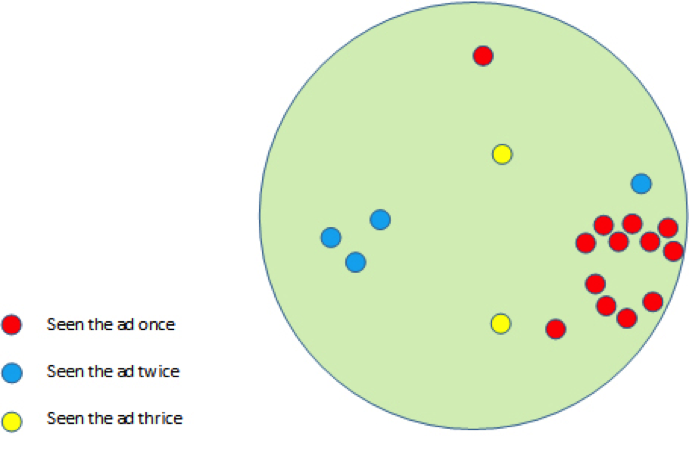
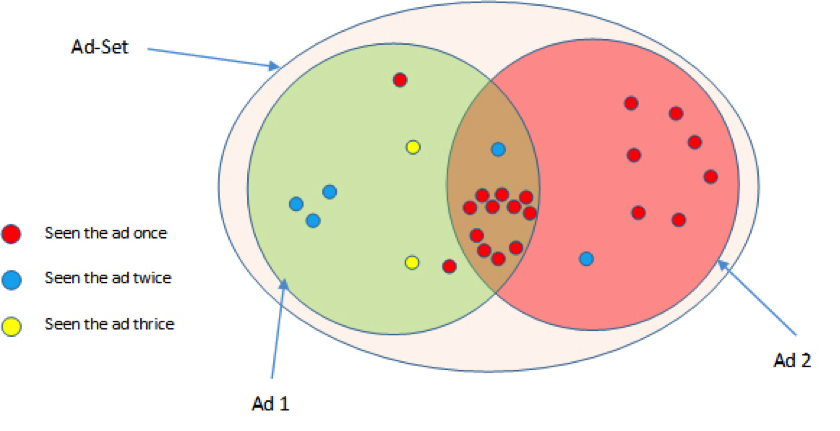
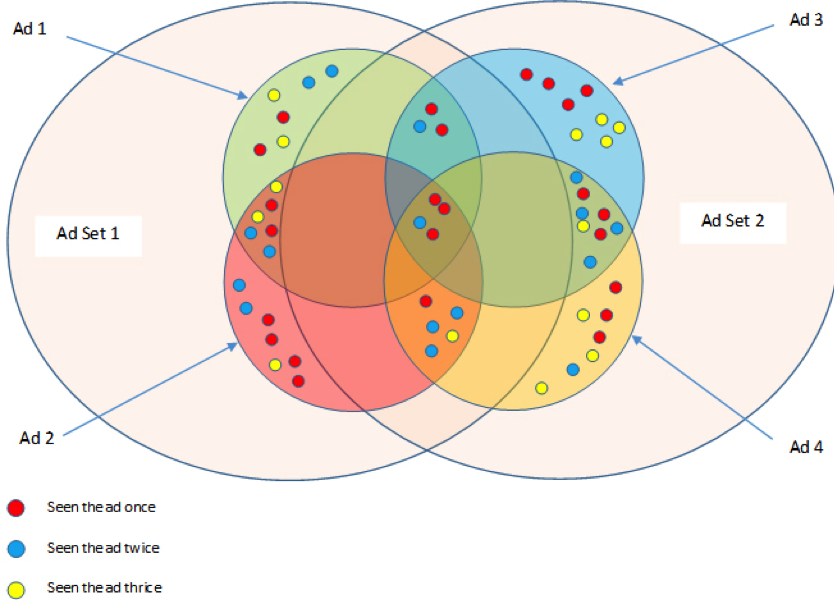
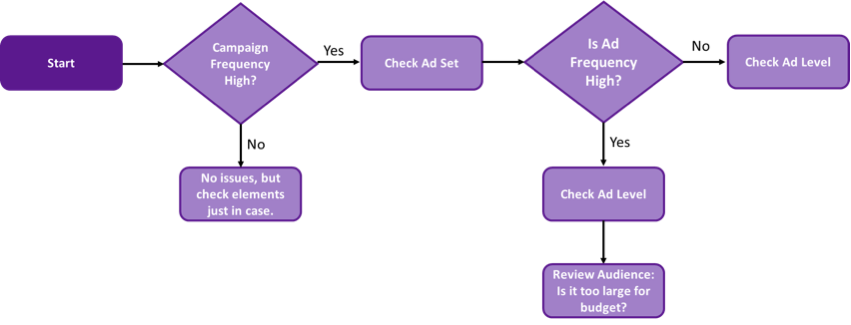


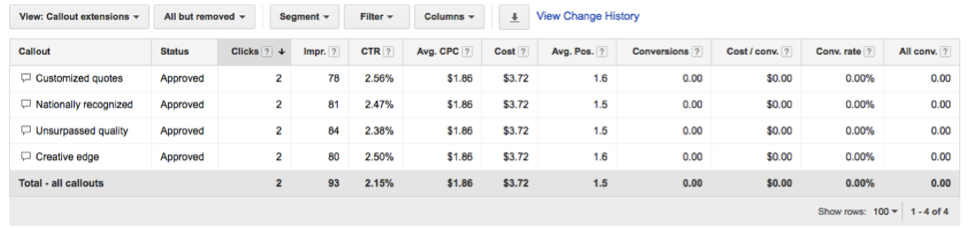


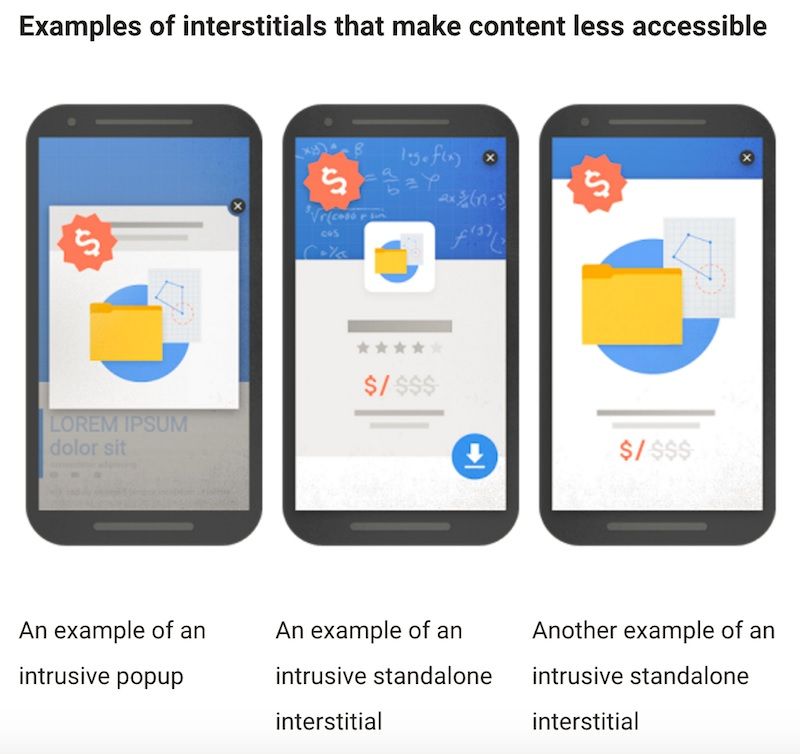
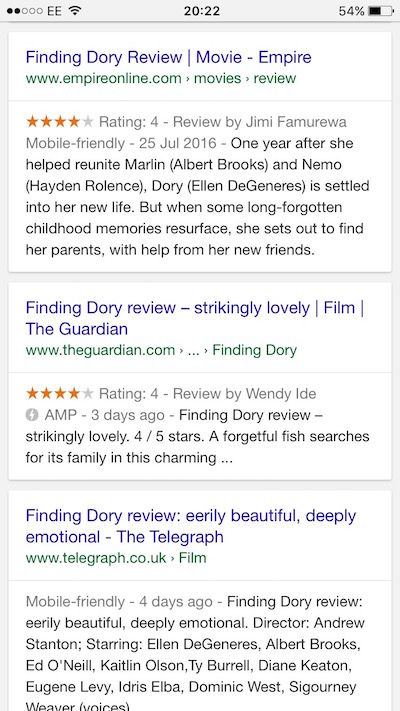 AMP results featured in organic mobile search

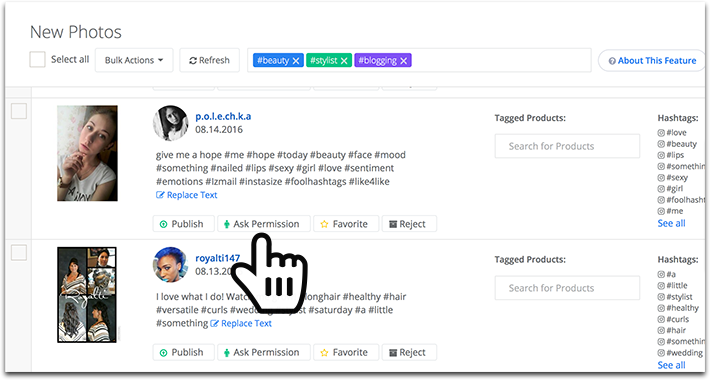
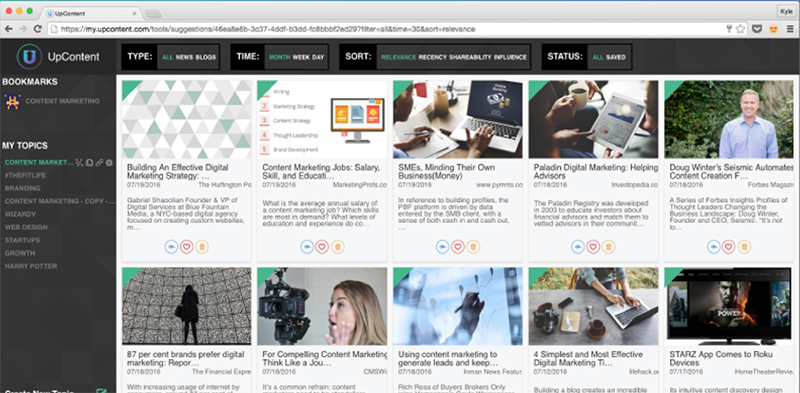
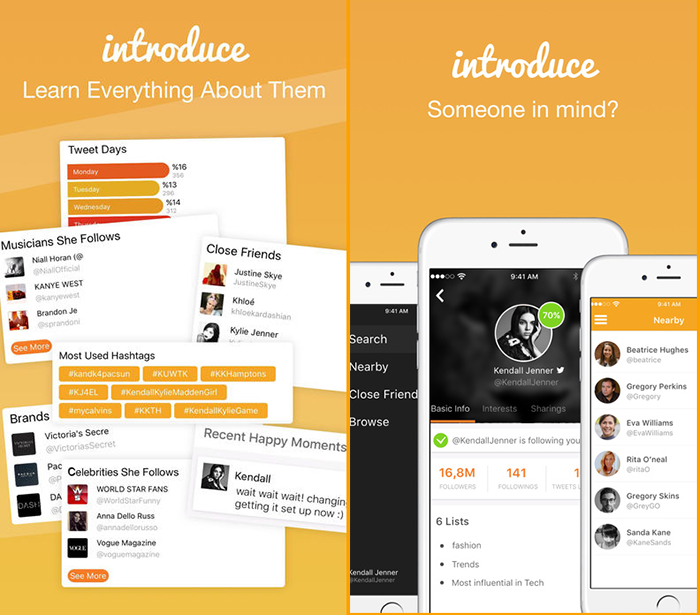
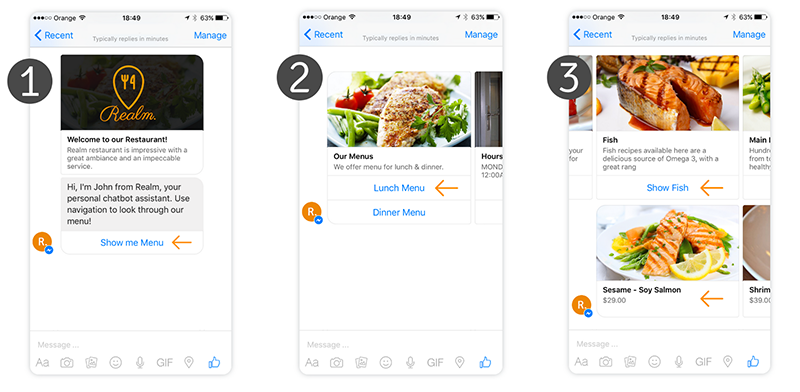
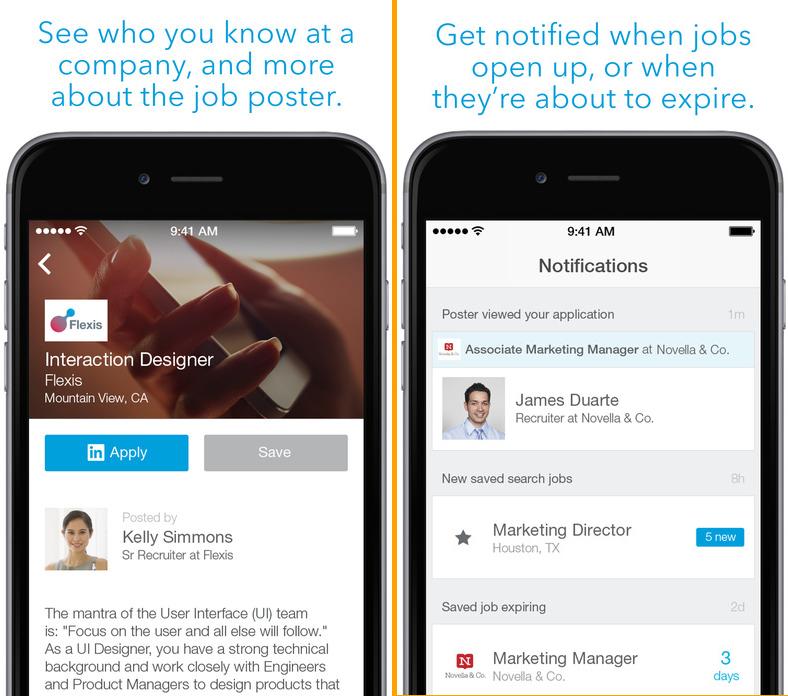
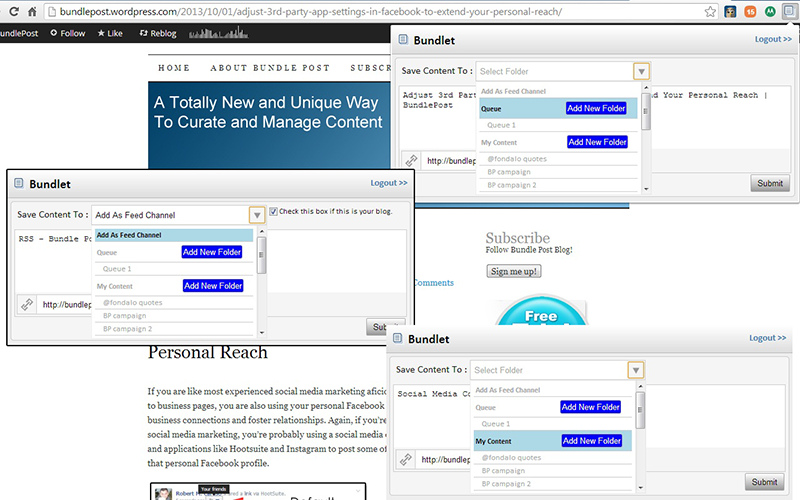
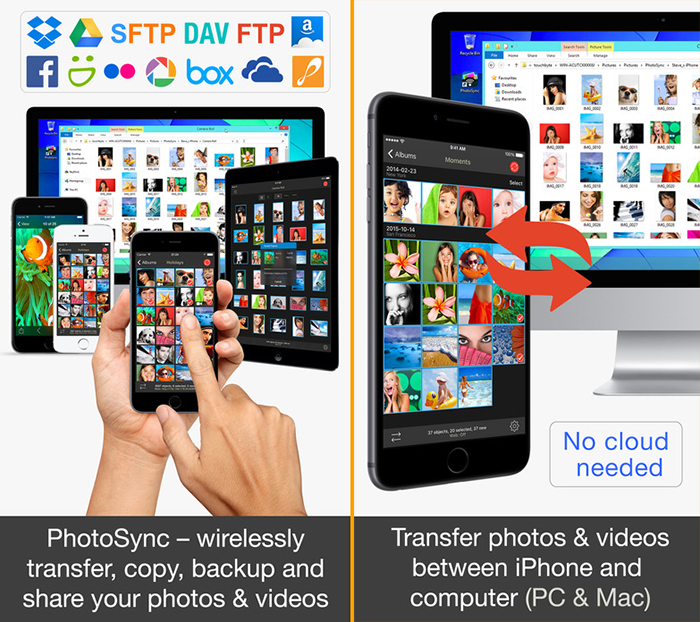
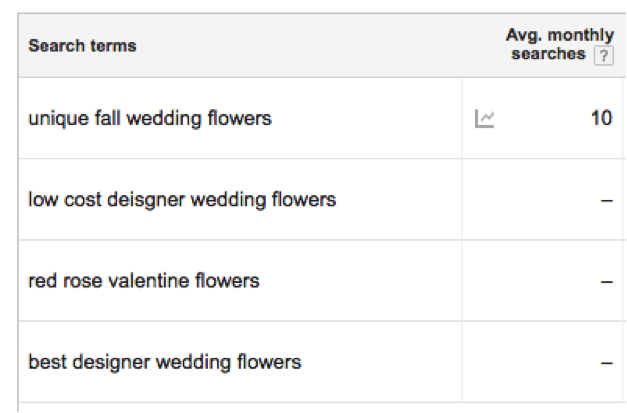
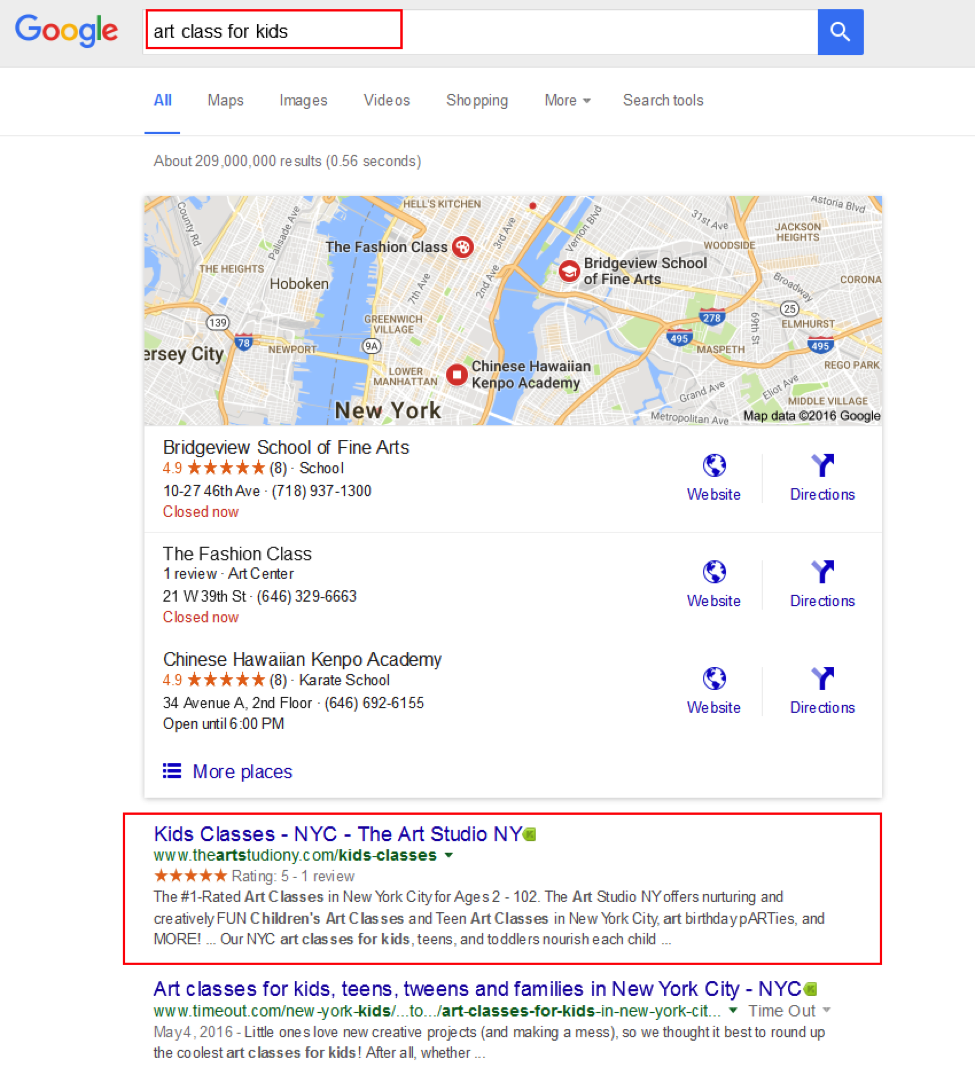
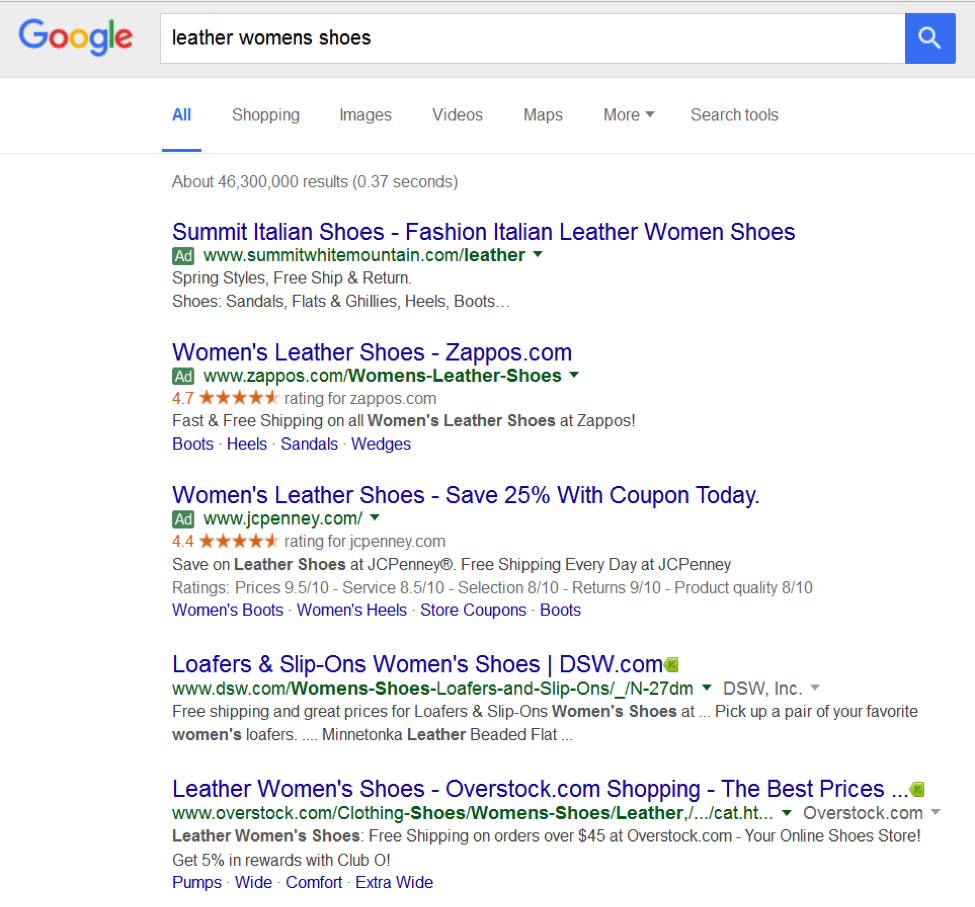



 Image by Bablu bit, available via
 Subtle cues about a user’s state like battery level can be used to personalise your m-commerce site | Image by Martin Abegglen, available via
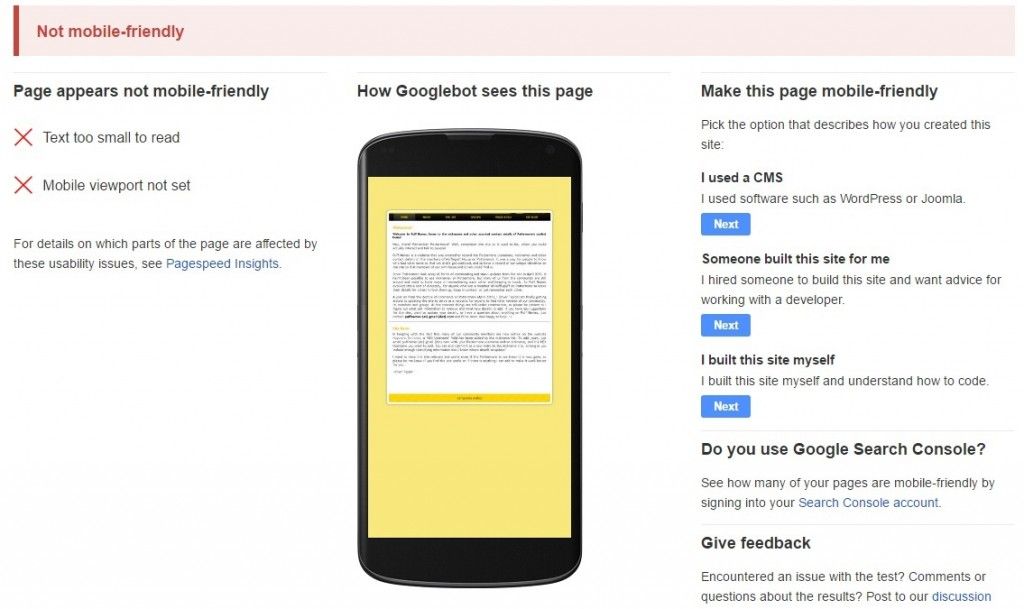



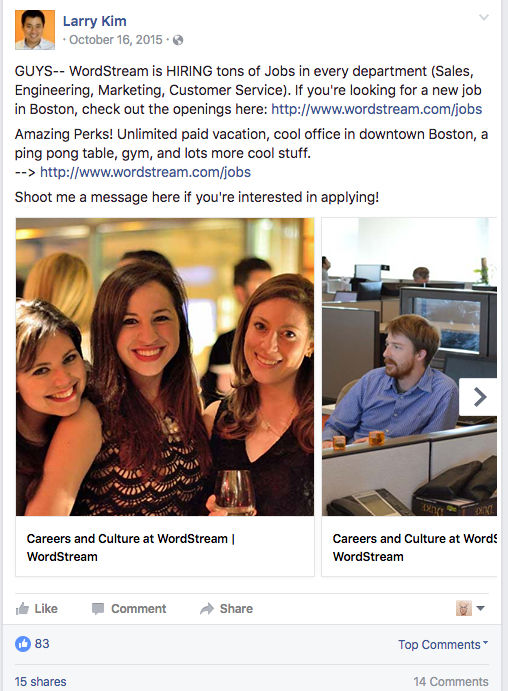
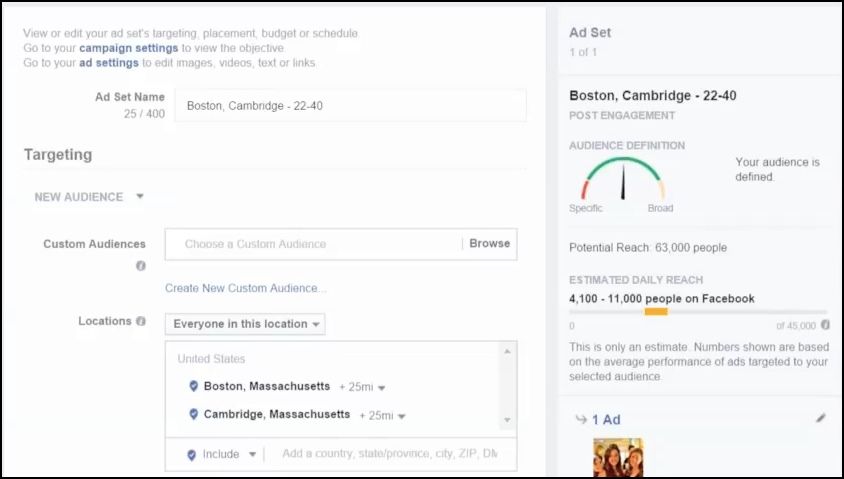
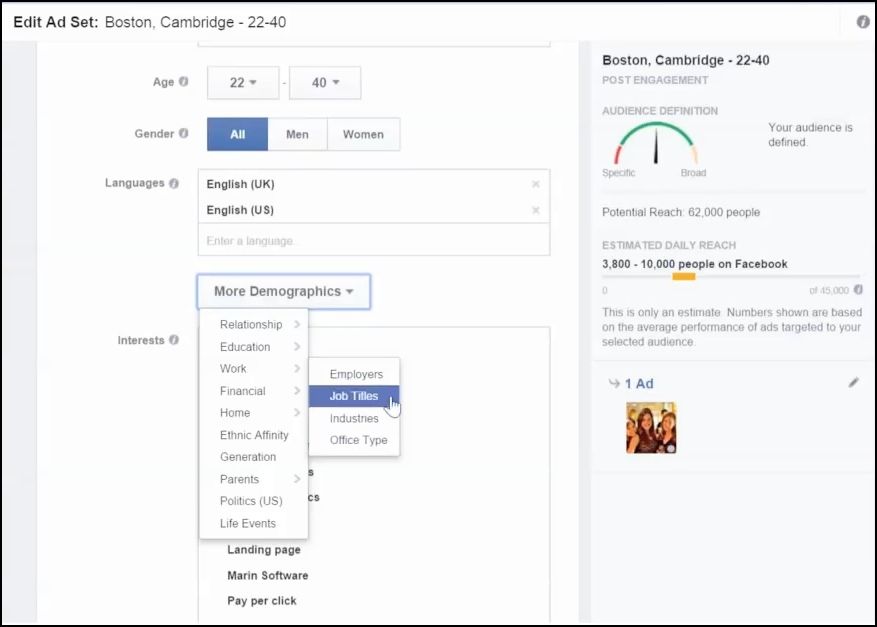
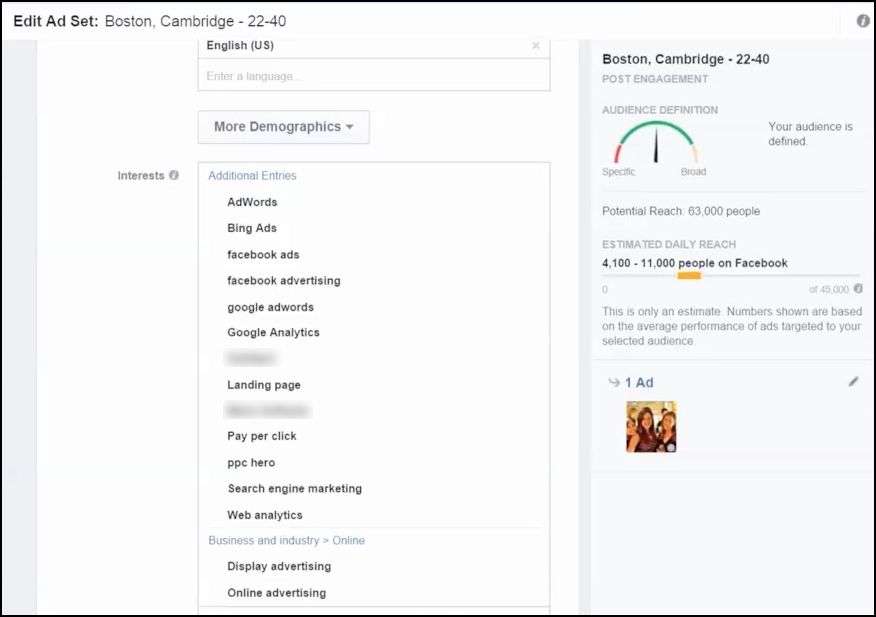
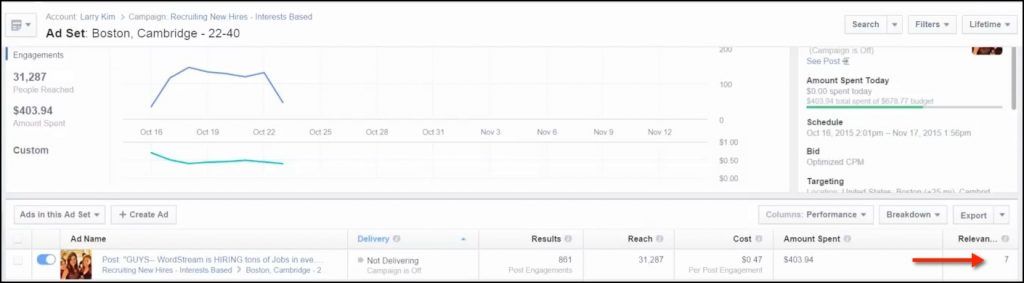
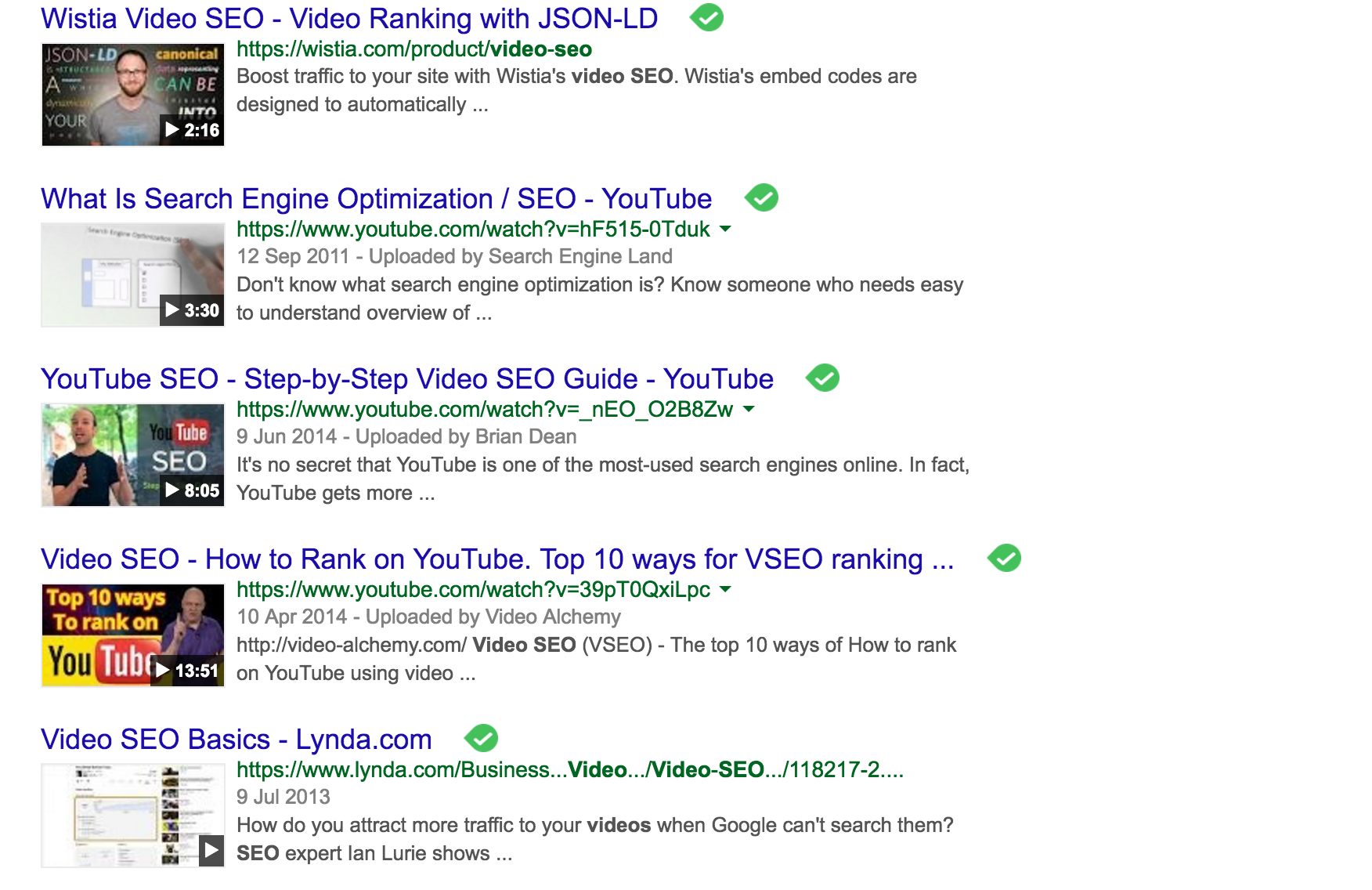
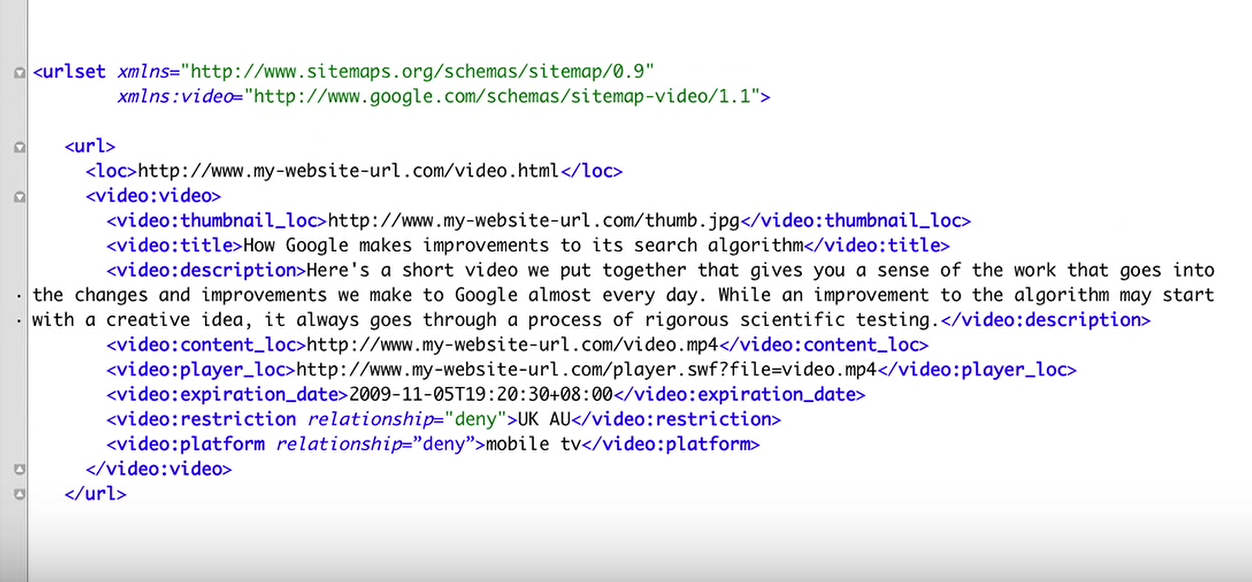
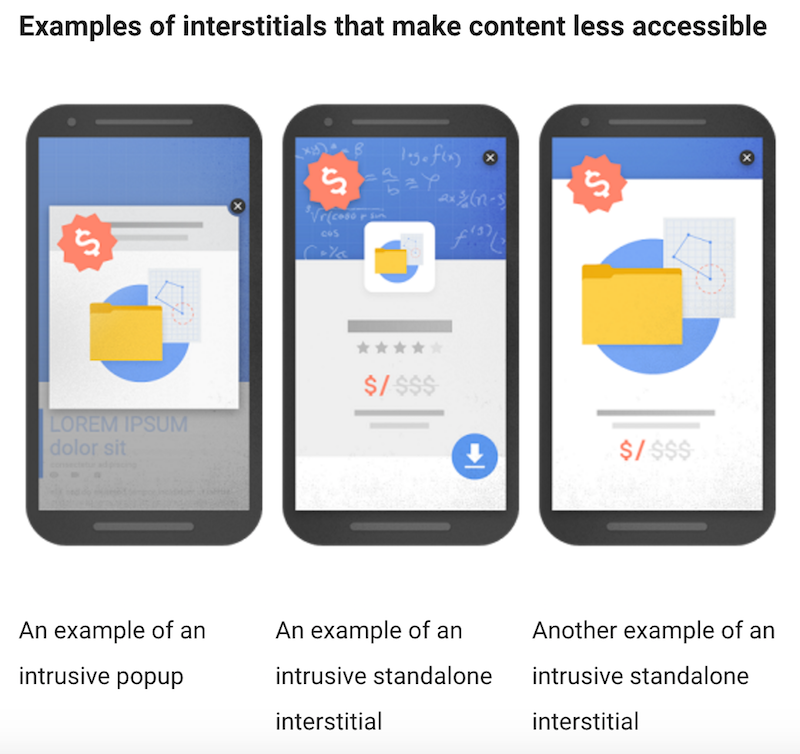



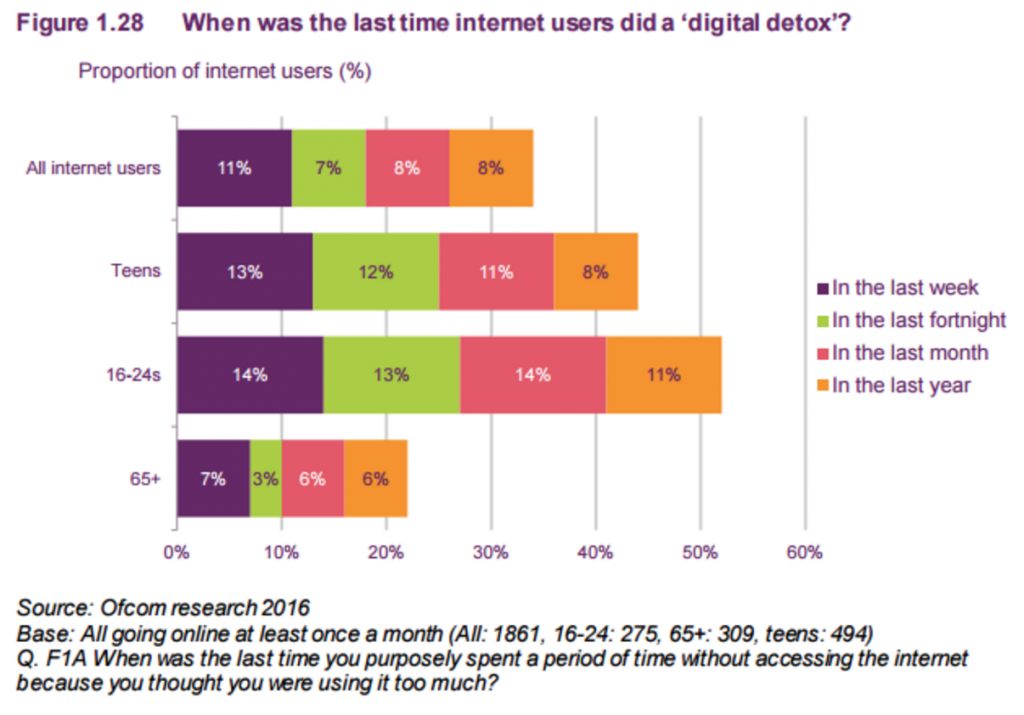
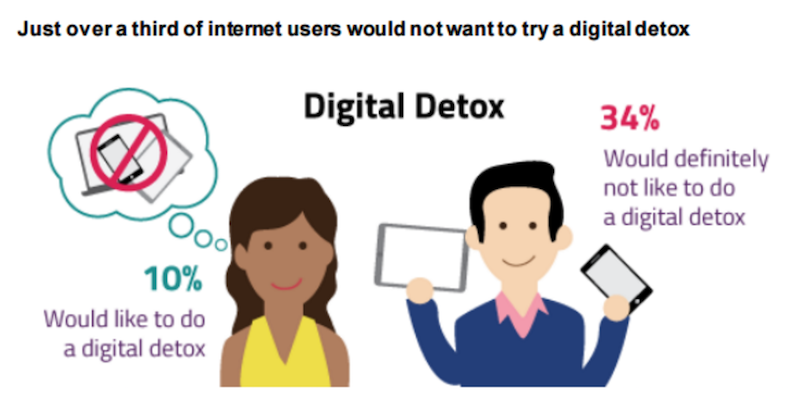
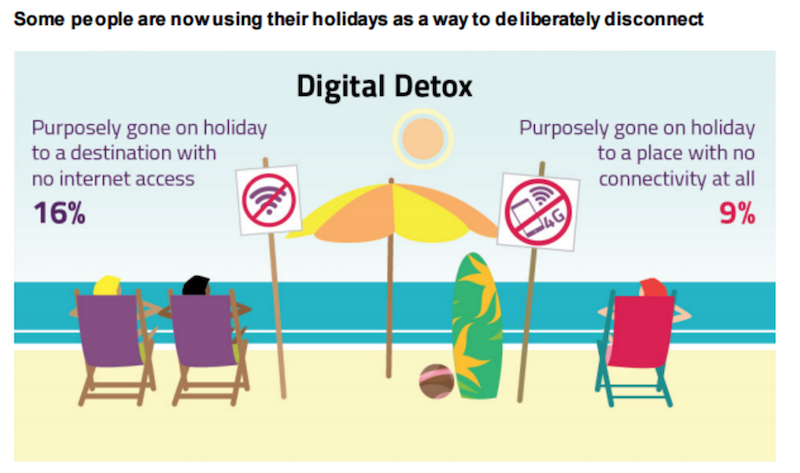


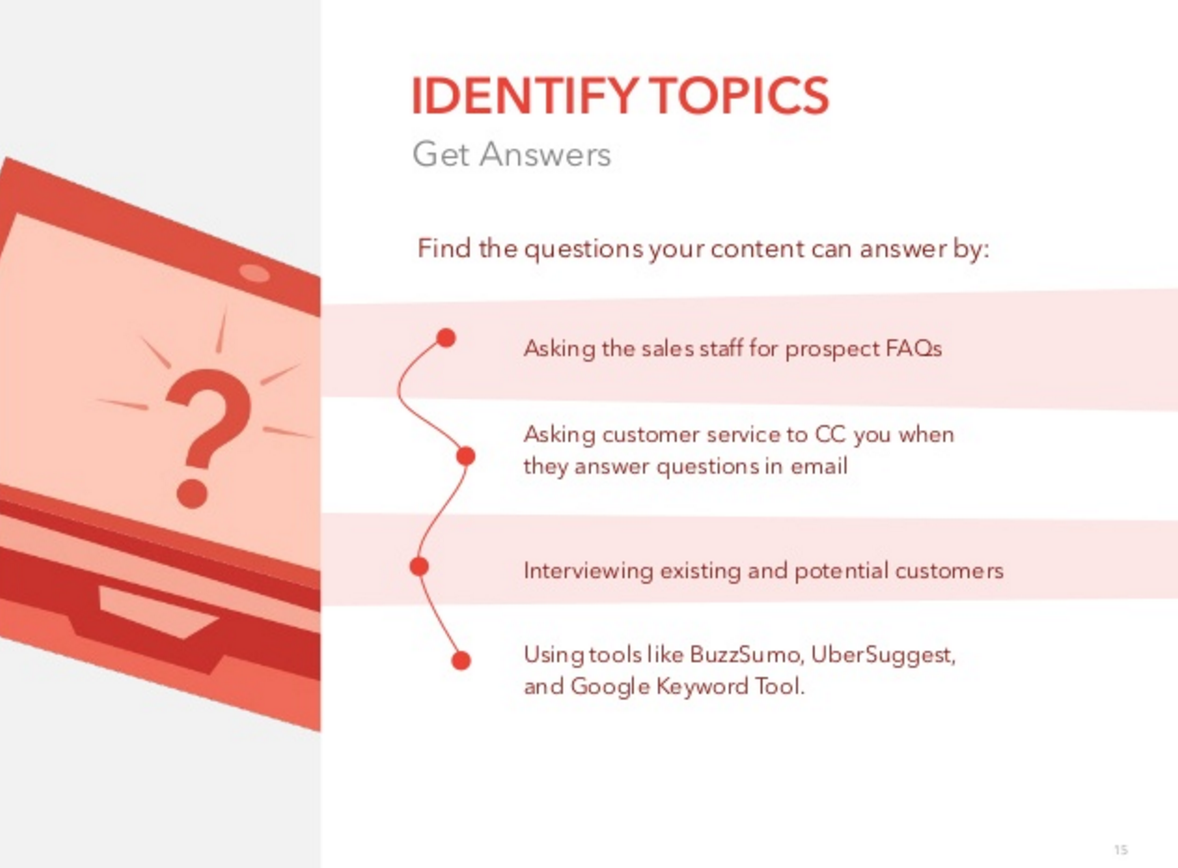
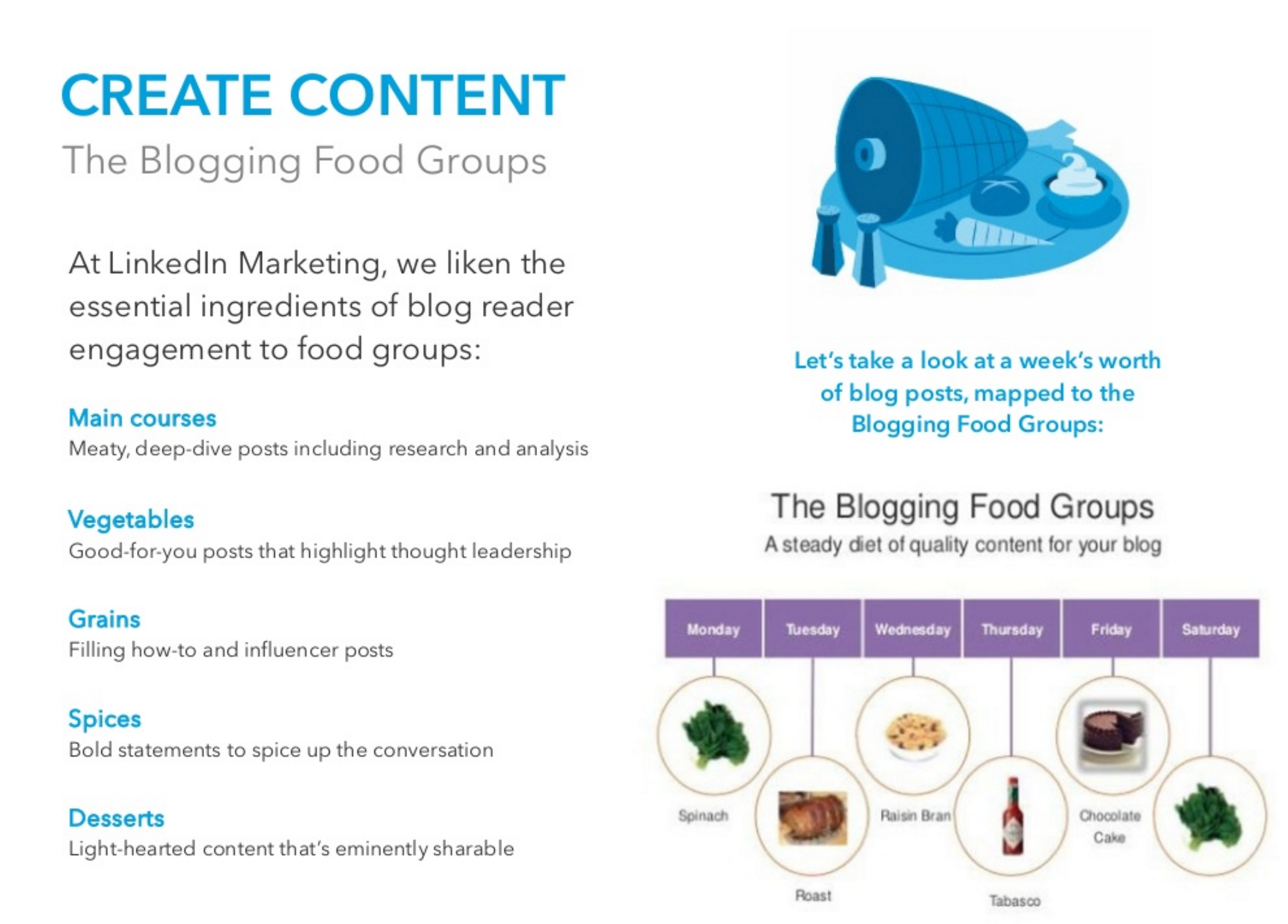
LJ.Rossia.org makes no claim to the content supplied through this journal account. Articles are retrieved via a public feed supplied by the site for this purpose.