[Most Recent Entries] [Calendar View]
Thursday, November 12th, 2015
| Time | Event | |||||||||||||||||||||||||||||||||||||||||||||||||||||||||||||||||||||||||||||||||||||||||||||||||||||||||||||||||||||||||||||||||||||||||||||||||||||||||||||||||||||||||||||||||||||||||||||||||||||||||||||||||||||||||||||||||||||||||||||||||||||||||||||||||||||||||||||||||||||||||||||||||||||||||||||||||||||||||||
| 1:50a | Samsung Announces Exynos 8890 with Cat.12/13 Modem and Custom CPU
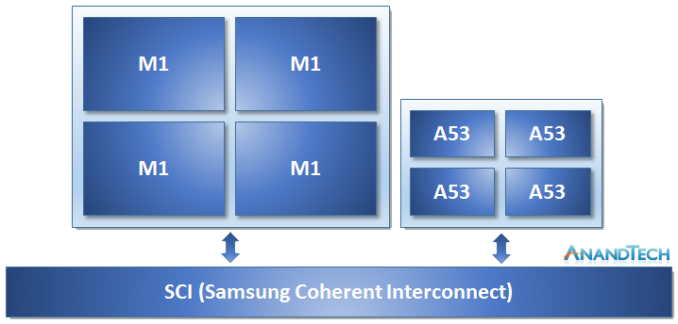
In an unexpected and surprise annoucement, Samsung today revealed its new generation flagship SoC - the Exynos 8. The Exynos 8890 to be more specific, is the successor to the Exynos 7420 that we've come to know very well in this year's Galaxy flagships such as the Galaxy S6 or the Note5. The Exynos 8890 is still an 4+4 big.LITTLE design using four Cortex A53 cores in the little cluster, but on the big cluster we see for the first time Samsung's own custom developed CPU architecture deployed in silicon. The new core, officially called the Exynos M1, is the first fruit of years-long efforts by Samsung's Austin R&D Center to try to create an in-house CPU architecture. What we do know of the M1 is that it's still very similar to ARM's big core architectures (And thus might be a derivative) such as the A72: It's still a 3-wide OoO design with the same amount of execution pipelines and similar, although not quite identical pipeline stages on the execution units. Samsung is claiming the Exynos 8890 will provide up to 30% higher performance and 10% better power efficiency than the Exynos 7420's - although the wording is a bit vague and doesn't specify if we're talking about a pure architectural comparison or actual implementation comparison, as previous PR numbers on the Exynos 7420 also didn't quite represent the full improvements of the chipset.
Samsung follows MediaTek's example by dropping the use of ARM's CCI IP in favour of designing their own cache-coherent interconnect fabric aptly named SCI (Samsung Coherent Interconnect). It seems that vendors are keen to try to improve their SoC architectures by designing fully optimized SoC fabric solutions and I guess Samsung saw the need to differentiate in this regard. On the GPU side, we see usage of an ARM Mali T880MP12. This is the biggest Mali core implementation to date and increases the number of cores by 50% compared to the Exynos 7420's MP8 configuration. Keeping in mind that the T880 also increases ALU pipelines per core by 50%, we're looking at an 2.25x increase in computational power assuming Samsung kept the clock frequencies equal. Alternatively, they could go lower in frequency for much improved power efficiency. Samsung advertises 4K as an option for this SoC so likely we're looking at a very powerful GPU setup. Lastly, but not least, is the announcement that the Exynos 8890 is part of Samsung's ModAP lineup, meaning this is a part with a modem. The new modem supports LTE Category 12 download speeds with up to 3x carrier aggregation up to 600Mbps or uploads speeds up to 150Mbps on Cat. 13 with CA. This effectively makes the new Shannon modem on the 8890 equal Qualcomm's Snapdragon 820 modem capabilities. Until further future confirmation on the matter, I fail to use the "integrated" word in regards to the modem due to Samsung's new product page presenting a graphic representing the modem/AP in a way that seems strikingly similar to a SiP (System-in-Package) solution, as opposed to an on-die solution. The Exynos 8890 is announced to enter mass production in late 2015. With just six weeks left in the calendar year this likely means we're already seeing silicon being etched as we speak, just in time for Samsung's new Galaxy flagship early next year. | |||||||||||||||||||||||||||||||||||||||||||||||||||||||||||||||||||||||||||||||||||||||||||||||||||||||||||||||||||||||||||||||||||||||||||||||||||||||||||||||||||||||||||||||||||||||||||||||||||||||||||||||||||||||||||||||||||||||||||||||||||||||||||||||||||||||||||||||||||||||||||||||||||||||||||||||||||||||||||
| 8:00a | Build-A-Rig Round 2, SilverStone vs. Crucial: The $800 PC Showdown We’re back again for the final phase of our second Build-a-Rig competition. For this round we are doing a theme relevant to many a younger enthusiast: back to school computers. In this Round we invited both Tony Ou from SilverStone and Jeremy Mortensen from Crucial to each spec out an $800 computer for the back to school season. Earlier we interviewed both representatives to discuss their own background and also to find the motives behind the configurations they submitted. Last week we got to dive into the experience of building these computers, and got to see what it is like to put these machines together and how easy they are to work on for those that like to get their hands dirty. Now for the final part of this round of Build-a-Rig we have the showdown: running our benchmark suite and seeing how these machines compare to each other. The $800 budget this time is substantially tighter than what we saw in our previous round, which when coupled with both machines being built on mITX platforms for portability brings its own constraints, and as a result we can see completely different trade-offs being made on both sides. | |||||||||||||||||||||||||||||||||||||||||||||||||||||||||||||||||||||||||||||||||||||||||||||||||||||||||||||||||||||||||||||||||||||||||||||||||||||||||||||||||||||||||||||||||||||||||||||||||||||||||||||||||||||||||||||||||||||||||||||||||||||||||||||||||||||||||||||||||||||||||||||||||||||||||||||||||||||||||||
| 5:05p | Windows 10 Fall Update Available: Filling Out The Business Gaps
Today Microsoft started rolling out their first big update to Windows 10. When Windows 10 first launched in July, there was a commitment to moving Windows from optional updates to Windows as a Service, with constant, continuous feature updates and fixes. We’ve seen quite a few of the fixes already in the cumulative updates pushed out over the last few months, and today brings the first big update to the Core OS itself. Much of this update is focused on speed and polish, with many of the business features that were initially promised being rolled out now. The update process itself is more like how the Insider Builds are rolled out, and people that see the update happening will get the same style of update as the initial Windows 10 rollout, rather than just a typical Windows Update style reboot. On the end user side, the changes are subtle, but numerous. All of these changes have been rolled out to the Windows Insiders over the last couple of months, so there are no real surprises here. But they are certainly welcome. One annoyance with Windows 10 when it first debuted was that any time you right-click somewhere in the system, you would get a completely different context menu depending on where you did the action. It was not a huge issue, but it certainly was jarring and make the system look less than polished. With this update, Microsoft has now moved to one style of context menu across all locations. It’s a small but welcome change, and makes the operating system feel more coherent.
Start Menu
Task Bar Microsoft’s new browser has picked up some new features that somehow missed the cut on the initial launch. You can now do basic tasks like right click a file and Save As, which is so basic of a task that it really points to how new Edge really is. Microsoft has also enabled Tab previews, so if you hover over one of your tabs, a small window will pop up showing you what’s on that page. It’s very useful if you have a lot of tabs open. I’ve also found Edge to be more stable than before, although it is still not perfect. One key feature that is not part of this update is the promised extensions model, and that has been moved to 2016 for now. This is very much necessary to give Edge any sort of chance against the extensibility of Chrome and Firefox, so hopefully this gets bumped up on the priority list.
Cortana also gains the ability to understand written notes using a stylus. Cortana has also had her market expand to include Japan, Australia, Canadian English, and India in English, with a customized experience for each culture.
Now in Canada! Skype is now offered with standalone Universal Windows Apps for text, video, and phone. People who prefer to use the monolithic Skype will still have that option, but Microsoft is trying to emulate the more simplistic single use app model that has been successful on iOS with iMessage and FaceTime, as well as Google Hangouts. This is still in the consumer preview stage, but it is an important part of their strategy to get a proper Skype client across all of their platforms. For those interested in kicking the tires on this, I would suggest checking out the Skype blog for details.
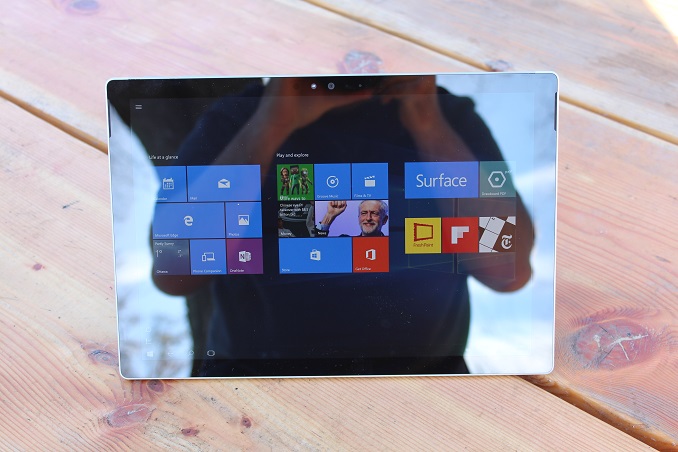
The Start Menu also gets some tweaks, with the ability to add more tiles. This should help a lot with issues I had on the Surface Tablets with their 3:2 aspect ratio when using them in Tablet Mode. I found a lot of wasted width on the Start screen, and this should help a lot. It gives you the ability to add a fourth medium tile to a column, meaning you can now have two Large tiles on the same row. In addition, the theme can now be chosen automatically from the background picture, and you can do more customization of the colors. Most of the changes are small, but should lead to a better experience. The bigger changes are going to affect business users, who now get access to some of the cool features for Windows 10 in the business world. Windows Update for Business is now available to control and manage updates within a company, and Windows Store for Business is a more powerful store which will let businesses manage which apps are available to employees, be a home to custom line of business apps, and connect them with management solutions. For device management, today’s update brings Mobile Device Management (MDM) to the entire range of Windows 10 devices, including PCs, tablets, phones, and IoT. For businesses with more complex management, that will of course continue to work as well. Companies can now leverage Azure Active Directory to join devices to the Azure based domain. For large, diverse operations, this can cut down on a lot of the complexity with having to create and manage a domain, and being that it’s a cloud service, connectivity should be much simpler. Not available yet, but coming soon, is Enterprise Data Protection, which will allow enterprises to manage and maintain control of data, even if it leaves their hands, and allow a more granular approach to separating corporate and consumer data. For anyone already on the Insider Program, this update came as 10586 a little while ago, and Windows is now at version 1511, which is November 2015, and future updates should continue this format. There are a lot of little changes brought about, and those that want to update right away should just be able to check with Windows Update for a download. Source: Windows Blog | |||||||||||||||||||||||||||||||||||||||||||||||||||||||||||||||||||||||||||||||||||||||||||||||||||||||||||||||||||||||||||||||||||||||||||||||||||||||||||||||||||||||||||||||||||||||||||||||||||||||||||||||||||||||||||||||||||||||||||||||||||||||||||||||||||||||||||||||||||||||||||||||||||||||||||||||||||||||||||
| 10:15p | Xbox One Gets Windows 10 Underpinnings With New Xbox One Experience
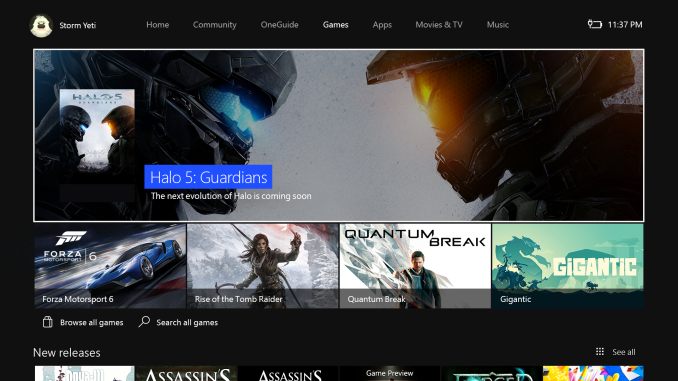
Today the New Xbox One Experience began rolling out, and with it comes a big change in not only the look and feel of the Xbox One’s Dashboard, but it also brings Windows 10 to Microsoft’s gaming console. The new update brings about a big shift in the user interface, as well as some very anticipated features. The first thing you’ll notice is the new interface, which departs from the horizontal scrolling of the Windows 8 style interface, to something that fits more into the Windows 10 theme. In fact, the new dashboard is very similar to the Windows 10 Xbox app, including the navigation at the left, and vertical scrolling to access pinned content. Unfortunately, there is still a good 20-25% of the right side of the screen devoted to promotional items, which takes up too much of the on-screen real estate. The old dashboard would also show you the last several items that you did, which was nice since you often did things like Netflix and TV a lot. But the new experience just shows a single item other than the current active task, so you need to scroll down to find them. Luckily when you do, the items are bigger, and offer choices like Watch Live TV or Find TV.
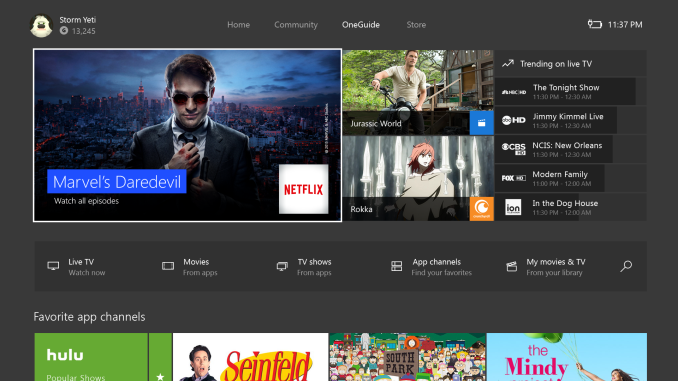
Not all is bad though. The new experience is a lot quicker for social aspects like chatting and finding groups for games. Bringing up the Xbox guide while in a game is much quicker and doesn’t slow the experience to a halt. They’ve been improving on these aspects over the last year or so since they have been one of the top items on the Feedback forum. I’m not in love with the new UI yet, but maybe I just need some time to get used to it. I had been using the previous UI for almost two years, and I think we’re all a but stubborn about change. One thing that looks much better though is the new OneGuide, despite it constantly asking me to plug in my Kinect (which stopped working a couple of weeks ago). The guide comes up much quicker than the previous incarnation, and it’s been subtly chanted to make it easier to use I think. I still wish there was some way to customize the channels, since I don’t get every channel in the listing. Perhaps someone has a better way to do this, but I’ve been setting the channels I do get as favorites, and then just using favorites instead of the guide. This kind of functionality was always part of Media Center, so it’s a bit surprising it doesn’t seem to be there. The new guide will work with either cable, which can be controlled through IR blasting on the Kinect, or you can hook the Xbox up to a TV tuner if you want to cut the cord. And in case you missed it, this is all set up to add DVR capabilities next year.
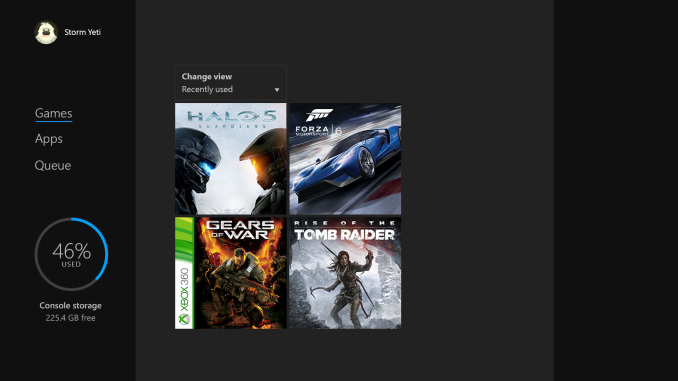
I think the big thing with today’s update though is the inclusion of backwards compatibility with Xbox 360 games. Out of the gate, Microsoft is support 104 Xbox 360 titles, with quite a few very popular games already on the list. More will be added over time. The Xbox 360 is actually running in a virtualized environment, so when you are in one of the 360 games, all of the menus and whatnot are actually the Xbox 360 menus, but you can still do things like record game clips and chat using the Xbox One interface. This was a much requested feature, and it expands the capabilities of the Xbox One, as well as the available software titles.
There are more features coming down the line as well. Cortana will be coming as a voice assistant, and it should help a lot over the very basic voice commands the Xbox One uses now. I’ve heard that Cortana will work with either Kinect, or with a headset, which is good since not everyone that might want to use it would own Kinect. Also, the store on Xbox One is being unified with the Windows 10 store, which will add the ability to use Universal Windows Apps tailored for the TV interface. That should open up a whole bunch of opportunities for developers for content consumption apps. This is easily the biggest change to the Xbox One since it was launched, but over the last two years it has come a long way in terms of features and usability. Microsoft seems to be keen on keeping these updates coming too. I’ll need more time with the new experience to see whether or not I prefer it though. Change can be difficult. Source: Major Nelson blog Xbox One Backward Compatibility ListList from majornelson.com
|


| << Previous Day |
2015/11/12 [Calendar] |
Next Day >> |