
|
|


Пишет AnandTech (![[info]](http://lj.rossia.org/img/syndicated.gif) syn_anandtech) syn_anandtech)@ 2015-07-27 08:00:00 |
 |
|
 |
|
|
|
|
|
|
 |
|
 |


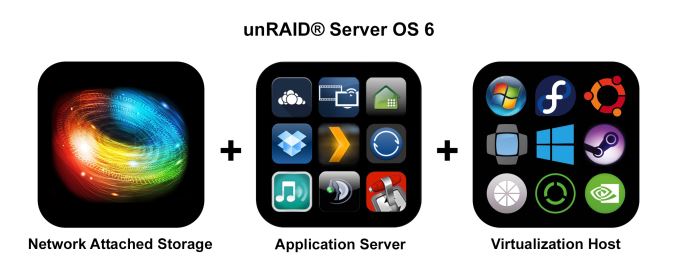
Consumers looking for network-attached storage have plenty of options. Most businesses go for a commercial off-the-shelf (COTS) unit, while enthusiasts and home users can go for either COTS or do-it-yourself (DIY) units. There are plenty of excellent COTS NAS vendors in the market, including, but not restricted to Asustor, QNAP, Seagate, Synology and Western Digital. QNAP and Synology have been at the forefront of bringing new features to COTS NAS units. On the DIY front, consumers can go for a dedicated NAS build or re-purpose an existing PC.
Some of the popular operating system options for DIY NAS units include Windows and its server variants, NAS4Free, FreeNAS, Rockstor etc. While NAS4Free, FreeNAS and Rockstor are free open source solutions, Windows and its server variants are paid options. Lime Technology's unRAID is a Linux-based embedded NAS OS that belongs to the latter category.
The following trends have been observed in the evolution of NAS operating systems over the last couple of years:
- An attempt to move from the traditional EXT3 / EXT4 to the more robust and modern ZFS and btrfs file-systems
- Movement of enterprise features such as high availability down the product stack
- Extensive focus on SDKs for enabling third-party applications / mobile-OS-like app stores
- Extending core functionality via features such as virtualization (NAS acting as a host for virtual machines) etc.
In the COTS space, QNAP's QTS brought about virtualization support more than a year back. Synology's high availability feature has been around in their business-class units for some time now. In addition, Synology's DSM 5.2 as well as QNAP's QTS 4.2 beta brought about Docker support. Recently, Lime Technology issued a press release to highlight the release of their unRAID Server OS 6.0 and proclaimed it to be the first non-beta NAS OS with support for both virtualization and containers (Docker). Where does unRAID stand in the current ecosystem of NAS units? Is it a good choice for your particular use-case? Read on for our analysis of the press release.
How does unRAID Work?
Traditional RAID systems use RAID 0, RAID 1, RAID 5, RAID 6 or some combination thereof. These RAID levels stripe data over multiple disks and, for non-RAID 0 or RAID 1 systems, also distribute parity blocks across the member disks. unRAID is not like these traditional RAID systems. The closest it can be compared to is RAID 4, a system in which data is striped across member disks and parity is always written to a dedicated parity disk. In the case of unRAID, the data is never striped. A given file is written to only one of the member disks. A dedicated parity disk enables recovery in case of a single disk failure. In addition, the disks can be of different sizes, as long as the parity disks is the largest of the lot.
unRAID 6 is a lightweight system in the sense that it can be booted off even a 512 MB flash drive on any x86_64 system. Usage as a NAS only requires 1 GB of RAM, and the whole system is loaded into and run off the RAM. Earlier versions of unRAID used ReiserFS, but unRAID 6.0 uses XFS by default. The use of a dedicated parity disk has a couple of drawbacks - the stress on the parity disk is comparatively higher when compared to traditional RAID systems, and the performance is bottlenecked by the performance of the parity disk. In addition, with UnRAID's policy of not striping data across the member disks, the performance is often what one disk can provide. To alleviate these shortcomings, unRAID provides the option of cache pools.
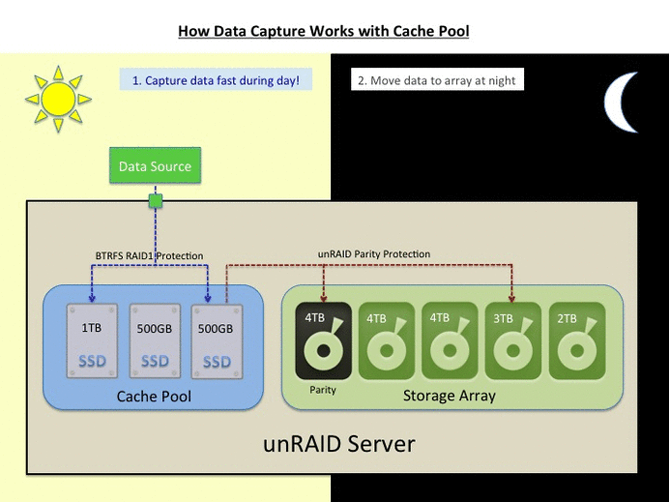
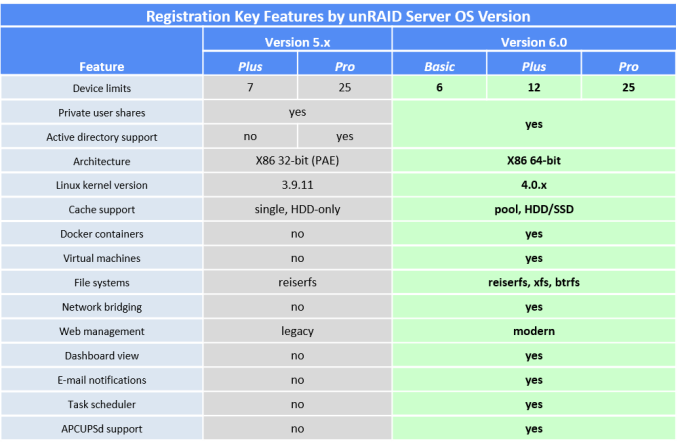
Cache pools can be made up of multiple disks protected using a traditional RAID-1 configuration. Unlike the main pool formatted in XFS, the cache pools are formatted in btrfs. unRAID 6.0 comes in three falvors - Basic ($59), Plus ($89) and Pro ($129). They differ only in the number of supported devices, as shown in the table below.
NAS Units as VM Hosts
We have already covered the usage of COTS NAS units as hosts for virtual machines using QNAP's QTS. unRAID 6 uses the same KVM / QEMU combination. Like QTS, unRAID also requires Intel VT-x / AMD-V support for running virtual machines.
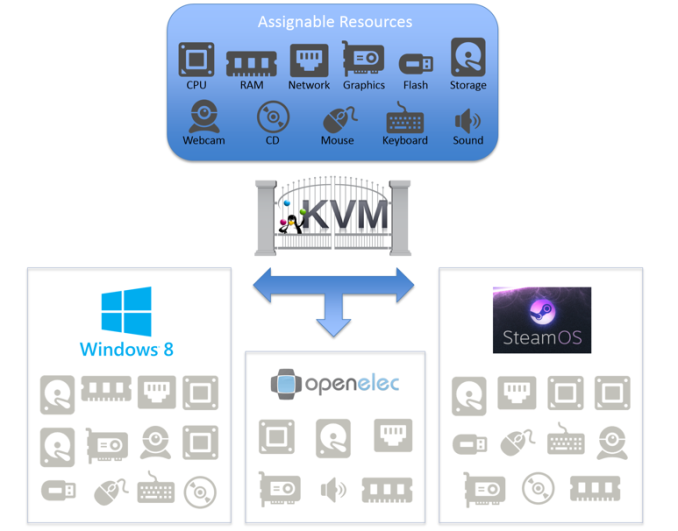
In addition, unRAID 6 also supports pass-through of PCIe devices such as GPUs. To give an example, it is possible to run Windows as a guest OS on unRAID 6 and also have it take advantage of discrete GPUs in the PCIe slot. This feature is in the works for QNAP's QTS, but unRAID seems to be the first to bring it to a stable release. It is important to note that PCI device pass-through requires IOMMU (VT-d / AMD-Vi) support.
Docker - Containers for Lightweight Virtualization
Over the last couple of years, OS-level virtualization has taken off, with Docker leading the way. It enables applications to be deployed inside software containers. Portable applications made using VMWare's ThinApp or Microsoft App-V are very popular in Windows - one can think of Docker as enabling similar functionality on Linux. Arguably, Linux is much more fragmented (with respect to the number of distros) compared to Windows. Docker enables seamless deployment of one application build on a variety of Linux distros / versions. Each application has its own isolated environment, preventing the creation of software compatibility / co-existence conflicts with others.

It must be noted that container technology is not an alternative for full-blown virtualization. To be more specific, the KVM/QEMU combination allows users to run even Windows on top of a Linux OS. On the other hand, Docker allows only apps written for any Linux distro / version to run on a particular machine. Obviously, the hardware requirements and stress on the host machine are comparatively lower for Docker compared to KVM/QEMU.
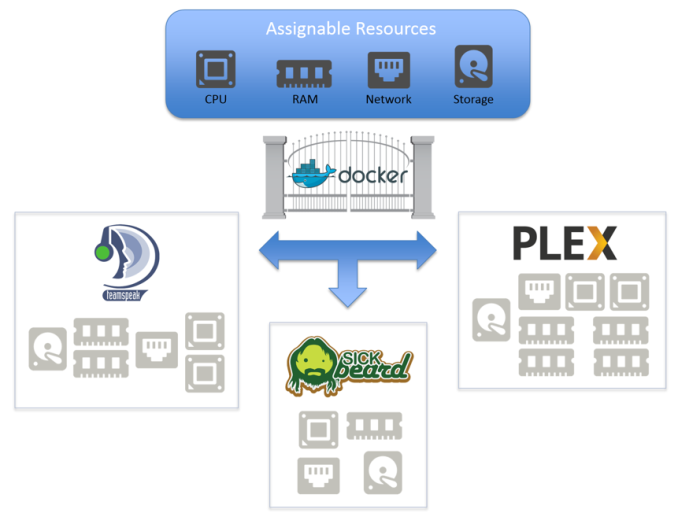
The benefits of Docker in the server space are not touched upon - unRAID's Docker feature is meant for use in a home environment.
Concluding Remarks
The nature of unRAID's approach to data protection severely restricts the target market for the OS, unlike, say, the approach of FreeNAS, NAS4Free or Rockstor. Realizing this, Lime Technology has gone to great lengths to ensure that UnRAID 6 targets power users and enthusiasts with media serving / storage needs. The presence of both Docker and full-blown virtualization with PCIe device pass-through enables it to target users with gaming PCs that need to double up as media storage servers.
unRAID has been having a loyal following (I have been following them on AVSForum since 2009). The new features in unRAID 6.0 will serve to bring in more people into the fold. unRAID's approach does have some advantages for media serving scenarios:
- Avoiding striping ensures that it is trivial to take out a disk, mount it on another Linux system and copy off its contents. To drive home the advantage of this aspect - in case of simultaneous failure of two or more disks, it is possible to recover at least some data from the array by mounting the remaining good disks on another PC. (In the case of a RAID-5 array, the whole data is toast).
- Avoiding striping ensures that only the relevant disk needs to be spun up to read or write data. This may result in substantial power savings for multi-bay units where the power consumption of the member disks far outweighs the consumption of the system components.
However, there is plenty of scope for improvement - particularly since many users tend to have a single NAS for storing both media as well as other data:
- Improvement in data transfer rates across all types of accesses
- Automatic / continuous protection against bit-rot (available for the btrfs cache pool, but not the main XFS volume)
- Increasing disk sizes (and URE ratings remaining the same) make it a risky proposition to run multi-bay storage servers that can withstand only the failure of one disk.
- Compared to solutions like FreeNAS, NAS4Free and Rockstor, unRAID is closed-source and carries a licensing fee (ranging from $59 for the Basic version to $129 for the Pro).
We have provided a brief overview of unRAID and what v6.0 brings to the table. More information can be gleaned from Lime Technology's FAQs. If you are an unRAID user, feel free to chime in with more information / opinions in the comments section.

